

MCP servers are how your agent reaches real systems: SaaS apps, internal APIs, data platforms, ticketing tools, and infrastructure controls. In Agent Harness, MCP connectivity is fully managed through TrueFoundry MCP Gateway. Authentication, access control, guardrails, and observability are centralized — developers building agents never paste API keys or manage per-server credentials.Documentation Index
Fetch the complete documentation index at: https://www.truefoundry.com/llms.txt
Use this file to discover all available pages before exploring further.
Why this matters
In other agent platforms, you must register MCP servers with credential headers per agent or per workspace, and developers handle OAuth tokens or API keys directly:- Claude Managed Agents — register MCP servers with vault credentials per workspace. Developers manage vault IDs and credential matching by URL.
- LangSmith Managed Deep Agents — register MCP servers via API with
headersarrays containing raw bearer tokens.
Gateway-managed MCP access
| Concern | How TrueFoundry handles it |
|---|---|
| Server credentials | Stored in MCP Gateway. Agents never see tokens or keys. |
| User-scoped auth (OAuth) | Gateway manages per-user OAuth flows, stores and refreshes tokens. |
| Who can use which servers/tools | RBAC — assign MCP server access to teams, users, or agents. |
| Tool-level restrictions | Enable/disable individual tools per agent. Exclude destructive tools. |
| Guardrails | Pre-execution and post-execution checks on tool inputs/outputs. |
| Approval gates | Tools marked destructive automatically pause for user confirmation. |
| Observability | Every tool call traced with inputs, outputs, latency, and attribution. |
How MCP works in Agent Harness
When an agent run needs a tool:- The harness discovers tools from connected MCP servers.
- The MCP Gateway checks user/team permissions.
- The gateway applies stored credentials (user-scoped OAuth or service-level tokens).
- The tool is invoked, traced, and results flow back into the agent context.
Server and tool selection
- Attach only the MCP servers an agent needs
- Enable only specific tools required for a use case
- Exclude sensitive or destructive tools from the agent’s tool surface
- Use virtual MCP servers to curate and expose a controlled subset of tools
Preload Skill / MCP tools into agent context
For each MCP server, you can configure Preload Skill / MCP tools into agent context. When disabled for an MCP server:- Tool details are not loaded upfront in the agent’s context.
- The agent dynamically discovers available tools at runtime.
In-chat authentication
If a user has not yet authenticated to a required MCP server, the agent chat experience prompts authentication inline — the user clicks “Connect”, completes the OAuth flow, and continues the conversation without leaving the chat.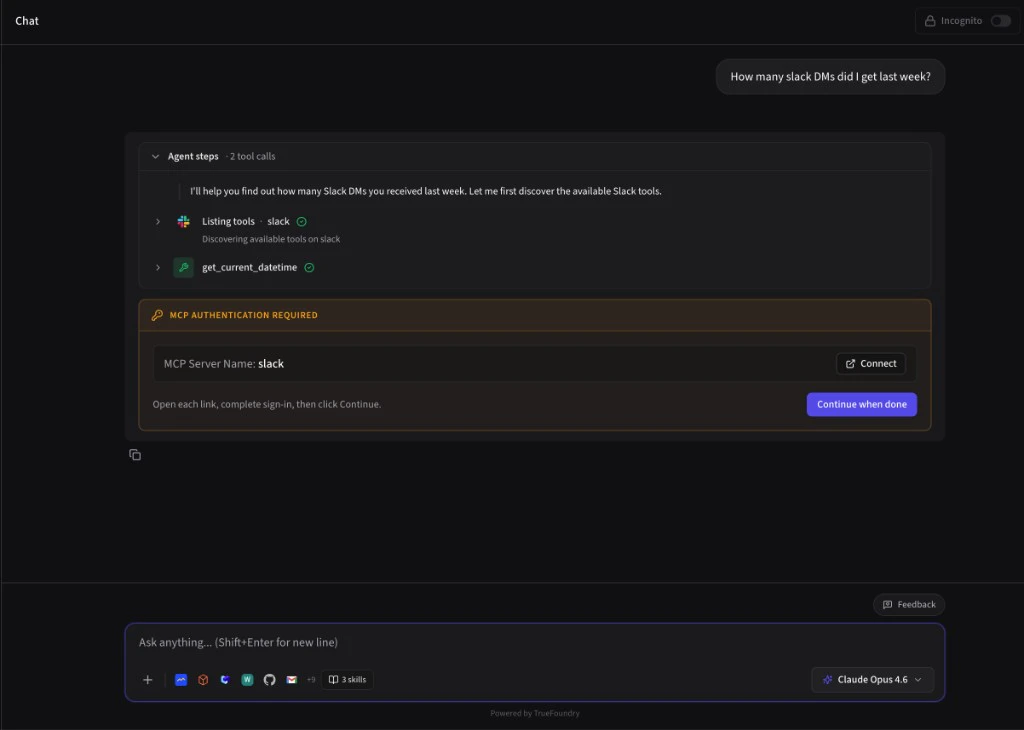
Safety controls
- Mark destructive or non-read-only tools for approval workflows
- Require explicit human confirmation before high-impact actions
- Apply MCP guardrails and gateway policies before and after tool execution
Operational visibility
MCP tool calls are part of end-to-end agent tracing:- Which server and tool were used
- Inputs and outputs (subject to policy/redaction)
- Latency and error patterns
- User/team attribution and cost impact