Documentation Index

Fetch the complete documentation index at: https://www.truefoundry.com/llms.txt

Use this file to discover all available pages before exploring further.

Sandbox gives your agent a secure, isolated environment to run code, manipulate files, and execute shell commands. Each sandbox is a full compute environment with its own kernel, filesystem, network stack, and dedicated resources — completely isolated from your host system and other sandboxes.

Integration patterns

There are two architecture patterns for integrating agents with sandboxes, based on where the agent runs.

Agent in sandbox

The agent runs inside the sandbox. You build an image with your agent framework pre-installed, run it inside the sandbox, and communicate with it over the network (WebSocket or HTTP).
AdvantagesDisadvantages
Mirrors local development closelyAPI keys and secrets must live inside the sandbox
Tight coupling between agent and environmentUpdates require rebuilding images
Requires infrastructure for agent communication

Sandbox as tool

The agent runs outside the sandbox — on your server or platform. When it needs to execute code, it calls sandbox tools (execute, read_file, write_file) which invoke APIs to run operations in the remote sandbox.
AdvantagesDisadvantages
API keys and secrets stay outside the sandboxNetwork latency on each execution call
Update agent logic instantly without rebuilding images
Sandbox failures don’t lose agent state
Run tasks in multiple sandboxes in parallel
Pay only for execution time

TrueFoundry’s approach

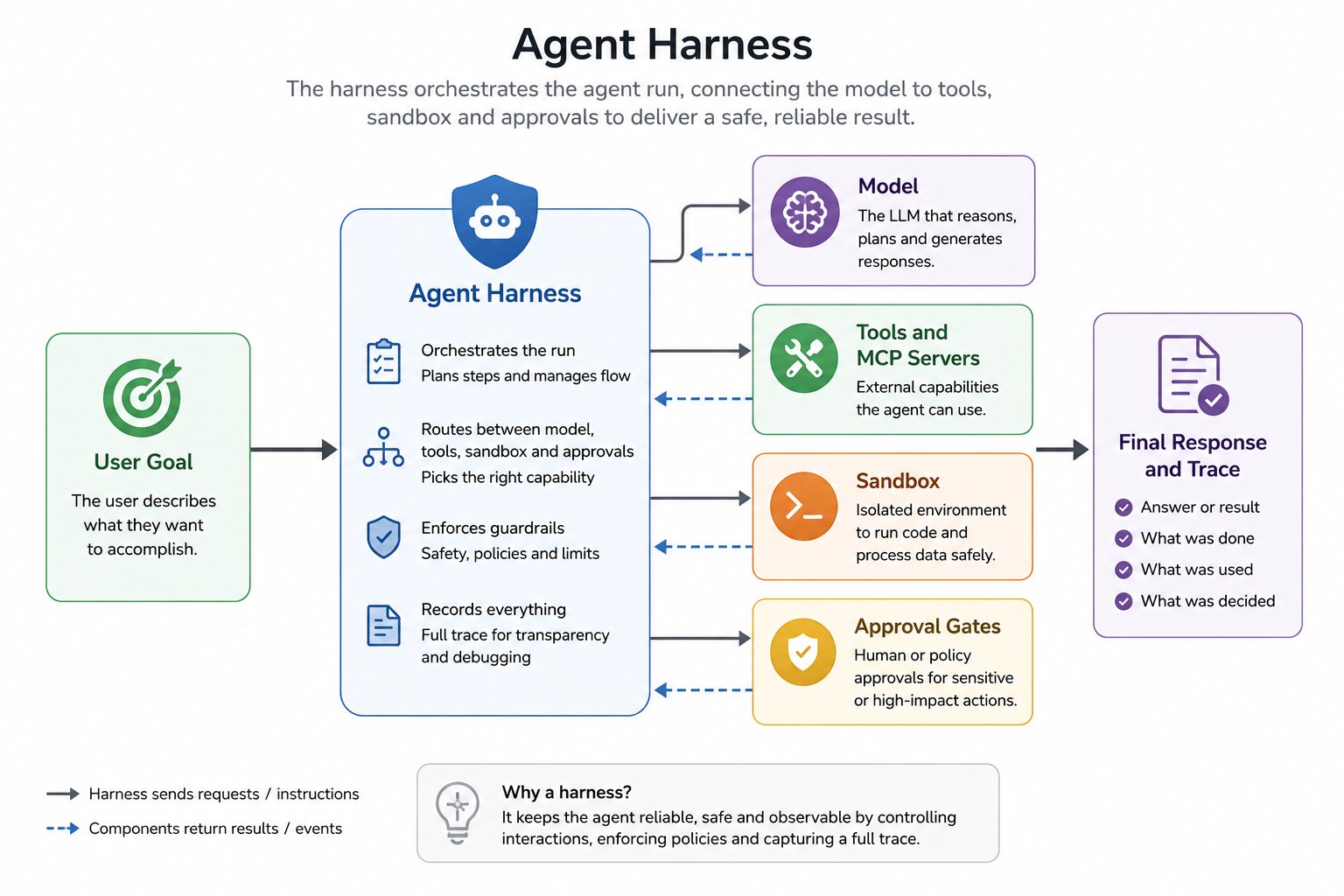
TrueFoundry Agent Harness uses the sandbox as tool pattern. The agent and all orchestration logic run inside the harness — the sandbox is only used for code execution, file operations, and shell commands. This design gives you several advantages:
  • Secrets never enter the sandbox — API keys, tokens, and credentials stay in the harness. The agent calls MCP tools that handle authentication outside the sandbox, so even a compromised sandbox cannot exfiltrate secrets.
  • ~1ms execution latency — The typical disadvantage of the sandbox-as-tool pattern is network latency on each execution call. In TrueFoundry, the harness and sandbox are colocated in the same infrastructure, so tool execution overhead is approximately 1ms — effectively eliminating this trade-off.
  • On-demand provisioning — Unlike architectures that spin up a sandbox for every run, the harness provisions a sandbox only when the agent actually needs one. Simple Q&A, MCP tool calls, and reasoning happen without any sandbox cost.
  • Automatic lifecycle management — The harness handles provisioning, reuse across turns, idle shutdown, and cleanup. No container runtimes to configure or VM pools to manage.
  • Clean separation of concerns — Agent state (conversation history, context, tool definitions) lives in the harness. Sandbox state (files, installed packages) lives in the sandbox. A sandbox crash doesn’t lose the agent’s progress.

Sandbox specifications

Each sandbox is provisioned with the following resources and configuration:
PropertyValue
CPU1 vCPU
Memory1 GB RAM
Disk1 GB
Command timeout2 minutes per command
Base OSDebian (slim)

Pre-installed tools

Every sandbox comes with a standard set of tools and libraries pre-installed so the agent can start working immediately without spending turns on setup:
  • git — version control
  • curl — HTTP requests
  • jq — JSON processing
  • ripgrep (rg) — fast code search
  • tree — directory visualization
  • helm — Kubernetes package manager
  • zip / unzip — archive handling
The agent can install additional packages at runtime using pip install or apt-get install within the sandbox. Installed packages persist across turns within the same session.

On-demand provisioning

Most agent tasks — answering questions, looking up data, calling MCP tools — do not require code execution. Provisioning a sandbox for every run wastes resources and adds startup latency. TrueFoundry Agent Harness provisions a sandbox only when the agent determines it needs one:

When is a sandbox provisioned?

The harness creates a sandbox when the agent needs to:
  • Run Python, shell, or other code
  • Write, read, or process files
  • Install dependencies or use CLI tools
  • Process large data transformations
  • Generate downloadable artifacts (CSVs, reports, images)
  • Execute Code Mode scripts that chain MCP tool calls programmatically
If none of these are needed, no sandbox is created and the agent responds using only model reasoning and MCP tool calls.

Example: no sandbox needed

User

hello

Assistant

Hello! How can I help you today?
No sandbox provisioned. No compute cost beyond the model call.

Example: sandbox provisioned on demand

User

Can you please compute the 50th to 100th fibonacci numbers, add them to a csv file and give it to me for download

Assistant

Let me compute the 50th through 100th Fibonacci numbers and save them to a CSV file.

sandbox

Tool Call
python3 -c "
import csv

def fibonacci(n):
    a, b = 0, 1
    for _ in range(n - 1):
        a, b = b, a + b
    return a

with open('/tmp/fibonacci_50_to_100.csv', 'w', newline='') as f:
    writer = csv.writer(f)
    writer.writerow(['Index', 'Fibonacci Number'])
    for i in range(50, 101):
        writer.writerow([i, fibonacci(i)])

print('Done!')
"
Tool Response
Done!

Assistant

The CSV file is ready. Here’s your download:
fibonacci_50_to_100.csv
TrueFoundry trace view showing sandbox code execution with tool call and response

Sandbox persistence across turns

Once provisioned, the sandbox persists across response turns within the same session. Files written in one turn are available in the next. Pass previous_response_id to reuse an existing sandbox — no new sandbox.created event is emitted. For a working client example, see API Reference — Sandbox.

Lifecycle

  • Provisioned — When the agent first needs code execution in a session
  • Reused — Across multiple turns within the same session via previous_response_id
  • Stopped — After 5 minutes of inactivity (restartable, all files and installed packages preserved)
  • Deleted — 30 days after being stopped

Security

Every sandbox runs as a fully isolated instance with multiple layers of protection to ensure that agent code execution cannot affect your host system, other sandboxes, or your infrastructure.

Isolation boundaries

Each sandbox enforces isolation at the OS level:
  • Dedicated kernel and namespaces — Every sandbox gets its own Linux namespaces for processes, filesystem mounts, network, and inter-process communication. Processes inside one sandbox cannot see or interact with processes in another.
  • Dedicated resources — Each sandbox receives allocated vCPU, RAM, and disk. Resource consumption in one sandbox cannot starve another.
  • Isolated filesystem — The sandbox filesystem is completely separate. The agent cannot access files on the host or in other sandboxes.
  • Per-sandbox network stack — Each sandbox has its own network stack with dedicated firewall rules. Egress can be restricted to specific allowed destinations or blocked entirely to prevent data exfiltration.

Credential safety

Because Agent Harness uses the sandbox as tool pattern, credentials and secrets are never placed inside the sandbox:
  • API keys and tokens remain in the harness and are used by MCP tools that run outside the sandbox.
  • The agent calls authenticated APIs through MCP tools — the sandbox only handles code execution and file operations.
  • Even if a sandbox is compromised through prompt injection, there are no secrets to exfiltrate.
If your workflow requires network access from within the sandbox (e.g., installing packages), the sandbox allows configuring egress rules to restrict outbound traffic to specific destinations.

FAQ

Not yet. Today, TrueFoundry fully manages sandbox provisioning, lifecycle, and cleanup. Support for bring-your-own-sandbox is planned — this will let teams connect their own execution environments (custom containers, on-prem sandboxes, or third-party sandbox providers) while keeping the same harness orchestration and governance. Contact the TrueFoundry team if this is a priority for your use case.
Custom sandbox images are not yet supported. The default sandbox comes with Python 3.13, common system tools (git, curl, jq, ripgrep, helm), and useful Python packages. The agent can install additional packages at runtime using pip install or apt-get install. Contact the TrueFoundry team if you need a custom base image.
Sandbox state — files, installed packages, and any changes made by the agent — persists for 30 days after the sandbox is stopped. After 30 days, the sandbox and all its data are permanently deleted. If you need longer retention, contact the TrueFoundry team.
Each command executed in the sandbox has a 2-minute timeout. If a command exceeds this limit, it is terminated and the agent receives a timeout error. The agent can then retry with a different approach, break the work into smaller steps, or adjust the command.
The default sandbox is provisioned with 1 vCPU, 1 GB RAM, and 1 GB disk. Custom resource configurations are not yet self-serve. Contact the TrueFoundry team if your workload requires more resources.