> ## Documentation Index
> Fetch the complete documentation index at: https://www.truefoundry.com/llms.txt
> Use this file to discover all available pages before exploring further.
# XGBoost
> Logging and Deploying XGBoost Models in TrueFoundry
We will need to know some information about the model you are logging to generate a deployment package.
* To load the model:
* The serialization format (`joblib`,`cloudpickle`, `pickle` or`json`) and the model file name.
* To generate the inference script and wrap it around a model server:
* The input and output schema of the inference method.\
**NOTE** For XGBoost models we only support `predict` inference method name as of now.
* To deploy and run:
* Python version along with pip package (numpy, xgboost) dependencies.
***
### **Log a deployable XGBoost Model**
Below is an example of logging a model trained using XGBoost:
```python Python lines theme={"dark"}
from truefoundry.ml import get_client, XGBoostFramework, xgboost_infer_schema
import joblib
import os
import numpy as np
from xgboost import XGBClassifier
X = np.array([[-1, -1], [-2, -1], [1, 1], [2, 1]])
y = np.array([0, 0, 1, 1])
clf = XGBClassifier()
clf.fit(X, y)
name = "my-xgboost-model"
LOCAL_MODEL_DIR = f"{name}/"
model_file_name = "xgboost-model.joblib"
model_file_path = f"{name}/{model_file_name}"
os.makedirs(LOCAL_MODEL_DIR, exist_ok=True)
joblib.dump(clf, model_file_path)
client = get_client()
model = joblib.load(model_file_path)
model_schema = xgboost_infer_schema(
model_input=X, model=model,
)
model_version = client.log_model(
ml_repo="project-classification",
name="my-xgboost-model",
description="A simple xgboost model",
model_file_or_folder=model_file_path,
framework=XGBoostFramework(
model_filepath=model_file_name,
serialization_format="joblib",
model_schema=model_schema,
),
)
```
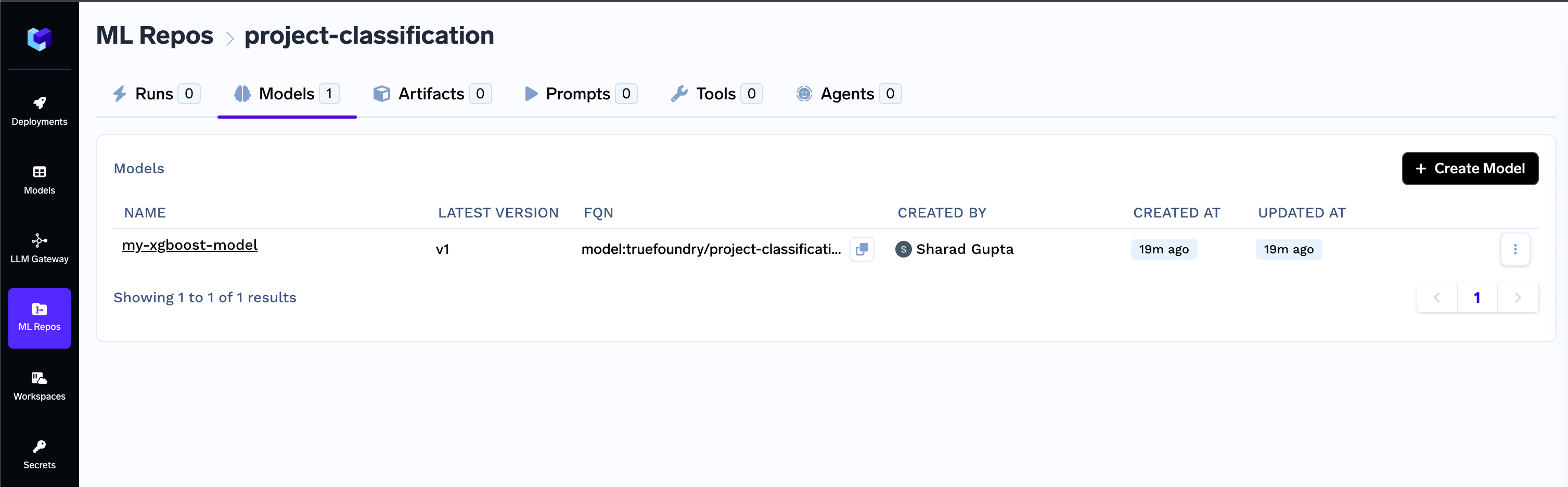
* View and manage recently logged models in the ML Repos.
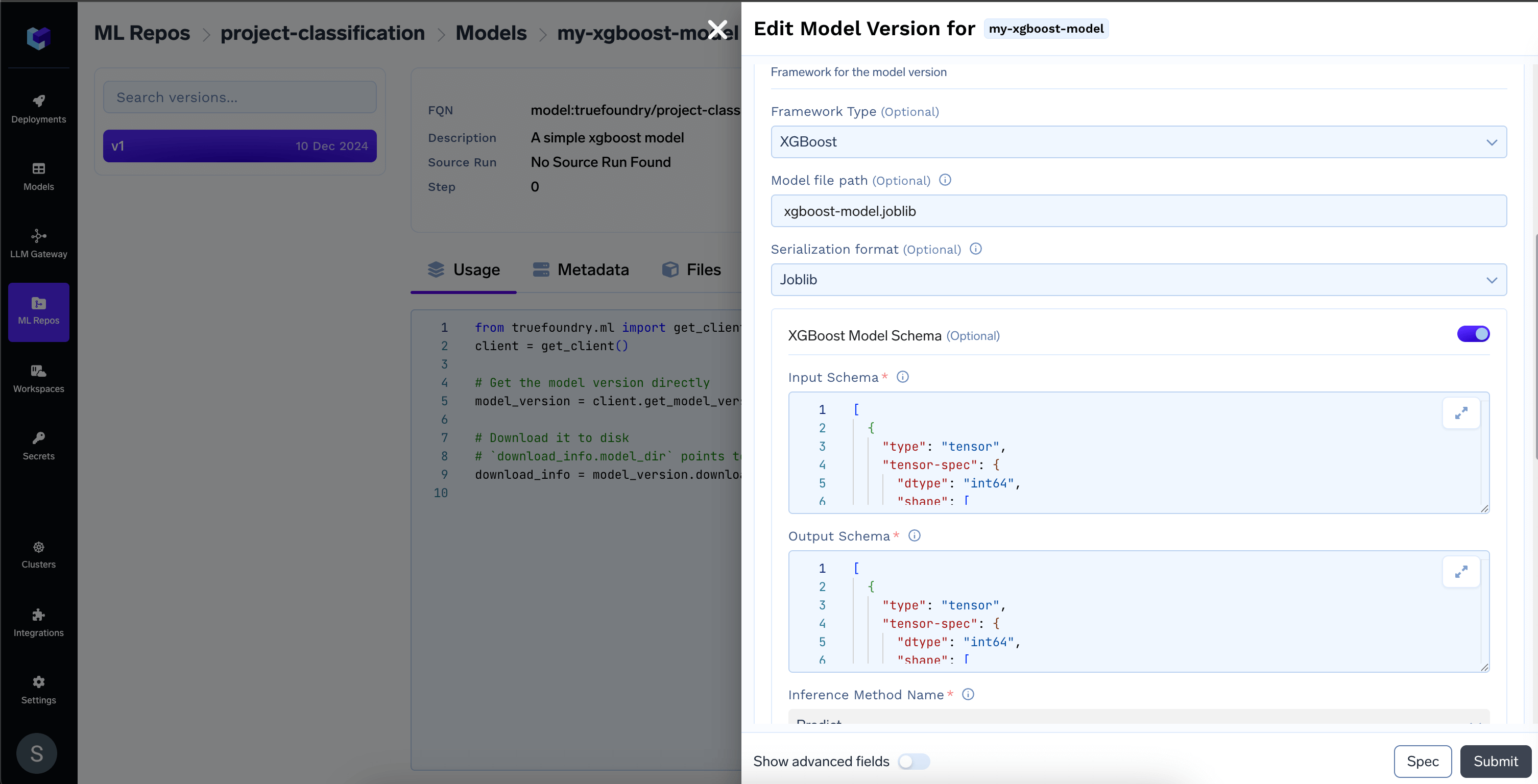
 * Access framework details like serialization format, model schema, and inference method.
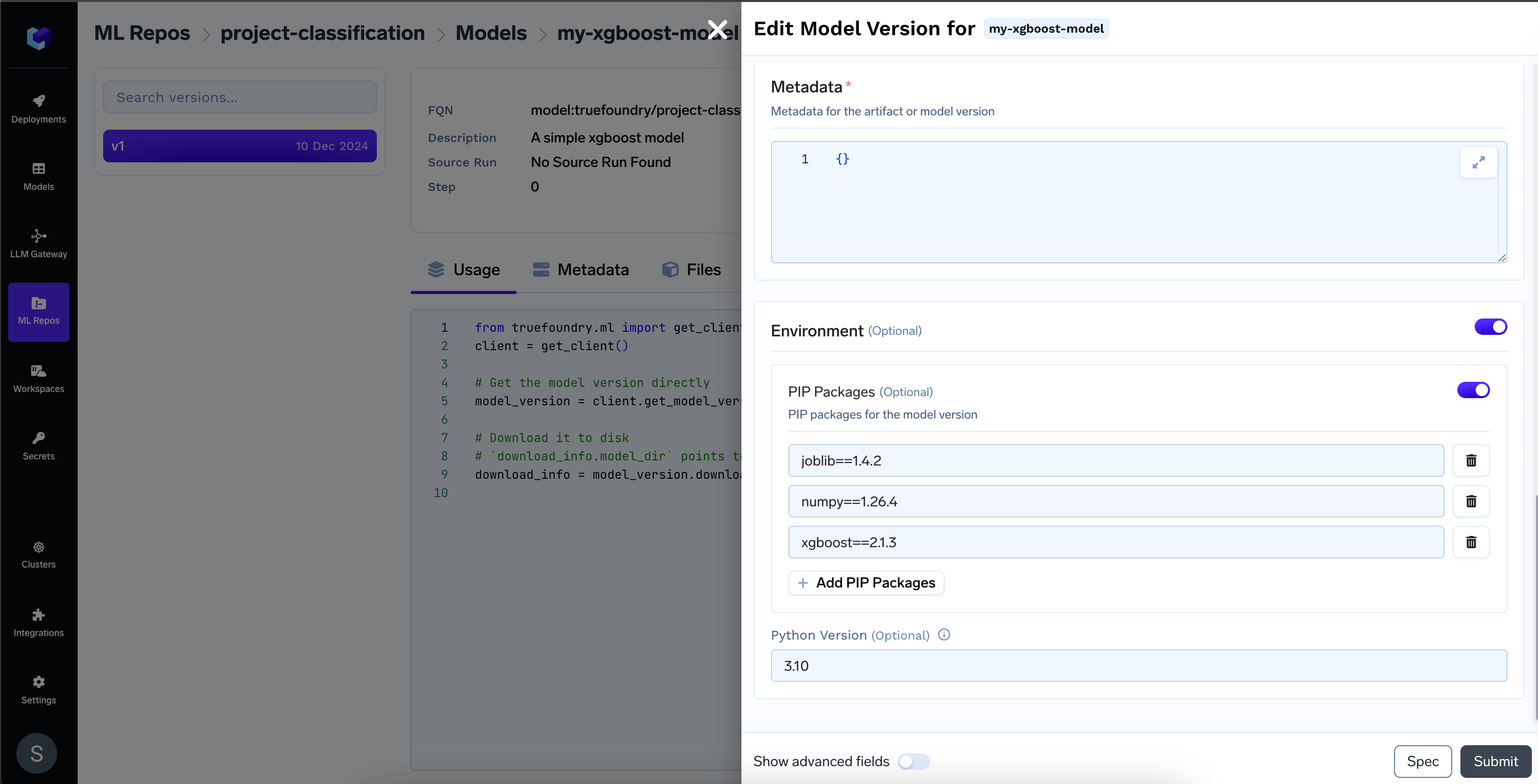
 * Access environment details like the Python version and pip packages list required for a specific model version.
 ***
### **Deploy the model**
Once the model is deployable, you can start the deployment flow directly using the CLI.
**Navigate to the Model Registry**
* Locate the desired model in the list and click on the **Deploy** button
***
### **Deploy the model**
Once the model is deployable, you can start the deployment flow directly using the CLI.
**Navigate to the Model Registry**
* Locate the desired model in the list and click on the **Deploy** button
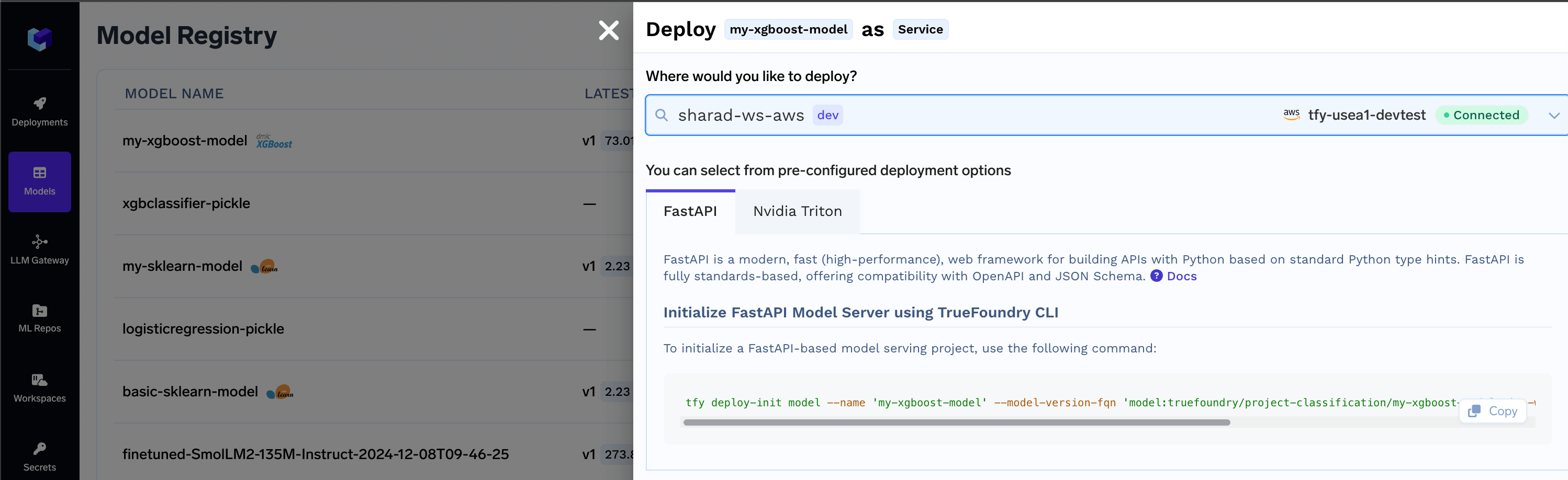
 * Select the **workspace** for deployment, then click the **copy** icon to use the generated CLI command and initialize the model deployment package.
 ***
### Common Model Deployment Issues and Troubleshooting Guide
* **Fix for Incomplete Model Manifest and make an existing logged model deployable**
### ❕Deploying a logged model may fail due to an incomplete model manifest, causing errors like:
-`Model framework is not supported for deployment`\
-`Model filename not found, please save model filename while logging the model`\
-`Model schema not found, please save schema while logging the model`\
-`Serialization format not found, please save serialization format while logging the model`
Here’s an example code snippet to resolve the Incomplete Model Manifest by adding the required fields and updating the model version:
```python Python lines theme={"dark"}
from truefoundry.ml import get_client, ModelVersionEnvironment, XGBoostFramework, xgboost_infer_schema
import joblib
import numpy as np
# Replace with your model version FQN
model_version_fqn = "model:truefoundry/project-classification/my-xgboost-model:1"
client = get_client()
model_version = client.get_model_version_by_fqn(model_version_fqn)
model_version.download(path=".")
# Replace with your model file path
model_file_path = "./xgboost-model.joblib"
model = joblib.load(model_file_path)
# Update the model input example as per your model
X = np.array([[-1, -1], [-2, -1], [1, 1], [2, 1]])
model_schema = xgboost_infer_schema(model_input=X, model=model)
# To make the model deployable and generate the inference script, model file, and schema(with the method name) are required.
model_version.framework = XGBoostFramework(
model_filepath="xgboost-model.joblib",
serialization_format="joblib",
model_schema=model_schema,
)
model_version.environment = ModelVersionEnvironment(
python_version="3.11",
pip_packages=[
"joblib==1.4.2",
"numpy==1.26.4",
"pandas==2.1.4",
"xgboost==2.1.3",
],
)
model_version.update()
```
***
* `Python version < 3.8 and > 3.12 is not supported for Triton deployment`
The Triton deployment depends on the nvidia-pytriton library ([https://pypi.org/project/nvidia-pytriton/](https://pypi.org/project/nvidia-pytriton/)) which supports Python versions >=3.8 and \<=3.12. If you need to use a version outside this range, consider using FastAPI as an alternative framework for serving the model.
***
* `Numpy version must be specified for Triton deployment`,`Numpy version must be less than 2.0.0 for Triton deployment`
The nvidia-pytriton library specifies in its `pyproject.toml` file that it does not support numpy versions >=2.0. This limitation has been confirmed through practical experience. If you need to use a version outside this range, consider using FastAPI as an alternative framework for serving the model.
***
***
### Common Model Deployment Issues and Troubleshooting Guide
* **Fix for Incomplete Model Manifest and make an existing logged model deployable**
### ❕Deploying a logged model may fail due to an incomplete model manifest, causing errors like:
-`Model framework is not supported for deployment`\
-`Model filename not found, please save model filename while logging the model`\
-`Model schema not found, please save schema while logging the model`\
-`Serialization format not found, please save serialization format while logging the model`
Here’s an example code snippet to resolve the Incomplete Model Manifest by adding the required fields and updating the model version:
```python Python lines theme={"dark"}
from truefoundry.ml import get_client, ModelVersionEnvironment, XGBoostFramework, xgboost_infer_schema
import joblib
import numpy as np
# Replace with your model version FQN
model_version_fqn = "model:truefoundry/project-classification/my-xgboost-model:1"
client = get_client()
model_version = client.get_model_version_by_fqn(model_version_fqn)
model_version.download(path=".")
# Replace with your model file path
model_file_path = "./xgboost-model.joblib"
model = joblib.load(model_file_path)
# Update the model input example as per your model
X = np.array([[-1, -1], [-2, -1], [1, 1], [2, 1]])
model_schema = xgboost_infer_schema(model_input=X, model=model)
# To make the model deployable and generate the inference script, model file, and schema(with the method name) are required.
model_version.framework = XGBoostFramework(
model_filepath="xgboost-model.joblib",
serialization_format="joblib",
model_schema=model_schema,
)
model_version.environment = ModelVersionEnvironment(
python_version="3.11",
pip_packages=[
"joblib==1.4.2",
"numpy==1.26.4",
"pandas==2.1.4",
"xgboost==2.1.3",
],
)
model_version.update()
```
***
* `Python version < 3.8 and > 3.12 is not supported for Triton deployment`
The Triton deployment depends on the nvidia-pytriton library ([https://pypi.org/project/nvidia-pytriton/](https://pypi.org/project/nvidia-pytriton/)) which supports Python versions >=3.8 and \<=3.12. If you need to use a version outside this range, consider using FastAPI as an alternative framework for serving the model.
***
* `Numpy version must be specified for Triton deployment`,`Numpy version must be less than 2.0.0 for Triton deployment`
The nvidia-pytriton library specifies in its `pyproject.toml` file that it does not support numpy versions >=2.0. This limitation has been confirmed through practical experience. If you need to use a version outside this range, consider using FastAPI as an alternative framework for serving the model.
***