> ## Documentation Index
> Fetch the complete documentation index at: https://www.truefoundry.com/llms.txt
> Use this file to discover all available pages before exploring further.
# Scikit Learn
> Logging and Deploying Sklearn Models in TrueFoundry
For Sklearn models, TrueFoundry provides a seamless deployment experience by generating FastAPI / Triton code for a logged SkLearn Model.
### Log the SkLearn model
Below is an example of logging a model trained using Scikit-learn:
```python Python {28-49} lines theme={"dark"}
from truefoundry.ml import get_client, SklearnFramework, sklearn_infer_schema
import joblib
import numpy ass np
from sklearn.pipeline import make_pipeline
from sklearn.preprocessing import StandardScaler
from sklearn.svm import SVC
# Define training data
X = np.array([[-1, -1], [-2, -1], [1, 1], [2, 1]])
y = np.array([1, 1, 2, 2])
# Create and train the model
clf = make_pipeline(StandardScaler(), SVC(gamma="auto"))
model = clf.fit(X, y)
# Save the model
joblib.dump(clf, "sklearn-pipeline.joblib")
# Initialize the TrueFoundry client
client = get_client()
# Infer model schema
model_schema = sklearn_infer_schema(
model_input=X, model=model, infer_method_name="predict"
)
# Log the model
model_version = client.log_model(
ml_repo="my-classification-project",
name="my-sklearn-model",
model_file_or_folder="sklearn-pipeline.joblib",
# To make the model deployable and generate the inference script,
# model file, and schema(with the method name) are required.
framework=SklearnFramework(
model_filepath="sklearn-pipeline.joblib",
model_schema=model_schema,
),
# Auto-captures the current environment details (e.g., python_version, pip_packages)
# based on the framework. If you want to override, you can add this block:
# environment=ModelVersionEnvironment(
# python_version="3.10",
# pip_packages=[
# "joblib==1.4.2",
# "numpy==1.26.4",
# "pandas==2.2.3",
# "scikit-learn==1.6.1",
# ],
# ),
)
# Output the model's Fully Qualified Name (FQN)
print(f"Model version logged successfully: {model_version.fqn}")
```
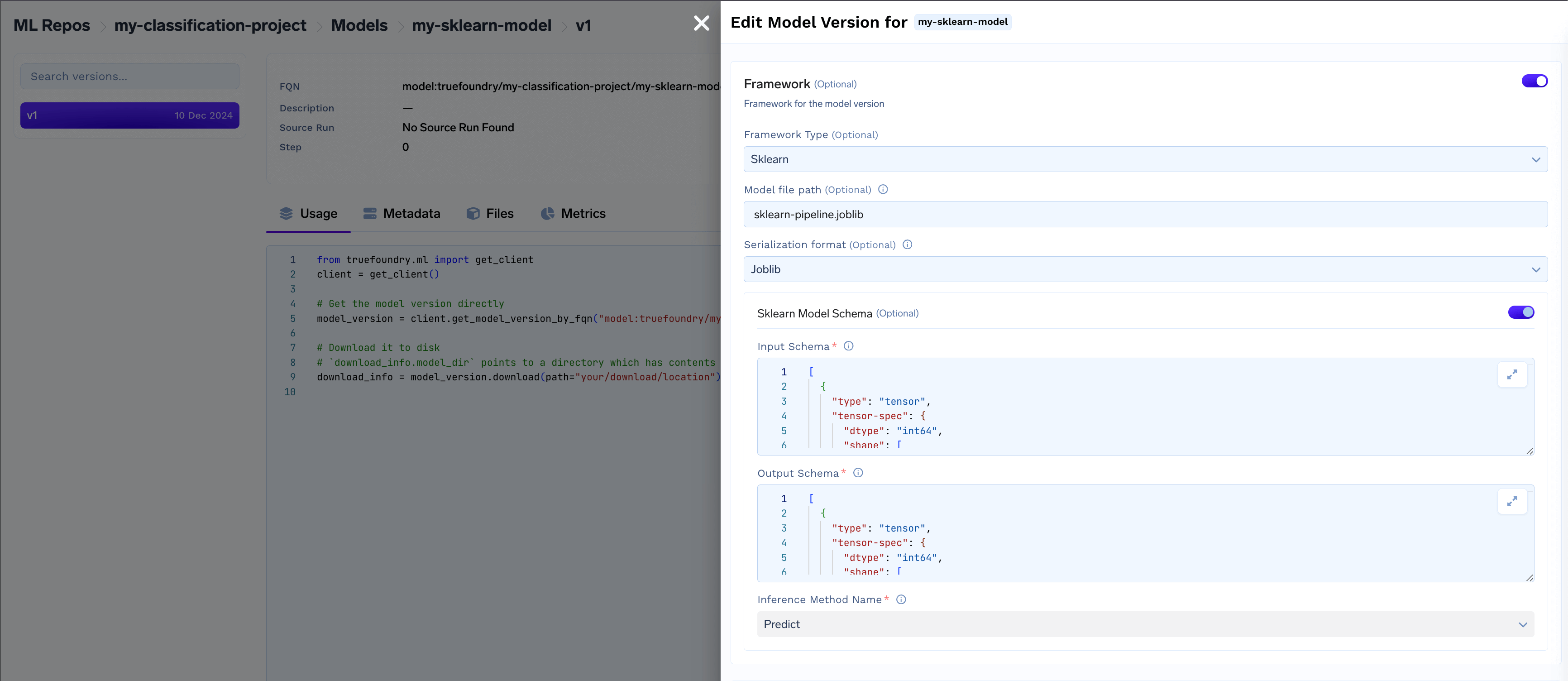
### View and manage models in Model Registry
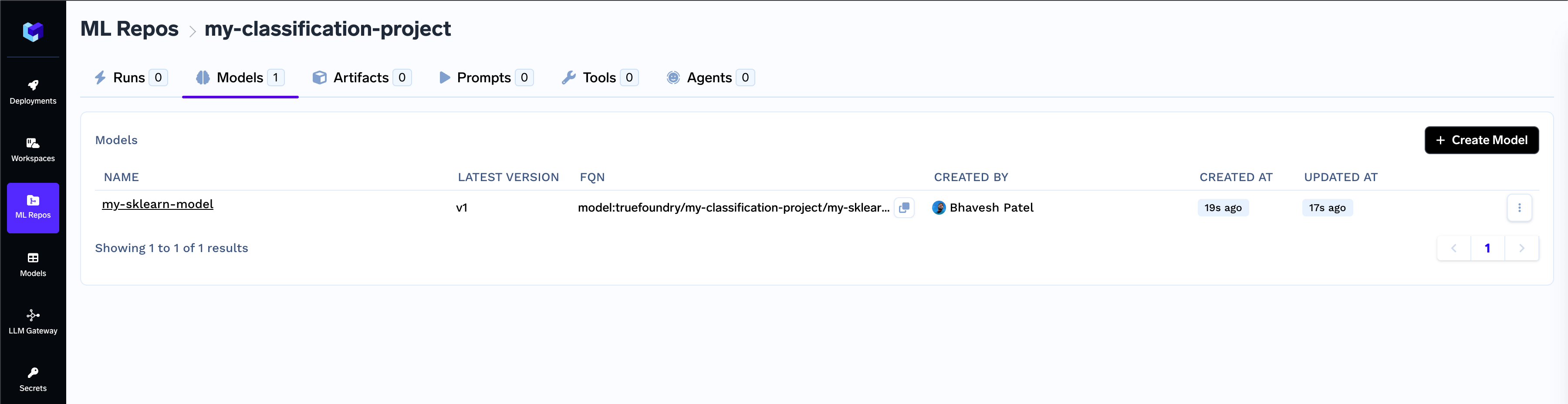 * Access framework details like serialization format, model schema, and inference method.
 ***
### **Deploy the model**
Once the model is deployable, you can start the deployment flow directly using the CLI.
**Navigate to the Model Registry**
* Locate the desired model in the list and click on the **Deploy** button
***
### **Deploy the model**
Once the model is deployable, you can start the deployment flow directly using the CLI.
**Navigate to the Model Registry**
* Locate the desired model in the list and click on the **Deploy** button
 * Select the **workspace** for deployment, then click the **copy** icon to use the generated CLI command and initialize the model deployment package.
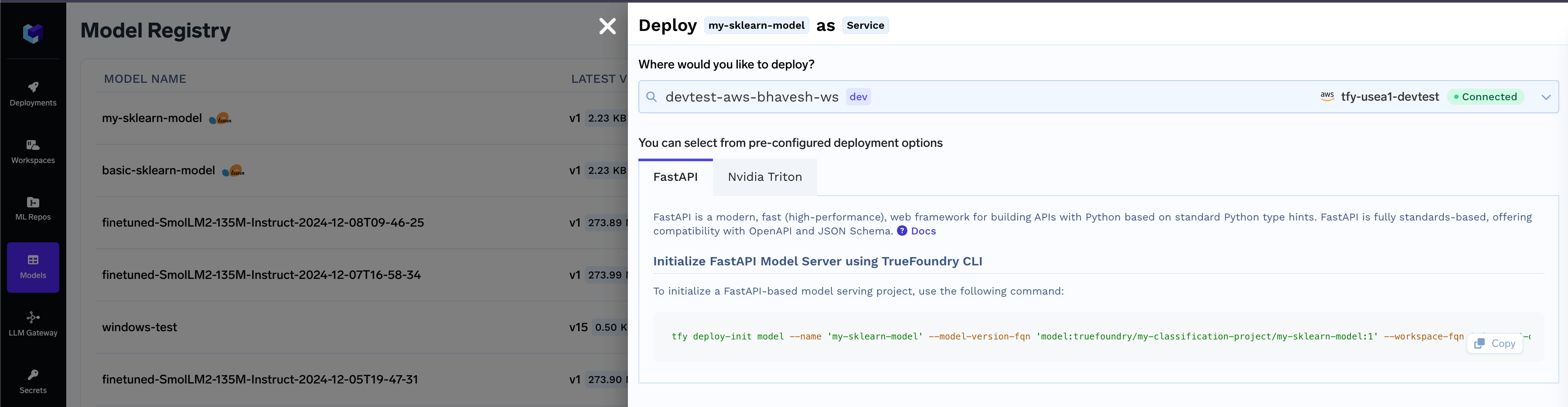 This will generate the code, which you can push to your Git Repository and then deploy a service from the git repo.
***
### Common Model Deployment Issues and Troubleshooting Guide
A logged SkLearn model will not have Deploy button, in case any of the below is true:
* Model framework is not supported for deployment
* Model filename not found, please save model filename while logging the model
* Model schema not found, please save schema while logging the model
* Serialization format not found, please save serialization format while logging the model
Here’s an example code snippet to resolve the Incomplete Model Manifest by adding the required fields and updating the model version:
```python Python lines theme={"dark"}
from truefoundry.ml import get_client, ModelVersionEnvironment, SklearnFramework, sklearn_infer_schema
import joblib
import numpy as np
# Replace with your model version FQN
model_version_fqn = "model:truefoundry/my-classification-project/my-sklearn-model:1"
client = get_client()
model_version = client.get_model_version_by_fqn(model_version_fqn)
model_version.download(path=".")
# Replace with your model file path
model_file_path = "./sklearn-pipeline.joblib"
model = joblib.load(model_file_path)
# Update the model input example as per your model
X = np.array([[-1, -1], [-2, -1], [1, 1], [2, 1]])
model_schema = sklearn_infer_schema(model_input=X, model=model, infer_method_name="predict")
# To make the model deployable and generate the inference script, model file, and schema(with the method name) are required.
model_version.framework = SklearnFramework(
model_filepath="sklearn-pipeline.joblib",
serialization_format="joblib",
model_schema=model_schema,
)
model_version.environment = ModelVersionEnvironment(
python_version="3.11",
pip_packages=[
"joblib==1.4.2",
"numpy==1.26.4",
"pandas==2.1.4",
"scikit-learn==1.5.2",
],
)
model_version.update()
```
The Triton deployment depends on the nvidia-pytriton library ([https://pypi.org/project/nvidia-pytriton](https://pypi.org/project/nvidia-pytriton)),
which supports Python versions >=3.8 and \<=3.12. If you need to use a version outside this range, consider FastAPI as an alternative framework
for serving the model.
The nvidia-pytriton library does not support numpy versions >=2.0. If you need to use a version outside this range, consider FastAPI as an alternative framework for serving the model.
This will generate the code, which you can push to your Git Repository and then deploy a service from the git repo.
***
### Common Model Deployment Issues and Troubleshooting Guide
A logged SkLearn model will not have Deploy button, in case any of the below is true:
* Model framework is not supported for deployment
* Model filename not found, please save model filename while logging the model
* Model schema not found, please save schema while logging the model
* Serialization format not found, please save serialization format while logging the model
Here’s an example code snippet to resolve the Incomplete Model Manifest by adding the required fields and updating the model version:
```python Python lines theme={"dark"}
from truefoundry.ml import get_client, ModelVersionEnvironment, SklearnFramework, sklearn_infer_schema
import joblib
import numpy as np
# Replace with your model version FQN
model_version_fqn = "model:truefoundry/my-classification-project/my-sklearn-model:1"
client = get_client()
model_version = client.get_model_version_by_fqn(model_version_fqn)
model_version.download(path=".")
# Replace with your model file path
model_file_path = "./sklearn-pipeline.joblib"
model = joblib.load(model_file_path)
# Update the model input example as per your model
X = np.array([[-1, -1], [-2, -1], [1, 1], [2, 1]])
model_schema = sklearn_infer_schema(model_input=X, model=model, infer_method_name="predict")
# To make the model deployable and generate the inference script, model file, and schema(with the method name) are required.
model_version.framework = SklearnFramework(
model_filepath="sklearn-pipeline.joblib",
serialization_format="joblib",
model_schema=model_schema,
)
model_version.environment = ModelVersionEnvironment(
python_version="3.11",
pip_packages=[
"joblib==1.4.2",
"numpy==1.26.4",
"pandas==2.1.4",
"scikit-learn==1.5.2",
],
)
model_version.update()
```
The Triton deployment depends on the nvidia-pytriton library ([https://pypi.org/project/nvidia-pytriton](https://pypi.org/project/nvidia-pytriton)),
which supports Python versions >=3.8 and \<=3.12. If you need to use a version outside this range, consider FastAPI as an alternative framework
for serving the model.
The nvidia-pytriton library does not support numpy versions >=2.0. If you need to use a version outside this range, consider FastAPI as an alternative framework for serving the model.