> ## Documentation Index
> Fetch the complete documentation index at: https://www.truefoundry.com/llms.txt
> Use this file to discover all available pages before exploring further.
# Repositories
> Understand TrueFoundry repositories, what assets they store, how blob storage backs them, and how repository access controls work.
A **Repository** is a shared container for versioned AI assets in TrueFoundry. It is similar to a Git repository, except it stores AI and ML data instead of source code.
Repositories are a common concept across AI Engineering and AI Gateway. The same repository can hold assets used by training jobs, model deployments, prompt management, and agent workflows.
Some older SDK fields, manifests, and pages use the term **ML Repo** or `ml_repo`. These refer to the same Repository concept.
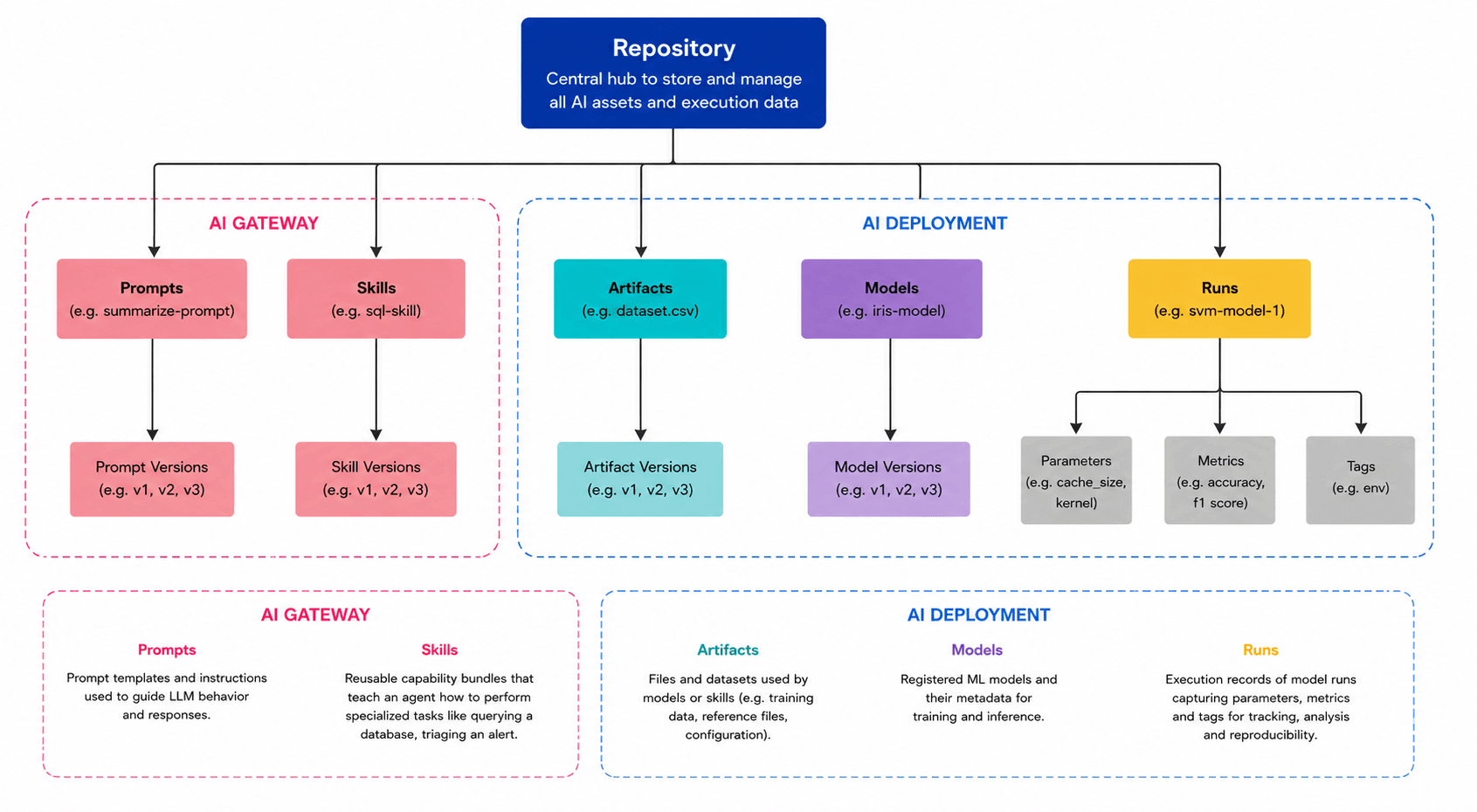 ## What repositories can hold
Repositories store versioned assets and the metadata needed to discover, audit, and reuse them.
Saved prompt templates, prompt versions, input variables, model configuration, guardrails, and structured output settings.
Versioned agent skills, including `SKILL.md` instructions and optional supporting files such as references, scripts, and assets.
Versioned files and directories such as datasets, checkpoints, evaluation outputs, and other project artifacts.
Versioned model files, model metadata, metrics, schemas, and lineage from training or fine-tuning workflows.
Experiment runs with parameters, metrics, tags, and links to artifacts, models, and prompts created or used during the run.
## Where repository content is stored
AI and ML assets such as model checkpoints, datasets, and artifact files can grow to gigabytes or more, making them impractical to store in a traditional Git repository. To handle this, every TrueFoundry repository is backed by blob storage — Amazon S3, Google Cloud Storage, Azure Blob Storage, MinIO, or another S3-compatible store.
TrueFoundry keeps the repository metadata (versions, tags, lineage, and access policies) in its control plane, while the actual asset content is written to the configured blob storage. This separation keeps the control plane lightweight and lets you manage storage costs, retention, and compliance independently.
In practice this means:
* You need at least one blob storage integration before creating a repository.
* Each repository points to a single storage backing and path.
* Multiple repositories can share the same blob storage with different path prefixes.
* Asset content always remains in storage controlled by your organization.
## Create a repository
You can create a repository from the **ML Repos** tab in the platform. Each repository requires a blob storage integration, so make sure you have connected at least one — [AWS S3](/docs/integration-provider-aws), [Google Cloud Storage](/docs/integration-provider-gcp), [Azure Blob Storage](/docs/integration-provider-azure), or any S3-compatible store.
Once the repository is created, you can start populating it with prompts, skills, artifacts, models, and experiment runs.
## Access control
Repository access controls who can view, create, update, and use the assets inside the repository. Prompts, skills, artifacts, and models do not need separate access policies for normal use; they inherit access from their parent repository.
Use repository access to answer questions like:
* Who can discover and use a prompt or skill?
* Who can publish a new prompt, skill, artifact, or model version?
* Who can view model files, artifact contents, and other stored data?
* Who can manage repository settings or delete repository data?
At a high level:
| Permission area | What it controls |
| -------------------------- | --------------------------------------------------------------------------------------- |
| **Read repository/data** | View repository details and read assets such as prompts, skills, models, and artifacts. |
| **Write data** | Publish or update assets by creating new versions. |
| **Manage repository** | Update repository configuration and manage access. |
| **Delete data/repository** | Delete assets or the repository itself, depending on the granted role. |
For the complete permission list, see the [Repository permissions](/docs/platform/manage-user-roles-and-permissions#repository) section in roles and permissions.
## When to create separate repositories
Create separate repositories when assets need different ownership, access control, storage locations, or lifecycle policies.
Common patterns include:
* **By team** — for example, `support-ai`, `growth-ai`, or `ml-platform`.
* **By environment** — for example, `checkout-dev` and `checkout-prod`.
* **By sensitivity** — for example, keeping regulated model artifacts or sensitive prompts in a restricted repository.
* **By project** — for example, grouping prompts, skills, artifacts, and models for a single agent or application.
## What repositories can hold
Repositories store versioned assets and the metadata needed to discover, audit, and reuse them.
Saved prompt templates, prompt versions, input variables, model configuration, guardrails, and structured output settings.
Versioned agent skills, including `SKILL.md` instructions and optional supporting files such as references, scripts, and assets.
Versioned files and directories such as datasets, checkpoints, evaluation outputs, and other project artifacts.
Versioned model files, model metadata, metrics, schemas, and lineage from training or fine-tuning workflows.
Experiment runs with parameters, metrics, tags, and links to artifacts, models, and prompts created or used during the run.
## Where repository content is stored
AI and ML assets such as model checkpoints, datasets, and artifact files can grow to gigabytes or more, making them impractical to store in a traditional Git repository. To handle this, every TrueFoundry repository is backed by blob storage — Amazon S3, Google Cloud Storage, Azure Blob Storage, MinIO, or another S3-compatible store.
TrueFoundry keeps the repository metadata (versions, tags, lineage, and access policies) in its control plane, while the actual asset content is written to the configured blob storage. This separation keeps the control plane lightweight and lets you manage storage costs, retention, and compliance independently.
In practice this means:
* You need at least one blob storage integration before creating a repository.
* Each repository points to a single storage backing and path.
* Multiple repositories can share the same blob storage with different path prefixes.
* Asset content always remains in storage controlled by your organization.
## Create a repository
You can create a repository from the **ML Repos** tab in the platform. Each repository requires a blob storage integration, so make sure you have connected at least one — [AWS S3](/docs/integration-provider-aws), [Google Cloud Storage](/docs/integration-provider-gcp), [Azure Blob Storage](/docs/integration-provider-azure), or any S3-compatible store.
Once the repository is created, you can start populating it with prompts, skills, artifacts, models, and experiment runs.
## Access control
Repository access controls who can view, create, update, and use the assets inside the repository. Prompts, skills, artifacts, and models do not need separate access policies for normal use; they inherit access from their parent repository.
Use repository access to answer questions like:
* Who can discover and use a prompt or skill?
* Who can publish a new prompt, skill, artifact, or model version?
* Who can view model files, artifact contents, and other stored data?
* Who can manage repository settings or delete repository data?
At a high level:
| Permission area | What it controls |
| -------------------------- | --------------------------------------------------------------------------------------- |
| **Read repository/data** | View repository details and read assets such as prompts, skills, models, and artifacts. |
| **Write data** | Publish or update assets by creating new versions. |
| **Manage repository** | Update repository configuration and manage access. |
| **Delete data/repository** | Delete assets or the repository itself, depending on the granted role. |
For the complete permission list, see the [Repository permissions](/docs/platform/manage-user-roles-and-permissions#repository) section in roles and permissions.
## When to create separate repositories
Create separate repositories when assets need different ownership, access control, storage locations, or lifecycle policies.
Common patterns include:
* **By team** — for example, `support-ai`, `growth-ai`, or `ml-platform`.
* **By environment** — for example, `checkout-dev` and `checkout-prod`.
* **By sensitivity** — for example, keeping regulated model artifacts or sensitive prompts in a restricted repository.
* **By project** — for example, grouping prompts, skills, artifacts, and models for a single agent or application.