> ## Documentation Index
> Fetch the complete documentation index at: https://www.truefoundry.com/llms.txt
> Use this file to discover all available pages before exploring further.
# Truefoundry Control Plane
> Architecture of the TrueFoundry Control Plane which is the brain of the Truefoundry platform.
The control-plane is the brain of the Truefoundry platform. It is responsible for managing the overall configuration and orchestration of the platform components.
We provide a hosted control-plane that you can use or also self-host the control-plane as part of our enterprise plan
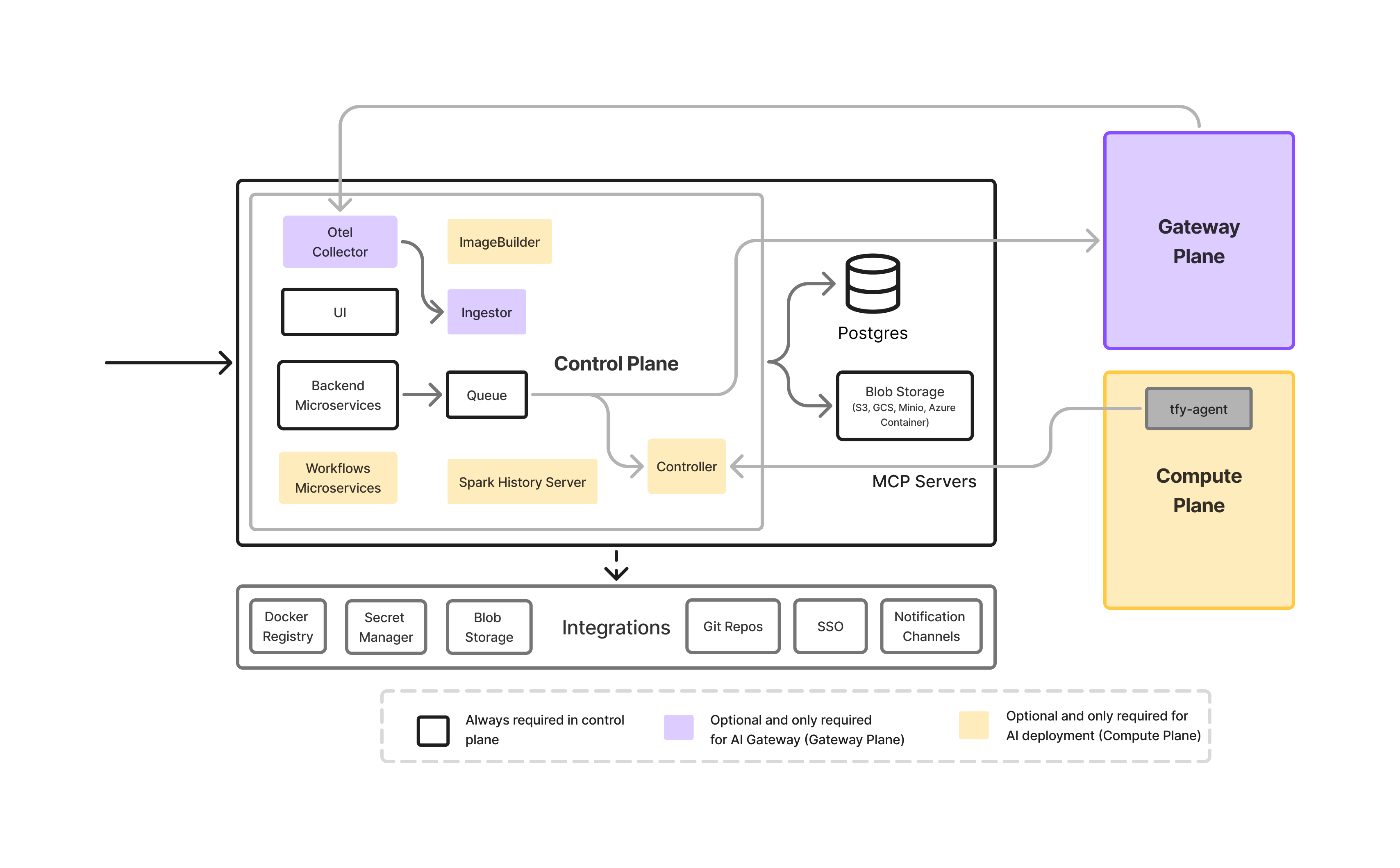 The control-plane comprises of the following key components. Different components are required for different use-cases. If you are not using those features, they can be disabled and will not be installed.
| Component | AI Deployment | AI Gateway | Description |
| -------------------------- | ----------------------------------------------------------- | ----------------------------------------------------------- | ----------------------------------------------------------------------------------------------------------------------------------------------------------------------------------------------------------------- |
| **UI** | | | This is the UI component to view deployments, and other resources. |
| **Backend Microservice** | | | Truefoundry comprises of multiple backend services that handle various aspects like authorization, deployment control flow, CRUD APIs, interaction with database and external services, etc. |
| **PostgreSQL** | | | Database to store user information, deployment information, etc, gateway configuration, etc. This can be deployed on Kubernetes in dev-mode, however, we recommend using managed database like RDS in production. |
| **Blob Storage** | | | Control-plane needs access to a blob storage to store code uploads, gateway logs and traces. |
| **Queue** | | | Truefoundry uses NATS as the queue and cache layer to communicate all data from the control plane to the compute and gateway planes. |
| **Otel Collector** | | | Otel collector to collect tracing data from AI Gateway |
| **Ingestor** | | | Ingestor receives the logs from the OTEL collector and dumps them to S3 or any other blob storage. |
| **Controller** | | | The controller is responsible for handling all connections from the tfy-agents in different compute-plane clusters. |
| **Image Builder** | | | ImageBuilder is used in AI deployment to build docker images on Kubernetes cluster using buildkit. |
| **Workflows Microservice** | | | Workflows microservice is used in AI deployment to manage Truefoundry workflows. This is needed only if you are using [workflows feature](/docs/introduction-to-workflow). |
| **Spark History Server** | | | Spark history server is used in AI deployment to view the logs and traces of the spark jobs deployed on Truefoundry . This is needed only if you are using deploying Spark jobs on Truefoundry. |
Control-plane also integrates with a number of external services to make it easier to manage your deployments and configuration. These integrations are optional and you can only enable the ones you need. The key types of integrations and their usecases are as follows:
| **Integration Type** | AI Deployment | AI Gateway | Description |
| ---------------------------------------------------------------------------- | :---------------------------------------------: | :---------------------------------------------------------: | -------------------------------------------------------------------------------------------------------------------------------- |
| **Docker Registry** | | | Needed to pull images for deployed services. Required for building and deploying AI services. |
| **Blob Storage** | | | Used to store code uploads, model artifacts, logs, and gateway traces. |
| **External Secrets Manager (e.g., AWS Secrets Manager, GCP Secret Manager)** | | | Used to securely inject sensitive credentials into services. |
| **Authentication System (OIDC, SSO)** | | | Provides user authentication and single sign-on capabilities for the platform. |
| **Notifications (Slack, Email, Webhooks)** | | | Allows configuring notifications for deployment status, failure alerts, and other platform events. |
| **Git Repository Integration** | | | Enables seamless integration with Git repositories for CI/CD workflows, code synchronization, and automated deployment triggers. |
### Supported Integrations
The control-plane comprises of the following key components. Different components are required for different use-cases. If you are not using those features, they can be disabled and will not be installed.
| Component | AI Deployment | AI Gateway | Description |
| -------------------------- | ----------------------------------------------------------- | ----------------------------------------------------------- | ----------------------------------------------------------------------------------------------------------------------------------------------------------------------------------------------------------------- |
| **UI** | | | This is the UI component to view deployments, and other resources. |
| **Backend Microservice** | | | Truefoundry comprises of multiple backend services that handle various aspects like authorization, deployment control flow, CRUD APIs, interaction with database and external services, etc. |
| **PostgreSQL** | | | Database to store user information, deployment information, etc, gateway configuration, etc. This can be deployed on Kubernetes in dev-mode, however, we recommend using managed database like RDS in production. |
| **Blob Storage** | | | Control-plane needs access to a blob storage to store code uploads, gateway logs and traces. |
| **Queue** | | | Truefoundry uses NATS as the queue and cache layer to communicate all data from the control plane to the compute and gateway planes. |
| **Otel Collector** | | | Otel collector to collect tracing data from AI Gateway |
| **Ingestor** | | | Ingestor receives the logs from the OTEL collector and dumps them to S3 or any other blob storage. |
| **Controller** | | | The controller is responsible for handling all connections from the tfy-agents in different compute-plane clusters. |
| **Image Builder** | | | ImageBuilder is used in AI deployment to build docker images on Kubernetes cluster using buildkit. |
| **Workflows Microservice** | | | Workflows microservice is used in AI deployment to manage Truefoundry workflows. This is needed only if you are using [workflows feature](/docs/introduction-to-workflow). |
| **Spark History Server** | | | Spark history server is used in AI deployment to view the logs and traces of the spark jobs deployed on Truefoundry . This is needed only if you are using deploying Spark jobs on Truefoundry. |
Control-plane also integrates with a number of external services to make it easier to manage your deployments and configuration. These integrations are optional and you can only enable the ones you need. The key types of integrations and their usecases are as follows:
| **Integration Type** | AI Deployment | AI Gateway | Description |
| ---------------------------------------------------------------------------- | :---------------------------------------------: | :---------------------------------------------------------: | -------------------------------------------------------------------------------------------------------------------------------- |
| **Docker Registry** | | | Needed to pull images for deployed services. Required for building and deploying AI services. |
| **Blob Storage** | | | Used to store code uploads, model artifacts, logs, and gateway traces. |
| **External Secrets Manager (e.g., AWS Secrets Manager, GCP Secret Manager)** | | | Used to securely inject sensitive credentials into services. |
| **Authentication System (OIDC, SSO)** | | | Provides user authentication and single sign-on capabilities for the platform. |
| **Notifications (Slack, Email, Webhooks)** | | | Allows configuring notifications for deployment status, failure alerts, and other platform events. |
| **Git Repository Integration** | | | Enables seamless integration with Git repositories for CI/CD workflows, code synchronization, and automated deployment triggers. |
### Supported Integrations
AWS Container Registry
GCP Artifact Registry
Azure Container Registry
Docker Hub
Quay
JFrog Artifactory
Self-hosted registries
AWS S3
GCP Storage
Azure Storage
MinIO
PureStorage
NetApp
AWS Parameter Store
AWS Secrets Manager
GCP Secret Manager
Azure Key Vault
Email
Slack Webhook/Bot
PagerDuty
GitHub
GitLab
Bitbucket
Azure Repos