> ## Documentation Index
> Fetch the complete documentation index at: https://www.truefoundry.com/llms.txt
> Use this file to discover all available pages before exploring further.
# Truefoundry Compute Plane Architecture
> Architecture of the TrueFoundry Compute Plane which handles all the models, services, jobs and pipelines deployed by the users.
The compute plane comprises of one or more Kubernetes clusters on which the applications deployed by the users run. This can be AWS EKS cluster, GKE cluster, AKS cluster, Openshift cluster, Oracle Kubernetes Engine cluster, or any other standard on-prem Kubernetes cluster.
The compute plane is always in the customer's own cloud environment. Truefoundry doesn't provide Kubernetes clusters as compute on its own. This ensures all data and compute stay within the customer's own infrastructure.
Truefoundry can help create a new compute plane cluster using OpenTofu/Terraform (recommended) or also use an existing cluster. If using an existing cluster, please make sure you conform to the key requirements mentioned below.
The tfy-agent runs on the compute plane and is responsible for connecting to the control-plane. It connects to the control-plane via a secure WebSocket connection and then receives the instructions from the control-plane while also sending realtime updates about the Kubernetes resources to the control-plane.
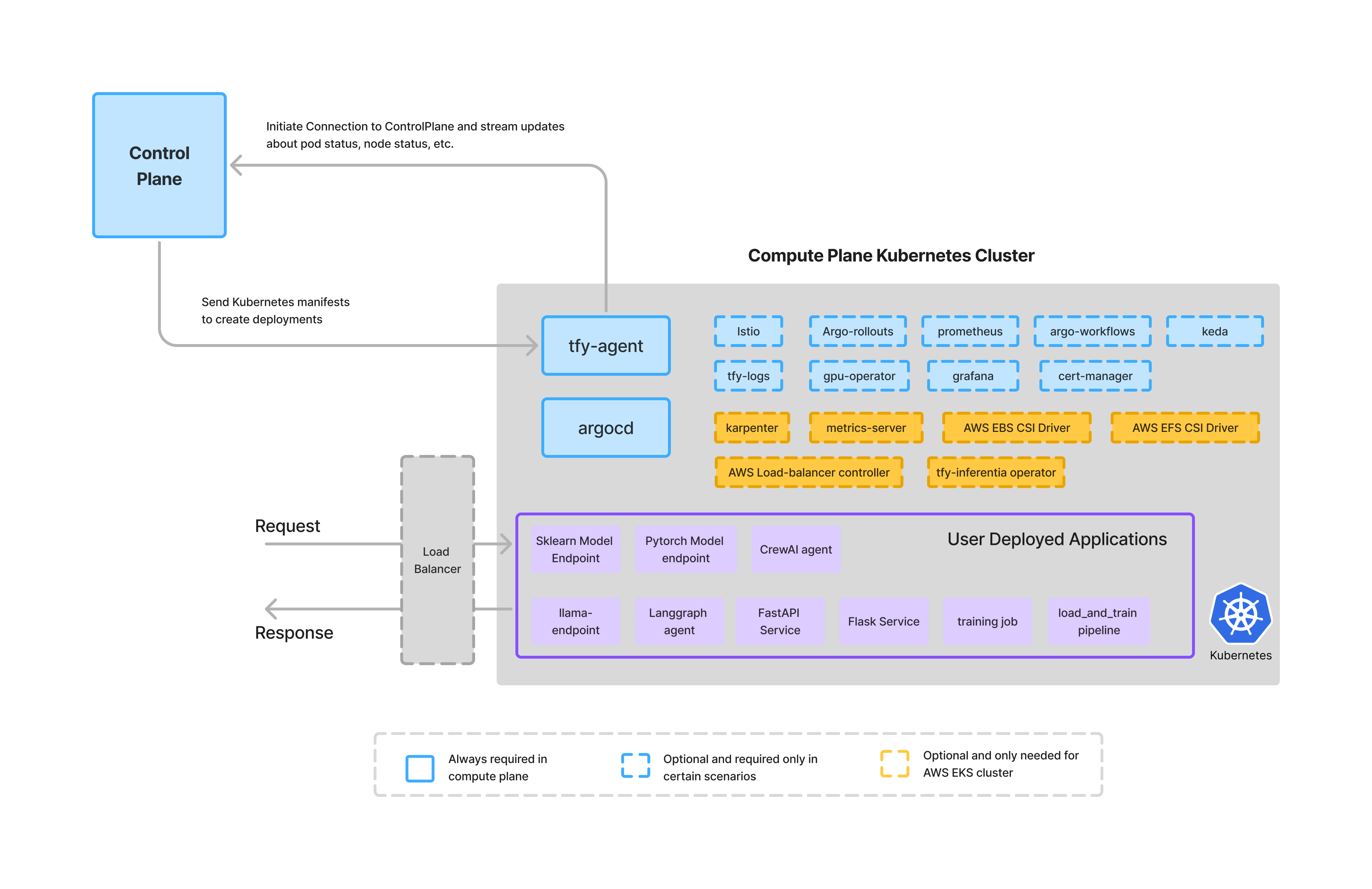 The compute plane cluster hosts the infrastructure-related K8s applications like ArgoCD, GPU operator, etc and also the user-deployed applications. The key infrastructure addons on the Kubernetes cluster are as follows:
TrueFoundry relies on [ArgoCD](https://argo-cd.readthedocs.io/en/stable/) to deploy applications to the compute-plane cluster. The infra applications are deployed in the *default* project in argocd
while the user deployed applications are deployed in *tfy-apps* project.
If you are **using your own ArgoCD**, please make sure of the following requirements:
1. Ensure argocd has access to create argo applications in all namespace. For this following things must be set
```yaml lines theme={"dark"}
server.extraArgs[0]="--insecure"
server.extraArgs[1]="--application-namespaces=*"
controller.extraArgs[0]="--application-namespaces=*"
```
2. Create a *tfy-apps* project with the following spec.
```yaml lines theme={"dark"}
apiVersion: argoproj.io/v1alpha1
kind: AppProject
metadata:
name: tfy-apps
namespace: argocd
spec:
clusterResourceWhitelist:
- group: '*'
kind: '*'
destinations:
- namespace: '*'
server: '*'
sourceNamespaces:
- '*'
sourceRepos:
- '*'
```
You can find the ArgoCD configuration file that Truefoundry installs by default [here](https://github.com/truefoundry/infra-charts/blob/main/charts/tfy-k8s-generic-inframold/templates/argocd.yaml).
[Prometheus](https://prometheus.io/) is used to power the [metrics](/docs/monitor-your-service) feature on the platform. It also powers the [autoscaling](/docs/autoscaling-overview), [autoshutdown](/docs/scale-service-to-0) and autopilot features of the platform. TrueFoundry uses the opensource [kube-prometheus-stack](https://github.com/prometheus-community/helm-charts/tree/main/charts/kube-prometheus-stack) for running prometheus in the cluster.
If you are already using kube-prometheus-stack in your cluster, TrueFoundry should be able to work with it with the following configuration changes:
```yaml lines theme={"dark"}
kube-state-metrics:
metricsLabelsAllowlist:
- pods=[truefoundry.com/application,truefoundry.com/component-type,truefoundry.com/component,truefoundry.com/application-id]
- nodes=[karpenter.sh/capacity-type,eks.amazonaws.com/capacityType,kubernetes.azure.com/scalesetpriority,kubernetes.azure.com/accelerator,cloud.google.com/gke-provisioning,node.kubernetes.io/instance-type]
```
and
```yaml lines theme={"dark"}
alertmanager:
alertmanagerSpec:
alertmanagerConfigMatcherStrategy:
type: None
```
You can find the argocd configuration [here](https://github.com/truefoundry/infra-charts/blob/main/charts/tfy-k8s-generic-inframold/templates/prometheus.yaml).
TFY Agent is the agent that runs on the compute plane cluster and is responsible for connecting the cluster to the control-plane. It connects to the control plane via a secure WebSocket connection and then receives the instructions from the control plane while also sending realtime updates about the Kubernetes resources to the control plane.
You can find the argocd configuration [here](https://github.com/truefoundry/infra-charts/blob/main/charts/tfy-k8s-generic-inframold/templates/tfy-agent.yaml).
[Istio](https://istio.io/) is a really powerful service mesh and ingress controller. TrueFoundry uses Istio as the primary ingress controller in the compute-plane cluster. If you are using any other Ingress controller, most of the features in the platform will still work except the ones listed below that specifically rely on Istio envoy proxy or envoy filters.
We don't inject the sidecar by
default - its only injected in cases where needed for usecases mentioned below
The key features that rely on Istio and will not work otherwise are:
1. [Request Count Based autoscaling](/docs/autoscaling-overview#enable-autoscaling)
2. Oauth based authentication and authorization for Jupyter Notebooks. Without Istio, there will be no authentication and authorization for the notebooks.
3. [Intercepts](/docs/intercepts) feature to redirect / mirror traffic to other applications.
4. [Authentication](/docs/endpoint-authentication) for services deployed on the cluster.
If you are already using Istio in your cluster, Truefoundry should be able to work with it without any additional configuration. Truefoundry agent automatically discovers the istio gateways and exposed the domains to the control plane.
Please ensure that if you have multiple Istio gateways, they do not have the same domains configured. If that is the case, then we will [need to specify which gateway to use](/docs/tfy-agent#define-which-istio-gateway-to-use-for-the-truefoundry-components) for the Truefoundry components as a variable in the tfy-agent helm chart.
There are three istio components that TrueFoundry installs:
1. **istio-base** - These are the bunch of CRDs that are required for Istio to work. You can find the argocd configuration [here](https://github.com/truefoundry/infra-charts/blob/main/charts/tfy-k8s-generic-inframold/templates/istio/istio-base.yaml).
2. **istio-discovery** - This is pilot service that is responsible for the discovery of the services in the cluster. You can find the argocd configuration [here](https://github.com/truefoundry/infra-charts/blob/main/charts/tfy-k8s-generic-inframold/templates/istio/istio-discovery.yaml).
3. **tfy-istio-ingress** - This is the ingress gateway that is responsible for the ingress of the services to the cluster. You can find the argocd configuration [here](https://github.com/truefoundry/infra-charts/blob/main/charts/tfy-k8s-generic-inframold/templates/istio/tfy-istio-ingress.yaml).
[Argo Rollouts](https://argoproj.github.io/argo-rollouts/) is used to power the [canary and blue-green rollout strategies](/docs/rollout-strategy) in TrueFoundry.
If you are already using Argo Rollouts in your cluster, Truefoundry should be able to work with it without any additional configuration.
You can find the argocd configuration [here](https://github.com/truefoundry/infra-charts/blob/main/charts/tfy-k8s-generic-inframold/templates/argo-rollouts.yaml).
TrueFoundry uses [Argo Workflows](https://argo-workflows.readthedocs.io/en/latest/) to power the [Jobs feature](/docs/introduction-to-a-job) on the platform.
If you are already using Argo Workflows in your cluster, Truefoundry should be able to work with the following configuration:
```yaml lines theme={"dark"}
controller:
workflowDefaults:
spec:
activeDeadlineSeconds: 432000
ttlStrategy:
secondsAfterCompletion: 3600
namespaceParallelism: 1000
parallelism: 1000
```
You can find the argocd configuration [here](https://github.com/truefoundry/infra-charts/blob/main/charts/tfy-k8s-generic-inframold/templates/argo-workflows.yaml).
[Keda](https://keda.sh/) is used to power the [autoscaling](/docs/autoscaling-overview#autoscaling) feature on the platform. TrueFoundry uses the opensource [keda](https://github.com/kedacore/keda) for event driver autoscaling in the cluster.
If you are already using Keda in your cluster, TrueFoundry should be able to work without any additional configuration.
You can find the argocd configuration [here](https://github.com/truefoundry/infra-charts/blob/main/charts/tfy-k8s-generic-inframold/templates/keda.yaml).
[Victoria logs](https://victoriametrics.com/products/victorialogs/) and [Vector](https://vector.dev/) are used to power the [logs](/docs/monitor-your-service) feature on the platform. This is optional and you can choose to provide your own logging solution.
Without tfy-logs, we will not be able to show the aggregated logs on the platform for the services.
If you are already using Victoria logs in your cluster, Truefoundry should be able to work without any additional configuration. If you are already using vector to ingest logs, Truefoundry should be able to work with the following configuration:
```yaml lines theme={"dark"}
customConfig:
sinks:
vlogs:
type: elasticsearch
query:
_time_field: timestamp
_stream_fields: namespace,pod,container,stream,truefoundry_com_application,truefoundry_com_deployment_version,truefoundry_com_component_type,truefoundry_com_retry_number,job_name,sparkoperator_k8s_io_app_name,truefoundry_com_buildName
inputs:
- parser
transforms:
parser:
type: remap
inputs:
- k8s
source: >
if .message == "" {
.message = " "
}
# Extract basic pod information
.service = .kubernetes.container_name
.container = .kubernetes.container_name
.app = .kubernetes.container_name
.pod = .kubernetes.pod_name
.node = .kubernetes.pod_node_name
.namespace = .kubernetes.pod_namespace
.job_name = .kubernetes.job_name
# Extract ALL pod labels dynamically using for_each
pod_labels = object(.kubernetes.pod_labels) ?? {}
# Iterate through all pod labels and add them with a prefix
for_each(pod_labels) -> |key, value| {
label_key = replace(replace(replace(key, ".", "_"), "/", "_"), "-", "_")
. = set!(., [label_key], string(value) ?? "")
}
# Clean up kubernetes metadata
del(.kubernetes)
del(.file)
sources:
k8s:
type: kubernetes_logs
glob_minimum_cooldown_ms: 1000
```
You can find the argocd configuration [here](https://github.com/truefoundry/infra-charts/blob/main/charts/tfy-k8s-generic-inframold/templates/tfy-logs.yaml).
[GPU Operator](https://artifacthub.io/packages/helm/truefoundry/tfy-gpu-operator) is used to deploy workloads on the GPU nodes. It's a TrueFoundry provided helm chart that's based on [Nvidia's GPU operator](https://github.com/NVIDIA/gpu-operator).
If you are already using nvidia's GPU Operator in your cluster, TrueFoundry should be able to work without any additional configuration.
You can find the argocd configuration for the following cloud providers
1. [AWS](https://github.com/truefoundry/infra-charts/blob/main/charts/tfy-k8s-aws-eks-inframold/templates/tfy-gpu-operator.yaml)
2. [GCP](https://github.com/truefoundry/infra-charts/blob/main/charts/tfy-k8s-gcp-gke-standard-inframold/templates/tfy-gpu-operator.yaml)
3. [Azure](https://github.com/truefoundry/infra-charts/blob/main/charts/tfy-k8s-azure-aks-inframold/templates/tfy-gpu-operator.yaml)
4. [Generic](https://github.com/truefoundry/infra-charts/blob/main/charts/tfy-k8s-generic-inframold/templates/tfy-gpu-operator.yaml).
[Grafana](https://grafana.com/) is a monitoring tool that can be installed to view the metrics, logs and create dashboards on the cluster. TrueFoundry doesn't direcly use grafana to power the monitoring dashboard on the platform but it is available to view additional cluster level metrics as a separate addon.
If you are using Grafana in your cluster, you can use it for monitoring the cluster. But if you want to use the TrueFoundry provided Grafana, you can install the TrueFoundry [grafana helm chart](https://artifacthub.io/packages/helm/truefoundry/tfy-grafana) that comes with a lot of inbuilt dashboards for cluster monitoring.
You can find the argocd configuration [here](https://github.com/truefoundry/infra-charts/blob/main/charts/tfy-k8s-generic-inframold/templates/grafana.yaml).
[Karpenter](https://karpenter.sh/) is required for supporting dynamic node provisioning on AWS EKS.
If you are already using Karpenter in your cluster, Truefoundry should be able to work with the following additional configuration:
1. Install [eks-node-monitoring-agent](https://github.com/aws/eks-node-monitoring-agent) helm chart.
2. Configure Karpenter to use the eks-node-monitoring-agent.
```yaml lines theme={"dark"}
settings:
featureGates:
nodeRepair: true
```
You can find the karpenter argocd configuration [here](https://github.com/truefoundry/infra-charts/blob/main/charts/tfy-k8s-aws-eks-inframold/templates/tfy-aws/karpenter.yaml).
We also install tfy-karpenter-config which is another helm chart that installs the [nodepools](https://karpenter.sh/docs/concepts/nodepools/) and [nodeclasses](https://karpenter.sh/docs/concepts/nodeclasses/). If you are already using Karpenter in your cluster, TrueFoundry requires following nodepool types to be present:
| Nodepool Type | Configuration | Purpose |
| :--------------- | :--------------------------------------------------------------------------------------------------------------------------------------------------- | :--------------------------------------------------------------------------------------- |
| Critical | amd64 linux on-demand nodepool with taint `class.truefoundry.com/component=critical:NoSchedule` and label `class.truefoundry.com/component=critical` | For running TrueFoundry critical workloads like prometheus, victoria-logs and tfy-agent. |
| GPU nodepool | amd64 linux on-demand/spot (both) with taint `nvidia.com/gpu=true:NoSchedule` and label `nvidia.com/gpu.deploy.operands=true` | For running user deployed GPU applications. |
| Default nodepool | amd64 linux on-demand/spot (both) without any taints | For running user deployed CPU applications. |
You can find the tfy-karpenter-config argocd configuration [here](https://github.com/truefoundry/infra-charts/blob/main/charts/tfy-k8s-aws-eks-inframold/templates/tfy-aws/karpenter-config.yaml).
[Metrics-Server](https://github.com/kubernetes-sigs/metrics-server) is required on AWS EKS cluster for autoscaling.
If you are already using Metrics-Server in your cluster, Truefoundry should be able to work without any additional configuration.
You can find the argocd configuration [here](https://github.com/truefoundry/infra-charts/blob/main/charts/tfy-k8s-aws-eks-inframold/templates/metrics-server.yaml).
[AWS EBS CSI Driver](https://docs.aws.amazon.com/eks/latest/userguide/ebs-csi.html) is required for supporting EBS volumes on EKS cluster.
If you are already using AWS EBS CSI Driver in your cluster, Truefoundry should be able to work without any additional configuration. We do expect a default storage class to be present in the cluster preferrably gp3 backed by encrypted volumes.
You can find the argocd configuration [here](https://github.com/truefoundry/infra-charts/blob/main/charts/tfy-k8s-aws-eks-inframold/templates/tfy-aws/aws-ebs-csi-driver.yaml).
[AWS EFS CSI Driver](https://docs.aws.amazon.com/eks/latest/userguide/efs-csi.html) is required for supporting EFS volumes for EKS cluster.
If you are already using AWS EFS CSI Driver in your cluster, Truefoundry should be able to work without any additional configuration. We do expect a storage class to be present in the cluster which can be used for mounting EFS volumes.
You can find the argocd configuration [here](https://github.com/truefoundry/infra-charts/blob/main/charts/tfy-k8s-aws-eks-inframold/templates/tfy-aws/aws-efs-csi-driver.yaml).
[AWS Load Balancer Controller](https://docs.aws.amazon.com/eks/latest/userguide/aws-load-balancer-controller.html) is required for supporting load balancer on EKS.
If you are already using AWS Load Balancer Controller in your cluster, Truefoundry should be able to work without any additional configuration.
You can find the argocd configuration [here](https://github.com/truefoundry/infra-charts/blob/main/charts/tfy-k8s-aws-eks-inframold/templates/tfy-aws/aws-load-balancer-controller.yaml).
[TFY Inferentia Operator](https://artifacthub.io/packages/helm/truefoundry/tfy-inferentia-operator) is required for supporting Inferentia machines on EKS.
If you are already using Inferentia Operator in your cluster, TrueFoundry should be able to work without any additional configuration.
You can find the argocd configuration [here](https://github.com/truefoundry/infra-charts/blob/main/charts/tfy-k8s-aws-eks-inframold/templates/tfy-aws/tfy-inferentia-operator.yaml).
[Cert-Manager](https://cert-manager.io/) is required for provisioning certificates for exposing services. In AWS you can use the [AWS Certificate Manager](https://aws.amazon.com/certificate-manager/) to provision the certificates. For more details on how to setup the certificates, please refer to the [TrueFoundry documentation](/docs/add-certificate-for-tls).
The compute plane cluster hosts the infrastructure-related K8s applications like ArgoCD, GPU operator, etc and also the user-deployed applications. The key infrastructure addons on the Kubernetes cluster are as follows:
TrueFoundry relies on [ArgoCD](https://argo-cd.readthedocs.io/en/stable/) to deploy applications to the compute-plane cluster. The infra applications are deployed in the *default* project in argocd
while the user deployed applications are deployed in *tfy-apps* project.
If you are **using your own ArgoCD**, please make sure of the following requirements:
1. Ensure argocd has access to create argo applications in all namespace. For this following things must be set
```yaml lines theme={"dark"}
server.extraArgs[0]="--insecure"
server.extraArgs[1]="--application-namespaces=*"
controller.extraArgs[0]="--application-namespaces=*"
```
2. Create a *tfy-apps* project with the following spec.
```yaml lines theme={"dark"}
apiVersion: argoproj.io/v1alpha1
kind: AppProject
metadata:
name: tfy-apps
namespace: argocd
spec:
clusterResourceWhitelist:
- group: '*'
kind: '*'
destinations:
- namespace: '*'
server: '*'
sourceNamespaces:
- '*'
sourceRepos:
- '*'
```
You can find the ArgoCD configuration file that Truefoundry installs by default [here](https://github.com/truefoundry/infra-charts/blob/main/charts/tfy-k8s-generic-inframold/templates/argocd.yaml).
[Prometheus](https://prometheus.io/) is used to power the [metrics](/docs/monitor-your-service) feature on the platform. It also powers the [autoscaling](/docs/autoscaling-overview), [autoshutdown](/docs/scale-service-to-0) and autopilot features of the platform. TrueFoundry uses the opensource [kube-prometheus-stack](https://github.com/prometheus-community/helm-charts/tree/main/charts/kube-prometheus-stack) for running prometheus in the cluster.
If you are already using kube-prometheus-stack in your cluster, TrueFoundry should be able to work with it with the following configuration changes:
```yaml lines theme={"dark"}
kube-state-metrics:
metricsLabelsAllowlist:
- pods=[truefoundry.com/application,truefoundry.com/component-type,truefoundry.com/component,truefoundry.com/application-id]
- nodes=[karpenter.sh/capacity-type,eks.amazonaws.com/capacityType,kubernetes.azure.com/scalesetpriority,kubernetes.azure.com/accelerator,cloud.google.com/gke-provisioning,node.kubernetes.io/instance-type]
```
and
```yaml lines theme={"dark"}
alertmanager:
alertmanagerSpec:
alertmanagerConfigMatcherStrategy:
type: None
```
You can find the argocd configuration [here](https://github.com/truefoundry/infra-charts/blob/main/charts/tfy-k8s-generic-inframold/templates/prometheus.yaml).
TFY Agent is the agent that runs on the compute plane cluster and is responsible for connecting the cluster to the control-plane. It connects to the control plane via a secure WebSocket connection and then receives the instructions from the control plane while also sending realtime updates about the Kubernetes resources to the control plane.
You can find the argocd configuration [here](https://github.com/truefoundry/infra-charts/blob/main/charts/tfy-k8s-generic-inframold/templates/tfy-agent.yaml).
[Istio](https://istio.io/) is a really powerful service mesh and ingress controller. TrueFoundry uses Istio as the primary ingress controller in the compute-plane cluster. If you are using any other Ingress controller, most of the features in the platform will still work except the ones listed below that specifically rely on Istio envoy proxy or envoy filters.
We don't inject the sidecar by
default - its only injected in cases where needed for usecases mentioned below
The key features that rely on Istio and will not work otherwise are:
1. [Request Count Based autoscaling](/docs/autoscaling-overview#enable-autoscaling)
2. Oauth based authentication and authorization for Jupyter Notebooks. Without Istio, there will be no authentication and authorization for the notebooks.
3. [Intercepts](/docs/intercepts) feature to redirect / mirror traffic to other applications.
4. [Authentication](/docs/endpoint-authentication) for services deployed on the cluster.
If you are already using Istio in your cluster, Truefoundry should be able to work with it without any additional configuration. Truefoundry agent automatically discovers the istio gateways and exposed the domains to the control plane.
Please ensure that if you have multiple Istio gateways, they do not have the same domains configured. If that is the case, then we will [need to specify which gateway to use](/docs/tfy-agent#define-which-istio-gateway-to-use-for-the-truefoundry-components) for the Truefoundry components as a variable in the tfy-agent helm chart.
There are three istio components that TrueFoundry installs:
1. **istio-base** - These are the bunch of CRDs that are required for Istio to work. You can find the argocd configuration [here](https://github.com/truefoundry/infra-charts/blob/main/charts/tfy-k8s-generic-inframold/templates/istio/istio-base.yaml).
2. **istio-discovery** - This is pilot service that is responsible for the discovery of the services in the cluster. You can find the argocd configuration [here](https://github.com/truefoundry/infra-charts/blob/main/charts/tfy-k8s-generic-inframold/templates/istio/istio-discovery.yaml).
3. **tfy-istio-ingress** - This is the ingress gateway that is responsible for the ingress of the services to the cluster. You can find the argocd configuration [here](https://github.com/truefoundry/infra-charts/blob/main/charts/tfy-k8s-generic-inframold/templates/istio/tfy-istio-ingress.yaml).
[Argo Rollouts](https://argoproj.github.io/argo-rollouts/) is used to power the [canary and blue-green rollout strategies](/docs/rollout-strategy) in TrueFoundry.
If you are already using Argo Rollouts in your cluster, Truefoundry should be able to work with it without any additional configuration.
You can find the argocd configuration [here](https://github.com/truefoundry/infra-charts/blob/main/charts/tfy-k8s-generic-inframold/templates/argo-rollouts.yaml).
TrueFoundry uses [Argo Workflows](https://argo-workflows.readthedocs.io/en/latest/) to power the [Jobs feature](/docs/introduction-to-a-job) on the platform.
If you are already using Argo Workflows in your cluster, Truefoundry should be able to work with the following configuration:
```yaml lines theme={"dark"}
controller:
workflowDefaults:
spec:
activeDeadlineSeconds: 432000
ttlStrategy:
secondsAfterCompletion: 3600
namespaceParallelism: 1000
parallelism: 1000
```
You can find the argocd configuration [here](https://github.com/truefoundry/infra-charts/blob/main/charts/tfy-k8s-generic-inframold/templates/argo-workflows.yaml).
[Keda](https://keda.sh/) is used to power the [autoscaling](/docs/autoscaling-overview#autoscaling) feature on the platform. TrueFoundry uses the opensource [keda](https://github.com/kedacore/keda) for event driver autoscaling in the cluster.
If you are already using Keda in your cluster, TrueFoundry should be able to work without any additional configuration.
You can find the argocd configuration [here](https://github.com/truefoundry/infra-charts/blob/main/charts/tfy-k8s-generic-inframold/templates/keda.yaml).
[Victoria logs](https://victoriametrics.com/products/victorialogs/) and [Vector](https://vector.dev/) are used to power the [logs](/docs/monitor-your-service) feature on the platform. This is optional and you can choose to provide your own logging solution.
Without tfy-logs, we will not be able to show the aggregated logs on the platform for the services.
If you are already using Victoria logs in your cluster, Truefoundry should be able to work without any additional configuration. If you are already using vector to ingest logs, Truefoundry should be able to work with the following configuration:
```yaml lines theme={"dark"}
customConfig:
sinks:
vlogs:
type: elasticsearch
query:
_time_field: timestamp
_stream_fields: namespace,pod,container,stream,truefoundry_com_application,truefoundry_com_deployment_version,truefoundry_com_component_type,truefoundry_com_retry_number,job_name,sparkoperator_k8s_io_app_name,truefoundry_com_buildName
inputs:
- parser
transforms:
parser:
type: remap
inputs:
- k8s
source: >
if .message == "" {
.message = " "
}
# Extract basic pod information
.service = .kubernetes.container_name
.container = .kubernetes.container_name
.app = .kubernetes.container_name
.pod = .kubernetes.pod_name
.node = .kubernetes.pod_node_name
.namespace = .kubernetes.pod_namespace
.job_name = .kubernetes.job_name
# Extract ALL pod labels dynamically using for_each
pod_labels = object(.kubernetes.pod_labels) ?? {}
# Iterate through all pod labels and add them with a prefix
for_each(pod_labels) -> |key, value| {
label_key = replace(replace(replace(key, ".", "_"), "/", "_"), "-", "_")
. = set!(., [label_key], string(value) ?? "")
}
# Clean up kubernetes metadata
del(.kubernetes)
del(.file)
sources:
k8s:
type: kubernetes_logs
glob_minimum_cooldown_ms: 1000
```
You can find the argocd configuration [here](https://github.com/truefoundry/infra-charts/blob/main/charts/tfy-k8s-generic-inframold/templates/tfy-logs.yaml).
[GPU Operator](https://artifacthub.io/packages/helm/truefoundry/tfy-gpu-operator) is used to deploy workloads on the GPU nodes. It's a TrueFoundry provided helm chart that's based on [Nvidia's GPU operator](https://github.com/NVIDIA/gpu-operator).
If you are already using nvidia's GPU Operator in your cluster, TrueFoundry should be able to work without any additional configuration.
You can find the argocd configuration for the following cloud providers
1. [AWS](https://github.com/truefoundry/infra-charts/blob/main/charts/tfy-k8s-aws-eks-inframold/templates/tfy-gpu-operator.yaml)
2. [GCP](https://github.com/truefoundry/infra-charts/blob/main/charts/tfy-k8s-gcp-gke-standard-inframold/templates/tfy-gpu-operator.yaml)
3. [Azure](https://github.com/truefoundry/infra-charts/blob/main/charts/tfy-k8s-azure-aks-inframold/templates/tfy-gpu-operator.yaml)
4. [Generic](https://github.com/truefoundry/infra-charts/blob/main/charts/tfy-k8s-generic-inframold/templates/tfy-gpu-operator.yaml).
[Grafana](https://grafana.com/) is a monitoring tool that can be installed to view the metrics, logs and create dashboards on the cluster. TrueFoundry doesn't direcly use grafana to power the monitoring dashboard on the platform but it is available to view additional cluster level metrics as a separate addon.
If you are using Grafana in your cluster, you can use it for monitoring the cluster. But if you want to use the TrueFoundry provided Grafana, you can install the TrueFoundry [grafana helm chart](https://artifacthub.io/packages/helm/truefoundry/tfy-grafana) that comes with a lot of inbuilt dashboards for cluster monitoring.
You can find the argocd configuration [here](https://github.com/truefoundry/infra-charts/blob/main/charts/tfy-k8s-generic-inframold/templates/grafana.yaml).
[Karpenter](https://karpenter.sh/) is required for supporting dynamic node provisioning on AWS EKS.
If you are already using Karpenter in your cluster, Truefoundry should be able to work with the following additional configuration:
1. Install [eks-node-monitoring-agent](https://github.com/aws/eks-node-monitoring-agent) helm chart.
2. Configure Karpenter to use the eks-node-monitoring-agent.
```yaml lines theme={"dark"}
settings:
featureGates:
nodeRepair: true
```
You can find the karpenter argocd configuration [here](https://github.com/truefoundry/infra-charts/blob/main/charts/tfy-k8s-aws-eks-inframold/templates/tfy-aws/karpenter.yaml).
We also install tfy-karpenter-config which is another helm chart that installs the [nodepools](https://karpenter.sh/docs/concepts/nodepools/) and [nodeclasses](https://karpenter.sh/docs/concepts/nodeclasses/). If you are already using Karpenter in your cluster, TrueFoundry requires following nodepool types to be present:
| Nodepool Type | Configuration | Purpose |
| :--------------- | :--------------------------------------------------------------------------------------------------------------------------------------------------- | :--------------------------------------------------------------------------------------- |
| Critical | amd64 linux on-demand nodepool with taint `class.truefoundry.com/component=critical:NoSchedule` and label `class.truefoundry.com/component=critical` | For running TrueFoundry critical workloads like prometheus, victoria-logs and tfy-agent. |
| GPU nodepool | amd64 linux on-demand/spot (both) with taint `nvidia.com/gpu=true:NoSchedule` and label `nvidia.com/gpu.deploy.operands=true` | For running user deployed GPU applications. |
| Default nodepool | amd64 linux on-demand/spot (both) without any taints | For running user deployed CPU applications. |
You can find the tfy-karpenter-config argocd configuration [here](https://github.com/truefoundry/infra-charts/blob/main/charts/tfy-k8s-aws-eks-inframold/templates/tfy-aws/karpenter-config.yaml).
[Metrics-Server](https://github.com/kubernetes-sigs/metrics-server) is required on AWS EKS cluster for autoscaling.
If you are already using Metrics-Server in your cluster, Truefoundry should be able to work without any additional configuration.
You can find the argocd configuration [here](https://github.com/truefoundry/infra-charts/blob/main/charts/tfy-k8s-aws-eks-inframold/templates/metrics-server.yaml).
[AWS EBS CSI Driver](https://docs.aws.amazon.com/eks/latest/userguide/ebs-csi.html) is required for supporting EBS volumes on EKS cluster.
If you are already using AWS EBS CSI Driver in your cluster, Truefoundry should be able to work without any additional configuration. We do expect a default storage class to be present in the cluster preferrably gp3 backed by encrypted volumes.
You can find the argocd configuration [here](https://github.com/truefoundry/infra-charts/blob/main/charts/tfy-k8s-aws-eks-inframold/templates/tfy-aws/aws-ebs-csi-driver.yaml).
[AWS EFS CSI Driver](https://docs.aws.amazon.com/eks/latest/userguide/efs-csi.html) is required for supporting EFS volumes for EKS cluster.
If you are already using AWS EFS CSI Driver in your cluster, Truefoundry should be able to work without any additional configuration. We do expect a storage class to be present in the cluster which can be used for mounting EFS volumes.
You can find the argocd configuration [here](https://github.com/truefoundry/infra-charts/blob/main/charts/tfy-k8s-aws-eks-inframold/templates/tfy-aws/aws-efs-csi-driver.yaml).
[AWS Load Balancer Controller](https://docs.aws.amazon.com/eks/latest/userguide/aws-load-balancer-controller.html) is required for supporting load balancer on EKS.
If you are already using AWS Load Balancer Controller in your cluster, Truefoundry should be able to work without any additional configuration.
You can find the argocd configuration [here](https://github.com/truefoundry/infra-charts/blob/main/charts/tfy-k8s-aws-eks-inframold/templates/tfy-aws/aws-load-balancer-controller.yaml).
[TFY Inferentia Operator](https://artifacthub.io/packages/helm/truefoundry/tfy-inferentia-operator) is required for supporting Inferentia machines on EKS.
If you are already using Inferentia Operator in your cluster, TrueFoundry should be able to work without any additional configuration.
You can find the argocd configuration [here](https://github.com/truefoundry/infra-charts/blob/main/charts/tfy-k8s-aws-eks-inframold/templates/tfy-aws/tfy-inferentia-operator.yaml).
[Cert-Manager](https://cert-manager.io/) is required for provisioning certificates for exposing services. In AWS you can use the [AWS Certificate Manager](https://aws.amazon.com/certificate-manager/) to provision the certificates. For more details on how to setup the certificates, please refer to the [TrueFoundry documentation](/docs/add-certificate-for-tls).