> ## Documentation Index
> Fetch the complete documentation index at: https://www.truefoundry.com/llms.txt
> Use this file to discover all available pages before exploring further.
# HuggingFace
> Deploying any model from HuggingFace Hub using optimized model servers.
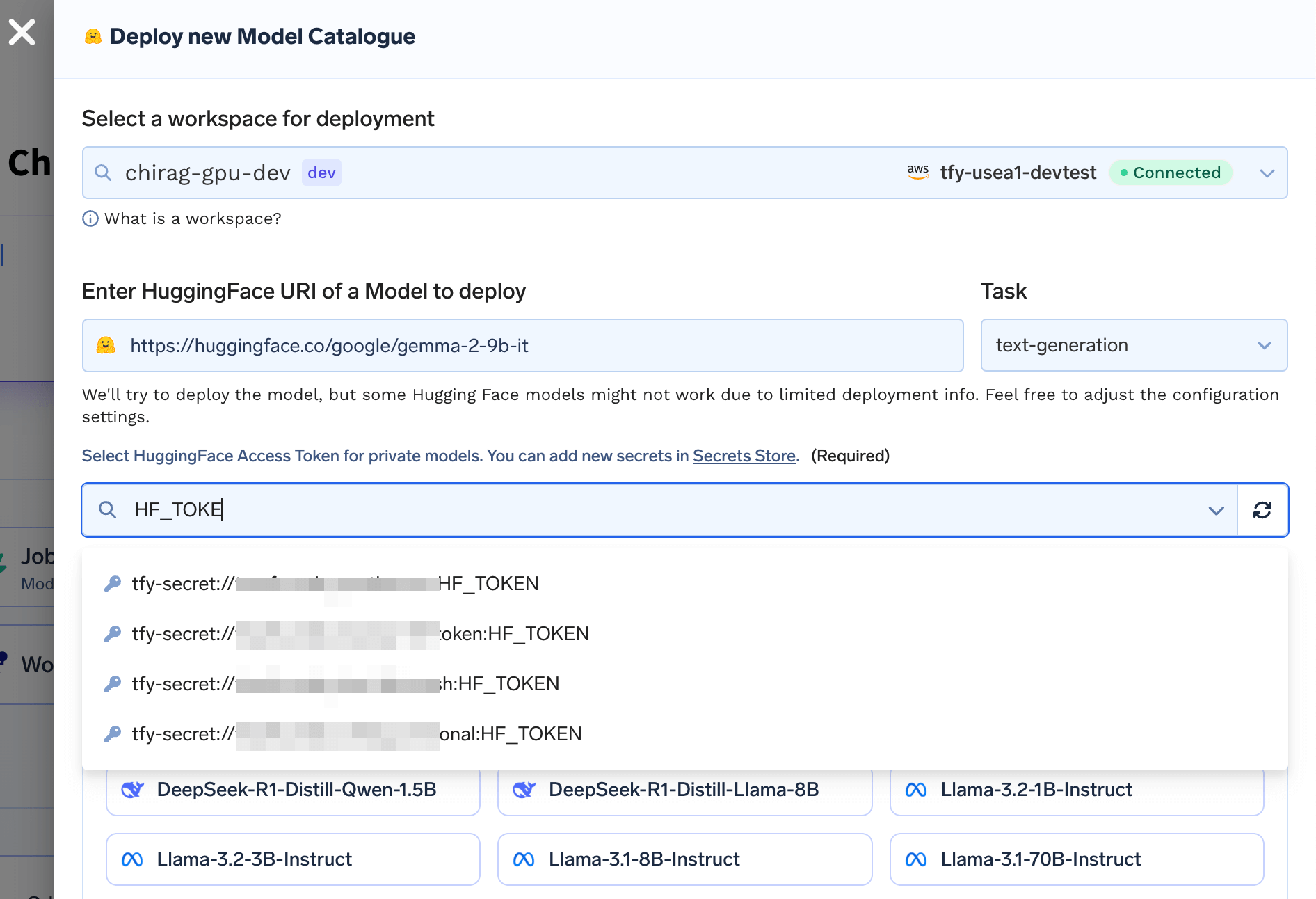
You can provide link to any HuggingFace model and TrueFoundry will be automatically able to deploy the model as an API. We analyze the HuggingFace model tags and files to understand which is the deployment framework
to serve the model and automatically generate the deployment manifests for the model.
Some models might not be supported or might need additional inputs since the HuggingFace tags might be missing or incorrect.
### Deploying private/gated HuggingFace models
In some cases, you might need a HuggingFace token to access the model. This is needed if you are trying to download your own private models or using gated models like Llama which require you to accept the license and terms of use.
In this case, you will need to create a secret with your HuggingFace token. You can create a secret following the guide [here](/docs/manage-secrets#store-secrets-in-your-secret-store-with-truefoundry).
You will be asked to provide the secret name as input.
 ### Key Tasks (Model Types) supported
Here's the list of the most commonly used task types that are supported in TrueFoundry and how to infer from the model endpoint.
We support other tasks on a best effort basis. You can find the input formats for them [here](https://huggingface.co/docs/inference-endpoints/supported_tasks)
We use [vLLM](https://github.com/vllm-project/vllm), [SGLang](https://github.com/sgl-project/sglang) or [TRT-LLM](https://github.com/NVIDIA/TensorRT-LLM) to deploy these models.
To read more on the deployment of LLMs, please refer to the [LLM Deployment](/docs/deploying-an-llm-model-from-the-model-catalogue) guide.
If the model is trained using `sentence-transformers` library we use [Text-Embeddings Inference](https://github.com/huggingface/text-embeddings-inference) or [Infinity](https://github.com/michaelfeil/infinity) to deploy these models.
You can use `OpenAI` SDK to generate embeddings from the model.
```python Python lines theme={"dark"}
from openai import OpenAI
endpoint = ""
sub_path = "/v1"
url = endpoint + sub_path
model_name = "" # `MODEL_NAME` environment variable in the deployment manifest
client = OpenAI(api_key="EMPTY", base_url=url)
response = client.embeddings.create(
input="Sample text to embed",
model=model_name,
)
output = [embed.embedding for embed in response.data]
print(output)
```
If the model is trained using `sentence-transformers` library we use [Text-Embeddings Inference](https://github.com/huggingface/text-embeddings-inference) or [Infinity](https://github.com/michaelfeil/infinity) to deploy these models.
```python Python lines theme={"dark"}
import requests
endpoint = ""
predict_path = "/rerank"
model_name = "" # `MODEL_NAME` environment variable in the deployment manifest
url = endpoint + predict_path
def infer():
payload = {
"model": model_name,
"query": "Where is Munich?",
"documents": ["Munich is in Germany.", "The sky is blue."]
}
response = requests.post(url=url, json=payload)
return response.json()
print(infer())
```
The output will be an array of classes with their score.
```json JSON lines theme={"dark"}
{
"object": "rerank",
"results": [
{
"relevance_score": 0.9473810195922852,
"index": 0,
"document": null
},
{
"relevance_score": 3.7636447814293206e-05,
"index": 1,
"document": null
}
],
"model": "baai-bge-reranker-base",
"usage": {
"prompt_tokens": 69,
"total_tokens": 69
},
"id": "infinity-c2e78197-c5b1-4504-9b38-75aa93bc420f",
"created": 1749553932
}
```
We use modified [Multi-Model Server](https://github.com/aws/sagemaker-huggingface-inference-toolkit) to deploy these models.
```python Python lines theme={"dark"}
import requests
endpoint = ""
predict_path = "/predictions/model"
url = endpoint + predict_path
def infer():
payload = {"inputs": "I am very happy today"}
response = requests.post(url=url, json=payload)
return response.json()
print(infer())
```
The output will be an array of classes with their score.
```json JSON lines theme={"dark"}
[
{
"label": "POSITIVE",
"score": 0.9998797178268433
}
]
```
We use modified [Multi-Model Server](https://github.com/aws/sagemaker-huggingface-inference-toolkit) to deploy these models.
```python Python lines theme={"dark"}
import requests
endpoint = ""
predict_path = "/predictions/model"
url = endpoint + predict_path
def infer():
payload = {
"inputs": "I have a problem with my iphone that needs to be resolved asap!!",
# The candidate labels which you want to classify the text into.
"parameters": {
"candidate_labels": "urgent, not urgent, phone, tablet, computer",
# If there are more than two classes, set this to True.
"multi_class": True,
},
}
response = requests.post(url=url, json=payload)
return response.json()
print(infer())
```
The output will look something like this.
```json JSON lines theme={"dark"}
{
"sequence": "I have a problem with my iphone that needs to be resolved asap!!",
"labels": [
"urgent",
"phone",
...
],
"scores": [
0.998576283454895,
0.9949977993965149,
...
]
}
```
We use modified [Multi-Model Server](https://github.com/aws/sagemaker-huggingface-inference-toolkit) to deploy these models.
```python Python lines theme={"dark"}
import requests
endpoint = ""
predict_path = "/predictions/model"
url = endpoint + predict_path
def infer():
# The text string which you want to get classification for.
payload = {
"inputs": "My name is Sarah and I live in London"
}
response = requests.post(url=url, json=payload)
return response.json()
print(infer())
```
The output will be subject to change based on the mode, for NER classification it would look like this.
```json JSON lines theme={"dark"}
[
{
"entity": "B-PER",
"score": 0.9985477328300476,
"index": 4,
"word": "Sarah",
"start": 11,
"end": 16
},
...
]
```
We use modified [Multi-Model Server](https://github.com/aws/sagemaker-huggingface-inference-toolkit) to deploy these models.
```python Python lines theme={"dark"}
import requests
endpoint = ""
predict_path = "/predictions/model"
url = endpoint + predict_path
def infer():
# The text string which you want to get classification for.
payload = {
"inputs": "The goal of life is [MASK]."
}
response = requests.post(url=url, json=payload)
return response.json()
print(infer())
```
The output will be the array of words with the percentage of how likely a work can fit and replace `[MASK]`
```json JSON lines theme={"dark"}
[
{
"score": 0.1093330830335617,
"token": 2166,
"token_str": "life",
"sequence": "the goal of life is life."
},
...
]
```
We use modified [Multi-Model Server](https://github.com/aws/sagemaker-huggingface-inference-toolkit) to deploy these models.
```python Python lines theme={"dark"}
import requests
endpoint = ""
predict_path = "/predictions/model"
url = endpoint + predict_path
def infer():
# The text string which you want to get Summarization for.
payload = {
"inputs": """
TrueFoundry is a Cloud-native PaaS for Machine learning teams to build, deploy and ship ML/LLM Applications on their own cloud/on-prem Infra in a faster, scalable, cost efficient way with the right governance controls, allowing them to achieve 90% faster time to value than other teams.
TrueFoundry abstracts out the engineering required and offers GenAI accelerators - LLM PlayGround, LLM Gateway, LLM Deploy, LLM Finetune, RAG Playground and Application Templates that can enable an organisation to speed up the layout of their overall GenAI/LLMOps framework. Enterprises can plug and play these accelerators with their internal systems as well as build on top of our accelerators to enable a LLMOps platform of their choice to the GenAI developers. TrueFoundry is modular and completely API driven, has native integration with popular tools in the market like LangChain, VectorDBs, GuardRails, etc.
"""
}
response = requests.post(url=url, json=payload)
return response.json()
print(infer())
```
The output will be summarized text.
```json JSON lines theme={"dark"}
[
{
"summary_text": "TrueFoundry is a Cloud-native PaaS for Machine learning teams to build, deploy and ship ML/LLM Applications on their own cloud/on-prem Infra in a faster, scalable, cost efficient way . Enterprises can plug and play these accelerators with their internal systems as well as build on top of our accelerators to enable a LLMOps platform of their choice to the GenAI developers ."
}
]
```
We use modified [Multi-Model Server](https://github.com/aws/sagemaker-huggingface-inference-toolkit) to deploy these models.
```python Python lines theme={"dark"}
import requests
endpoint = ""
predict_path = "/predictions/model"
url = endpoint + predict_path
def infer():
payload = {
"inputs": "Everybody walk the dinosaur"
}
response = requests.post(url=url, json=payload)
return response.json()
print(infer())
```
The ouput will containt the translated text
```json JSON lines theme={"dark"}
[
{
"translation_text": "Tout le monde marche sur le dinosaure"
}
]
```
For models like Flux and Stable Diffusion we use [Nvidia PyTriton](https://github.com/triton-inference-server/pytriton) to deploy these models.
```python Python lines theme={"dark"}
import requests
endpoint = ""
predict_path = "/generate-image"
url = endpoint + predict_path
def infer(prompt, parameters):
payload = {"prompt": prompt, "parameters": parameters}
response = requests.post(url=url, json=payload)
if response.status_code == 200:
with open("image.png", "wb") as f:
f.write(response.content)
else:
print("Error: ", response.text)
with open("image.png", "wb") as f:
f.write(response.content)
infer(
"A panda drinking water from a bottle.",
parameters={"num_inference_steps": 15, "height": 512, "width": 512}
)
```
The above code will call the api and then it will save the image as image.png in root directory.
We use modified [Multi-Model Server](https://github.com/aws/sagemaker-huggingface-inference-toolkit) to deploy these models.
```python Python lines theme={"dark"}
import requests
def infer(image_path, url):
# Open the image file in binary mode
with open(image_path, 'rb') as image_file:
# Send the POST request
headers = {
"accept": "application/json",
"Content-Type": "image/png"
}
response = requests.post(url, headers=headers, data=image_file)
# Check the response
if response.status_code == 200:
print("Success:", response.json())
else:
print("Failed:", response.status_code, response.text)
# Example usage
image_path = "" # Replace with your image file name
endpoint = ""
predict_path = "/predictions/model"
url = endpoint + predict_path
send_image(image_path, url)
```
In this, the response will be the array of objects that will have the confidence percentage of the prediction and the prediction category.
```json JSON lines theme={"dark"}
[
{
"label": "surprise",
"score": 0.5451123118400574
},
{
"label": "fear",
"score": 0.3301483392715454
},
{
"label": "angry",
"score": 0.08691153675317764
},
{
"label": "happy",
"score": 0.03233131021261215
},
{
"label": "sad",
"score": 0.003138515865430236
}
]
```
We use modified [Multi-Model Server](https://github.com/aws/sagemaker-huggingface-inference-toolkit) to deploy these models.
```python Python lines theme={"dark"}
import requests
def infer(image_path, url):
# Open the image file in binary mode
with open(image_path, 'rb') as image_file:
# Send the POST request
headers = {
"accept": "application/json",
"Content-Type": "image/png"
}
response = requests.post(url, headers=headers, data=image_file)
# Check the response
if response.status_code == 200:
print(response.json())
else:
print("Failed:", response.status_code, response.text)
# Example usage
image_path = "" # Replace with your image file name
endpoint = ""
predict_path = "/predictions/model"
url = endpoint + predict_path
infer(image_path, url)
```
The output will contain the labels along with the co-ordinates of box
```json JSON lines theme={"dark"}
[
{
"score": 0.9769997596740723,
"label": "string",
"box": {
"xmin": 90,
"ymin": 200,
"xmax": 99,
"ymax": 212
}
}
]
```
We use modified [Multi-Model Server](https://github.com/aws/sagemaker-huggingface-inference-toolkit) to deploy these models.
```python Python lines theme={"dark"}
import requests
def infer(image_path, url):
# Open the image file in binary mode
with open(image_path, 'rb') as image_file:
# Send the POST request
headers = {
"accept": "application/json",
"Content-Type": "image/png"
}
response = requests.post(url, headers=headers, data=image_file)
# Check the response
if response.status_code == 200:
print(response.json())
else:
print("Failed:", response.status_code, response.text)
# Example usage
image_path = "" # Replace with your image file name
endpoint = ""
predict_path = "/predictions/model"
url = endpoint + predict_path
infer(image_path, url)
```
The response will be something like this
```json JSON lines theme={"dark"}
[{"generated_text": "a painting of people around a fire with money flying around"}]
```
For whisper models, we use [Nvidia PyTriton](https://github.com/triton-inference-server/pytriton) to deploy these models.
```python Python lines theme={"dark"}
import requests
import os
endpoint = ""
predict_path = "/transcribe"
url = endpoint + predict_path
def infer(file_path, url):
with open(file_path, 'rb') as f:
files_to_upload = {
'file': (os.path.basename(file_path), f, 'audio/mpeg')
}
print(f"Uploading {file_path} to {url}...")
response = requests.post(
url,
data={"parameters": json.dumps({"return_timestamps": True})},
files=files_to_upload
)
response.raise_for_status()
print(response.json())
file_path = "" # Replace with your audio file name
infer(file_path, url)
```
The output will be the transcription of the audio file.
```json JSON lines theme={"dark"}
{
"text": " My dear Fanny, you feel these things a great deal too much. I am most happy that you like the chain.",
"chunks": [
{
"timestamp": [
0,
3.76
],
"text": " My dear Fanny, you feel these things a great deal too much."
},
{
"timestamp": [
3.76,
5.84
],
"text": " I am most happy that you like the chain."
}
]
}
```
### Key Tasks (Model Types) supported
Here's the list of the most commonly used task types that are supported in TrueFoundry and how to infer from the model endpoint.
We support other tasks on a best effort basis. You can find the input formats for them [here](https://huggingface.co/docs/inference-endpoints/supported_tasks)
We use [vLLM](https://github.com/vllm-project/vllm), [SGLang](https://github.com/sgl-project/sglang) or [TRT-LLM](https://github.com/NVIDIA/TensorRT-LLM) to deploy these models.
To read more on the deployment of LLMs, please refer to the [LLM Deployment](/docs/deploying-an-llm-model-from-the-model-catalogue) guide.
If the model is trained using `sentence-transformers` library we use [Text-Embeddings Inference](https://github.com/huggingface/text-embeddings-inference) or [Infinity](https://github.com/michaelfeil/infinity) to deploy these models.
You can use `OpenAI` SDK to generate embeddings from the model.
```python Python lines theme={"dark"}
from openai import OpenAI
endpoint = ""
sub_path = "/v1"
url = endpoint + sub_path
model_name = "" # `MODEL_NAME` environment variable in the deployment manifest
client = OpenAI(api_key="EMPTY", base_url=url)
response = client.embeddings.create(
input="Sample text to embed",
model=model_name,
)
output = [embed.embedding for embed in response.data]
print(output)
```
If the model is trained using `sentence-transformers` library we use [Text-Embeddings Inference](https://github.com/huggingface/text-embeddings-inference) or [Infinity](https://github.com/michaelfeil/infinity) to deploy these models.
```python Python lines theme={"dark"}
import requests
endpoint = ""
predict_path = "/rerank"
model_name = "" # `MODEL_NAME` environment variable in the deployment manifest
url = endpoint + predict_path
def infer():
payload = {
"model": model_name,
"query": "Where is Munich?",
"documents": ["Munich is in Germany.", "The sky is blue."]
}
response = requests.post(url=url, json=payload)
return response.json()
print(infer())
```
The output will be an array of classes with their score.
```json JSON lines theme={"dark"}
{
"object": "rerank",
"results": [
{
"relevance_score": 0.9473810195922852,
"index": 0,
"document": null
},
{
"relevance_score": 3.7636447814293206e-05,
"index": 1,
"document": null
}
],
"model": "baai-bge-reranker-base",
"usage": {
"prompt_tokens": 69,
"total_tokens": 69
},
"id": "infinity-c2e78197-c5b1-4504-9b38-75aa93bc420f",
"created": 1749553932
}
```
We use modified [Multi-Model Server](https://github.com/aws/sagemaker-huggingface-inference-toolkit) to deploy these models.
```python Python lines theme={"dark"}
import requests
endpoint = ""
predict_path = "/predictions/model"
url = endpoint + predict_path
def infer():
payload = {"inputs": "I am very happy today"}
response = requests.post(url=url, json=payload)
return response.json()
print(infer())
```
The output will be an array of classes with their score.
```json JSON lines theme={"dark"}
[
{
"label": "POSITIVE",
"score": 0.9998797178268433
}
]
```
We use modified [Multi-Model Server](https://github.com/aws/sagemaker-huggingface-inference-toolkit) to deploy these models.
```python Python lines theme={"dark"}
import requests
endpoint = ""
predict_path = "/predictions/model"
url = endpoint + predict_path
def infer():
payload = {
"inputs": "I have a problem with my iphone that needs to be resolved asap!!",
# The candidate labels which you want to classify the text into.
"parameters": {
"candidate_labels": "urgent, not urgent, phone, tablet, computer",
# If there are more than two classes, set this to True.
"multi_class": True,
},
}
response = requests.post(url=url, json=payload)
return response.json()
print(infer())
```
The output will look something like this.
```json JSON lines theme={"dark"}
{
"sequence": "I have a problem with my iphone that needs to be resolved asap!!",
"labels": [
"urgent",
"phone",
...
],
"scores": [
0.998576283454895,
0.9949977993965149,
...
]
}
```
We use modified [Multi-Model Server](https://github.com/aws/sagemaker-huggingface-inference-toolkit) to deploy these models.
```python Python lines theme={"dark"}
import requests
endpoint = ""
predict_path = "/predictions/model"
url = endpoint + predict_path
def infer():
# The text string which you want to get classification for.
payload = {
"inputs": "My name is Sarah and I live in London"
}
response = requests.post(url=url, json=payload)
return response.json()
print(infer())
```
The output will be subject to change based on the mode, for NER classification it would look like this.
```json JSON lines theme={"dark"}
[
{
"entity": "B-PER",
"score": 0.9985477328300476,
"index": 4,
"word": "Sarah",
"start": 11,
"end": 16
},
...
]
```
We use modified [Multi-Model Server](https://github.com/aws/sagemaker-huggingface-inference-toolkit) to deploy these models.
```python Python lines theme={"dark"}
import requests
endpoint = ""
predict_path = "/predictions/model"
url = endpoint + predict_path
def infer():
# The text string which you want to get classification for.
payload = {
"inputs": "The goal of life is [MASK]."
}
response = requests.post(url=url, json=payload)
return response.json()
print(infer())
```
The output will be the array of words with the percentage of how likely a work can fit and replace `[MASK]`
```json JSON lines theme={"dark"}
[
{
"score": 0.1093330830335617,
"token": 2166,
"token_str": "life",
"sequence": "the goal of life is life."
},
...
]
```
We use modified [Multi-Model Server](https://github.com/aws/sagemaker-huggingface-inference-toolkit) to deploy these models.
```python Python lines theme={"dark"}
import requests
endpoint = ""
predict_path = "/predictions/model"
url = endpoint + predict_path
def infer():
# The text string which you want to get Summarization for.
payload = {
"inputs": """
TrueFoundry is a Cloud-native PaaS for Machine learning teams to build, deploy and ship ML/LLM Applications on their own cloud/on-prem Infra in a faster, scalable, cost efficient way with the right governance controls, allowing them to achieve 90% faster time to value than other teams.
TrueFoundry abstracts out the engineering required and offers GenAI accelerators - LLM PlayGround, LLM Gateway, LLM Deploy, LLM Finetune, RAG Playground and Application Templates that can enable an organisation to speed up the layout of their overall GenAI/LLMOps framework. Enterprises can plug and play these accelerators with their internal systems as well as build on top of our accelerators to enable a LLMOps platform of their choice to the GenAI developers. TrueFoundry is modular and completely API driven, has native integration with popular tools in the market like LangChain, VectorDBs, GuardRails, etc.
"""
}
response = requests.post(url=url, json=payload)
return response.json()
print(infer())
```
The output will be summarized text.
```json JSON lines theme={"dark"}
[
{
"summary_text": "TrueFoundry is a Cloud-native PaaS for Machine learning teams to build, deploy and ship ML/LLM Applications on their own cloud/on-prem Infra in a faster, scalable, cost efficient way . Enterprises can plug and play these accelerators with their internal systems as well as build on top of our accelerators to enable a LLMOps platform of their choice to the GenAI developers ."
}
]
```
We use modified [Multi-Model Server](https://github.com/aws/sagemaker-huggingface-inference-toolkit) to deploy these models.
```python Python lines theme={"dark"}
import requests
endpoint = ""
predict_path = "/predictions/model"
url = endpoint + predict_path
def infer():
payload = {
"inputs": "Everybody walk the dinosaur"
}
response = requests.post(url=url, json=payload)
return response.json()
print(infer())
```
The ouput will containt the translated text
```json JSON lines theme={"dark"}
[
{
"translation_text": "Tout le monde marche sur le dinosaure"
}
]
```
For models like Flux and Stable Diffusion we use [Nvidia PyTriton](https://github.com/triton-inference-server/pytriton) to deploy these models.
```python Python lines theme={"dark"}
import requests
endpoint = ""
predict_path = "/generate-image"
url = endpoint + predict_path
def infer(prompt, parameters):
payload = {"prompt": prompt, "parameters": parameters}
response = requests.post(url=url, json=payload)
if response.status_code == 200:
with open("image.png", "wb") as f:
f.write(response.content)
else:
print("Error: ", response.text)
with open("image.png", "wb") as f:
f.write(response.content)
infer(
"A panda drinking water from a bottle.",
parameters={"num_inference_steps": 15, "height": 512, "width": 512}
)
```
The above code will call the api and then it will save the image as image.png in root directory.
We use modified [Multi-Model Server](https://github.com/aws/sagemaker-huggingface-inference-toolkit) to deploy these models.
```python Python lines theme={"dark"}
import requests
def infer(image_path, url):
# Open the image file in binary mode
with open(image_path, 'rb') as image_file:
# Send the POST request
headers = {
"accept": "application/json",
"Content-Type": "image/png"
}
response = requests.post(url, headers=headers, data=image_file)
# Check the response
if response.status_code == 200:
print("Success:", response.json())
else:
print("Failed:", response.status_code, response.text)
# Example usage
image_path = "" # Replace with your image file name
endpoint = ""
predict_path = "/predictions/model"
url = endpoint + predict_path
send_image(image_path, url)
```
In this, the response will be the array of objects that will have the confidence percentage of the prediction and the prediction category.
```json JSON lines theme={"dark"}
[
{
"label": "surprise",
"score": 0.5451123118400574
},
{
"label": "fear",
"score": 0.3301483392715454
},
{
"label": "angry",
"score": 0.08691153675317764
},
{
"label": "happy",
"score": 0.03233131021261215
},
{
"label": "sad",
"score": 0.003138515865430236
}
]
```
We use modified [Multi-Model Server](https://github.com/aws/sagemaker-huggingface-inference-toolkit) to deploy these models.
```python Python lines theme={"dark"}
import requests
def infer(image_path, url):
# Open the image file in binary mode
with open(image_path, 'rb') as image_file:
# Send the POST request
headers = {
"accept": "application/json",
"Content-Type": "image/png"
}
response = requests.post(url, headers=headers, data=image_file)
# Check the response
if response.status_code == 200:
print(response.json())
else:
print("Failed:", response.status_code, response.text)
# Example usage
image_path = "" # Replace with your image file name
endpoint = ""
predict_path = "/predictions/model"
url = endpoint + predict_path
infer(image_path, url)
```
The output will contain the labels along with the co-ordinates of box
```json JSON lines theme={"dark"}
[
{
"score": 0.9769997596740723,
"label": "string",
"box": {
"xmin": 90,
"ymin": 200,
"xmax": 99,
"ymax": 212
}
}
]
```
We use modified [Multi-Model Server](https://github.com/aws/sagemaker-huggingface-inference-toolkit) to deploy these models.
```python Python lines theme={"dark"}
import requests
def infer(image_path, url):
# Open the image file in binary mode
with open(image_path, 'rb') as image_file:
# Send the POST request
headers = {
"accept": "application/json",
"Content-Type": "image/png"
}
response = requests.post(url, headers=headers, data=image_file)
# Check the response
if response.status_code == 200:
print(response.json())
else:
print("Failed:", response.status_code, response.text)
# Example usage
image_path = "" # Replace with your image file name
endpoint = ""
predict_path = "/predictions/model"
url = endpoint + predict_path
infer(image_path, url)
```
The response will be something like this
```json JSON lines theme={"dark"}
[{"generated_text": "a painting of people around a fire with money flying around"}]
```
For whisper models, we use [Nvidia PyTriton](https://github.com/triton-inference-server/pytriton) to deploy these models.
```python Python lines theme={"dark"}
import requests
import os
endpoint = ""
predict_path = "/transcribe"
url = endpoint + predict_path
def infer(file_path, url):
with open(file_path, 'rb') as f:
files_to_upload = {
'file': (os.path.basename(file_path), f, 'audio/mpeg')
}
print(f"Uploading {file_path} to {url}...")
response = requests.post(
url,
data={"parameters": json.dumps({"return_timestamps": True})},
files=files_to_upload
)
response.raise_for_status()
print(response.json())
file_path = "" # Replace with your audio file name
infer(file_path, url)
```
The output will be the transcription of the audio file.
```json JSON lines theme={"dark"}
{
"text": " My dear Fanny, you feel these things a great deal too much. I am most happy that you like the chain.",
"chunks": [
{
"timestamp": [
0,
3.76
],
"text": " My dear Fanny, you feel these things a great deal too much."
},
{
"timestamp": [
3.76,
5.84
],
"text": " I am most happy that you like the chain."
}
]
}
```