> ## Documentation Index
> Fetch the complete documentation index at: https://www.truefoundry.com/llms.txt
> Use this file to discover all available pages before exploring further.
# Interacting with TrueFoundry using AI
> Manage your TrueFoundry platform through natural language using AI agents.
You can manage models, MCP servers, users, teams, secrets, and policies on TrueFoundry through natural language. There are two ways to do it:
The agent built into the TrueFoundry dashboard. No setup — open it and start typing.
Connect TrueFoundry to Claude, Cursor, Codex, or any other tool you already use, through the TrueFoundry MCP server.
Both run on the same MCP server and skills. Actions run as the authenticated user and follow the same RBAC as the dashboard and CLI.
## Which one should you use?
We recommend **Ask AI** in the product for most workflows. It runs the same tools as the MCP server, plus capabilities that aren't available when you connect from an external tool:
Skills, MCP servers are constantly kept up-to-date and includes additional context like TrueFoundry docs. The agent is tuned to use fewer tokens, lower cost and provide better insights.
Ask AI renders charts and visualizations inline, so usage, cost, and observability answers come back as graphs instead of raw text.
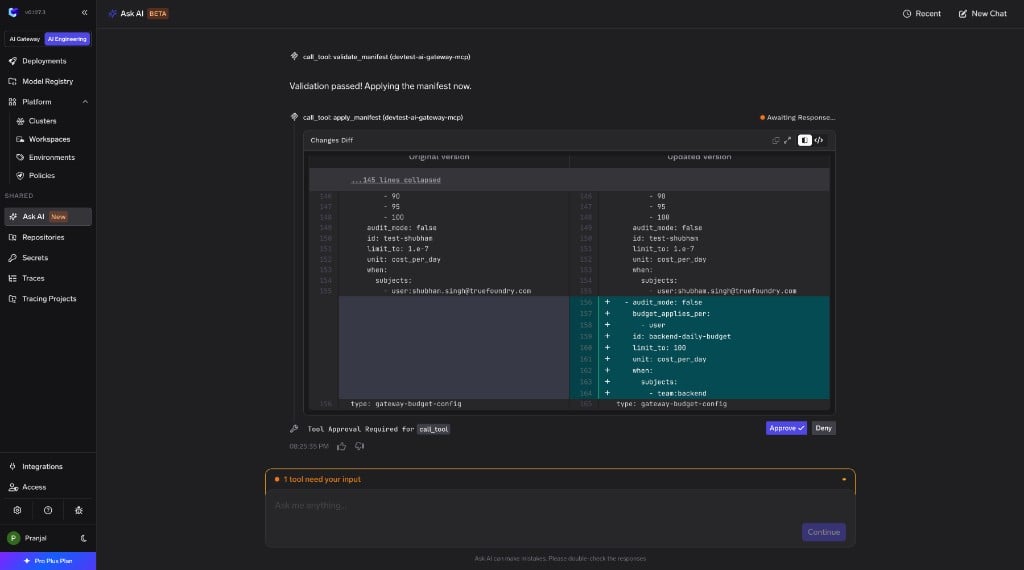
Ask AI recognizes write actions, shows you a diff of what will change, and asks for approval before applying it. Connecting from another tool gives you the raw tools without this safety layer.
Connect **Claude, Cursor, or another tool** when you want TrueFoundry operations inside the editor or assistant you already use, or need to combine them with other MCP servers in a single session.
## Ask AI
Ask AI is available on TrueFoundry SaaS. On-prem support is coming soon.
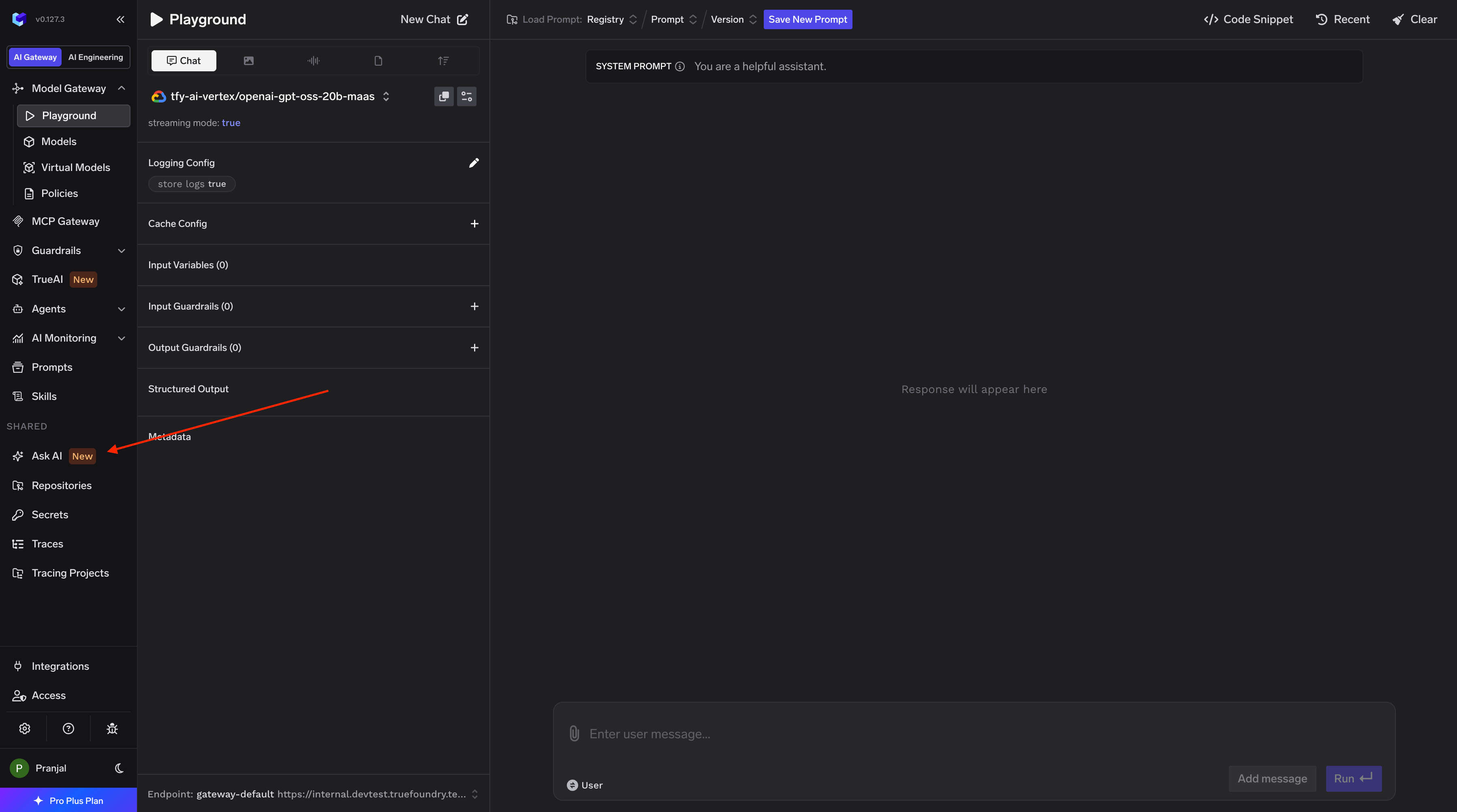
Find **Ask AI** in the left sidebar under **Shared**.
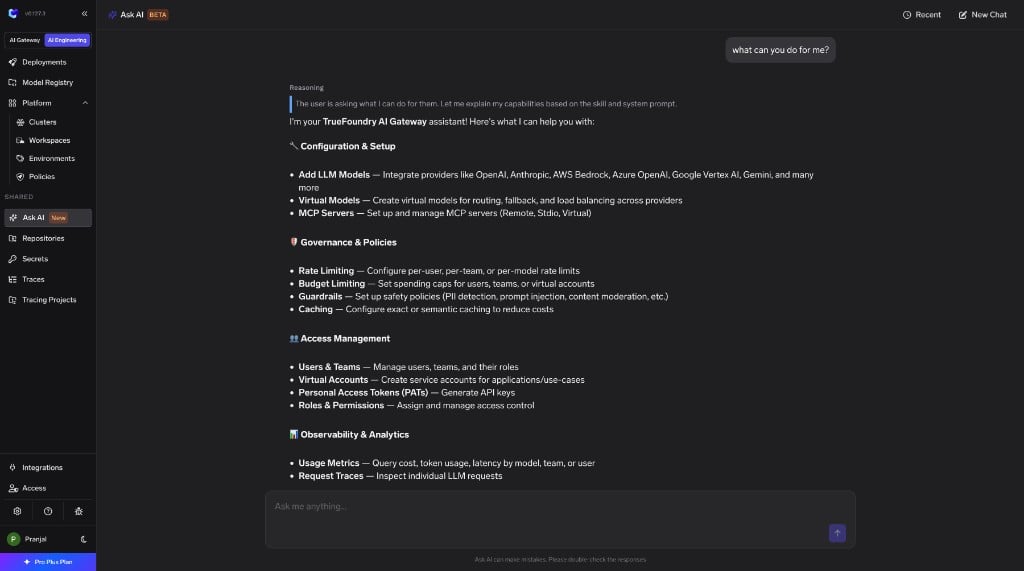
 Type a request in natural language. The agent picks the right tools and skills and executes them.
 For write operations, Ask AI shows a diff of what will change and asks for confirmation before applying.
 **Example prompts**
* Add my OpenAI API key as a provider account and give access to my team
* Create a virtual model that load-balances between Groq and Cerebras
* Rate limit the interns team to 100 requests per minute
* Show me the top 5 teams by token usage in the last 7 days
* Connect the Linear MCP server from the catalogue
## Connect Claude, Cursor, or other tools
TrueFoundry provides an **MCP server** and a set of **skills** that you can plug into Claude, Cursor, Codex, or any tool that speaks MCP. The MCP server exposes platform operations as tools the agent can call; skills give it tested, step-by-step procedures for common workflows.
The MCP server is available starting **v0.155**.
Connecting the MCP server directly gives you the raw tools without the diff previews, approval flows, or inline visualizations available in Ask AI.
### MCP server
Point your tool at the TrueFoundry MCP server:
* **Server URL:** `https:///mcp`
* **Transport:** Streamable HTTP
* **Auth:** OAuth or a TrueFoundry API key
The server supports **OAuth**, so in tools like Claude and Cursor you can sign in directly when you add the server — no API key required. For tools or scripts that don't support OAuth, create an API key from **Settings > API Keys** and send it as a Bearer token instead.
All actions run as the authenticated user and follow the same RBAC as the dashboard and CLI.
#### Connect your tool
Replace `` with your control plane host. The examples below use OAuth; add the `Authorization` header only if you're using an API key.
Add the server with the CLI, then run `/mcp` inside Claude Code to sign in via OAuth:
```bash theme={"dark"}
claude mcp add --transport http truefoundry https:///mcp
```
To use an API key instead of OAuth, pass it as a header:
```bash theme={"dark"}
claude mcp add --transport http truefoundry https:///mcp \
--header "Authorization: Bearer "
```
Then ask Claude in natural language, for example: *"Using TrueFoundry, list the provider accounts I can access."*
Go to **Settings > Connectors > Add custom connector** and set the URL to `https:///mcp`. Claude prompts you to sign in via OAuth. Once connected, the TrueFoundry tools appear in the tools menu.
Add the server to `.cursor/mcp.json` (project) or `~/.cursor/mcp.json` (global). Cursor opens an OAuth sign-in the first time it connects:
```json theme={"dark"}
{
"mcpServers": {
"truefoundry": {
"url": "https:///mcp"
}
}
}
```
To use an API key instead, add a `headers` block with `"Authorization": "Bearer "`.
#### Available tools
Every tool carries an MCP annotation: `readOnlyHint: true` tools only read data and are safe to call without confirmation, while `destructiveHint: true` tools create, update, or delete a resource and should be confirmed by a human.
| Category | Tool | Read / Write | Description |
| ---------------------------- | ------------------------------------ | ------------ | ------------------------------------------------------------------------------------------------- |
| Resource management | `apply_manifest` | Write | Apply a manifest to create or update a resource. |
| Resource management | `delete_manifest` | Write | Delete a resource identified by the provided manifest. |
| Resource management | `validate_manifest` | Read | Validate a manifest object against the schema for the given type. |
| Resource management | `get_manifest_json_schema` | Read | Get the JSON schema for the specified manifest type. |
| AI Gateway | `generate_multi_lang_code_snippets` | Read | Generate code snippets for calling an AI Gateway model. |
| AI Gateway | `gateway_execute_sql` | Read | Query AI Gateway observability data using SQL. |
| AI Gateway | `get_gateway_config` | Read | Get the AI Gateway configuration for a given type. |
| AI Gateway | `get_budget_usage` | Read | Get the current budget usage for every budget rule configured in the tenant. |
| AI Gateway | `list_data_routing_destinations` | Read | List data routing destination names for the current tenant. |
| AI Gateway | `list_mcp_servers` | Read | List MCP servers for the current tenant. |
| AI Gateway | `get_mcp_server` | Read | Get a single MCP server by its ID. |
| AI Gateway | `delete_mcp_server` | Write | Permanently delete an MCP server by ID. |
| AI Gateway | `list_mcp_server_tools` | Read | List the tools available on a given MCP server. |
| AI Gateway | `list_mcp_catalogue` | Read | Returns the TFY-managed MCP server catalogue and the MCP integrations catalogue. |
| AI Gateway | `get_mcp_server_oauth_config` | Read | Get the OAuth authorization server configuration for an MCP server URL. |
| Provider accounts | `list_providers` | Read | List all provider types along with their supported integrations, models, and model types. |
| Provider accounts | `list_provider_accounts` | Read | List provider accounts the caller can read. |
| Provider accounts | `get_provider_account` | Read | Get a single provider account by its ID. |
| Secrets | `list_secrets` | Read | List secrets the caller has access to. |
| Secrets | `delete_secret` | Write | Delete a secret and all its versions permanently. |
| Secrets | `list_secret_groups` | Read | List secret groups along with associated secrets. Secret values are not included. |
| Secrets | `get_secret_group` | Read | Get a secret group by ID. |
| Secrets | `list_secret_active_deployments` | Read | Get active deployments associated with the given secret IDs. |
| Secrets | `get_secret_deployments` | Read | List active deployments that reference a specific secret. |
| Identity and user management | `get_me` | Read | Returns the identity and role information of the currently authenticated user or service account. |
| Identity and user management | `list_users` | Read | List users in the current tenant. |
| Identity and user management | `get_user` | Read | Get a single user by their ID. |
| Identity and user management | `delete_user` | Write | Permanently delete a user by ID. |
| Identity and user management | `check_user_registration` | Read | Check whether a user with the given email is registered in the current tenant. |
| Teams | `list_teams_for_user` | Read | List teams accessible to the current user. |
| Teams | `get_team` | Read | Get a single team by its ID. |
| Teams | `list_team_members` | Read | List users who are members of a team. |
| Teams | `list_team_managers` | Read | List users who hold the team-manager role on a team. |
| Teams | `get_team_permissions` | Read | Get all role bindings associated with a team. |
| Teams | `delete_team` | Write | Permanently delete a team. |
| Roles and access control | `list_roles` | Read | List roles for the current tenant. |
| Roles and access control | `delete_role` | Write | Permanently delete a role. |
| Roles and access control | `get_actions_for_resource_type` | Read | Get all permission actions available for a given resource type. |
| Virtual accounts and tokens | `list_virtual_accounts` | Read | List virtual accounts accessible to the current user. |
| Virtual accounts and tokens | `get_virtual_account` | Read | Get a single virtual account by its ID. |
| Virtual accounts and tokens | `check_virtual_account_exists` | Read | Check whether a virtual account with the given name exists. |
| Virtual accounts and tokens | `delete_virtual_account` | Write | Permanently delete a virtual account. |
| Virtual accounts and tokens | `list_personal_access_tokens` | Read | List personal access tokens created by the current user. |
| Virtual accounts and tokens | `create_personal_access_token` | Write | Create a new personal access token for the current user. |
| Virtual accounts and tokens | `check_personal_access_token_exists` | Read | Check whether a personal access token with the given name exists. |
| Virtual accounts and tokens | `delete_personal_access_token` | Write | Permanently delete a personal access token. |
| Platform configuration | `list_settings` | Read | List all settings configured for the tenant. |
### Skills
Skills give the agent tested, step-by-step procedures for TrueFoundry operations — the right field values, ordering, edge cases, and validations. They follow the open [Agent Skills](https://agentskills.io/) standard and work in any tool that supports skills, including Cursor, Claude Code, Codex, and TrueFoundry's Agent Harness.
| Skill | What it helps you do |
| ----------------- | -------------------------------------------------------------------------- |
| Gateway | Set up models, provider accounts, virtual models with routing and failover |
| Integrate Gateway | Scan your codebase and migrate to AI Gateway |
| Observability | Query usage, token consumption, cost breakdowns, error analysis |
| MCP servers | Register from catalogue, configure auth, manage lifecycle |
| Platform | Workspaces, secrets, access control, tokens, CLI setup |
| Agents | Build and manage agents in the Agent Registry |
| Skills Registry | Publish and share reusable skills |
| Prompts | Manage prompts in the Prompt Registry |
Browse the source and see exactly what each skill does.
**Example prompts**
* Add my OpenAI API key as a provider account and give access to my team
* Create a virtual model that load-balances between Groq and Cerebras
* Rate limit the interns team to 100 requests per minute
* Show me the top 5 teams by token usage in the last 7 days
* Connect the Linear MCP server from the catalogue
## Connect Claude, Cursor, or other tools
TrueFoundry provides an **MCP server** and a set of **skills** that you can plug into Claude, Cursor, Codex, or any tool that speaks MCP. The MCP server exposes platform operations as tools the agent can call; skills give it tested, step-by-step procedures for common workflows.
The MCP server is available starting **v0.155**.
Connecting the MCP server directly gives you the raw tools without the diff previews, approval flows, or inline visualizations available in Ask AI.
### MCP server
Point your tool at the TrueFoundry MCP server:
* **Server URL:** `https:///mcp`
* **Transport:** Streamable HTTP
* **Auth:** OAuth or a TrueFoundry API key
The server supports **OAuth**, so in tools like Claude and Cursor you can sign in directly when you add the server — no API key required. For tools or scripts that don't support OAuth, create an API key from **Settings > API Keys** and send it as a Bearer token instead.
All actions run as the authenticated user and follow the same RBAC as the dashboard and CLI.
#### Connect your tool
Replace `` with your control plane host. The examples below use OAuth; add the `Authorization` header only if you're using an API key.
Add the server with the CLI, then run `/mcp` inside Claude Code to sign in via OAuth:
```bash theme={"dark"}
claude mcp add --transport http truefoundry https:///mcp
```
To use an API key instead of OAuth, pass it as a header:
```bash theme={"dark"}
claude mcp add --transport http truefoundry https:///mcp \
--header "Authorization: Bearer "
```
Then ask Claude in natural language, for example: *"Using TrueFoundry, list the provider accounts I can access."*
Go to **Settings > Connectors > Add custom connector** and set the URL to `https:///mcp`. Claude prompts you to sign in via OAuth. Once connected, the TrueFoundry tools appear in the tools menu.
Add the server to `.cursor/mcp.json` (project) or `~/.cursor/mcp.json` (global). Cursor opens an OAuth sign-in the first time it connects:
```json theme={"dark"}
{
"mcpServers": {
"truefoundry": {
"url": "https:///mcp"
}
}
}
```
To use an API key instead, add a `headers` block with `"Authorization": "Bearer "`.
#### Available tools
Every tool carries an MCP annotation: `readOnlyHint: true` tools only read data and are safe to call without confirmation, while `destructiveHint: true` tools create, update, or delete a resource and should be confirmed by a human.
| Category | Tool | Read / Write | Description |
| ---------------------------- | ------------------------------------ | ------------ | ------------------------------------------------------------------------------------------------- |
| Resource management | `apply_manifest` | Write | Apply a manifest to create or update a resource. |
| Resource management | `delete_manifest` | Write | Delete a resource identified by the provided manifest. |
| Resource management | `validate_manifest` | Read | Validate a manifest object against the schema for the given type. |
| Resource management | `get_manifest_json_schema` | Read | Get the JSON schema for the specified manifest type. |
| AI Gateway | `generate_multi_lang_code_snippets` | Read | Generate code snippets for calling an AI Gateway model. |
| AI Gateway | `gateway_execute_sql` | Read | Query AI Gateway observability data using SQL. |
| AI Gateway | `get_gateway_config` | Read | Get the AI Gateway configuration for a given type. |
| AI Gateway | `get_budget_usage` | Read | Get the current budget usage for every budget rule configured in the tenant. |
| AI Gateway | `list_data_routing_destinations` | Read | List data routing destination names for the current tenant. |
| AI Gateway | `list_mcp_servers` | Read | List MCP servers for the current tenant. |
| AI Gateway | `get_mcp_server` | Read | Get a single MCP server by its ID. |
| AI Gateway | `delete_mcp_server` | Write | Permanently delete an MCP server by ID. |
| AI Gateway | `list_mcp_server_tools` | Read | List the tools available on a given MCP server. |
| AI Gateway | `list_mcp_catalogue` | Read | Returns the TFY-managed MCP server catalogue and the MCP integrations catalogue. |
| AI Gateway | `get_mcp_server_oauth_config` | Read | Get the OAuth authorization server configuration for an MCP server URL. |
| Provider accounts | `list_providers` | Read | List all provider types along with their supported integrations, models, and model types. |
| Provider accounts | `list_provider_accounts` | Read | List provider accounts the caller can read. |
| Provider accounts | `get_provider_account` | Read | Get a single provider account by its ID. |
| Secrets | `list_secrets` | Read | List secrets the caller has access to. |
| Secrets | `delete_secret` | Write | Delete a secret and all its versions permanently. |
| Secrets | `list_secret_groups` | Read | List secret groups along with associated secrets. Secret values are not included. |
| Secrets | `get_secret_group` | Read | Get a secret group by ID. |
| Secrets | `list_secret_active_deployments` | Read | Get active deployments associated with the given secret IDs. |
| Secrets | `get_secret_deployments` | Read | List active deployments that reference a specific secret. |
| Identity and user management | `get_me` | Read | Returns the identity and role information of the currently authenticated user or service account. |
| Identity and user management | `list_users` | Read | List users in the current tenant. |
| Identity and user management | `get_user` | Read | Get a single user by their ID. |
| Identity and user management | `delete_user` | Write | Permanently delete a user by ID. |
| Identity and user management | `check_user_registration` | Read | Check whether a user with the given email is registered in the current tenant. |
| Teams | `list_teams_for_user` | Read | List teams accessible to the current user. |
| Teams | `get_team` | Read | Get a single team by its ID. |
| Teams | `list_team_members` | Read | List users who are members of a team. |
| Teams | `list_team_managers` | Read | List users who hold the team-manager role on a team. |
| Teams | `get_team_permissions` | Read | Get all role bindings associated with a team. |
| Teams | `delete_team` | Write | Permanently delete a team. |
| Roles and access control | `list_roles` | Read | List roles for the current tenant. |
| Roles and access control | `delete_role` | Write | Permanently delete a role. |
| Roles and access control | `get_actions_for_resource_type` | Read | Get all permission actions available for a given resource type. |
| Virtual accounts and tokens | `list_virtual_accounts` | Read | List virtual accounts accessible to the current user. |
| Virtual accounts and tokens | `get_virtual_account` | Read | Get a single virtual account by its ID. |
| Virtual accounts and tokens | `check_virtual_account_exists` | Read | Check whether a virtual account with the given name exists. |
| Virtual accounts and tokens | `delete_virtual_account` | Write | Permanently delete a virtual account. |
| Virtual accounts and tokens | `list_personal_access_tokens` | Read | List personal access tokens created by the current user. |
| Virtual accounts and tokens | `create_personal_access_token` | Write | Create a new personal access token for the current user. |
| Virtual accounts and tokens | `check_personal_access_token_exists` | Read | Check whether a personal access token with the given name exists. |
| Virtual accounts and tokens | `delete_personal_access_token` | Write | Permanently delete a personal access token. |
| Platform configuration | `list_settings` | Read | List all settings configured for the tenant. |
### Skills
Skills give the agent tested, step-by-step procedures for TrueFoundry operations — the right field values, ordering, edge cases, and validations. They follow the open [Agent Skills](https://agentskills.io/) standard and work in any tool that supports skills, including Cursor, Claude Code, Codex, and TrueFoundry's Agent Harness.
| Skill | What it helps you do |
| ----------------- | -------------------------------------------------------------------------- |
| Gateway | Set up models, provider accounts, virtual models with routing and failover |
| Integrate Gateway | Scan your codebase and migrate to AI Gateway |
| Observability | Query usage, token consumption, cost breakdowns, error analysis |
| MCP servers | Register from catalogue, configure auth, manage lifecycle |
| Platform | Workspaces, secrets, access control, tokens, CLI setup |
| Agents | Build and manage agents in the Agent Registry |
| Skills Registry | Publish and share reusable skills |
| Prompts | Manage prompts in the Prompt Registry |
Browse the source and see exactly what each skill does.