> ## Documentation Index
> Fetch the complete documentation index at: https://www.truefoundry.com/llms.txt
> Use this file to discover all available pages before exploring further.
# Azure
> This page provides an overview of the architecture, requirements and steps to install the TrueFoundry compute plane cluster in Azure
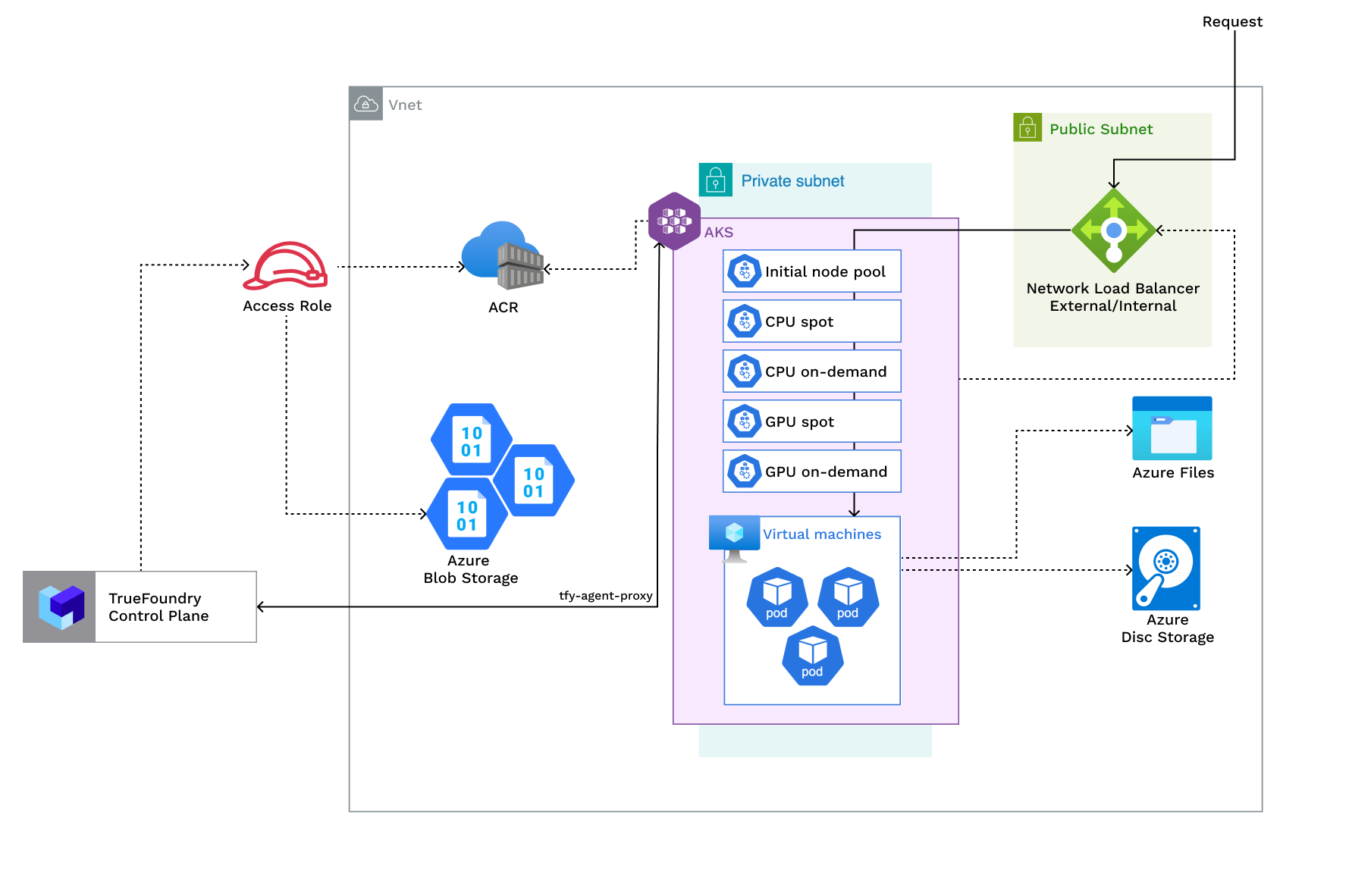
The architecture of a TrueFoundry compute plane is as follows:
 | Policy | Description |
| ----------------------------------------------------------------- | ------------------------------------------------------------------------------------------------------------------------------------------------------------------------------------------------ |
| Access required for Azure container registry, storage account | An azure container registry is used to store the docker images for the platform. A storage account is used to store the model artifacts. |
| Azure AD application with `Reader` and `Monitoring Reader` on AKS | Reader and monitoring reader permission on AKS is used to access the cluster autoscaler logs in Log Analytics and read azure node pools. User should have access to create Azure AD application. |
## Requirements:
The common requirements to setup compute plane in each of the scenarios is as follows:
* Billing must be enabled for the Azure subscription.
* Ensure that Microsoft.Storage resource provider is registered. Check this [link](https://learn.microsoft.com/en-us/azure/virtual-machines/disks-enable-host-based-encryption-portal?tabs=azure-cli) for more details.
* Egress access to container registries - `public.ecr.aws`, `quay.io`, `ghcr.io`, `tfy.jfrog.io`, `docker.io/natsio`, `nvcr.io`, `registry.k8s.io` so that we can download the docker images for argocd, nats, gpu operator, argo rollouts, argo workflows, istio, keda, etc.
* We need a domain to map to the service endpoints and certificate to encrypt the traffic. A wildcard domain like \*.services.example.com is preferred. TrueFoundry can do path based routing like `services.example.com/tfy/*`, however, many frontend applications do not support this.
* Enough quotas for CPU/GPU instances must be present depending on your usecase. You can check and increase quotas at [Azure compute quotas](https://learn.microsoft.com/en-us/azure/quotas/view-quotas)
* Ensure that [host encryption](https://learn.microsoft.com/en-us/azure/virtual-machines/disks-enable-host-based-encryption-portal?tabs=azure-cli) is enabled.
1. The new VPC subnet should have a CIDR range of /24 or larger. Secondary ranges for pods (min /20) and services (min /24) are required. Secondary range can be from a non-routable range. This is to ensure capacity for \~250 instances and 4096 pods.
2. User/serviceaccount to provision the infrastructure.
1. The existing network subnet should have a CIDR range of /24 or larger. Secondary ranges for pods (min /20) and services (min /24) are required. Secondary range can be from a non-routable range. This is to ensure capacity for \~250 instances and 4096 pods.
2. The network should have NAT gateway for subnets to reach to internet. Port 80 and 443 should be open for the load balancer. Allow all traffic between the subnets.
3. User/serviceaccount to provision the infrastructure.
1. AKS Version should be 1.30 or later.
2. Following node pools must be created:
We need to create one nodepool which is for running truefoundry critical workloads like prometheus,
loki and tfy-agent. We should put the taint `class.truefoundry.com/component=critical:NoSchedule` and label `class.truefoundry.com/component=critical` on this nodepool. The min-instance count should be 2 and max-instance count should be 5.
These nodepools are for running the user deployed applications. We should create 2-3 on-demand CPU nodepools with varying configuration depending on the requirement of the workloads. The min instance count can be configured to 0 and max-instance count can be configured to 10. A few sample instance types that can be chosen for: `Standard_D4ds_v5`, `Standard_D8ds_v5`, `Standard_D16ds_v5`. **This depends on the expected usage of the cluster.**
These nodepools are for running the user deployed applications. We should create 2-3 spot CPU nodepools with varying configuration depending on the requirement of the workloads. The min instance count can be configured to 0 and max-instance count can be configured to 10. A few sample instance types that can be chosen for: `Standard_D4ds_v5`, `Standard_D8ds_v5`, `Standard_D16ds_v5`. **This depends on the expected usage of the cluster.**
These nodepools are for running the user deployed applications. In case you are planning to use GPU instances, you can create 2-3 on-demand GPU nodepools with different types of GPUs - like with instance types: `Standard_NC4as_T4_v3`, `Standard_NC24ads_A100_v4`, `Standard_NV6ads_A10_v5`. The min instance count should be configured to 0 and max-instance count can be configured to 10.
These nodepools are for running the user deployed applications.In case you are planning to use GPU instances, you can create 2-3 spot GPU nodepools with different types of GPUs - like with instance types: `Standard_NC4as_T4_v3`, `Standard_NC24ads_A100_v4`, `Standard_NV6ads_A10_v5`.The min instance count should be configured to 0 and max-instance count can be configured to 10.
3. Compute quotas should be increased for the cluster. Required to ensure sufficient resources are available. Spot instances can help optimize costs for interruptible workloads.
## Setting up compute plane
TrueFoundry compute plane infrastructure is provisioned using OpenTofu/Terraform. You can download the OpenTofu/Terraform code for your exact account by filling up your account details and downloading a script that can be executed on your local machine.
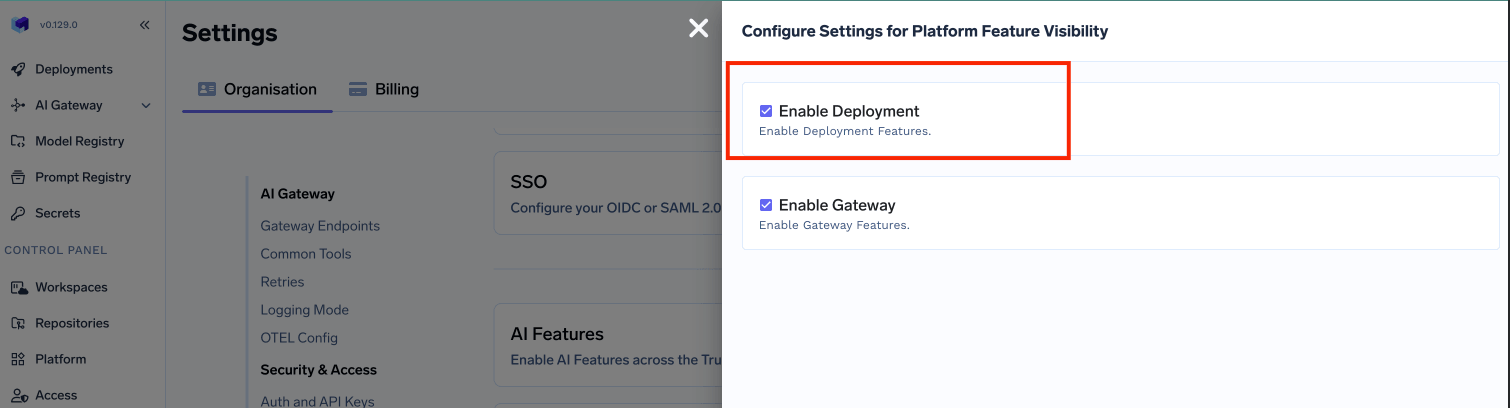
To enable the deployment feature which allows you to deploy services through the platform, you need to enable it;
* In the left hand navigation, go to `Settings` then `Platform Feature Visibility` under `Preferences`
* Click on `Edit` button. Then enable the toggle for `Enable Deployment`
| Policy | Description |
| ----------------------------------------------------------------- | ------------------------------------------------------------------------------------------------------------------------------------------------------------------------------------------------ |
| Access required for Azure container registry, storage account | An azure container registry is used to store the docker images for the platform. A storage account is used to store the model artifacts. |
| Azure AD application with `Reader` and `Monitoring Reader` on AKS | Reader and monitoring reader permission on AKS is used to access the cluster autoscaler logs in Log Analytics and read azure node pools. User should have access to create Azure AD application. |
## Requirements:
The common requirements to setup compute plane in each of the scenarios is as follows:
* Billing must be enabled for the Azure subscription.
* Ensure that Microsoft.Storage resource provider is registered. Check this [link](https://learn.microsoft.com/en-us/azure/virtual-machines/disks-enable-host-based-encryption-portal?tabs=azure-cli) for more details.
* Egress access to container registries - `public.ecr.aws`, `quay.io`, `ghcr.io`, `tfy.jfrog.io`, `docker.io/natsio`, `nvcr.io`, `registry.k8s.io` so that we can download the docker images for argocd, nats, gpu operator, argo rollouts, argo workflows, istio, keda, etc.
* We need a domain to map to the service endpoints and certificate to encrypt the traffic. A wildcard domain like \*.services.example.com is preferred. TrueFoundry can do path based routing like `services.example.com/tfy/*`, however, many frontend applications do not support this.
* Enough quotas for CPU/GPU instances must be present depending on your usecase. You can check and increase quotas at [Azure compute quotas](https://learn.microsoft.com/en-us/azure/quotas/view-quotas)
* Ensure that [host encryption](https://learn.microsoft.com/en-us/azure/virtual-machines/disks-enable-host-based-encryption-portal?tabs=azure-cli) is enabled.
1. The new VPC subnet should have a CIDR range of /24 or larger. Secondary ranges for pods (min /20) and services (min /24) are required. Secondary range can be from a non-routable range. This is to ensure capacity for \~250 instances and 4096 pods.
2. User/serviceaccount to provision the infrastructure.
1. The existing network subnet should have a CIDR range of /24 or larger. Secondary ranges for pods (min /20) and services (min /24) are required. Secondary range can be from a non-routable range. This is to ensure capacity for \~250 instances and 4096 pods.
2. The network should have NAT gateway for subnets to reach to internet. Port 80 and 443 should be open for the load balancer. Allow all traffic between the subnets.
3. User/serviceaccount to provision the infrastructure.
1. AKS Version should be 1.30 or later.
2. Following node pools must be created:
We need to create one nodepool which is for running truefoundry critical workloads like prometheus,
loki and tfy-agent. We should put the taint `class.truefoundry.com/component=critical:NoSchedule` and label `class.truefoundry.com/component=critical` on this nodepool. The min-instance count should be 2 and max-instance count should be 5.
These nodepools are for running the user deployed applications. We should create 2-3 on-demand CPU nodepools with varying configuration depending on the requirement of the workloads. The min instance count can be configured to 0 and max-instance count can be configured to 10. A few sample instance types that can be chosen for: `Standard_D4ds_v5`, `Standard_D8ds_v5`, `Standard_D16ds_v5`. **This depends on the expected usage of the cluster.**
These nodepools are for running the user deployed applications. We should create 2-3 spot CPU nodepools with varying configuration depending on the requirement of the workloads. The min instance count can be configured to 0 and max-instance count can be configured to 10. A few sample instance types that can be chosen for: `Standard_D4ds_v5`, `Standard_D8ds_v5`, `Standard_D16ds_v5`. **This depends on the expected usage of the cluster.**
These nodepools are for running the user deployed applications. In case you are planning to use GPU instances, you can create 2-3 on-demand GPU nodepools with different types of GPUs - like with instance types: `Standard_NC4as_T4_v3`, `Standard_NC24ads_A100_v4`, `Standard_NV6ads_A10_v5`. The min instance count should be configured to 0 and max-instance count can be configured to 10.
These nodepools are for running the user deployed applications.In case you are planning to use GPU instances, you can create 2-3 spot GPU nodepools with different types of GPUs - like with instance types: `Standard_NC4as_T4_v3`, `Standard_NC24ads_A100_v4`, `Standard_NV6ads_A10_v5`.The min instance count should be configured to 0 and max-instance count can be configured to 10.
3. Compute quotas should be increased for the cluster. Required to ensure sufficient resources are available. Spot instances can help optimize costs for interruptible workloads.
## Setting up compute plane
TrueFoundry compute plane infrastructure is provisioned using OpenTofu/Terraform. You can download the OpenTofu/Terraform code for your exact account by filling up your account details and downloading a script that can be executed on your local machine.
To enable the deployment feature which allows you to deploy services through the platform, you need to enable it;
* In the left hand navigation, go to `Settings` then `Platform Feature Visibility` under `Preferences`
* Click on `Edit` button. Then enable the toggle for `Enable Deployment`
 * Click on `Save` button.
This will enable the deployment feature in the platform and allow you to create either a control plane and compute plane.
* Click on `Save` button.
This will enable the deployment feature in the platform and allow you to create either a control plane and compute plane.
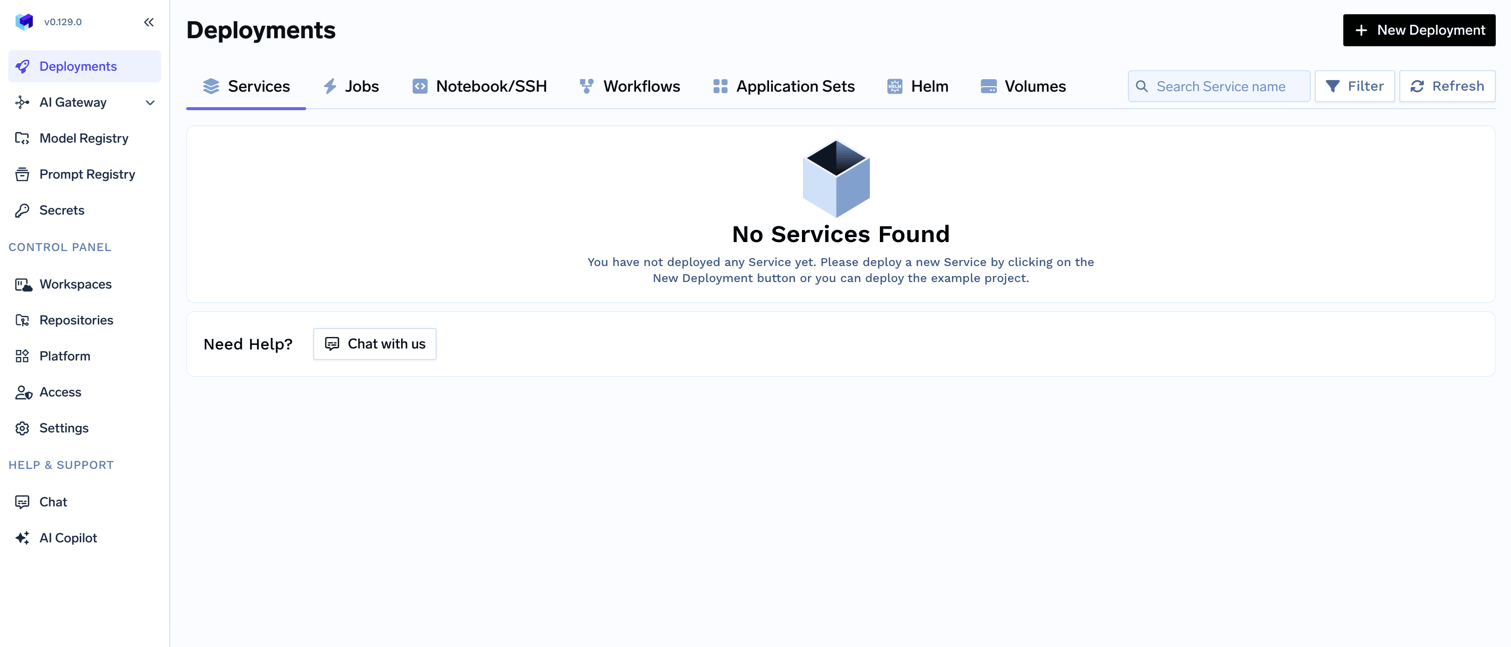 Go to the platform section in the left panel and click on `Clusters`. You can click on `Create New Cluster` or `Attach Existing Cluster` depending on your use case. Read the requirements and if everything is satisfied, click on `Continue`.
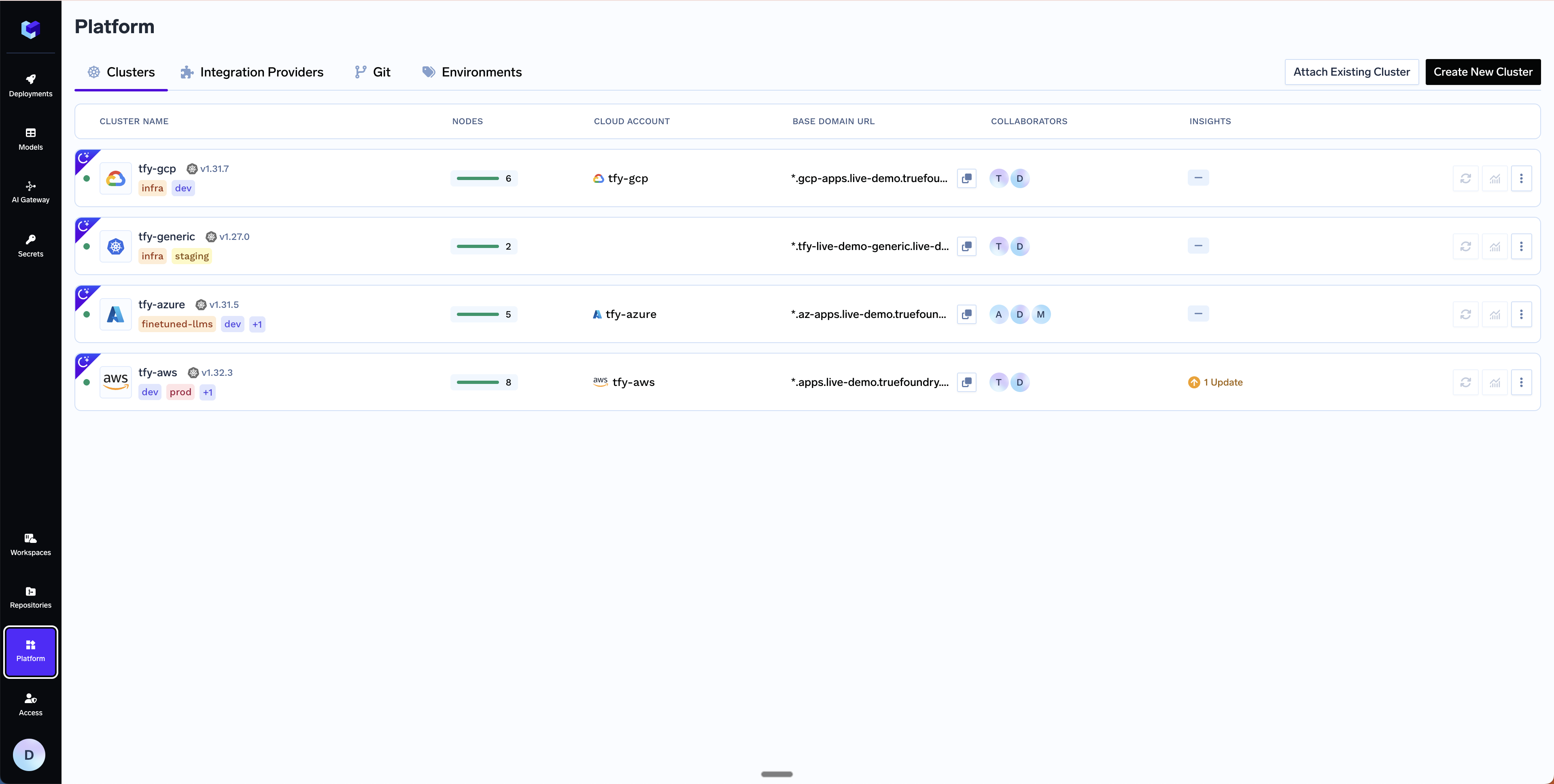 A form will be presented with the details for the new cluster to be created. Fill in with your cluster details. Click `Submit` when done
The key fields to fill up here are:
* `Region` - The region and availability zones where you want to create the cluster.
* `Resource Group` - The resource group where you want to create the cluster. Chose between `New Resource Group` or `Existing Resource Group` depending on your use case.
* `Cluster Name` - A name for your cluster.
* `Kubernetes Version` - The Kubernetes version for the cluster (e.g. `1.34`).
* `Node Pools` - Configure CPU and GPU node pools for the cluster. The form comes with sensible defaults (see below) which you can adjust based on your workload requirements.
A form will be presented with the details for the new cluster to be created. Fill in with your cluster details. Click `Submit` when done
The key fields to fill up here are:
* `Region` - The region and availability zones where you want to create the cluster.
* `Resource Group` - The resource group where you want to create the cluster. Chose between `New Resource Group` or `Existing Resource Group` depending on your use case.
* `Cluster Name` - A name for your cluster.
* `Kubernetes Version` - The Kubernetes version for the cluster (e.g. `1.34`).
* `Node Pools` - Configure CPU and GPU node pools for the cluster. The form comes with sensible defaults (see below) which you can adjust based on your workload requirements.
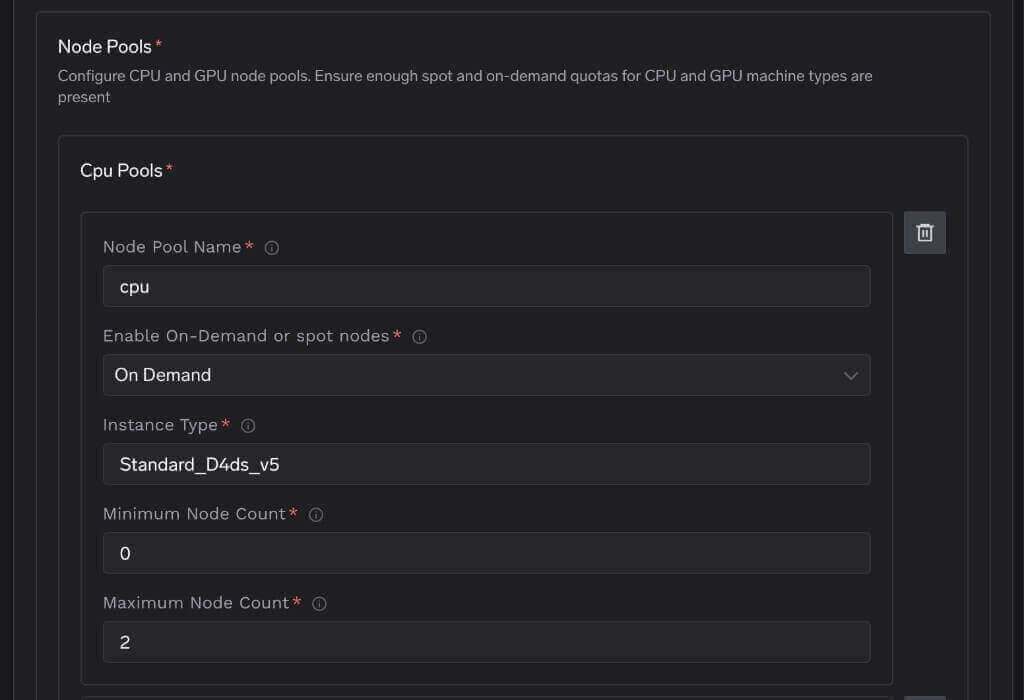 The default node pool configuration is:
| Pool | Type | Instance Type | Capacity | Min | Max |
| -------------------- | --------- | ------------------------ | -------- | --- | --- |
| **initial** (system) | On-Demand | `Standard_D4ds_v5` | CPU | 2 | 2 |
| **cpu** | On-Demand | `Standard_D4ds_v5` | CPU | 0 | 2 |
| **cpu2x** | On-Demand | `Standard_D8ds_v5` | CPU | 0 | 2 |
| **a10** | On-Demand | `Standard_NV6ads_A10_v5` | GPU | 0 | 2 |
| **t4** | On-Demand | `Standard_NC4as_T4_v3` | GPU | 0 | 2 |
The **initial** pool is the system node pool that runs TrueFoundry platform components (ArgoCD, Istio, tfy-agent, etc.) and must always be on-demand with at least 2 nodes. You can add, remove, or resize the other CPU/GPU pools to match your workload needs. GPU pools can be removed entirely if you don't plan to run GPU workloads. Make sure you have sufficient [Azure compute quotas](https://learn.microsoft.com/en-us/azure/quotas/view-quotas) for the instance types you select.
* `Network Configuration` - Choose between `New Vnet` or `Existing Vnet` depending on your use case.
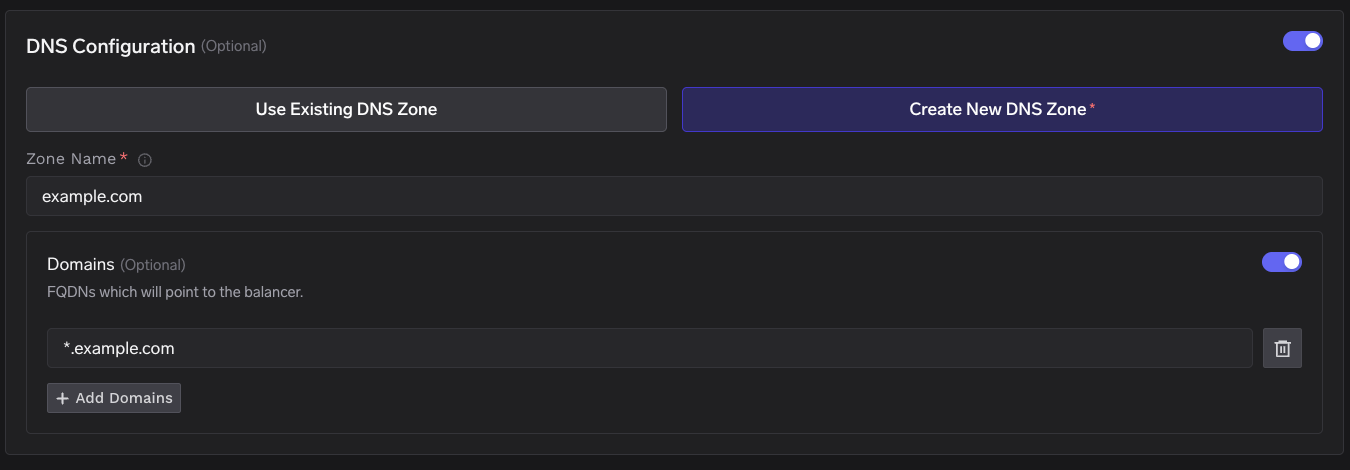
* `DNS Configuration` - Configure the DNS zone and domains that will point to the cluster’s load balancer. This also provisions a TLS certificate for those domains. Select New DNS Zone or Existing DNS Zone if you want TrueFoundry to manage DNS in Azure. If you use an external DNS provider (e.g., Route53, Cloudflare), you can skip this section.
The default node pool configuration is:
| Pool | Type | Instance Type | Capacity | Min | Max |
| -------------------- | --------- | ------------------------ | -------- | --- | --- |
| **initial** (system) | On-Demand | `Standard_D4ds_v5` | CPU | 2 | 2 |
| **cpu** | On-Demand | `Standard_D4ds_v5` | CPU | 0 | 2 |
| **cpu2x** | On-Demand | `Standard_D8ds_v5` | CPU | 0 | 2 |
| **a10** | On-Demand | `Standard_NV6ads_A10_v5` | GPU | 0 | 2 |
| **t4** | On-Demand | `Standard_NC4as_T4_v3` | GPU | 0 | 2 |
The **initial** pool is the system node pool that runs TrueFoundry platform components (ArgoCD, Istio, tfy-agent, etc.) and must always be on-demand with at least 2 nodes. You can add, remove, or resize the other CPU/GPU pools to match your workload needs. GPU pools can be removed entirely if you don't plan to run GPU workloads. Make sure you have sufficient [Azure compute quotas](https://learn.microsoft.com/en-us/azure/quotas/view-quotas) for the instance types you select.
* `Network Configuration` - Choose between `New Vnet` or `Existing Vnet` depending on your use case.
* `DNS Configuration` - Configure the DNS zone and domains that will point to the cluster’s load balancer. This also provisions a TLS certificate for those domains. Select New DNS Zone or Existing DNS Zone if you want TrueFoundry to manage DNS in Azure. If you use an external DNS provider (e.g., Route53, Cloudflare), you can skip this section.
 * `Storage account (container) for OpenTofu/Terraform State` - OpenTofu/Terraform state will be stored in this container. It can be a preexisting storage account or a new storage account name. The new storage account will automatically be created by our script.
* `Platform Features` - This is to decide which features like BlobStorage, ClusterIntegration using Azure AD and Container Registry will be enabled for your cluster. To read more on how these integrations are used in the platform, please refer to the [platform features](/docs/infrastructure/deploy-compute-plane) page.
The key fields to fill up here are:
* `Region` - The region and availability zones where you want to create the cluster.
* `Resource Group` - The resource group where the cluster is already created.
* `Cluster Name` - Your cluster name.
* `Network Configuration` - Existing Vnet and subnet details.
* `DNS Configuration` - Configure the DNS zone and domains that will point to the cluster’s load balancer. This also provisions a TLS certificate for those domains. Select New DNS Zone or Existing DNS Zone if you want TrueFoundry to manage DNS in Azure. If you use an external DNS provider (e.g., Route53, Cloudflare), you can skip this section.
* `Cluster Addons` - TrueFoundry needs to install addons like ArgoCD, ArgoWorkflows, Keda, Istio, etc. Please disable the addons that are already installed on your cluster so that truefoundry installation does not overrride the existing configuration and affect your existing workloads.
* `Storage account (container) for OpenTofu/Terraform State` - OpenTofu/Terraform state will be stored in this container. It can be a preexisting storage account or a new storage account name. The new storage account will automatically be created by our script.
* `Platform Features` - This is to decide which features like BlobStorage, ClusterIntegration using Azure AD and Container Registry will be enabled for your cluster. To read more on how these integrations are used in the platform, please refer to the [platform features](/docs/infrastructure/deploy-compute-plane) page.
You will be presented with a `curl` command to download and execute the script. The script will take care of installing the pre-requisites, downloading OpenTofu/Terraform code and running it on your local machine to create the cluster. This will take around 40-50 minutes to complete.
* `Storage account (container) for OpenTofu/Terraform State` - OpenTofu/Terraform state will be stored in this container. It can be a preexisting storage account or a new storage account name. The new storage account will automatically be created by our script.
* `Platform Features` - This is to decide which features like BlobStorage, ClusterIntegration using Azure AD and Container Registry will be enabled for your cluster. To read more on how these integrations are used in the platform, please refer to the [platform features](/docs/infrastructure/deploy-compute-plane) page.
The key fields to fill up here are:
* `Region` - The region and availability zones where you want to create the cluster.
* `Resource Group` - The resource group where the cluster is already created.
* `Cluster Name` - Your cluster name.
* `Network Configuration` - Existing Vnet and subnet details.
* `DNS Configuration` - Configure the DNS zone and domains that will point to the cluster’s load balancer. This also provisions a TLS certificate for those domains. Select New DNS Zone or Existing DNS Zone if you want TrueFoundry to manage DNS in Azure. If you use an external DNS provider (e.g., Route53, Cloudflare), you can skip this section.
* `Cluster Addons` - TrueFoundry needs to install addons like ArgoCD, ArgoWorkflows, Keda, Istio, etc. Please disable the addons that are already installed on your cluster so that truefoundry installation does not overrride the existing configuration and affect your existing workloads.
* `Storage account (container) for OpenTofu/Terraform State` - OpenTofu/Terraform state will be stored in this container. It can be a preexisting storage account or a new storage account name. The new storage account will automatically be created by our script.
* `Platform Features` - This is to decide which features like BlobStorage, ClusterIntegration using Azure AD and Container Registry will be enabled for your cluster. To read more on how these integrations are used in the platform, please refer to the [platform features](/docs/infrastructure/deploy-compute-plane) page.
You will be presented with a `curl` command to download and execute the script. The script will take care of installing the pre-requisites, downloading OpenTofu/Terraform code and running it on your local machine to create the cluster. This will take around 40-50 minutes to complete.
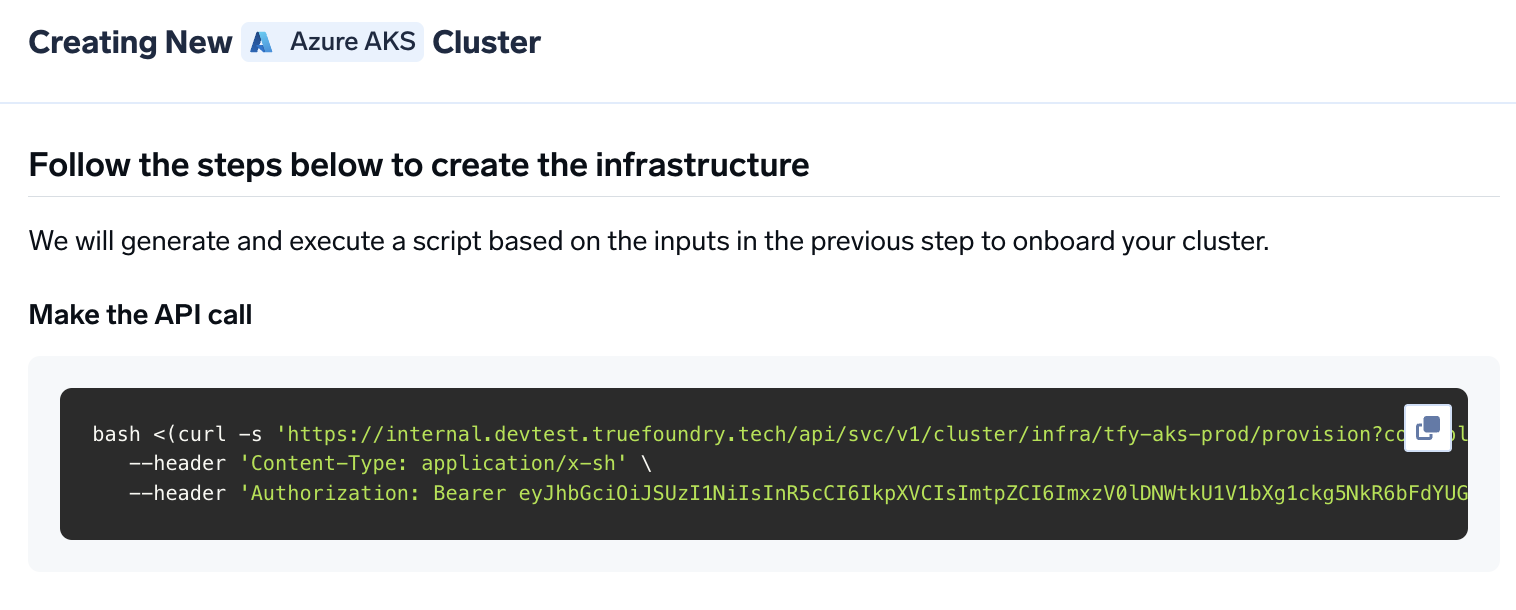 Once the script is executed, the cluster will be shown as connected in the platform.
We can get the load-balancer's IP address by going to the platform section in the bottom left panel under the Clusters section. Under the preferred cluster, you'll see the load balancer IP address under the `Base Domain URL` section.
Once the script is executed, the cluster will be shown as connected in the platform.
We can get the load-balancer's IP address by going to the platform section in the bottom left panel under the Clusters section. Under the preferred cluster, you'll see the load balancer IP address under the `Base Domain URL` section.
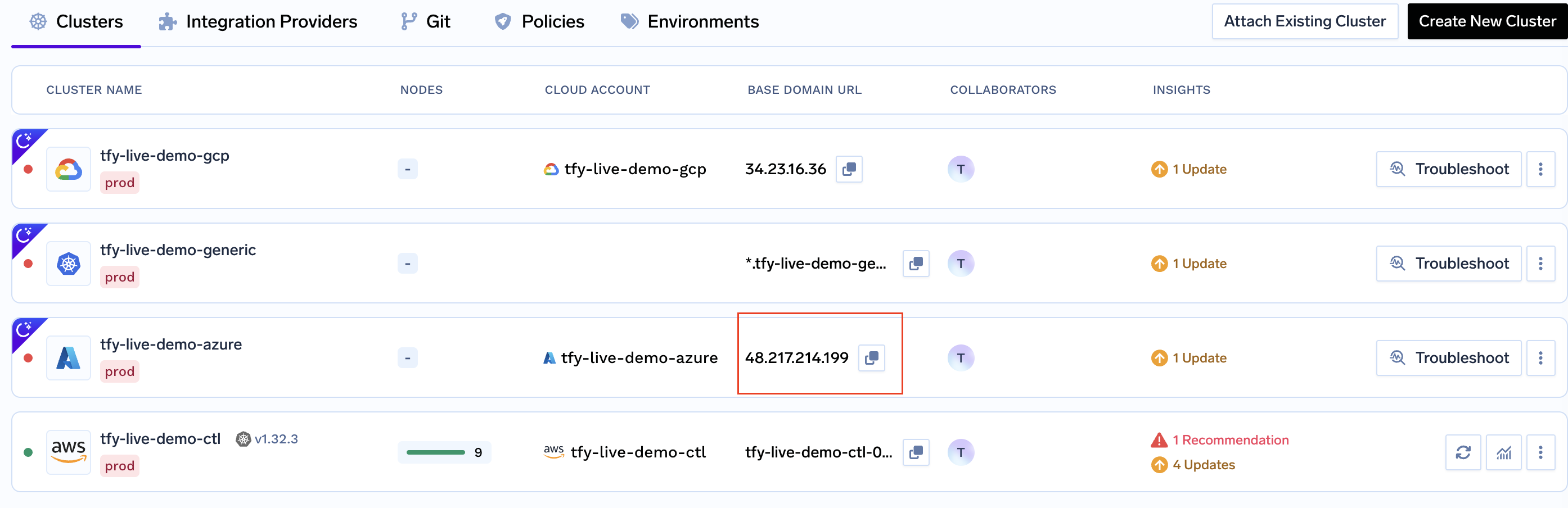 Create a DNS record in your Azure DNS Zone or your DNS provider with the following details
| Record Type | Record Name | Record value |
| ----------- | ------------------ | ------------------------- |
| A | \*.tfy.example.com | LOADBALANCER\_IP\_ADDRESS |
You can start by going [here](https://docs.truefoundry.com/docs/deploy-first-service#deploy-from-github)
***
## Permissions required to create the infrastructure
The IAM user should have the following permissions -
* Contributor Role to the above Subscription
* Role Based Access Administrator to the above subscription
* Either Azure AD Administrator or Azure AD Application Developer role to:
* Create app registrations and service principals
* Assign Reader role to AD application for read-only AKS cluster access
* Assign Monitoring Reader role to applications for cluster monitoring (Ref: How to add [Azure admin permission](https://learn.microsoft.com/en-us/azure/role-based-access-control/role-assignments-portal-subscription-admin)
## FAQ
If you have your own certificate files (for example, from another certificate provider or self-signed), you can use them directly with TrueFoundry.
1. Create a Kubernetes secret with your certificate and key, or create a self-signed certificate:
```shell Shell lines theme={"dark"}
# Generate a self-signed certificate
openssl req -x509 -nodes -days 365 -newkey rsa:2048 \
-keyout tls.key -out tls.crt \
-subj "/CN=*.example.com" \
-addext "subjectAltName = DNS:example.com,DNS:*.example.com"
```
```shell Shell lines theme={"dark"}
# Create secret from local certificate files
kubectl create secret tls example-com-tls \
--cert=path/to/cert/file \
--key=path/to/key/file \
-n istio-system
```
2. Once the secret is created, head over to the cluster page and navigate to the `tfy-istio-ingress` add-on. Add the secret name in the `tfyGateway.spec.servers[1].tls.credentialName` section and ensure that `tfyGateway.spec.servers[1].port.protocol` is set to `HTTPS`. Here we are using `example-com-tls` as the secret name, which contains the certificate and key.
```yaml YAML lines theme={"dark"}
servers:
-
- hosts:
- "*"
port:
name: https-tfy-wildcard
number: 443
protocol: HTTPS
tls:
mode: SIMPLE
credentialName: example-com-tls
```
Self-signed certificates will cause browser warnings. They should only be used for testing or internal systems. To connect to services with self-signed certificates, you have to pass the CA certificate to verify the SSL certificate.
If you need to add or modify node pools after the cluster is created, you can do so using the [Azure CLI](https://learn.microsoft.com/en-us/cli/azure/). Set the following variables before running the commands:
```bash theme={"dark"}
export RESOURCE_GROUP=""
export CLUSTER_NAME=""
export INSTANCE_SIZE="" # e.g. Standard_D4ds_v5
```
You can browse available instance types and pricing at [azureprice.net](https://azureprice.net/).
```bash theme={"dark"}
az aks nodepool add \
--resource-group $RESOURCE_GROUP \
--cluster-name $CLUSTER_NAME \
--name \
--enable-cluster-autoscaler \
--enable-encryption-at-host \
--node-vm-size $INSTANCE_SIZE \
--min-count 0 \
--node-count 0 \
--node-osdisk-size 100 \
--max-count 10 \
--no-wait
```
```bash theme={"dark"}
az aks nodepool add \
--resource-group $RESOURCE_GROUP \
--cluster-name $CLUSTER_NAME \
--name \
--priority Spot \
--eviction-policy Delete \
--spot-max-price -1 \
--enable-cluster-autoscaler \
--enable-encryption-at-host \
--node-vm-size $INSTANCE_SIZE \
--min-count 0 \
--node-count 0 \
--max-count 10 \
--no-wait
```
Spot pools automatically get the taint `kubernetes.azure.com/scalesetpriority:spot`. Pods must tolerate this taint to be scheduled on spot nodes. TrueFoundry handles this automatically when you select a spot node pool during deployment.
```bash theme={"dark"}
az aks nodepool add \
--resource-group $RESOURCE_GROUP \
--cluster-name $CLUSTER_NAME \
--name \
--enable-cluster-autoscaler \
--enable-encryption-at-host \
--node-vm-size $INSTANCE_SIZE \
--node-taints nvidia.com/gpu=Present:NoSchedule \
--min-count 0 \
--node-count 0 \
--node-osdisk-size 100 \
--max-count 2 \
--mode user \
--no-wait
```
The `nvidia.com/gpu=Present:NoSchedule` taint prevents non-GPU workloads from being scheduled on expensive GPU nodes.
```bash theme={"dark"}
az aks nodepool add \
--resource-group $RESOURCE_GROUP \
--cluster-name $CLUSTER_NAME \
--name \
--priority Spot \
--eviction-policy Delete \
--spot-max-price -1 \
--enable-cluster-autoscaler \
--enable-encryption-at-host \
--node-vm-size $INSTANCE_SIZE \
--node-taints nvidia.com/gpu=Present:NoSchedule \
--min-count 0 \
--node-count 0 \
--max-count 2 \
--mode user \
--no-wait
```
New node pools are automatically synced in TrueFoundry if the Azure AD application has `Reader` access on the AKS cluster.
| | On-Demand | Spot |
| ---------------- | --------------------------------------------------- | --------------------------------------------------- |
| **Availability** | Guaranteed — no interruptions | Can be reclaimed by Azure at any time |
| **Cost** | Standard pricing | Up to 60-90% cheaper |
| **Best for** | Production services, databases, platform components | Dev/test workloads, batch jobs, interruptible tasks |
The system node pool (**initial**) must always be on-demand. For user workloads, spot pools can bring significant cost savings if the application can tolerate interruptions. Make sure you have sufficient [spot quotas](https://learn.microsoft.com/en-us/azure/quotas/view-quotas) in your region.
***
Create a DNS record in your Azure DNS Zone or your DNS provider with the following details
| Record Type | Record Name | Record value |
| ----------- | ------------------ | ------------------------- |
| A | \*.tfy.example.com | LOADBALANCER\_IP\_ADDRESS |
You can start by going [here](https://docs.truefoundry.com/docs/deploy-first-service#deploy-from-github)
***
## Permissions required to create the infrastructure
The IAM user should have the following permissions -
* Contributor Role to the above Subscription
* Role Based Access Administrator to the above subscription
* Either Azure AD Administrator or Azure AD Application Developer role to:
* Create app registrations and service principals
* Assign Reader role to AD application for read-only AKS cluster access
* Assign Monitoring Reader role to applications for cluster monitoring (Ref: How to add [Azure admin permission](https://learn.microsoft.com/en-us/azure/role-based-access-control/role-assignments-portal-subscription-admin)
## FAQ
If you have your own certificate files (for example, from another certificate provider or self-signed), you can use them directly with TrueFoundry.
1. Create a Kubernetes secret with your certificate and key, or create a self-signed certificate:
```shell Shell lines theme={"dark"}
# Generate a self-signed certificate
openssl req -x509 -nodes -days 365 -newkey rsa:2048 \
-keyout tls.key -out tls.crt \
-subj "/CN=*.example.com" \
-addext "subjectAltName = DNS:example.com,DNS:*.example.com"
```
```shell Shell lines theme={"dark"}
# Create secret from local certificate files
kubectl create secret tls example-com-tls \
--cert=path/to/cert/file \
--key=path/to/key/file \
-n istio-system
```
2. Once the secret is created, head over to the cluster page and navigate to the `tfy-istio-ingress` add-on. Add the secret name in the `tfyGateway.spec.servers[1].tls.credentialName` section and ensure that `tfyGateway.spec.servers[1].port.protocol` is set to `HTTPS`. Here we are using `example-com-tls` as the secret name, which contains the certificate and key.
```yaml YAML lines theme={"dark"}
servers:
-
- hosts:
- "*"
port:
name: https-tfy-wildcard
number: 443
protocol: HTTPS
tls:
mode: SIMPLE
credentialName: example-com-tls
```
Self-signed certificates will cause browser warnings. They should only be used for testing or internal systems. To connect to services with self-signed certificates, you have to pass the CA certificate to verify the SSL certificate.
If you need to add or modify node pools after the cluster is created, you can do so using the [Azure CLI](https://learn.microsoft.com/en-us/cli/azure/). Set the following variables before running the commands:
```bash theme={"dark"}
export RESOURCE_GROUP=""
export CLUSTER_NAME=""
export INSTANCE_SIZE="" # e.g. Standard_D4ds_v5
```
You can browse available instance types and pricing at [azureprice.net](https://azureprice.net/).
```bash theme={"dark"}
az aks nodepool add \
--resource-group $RESOURCE_GROUP \
--cluster-name $CLUSTER_NAME \
--name \
--enable-cluster-autoscaler \
--enable-encryption-at-host \
--node-vm-size $INSTANCE_SIZE \
--min-count 0 \
--node-count 0 \
--node-osdisk-size 100 \
--max-count 10 \
--no-wait
```
```bash theme={"dark"}
az aks nodepool add \
--resource-group $RESOURCE_GROUP \
--cluster-name $CLUSTER_NAME \
--name \
--priority Spot \
--eviction-policy Delete \
--spot-max-price -1 \
--enable-cluster-autoscaler \
--enable-encryption-at-host \
--node-vm-size $INSTANCE_SIZE \
--min-count 0 \
--node-count 0 \
--max-count 10 \
--no-wait
```
Spot pools automatically get the taint `kubernetes.azure.com/scalesetpriority:spot`. Pods must tolerate this taint to be scheduled on spot nodes. TrueFoundry handles this automatically when you select a spot node pool during deployment.
```bash theme={"dark"}
az aks nodepool add \
--resource-group $RESOURCE_GROUP \
--cluster-name $CLUSTER_NAME \
--name \
--enable-cluster-autoscaler \
--enable-encryption-at-host \
--node-vm-size $INSTANCE_SIZE \
--node-taints nvidia.com/gpu=Present:NoSchedule \
--min-count 0 \
--node-count 0 \
--node-osdisk-size 100 \
--max-count 2 \
--mode user \
--no-wait
```
The `nvidia.com/gpu=Present:NoSchedule` taint prevents non-GPU workloads from being scheduled on expensive GPU nodes.
```bash theme={"dark"}
az aks nodepool add \
--resource-group $RESOURCE_GROUP \
--cluster-name $CLUSTER_NAME \
--name \
--priority Spot \
--eviction-policy Delete \
--spot-max-price -1 \
--enable-cluster-autoscaler \
--enable-encryption-at-host \
--node-vm-size $INSTANCE_SIZE \
--node-taints nvidia.com/gpu=Present:NoSchedule \
--min-count 0 \
--node-count 0 \
--max-count 2 \
--mode user \
--no-wait
```
New node pools are automatically synced in TrueFoundry if the Azure AD application has `Reader` access on the AKS cluster.
| | On-Demand | Spot |
| ---------------- | --------------------------------------------------- | --------------------------------------------------- |
| **Availability** | Guaranteed — no interruptions | Can be reclaimed by Azure at any time |
| **Cost** | Standard pricing | Up to 60-90% cheaper |
| **Best for** | Production services, databases, platform components | Dev/test workloads, batch jobs, interruptible tasks |
The system node pool (**initial**) must always be on-demand. For user workloads, spot pools can bring significant cost savings if the application can tolerate interruptions. Make sure you have sufficient [spot quotas](https://learn.microsoft.com/en-us/azure/quotas/view-quotas) in your region.
***