> ## Documentation Index
> Fetch the complete documentation index at: https://www.truefoundry.com/llms.txt
> Use this file to discover all available pages before exploring further.
# Creating A Conditional Task
> Step-by-step guide for conditional task, explaining configuration, best practices, and real-world usage on TrueFoundry.
A special type of task that enables conditional execution paths within a workflow. Conditional tasks allow the workflow to choose different execution paths based on the outcome of a previous task or variable.
Conditional task are typically structured with a condition followed by one or more possible execution paths (if-else branches).
## Example
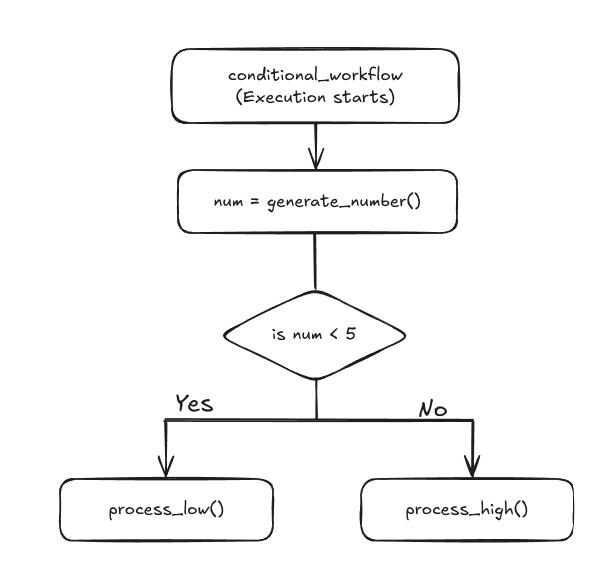
This is how the flow will be of the given example workflow
 ## Code
Create file names `workflow.py` and paste the following contents into the file:
```python Python lines theme={"dark"}
from truefoundry.workflow import task, workflow, PythonTaskConfig, TaskPythonBuild, conditional
task_config = PythonTaskConfig(image=TaskPythonBuild(
python_version="3.11",
pip_packages=["truefoundry[workflow]==0.4.8"],
)
)
@task(task_config=task_config)
def generate_number() -> int:
return 7
@task(task_config=task_config)
def process_low() -> str:
return "Low number processing"
@task(task_config=task_config)
def process_high() -> str:
return "High number processing"
@workflow
def conditional_workflow() -> str:
number = generate_number()
result = conditional("branch")\
.if_(number < 5).then(process_low())\
.else_().then(process_high())
return result
```
Now run the below command in the terminal to deploy your workflow, replace `` with the [workspace fqn](/docs/key-concepts#getting-workspace-fqn) which you can find on the UI.
```shell Shell lines theme={"dark"}
tfy deploy workflow \
--name conditional-example-wf \
--file workflow.py \
--workspace_fqn "Paste your workspace FQN here"
```
In this example:
* generate\_number: A task that generates a number.
* process\_low and process\_high: Tasks that process the number based on whether it is low or high.
* conditional: A branch node that checks if the number is less than 5. If true, it executes process\_low, otherwise it executes process\_high.
## Conditional task on ui
## Code
Create file names `workflow.py` and paste the following contents into the file:
```python Python lines theme={"dark"}
from truefoundry.workflow import task, workflow, PythonTaskConfig, TaskPythonBuild, conditional
task_config = PythonTaskConfig(image=TaskPythonBuild(
python_version="3.11",
pip_packages=["truefoundry[workflow]==0.4.8"],
)
)
@task(task_config=task_config)
def generate_number() -> int:
return 7
@task(task_config=task_config)
def process_low() -> str:
return "Low number processing"
@task(task_config=task_config)
def process_high() -> str:
return "High number processing"
@workflow
def conditional_workflow() -> str:
number = generate_number()
result = conditional("branch")\
.if_(number < 5).then(process_low())\
.else_().then(process_high())
return result
```
Now run the below command in the terminal to deploy your workflow, replace `` with the [workspace fqn](/docs/key-concepts#getting-workspace-fqn) which you can find on the UI.
```shell Shell lines theme={"dark"}
tfy deploy workflow \
--name conditional-example-wf \
--file workflow.py \
--workspace_fqn "Paste your workspace FQN here"
```
In this example:
* generate\_number: A task that generates a number.
* process\_low and process\_high: Tasks that process the number based on whether it is low or high.
* conditional: A branch node that checks if the number is less than 5. If true, it executes process\_low, otherwise it executes process\_high.
## Conditional task on ui
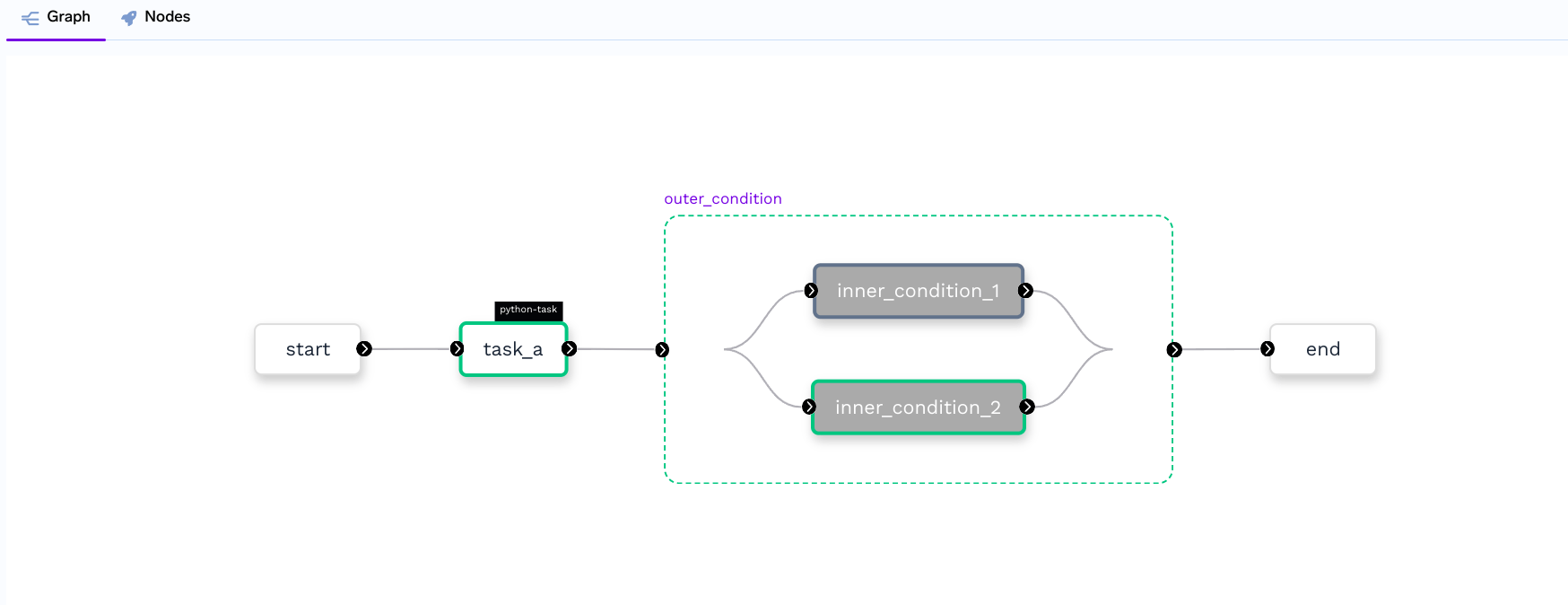 * When you see the graph of a workflow containing the conditional task then you can see that the green box here represents the conditional task and the green color indicates that the task execution was successful.
***
* When you see the graph of a workflow containing the conditional task then you can see that the green box here represents the conditional task and the green color indicates that the task execution was successful.
***