> ## Documentation Index
> Fetch the complete documentation index at: https://www.truefoundry.com/llms.txt
> Use this file to discover all available pages before exploring further.
# Identity and Access Revamp — v0.143
> SSO form simplified, dedicated user provisioning settings, and External Identity replaced by Identity Providers in v0.143.
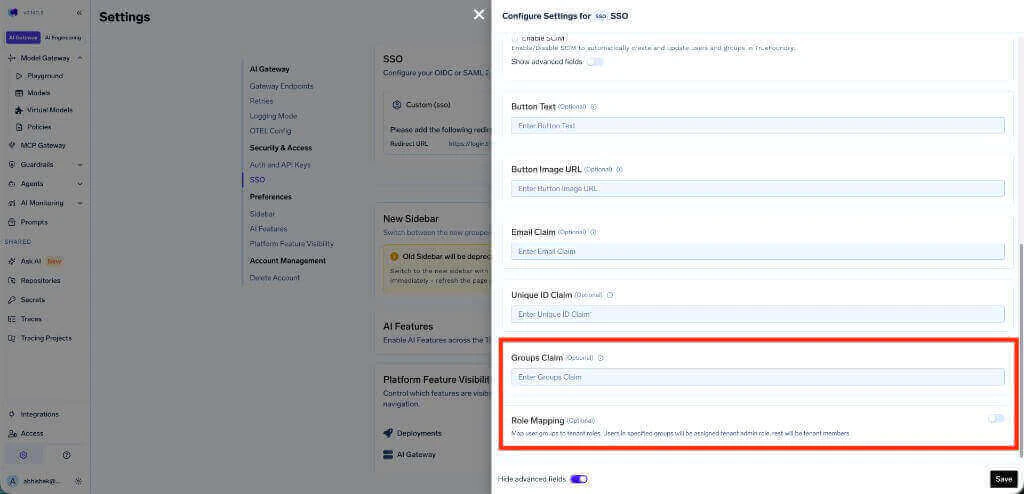
**Applicable to:** Tenant admins who configure **role mapping via SSO groups** (using the **Groups Claim** / **Role Mapping** toggle in the SSO form) or use **External Identities**. If you don't use either, this change does not affect you — your tenant continues to work as before after upgrading to v0.143.
## What Is Changing
Starting in **v0.143**, identity and access management on TrueFoundry has been reorganized into clearer, single-purpose surfaces. Three things change in this release.
### 1. SSO configuration form simplified
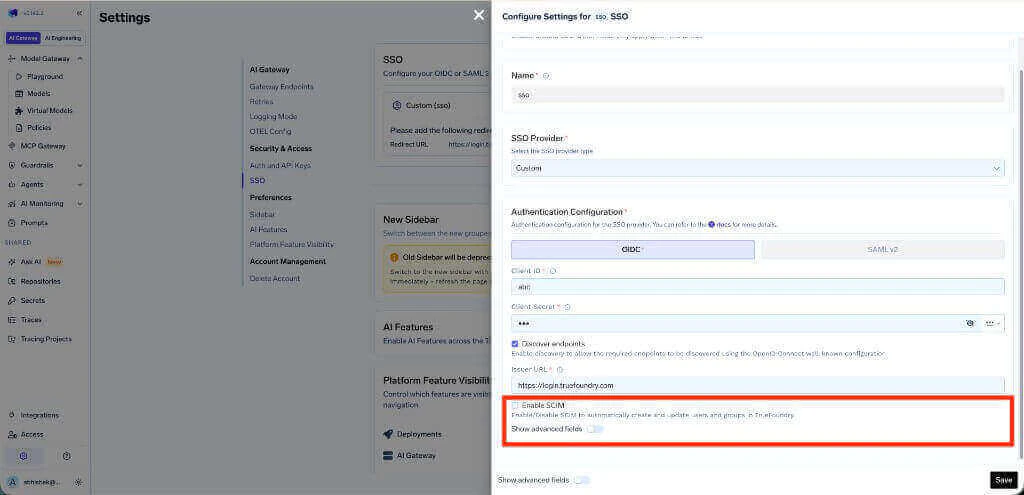
The **Settings > Security & Access > SSO** form is now scoped strictly to authentication. The following fields and toggles are deprecated and being moved out of the SSO form:
* **Groups Claim** field — deprecated.
* **Role Mapping** toggle (assign tenant admin / member based on SSO group membership) — deprecated.
* **Enable SCIM** toggle and the SCIM-related advanced fields — moved out of the SSO form into the new **Provisioning** settings page (see below).
 After the upgrade, the SSO form keeps only authentication configuration: provider type, OIDC/SAML credentials, issuer, endpoints, and the standard claim overrides (`Email Claim`, `Unique ID Claim`).
### 2. Dedicated Provisioning settings page
User provisioning is no longer configured inside the SSO form. A new top-level page at **Settings > Security & Access > Provisioning** lets each tenant pick exactly one provisioning mode:
| Mode | What it does | Best for |
| ---------------------- | ----------------------------------------------------------------------------------------------------------- | ------------------------------------------------------------------------------------------------ |
| **SCIM** | Your IdP syncs users and groups into TrueFoundry automatically. Deprovisioning is also handled by your IdP. | Organizations where the IdP should be the source of truth for the user and group lifecycle. |
| **Just-in-time (JIT)** | TrueFoundry creates a user dynamically the first time a valid token is received from your IdP. | Organizations using SSO that do not want to configure SCIM sync. |
| **Invite-only** | Admins manually invite users from **Access > Users**. | External collaborators, early rollouts, or tenants where every user should be approved manually. |
If you currently use SCIM, your existing SCIM URL and SCIM token continue to work — only the configuration surface moves. The full setup, including the new capability matrix, is documented in [Manage Users — User provisioning](/docs/platform/user-management#user-provisioning).
### 3. External Identity replaced by Identity Providers
The legacy [External Identity](/docs/external-identity) flow (configured under **Access > External Auth**) is **deprecated** and replaced by [Identity Providers](/docs/platform/identity-providers) (configured under **Settings > Security & Access > Identity Providers**).
Identity Providers offer the same capability — validating externally issued JWTs and using them to access TrueFoundry APIs, AI Gateway, and MCP Gateway — with a cleaner mental model:
* JWT validation (JWKS URI, issuer, allowed audiences) is configured **once per provider**.
* Token-to-identity mapping is defined **directly on the target** — virtual accounts, teams, or users — instead of on a separate "External Identity" object.
* A single token can resolve to a **virtual account** (for service-to-service callers) or a **TrueFoundry user with team mapping** (for human users), with virtual account resolution taking precedence when both are configured.
## Why This Change
Previously, SSO, SCIM, role mapping via SSO groups, and external JWT validation were all entangled in the SSO configuration form and the External Identity surface. This made it hard to:
* Configure SCIM independently of SSO advanced fields.
* Reason about role assignment when SSO group claims, role mapping toggles, and TrueFoundry team membership all interacted.
* Reuse a single JWT validation configuration across many virtual accounts and teams.
The v0.143 layout separates these concerns: **SSO** for authentication, **Provisioning** for user lifecycle, **Identity Providers** for external JWT validation, and **Teams / Virtual Accounts** for RBAC mappings.
## What You Need to Do
Plan the migration before upgrading to v0.143. Once on v0.143, complete the steps that apply to your tenant.
### If you used the SSO Groups Claim or Role Mapping toggle
The Groups Claim field and the Role Mapping toggle in the SSO form will no longer assign roles. Migrate to one of the following before upgrading:
* **Use SCIM** to sync groups from your IdP, then assign tenant roles directly to those groups inside TrueFoundry.
* **Assign roles manually** under **Access > Users**, or grant team-level permissions via [team management](/docs/platform/team-management).
Existing manual role assignments (for example, users explicitly promoted to **Admin**) are preserved across the upgrade and continue to take precedence.
### If you use External Identity
**Identity Providers are migrated automatically.** All identity providers previously configured under **Access > External Auth > Identity Providers** are migrated to the new [Identity Providers](/docs/platform/identity-providers) surface (under **Settings > Security & Access > Identity Providers**) on upgrade. JWKS URI, issuer, audience, and claim overrides are preserved — no manual reconfiguration is required.
**Support timeline:** Existing External Identities will continue to work after the v0.143 upgrade so your traffic does not break, but **support for External Identities will be fully removed on 15 June 2026**. Plan to migrate before that date. If you need the support window extended for your tenant, reach out to [**support@truefoundry.com**](mailto:support@truefoundry.com) and we'll work with you on a longer timeline.
What you **do** need to migrate manually are the **External Identities** themselves — the identity objects you previously added as collaborators on TrueFoundry resources. Each External Identity should be replaced with either a **virtual account** or a **team mapping**, depending on the use case.
For every External Identity in your tenant, pick the replacement that matches how it is used:
* **Virtual account** — for machine-to-machine callers, partner apps, or any shared external identity that does not correspond to an individual TrueFoundry user. This is the right choice for most existing External Identities.
* **Team** — when the JWT carries a group/team claim and you want each token to resolve to a TrueFoundry user mapped into that team.
On the chosen target, add a mapping that points at the auto-migrated Identity Provider and matches the same JWT claim values you previously used:
* For a virtual account, add an [identity provider mapping](/docs/platform/virtual-account-management#identity-provider-mappings) that matches the configured **Name Claim**.
* For a team, add an [identity provider mapping](/docs/platform/team-management#identity-provider-mappings) that matches the configured **Team Claim** and ensure the target users exist in the tenant.
Wherever you previously added an **External Identity** as a collaborator on a model, MCP server, workspace, agent, or other resource, replace it with the new **virtual account** (or with the team / user that the JWT now resolves to). Permissions are evaluated against the resolved TrueFoundry identity from this point on.
Client applications continue to call the same TrueFoundry URLs with the same `Authorization: Bearer ` headers — JWT format and validation behavior are unchanged. Once traffic is flowing through the new mappings, remove the legacy External Identity entries from **Access > External Auth**.
Identity Providers do not create missing TrueFoundry users or teams. Make sure target users exist (via SCIM, JIT, or invite) and that teams have the matching identity provider mapping before cutting traffic over. See the capability matrix in [Identity Providers](/docs/platform/identity-providers#what-identity-providers-can-and-cannot-do).
## References
* [Manage Users](/docs/platform/user-management)
* [Identity Providers](/docs/platform/identity-providers)
* [SSO Overview](/docs/sso)
* [Manage External Identity (Deprecated)](/docs/external-identity)
***
If you have questions about the migration or run into anything unexpected, reach out to [**support@truefoundry.com**](mailto:support@truefoundry.com) — we're happy to help.
After the upgrade, the SSO form keeps only authentication configuration: provider type, OIDC/SAML credentials, issuer, endpoints, and the standard claim overrides (`Email Claim`, `Unique ID Claim`).
### 2. Dedicated Provisioning settings page
User provisioning is no longer configured inside the SSO form. A new top-level page at **Settings > Security & Access > Provisioning** lets each tenant pick exactly one provisioning mode:
| Mode | What it does | Best for |
| ---------------------- | ----------------------------------------------------------------------------------------------------------- | ------------------------------------------------------------------------------------------------ |
| **SCIM** | Your IdP syncs users and groups into TrueFoundry automatically. Deprovisioning is also handled by your IdP. | Organizations where the IdP should be the source of truth for the user and group lifecycle. |
| **Just-in-time (JIT)** | TrueFoundry creates a user dynamically the first time a valid token is received from your IdP. | Organizations using SSO that do not want to configure SCIM sync. |
| **Invite-only** | Admins manually invite users from **Access > Users**. | External collaborators, early rollouts, or tenants where every user should be approved manually. |
If you currently use SCIM, your existing SCIM URL and SCIM token continue to work — only the configuration surface moves. The full setup, including the new capability matrix, is documented in [Manage Users — User provisioning](/docs/platform/user-management#user-provisioning).
### 3. External Identity replaced by Identity Providers
The legacy [External Identity](/docs/external-identity) flow (configured under **Access > External Auth**) is **deprecated** and replaced by [Identity Providers](/docs/platform/identity-providers) (configured under **Settings > Security & Access > Identity Providers**).
Identity Providers offer the same capability — validating externally issued JWTs and using them to access TrueFoundry APIs, AI Gateway, and MCP Gateway — with a cleaner mental model:
* JWT validation (JWKS URI, issuer, allowed audiences) is configured **once per provider**.
* Token-to-identity mapping is defined **directly on the target** — virtual accounts, teams, or users — instead of on a separate "External Identity" object.
* A single token can resolve to a **virtual account** (for service-to-service callers) or a **TrueFoundry user with team mapping** (for human users), with virtual account resolution taking precedence when both are configured.
## Why This Change
Previously, SSO, SCIM, role mapping via SSO groups, and external JWT validation were all entangled in the SSO configuration form and the External Identity surface. This made it hard to:
* Configure SCIM independently of SSO advanced fields.
* Reason about role assignment when SSO group claims, role mapping toggles, and TrueFoundry team membership all interacted.
* Reuse a single JWT validation configuration across many virtual accounts and teams.
The v0.143 layout separates these concerns: **SSO** for authentication, **Provisioning** for user lifecycle, **Identity Providers** for external JWT validation, and **Teams / Virtual Accounts** for RBAC mappings.
## What You Need to Do
Plan the migration before upgrading to v0.143. Once on v0.143, complete the steps that apply to your tenant.
### If you used the SSO Groups Claim or Role Mapping toggle
The Groups Claim field and the Role Mapping toggle in the SSO form will no longer assign roles. Migrate to one of the following before upgrading:
* **Use SCIM** to sync groups from your IdP, then assign tenant roles directly to those groups inside TrueFoundry.
* **Assign roles manually** under **Access > Users**, or grant team-level permissions via [team management](/docs/platform/team-management).
Existing manual role assignments (for example, users explicitly promoted to **Admin**) are preserved across the upgrade and continue to take precedence.
### If you use External Identity
**Identity Providers are migrated automatically.** All identity providers previously configured under **Access > External Auth > Identity Providers** are migrated to the new [Identity Providers](/docs/platform/identity-providers) surface (under **Settings > Security & Access > Identity Providers**) on upgrade. JWKS URI, issuer, audience, and claim overrides are preserved — no manual reconfiguration is required.
**Support timeline:** Existing External Identities will continue to work after the v0.143 upgrade so your traffic does not break, but **support for External Identities will be fully removed on 15 June 2026**. Plan to migrate before that date. If you need the support window extended for your tenant, reach out to [**support@truefoundry.com**](mailto:support@truefoundry.com) and we'll work with you on a longer timeline.
What you **do** need to migrate manually are the **External Identities** themselves — the identity objects you previously added as collaborators on TrueFoundry resources. Each External Identity should be replaced with either a **virtual account** or a **team mapping**, depending on the use case.
For every External Identity in your tenant, pick the replacement that matches how it is used:
* **Virtual account** — for machine-to-machine callers, partner apps, or any shared external identity that does not correspond to an individual TrueFoundry user. This is the right choice for most existing External Identities.
* **Team** — when the JWT carries a group/team claim and you want each token to resolve to a TrueFoundry user mapped into that team.
On the chosen target, add a mapping that points at the auto-migrated Identity Provider and matches the same JWT claim values you previously used:
* For a virtual account, add an [identity provider mapping](/docs/platform/virtual-account-management#identity-provider-mappings) that matches the configured **Name Claim**.
* For a team, add an [identity provider mapping](/docs/platform/team-management#identity-provider-mappings) that matches the configured **Team Claim** and ensure the target users exist in the tenant.
Wherever you previously added an **External Identity** as a collaborator on a model, MCP server, workspace, agent, or other resource, replace it with the new **virtual account** (or with the team / user that the JWT now resolves to). Permissions are evaluated against the resolved TrueFoundry identity from this point on.
Client applications continue to call the same TrueFoundry URLs with the same `Authorization: Bearer ` headers — JWT format and validation behavior are unchanged. Once traffic is flowing through the new mappings, remove the legacy External Identity entries from **Access > External Auth**.
Identity Providers do not create missing TrueFoundry users or teams. Make sure target users exist (via SCIM, JIT, or invite) and that teams have the matching identity provider mapping before cutting traffic over. See the capability matrix in [Identity Providers](/docs/platform/identity-providers#what-identity-providers-can-and-cannot-do).
## References
* [Manage Users](/docs/platform/user-management)
* [Identity Providers](/docs/platform/identity-providers)
* [SSO Overview](/docs/sso)
* [Manage External Identity (Deprecated)](/docs/external-identity)
***
If you have questions about the migration or run into anything unexpected, reach out to [**support@truefoundry.com**](mailto:support@truefoundry.com) — we're happy to help.