> ## Documentation Index
> Fetch the complete documentation index at: https://www.truefoundry.com/llms.txt
> Use this file to discover all available pages before exploring further.
# Guardrails YAML Schema Change — v0.116
> MCP Guardrails feature launched in v0.116 introduces breaking changes to the guardrails YAML schema for GitOps users.
**Applicable to:** Users managing Guardrail configuration via GitOps (`tfy apply`). If you only use the UI to configure guardrails, no action is needed — your configuration is automatically migrated.
## What Is Changing
We have launched a feature to enable MCP Guardrails from v0.116. This allows you to configure policies at the AI Gateway layer to apply certain guardrails to specific MCP servers and models.
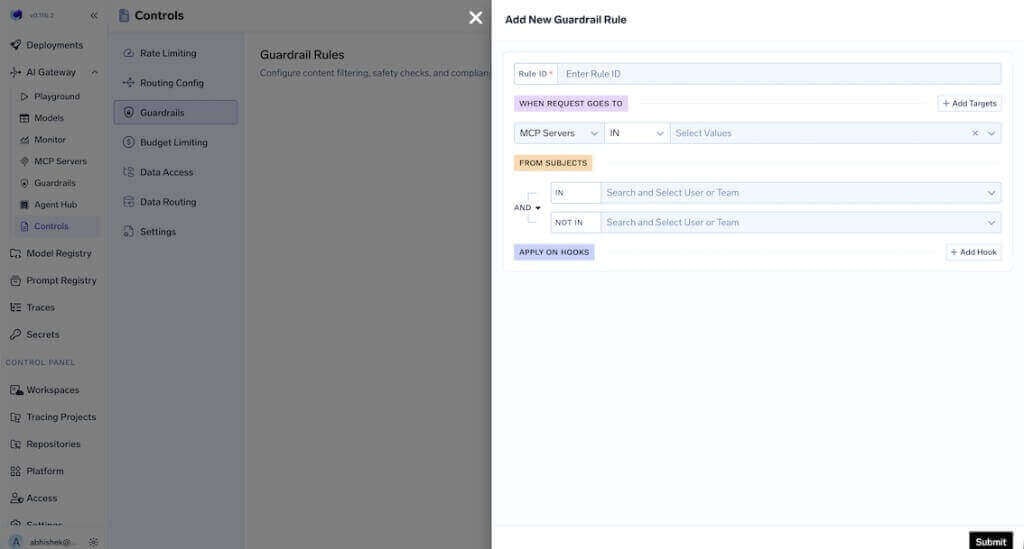 This changes the YAML schema of the guardrails. If you are using Git to apply guardrail policy configuration, you will need to take the new schema from the UI and apply it to Git.
## Why This Change
To bring the guardrails feature to MCP servers, we decided to merge it in the central guardrails policy instead of keeping it separate for models and MCP servers. We will be closely tracking the usage patterns here and evolve this if needed in the future.
## What You Need to Do
1. Open the Guardrails configuration in the TrueFoundry UI.
2. Copy the new YAML schema from the UI.
3. Replace the old schema in your Git repository with the new one.
4. Commit and apply via `tfy apply`.
## Changes in YAML Schema
**Previous schema:**
```yaml theme={"dark"}
name: my-guardrails
type: gateway-guardrails-config
rules:
- id: rule-1
when:
subjects:
- user:foo@example.com
models:
- my-account/my-model
input_guardrails:
- group-a/guardrail-1
output_guardrails:
- group-a/guardrail-2
```
**New schema:**
```yaml theme={"dark"}
name: my-guardrails
type: gateway-guardrails-config
rules:
- id: rule-1
when:
subjects:
operator: and
conditions:
in:
- user:foo@example.com
target:
operator: and
conditions:
model:
condition: in
values:
- my-account/my-model
llm_input_guardrails:
- group-a/guardrail-1
llm_output_guardrails:
- group-a/guardrail-2
```
## Key Changes in Schema
* `input_guardrails` is renamed to `llm_input_guardrails` in every rule.
* `output_guardrails` is renamed to `llm_output_guardrails` in every rule.
* Migrate `when.subjects` from a list of strings to the new shape with `operator` and `conditions.in` (or `conditions.not_in`). Specify at least one of `in` or `not_in`. Use subject format `user:email` or `team:teamName`.
* Migrate `when.models` into `when.target` with `operator`, `conditions.model`, `condition: in` or `condition: not_in`, and `values`.
* Ensure `when.metadata` (if used) lists only keys that must be present in the request with exact values; request may have extra keys.
***
If you face any issues in the migration, reach out and we'll be happy to assist.
This changes the YAML schema of the guardrails. If you are using Git to apply guardrail policy configuration, you will need to take the new schema from the UI and apply it to Git.
## Why This Change
To bring the guardrails feature to MCP servers, we decided to merge it in the central guardrails policy instead of keeping it separate for models and MCP servers. We will be closely tracking the usage patterns here and evolve this if needed in the future.
## What You Need to Do
1. Open the Guardrails configuration in the TrueFoundry UI.
2. Copy the new YAML schema from the UI.
3. Replace the old schema in your Git repository with the new one.
4. Commit and apply via `tfy apply`.
## Changes in YAML Schema
**Previous schema:**
```yaml theme={"dark"}
name: my-guardrails
type: gateway-guardrails-config
rules:
- id: rule-1
when:
subjects:
- user:foo@example.com
models:
- my-account/my-model
input_guardrails:
- group-a/guardrail-1
output_guardrails:
- group-a/guardrail-2
```
**New schema:**
```yaml theme={"dark"}
name: my-guardrails
type: gateway-guardrails-config
rules:
- id: rule-1
when:
subjects:
operator: and
conditions:
in:
- user:foo@example.com
target:
operator: and
conditions:
model:
condition: in
values:
- my-account/my-model
llm_input_guardrails:
- group-a/guardrail-1
llm_output_guardrails:
- group-a/guardrail-2
```
## Key Changes in Schema
* `input_guardrails` is renamed to `llm_input_guardrails` in every rule.
* `output_guardrails` is renamed to `llm_output_guardrails` in every rule.
* Migrate `when.subjects` from a list of strings to the new shape with `operator` and `conditions.in` (or `conditions.not_in`). Specify at least one of `in` or `not_in`. Use subject format `user:email` or `team:teamName`.
* Migrate `when.models` into `when.target` with `operator`, `conditions.model`, `condition: in` or `condition: not_in`, and `values`.
* Ensure `when.metadata` (if used) lists only keys that must be present in the request with exact values; request may have extra keys.
***
If you face any issues in the migration, reach out and we'll be happy to assist.