> ## Documentation Index
> Fetch the complete documentation index at: https://www.truefoundry.com/llms.txt
> Use this file to discover all available pages before exploring further.
# Deployment Guardrails and Policies
> Step-by-step guide for applying custom policies, explaining configuration, best practices, and real-world usage on TrueFoundry.
TrueFoundry makes it very easy for developers to create deployments in a self-serve way. However, this often leads to them skipping the best practices or not following organizational guidelines. Policies help the platform
team configure guardrails and modifications to ensure certain practices are followed across all deployments. Examples of a few commonly used policies are:
1. No service in production can be deployed on spot instances if there is less than 2 replicas.
2. Every service that is deployed should have a readiness and liveness probe configured.
3. Developers should not be able to provision more than 32 CPU and 96GB RAM for any of their services without approval.
4. For all Jupyter Notebooks deployed, redirect them to a separate nodepool.
5. All services deployed on GPU in dev environments should have scale to 0 configured.
TrueFoundry Policy Engine allows platform teams to encode these policies in Typescript code (Support for other languages will be added in the future). The policies are executed in a sandbox environment
in the control-plane before deployment to ensure secure and isolated execution.
## Types of policies:
### Validation Policies
Validation policies ensure that only compliant configurations are deployed. These policies evaluate TrueFoundry manifests and prevent deployments
that do not meet specific conditions. A few common examples are:
* Enforcing readiness and liveness probes for all production services.
* Enforcing on-demand instances on production environments for better reliability.
* Enforcing auto-shutdown for all dev services.
### Mutation Policies
Mutation policies let you automatically modify Kubernetes manifests before they're applied to the cluster. You can define custom rules
by writing code to change these manifests - kind of similar to applying a Kustomize patch (except this is code and more flexible). A few common use-case
examples are:
* Setting node affinity for certain workloads like SSH servers or notebooks.
* Adding default secrets, volume mounts, or environment variables to services and jobs.
* Updating image prefixes to match internal repository setups.
## Creating and registering a policy
Policies are defined in a YAML that can be registered in TrueFoundry UI. A policy comprises of the following fields:
* **name**: The name of the policy. Used to identify the policy in the UI.
* **description**: The description of the policy so that its easier to understand what the policy does.
* **action**: The action to be performed by the policy - either validate or mutate.
* **mode**:
* *Audit*: Logs policy executions but does not block deployments. This mode is ideal for testing new policies before enforcing them.
* *Enforce*: Applies the policy rules strictly. For validation policies, this blocks non-compliant deployments.
For mutation policies, this ensures the changes are always applied.
* *Disabled*: The policy is not executed and has no effect on deployments.
* **code**: The TypeScript code that defines the policy logic. To understand how to write the policy, refer to [Understanding the policy code](/docs/applying-custom-policies#understanding-the-policy-code)
* **entities**: The truefoundry entities that the policy should apply to - for e.g. service, job, ssh-server etc.
* **filters**: You can use filters to specify the clusters, environments, and workspaces that the policy should apply to. If not specified, the policy will be applied to all deployments. In filters, you need to provide the name (not FQN) of workspaces, environments, and clusters.
You can register a policy on the UI following the steps below:
TrueFoundry provides some template policies for common use-cases. You can use these templates as a starting point and customize them as per your requirements.
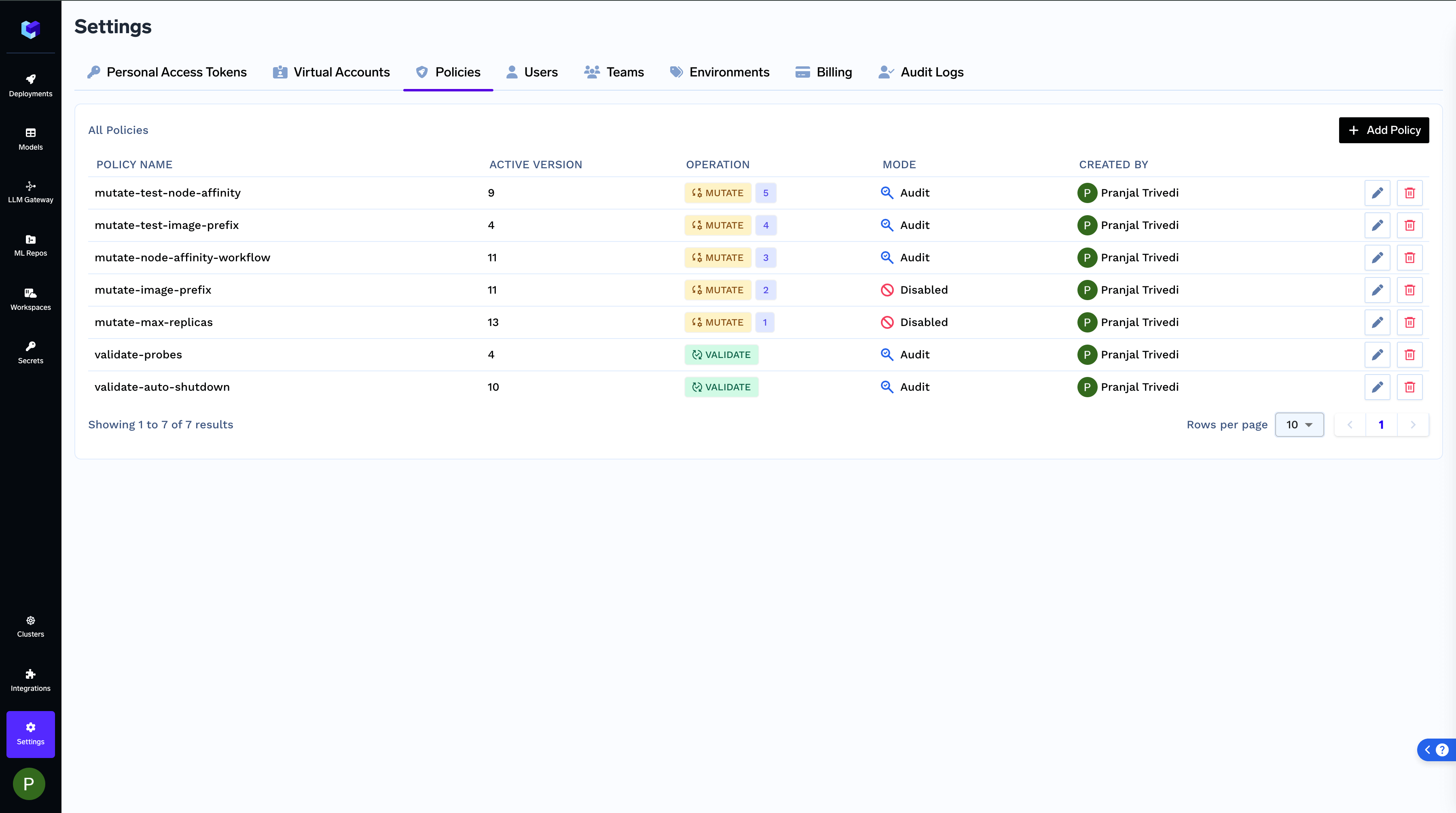
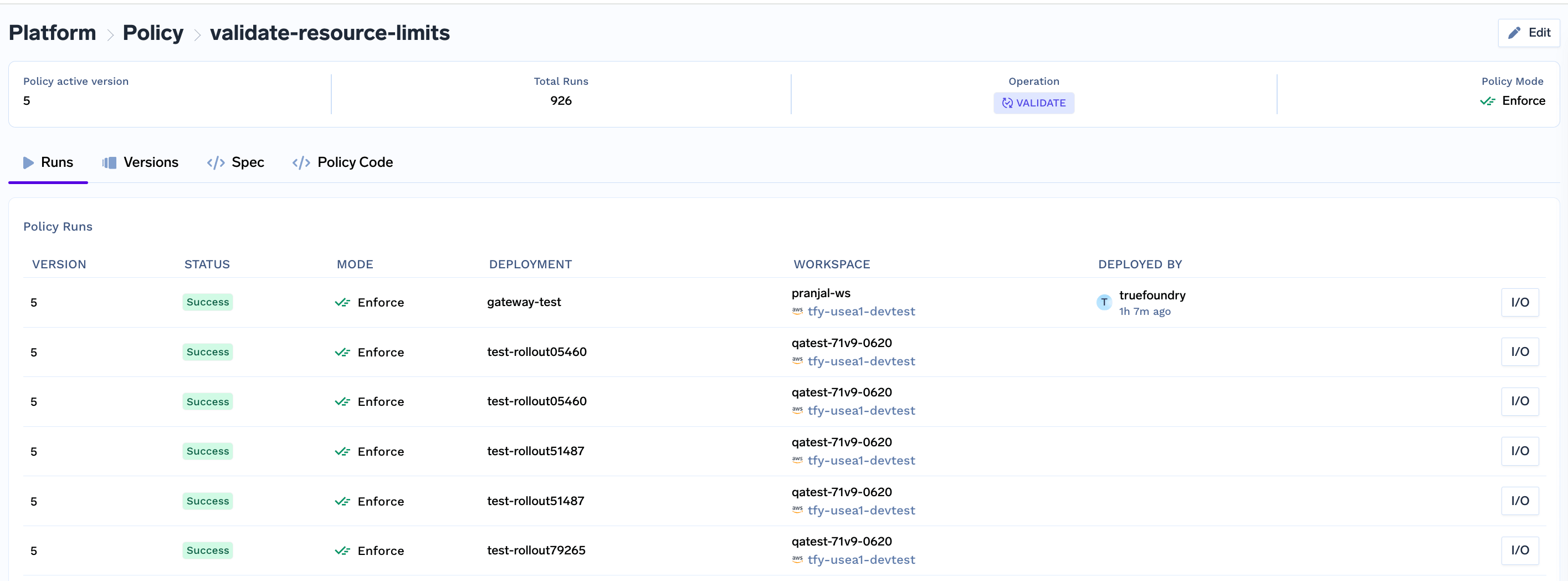
You can find all policies registered and see their specific runs:
 ## Understanding the policy code
To write the policy code, you will need to implement a function in typescript that defines what the policy does. The code varies based on if you are writing a validation or mutation policy.
### Validation Policy
We need to implement a function `validate` that takes in a `ValidationInput` object and throws a `ValidationError` if the policy is violated. If the policy is not violated, the function should return nothing.
Here is a sample policy which enforces auto-shutdown for all services:
```typescript TypeScript {3} lines theme={"dark"}
import { ValidationInput, ValidationError } from '@src/types';
export function validate(validationInput: ValidationInput): void {
const { manifest } = validationInput;
if(manifest.type !== 'service') return;
if (!manifest.auto_shutdown) {
throw new ValidationError(
'Auto shutdown is required for services'
);
}
}
```
The ValidationInput object has the following fields:
* `manifest`: The manifest of the deployment that is being created.
* `context`: The context of the deployment that is being created. `context` has the following fields:
* `environment`: This field tells you about the deployment target - whether it's production or development, cost-optimized, etc.
* `createdByUser`: The user that is creating the deployment.
* `activeDeployment`: The manifest of the currently running version (if any).
You can use the `context` object to write more complex policies. Here are a few examples showing how to use the `context` object:
```typescript lines theme={"dark"}
import { ValidationInput, ValidationError } from '@src/types';
export function validate(validationInput: ValidationInput): void {
const { manifest, context } = validationInput;
const environment = context.environment;
const isProduction = environment?.manifest.isProduction;
// if the environment is not production return
if (!isProduction) return;
// if the application is not a service or async service return
if (manifest.type !== 'service' && manifest.type !== 'async-service') return;
// if the service does not have both liveness and readiness probes throw an error
if (!manifest.liveness_probe || !manifest.readiness_probe) {
throw new ValidationError(
'Liveness and Readiness probes are required for production services'
);
}
}
```
```typescript lines theme={"dark"}
import { ValidationInput, ValidationError } from '@src/types';
export function validate(validationInput: ValidationInput): void {
const { context } = validationInput;
const environment = context.environment;
const isProduction = environment?.manifest.isProduction;
// This policy only applies to production deployments
if (!isProduction) return;
if (context.createdByUser.subjectType !== 'serviceaccount') {
throw new ValidationError(
'Production deployments must be made using a service account'
);
}
}
```
### Mutation Policy
We need to implement a function `mutate` that takes in a `MutationInput` object and returns a `MutationOutput` object. The `MutationOutput` object contains the mutated manifests.
Here is a sample mutation policy which mutates the registry for the images to private JFrog repository:
```typescript TypeScript lines theme={"dark"}
import { MutationInput, MutationOutput } from '@src/types';
export function mutate(mutationInput: MutationInput): MutationOutput {
const { generatedK8sManifests } = mutationInput;
if (generatedK8sManifests) {
for (const manifest of generatedK8sManifests) {
if (manifest.kind === 'Deployment') {
manifest.spec.template.spec.containers.forEach((container: any) => {
if (container.image.startsWith('tfy.jfrog.io')) {
container.image = container.image.replace(
'tfy.jfrog.io',
'private.tfy.jfrog.io'
);
}
});
}
}
}
return { generatedK8sManifests };
}
```
The MutationInput object has the following fields:
* `generatedK8sManifests`: The generated Kubernetes manifests for the deployment which would be applied to the Kubernetes cluster.
* `context`: The context of the deployment that is being created. `context` has the following fields:
* `environment`: This field tells you about the deployment target - whether it's production or development, cost-optimized, etc.
* `createdByUser`: The user that is creating the deployment.
* `activeDeployment`: The manifest of the currently running version (if any).
* `inputManifest`: The TrueFoundry manifest of the deployment that is being created.
Here is an example of a mutation policy that only applies to notebooks. You can use the `inputManifest` in the `context` object to see if this deplotment is of type notebook and then only do the mutation.
```typescript TypeScript lines theme={"dark"}
import { MutationInput, MutationOutput } from '@src/types';
export function mutate(mutationInput: MutationInput): MutationOutput {
const { generatedK8sManifests, context } = mutationInput;
// This policy only applies to notebooks
if (context.inputManifest.type !== 'notebook') return;
if (generatedK8sManifests) {
// core mutation logic here
}
return { generatedK8sManifests };
}
```
## Write and Test your policy locally
Its easy to test your policy locally before registering it in TrueFoundry. To write your own policy and test it locally, follow the steps below:
1. Clone the repository: [https://github.com/truefoundry/tfy-typescript-policy](https://github.com/truefoundry/tfy-typescript-policy). You can find policy code examples for common use cases in this folder: [https://github.com/truefoundry/tfy-typescript-policy/tree/main/examples](https://github.com/truefoundry/tfy-typescript-policy/tree/main/examples)
2. Write your policy logic in `src/policy.ts`.
3. Import required models from `src/models.ts`. Use type definitions from `src/types.ts` to ensure type-safe code.
4. Test your policy locally using:
```
npx ts-node local_run.ts
```
5. When creating/updating your policy on the TrueFoundry portal, only provide the contents of policy.ts in the Policy Code input field.
## Understanding the policy code
To write the policy code, you will need to implement a function in typescript that defines what the policy does. The code varies based on if you are writing a validation or mutation policy.
### Validation Policy
We need to implement a function `validate` that takes in a `ValidationInput` object and throws a `ValidationError` if the policy is violated. If the policy is not violated, the function should return nothing.
Here is a sample policy which enforces auto-shutdown for all services:
```typescript TypeScript {3} lines theme={"dark"}
import { ValidationInput, ValidationError } from '@src/types';
export function validate(validationInput: ValidationInput): void {
const { manifest } = validationInput;
if(manifest.type !== 'service') return;
if (!manifest.auto_shutdown) {
throw new ValidationError(
'Auto shutdown is required for services'
);
}
}
```
The ValidationInput object has the following fields:
* `manifest`: The manifest of the deployment that is being created.
* `context`: The context of the deployment that is being created. `context` has the following fields:
* `environment`: This field tells you about the deployment target - whether it's production or development, cost-optimized, etc.
* `createdByUser`: The user that is creating the deployment.
* `activeDeployment`: The manifest of the currently running version (if any).
You can use the `context` object to write more complex policies. Here are a few examples showing how to use the `context` object:
```typescript lines theme={"dark"}
import { ValidationInput, ValidationError } from '@src/types';
export function validate(validationInput: ValidationInput): void {
const { manifest, context } = validationInput;
const environment = context.environment;
const isProduction = environment?.manifest.isProduction;
// if the environment is not production return
if (!isProduction) return;
// if the application is not a service or async service return
if (manifest.type !== 'service' && manifest.type !== 'async-service') return;
// if the service does not have both liveness and readiness probes throw an error
if (!manifest.liveness_probe || !manifest.readiness_probe) {
throw new ValidationError(
'Liveness and Readiness probes are required for production services'
);
}
}
```
```typescript lines theme={"dark"}
import { ValidationInput, ValidationError } from '@src/types';
export function validate(validationInput: ValidationInput): void {
const { context } = validationInput;
const environment = context.environment;
const isProduction = environment?.manifest.isProduction;
// This policy only applies to production deployments
if (!isProduction) return;
if (context.createdByUser.subjectType !== 'serviceaccount') {
throw new ValidationError(
'Production deployments must be made using a service account'
);
}
}
```
### Mutation Policy
We need to implement a function `mutate` that takes in a `MutationInput` object and returns a `MutationOutput` object. The `MutationOutput` object contains the mutated manifests.
Here is a sample mutation policy which mutates the registry for the images to private JFrog repository:
```typescript TypeScript lines theme={"dark"}
import { MutationInput, MutationOutput } from '@src/types';
export function mutate(mutationInput: MutationInput): MutationOutput {
const { generatedK8sManifests } = mutationInput;
if (generatedK8sManifests) {
for (const manifest of generatedK8sManifests) {
if (manifest.kind === 'Deployment') {
manifest.spec.template.spec.containers.forEach((container: any) => {
if (container.image.startsWith('tfy.jfrog.io')) {
container.image = container.image.replace(
'tfy.jfrog.io',
'private.tfy.jfrog.io'
);
}
});
}
}
}
return { generatedK8sManifests };
}
```
The MutationInput object has the following fields:
* `generatedK8sManifests`: The generated Kubernetes manifests for the deployment which would be applied to the Kubernetes cluster.
* `context`: The context of the deployment that is being created. `context` has the following fields:
* `environment`: This field tells you about the deployment target - whether it's production or development, cost-optimized, etc.
* `createdByUser`: The user that is creating the deployment.
* `activeDeployment`: The manifest of the currently running version (if any).
* `inputManifest`: The TrueFoundry manifest of the deployment that is being created.
Here is an example of a mutation policy that only applies to notebooks. You can use the `inputManifest` in the `context` object to see if this deplotment is of type notebook and then only do the mutation.
```typescript TypeScript lines theme={"dark"}
import { MutationInput, MutationOutput } from '@src/types';
export function mutate(mutationInput: MutationInput): MutationOutput {
const { generatedK8sManifests, context } = mutationInput;
// This policy only applies to notebooks
if (context.inputManifest.type !== 'notebook') return;
if (generatedK8sManifests) {
// core mutation logic here
}
return { generatedK8sManifests };
}
```
## Write and Test your policy locally
Its easy to test your policy locally before registering it in TrueFoundry. To write your own policy and test it locally, follow the steps below:
1. Clone the repository: [https://github.com/truefoundry/tfy-typescript-policy](https://github.com/truefoundry/tfy-typescript-policy). You can find policy code examples for common use cases in this folder: [https://github.com/truefoundry/tfy-typescript-policy/tree/main/examples](https://github.com/truefoundry/tfy-typescript-policy/tree/main/examples)
2. Write your policy logic in `src/policy.ts`.
3. Import required models from `src/models.ts`. Use type definitions from `src/types.ts` to ensure type-safe code.
4. Test your policy locally using:
```
npx ts-node local_run.ts
```
5. When creating/updating your policy on the TrueFoundry portal, only provide the contents of policy.ts in the Policy Code input field.