> ## Documentation Index
> Fetch the complete documentation index at: https://www.truefoundry.com/llms.txt
> Use this file to discover all available pages before exploring further.
# PII/PHI Detection Guardrail
> Detect and redact PII or PHI in LLM inputs, outputs, and MCP tool calls using the built-in TrueFoundry guardrail.
This guide explains how to use TrueFoundry's built-in **PII/PHI Detection** guardrail to detect and redact personally identifiable information or protected health information in LLM interactions and MCP tool invocations.
**Implementation:** This guardrail is powered by **Azure AI Language PII Detection** and runs on **TrueFoundry-managed** infrastructure — no third-party API keys or setup required. For vendor-hosted PII services using your own credentials (Azure PII, Google Model Armor, and others) or self-hosted redaction (for example via [Custom Guardrails](/docs/ai-gateway/custom-guardrails)), see [Supported Guardrails](/docs/ai-gateway/guardrails-overview#supported-guardrails) and [Guardrails Overview](/docs/ai-gateway/guardrails-overview).
PII/PHI Detection can be applied to **all four guardrail hooks**: LLM Input, LLM Output, MCP Pre Tool, and MCP Post Tool—providing comprehensive PII/PHI protection across your entire AI workflow.
## What is PII Detection?
PII Detection is a built-in TrueFoundry guardrail that identifies and redacts personally identifiable information or protected health information from text content. It is powered by **Azure AI Language PII Detection** under the hood and understands context to detect PII/PHI with high accuracy even when the data doesn't follow a strict format. The guardrail is fully managed by TrueFoundry — no external credentials or setup required.
### Key Features
1. **Context-Aware Detection**: Detects PII/PHI with contextual understanding, providing higher accuracy and fewer false positives than simple pattern matching.
2. **Configurable Entity Categories**: Select which types of PII/PHI to detect from a comprehensive set of entity categories from basic identifiers like names and emails to financial and identity document numbers.
3. **Automatic Redaction**: Operates in mutate mode, detected PII/PHI is automatically redacted in the content, allowing the request to continue with sensitive data removed.
## Adding PII/PHI Detection Guardrail
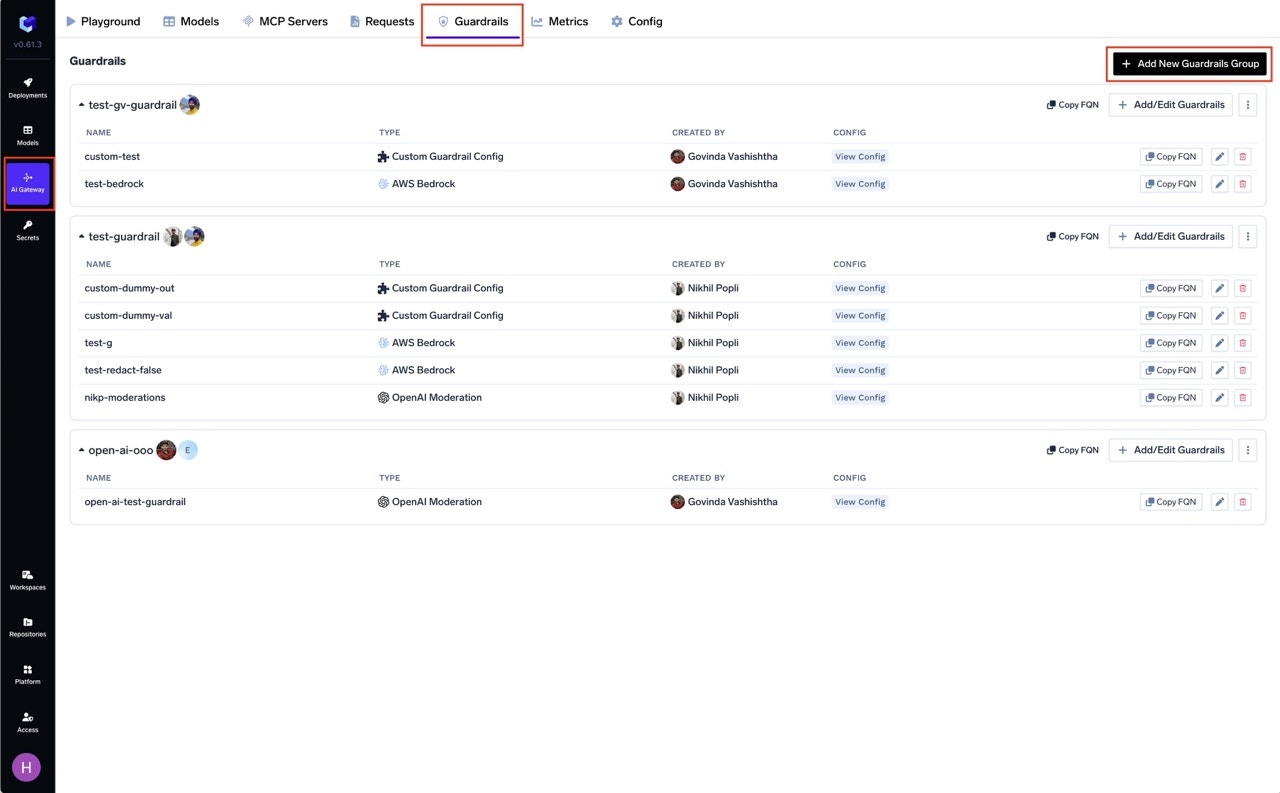
Go to the AI Gateway dashboard and navigate to the **Guardrails** section.
Create a new guardrails group or select an existing one where you want to add the PII/PHI Detection guardrail.
Click on **Add Guardrail** and select **PII/PHI Detection** from the TrueFoundry Guardrails section.
 Fill in the configuration form:
* **Name**: Enter a unique name for this guardrail configuration (e.g., `pii-detection`)
* **PII Categories**: Select the entity categories you want to detect or select all categories(Default).
* **Enforcing Strategy**: Choose how violations are handled
Fill in the configuration form:
* **Name**: Enter a unique name for this guardrail configuration (e.g., `pii-detection`)
* **PII Categories**: Select the entity categories you want to detect or select all categories(Default).
* **Enforcing Strategy**: Choose how violations are handled
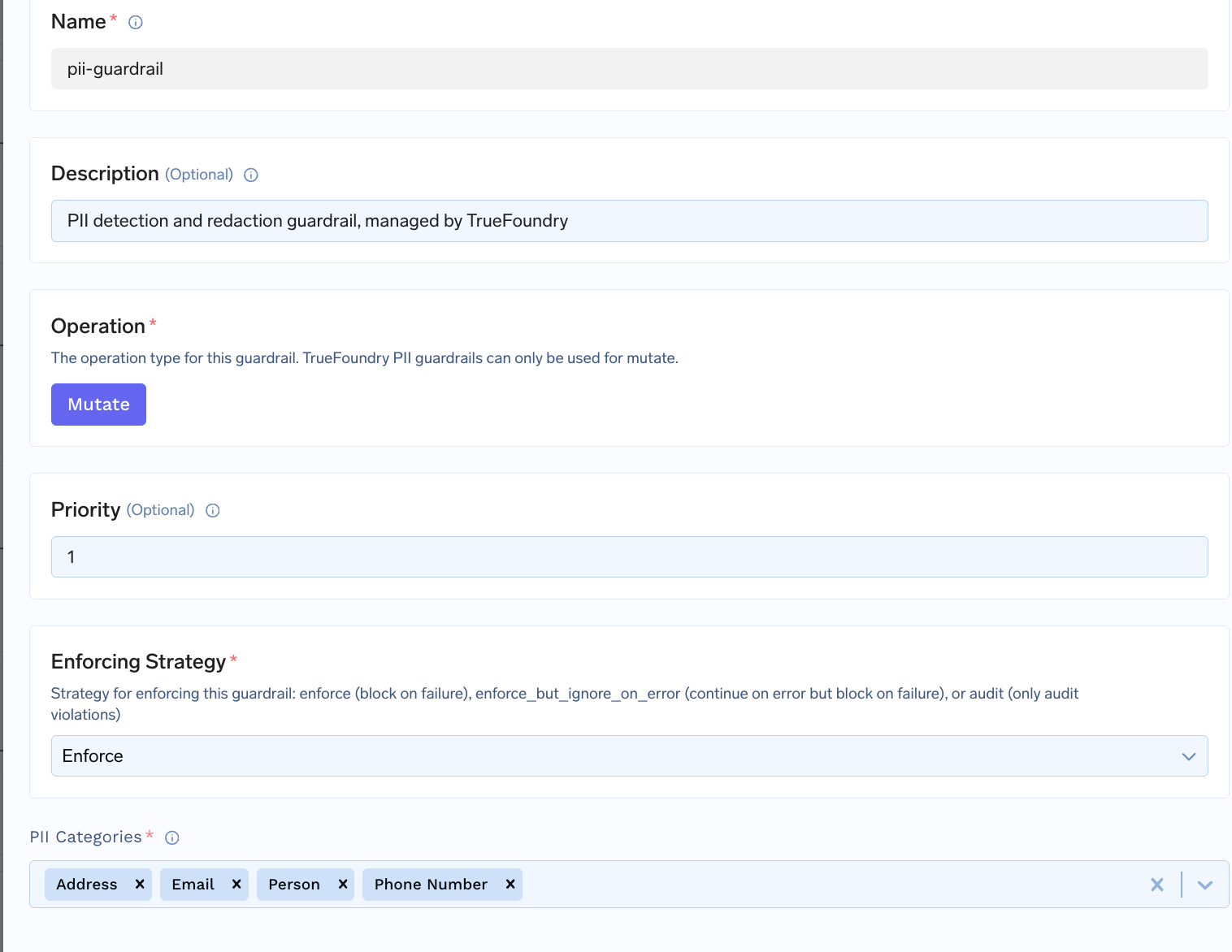 Click **Save** to add the guardrail to your group.
## Configuration Options
| Parameter | Description | Default |
| ---------------------- | -------------------------------------------------------- | --------- |
| **Name** | Unique identifier for this guardrail | Required |
| **Operation** | `mutate` only (detects and redacts PII) | `mutate` |
| **Priority** | Execution order for mutate guardrails (lower runs first) | `1` |
| **Enforcing Strategy** | `enforce`, `enforce_but_ignore_on_error` | `enforce` |
| **PII Categories** | Array of entity categories to detect | Required |
PII Detection only supports **mutate** mode — it always redacts detected entities. See [Guardrails Overview](/docs/ai-gateway/guardrails-overview#operation-modes) for details on Operation Modes and Enforcing Strategy.
## How It Works
When content passes through the guardrail, detected PII entities are replaced with asterisks in the output, preserving the rest of the text.
**Example**:
```
Input: "Call our office at 312-555-1234, or send an email to support@contoso.com"
Output: "Call our office at ************, or send an email to *******************"
```
```
Input: "My name is John Smith and I live at 742 Evergreen Terrace, Springfield"
Output: "My name is ********** and I live at *************************************"
```
## Use Cases
### Recommended Hook Usage
| Hook | Use Case |
| ----------------- | -------------------------------------------------------------- |
| **LLM Input** | Redact PII from user messages before they reach the LLM |
| **LLM Output** | Redact PII from LLM-generated responses |
| **MCP Pre Tool** | Remove PII from tool parameters before invocation |
| **MCP Post Tool** | Redact PII from tool outputs (database results, file contents) |
Click **Save** to add the guardrail to your group.
## Configuration Options
| Parameter | Description | Default |
| ---------------------- | -------------------------------------------------------- | --------- |
| **Name** | Unique identifier for this guardrail | Required |
| **Operation** | `mutate` only (detects and redacts PII) | `mutate` |
| **Priority** | Execution order for mutate guardrails (lower runs first) | `1` |
| **Enforcing Strategy** | `enforce`, `enforce_but_ignore_on_error` | `enforce` |
| **PII Categories** | Array of entity categories to detect | Required |
PII Detection only supports **mutate** mode — it always redacts detected entities. See [Guardrails Overview](/docs/ai-gateway/guardrails-overview#operation-modes) for details on Operation Modes and Enforcing Strategy.
## How It Works
When content passes through the guardrail, detected PII entities are replaced with asterisks in the output, preserving the rest of the text.
**Example**:
```
Input: "Call our office at 312-555-1234, or send an email to support@contoso.com"
Output: "Call our office at ************, or send an email to *******************"
```
```
Input: "My name is John Smith and I live at 742 Evergreen Terrace, Springfield"
Output: "My name is ********** and I live at *************************************"
```
## Use Cases
### Recommended Hook Usage
| Hook | Use Case |
| ----------------- | -------------------------------------------------------------- |
| **LLM Input** | Redact PII from user messages before they reach the LLM |
| **LLM Output** | Redact PII from LLM-generated responses |
| **MCP Pre Tool** | Remove PII from tool parameters before invocation |
| **MCP Post Tool** | Redact PII from tool outputs (database results, file contents) |