> ## Documentation Index
> Fetch the complete documentation index at: https://www.truefoundry.com/llms.txt
> Use this file to discover all available pages before exploring further.
# Secrets Detection Guardrail
> Detect and redact sensitive credentials and secrets in LLM inputs/outputs and MCP tool invocations using TrueFoundry's built-in Secrets Detection guardrail.
This guide explains how to use TrueFoundry's built-in **Secrets Detection** guardrail to protect sensitive credentials from being exposed in LLM interactions and MCP tool invocations.
Secrets Detection can be applied to **all four guardrail hooks**: LLM Input, LLM Output, MCP Pre Tool, and MCP Post Tool—providing comprehensive protection across your entire AI workflow.
## What is Secrets Detection?
Secrets Detection is a built-in TrueFoundry guardrail that identifies and handles sensitive credentials and secrets in text content. It runs directly within the AI Gateway without requiring external API calls, providing fast and cost-effective secret detection.
### Key Features
1. **Comprehensive Secret Recognition**: Detects a wide range of sensitive credentials including:
* AWS access keys and secret keys
* API keys (OpenAI, Anthropic, Google, etc.)
* JWT tokens and bearer tokens
* Private keys (RSA, SSH, PGP)
* Database connection strings
* OAuth tokens and refresh tokens
* Generic high-entropy strings that may be secrets
2. **Flexible Operation Modes**:
* **Validate**: Detect secrets and block requests/responses that contain them
* **Mutate**: Detect secrets and redact them with configurable replacement text, allowing the request to continue
3. **Zero External Dependencies**: Runs entirely within the AI Gateway with no external API calls, ensuring low latency and no additional costs.
## Adding Secrets Detection Guardrail
To add Secrets Detection to your TrueFoundry setup, follow these steps:
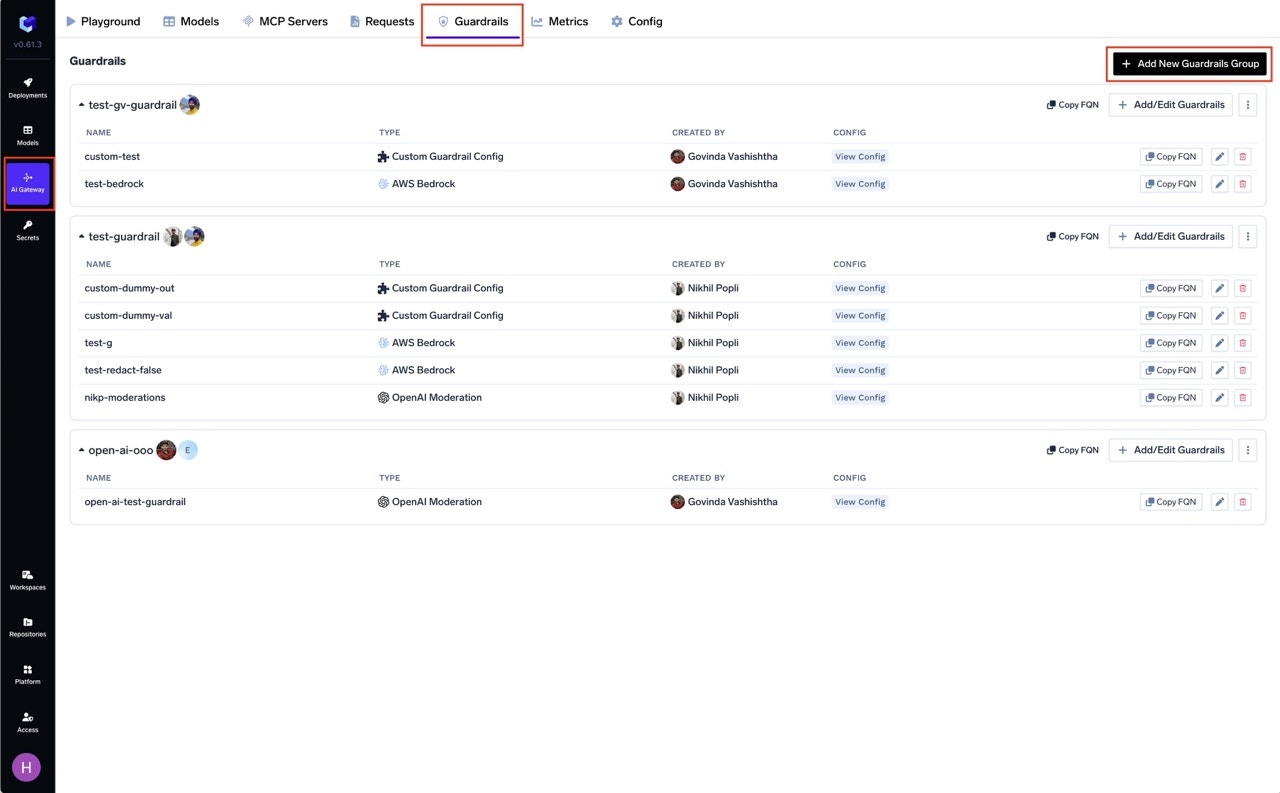
Go to the AI Gateway dashboard and navigate to the **Guardrails** section.
Create a new guardrails group or select an existing one where you want to add the Secrets Detection guardrail.
Click on **Add Guardrail** and select **Secrets Detection** from the TrueFoundry Guardrails section.
 Fill in the configuration form:
* **Name**: Enter a unique name for this guardrail configuration (e.g., `secrets-detection`)
* **Description**: Optional description for this guardrail (default: "Detects likely credentials/secrets (AWS keys, API keys, JWT tokens, private keys)")
* **Operation**: Choose the operation mode:
* `validate`: Detect and block requests containing secrets
* `mutate`: Detect and redact secrets, allowing the request to continue
* **Redaction Text** (for mutate mode): Text to replace detected secrets (default: `***REDACTED***`)
Click **Save** to add the guardrail to your group.
## Configuration Options
| Parameter | Description | Default |
| ---------------------- | -------------------------------------------------------- | ---------------- |
| **Name** | Unique identifier | Required |
| **Operation** | `validate` (block) or `mutate` (redact) | `validate` |
| **Priority** | Execution order for mutate guardrails (lower runs first) | `1` |
| **Enforcing Strategy** | `enforce`, `enforce_but_ignore_on_error`, or `audit` | `enforce` |
| **Redaction Text** | Replacement text (mutate mode only) | `***REDACTED***` |
See [Guardrails Overview](/docs/ai-gateway/guardrails-overview#operation-modes) for details on Operation Modes and Enforcing Strategy.
## How It Works
### Validate Mode
When configured in **validate** mode, the guardrail scans the content for secrets and blocks the request if any are detected.
**Example**:
```
Input: "Use this API key: sk-abc123xyz456 to authenticate"
Result: Request blocked with error message indicating secret detected
```
### Mutate Mode
When configured in **mutate** mode, the guardrail scans the content for secrets and replaces them with the configured redaction text.
**Example**:
```
Input: "Use this API key: sk-abc123xyz456 to authenticate"
Output: "Use this API key: ***REDACTED*** to authenticate"
```
## Detected Secret Types
The Secrets Detection guardrail identifies a comprehensive set of secret patterns across multiple categories. Below is the complete list of detected secret types.
### Cloud Provider Credentials
| Secret Type | Pattern Description | Example Format |
| --------------------------------------- | ------------------------------------------- | ------------------------------------------------------------- |
| **AWS Access Key ID** | AWS access key identifiers | `AKIA` followed by 16 alphanumeric characters |
| **AWS Secret Access Key** | AWS secret keys with contextual keywords | 40-character base64 string near `secret` or `access` keywords |
| **Google API Key** | Google Cloud API keys | `AIza` followed by 35 characters |
| **Google OAuth Token** | Google OAuth access tokens | `ya29.` followed by 20+ characters |
| **Azure SAS Token** | Azure Shared Access Signature tokens | URL parameters with `sv=` and `sig=` |
| **Azure Storage Account Key** | Azure storage account keys | `AccountKey=` followed by 88-character base64 string |
| **Azure Storage Connection String** | Full Azure storage connection strings | `DefaultEndpointsProtocol=...AccountKey=...` |
| **Digital Ocean Personal Access Token** | DO API tokens | `dop_v1_` followed by 64 hex characters |
| **Databricks Personal Access Token** | Databricks API tokens | `dapi` followed by 32 alphanumeric characters |
| **Cloudant Authenticated URL** | IBM Cloudant database URLs with credentials | Cloudant URLs containing embedded credentials |
| **Firebase Cloud Messaging Server Key** | FCM server keys | `AAAA` prefix with 140+ character token |
| **SoftLayer API Token** | IBM SoftLayer API tokens | 64-character tokens in SoftLayer API URLs |
### AI/ML Provider API Keys
| Secret Type | Pattern Description | Example Format |
| ------------------------- | ------------------------------- | ----------------------------------------------------------------- |
| **OpenAI API Key** | OpenAI API secret keys | `sk-` prefix with `T3BlbkFJ` marker, or `sk-` with 20+ characters |
| **Anthropic API Key** | Anthropic Claude API keys | `sk-ant-api` followed by version and 90+ characters |
| **Airtable Secret Token** | Airtable personal access tokens | `pat` followed by 14 characters, dot, and 64 hex characters |
| **Groq API Key** | Groq Cloud API keys | `gsk_` followed by 52 alphanumeric characters |
### Code Repository & Package Manager Tokens
| Secret Type | Pattern Description | Example Format |
| ---------------------------------- | ------------------------------------------ | ------------------------------------------------------------------- |
| **GitHub Fine-Grained PAT** | GitHub fine-grained personal access tokens | `github_pat_` followed by 20-255 characters |
| **GitHub Personal Token** | GitHub classic personal access tokens | `ghp_`, `gho_`, `ghu_`, `ghs_`, or `ghr_` followed by 36 characters |
| **GitLab Token** | Various GitLab token types | `glpat-`, `gldt-`, `glft-`, `glsoat-`, `glrt-`, `GR1348941`, etc. |
| **NPM Token** | NPM authentication tokens | `npm_` followed by 30+ characters |
| **NPM .npmrc Auth Token** | Tokens in .npmrc configuration | `_authToken=` with npm token or UUID format |
| **PyPI Token** | Python Package Index tokens | `pypi-` followed by base64 identifier and 70+ characters |
| **Artifactory Credential** | JFrog Artifactory API keys | `AKC` followed by 10+ alphanumeric characters |
| **Artifactory Encrypted Password** | Encrypted Artifactory passwords | `AP` followed by hex digit and 8+ characters |
### Communication & Collaboration Platforms
| Secret Type | Pattern Description | Example Format |
| ----------------------- | --------------------------------- | --------------------------------------------------- |
| **Slack Token** | Slack API tokens (various types) | `xoxb-`, `xoxa-`, `xoxp-`, `xoxr-`, `xoxs-` formats |
| **Slack Bot Token** | Slack bot authentication tokens | `xox[abpors]-` followed by numeric segments |
| **Slack Webhook URL** | Slack incoming webhook URLs | `https://hooks.slack.com/services/T.../B.../...` |
| **Discord Bot Token** | Discord bot authentication tokens | Three-part token with `M`, `N`, or `O` prefix |
| **Discord Webhook URL** | Discord webhook URLs | `https://discord.com/api/webhooks/...` |
| **Telegram Bot Token** | Telegram bot API tokens | 8-10 digit bot ID followed by 35-character token |
### Payment & E-Commerce
| Secret Type | Pattern Description | Example Format |
| -------------------------- | --------------------------------- | ------------------------------------------------------------- |
| **Stripe Publishable Key** | Stripe public API keys | `pk_live_` followed by 20+ characters |
| **Stripe Secret Key** | Stripe secret/restricted API keys | `sk_live_` or `rk_live_` followed by 24+ characters |
| **Square Access Token** | Square API access tokens | `EAAA` followed by 60 characters |
| **Square OAuth Secret** | Square OAuth client secrets | `sq0csp-` followed by 43 characters |
| **Shopify Token** | Shopify API tokens | `shpat_`, `shppa_`, or `shpss_` followed by 32 hex characters |
### Database Connection Strings
| Secret Type | Pattern Description | Example Format |
| -------------------------------- | ------------------------------------------- | --------------------------------- |
| **MongoDB Connection String** | MongoDB connection URLs with credentials | `mongodb://user:password@host` |
| **MySQL Connection String** | MySQL connection URLs with credentials | `mysql://user:password@host` |
| **PostgreSQL Connection String** | PostgreSQL connection URLs with credentials | `postgresql://user:password@host` |
### Private Keys & Certificates
| Secret Type | Pattern Description | Example Format |
| ------------------------------ | --------------------------------------- | -------------------------------------------- |
| **Private Key (Generic)** | RSA, EC, DSA, or encrypted private keys | `-----BEGIN PRIVATE KEY-----` blocks |
| **RSA/DSA/EC Private Key** | Specific algorithm private keys | `-----BEGIN RSA PRIVATE KEY-----` blocks |
| **OpenSSH Private Key** | OpenSSH format private keys | `-----BEGIN OPENSSH PRIVATE KEY-----` blocks |
| **PGP Private Key** | PGP/GPG private key blocks | `-----BEGIN PGP PRIVATE KEY BLOCK-----` |
| **SSH2 Encrypted Private Key** | SSH2 encrypted private keys | `-----BEGIN SSH2 ENCRYPTED PRIVATE KEY-----` |
| **PuTTY Private Key** | PuTTY PPK format private keys | `PuTTY-User-Key-File-` header |
| **Certificate** | X.509 certificates | `-----BEGIN CERTIFICATE-----` blocks |
### Authentication Tokens & Credentials
| Secret Type | Pattern Description | Example Format |
| -------------------------- | ------------------------------------ | ----------------------------------------------------- |
| **JWT Token** | JSON Web Tokens | `eyJ...` three-part base64 structure |
| **Basic Auth Credentials** | Credentials embedded in URLs | `://username:password@` in URLs |
| **Password** | Password assignments in code/config | `password=`, `pass=`, `pwd=` with quoted values |
| **Generic Secret** | Generic secret/token/key assignments | `secret=`, `token=`, `key=` with 20+ character values |
### Other Services
| Secret Type | Pattern Description | Example Format |
| ---------------------------- | ---------------------------------- | --------------------------------------------------------- |
| **Twilio Account SID** | Twilio account identifiers | `AC` followed by 32 hex characters |
| **Twilio API Key SID** | Twilio API key identifiers | `SK` followed by 32 hex characters |
| **Twilio Auth Token** | Twilio authentication tokens | 32-character hex tokens with `auth_token` context |
| **SendGrid API Key** | SendGrid email API keys | `SG.` followed by 22 and 43 character segments |
| **Mailchimp API Key** | Mailchimp API keys | 32 hex characters followed by `-us` and datacenter number |
| **Mapbox Access Token** | Mapbox API tokens | `pk.` or `sk.` followed by 30+ characters |
| **Notion Integration Token** | Notion API integration tokens | `secret_` followed by 32+ characters |
| **Linear API Key** | Linear project management API keys | `lin_api_` followed by 40+ characters |
| **Dropbox Access Token** | Dropbox API tokens | `sl.` followed by 120+ characters |
| **Facebook Access Token** | Facebook/Meta API tokens | `EAA` followed by 30+ characters |
### Contextual Pattern Detection
In addition to specific patterns, Secrets Detection also identifies secrets based on contextual clues:
| Pattern Type | Description |
| ----------------------------- | ----------------------------------------------------------------------------------------------------------------------------------------------------------- |
| **Hex Secret (32+ chars)** | Hexadecimal strings near keywords like `secret`, `api_key`, `token`, `password`, `credential`, `auth_token`, `private_key`, `signing_key`, `encryption_key` |
| **Base64 Secret (24+ chars)** | Base64-encoded strings near the same contextual keywords |
Contextual patterns help detect secrets that don't follow a specific format but appear in contexts that suggest they are sensitive credentials.
## Use Cases
Secrets Detection can be applied to any of the four guardrail hooks depending on your use case:
### Recommended Hook Usage
| Hook | Use Case |
| ----------------- | ------------------------------------------------------------------------------ |
| **LLM Input** | Prevent users from accidentally sending credentials to LLMs |
| **LLM Output** | Ensure LLM responses don't leak sensitive information |
| **MCP Pre Tool** | Detect secrets in tool parameters before invocation |
| **MCP Post Tool** | Detect and redact secrets in tool outputs (file contents, API responses, etc.) |
### LLM Input Hook
Prevent users from accidentally sending sensitive credentials to LLMs:
```bash theme={"dark"}
curl -X POST "{GATEWAY_BASE_URL}/chat/completions" \
-H "Authorization: Bearer YOUR_API_KEY" \
-H "Content-Type: application/json" \
-H 'X-TFY-METADATA: {}' \
-H 'X-TFY-GUARDRAILS: {"llm_input_guardrails":["my-guardrail-group/secrets-detection"],"llm_output_guardrails":[]}' \
-H 'X-TFY-LOGGING-CONFIG: {"enabled": true}' \
-d '{
"model": "openai-main/gpt-4o-mini",
"messages": [
{"role": "system", "content": "You are an AI assistant."},
{"role": "user", "content": "Help me debug this code that uses API key sk-abc123xyz"}
],
"max_tokens": 2500,
"stream": true
}'
```
### LLM Output Hook
Ensure LLM responses don't leak sensitive information:
```bash theme={"dark"}
curl -X POST "{GATEWAY_BASE_URL}/chat/completions" \
-H "Authorization: Bearer YOUR_API_KEY" \
-H "Content-Type: application/json" \
-H 'X-TFY-METADATA: {}' \
-H 'X-TFY-GUARDRAILS: {"llm_input_guardrails":[],"llm_output_guardrails":["my-guardrail-group/secrets-detection"]}' \
-H 'X-TFY-LOGGING-CONFIG: {"enabled": true}' \
-d '{
"model": "openai-main/gpt-4o-mini",
"messages": [
{"role": "system", "content": "You are an AI assistant."},
{"role": "user", "content": "Generate an example AWS configuration file"}
],
"max_tokens": 2500,
"stream": true
}'
```
### MCP Tool Hooks
```yaml theme={"dark"}
name: guardrails-control
type: gateway-guardrails-config
rules:
- id: mcp-secrets-protection
when:
target:
operator: or
conditions:
mcpServers:
values:
- file-reader
condition: in
subjects:
operator: and
conditions:
in:
- team:engineering
not_in:
- user:security-admin@example.com
llm_input_guardrails: []
llm_output_guardrails: []
mcp_tool_pre_invoke_guardrails: []
mcp_tool_post_invoke_guardrails:
- my-guardrail-group/secrets-detection
```
For maximum protection, apply Secrets Detection to **all four hooks** to catch secrets from user input, LLM output, and MCP tool results.
## Best Practices
Use **mutate mode** to redact secrets while preserving request flow—useful for logging scenarios.
High-entropy strings (UUIDs, encoded data) may trigger false positives. Test with your specific data.
Fill in the configuration form:
* **Name**: Enter a unique name for this guardrail configuration (e.g., `secrets-detection`)
* **Description**: Optional description for this guardrail (default: "Detects likely credentials/secrets (AWS keys, API keys, JWT tokens, private keys)")
* **Operation**: Choose the operation mode:
* `validate`: Detect and block requests containing secrets
* `mutate`: Detect and redact secrets, allowing the request to continue
* **Redaction Text** (for mutate mode): Text to replace detected secrets (default: `***REDACTED***`)
Click **Save** to add the guardrail to your group.
## Configuration Options
| Parameter | Description | Default |
| ---------------------- | -------------------------------------------------------- | ---------------- |
| **Name** | Unique identifier | Required |
| **Operation** | `validate` (block) or `mutate` (redact) | `validate` |
| **Priority** | Execution order for mutate guardrails (lower runs first) | `1` |
| **Enforcing Strategy** | `enforce`, `enforce_but_ignore_on_error`, or `audit` | `enforce` |
| **Redaction Text** | Replacement text (mutate mode only) | `***REDACTED***` |
See [Guardrails Overview](/docs/ai-gateway/guardrails-overview#operation-modes) for details on Operation Modes and Enforcing Strategy.
## How It Works
### Validate Mode
When configured in **validate** mode, the guardrail scans the content for secrets and blocks the request if any are detected.
**Example**:
```
Input: "Use this API key: sk-abc123xyz456 to authenticate"
Result: Request blocked with error message indicating secret detected
```
### Mutate Mode
When configured in **mutate** mode, the guardrail scans the content for secrets and replaces them with the configured redaction text.
**Example**:
```
Input: "Use this API key: sk-abc123xyz456 to authenticate"
Output: "Use this API key: ***REDACTED*** to authenticate"
```
## Detected Secret Types
The Secrets Detection guardrail identifies a comprehensive set of secret patterns across multiple categories. Below is the complete list of detected secret types.
### Cloud Provider Credentials
| Secret Type | Pattern Description | Example Format |
| --------------------------------------- | ------------------------------------------- | ------------------------------------------------------------- |
| **AWS Access Key ID** | AWS access key identifiers | `AKIA` followed by 16 alphanumeric characters |
| **AWS Secret Access Key** | AWS secret keys with contextual keywords | 40-character base64 string near `secret` or `access` keywords |
| **Google API Key** | Google Cloud API keys | `AIza` followed by 35 characters |
| **Google OAuth Token** | Google OAuth access tokens | `ya29.` followed by 20+ characters |
| **Azure SAS Token** | Azure Shared Access Signature tokens | URL parameters with `sv=` and `sig=` |
| **Azure Storage Account Key** | Azure storage account keys | `AccountKey=` followed by 88-character base64 string |
| **Azure Storage Connection String** | Full Azure storage connection strings | `DefaultEndpointsProtocol=...AccountKey=...` |
| **Digital Ocean Personal Access Token** | DO API tokens | `dop_v1_` followed by 64 hex characters |
| **Databricks Personal Access Token** | Databricks API tokens | `dapi` followed by 32 alphanumeric characters |
| **Cloudant Authenticated URL** | IBM Cloudant database URLs with credentials | Cloudant URLs containing embedded credentials |
| **Firebase Cloud Messaging Server Key** | FCM server keys | `AAAA` prefix with 140+ character token |
| **SoftLayer API Token** | IBM SoftLayer API tokens | 64-character tokens in SoftLayer API URLs |
### AI/ML Provider API Keys
| Secret Type | Pattern Description | Example Format |
| ------------------------- | ------------------------------- | ----------------------------------------------------------------- |
| **OpenAI API Key** | OpenAI API secret keys | `sk-` prefix with `T3BlbkFJ` marker, or `sk-` with 20+ characters |
| **Anthropic API Key** | Anthropic Claude API keys | `sk-ant-api` followed by version and 90+ characters |
| **Airtable Secret Token** | Airtable personal access tokens | `pat` followed by 14 characters, dot, and 64 hex characters |
| **Groq API Key** | Groq Cloud API keys | `gsk_` followed by 52 alphanumeric characters |
### Code Repository & Package Manager Tokens
| Secret Type | Pattern Description | Example Format |
| ---------------------------------- | ------------------------------------------ | ------------------------------------------------------------------- |
| **GitHub Fine-Grained PAT** | GitHub fine-grained personal access tokens | `github_pat_` followed by 20-255 characters |
| **GitHub Personal Token** | GitHub classic personal access tokens | `ghp_`, `gho_`, `ghu_`, `ghs_`, or `ghr_` followed by 36 characters |
| **GitLab Token** | Various GitLab token types | `glpat-`, `gldt-`, `glft-`, `glsoat-`, `glrt-`, `GR1348941`, etc. |
| **NPM Token** | NPM authentication tokens | `npm_` followed by 30+ characters |
| **NPM .npmrc Auth Token** | Tokens in .npmrc configuration | `_authToken=` with npm token or UUID format |
| **PyPI Token** | Python Package Index tokens | `pypi-` followed by base64 identifier and 70+ characters |
| **Artifactory Credential** | JFrog Artifactory API keys | `AKC` followed by 10+ alphanumeric characters |
| **Artifactory Encrypted Password** | Encrypted Artifactory passwords | `AP` followed by hex digit and 8+ characters |
### Communication & Collaboration Platforms
| Secret Type | Pattern Description | Example Format |
| ----------------------- | --------------------------------- | --------------------------------------------------- |
| **Slack Token** | Slack API tokens (various types) | `xoxb-`, `xoxa-`, `xoxp-`, `xoxr-`, `xoxs-` formats |
| **Slack Bot Token** | Slack bot authentication tokens | `xox[abpors]-` followed by numeric segments |
| **Slack Webhook URL** | Slack incoming webhook URLs | `https://hooks.slack.com/services/T.../B.../...` |
| **Discord Bot Token** | Discord bot authentication tokens | Three-part token with `M`, `N`, or `O` prefix |
| **Discord Webhook URL** | Discord webhook URLs | `https://discord.com/api/webhooks/...` |
| **Telegram Bot Token** | Telegram bot API tokens | 8-10 digit bot ID followed by 35-character token |
### Payment & E-Commerce
| Secret Type | Pattern Description | Example Format |
| -------------------------- | --------------------------------- | ------------------------------------------------------------- |
| **Stripe Publishable Key** | Stripe public API keys | `pk_live_` followed by 20+ characters |
| **Stripe Secret Key** | Stripe secret/restricted API keys | `sk_live_` or `rk_live_` followed by 24+ characters |
| **Square Access Token** | Square API access tokens | `EAAA` followed by 60 characters |
| **Square OAuth Secret** | Square OAuth client secrets | `sq0csp-` followed by 43 characters |
| **Shopify Token** | Shopify API tokens | `shpat_`, `shppa_`, or `shpss_` followed by 32 hex characters |
### Database Connection Strings
| Secret Type | Pattern Description | Example Format |
| -------------------------------- | ------------------------------------------- | --------------------------------- |
| **MongoDB Connection String** | MongoDB connection URLs with credentials | `mongodb://user:password@host` |
| **MySQL Connection String** | MySQL connection URLs with credentials | `mysql://user:password@host` |
| **PostgreSQL Connection String** | PostgreSQL connection URLs with credentials | `postgresql://user:password@host` |
### Private Keys & Certificates
| Secret Type | Pattern Description | Example Format |
| ------------------------------ | --------------------------------------- | -------------------------------------------- |
| **Private Key (Generic)** | RSA, EC, DSA, or encrypted private keys | `-----BEGIN PRIVATE KEY-----` blocks |
| **RSA/DSA/EC Private Key** | Specific algorithm private keys | `-----BEGIN RSA PRIVATE KEY-----` blocks |
| **OpenSSH Private Key** | OpenSSH format private keys | `-----BEGIN OPENSSH PRIVATE KEY-----` blocks |
| **PGP Private Key** | PGP/GPG private key blocks | `-----BEGIN PGP PRIVATE KEY BLOCK-----` |
| **SSH2 Encrypted Private Key** | SSH2 encrypted private keys | `-----BEGIN SSH2 ENCRYPTED PRIVATE KEY-----` |
| **PuTTY Private Key** | PuTTY PPK format private keys | `PuTTY-User-Key-File-` header |
| **Certificate** | X.509 certificates | `-----BEGIN CERTIFICATE-----` blocks |
### Authentication Tokens & Credentials
| Secret Type | Pattern Description | Example Format |
| -------------------------- | ------------------------------------ | ----------------------------------------------------- |
| **JWT Token** | JSON Web Tokens | `eyJ...` three-part base64 structure |
| **Basic Auth Credentials** | Credentials embedded in URLs | `://username:password@` in URLs |
| **Password** | Password assignments in code/config | `password=`, `pass=`, `pwd=` with quoted values |
| **Generic Secret** | Generic secret/token/key assignments | `secret=`, `token=`, `key=` with 20+ character values |
### Other Services
| Secret Type | Pattern Description | Example Format |
| ---------------------------- | ---------------------------------- | --------------------------------------------------------- |
| **Twilio Account SID** | Twilio account identifiers | `AC` followed by 32 hex characters |
| **Twilio API Key SID** | Twilio API key identifiers | `SK` followed by 32 hex characters |
| **Twilio Auth Token** | Twilio authentication tokens | 32-character hex tokens with `auth_token` context |
| **SendGrid API Key** | SendGrid email API keys | `SG.` followed by 22 and 43 character segments |
| **Mailchimp API Key** | Mailchimp API keys | 32 hex characters followed by `-us` and datacenter number |
| **Mapbox Access Token** | Mapbox API tokens | `pk.` or `sk.` followed by 30+ characters |
| **Notion Integration Token** | Notion API integration tokens | `secret_` followed by 32+ characters |
| **Linear API Key** | Linear project management API keys | `lin_api_` followed by 40+ characters |
| **Dropbox Access Token** | Dropbox API tokens | `sl.` followed by 120+ characters |
| **Facebook Access Token** | Facebook/Meta API tokens | `EAA` followed by 30+ characters |
### Contextual Pattern Detection
In addition to specific patterns, Secrets Detection also identifies secrets based on contextual clues:
| Pattern Type | Description |
| ----------------------------- | ----------------------------------------------------------------------------------------------------------------------------------------------------------- |
| **Hex Secret (32+ chars)** | Hexadecimal strings near keywords like `secret`, `api_key`, `token`, `password`, `credential`, `auth_token`, `private_key`, `signing_key`, `encryption_key` |
| **Base64 Secret (24+ chars)** | Base64-encoded strings near the same contextual keywords |
Contextual patterns help detect secrets that don't follow a specific format but appear in contexts that suggest they are sensitive credentials.
## Use Cases
Secrets Detection can be applied to any of the four guardrail hooks depending on your use case:
### Recommended Hook Usage
| Hook | Use Case |
| ----------------- | ------------------------------------------------------------------------------ |
| **LLM Input** | Prevent users from accidentally sending credentials to LLMs |
| **LLM Output** | Ensure LLM responses don't leak sensitive information |
| **MCP Pre Tool** | Detect secrets in tool parameters before invocation |
| **MCP Post Tool** | Detect and redact secrets in tool outputs (file contents, API responses, etc.) |
### LLM Input Hook
Prevent users from accidentally sending sensitive credentials to LLMs:
```bash theme={"dark"}
curl -X POST "{GATEWAY_BASE_URL}/chat/completions" \
-H "Authorization: Bearer YOUR_API_KEY" \
-H "Content-Type: application/json" \
-H 'X-TFY-METADATA: {}' \
-H 'X-TFY-GUARDRAILS: {"llm_input_guardrails":["my-guardrail-group/secrets-detection"],"llm_output_guardrails":[]}' \
-H 'X-TFY-LOGGING-CONFIG: {"enabled": true}' \
-d '{
"model": "openai-main/gpt-4o-mini",
"messages": [
{"role": "system", "content": "You are an AI assistant."},
{"role": "user", "content": "Help me debug this code that uses API key sk-abc123xyz"}
],
"max_tokens": 2500,
"stream": true
}'
```
### LLM Output Hook
Ensure LLM responses don't leak sensitive information:
```bash theme={"dark"}
curl -X POST "{GATEWAY_BASE_URL}/chat/completions" \
-H "Authorization: Bearer YOUR_API_KEY" \
-H "Content-Type: application/json" \
-H 'X-TFY-METADATA: {}' \
-H 'X-TFY-GUARDRAILS: {"llm_input_guardrails":[],"llm_output_guardrails":["my-guardrail-group/secrets-detection"]}' \
-H 'X-TFY-LOGGING-CONFIG: {"enabled": true}' \
-d '{
"model": "openai-main/gpt-4o-mini",
"messages": [
{"role": "system", "content": "You are an AI assistant."},
{"role": "user", "content": "Generate an example AWS configuration file"}
],
"max_tokens": 2500,
"stream": true
}'
```
### MCP Tool Hooks
```yaml theme={"dark"}
name: guardrails-control
type: gateway-guardrails-config
rules:
- id: mcp-secrets-protection
when:
target:
operator: or
conditions:
mcpServers:
values:
- file-reader
condition: in
subjects:
operator: and
conditions:
in:
- team:engineering
not_in:
- user:security-admin@example.com
llm_input_guardrails: []
llm_output_guardrails: []
mcp_tool_pre_invoke_guardrails: []
mcp_tool_post_invoke_guardrails:
- my-guardrail-group/secrets-detection
```
For maximum protection, apply Secrets Detection to **all four hooks** to catch secrets from user input, LLM output, and MCP tool results.
## Best Practices
Use **mutate mode** to redact secrets while preserving request flow—useful for logging scenarios.
High-entropy strings (UUIDs, encoded data) may trigger false positives. Test with your specific data.