> ## Documentation Index
> Fetch the complete documentation index at: https://www.truefoundry.com/llms.txt
> Use this file to discover all available pages before exploring further.
# Rate Limiting
> Learn how to configure rate limiting in TrueFoundry AI Gateway to control usage, manage costs, and set limits based on users, teams, or applications.
Ratelimiting is an important feature that is needed in a lot of scenarios when managing LLM workloads. A few examples of the usecases are:
1. **Control cost per developer/team/application**: Its really easy to blow up cost in LLMs because of a bug in the code somewhere or an agent stuck in an infinite loop. Hence, a good safety measure is to limit the cost per developer so that we don't incur such costly mistakes.
2. **Ratelimit self-hosted LLMs**: Often times, companies deploy models on their own GPUs (on-prem or cloud). However, we do want to burst to the cloud per-token API calls in case there is a sudden surge in traffic and there are not enough GPUs left to serve the requests on-prem. In this case, to avoid overwhelming the on-prem GPU, its good to setup a rate limit on the on-prem LLM.
3. **Ratelimit your customers based on their tier**: Many products have different tiers of customers, each with a different limit on LLM usage. This can be directly modeled using a rate-limit configuration where in they can set a limit per customer.
### Configure RateLimiting in TrueFoundry AI Gateway
Using the ratelimiting feature, you can **rate limit requests to a specified tokens/requests per minute/hour/day for certain sets of
requests**. The rate limiting configuration is defined as a YAML file which has the following fields:
1. **name**: The name of the rate limiting configuration - it can be anything and is only used for reference in logs.
2. **type**: This should be `gateway-rate-limiting-config`. It helps TrueFoundry identify that this is a rate limiting configuration file.
3. **rules**: An array of rules.
The rate limiting configuration contains an array of rules. **Every request is evaluated against the set of rules, and only the first matching rule is applied—subsequent rules are ignored.** So keep generic ones at bottom, specialised configs at top.
## Migration from Dynamic Rule IDs (Breaking Changes)
**Migration from Dynamic Rule IDs**
If you're using the old dynamic rule ID format with `{}` placeholders (e.g., `{user}-daily-limit`, `{model}-hourly-limit`), you need to migrate to the new format:
**Old Format (Deprecated):**
```yaml theme={"dark"}
- id: '{user}-daily-limit'
limit_to: 1000000
unit: tokens_per_day
```
**New Format:**
```yaml theme={"dark"}
- id: 'user-daily-limit'
limit_to: 1000000
unit: tokens_per_day
rate_limit_applies_per: ['user']
```
**Migration Steps:**
1. Remove `{}` placeholders from the rule `id` (make it static)
2. Add `rate_limit_applies_per` field with the appropriate scope value(s)
3. Select from: `user`, `model`, `virtualaccount`, or `metadata.*` (replace `*` with your metadata key)
**Common Migrations:**
* `{user}-daily-limit` → `id: 'user-daily-limit'` + `rate_limit_applies_per: ['user']`
* `{model}-hourly-limit` → `id: 'model-hourly-limit'` + `rate_limit_applies_per: ['model']`
* `{user}-{model}-daily-limit` → `id: 'user-model-daily-limit'` + `rate_limit_applies_per: ['user', 'model']`
* `project-{metadata.project_id}-limit` → `id: 'project-limit'` + `rate_limit_applies_per: ['metadata.project_id']`
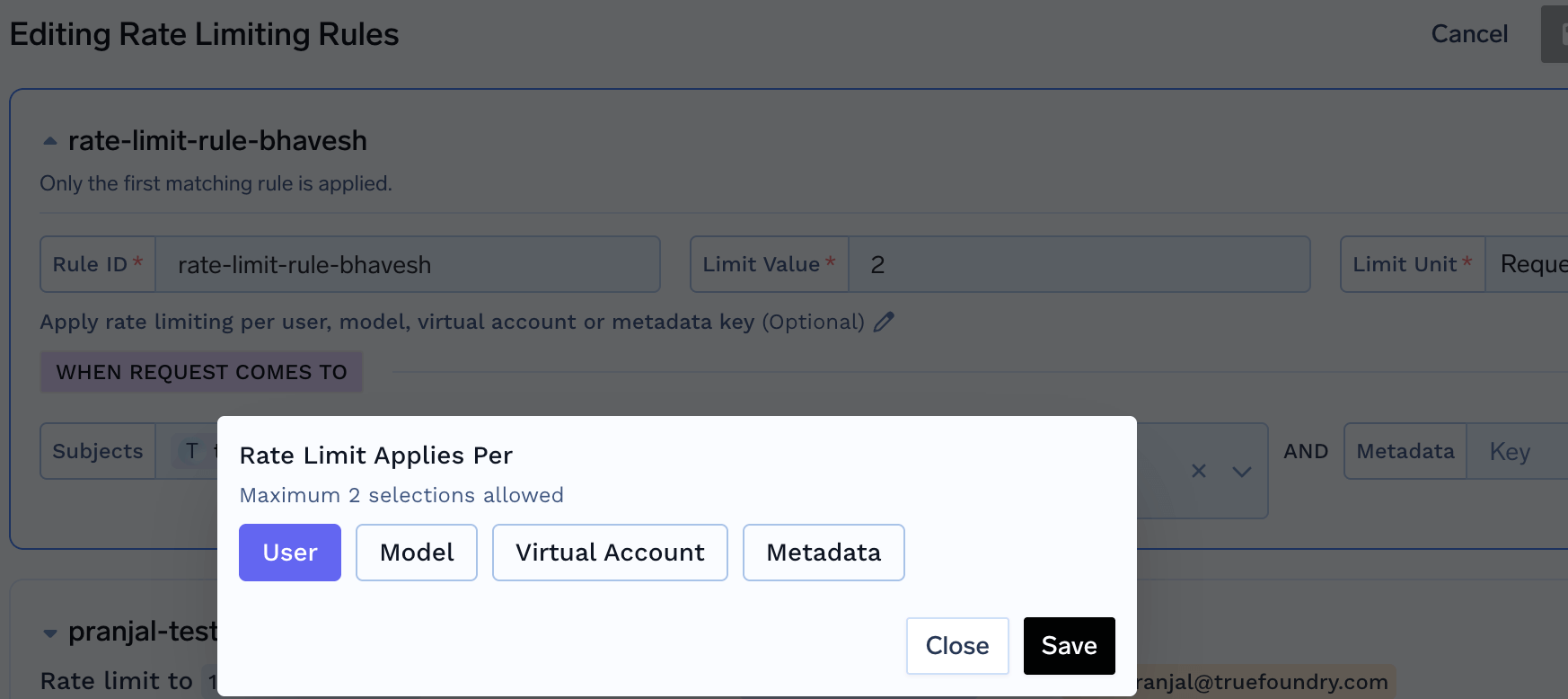 For each rule, we have five sections:
1. **id**: A unique identifier for the rule. Used in logs, metrics, and API responses.
Rule IDs must be **static** (no `{}` placeholders). Use `rate_limit_applies_per` to create per-entity rate limits instead of dynamic rule IDs.
2. **when** (Define the subset of requests on which the rule applies): TrueFoundry AI gateway provides a very flexible configuration to define the exact subset of requests on which the rule applies. We can define based on the user calling the model, or the model name or any of the custom metadata key present in the request header `X-TFY-METADATA`. **The subjects, models and metadata fields are conditioned in an AND fashion - meaning that the rule will only match if all the conditions are met**. If an incoming request doesn't match the when block in one rule, the next rule will be evaluated.
* `subjects`: Filter based on the list of users / teams / virtual accounts calling the model. User can be specified using `user:john-doe` or `team:engineering-team` or `virtualaccount:acct_1234567890`.
* `models`: Rule matches if the model name in the request matches any of the models in the list.
* `metadata`: Rule matches if the metadata in the request matches the metadata in the rule. For e.g. if we specify `metadata: {environment: "production"}`, the rule will only match if the request has the metadata key `environment` with value `production` in the request header `X-TFY-METADATA`.
3. **limit\_to**: Integer value which along with unit specifies the limit (for e.g. 100000 tokens per minute)
4. **unit**: Possible values are requests\_per\_minute, requests\_per\_hour, requests\_per\_day, tokens\_per\_minute, tokens\_per\_hour, tokens\_per\_day
5. **rate\_limit\_applies\_per** (Optional): Creates separate rate limit instances for each unique value of the specified entity or combination of entities. This allows you to set individual rate limits for each user, model, or other entity without creating separate rules.
**Replaces Dynamic Rule IDs:** This field replaces the old dynamic rule ID format (e.g., `{user}-daily-limit`, `{user}-{model}-limit`). Use static rule IDs with `rate_limit_applies_per` instead.
**How it works:**
* **`Without rate_limit_applies_per`**: One rate limit applies to all matching requests
* Example: All users collectively share a 1000 requests/minute limit
* **`With rate_limit_applies_per: ['user']`**: A separate rate limit is created for each user
* Example: User Alice has 1000 requests/minute, User Bob has a separate 1000 requests/minute
* **`With rate_limit_applies_per: ['model']`**: A separate rate limit is created for each model
* **`With rate_limit_applies_per: ['user', 'model']`**: A separate rate limit is created for each user-model combination
* Example: Alice using GPT-4 has 1000 req/min, Alice using Claude has a separate 1000 req/min, Bob using GPT-4 has a separate 1000 req/min
* **`With rate_limit_applies_per: ['metadata.project_id']`**: A separate rate limit is created for each project ID value
**Allowed Values:**
* `user` - One rate limit per user
* `virtualaccount` - One rate limit per virtual account
* `model` - One rate limit per model
* `metadata.*` - One rate limit per custom metadata value (replace `*` with your metadata key)
**Example:** If you set `limit_to: 1000`, `unit: requests_per_minute`, and `rate_limit_applies_per: ['user', 'model']`:
* User Alice calling GPT-4 has 1000 requests/minute
* User Alice calling Claude-3 has a separate 1000 requests/minute
* User Bob calling GPT-4 has a separate 1000 requests/minute
* Each user-model combination's usage is tracked independently
Maximum **2 values** per rule. You can combine up to two entities (e.g., `['user', 'model']`).
Let's say you want to rate limit requests based on the following rules:
1. Limit all requests to gpt4 model from openai-main account for user:[bob@email.com](mailto:bob@email.com) to 1000 requests per day
2. Limit all requests to gpt4 model for team:backend to 20000 tokens per minute
3. Limit all requests to gpt4 model for virtualaccount:virtualaccount1 to 20000 tokens per minute
4. Limit each model to have a limit of 1000000 tokens per day (using `rate_limit_applies_per: ['model']`)
5. Limit each user to have a limit of 1000000 tokens per day (using `rate_limit_applies_per: ['user']`)
6. Limit each user to have a limit of 1000000 tokens per day for each model separately (using `rate_limit_applies_per: ['user', 'model']`)
7. Limit each project (identified by custom metadata) to 50000 tokens per hour (using `rate_limit_applies_per: ['metadata.project_id']`)
Your rate limit config would look like this:
```yaml YAML lines theme={"dark"}
name: ratelimiting-config
type: gateway-rate-limiting-config
# The rules are evaluated in order, and only the first matching rule is applied, subsequent rules are ignored.
rules:
# Limit all requests to gpt4 model from openai-main account for user:bob@email.com to
# 1000 requests per day
- id: "openai-gpt4-dev-env"
when:
subjects: ["user:bob@email.com"]
models: ["openai-main/gpt4"]
limit_to: 1000
unit: requests_per_day
# Limit all requests to gpt4 model for team:backend to 20000 tokens per minute
- id: "openai-gpt4-dev-env"
when:
subjects: ["team:backend"]
models: ["openai-main/gpt4"]
limit_to: 20000
unit: tokens_per_minute
# Limit all requests to gpt4 model for virtualaccount:virtualaccount1 to 20000 tokens per minute
- id: "openai-gpt4-dev-env"
when:
subjects: ["virtualaccount:virtualaccount1"]
models: ["openai-main/gpt4"]
limit_to: 20000
unit: tokens_per_minute
# Limit each model to have a limit of 1000000 tokens per day
- id: "model-daily-limit"
when: {}
limit_to: 1000000
unit: tokens_per_day
rate_limit_applies_per: ['model']
# Limit each user to have a limit of 1000000 tokens per day
- id: "user-daily-limit"
when: {}
limit_to: 1000000
unit: tokens_per_day
rate_limit_applies_per: ['user']
# Limit each user to have a limit of 1000000 tokens per day for each model
- id: "user-model-daily-limit"
when: {}
limit_to: 1000000
unit: tokens_per_day
rate_limit_applies_per: ['user', 'model']
# Limit each project (identified by custom metadata) to 50000 tokens per hour
# Requests must include X-TFY-METADATA header with project_id field
# Example: X-TFY-METADATA: {"project_id": "proj-123"}
- id: "project-hourly-limit"
when: {}
limit_to: 50000
unit: tokens_per_hour
rate_limit_applies_per: ['metadata.project_id']
```
### Configure Ratelimit on Gateway
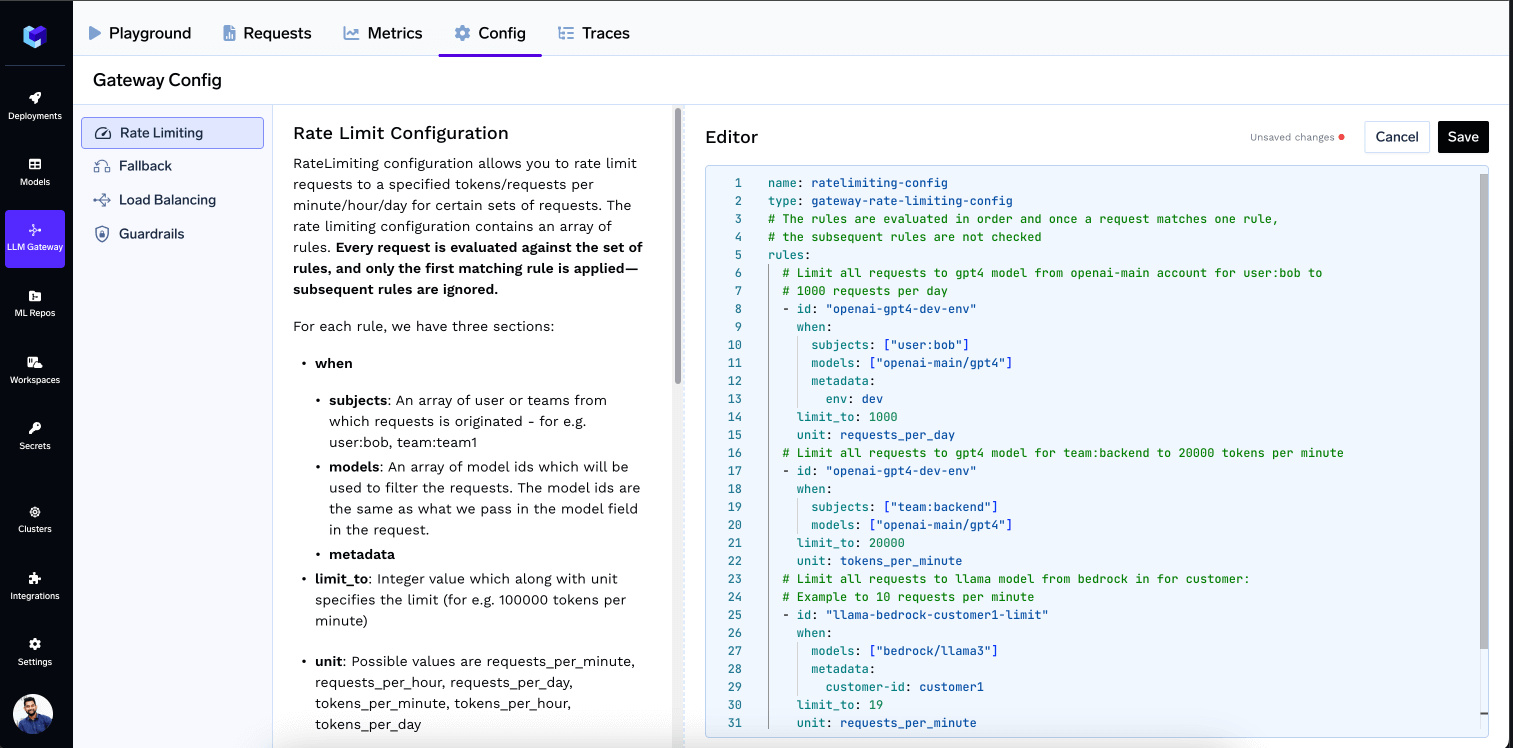
It's straightforward—simply go to the Config tab in the Gateway, add your configuration, and save.
For each rule, we have five sections:
1. **id**: A unique identifier for the rule. Used in logs, metrics, and API responses.
Rule IDs must be **static** (no `{}` placeholders). Use `rate_limit_applies_per` to create per-entity rate limits instead of dynamic rule IDs.
2. **when** (Define the subset of requests on which the rule applies): TrueFoundry AI gateway provides a very flexible configuration to define the exact subset of requests on which the rule applies. We can define based on the user calling the model, or the model name or any of the custom metadata key present in the request header `X-TFY-METADATA`. **The subjects, models and metadata fields are conditioned in an AND fashion - meaning that the rule will only match if all the conditions are met**. If an incoming request doesn't match the when block in one rule, the next rule will be evaluated.
* `subjects`: Filter based on the list of users / teams / virtual accounts calling the model. User can be specified using `user:john-doe` or `team:engineering-team` or `virtualaccount:acct_1234567890`.
* `models`: Rule matches if the model name in the request matches any of the models in the list.
* `metadata`: Rule matches if the metadata in the request matches the metadata in the rule. For e.g. if we specify `metadata: {environment: "production"}`, the rule will only match if the request has the metadata key `environment` with value `production` in the request header `X-TFY-METADATA`.
3. **limit\_to**: Integer value which along with unit specifies the limit (for e.g. 100000 tokens per minute)
4. **unit**: Possible values are requests\_per\_minute, requests\_per\_hour, requests\_per\_day, tokens\_per\_minute, tokens\_per\_hour, tokens\_per\_day
5. **rate\_limit\_applies\_per** (Optional): Creates separate rate limit instances for each unique value of the specified entity or combination of entities. This allows you to set individual rate limits for each user, model, or other entity without creating separate rules.
**Replaces Dynamic Rule IDs:** This field replaces the old dynamic rule ID format (e.g., `{user}-daily-limit`, `{user}-{model}-limit`). Use static rule IDs with `rate_limit_applies_per` instead.
**How it works:**
* **`Without rate_limit_applies_per`**: One rate limit applies to all matching requests
* Example: All users collectively share a 1000 requests/minute limit
* **`With rate_limit_applies_per: ['user']`**: A separate rate limit is created for each user
* Example: User Alice has 1000 requests/minute, User Bob has a separate 1000 requests/minute
* **`With rate_limit_applies_per: ['model']`**: A separate rate limit is created for each model
* **`With rate_limit_applies_per: ['user', 'model']`**: A separate rate limit is created for each user-model combination
* Example: Alice using GPT-4 has 1000 req/min, Alice using Claude has a separate 1000 req/min, Bob using GPT-4 has a separate 1000 req/min
* **`With rate_limit_applies_per: ['metadata.project_id']`**: A separate rate limit is created for each project ID value
**Allowed Values:**
* `user` - One rate limit per user
* `virtualaccount` - One rate limit per virtual account
* `model` - One rate limit per model
* `metadata.*` - One rate limit per custom metadata value (replace `*` with your metadata key)
**Example:** If you set `limit_to: 1000`, `unit: requests_per_minute`, and `rate_limit_applies_per: ['user', 'model']`:
* User Alice calling GPT-4 has 1000 requests/minute
* User Alice calling Claude-3 has a separate 1000 requests/minute
* User Bob calling GPT-4 has a separate 1000 requests/minute
* Each user-model combination's usage is tracked independently
Maximum **2 values** per rule. You can combine up to two entities (e.g., `['user', 'model']`).
Let's say you want to rate limit requests based on the following rules:
1. Limit all requests to gpt4 model from openai-main account for user:[bob@email.com](mailto:bob@email.com) to 1000 requests per day
2. Limit all requests to gpt4 model for team:backend to 20000 tokens per minute
3. Limit all requests to gpt4 model for virtualaccount:virtualaccount1 to 20000 tokens per minute
4. Limit each model to have a limit of 1000000 tokens per day (using `rate_limit_applies_per: ['model']`)
5. Limit each user to have a limit of 1000000 tokens per day (using `rate_limit_applies_per: ['user']`)
6. Limit each user to have a limit of 1000000 tokens per day for each model separately (using `rate_limit_applies_per: ['user', 'model']`)
7. Limit each project (identified by custom metadata) to 50000 tokens per hour (using `rate_limit_applies_per: ['metadata.project_id']`)
Your rate limit config would look like this:
```yaml YAML lines theme={"dark"}
name: ratelimiting-config
type: gateway-rate-limiting-config
# The rules are evaluated in order, and only the first matching rule is applied, subsequent rules are ignored.
rules:
# Limit all requests to gpt4 model from openai-main account for user:bob@email.com to
# 1000 requests per day
- id: "openai-gpt4-dev-env"
when:
subjects: ["user:bob@email.com"]
models: ["openai-main/gpt4"]
limit_to: 1000
unit: requests_per_day
# Limit all requests to gpt4 model for team:backend to 20000 tokens per minute
- id: "openai-gpt4-dev-env"
when:
subjects: ["team:backend"]
models: ["openai-main/gpt4"]
limit_to: 20000
unit: tokens_per_minute
# Limit all requests to gpt4 model for virtualaccount:virtualaccount1 to 20000 tokens per minute
- id: "openai-gpt4-dev-env"
when:
subjects: ["virtualaccount:virtualaccount1"]
models: ["openai-main/gpt4"]
limit_to: 20000
unit: tokens_per_minute
# Limit each model to have a limit of 1000000 tokens per day
- id: "model-daily-limit"
when: {}
limit_to: 1000000
unit: tokens_per_day
rate_limit_applies_per: ['model']
# Limit each user to have a limit of 1000000 tokens per day
- id: "user-daily-limit"
when: {}
limit_to: 1000000
unit: tokens_per_day
rate_limit_applies_per: ['user']
# Limit each user to have a limit of 1000000 tokens per day for each model
- id: "user-model-daily-limit"
when: {}
limit_to: 1000000
unit: tokens_per_day
rate_limit_applies_per: ['user', 'model']
# Limit each project (identified by custom metadata) to 50000 tokens per hour
# Requests must include X-TFY-METADATA header with project_id field
# Example: X-TFY-METADATA: {"project_id": "proj-123"}
- id: "project-hourly-limit"
when: {}
limit_to: 50000
unit: tokens_per_hour
rate_limit_applies_per: ['metadata.project_id']
```
### Configure Ratelimit on Gateway
It's straightforward—simply go to the Config tab in the Gateway, add your configuration, and save.
 ### How does the gateway do rate limiting?
The gateway uses a [sliding window](https://blog.algomaster.io/p/rate-limiting-algorithms-explained-with-code) algorithm to enforce rate-limiting. Since the minimum unit of rate-limiting is on a per-minute window for LLM traffic, the gateway maintains a sliding window of 60 seconds to track the number of requests. The gateway maintains time-based buckets for each user, model, team, or any other custom segment defined by the user in the Loadbalancing / ratelimiting configs for every 10 seconds. So to calculate the counter over the 60-second window, it sums up the requests or tokens in the last 6 buckets. The older buckets are removed from the sliding window.
The gateway then checks if the request is within the limit. If it is, the request is forwarded to the model. If it is not, the request is rejected with an error.
### How does the gateway do rate limiting?
The gateway uses a [sliding window](https://blog.algomaster.io/p/rate-limiting-algorithms-explained-with-code) algorithm to enforce rate-limiting. Since the minimum unit of rate-limiting is on a per-minute window for LLM traffic, the gateway maintains a sliding window of 60 seconds to track the number of requests. The gateway maintains time-based buckets for each user, model, team, or any other custom segment defined by the user in the Loadbalancing / ratelimiting configs for every 10 seconds. So to calculate the counter over the 60-second window, it sums up the requests or tokens in the last 6 buckets. The older buckets are removed from the sliding window.
The gateway then checks if the request is within the limit. If it is, the request is forwarded to the model. If it is not, the request is rejected with an error.