> ## Documentation Index
> Fetch the complete documentation index at: https://www.truefoundry.com/llms.txt
> Use this file to discover all available pages before exploring further.
# Rate Limiting
> Cap request, token, and MCP tool-call throughput per user, team, virtual account, model, or metadata value with multi-window limits, per-entity overrides, and audit-mode rollout in AI Gateway.
Rate limiting controls how much traffic flows through the AI Gateway. You define named rate limits that match specific callers, models, provider accounts, MCP servers, or metadata, and the AI Gateway blocks requests once a limit is breached, or runs in a warn-only mode so you can size a limit before enforcing it.
Rate Limiting V2 runs alongside [Rate Limiting V1](/docs/ai-gateway/ratelimiting). V1 is still supported and needs no migration. New rate limits should use V2, which adds multi-window limits, `NOT IN` exclusions, per-entity overrides, audit mode, and MCP tool-call limits. See [Relationship to rate limiting V1](#relationship-to-rate-limiting-v1) for how the two interact.
## Rate limiting families
V2 splits rate limiting into two families. Each is a separate named configuration with its own limit units and its own filters.
| | Model rate limits | MCP rate limits |
| - | - | - |
| **Config type** | `tenant-rate-limit-config/model` | `tenant-rate-limit-config/mcp` |
| **Limits** | Requests and tokens | Tool calls |
| **Applies to traffic** | LLM requests through the AI Gateway | `tools/call` requests through the MCP Gateway |
| **Filter by** | Subjects, models, provider accounts, metadata | Subjects, MCP servers, metadata |
| **Partition by** | Aggregate, user, model, virtual account, metadata | Aggregate, user, MCP server, virtual account, metadata |
Rate limits control throughput, not spend. To cap cost in dollars, use [Budget Limiting](/docs/ai-gateway/budget-limiting-v2) instead. A model rate limit and an MCP rate limit are allowed to share the same name, because each family counts usage separately.
## How rate limiting works?
Rate limiting consists of a set of independent named limits. Each one defines *which traffic* it applies to, and *how much* of it is allowed.
**During evaluation:**
1. **Every matching limit is checked.** The AI Gateway finds all rate limits whose filters match the incoming request.
2. **All matching limits must allow the request.** If any matching limit is breached and is in enforcement mode, the request is blocked.
3. **Usage is counted against every matching limit.** When a request matches several rate limits, usage increments on each of them.
Think of matching rate limits as an AND across limits: a request proceeds only when every limit it touches has room. This differs from [V1](/docs/ai-gateway/ratelimiting), where only the first matching rule was enforced.
When several limits match, they are evaluated in alphabetical order by name. This affects only which limit is reported first on a blocked request. There is no priority field, and ordering never changes whether a request is blocked.
Enforcement is eventually consistent. The AI Gateway does not hold usage counters itself: it reports usage and reads back the blocked state. A burst of concurrent in-flight requests can therefore overshoot a limit slightly before blocking begins. Raising a limit clears an active block immediately, without waiting for the next reconciliation.
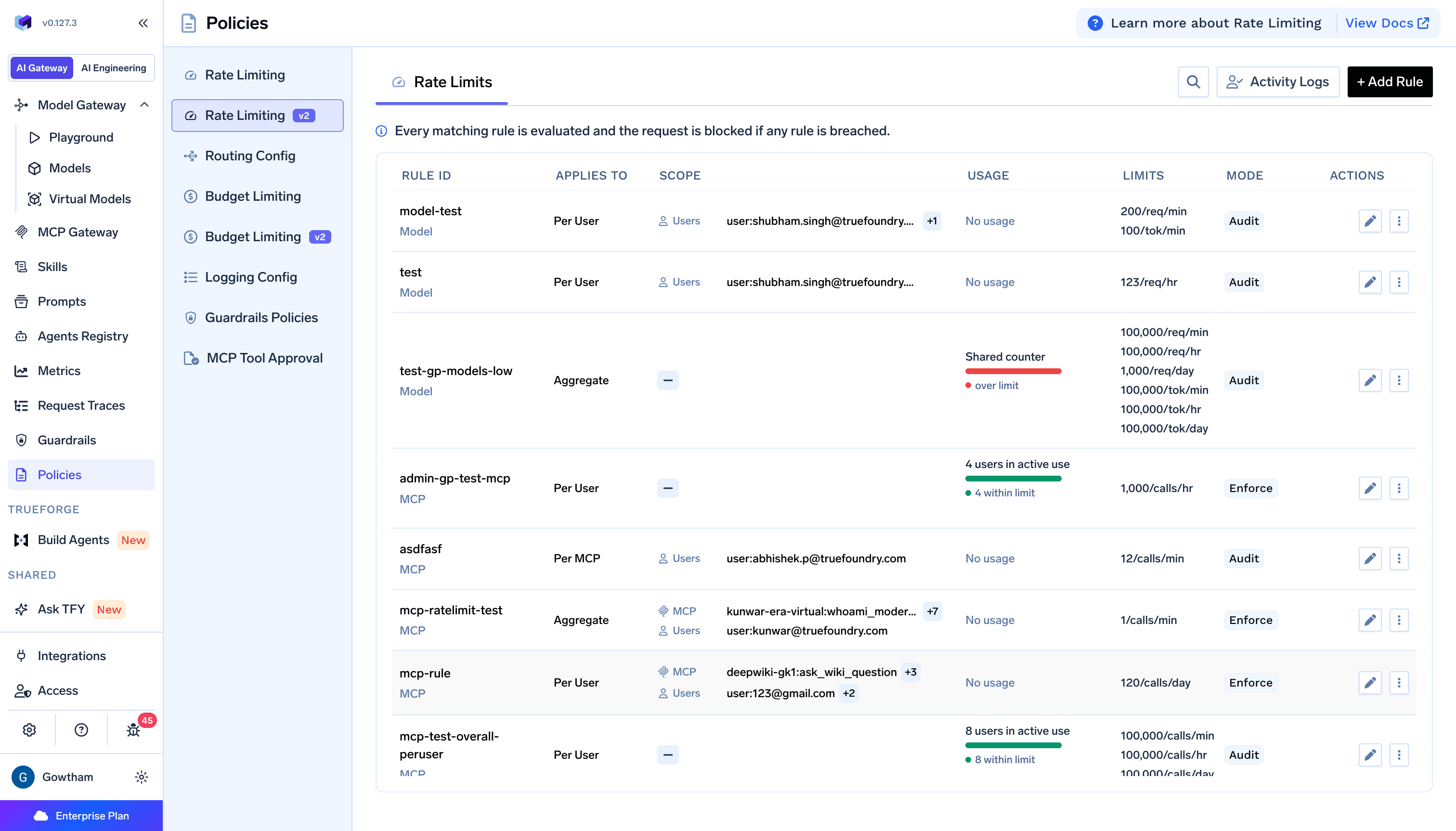 The rules list shows each rule's partition under **Applies To**, its filters under **Scope**, current usage, the configured limits, and its enforcement mode. The family, **Model** or **MCP**, appears under the rule id.
## Setting up a rate limit
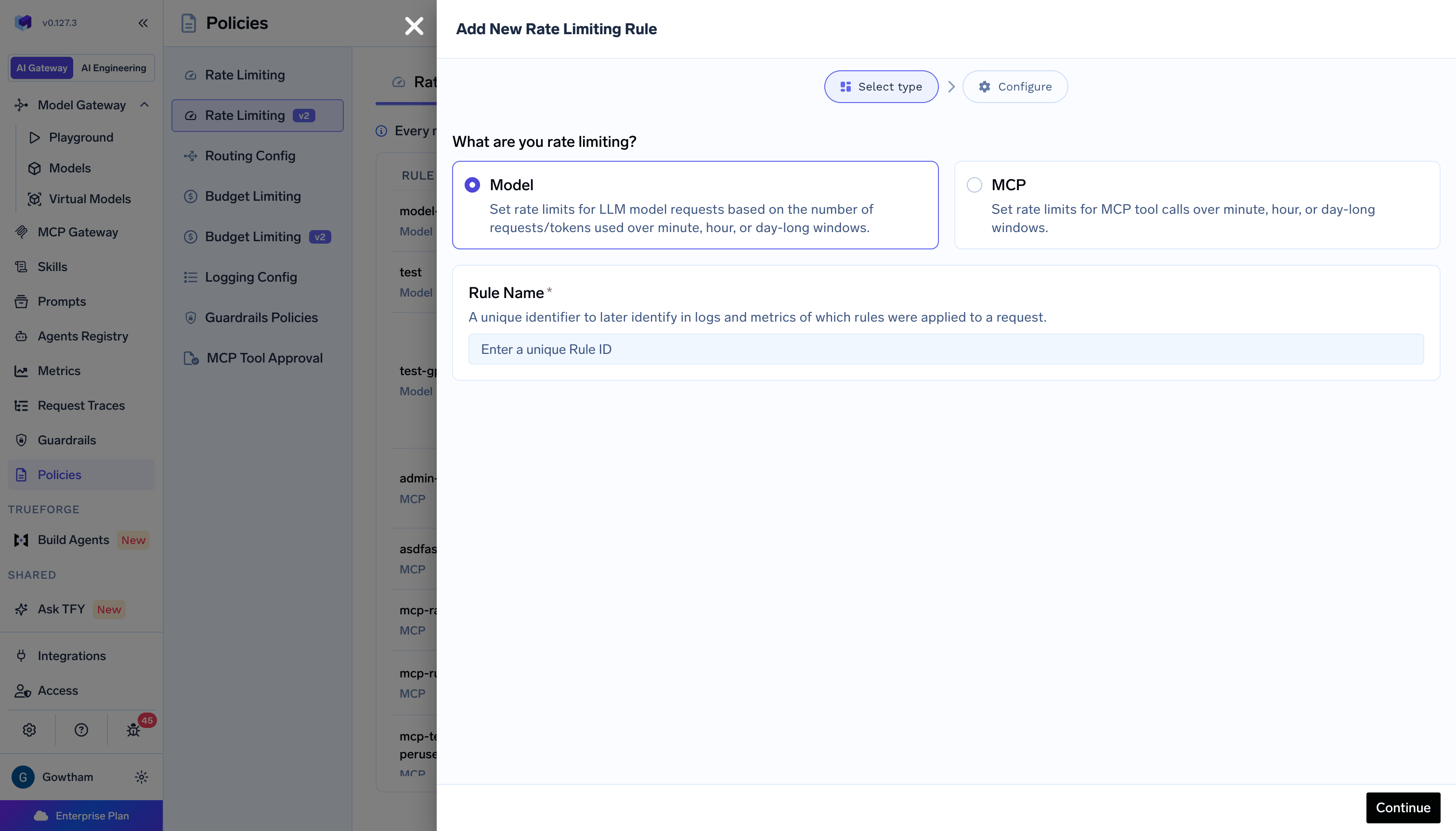
To create a rate limit, go to **AI Gateway** → **Policies** → **Rate Limiting v2**, and click on **+ Add Rule**. The form has two steps: **Select type** and **Configure**.
In **Select type**, choose what you are rate limiting and give the rule a name:
The rules list shows each rule's partition under **Applies To**, its filters under **Scope**, current usage, the configured limits, and its enforcement mode. The family, **Model** or **MCP**, appears under the rule id.
## Setting up a rate limit
To create a rate limit, go to **AI Gateway** → **Policies** → **Rate Limiting v2**, and click on **+ Add Rule**. The form has two steps: **Select type** and **Configure**.
In **Select type**, choose what you are rate limiting and give the rule a name:
 Rate limits are tenant-scoped and are managed by tenant admins. Unlike [Budget Limiting](/docs/ai-gateway/budget-limiting-v2), there is no team-owned scope, and rate limits do not send threshold alerts.
Click **Apply as YAML** at any point in the **Configure** step to view or edit the rule as YAML instead of filling the form. This is also the only way to set the filters that the form does not expose, described below.
### Scope filters
**Scope** defines which traffic the rate limit applies to. Use **+ Add Filters** to add filters, each with an `IN` or `NOT IN` operator. Filters use **AND** logic, so a request must match every filter you add.
The form offers three filters for model rate limits:
| Filter | Operators | Description |
| - | - | - |
| **Subjects** | `IN`, `NOT IN` | Users, teams, and virtual accounts |
| **Models** | `IN`, `NOT IN` | Concrete model ids (`account/model`) or [virtual model](/docs/ai-gateway/virtual-model) ids |
| **Metadata** | `IN`, `NOT IN` | Key-value pairs from the `X-TFY-METADATA` header |
Two further filters exist in the configuration but are not in the form: `provider_accounts` matches a provider account name such as `openai-main`, and `subjects.agents` matches agent callers. Set either through **Apply as YAML**. See the [YAML configuration reference](#yaml-configuration-reference).
Subject filters cover users, teams, virtual accounts, and agents. An `IN` match on any one of them satisfies the scope. A `NOT IN` match always wins: a caller excluded by one subject filter is not rescued by matching another.
`*` works as a wildcard in both operators. `in: ["*"]` matches any caller of that kind, and `not_in: ["*"]` excludes all of them.
If you add no filters, the rate limit matches **every request** in the tenant. This is useful for a tenant-wide default limit.
Requests authenticated by a service account cannot be selected by a subject filter. A rate limit with no subject filters still applies to them.
### Rate limits
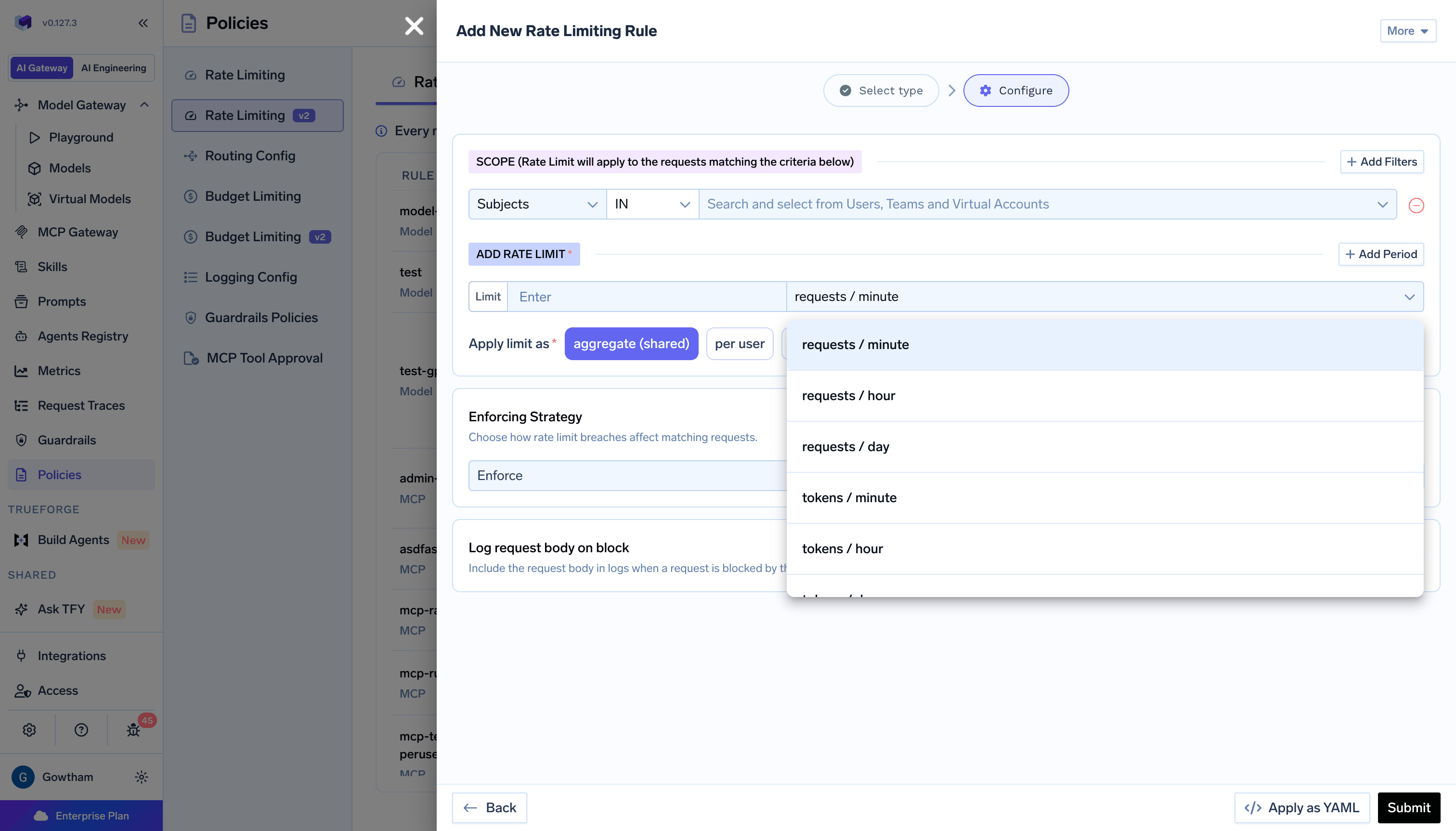
Under **Add Rate Limit**, set a **Limit** amount and pick its period. Use **+ Add Period** to add more. Every limit you set is enforced at the same time, so a request is blocked if **any** period on that rule is breached.
Model rate limits support these periods:
| Period | YAML field | Window | Counts |
| - | - | - | - |
| `requests / minute` | `requests_per_minute` | Rolling 60 seconds, in 10 second steps | Requests |
| `requests / hour` | `requests_per_hour` | Rolling 60 minutes, in 5 minute steps | Requests |
| `requests / day` | `requests_per_day` | Rolling 24 hours, in 1 hour steps | Requests |
| `tokens / minute` | `tokens_per_minute` | Rolling 60 seconds, in 10 second steps | Input plus output tokens |
| `tokens / hour` | `tokens_per_hour` | Rolling 60 minutes, in 5 minute steps | Input plus output tokens |
| `tokens / day` | `tokens_per_day` | Rolling 24 hours, in 1 hour steps | Input plus output tokens |
Rate limits are tenant-scoped and are managed by tenant admins. Unlike [Budget Limiting](/docs/ai-gateway/budget-limiting-v2), there is no team-owned scope, and rate limits do not send threshold alerts.
Click **Apply as YAML** at any point in the **Configure** step to view or edit the rule as YAML instead of filling the form. This is also the only way to set the filters that the form does not expose, described below.
### Scope filters
**Scope** defines which traffic the rate limit applies to. Use **+ Add Filters** to add filters, each with an `IN` or `NOT IN` operator. Filters use **AND** logic, so a request must match every filter you add.
The form offers three filters for model rate limits:
| Filter | Operators | Description |
| - | - | - |
| **Subjects** | `IN`, `NOT IN` | Users, teams, and virtual accounts |
| **Models** | `IN`, `NOT IN` | Concrete model ids (`account/model`) or [virtual model](/docs/ai-gateway/virtual-model) ids |
| **Metadata** | `IN`, `NOT IN` | Key-value pairs from the `X-TFY-METADATA` header |
Two further filters exist in the configuration but are not in the form: `provider_accounts` matches a provider account name such as `openai-main`, and `subjects.agents` matches agent callers. Set either through **Apply as YAML**. See the [YAML configuration reference](#yaml-configuration-reference).
Subject filters cover users, teams, virtual accounts, and agents. An `IN` match on any one of them satisfies the scope. A `NOT IN` match always wins: a caller excluded by one subject filter is not rescued by matching another.
`*` works as a wildcard in both operators. `in: ["*"]` matches any caller of that kind, and `not_in: ["*"]` excludes all of them.
If you add no filters, the rate limit matches **every request** in the tenant. This is useful for a tenant-wide default limit.
Requests authenticated by a service account cannot be selected by a subject filter. A rate limit with no subject filters still applies to them.
### Rate limits
Under **Add Rate Limit**, set a **Limit** amount and pick its period. Use **+ Add Period** to add more. Every limit you set is enforced at the same time, so a request is blocked if **any** period on that rule is breached.
Model rate limits support these periods:
| Period | YAML field | Window | Counts |
| - | - | - | - |
| `requests / minute` | `requests_per_minute` | Rolling 60 seconds, in 10 second steps | Requests |
| `requests / hour` | `requests_per_hour` | Rolling 60 minutes, in 5 minute steps | Requests |
| `requests / day` | `requests_per_day` | Rolling 24 hours, in 1 hour steps | Requests |
| `tokens / minute` | `tokens_per_minute` | Rolling 60 seconds, in 10 second steps | Input plus output tokens |
| `tokens / hour` | `tokens_per_hour` | Rolling 60 minutes, in 5 minute steps | Input plus output tokens |
| `tokens / day` | `tokens_per_day` | Rolling 24 hours, in 1 hour steps | Input plus output tokens |
 All values must be positive integers. Token limits count input and output tokens together, so a single expensive request can consume a large share of the window.
Failed requests still consume request quota, because the request reached the provider. Requests the AI Gateway itself rejected with `429` are not counted, so a blocked caller does not dig their own hole deeper.
### Apply limit as
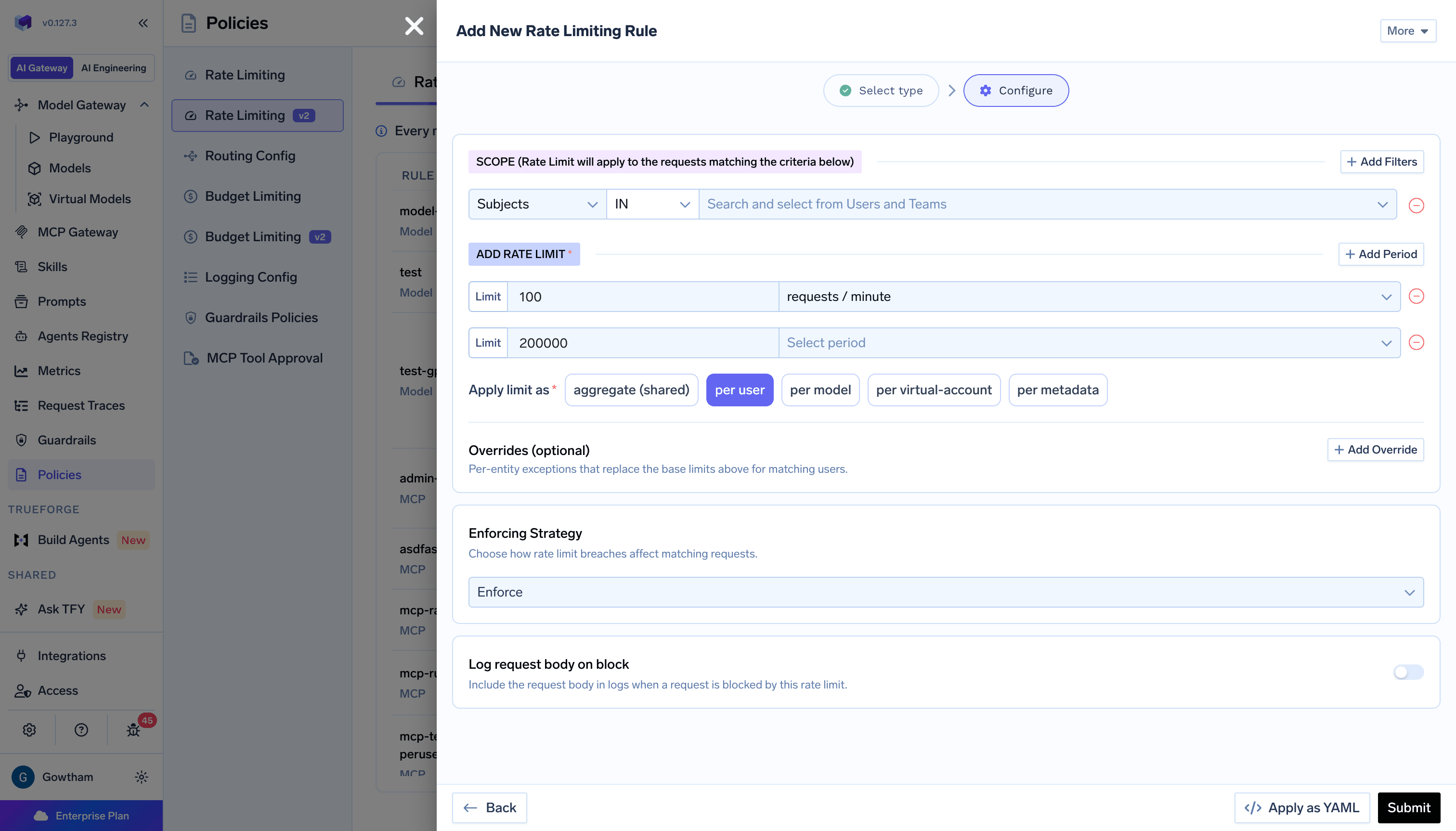
**Apply limit as** controls how the limit is partitioned across matching traffic.
| Option | YAML value | Effect |
| - | - | - |
| `aggregate (shared)` | `aggregate` | One shared limit for all matching traffic |
| `per user` | `per-user` | Each user gets an independent limit |
| `per model` | `per-model` | Each model gets an independent limit |
| `per virtual-account` | `per-virtual-account` | Each virtual account gets an independent limit |
| `per metadata` | `metadata` | Each distinct value of one metadata key gets an independent limit |
For `per metadata`, you also pick the metadata key whose distinct values each get their own limit. A limit partitioned on `project_id`, for example, gives every project its own allowance.
All values must be positive integers. Token limits count input and output tokens together, so a single expensive request can consume a large share of the window.
Failed requests still consume request quota, because the request reached the provider. Requests the AI Gateway itself rejected with `429` are not counted, so a blocked caller does not dig their own hole deeper.
### Apply limit as
**Apply limit as** controls how the limit is partitioned across matching traffic.
| Option | YAML value | Effect |
| - | - | - |
| `aggregate (shared)` | `aggregate` | One shared limit for all matching traffic |
| `per user` | `per-user` | Each user gets an independent limit |
| `per model` | `per-model` | Each model gets an independent limit |
| `per virtual-account` | `per-virtual-account` | Each virtual account gets an independent limit |
| `per metadata` | `metadata` | Each distinct value of one metadata key gets an independent limit |
For `per metadata`, you also pick the metadata key whose distinct values each get their own limit. A limit partitioned on `project_id`, for example, gives every project its own allowance.
 **Apply limit as cannot be changed after the rate limit is created.** The API rejects the change with a `403`. To repartition a limit, create a new one and delete the old one.
Two combinations are rejected, because the partition would have no value to key on:
* `per user` cannot be combined with the `virtual_accounts` or `agents` subject filters.
* `per virtual-account` cannot be combined with the `users`, `teams`, or `agents` subject filters.
The form enforces this as you go. Selecting `per user` narrows the **Subjects** picker to users and teams only.
There is no per-agent partition. Agents can be filtered on through `subjects.agents` in YAML, but agent traffic caught by a per-user limit produces no counter. Use `aggregate`, `per model`, or `per metadata` to bucket it.
### Overrides
On any per-entity partition, an **Overrides (optional)** section appears. Use **+ Add Override** to add per-entity exceptions that replace specific limits for named entities. Every other matching entity keeps the base limits.
Overrides merge with the base limits **one period at a time**. If a limit sets 100 requests per minute and 10,000 requests per day, an override of 500 requests per minute for one user leaves that user's daily limit at 10,000.
Two rules apply:
* An override can only replace a period that the base limits already set. You cannot introduce a new period through an override.
* Override target lists cannot overlap. No entity may appear in two overrides on the same rate limit.
### Enforcing strategy
**Enforcing Strategy** controls what happens when a rate limit is breached.
| Strategy | YAML value | Behavior |
| - | - | - |
| **Enforce** (default) | `enforce` | Blocks requests if any rate limit is breached |
| **Soft Enforce** | `soft_enforce` | Blocks a breaching request only when no other matching rate limit allows it |
| **Audit** | `audit` | Does not block; rate limit breaches are only logged |
**Apply limit as cannot be changed after the rate limit is created.** The API rejects the change with a `403`. To repartition a limit, create a new one and delete the old one.
Two combinations are rejected, because the partition would have no value to key on:
* `per user` cannot be combined with the `virtual_accounts` or `agents` subject filters.
* `per virtual-account` cannot be combined with the `users`, `teams`, or `agents` subject filters.
The form enforces this as you go. Selecting `per user` narrows the **Subjects** picker to users and teams only.
There is no per-agent partition. Agents can be filtered on through `subjects.agents` in YAML, but agent traffic caught by a per-user limit produces no counter. Use `aggregate`, `per model`, or `per metadata` to bucket it.
### Overrides
On any per-entity partition, an **Overrides (optional)** section appears. Use **+ Add Override** to add per-entity exceptions that replace specific limits for named entities. Every other matching entity keeps the base limits.
Overrides merge with the base limits **one period at a time**. If a limit sets 100 requests per minute and 10,000 requests per day, an override of 500 requests per minute for one user leaves that user's daily limit at 10,000.
Two rules apply:
* An override can only replace a period that the base limits already set. You cannot introduce a new period through an override.
* Override target lists cannot overlap. No entity may appear in two overrides on the same rate limit.
### Enforcing strategy
**Enforcing Strategy** controls what happens when a rate limit is breached.
| Strategy | YAML value | Behavior |
| - | - | - |
| **Enforce** (default) | `enforce` | Blocks requests if any rate limit is breached |
| **Soft Enforce** | `soft_enforce` | Blocks a breaching request only when no other matching rate limit allows it |
| **Audit** | `audit` | Does not block; rate limit breaches are only logged |
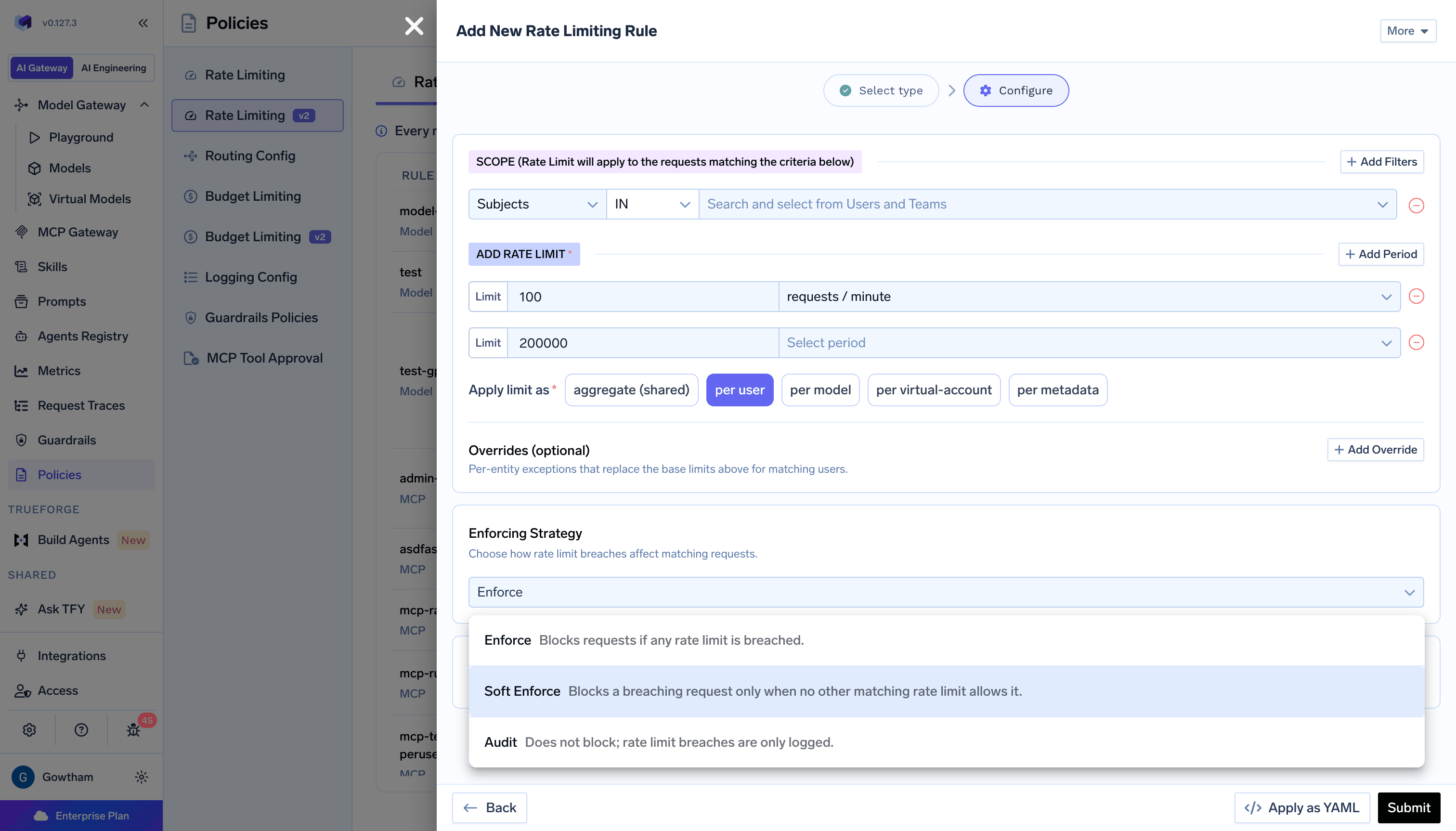 In **Audit** mode, usage is still tracked and the limit is reported on the response, so you can see what would have been blocked.
**Soft Enforce** is a condition across rate limits, not a gentler version of **Enforce**. Whether it blocks depends entirely on what else matched the request. A breached **Enforce** limit always blocks, no matter what other limits allow.
Use **Audit** to size a new limit against real traffic before enforcing it. Use **Soft Enforce** for an overflow cap that should bite only when nothing else is already holding the traffic back.
### Log request body on block
**Log Request Body on Block** keeps the request body on the trace for requests this rate limit blocks. It is off by default, and blocked requests normally have their body stripped from the trace.
Turn it on when you need to see what a blocked caller was actually sending. The body remains subject to your tenant logging and redaction settings, so a redacted field stays redacted.
### Virtual models in `when.models`
You can put a [virtual model](/docs/ai-gateway/virtual-model) id in the **Models** filter the same way as a concrete model.
When a request uses that virtual model:
* The AI Gateway matches the rate limit against the **virtual model id** and the **concrete target** it routes to. Either id can satisfy an `IN` list, and either id can trigger a `NOT IN` exclusion.
* **Per Model** counters always key on the concrete model that served the request, never on the virtual model id.
Do **not** list a virtual model id in **Models** `IN` on a limit that uses **Per Model**. That configuration is rejected and the rate limit is ignored entirely. Use **Aggregate**, **Per User**, **Per Virtual Account**, or **Per Metadata Value** instead.
## MCP rate limits
MCP rate limits cap tool calls through the [MCP Gateway](/docs/ai-gateway/mcp/mcp-overview). They share the concepts above, including subject filters, metadata filters, overrides, and the three enforcement modes. This section covers only what differs.
### MCP scope filters
MCP rate limits filter on **Subjects**, **MCP Servers**, and **Metadata**. They have no **Models** or provider account filter.
**MCP Servers** accepts two forms of value:
| Value | Matches |
| - | - |
| `search` | Every tool on the `search` server |
| `search:web_lookup` | Only the `web_lookup` tool on the `search` server |
MCP limits support `tool calls / minute`, `tool calls / hour`, and `tool calls / day`, on the same rolling windows as the model periods. There is no token or request period, because a tool call is the countable event.
**Apply limit as** offers `per mcp` in place of `per model`. It partitions the limit by server. Listing a `server:tool` value in an override gives that single tool its own counter, while every other tool on that server continues to share the server counter. This is how you carve out one expensive tool without splitting the whole server.
In **Audit** mode, usage is still tracked and the limit is reported on the response, so you can see what would have been blocked.
**Soft Enforce** is a condition across rate limits, not a gentler version of **Enforce**. Whether it blocks depends entirely on what else matched the request. A breached **Enforce** limit always blocks, no matter what other limits allow.
Use **Audit** to size a new limit against real traffic before enforcing it. Use **Soft Enforce** for an overflow cap that should bite only when nothing else is already holding the traffic back.
### Log request body on block
**Log Request Body on Block** keeps the request body on the trace for requests this rate limit blocks. It is off by default, and blocked requests normally have their body stripped from the trace.
Turn it on when you need to see what a blocked caller was actually sending. The body remains subject to your tenant logging and redaction settings, so a redacted field stays redacted.
### Virtual models in `when.models`
You can put a [virtual model](/docs/ai-gateway/virtual-model) id in the **Models** filter the same way as a concrete model.
When a request uses that virtual model:
* The AI Gateway matches the rate limit against the **virtual model id** and the **concrete target** it routes to. Either id can satisfy an `IN` list, and either id can trigger a `NOT IN` exclusion.
* **Per Model** counters always key on the concrete model that served the request, never on the virtual model id.
Do **not** list a virtual model id in **Models** `IN` on a limit that uses **Per Model**. That configuration is rejected and the rate limit is ignored entirely. Use **Aggregate**, **Per User**, **Per Virtual Account**, or **Per Metadata Value** instead.
## MCP rate limits
MCP rate limits cap tool calls through the [MCP Gateway](/docs/ai-gateway/mcp/mcp-overview). They share the concepts above, including subject filters, metadata filters, overrides, and the three enforcement modes. This section covers only what differs.
### MCP scope filters
MCP rate limits filter on **Subjects**, **MCP Servers**, and **Metadata**. They have no **Models** or provider account filter.
**MCP Servers** accepts two forms of value:
| Value | Matches |
| - | - |
| `search` | Every tool on the `search` server |
| `search:web_lookup` | Only the `web_lookup` tool on the `search` server |
MCP limits support `tool calls / minute`, `tool calls / hour`, and `tool calls / day`, on the same rolling windows as the model periods. There is no token or request period, because a tool call is the countable event.
**Apply limit as** offers `per mcp` in place of `per model`. It partitions the limit by server. Listing a `server:tool` value in an override gives that single tool its own counter, while every other tool on that server continues to share the server counter. This is how you carve out one expensive tool without splitting the whole server.
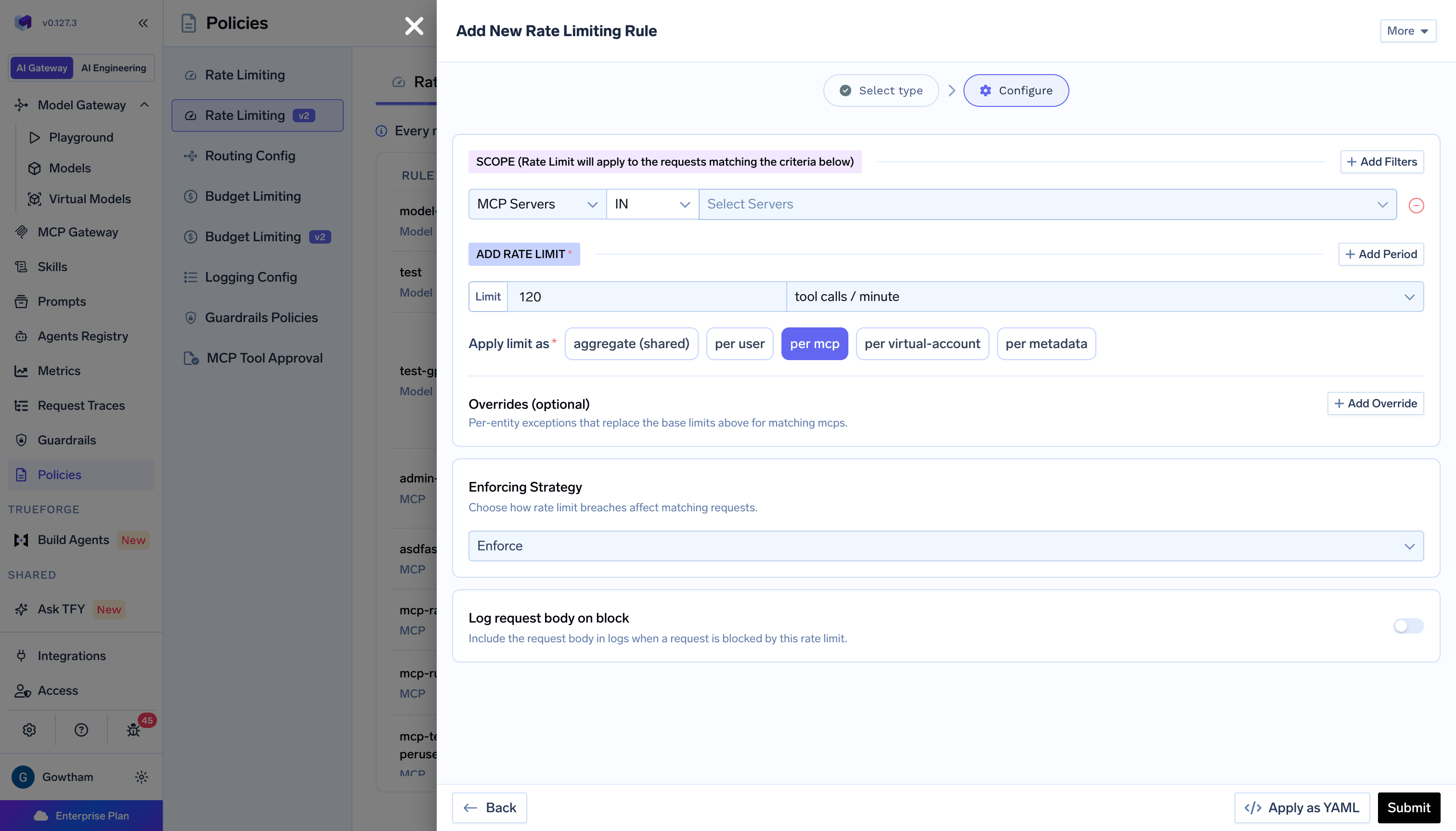 Three behaviors are worth knowing:
* Only `tools/call` is rate limited. `tools/list`, `resources/*`, and `prompts/*` are never counted.
* A tool call that the upstream server refused with `403` or `429` is not counted, because the tool never ran. Any other failure is counted.
* For a [virtual MCP server](/docs/ai-gateway/mcp/virtual-mcp-server), the call is counted once, against the source server it routes to. A rate limit may name either the virtual server or the source server, and both will match.
### MCP block response
A blocked MCP tool call does **not** return HTTP `429`. It returns HTTP `200` with a JSON-RPC result marked as a tool error, so the client hands the refusal to the model rather than failing the transport.
```json theme={"dark"}
{
"jsonrpc": "2.0",
"id": 1,
"result": {
"content": [
{ "type": "text", "text": "MCP rate limit exceeded: tool-cap.{mcp:search}" }
],
"isError": true,
"resultType": "complete"
}
}
```
The text names the rate limit and the counter that was breached. No `Retry-After` header is returned.
## Viewing rate limit usage
The rules list shows a **Usage** summary per rule: `No usage` when idle, a shared-counter bar for aggregate rules, or a count of entities in active use and how many are within their limit for per-entity rules. A rule that is currently over its limit is flagged there.
Click **View rate limit data** on a rule for its **Rate Limit Summary**, which reports each configured period's limit alongside the current cycle start and end, and a used-against-limit bar per period:
Three behaviors are worth knowing:
* Only `tools/call` is rate limited. `tools/list`, `resources/*`, and `prompts/*` are never counted.
* A tool call that the upstream server refused with `403` or `429` is not counted, because the tool never ran. Any other failure is counted.
* For a [virtual MCP server](/docs/ai-gateway/mcp/virtual-mcp-server), the call is counted once, against the source server it routes to. A rate limit may name either the virtual server or the source server, and both will match.
### MCP block response
A blocked MCP tool call does **not** return HTTP `429`. It returns HTTP `200` with a JSON-RPC result marked as a tool error, so the client hands the refusal to the model rather than failing the transport.
```json theme={"dark"}
{
"jsonrpc": "2.0",
"id": 1,
"result": {
"content": [
{ "type": "text", "text": "MCP rate limit exceeded: tool-cap.{mcp:search}" }
],
"isError": true,
"resultType": "complete"
}
}
```
The text names the rate limit and the counter that was breached. No `Retry-After` header is returned.
## Viewing rate limit usage
The rules list shows a **Usage** summary per rule: `No usage` when idle, a shared-counter bar for aggregate rules, or a count of entities in active use and how many are within their limit for per-entity rules. A rule that is currently over its limit is flagged there.
Click **View rate limit data** on a rule for its **Rate Limit Summary**, which reports each configured period's limit alongside the current cycle start and end, and a used-against-limit bar per period:
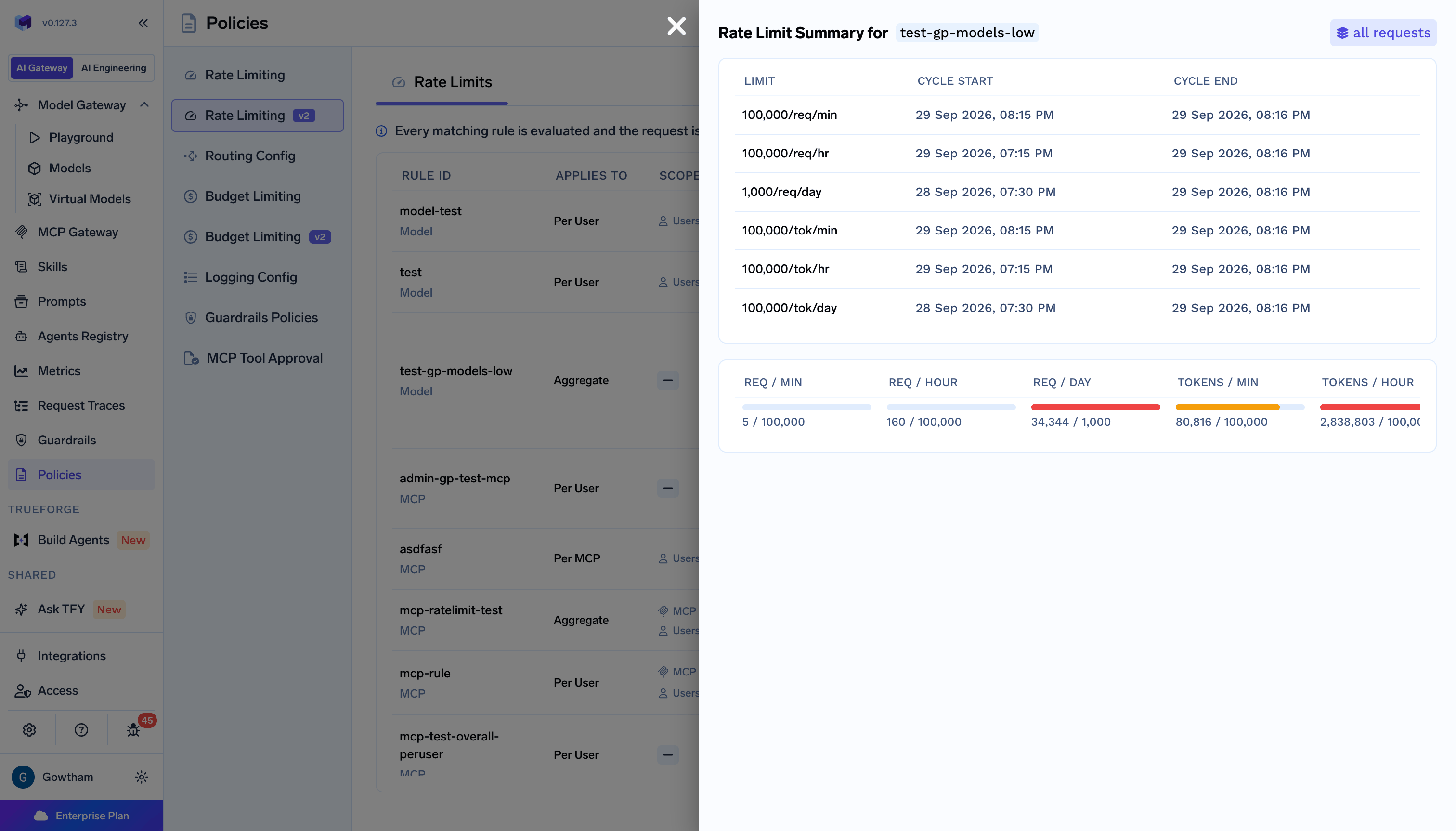 Entities are classified by their worst period: below 90% of the limit is within limit, 90% or more is at risk, and 100% or more is over.
Per-entity breakdowns track up to 500 entities per rate limit by default. Beyond that the breakdown is marked as incomplete, and it should be read as the busiest entities rather than an exact list of every one. Looking up a specific entity's usage stays exact even when it is absent from the breakdown.
## Rate limit exceeded response
When a model rate limit in enforcement mode is breached, the AI Gateway returns HTTP `429`:
```json theme={"dark"}
{
"status": "failure",
"message": "Rate limit exceeded for model: openai-main/gpt-4o for rule: per-user-cap.{user:alice@example.com}",
"error": {
"message": "Rate limit exceeded for model: openai-main/gpt-4o for rule: per-user-cap.{user:alice@example.com}",
"type": "RateLimitError",
"code": "429"
},
"error_origin_level": "rate_limit"
}
```
The response also includes an `x-tfy-applied-rules` header naming the rate limit that was breached:
```text theme={"dark"}
x-tfy-applied-rules: {"rate_limiting":{"rule_id":"per-user-cap","violated":true}}
```
A limit in `audit` mode reports itself on this header with `"audit_mode":true` and `"violated":false`, and the request still goes through. This is how you confirm an audit limit is matching the traffic you expect before switching it to `enforce`.
The AI Gateway does not return `Retry-After`, `X-RateLimit-Limit`, `X-RateLimit-Remaining`, or `X-RateLimit-Reset` headers. Clients should back off on `429` using their own retry policy. To read current usage programmatically, query the rate limit usage APIs rather than parsing response headers.
A budget breach also returns `429`, distinguished by `"type": "BudgetLimitError"` and `"error_origin_level": "budget_limit"`. See [Budget Limiting](/docs/ai-gateway/budget-limiting-v2).
## Relationship to rate limiting V1
V1 and V2 are independent systems that both evaluate on every request. V1 is checked first, and if a V1 rule blocks the request, V2 is not consulted. If V1 allows the request, V2 evaluates its own matching limits.
This has three practical consequences:
* **No migration is required.** V1 configurations keep working unchanged, and V1 is not deprecated.
* **Counters are not shared.** A V2 limit starts counting from zero when you create it, and it never inherits usage from a V1 rule, even one with the same intent.
* **Traffic can be covered twice.** If a V1 rule and a V2 limit both match the same request, both count it, and either can block it. When you recreate a V1 rule in V2, delete or narrow the V1 rule to avoid enforcing the same cap twice.
| Capability | V1 | V2 |
| - | - | - |
| Configuration shape | One config holding a `rules` list | One named config per limit |
| Limits per rule | A single unit and value | Several units and windows at once |
| Matching | First matching rule is enforced | Every matching limit is enforced |
| Subject filters | Flat `type:slug` list | Separate users, teams, virtual accounts, and agents |
| Exclusions | Not supported | `NOT IN` on every filter, with `*` wildcard |
| Provider account filter | Not supported | Supported |
| Partitioning | Up to two dimensions | Exactly one, fixed at creation |
| Per-entity overrides | Not supported | Supported |
| Warn-only mode | Not supported | `audit` and `soft_enforce` |
| MCP tool calls | Not supported | Supported |
## Practical examples
Each example shows both the UI configuration and the equivalent YAML. Click **Apply as YAML** in the rule form to paste or edit YAML directly.
Give every user their own throughput allowance across both requests and tokens.
| Name | Scope | Limits | Applies To | Mode |
| - | - | - | - | - |
| `per-user-cap` | *(empty, all tenant traffic)* | 100 requests/minute, 200,000 tokens/hour | Per User | Enforce |
**How it works:** Each user gets an independent 100 requests per minute and 200,000 tokens per hour. A user who exhausts either window is blocked until it rolls forward, and other users are unaffected.
```yaml theme={"dark"}
type: tenant-rate-limit-config/model
name: per-user-cap
limits:
requests_per_minute: 100
tokens_per_hour: 200000
applies_to:
type: per-user
mode: enforce
log_request_body_on_block: false
```
Cap how hard one team can hit an expensive model, as a single shared pool.
| Name | Scope | Limits | Applies To | Mode |
| - | - | - | - | - |
| `research-opus-cap` | Teams: `research`, Models: `tfy-ai-databricks/databricks-claude-opus-4-5` | 600 requests/hour | Aggregate | Enforce |
**How it works:** All requests from members of the `research` team to that model share one 600 requests per hour pool. Requests from the same team to other models do not count against it.
```yaml theme={"dark"}
type: tenant-rate-limit-config/model
name: research-opus-cap
when:
subjects:
teams:
in:
- research
models:
in:
- tfy-ai-databricks/databricks-claude-opus-4-5
limits:
requests_per_hour: 600
applies_to:
type: aggregate
mode: enforce
log_request_body_on_block: false
```
Apply a baseline limit to every user except a named service owner.
| Name | Scope | Limits | Applies To | Mode |
| - | - | - | - | - |
| `tenant-default` | Users: `NOT IN` `batch-owner@example.com` | 60 requests/minute | Per User | Enforce |
**How it works:** Every user except `batch-owner@example.com` gets 60 requests per minute. The excluded user does not match this limit at all, so they are governed only by whatever other rate limits match their traffic.
```yaml theme={"dark"}
type: tenant-rate-limit-config/model
name: tenant-default
when:
subjects:
users:
not_in:
- batch-owner@example.com
limits:
requests_per_minute: 60
applies_to:
type: per-user
mode: enforce
log_request_body_on_block: false
```
Protect a self-hosted or quota-limited provider account from being saturated.
| Name | Scope | Limits | Applies To | Mode |
| - | - | - | - | - |
| `selfhosted-capacity` | Provider Accounts: `selfhosted-vllm` | 40 requests/minute, 120,000 tokens/minute | Aggregate | Enforce |
**How it works:** Every request routed to any model on the `selfhosted-vllm` account counts against one shared pool, which keeps total load inside what the deployment can serve.
```yaml theme={"dark"}
type: tenant-rate-limit-config/model
name: selfhosted-capacity
when:
provider_accounts:
in:
- selfhosted-vllm
limits:
requests_per_minute: 40
tokens_per_minute: 120000
applies_to:
type: aggregate
mode: enforce
log_request_body_on_block: false
```
Give every project its own allowance, identified by a metadata header.
| Name | Scope | Limits | Applies To | Mode |
| - | - | - | - | - |
| `per-project-cap` | Metadata: `environment IN production` | 5,000 requests/day | Per Metadata Value (`project_id`) | Enforce |
Requests must include the header:
```text theme={"dark"}
X-TFY-METADATA: {"project_id": "proj-123", "environment": "production"}
```
**How it works:** Each distinct `project_id` gets its own 5,000 requests per day. Only production traffic matches, so non-production requests are not limited by this rule.
```yaml theme={"dark"}
type: tenant-rate-limit-config/model
name: per-project-cap
when:
metadata:
environment:
in:
- production
limits:
requests_per_day: 5000
applies_to:
type: metadata
metadata: project_id
mode: enforce
log_request_body_on_block: false
```
Set a default per-model limit, then raise it for a cheap, high-volume model.
| Name | Scope | Limits | Applies To | Mode |
| - | - | - | - | - |
| `per-model-cap` | *(empty)* | 300 requests/minute, 50,000 requests/day | Per Model | Enforce |
**Overrides:** `openai-main/gpt-4o-mini` → 2,000 requests/minute. Its daily limit stays at the base 50,000, because an override replaces only the units it sets.
```yaml theme={"dark"}
type: tenant-rate-limit-config/model
name: per-model-cap
limits:
requests_per_minute: 300
requests_per_day: 50000
applies_to:
type: per-model
overrides:
- models:
- openai-main/gpt-4o-mini
limits:
requests_per_minute: 2000
mode: enforce
log_request_body_on_block: false
```
Watch what a limit would block before you enforce it.
| Name | Scope | Limits | Applies To | Mode |
| - | - | - | - | - |
| `per-user-trial` | *(empty)* | 30 requests/minute | Per User | Audit |
**How it works:** No request is ever blocked. Usage is tracked per user, and requests that would have been blocked carry `"audit_mode":true` on the `x-tfy-applied-rules` header. Once the usage breakdown shows an acceptable number of users at risk, switch Mode to Enforce.
```yaml theme={"dark"}
type: tenant-rate-limit-config/model
name: per-user-trial
limits:
requests_per_minute: 30
applies_to:
type: per-user
mode: audit
log_request_body_on_block: false
```
Add a tenant-wide backstop that bites only when no narrower limit is already holding the traffic.
| Name | Scope | Limits | Applies To | Mode |
| - | - | - | - | - |
| `per-user-cap` | *(empty)* | 100 requests/minute | Per User | Enforce |
| `tenant-backstop` | *(empty)* | 5,000 requests/minute | Aggregate | Soft Enforce |
**How it works:** A request is checked against both. The per-user limit blocks absolutely when breached. The backstop blocks only when it is breached **and** no other matching limit has room, so it acts as a ceiling on total tenant throughput without pre-empting the per-user limit's own error.
```yaml theme={"dark"}
# Rule 1, per-user hard limit
type: tenant-rate-limit-config/model
name: per-user-cap
limits:
requests_per_minute: 100
applies_to:
type: per-user
mode: enforce
log_request_body_on_block: false
---
# Rule 2, tenant-wide overflow cap
type: tenant-rate-limit-config/model
name: tenant-backstop
limits:
requests_per_minute: 5000
applies_to:
type: aggregate
mode: soft_enforce
log_request_body_on_block: false
```
Limit each MCP server's tool calls, and give one expensive tool a tighter limit of its own.
| Name | Scope | Limits | Applies To | Mode |
| - | - | - | - | - |
| `mcp-server-cap` | *(empty, all MCP traffic)* | 120 tool calls/minute | Per MCP | Enforce |
**Overrides:** `github:create_issue` → 5 tool calls/minute.
**How it works:** Every server gets 120 tool calls per minute. Because `github:create_issue` is named in an override, that one tool gets its own counter capped at 5 per minute, while all other `github` tools continue to share the server's 120.
```yaml theme={"dark"}
type: tenant-rate-limit-config/mcp
name: mcp-server-cap
limits:
tool_calls_per_minute: 120
applies_to:
type: per-mcp
overrides:
- mcps:
- github:create_issue
limits:
tool_calls_per_minute: 5
mode: enforce
log_request_body_on_block: false
```
Keep a CI virtual account from exhausting a shared MCP server.
| Name | Scope | Limits | Applies To | Mode |
| - | - | - | - | - |
| `ci-search-cap` | Virtual Accounts: `ci-bot`, MCP Servers: `search` | 20 tool calls/minute, 500 tool calls/hour | Aggregate | Enforce |
**How it works:** Only `ci-bot` calls to tools on the `search` server match. Both windows are enforced, so the account is capped on bursts and on sustained volume. Human users calling the same server are unaffected.
```yaml theme={"dark"}
type: tenant-rate-limit-config/mcp
name: ci-search-cap
when:
subjects:
virtual_accounts:
in:
- ci-bot
mcp_servers:
in:
- search
limits:
tool_calls_per_minute: 20
tool_calls_per_hour: 500
applies_to:
type: aggregate
mode: enforce
log_request_body_on_block: false
```
## YAML configuration reference
```yaml theme={"dark"}
type: tenant-rate-limit-config/model
name: example-limit
when:
subjects:
users:
in:
- alice@example.com
teams:
in:
- engineering
virtual_accounts:
not_in:
- batch-worker
agents:
in:
- "*"
models:
in:
- openai-main/gpt-4o
provider_accounts:
in:
- openai-main
metadata:
environment:
in:
- production
limits:
requests_per_minute: 100
requests_per_hour: 3000
requests_per_day: 50000
tokens_per_minute: 50000
tokens_per_hour: 500000
tokens_per_day: 5000000
applies_to:
type: metadata
metadata: project_id
overrides:
- metadata_values:
- proj-critical
limits:
requests_per_minute: 150
mode: enforce
log_request_body_on_block: false
```
This example uses a `metadata` partition so that it can show every subject filter at once. A `per-user` partition cannot be combined with the `virtual_accounts` or `agents` filters, and a `per-virtual-account` partition cannot be combined with `users`, `teams`, or `agents`. Those combinations are rejected with a `400`.
**Field reference:**
| Field | Description |
| - | - |
| `type` | `tenant-rate-limit-config/model` for model traffic, `tenant-rate-limit-config/mcp` for MCP tool calls |
| `name` | Unique name for this rate limit within its family. Letters, digits, and hyphens, starting with a letter and ending with a letter or digit, 2 to 62 characters. A model limit and an MCP limit may share a name |
| `when` | Conditions that select the traffic. Omit it to match every request in the tenant. All conditions are ANDed |
| `when.subjects` | Filter by `users`, `teams`, `virtual_accounts`, or `agents`, each using `in` / `not_in`. An `in` match on any subject type is enough, and any `not_in` match excludes the request |
| `when.models` | Filter by concrete or [virtual model](/docs/ai-gateway/virtual-model) ids using `in` / `not_in`. On virtual model traffic, both the virtual id and the routed concrete model are considered. Do not use a positive virtual model selector with `applies_to.type: per-model` |
| `when.provider_accounts` | Filter by provider account name, the account portion of a model id, using `in` / `not_in` |
| `when.metadata` | Filter by metadata keys from the `X-TFY-METADATA` header, each using `in` / `not_in` |
| `limits` | One or more of `requests_per_minute`, `requests_per_hour`, `requests_per_day`, `tokens_per_minute`, `tokens_per_hour`, `tokens_per_day`. Positive integers. All configured units are enforced together |
| `applies_to.type` | `aggregate`, `per-user`, `per-model`, `per-virtual-account`, or `metadata`. For `metadata`, also set `applies_to.metadata` to the key whose values each get a counter. Cannot be changed after creation. `per-user` cannot be combined with the `virtual_accounts` or `agents` subject filters, and `per-virtual-account` cannot be combined with `users`, `teams`, or `agents` |
| `applies_to.overrides` | Optional per-entity exceptions, on per-entity partitions only. Each entry lists targets (`users`, `models`, `virtual_accounts`, or `metadata_values`) and a `limits` block that replaces only the units it names. Targets cannot overlap, and a unit not in the base `limits` cannot be introduced |
| `mode` | `enforce` (block when breached), `audit` (track and report only), or `soft_enforce` (block only when no other matching limit has room). Defaults to `enforce` |
| `log_request_body_on_block` | When `true`, keeps the request body on the trace for requests this limit blocks, subject to tenant logging and redaction settings. Defaults to `false` |
MCP rate limits use the same structure, with `mcp_servers` in place of `models` and `provider_accounts`, `tool_calls_*` units, and `per-mcp` in place of `per-model`:
```yaml theme={"dark"}
type: tenant-rate-limit-config/mcp
name: tool-cap
when:
subjects:
virtual_accounts:
in:
- ci-bot
mcp_servers:
in:
- search
- github:create_issue
metadata:
project:
in:
- alpha
limits:
tool_calls_per_minute: 20
tool_calls_per_hour: 500
tool_calls_per_day: 5000
applies_to:
type: per-mcp
overrides:
- mcps:
- search
limits:
tool_calls_per_minute: 40
mode: enforce
log_request_body_on_block: false
```
| Field | Description |
| - | - |
| `when.mcp_servers` | Filter by MCP server using `in` / `not_in`. Use `serverName` for every tool on a server, or `serverName:toolName` for one tool. For virtual MCP servers, either the virtual server or the source server matches |
| `limits` | One or more of `tool_calls_per_minute`, `tool_calls_per_hour`, `tool_calls_per_day`. Positive integers |
| `applies_to.type` | `aggregate`, `per-user`, `per-mcp`, `per-virtual-account`, or `metadata`. On `per-mcp`, a `serverName:toolName` override target gets its own counter while other tools on that server share the server counter |
| `applies_to.overrides` | Targets are `users`, `mcps`, `virtual_accounts`, or `metadata_values` |
Entities are classified by their worst period: below 90% of the limit is within limit, 90% or more is at risk, and 100% or more is over.
Per-entity breakdowns track up to 500 entities per rate limit by default. Beyond that the breakdown is marked as incomplete, and it should be read as the busiest entities rather than an exact list of every one. Looking up a specific entity's usage stays exact even when it is absent from the breakdown.
## Rate limit exceeded response
When a model rate limit in enforcement mode is breached, the AI Gateway returns HTTP `429`:
```json theme={"dark"}
{
"status": "failure",
"message": "Rate limit exceeded for model: openai-main/gpt-4o for rule: per-user-cap.{user:alice@example.com}",
"error": {
"message": "Rate limit exceeded for model: openai-main/gpt-4o for rule: per-user-cap.{user:alice@example.com}",
"type": "RateLimitError",
"code": "429"
},
"error_origin_level": "rate_limit"
}
```
The response also includes an `x-tfy-applied-rules` header naming the rate limit that was breached:
```text theme={"dark"}
x-tfy-applied-rules: {"rate_limiting":{"rule_id":"per-user-cap","violated":true}}
```
A limit in `audit` mode reports itself on this header with `"audit_mode":true` and `"violated":false`, and the request still goes through. This is how you confirm an audit limit is matching the traffic you expect before switching it to `enforce`.
The AI Gateway does not return `Retry-After`, `X-RateLimit-Limit`, `X-RateLimit-Remaining`, or `X-RateLimit-Reset` headers. Clients should back off on `429` using their own retry policy. To read current usage programmatically, query the rate limit usage APIs rather than parsing response headers.
A budget breach also returns `429`, distinguished by `"type": "BudgetLimitError"` and `"error_origin_level": "budget_limit"`. See [Budget Limiting](/docs/ai-gateway/budget-limiting-v2).
## Relationship to rate limiting V1
V1 and V2 are independent systems that both evaluate on every request. V1 is checked first, and if a V1 rule blocks the request, V2 is not consulted. If V1 allows the request, V2 evaluates its own matching limits.
This has three practical consequences:
* **No migration is required.** V1 configurations keep working unchanged, and V1 is not deprecated.
* **Counters are not shared.** A V2 limit starts counting from zero when you create it, and it never inherits usage from a V1 rule, even one with the same intent.
* **Traffic can be covered twice.** If a V1 rule and a V2 limit both match the same request, both count it, and either can block it. When you recreate a V1 rule in V2, delete or narrow the V1 rule to avoid enforcing the same cap twice.
| Capability | V1 | V2 |
| - | - | - |
| Configuration shape | One config holding a `rules` list | One named config per limit |
| Limits per rule | A single unit and value | Several units and windows at once |
| Matching | First matching rule is enforced | Every matching limit is enforced |
| Subject filters | Flat `type:slug` list | Separate users, teams, virtual accounts, and agents |
| Exclusions | Not supported | `NOT IN` on every filter, with `*` wildcard |
| Provider account filter | Not supported | Supported |
| Partitioning | Up to two dimensions | Exactly one, fixed at creation |
| Per-entity overrides | Not supported | Supported |
| Warn-only mode | Not supported | `audit` and `soft_enforce` |
| MCP tool calls | Not supported | Supported |
## Practical examples
Each example shows both the UI configuration and the equivalent YAML. Click **Apply as YAML** in the rule form to paste or edit YAML directly.
Give every user their own throughput allowance across both requests and tokens.
| Name | Scope | Limits | Applies To | Mode |
| - | - | - | - | - |
| `per-user-cap` | *(empty, all tenant traffic)* | 100 requests/minute, 200,000 tokens/hour | Per User | Enforce |
**How it works:** Each user gets an independent 100 requests per minute and 200,000 tokens per hour. A user who exhausts either window is blocked until it rolls forward, and other users are unaffected.
```yaml theme={"dark"}
type: tenant-rate-limit-config/model
name: per-user-cap
limits:
requests_per_minute: 100
tokens_per_hour: 200000
applies_to:
type: per-user
mode: enforce
log_request_body_on_block: false
```
Cap how hard one team can hit an expensive model, as a single shared pool.
| Name | Scope | Limits | Applies To | Mode |
| - | - | - | - | - |
| `research-opus-cap` | Teams: `research`, Models: `tfy-ai-databricks/databricks-claude-opus-4-5` | 600 requests/hour | Aggregate | Enforce |
**How it works:** All requests from members of the `research` team to that model share one 600 requests per hour pool. Requests from the same team to other models do not count against it.
```yaml theme={"dark"}
type: tenant-rate-limit-config/model
name: research-opus-cap
when:
subjects:
teams:
in:
- research
models:
in:
- tfy-ai-databricks/databricks-claude-opus-4-5
limits:
requests_per_hour: 600
applies_to:
type: aggregate
mode: enforce
log_request_body_on_block: false
```
Apply a baseline limit to every user except a named service owner.
| Name | Scope | Limits | Applies To | Mode |
| - | - | - | - | - |
| `tenant-default` | Users: `NOT IN` `batch-owner@example.com` | 60 requests/minute | Per User | Enforce |
**How it works:** Every user except `batch-owner@example.com` gets 60 requests per minute. The excluded user does not match this limit at all, so they are governed only by whatever other rate limits match their traffic.
```yaml theme={"dark"}
type: tenant-rate-limit-config/model
name: tenant-default
when:
subjects:
users:
not_in:
- batch-owner@example.com
limits:
requests_per_minute: 60
applies_to:
type: per-user
mode: enforce
log_request_body_on_block: false
```
Protect a self-hosted or quota-limited provider account from being saturated.
| Name | Scope | Limits | Applies To | Mode |
| - | - | - | - | - |
| `selfhosted-capacity` | Provider Accounts: `selfhosted-vllm` | 40 requests/minute, 120,000 tokens/minute | Aggregate | Enforce |
**How it works:** Every request routed to any model on the `selfhosted-vllm` account counts against one shared pool, which keeps total load inside what the deployment can serve.
```yaml theme={"dark"}
type: tenant-rate-limit-config/model
name: selfhosted-capacity
when:
provider_accounts:
in:
- selfhosted-vllm
limits:
requests_per_minute: 40
tokens_per_minute: 120000
applies_to:
type: aggregate
mode: enforce
log_request_body_on_block: false
```
Give every project its own allowance, identified by a metadata header.
| Name | Scope | Limits | Applies To | Mode |
| - | - | - | - | - |
| `per-project-cap` | Metadata: `environment IN production` | 5,000 requests/day | Per Metadata Value (`project_id`) | Enforce |
Requests must include the header:
```text theme={"dark"}
X-TFY-METADATA: {"project_id": "proj-123", "environment": "production"}
```
**How it works:** Each distinct `project_id` gets its own 5,000 requests per day. Only production traffic matches, so non-production requests are not limited by this rule.
```yaml theme={"dark"}
type: tenant-rate-limit-config/model
name: per-project-cap
when:
metadata:
environment:
in:
- production
limits:
requests_per_day: 5000
applies_to:
type: metadata
metadata: project_id
mode: enforce
log_request_body_on_block: false
```
Set a default per-model limit, then raise it for a cheap, high-volume model.
| Name | Scope | Limits | Applies To | Mode |
| - | - | - | - | - |
| `per-model-cap` | *(empty)* | 300 requests/minute, 50,000 requests/day | Per Model | Enforce |
**Overrides:** `openai-main/gpt-4o-mini` → 2,000 requests/minute. Its daily limit stays at the base 50,000, because an override replaces only the units it sets.
```yaml theme={"dark"}
type: tenant-rate-limit-config/model
name: per-model-cap
limits:
requests_per_minute: 300
requests_per_day: 50000
applies_to:
type: per-model
overrides:
- models:
- openai-main/gpt-4o-mini
limits:
requests_per_minute: 2000
mode: enforce
log_request_body_on_block: false
```
Watch what a limit would block before you enforce it.
| Name | Scope | Limits | Applies To | Mode |
| - | - | - | - | - |
| `per-user-trial` | *(empty)* | 30 requests/minute | Per User | Audit |
**How it works:** No request is ever blocked. Usage is tracked per user, and requests that would have been blocked carry `"audit_mode":true` on the `x-tfy-applied-rules` header. Once the usage breakdown shows an acceptable number of users at risk, switch Mode to Enforce.
```yaml theme={"dark"}
type: tenant-rate-limit-config/model
name: per-user-trial
limits:
requests_per_minute: 30
applies_to:
type: per-user
mode: audit
log_request_body_on_block: false
```
Add a tenant-wide backstop that bites only when no narrower limit is already holding the traffic.
| Name | Scope | Limits | Applies To | Mode |
| - | - | - | - | - |
| `per-user-cap` | *(empty)* | 100 requests/minute | Per User | Enforce |
| `tenant-backstop` | *(empty)* | 5,000 requests/minute | Aggregate | Soft Enforce |
**How it works:** A request is checked against both. The per-user limit blocks absolutely when breached. The backstop blocks only when it is breached **and** no other matching limit has room, so it acts as a ceiling on total tenant throughput without pre-empting the per-user limit's own error.
```yaml theme={"dark"}
# Rule 1, per-user hard limit
type: tenant-rate-limit-config/model
name: per-user-cap
limits:
requests_per_minute: 100
applies_to:
type: per-user
mode: enforce
log_request_body_on_block: false
---
# Rule 2, tenant-wide overflow cap
type: tenant-rate-limit-config/model
name: tenant-backstop
limits:
requests_per_minute: 5000
applies_to:
type: aggregate
mode: soft_enforce
log_request_body_on_block: false
```
Limit each MCP server's tool calls, and give one expensive tool a tighter limit of its own.
| Name | Scope | Limits | Applies To | Mode |
| - | - | - | - | - |
| `mcp-server-cap` | *(empty, all MCP traffic)* | 120 tool calls/minute | Per MCP | Enforce |
**Overrides:** `github:create_issue` → 5 tool calls/minute.
**How it works:** Every server gets 120 tool calls per minute. Because `github:create_issue` is named in an override, that one tool gets its own counter capped at 5 per minute, while all other `github` tools continue to share the server's 120.
```yaml theme={"dark"}
type: tenant-rate-limit-config/mcp
name: mcp-server-cap
limits:
tool_calls_per_minute: 120
applies_to:
type: per-mcp
overrides:
- mcps:
- github:create_issue
limits:
tool_calls_per_minute: 5
mode: enforce
log_request_body_on_block: false
```
Keep a CI virtual account from exhausting a shared MCP server.
| Name | Scope | Limits | Applies To | Mode |
| - | - | - | - | - |
| `ci-search-cap` | Virtual Accounts: `ci-bot`, MCP Servers: `search` | 20 tool calls/minute, 500 tool calls/hour | Aggregate | Enforce |
**How it works:** Only `ci-bot` calls to tools on the `search` server match. Both windows are enforced, so the account is capped on bursts and on sustained volume. Human users calling the same server are unaffected.
```yaml theme={"dark"}
type: tenant-rate-limit-config/mcp
name: ci-search-cap
when:
subjects:
virtual_accounts:
in:
- ci-bot
mcp_servers:
in:
- search
limits:
tool_calls_per_minute: 20
tool_calls_per_hour: 500
applies_to:
type: aggregate
mode: enforce
log_request_body_on_block: false
```
## YAML configuration reference
```yaml theme={"dark"}
type: tenant-rate-limit-config/model
name: example-limit
when:
subjects:
users:
in:
- alice@example.com
teams:
in:
- engineering
virtual_accounts:
not_in:
- batch-worker
agents:
in:
- "*"
models:
in:
- openai-main/gpt-4o
provider_accounts:
in:
- openai-main
metadata:
environment:
in:
- production
limits:
requests_per_minute: 100
requests_per_hour: 3000
requests_per_day: 50000
tokens_per_minute: 50000
tokens_per_hour: 500000
tokens_per_day: 5000000
applies_to:
type: metadata
metadata: project_id
overrides:
- metadata_values:
- proj-critical
limits:
requests_per_minute: 150
mode: enforce
log_request_body_on_block: false
```
This example uses a `metadata` partition so that it can show every subject filter at once. A `per-user` partition cannot be combined with the `virtual_accounts` or `agents` filters, and a `per-virtual-account` partition cannot be combined with `users`, `teams`, or `agents`. Those combinations are rejected with a `400`.
**Field reference:**
| Field | Description |
| - | - |
| `type` | `tenant-rate-limit-config/model` for model traffic, `tenant-rate-limit-config/mcp` for MCP tool calls |
| `name` | Unique name for this rate limit within its family. Letters, digits, and hyphens, starting with a letter and ending with a letter or digit, 2 to 62 characters. A model limit and an MCP limit may share a name |
| `when` | Conditions that select the traffic. Omit it to match every request in the tenant. All conditions are ANDed |
| `when.subjects` | Filter by `users`, `teams`, `virtual_accounts`, or `agents`, each using `in` / `not_in`. An `in` match on any subject type is enough, and any `not_in` match excludes the request |
| `when.models` | Filter by concrete or [virtual model](/docs/ai-gateway/virtual-model) ids using `in` / `not_in`. On virtual model traffic, both the virtual id and the routed concrete model are considered. Do not use a positive virtual model selector with `applies_to.type: per-model` |
| `when.provider_accounts` | Filter by provider account name, the account portion of a model id, using `in` / `not_in` |
| `when.metadata` | Filter by metadata keys from the `X-TFY-METADATA` header, each using `in` / `not_in` |
| `limits` | One or more of `requests_per_minute`, `requests_per_hour`, `requests_per_day`, `tokens_per_minute`, `tokens_per_hour`, `tokens_per_day`. Positive integers. All configured units are enforced together |
| `applies_to.type` | `aggregate`, `per-user`, `per-model`, `per-virtual-account`, or `metadata`. For `metadata`, also set `applies_to.metadata` to the key whose values each get a counter. Cannot be changed after creation. `per-user` cannot be combined with the `virtual_accounts` or `agents` subject filters, and `per-virtual-account` cannot be combined with `users`, `teams`, or `agents` |
| `applies_to.overrides` | Optional per-entity exceptions, on per-entity partitions only. Each entry lists targets (`users`, `models`, `virtual_accounts`, or `metadata_values`) and a `limits` block that replaces only the units it names. Targets cannot overlap, and a unit not in the base `limits` cannot be introduced |
| `mode` | `enforce` (block when breached), `audit` (track and report only), or `soft_enforce` (block only when no other matching limit has room). Defaults to `enforce` |
| `log_request_body_on_block` | When `true`, keeps the request body on the trace for requests this limit blocks, subject to tenant logging and redaction settings. Defaults to `false` |
MCP rate limits use the same structure, with `mcp_servers` in place of `models` and `provider_accounts`, `tool_calls_*` units, and `per-mcp` in place of `per-model`:
```yaml theme={"dark"}
type: tenant-rate-limit-config/mcp
name: tool-cap
when:
subjects:
virtual_accounts:
in:
- ci-bot
mcp_servers:
in:
- search
- github:create_issue
metadata:
project:
in:
- alpha
limits:
tool_calls_per_minute: 20
tool_calls_per_hour: 500
tool_calls_per_day: 5000
applies_to:
type: per-mcp
overrides:
- mcps:
- search
limits:
tool_calls_per_minute: 40
mode: enforce
log_request_body_on_block: false
```
| Field | Description |
| - | - |
| `when.mcp_servers` | Filter by MCP server using `in` / `not_in`. Use `serverName` for every tool on a server, or `serverName:toolName` for one tool. For virtual MCP servers, either the virtual server or the source server matches |
| `limits` | One or more of `tool_calls_per_minute`, `tool_calls_per_hour`, `tool_calls_per_day`. Positive integers |
| `applies_to.type` | `aggregate`, `per-user`, `per-mcp`, `per-virtual-account`, or `metadata`. On `per-mcp`, a `serverName:toolName` override target gets its own counter while other tools on that server share the server counter |
| `applies_to.overrides` | Targets are `users`, `mcps`, `virtual_accounts`, or `metadata_values` |