> ## Documentation Index
> Fetch the complete documentation index at: https://www.truefoundry.com/llms.txt
> Use this file to discover all available pages before exploring further.
# PII Redaction
> Learn how to implement PII redaction in your AI applications using TrueFoundry's integration options with AWS Bedrock, Azure PII, and open-source tools.
PII (Personally Identifiable Information) redaction refers to the process of masking, removing, or replacing sensitive personal information within a text or data source to prevent the exposure of data that can be used to identify an individual.
#### Why is PII redaction important?
* **Data privacy and security:** Redacting PII ensures that sensitive information is not exposed, helping organizations comply with regulations such as GDPR and CCPA.
* **Risk mitigation:** Masking or removing PII reduces the risk of data breaches and unauthorized access to personal information.
* **Compliance:** Many regulations require organizations to not only detect but also redact or anonymize PII before storing, processing, or sharing data.
#### Truefoundry's PII redaction solutions
* [AWS Bedrock Guardrails](https://docs.aws.amazon.com/bedrock/latest/userguide/guardrails.html)\
You can use the Bedrock integration on Truefoundry to achieve PII redaction. A brief tutorial for setting this up is provided at the end of this page.
* [Azure PII](https://learn.microsoft.com/en-us/azure/ai-services/language-service/personally-identifiable-information/overview?tabs=text-pii)\
You can use the Azure PII integration on Truefoundry to achieve PII redaction. It is a built-in guardrail integration that can be used to redact PII from the input and output of the model.
* [Open-source Presidio](https://github.com/microsoft/presidio)\
You can also implement PII redaction using the custom guardrail integration option on Truefoundry Gateway. As a starting point, refer to the Truefoundry Guardrail Template Repository, which already includes PII redaction using Presidio. This template can be extended to suit your specific requirements.
* [Guardrails.io](https://hub.guardrailsai.com/validator/guardrails/detect_pii)\
Similarly, Guardrails.io functionality can be achieved by building a custom guardrail using the same template repository. The template provides a foundation for integrating additional PII detection or redaction logic as needed.
Link to the [Truefoundry Guardrail Template Repository](https://github.com/truefoundry/custom-guardrails-template)
### How to setup PII redaction using Bedrock Guardrails on Truefoundry?
* Create guardrail on Bedrock, with sensitive information filter with Input & Ouput action as `Mask`
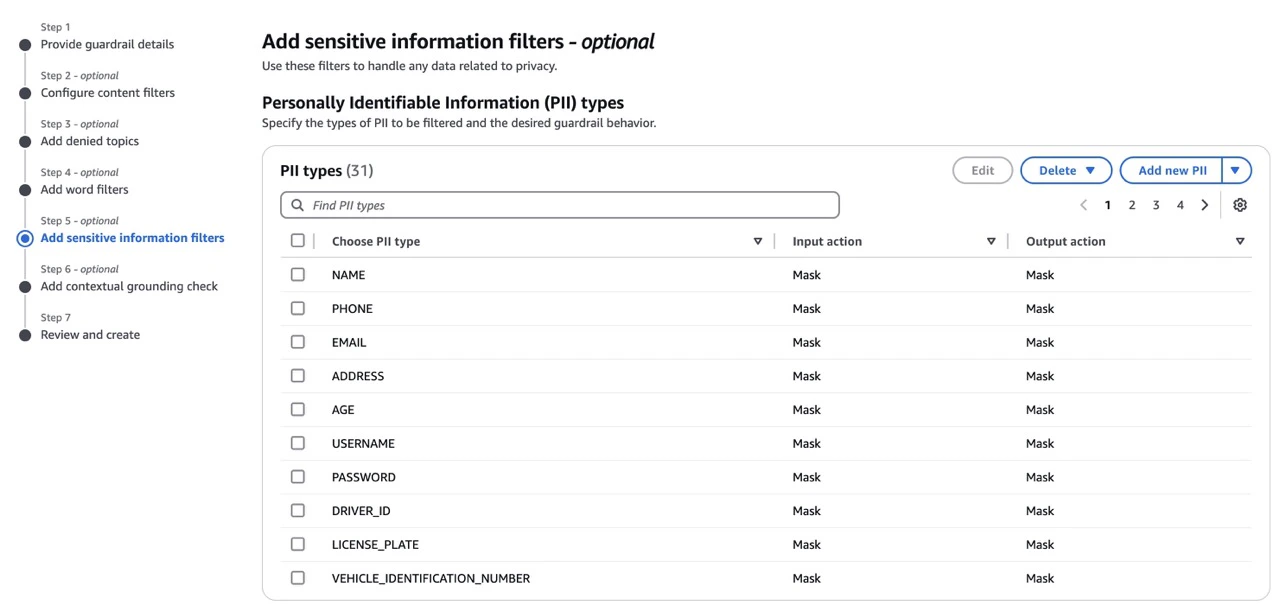 * Create a new or Add to an existing guardrail group on Truefoundry Gateway **(AI Gateway -> Guardrails -> Add New Guardrail Group or Add/Edit Guardrails)**
* Add bedrock guardrail and fill the details such as:
* Name
* GuardrailID
* Version
* Region
* Auth Data (AWS Access Key ID and Secret Access Key or ARN Based Credentials)
* Create a new or Edit existing guardrail configuration on Truefoundry Gateway **(AI Gateway -> Config -> Guardrail -> Create/Edit)**
* Test out the guardrail in playground **(AI Gateway -> Playground)**
* Create a new or Add to an existing guardrail group on Truefoundry Gateway **(AI Gateway -> Guardrails -> Add New Guardrail Group or Add/Edit Guardrails)**
* Add bedrock guardrail and fill the details such as:
* Name
* GuardrailID
* Version
* Region
* Auth Data (AWS Access Key ID and Secret Access Key or ARN Based Credentials)
* Create a new or Edit existing guardrail configuration on Truefoundry Gateway **(AI Gateway -> Config -> Guardrail -> Create/Edit)**
* Test out the guardrail in playground **(AI Gateway -> Playground)**