> ## Documentation Index
> Fetch the complete documentation index at: https://www.truefoundry.com/llms.txt
> Use this file to discover all available pages before exploring further.
# Noma Security
> Integrate Noma AI-DR with TrueFoundry AI Gateway for prompt, response, and tool content safety scanning.
This guide explains how to integrate [Noma Security](https://noma.security/) with TrueFoundry to add AI Detection and Response (AI-DR) guardrails to your LLM applications.
## What is Noma Security?
Noma Security provides enterprise-grade **AI Detection and Response (AI-DR)** that monitors AI interactions in real time and enforces security, privacy, and compliance policies at the point of execution. Its models analyze prompts, responses, tool calls, and agent behaviors — then detect, mask, or block threats before they impact your applications.
In the TrueFoundry AI Gateway integration, Noma AI-DR scans **prompt**, **response**, and **tool content** for unsafe or policy-violating material and returns a verdict the gateway uses to allow or block the request.
### Key Features of Noma Security
1. **Prompt, Response, and Tool Scanning**: Analyze LLM inputs, model outputs, and tool/MCP content in a single AI-DR engine so threats are caught across the full request path — not only at the prompt layer.
2. **Real-Time Policy Enforcement**: Detect prompt injection, jailbreaks, harmful content, sensitive data exposure, and banned topics, then block or flag requests according to the policies you configure in Noma.
3. **Application and User Attribution**: Optionally scope scans with an **Application ID** and a **User ID Metadata Key** so Noma can attribute findings to the right app and end user in your TrueFoundry traffic.
### Adding Noma Security Integration
To add Noma Security to your TrueFoundry setup, follow these steps:
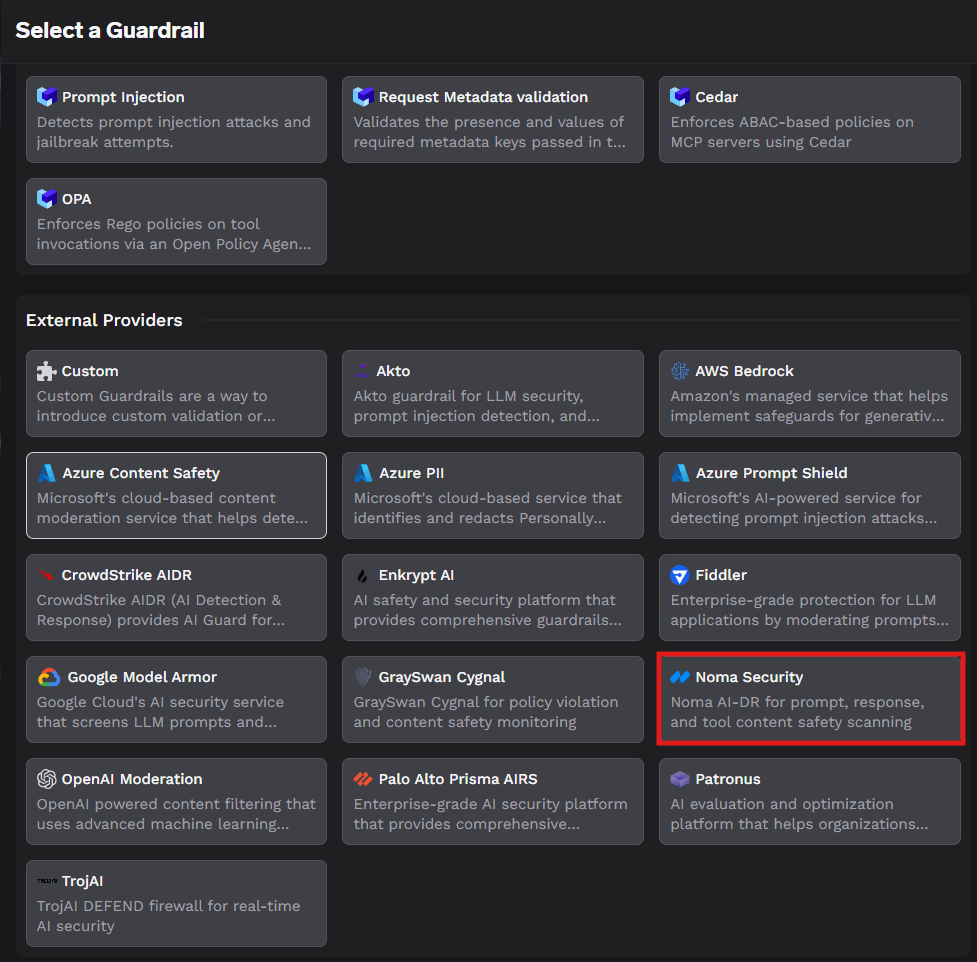
1. From **AI Gateway → Guardrails → Registry**, select **Noma Security** under **External Providers**. See [Get started with guardrails](/docs/ai-gateway/guardrails-getting-started) for the end-to-end flow of adding any guardrail.
 2. **Fill in the Guardrails Group Form**
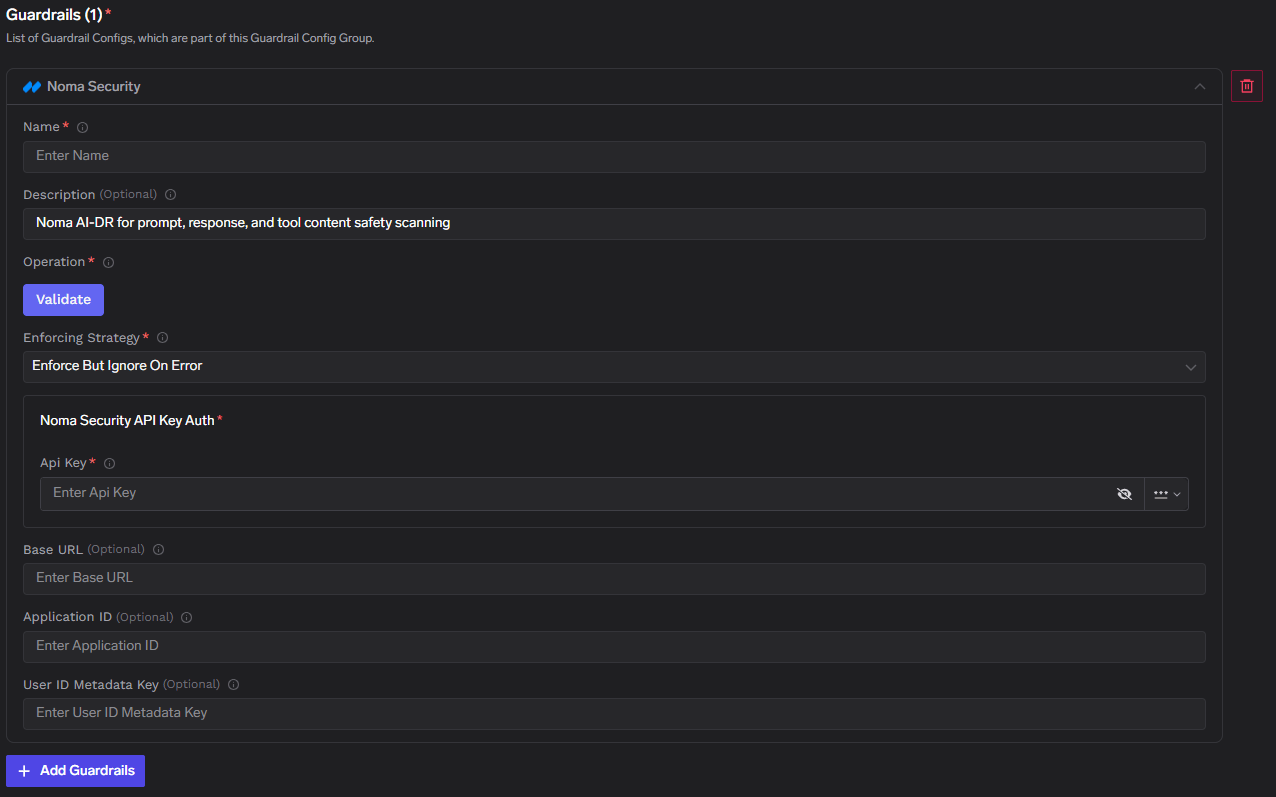
* **Name**: Enter a name for your guardrails group.
* **Collaborators**: Add collaborators who will have access to this group.
* **Noma Security Config**:
* **Name**: Enter a name for the Noma Security configuration (e.g., `noma`).
* **Description** (Optional): A description for the guardrail (e.g., "Noma AI-DR for prompt, response, and tool content safety scanning").
* **Operation**: The operation type for this guardrail. Noma Security guardrails use **Validate** — content is inspected and can be blocked without mutating the request or response.
* **Enforcing Strategy**: Strategy for enforcing this guardrail:
* **Enforce**: Guardrail is applied. If a violation is detected or an error occurs during execution, the request is blocked.
* **Enforce But Ignore On Error**: Guardrail is applied, but if an error occurs during execution, the guardrail is ignored and the request proceeds.
* **Audit**: Request is never blocked. Violations are logged for review only.
* **Noma Security API Key Auth**:
* **API Key**: The API key for Noma Security. Required to authenticate requests to the Noma AI-DR API. Obtain it from your [Noma Security](https://noma.security/) account. Keep this key secure — it grants access to your Noma resources.
* **Additional Configuration** (Optional):
* **Base URL**: Noma API base URL. Defaults to `https://api.noma.security/` when left empty. Override this if you use a regional or self-managed Noma endpoint.
* **Application ID**: Application identifier sent to Noma so findings can be attributed to a specific app or environment.
* **User ID Metadata Key**: Metadata key on the TrueFoundry request whose value is forwarded to Noma as the user identifier (for per-user attribution in Noma).
2. **Fill in the Guardrails Group Form**
* **Name**: Enter a name for your guardrails group.
* **Collaborators**: Add collaborators who will have access to this group.
* **Noma Security Config**:
* **Name**: Enter a name for the Noma Security configuration (e.g., `noma`).
* **Description** (Optional): A description for the guardrail (e.g., "Noma AI-DR for prompt, response, and tool content safety scanning").
* **Operation**: The operation type for this guardrail. Noma Security guardrails use **Validate** — content is inspected and can be blocked without mutating the request or response.
* **Enforcing Strategy**: Strategy for enforcing this guardrail:
* **Enforce**: Guardrail is applied. If a violation is detected or an error occurs during execution, the request is blocked.
* **Enforce But Ignore On Error**: Guardrail is applied, but if an error occurs during execution, the guardrail is ignored and the request proceeds.
* **Audit**: Request is never blocked. Violations are logged for review only.
* **Noma Security API Key Auth**:
* **API Key**: The API key for Noma Security. Required to authenticate requests to the Noma AI-DR API. Obtain it from your [Noma Security](https://noma.security/) account. Keep this key secure — it grants access to your Noma resources.
* **Additional Configuration** (Optional):
* **Base URL**: Noma API base URL. Defaults to `https://api.noma.security/` when left empty. Override this if you use a regional or self-managed Noma endpoint.
* **Application ID**: Application identifier sent to Noma so findings can be attributed to a specific app or environment.
* **User ID Metadata Key**: Metadata key on the TrueFoundry request whose value is forwarded to Noma as the user identifier (for per-user attribution in Noma).
 Keep the Noma API key in TrueFoundry only — it should never appear in client code or model request bodies. The gateway attaches it when calling Noma on each guarded request.
#### Validation Logic
TrueFoundry uses the Noma AI-DR response to determine content safety:
* If Noma reports a policy violation, the request is blocked and a **400** error is returned to the caller.
* If Noma reports no violations, the request is allowed to proceed.
* If the Noma API call fails (timeout, 5xx, auth error), behavior follows your **Enforcing Strategy**:
* **Enforce** — fail closed; the request is blocked.
* **Enforce But Ignore On Error** — fail open; the request proceeds and the failure is logged.
* **Audit** — never block; violations and errors are logged only.
#### Request Logs
When a Noma Security guardrail triggers, you can inspect the full request flow in the TrueFoundry request logs. The logs show the guardrail evaluation call to your Noma base URL, the detector results, the final action, and the downstream model request status.
## Reference
* [Noma Security](https://noma.security/) — AI security platform overview
* [Noma AI Runtime Protection](https://noma.security/platform/runtime-protection/) — AI-DR capabilities for prompts, responses, and tool calls
* [TrueFoundry guardrails overview](/docs/ai-gateway/guardrails-overview)
* [Configure guardrail rules](/docs/ai-gateway/guardrails-configuration)
Keep the Noma API key in TrueFoundry only — it should never appear in client code or model request bodies. The gateway attaches it when calling Noma on each guarded request.
#### Validation Logic
TrueFoundry uses the Noma AI-DR response to determine content safety:
* If Noma reports a policy violation, the request is blocked and a **400** error is returned to the caller.
* If Noma reports no violations, the request is allowed to proceed.
* If the Noma API call fails (timeout, 5xx, auth error), behavior follows your **Enforcing Strategy**:
* **Enforce** — fail closed; the request is blocked.
* **Enforce But Ignore On Error** — fail open; the request proceeds and the failure is logged.
* **Audit** — never block; violations and errors are logged only.
#### Request Logs
When a Noma Security guardrail triggers, you can inspect the full request flow in the TrueFoundry request logs. The logs show the guardrail evaluation call to your Noma base URL, the detector results, the final action, and the downstream model request status.
## Reference
* [Noma Security](https://noma.security/) — AI security platform overview
* [Noma AI Runtime Protection](https://noma.security/platform/runtime-protection/) — AI-DR capabilities for prompts, responses, and tool calls
* [TrueFoundry guardrails overview](/docs/ai-gateway/guardrails-overview)
* [Configure guardrail rules](/docs/ai-gateway/guardrails-configuration)