> ## Documentation Index
> Fetch the complete documentation index at: https://www.truefoundry.com/llms.txt
> Use this file to discover all available pages before exploring further.
# Nebius
> Add and configure Nebius Token Factory models through TrueFoundry's AI Gateway
[Nebius Token Factory](https://docs.tokenfactory.nebius.com/quickstart) provides an OpenAI-compatible API for inference on open models such as DeepSeek, Qwen, and Llama. TrueFoundry's AI Gateway supports Nebius models on the `/chat/completions` (Chat) endpoint.
### Adding Models
This section explains the steps to add Nebius models and configure the required access controls.
From the TrueFoundry dashboard, navigate to `AI Gateway` > `Models` and select `Nebius`.
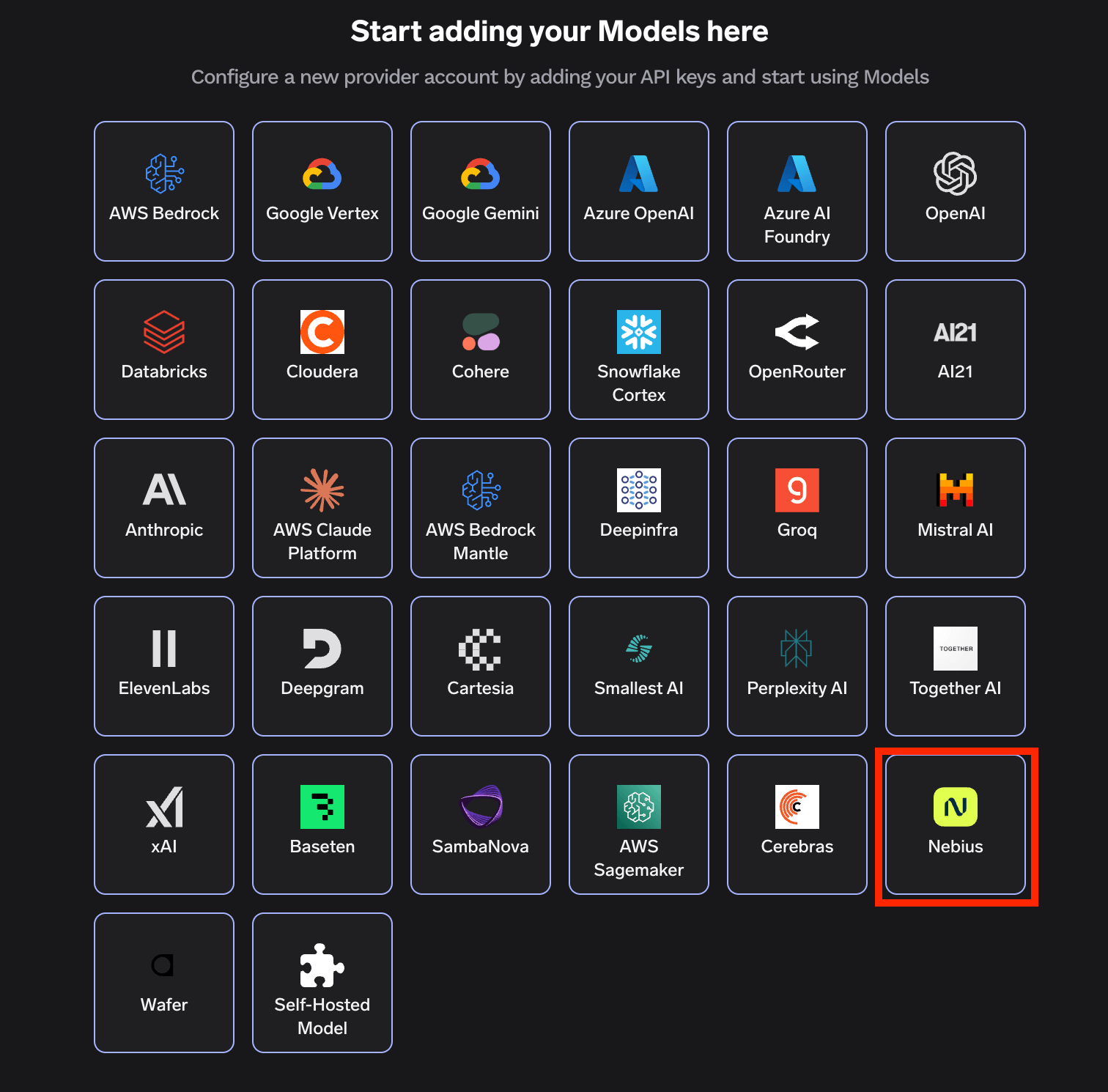 Click `Add Nebius Account`. Give a unique name to your Nebius account and complete the form with your Nebius authentication details (API Key). You can generate an API key from the [Nebius Token Factory console](https://tokenfactory.nebius.com/).
Add collaborators to your account. You can read more about access control [here](/docs/ai-gateway/gateway-access-control).
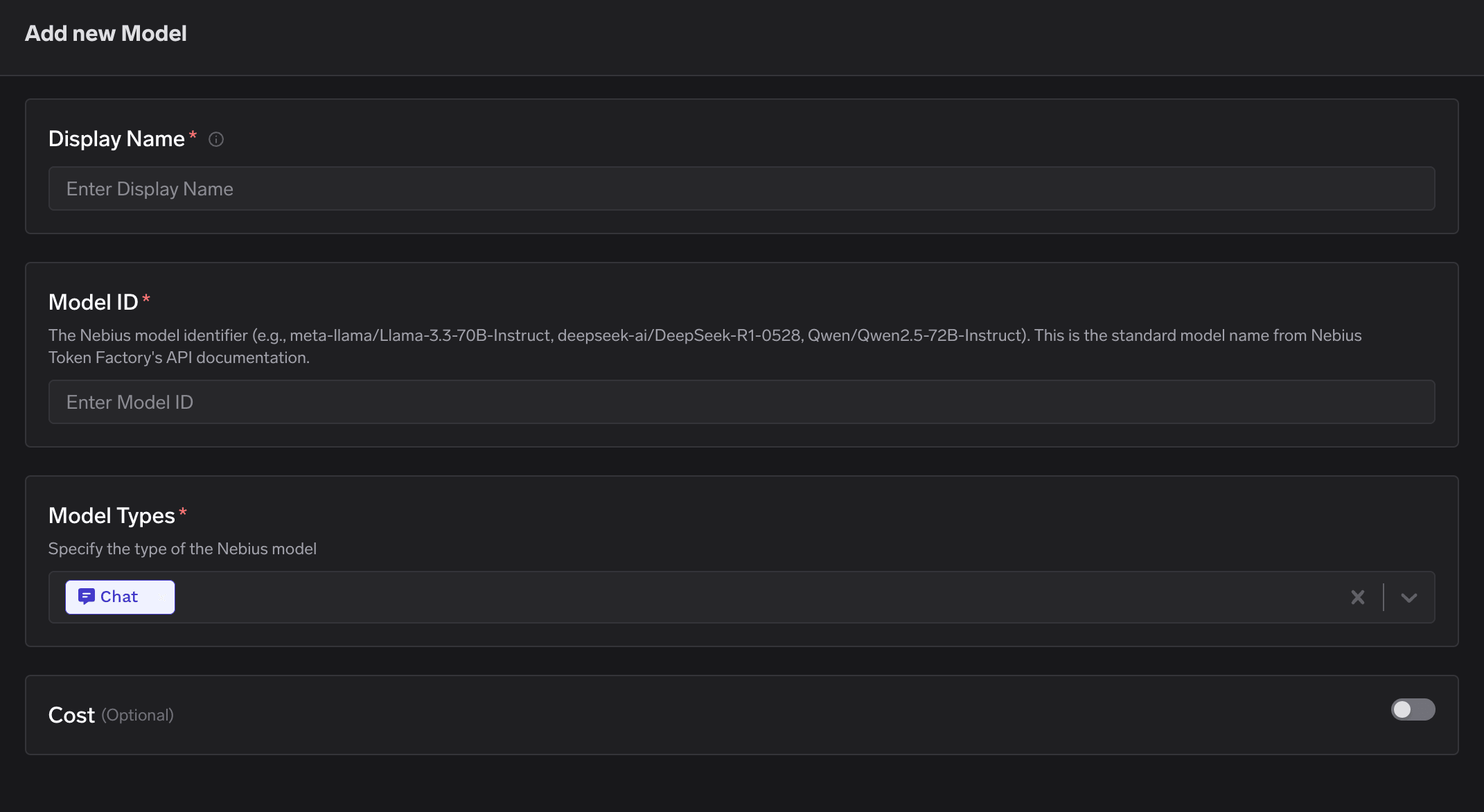
Click on `+ Add Model` to open the form for adding a new model. For Nebius, you don't select from a list. Instead, you need to get the `Model ID` from their [models](https://docs.tokenfactory.nebius.com/ai-models-inference/overview) page.
Provide the following:
* **Display Name**: A friendly name used to refer to the model in TrueFoundry.
* **Model ID**: The standard Nebius model identifier from their API documentation (e.g., `meta-llama/Llama-3.3-70B-Instruct`, `deepseek-ai/DeepSeek-R1-0528`, `Qwen/Qwen2.5-72B-Instruct`).
* **Model Types**: TrueFoundry supports Nebius models on the `Chat` endpoint only. Select `Chat`.
Click `Add Nebius Account`. Give a unique name to your Nebius account and complete the form with your Nebius authentication details (API Key). You can generate an API key from the [Nebius Token Factory console](https://tokenfactory.nebius.com/).
Add collaborators to your account. You can read more about access control [here](/docs/ai-gateway/gateway-access-control).
Click on `+ Add Model` to open the form for adding a new model. For Nebius, you don't select from a list. Instead, you need to get the `Model ID` from their [models](https://docs.tokenfactory.nebius.com/ai-models-inference/overview) page.
Provide the following:
* **Display Name**: A friendly name used to refer to the model in TrueFoundry.
* **Model ID**: The standard Nebius model identifier from their API documentation (e.g., `meta-llama/Llama-3.3-70B-Instruct`, `deepseek-ai/DeepSeek-R1-0528`, `Qwen/Qwen2.5-72B-Instruct`).
* **Model Types**: TrueFoundry supports Nebius models on the `Chat` endpoint only. Select `Chat`.
 ### Inference
After adding the models, you can perform inference using an OpenAI-compatible API via the Playground or by integrating with your own application.
### Inference
After adding the models, you can perform inference using an OpenAI-compatible API via the Playground or by integrating with your own application.
 Point the OpenAI SDK at your TrueFoundry gateway and use the model's fully qualified name (`/`) as the `model`. The example below streams a chat completion:
```python theme={"dark"}
from openai import OpenAI
client = OpenAI(api_key="", base_url="https://gateway.truefoundry.ai")
stream = client.chat.completions.create(
messages=[
{"role": "system", "content": "You are an AI bot."},
{"role": "user", "content": "Enter your prompt here"},
],
model="nebius-rishi/meta-llama-3.1",
stream=True,
extra_headers={
"X-TFY-METADATA": '{}',
"X-TFY-LOGGING-CONFIG": '{"enabled": true}',
},
)
for chunk in stream:
if (
chunk.choices
and len(chunk.choices) > 0
and chunk.choices[0].delta.content is not None
):
print(chunk.choices[0].delta.content, end="", flush=True)
```
Replace `nebius-rishi/meta-llama-3.1` with your own model's fully qualified name (the account name you chose plus the model's display name). You can copy the exact snippet for any model from the **code snippet** button in the Playground.
Point the OpenAI SDK at your TrueFoundry gateway and use the model's fully qualified name (`/`) as the `model`. The example below streams a chat completion:
```python theme={"dark"}
from openai import OpenAI
client = OpenAI(api_key="", base_url="https://gateway.truefoundry.ai")
stream = client.chat.completions.create(
messages=[
{"role": "system", "content": "You are an AI bot."},
{"role": "user", "content": "Enter your prompt here"},
],
model="nebius-rishi/meta-llama-3.1",
stream=True,
extra_headers={
"X-TFY-METADATA": '{}',
"X-TFY-LOGGING-CONFIG": '{"enabled": true}',
},
)
for chunk in stream:
if (
chunk.choices
and len(chunk.choices) > 0
and chunk.choices[0].delta.content is not None
):
print(chunk.choices[0].delta.content, end="", flush=True)
```
Replace `nebius-rishi/meta-llama-3.1` with your own model's fully qualified name (the account name you chose plus the model's display name). You can copy the exact snippet for any model from the **code snippet** button in the Playground.