> ## Documentation Index
> Fetch the complete documentation index at: https://www.truefoundry.com/llms.txt
> Use this file to discover all available pages before exploring further.
# Metadata Validation Guardrail
> Enforce the presence and values of request metadata keys using TrueFoundry's built-in Metadata Validation guardrail.
This guide explains how to use TrueFoundry's built-in **Metadata Validation** guardrail to enforce that requests carry the metadata your organization requires, with the values you expect.
## What is Metadata Validation?
Metadata Validation is a built-in TrueFoundry guardrail that checks the custom metadata sent with a request against a set of rules you define. It runs directly within the AI Gateway without requiring external API calls, providing fast and cost-effective validation.
Metadata is passed to the gateway using the `X-TFY-METADATA` header (see [Log Custom Metadata](/docs/ai-gateway/log-custom-metadata)). This guardrail lets you require that certain keys are always present, constrain their values to a regex pattern or a fixed list, and optionally reject any keys you have not explicitly allowed.
Metadata Validation only runs on the **LLM Input** hook (`beforeRequestHook`). When attached to any other hook (LLM Output, MCP Pre Tool, MCP Post Tool), it passes through without performing any checks.
### Key Features
1. **Required Keys**: Ensure specific metadata keys are always present in the request.
2. **Value Constraints**: Validate a key's value against a regex pattern or restrict it to a fixed set of allowed values.
3. **Unknown Key Control**: Optionally reject any metadata key that is not explicitly declared in your rules.
## Adding Metadata Validation Guardrail
To add Metadata Validation to your TrueFoundry setup, follow these steps:
Go to the AI Gateway dashboard and navigate to the **Guardrails** section.
Create a new guardrails group or select an existing one where you want to add the Metadata Validation guardrail.
Click on **Add Guardrail** and select **Metadata Validation** from the TrueFoundry Guardrails section.
Fill in the configuration form with your desired settings (see Configuration Options below). Toggle **Allow unknown keys** and add a rule for each metadata key you want to enforce.
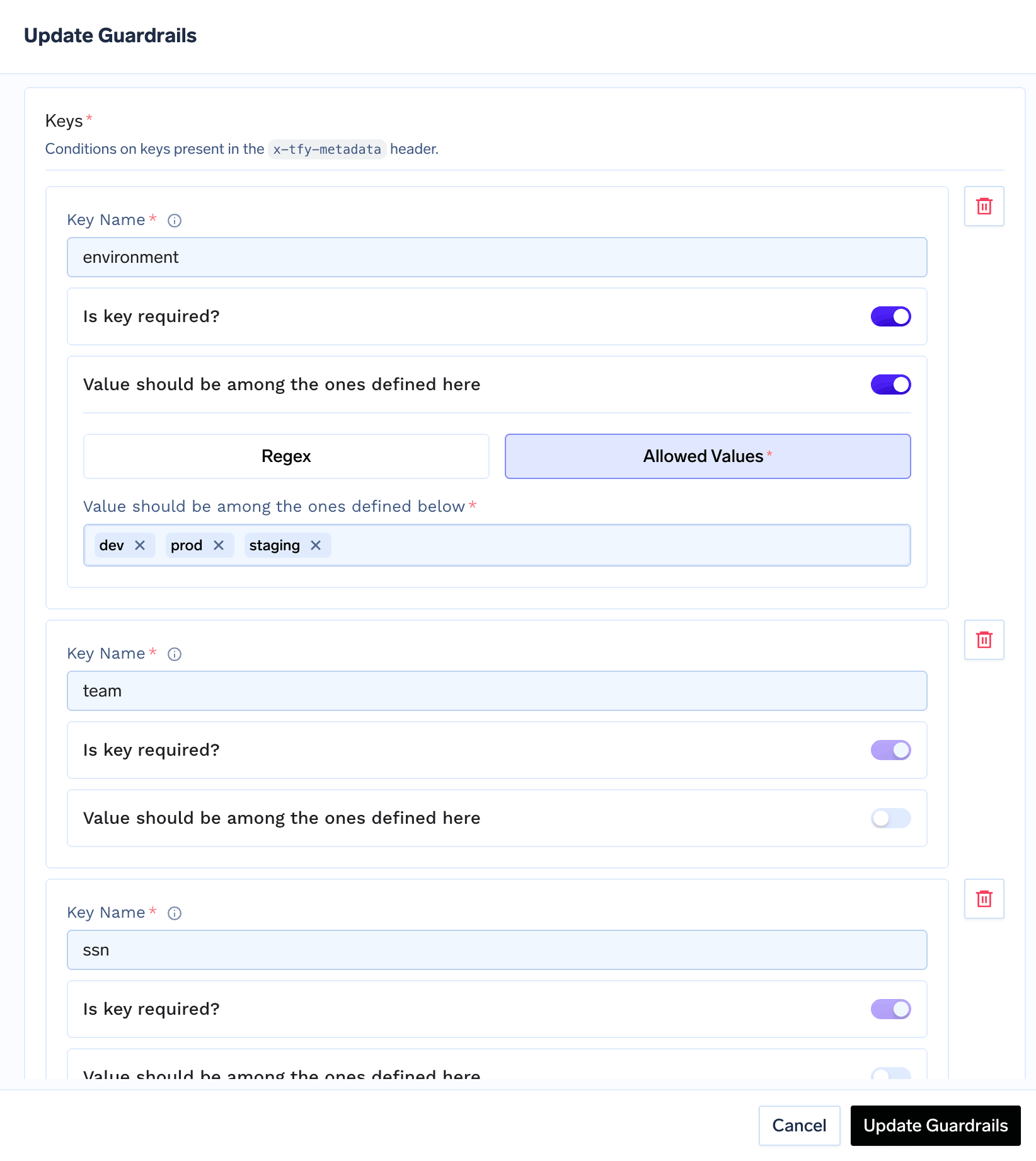 Click **Save** to add the guardrail to your group.
## Configuration Options
| Parameter | Default | Description |
| ---------------------- | ----------------------------- | ---------------------------------------------------------------------------------------------------- |
| **Name** | Required | Unique identifier for this guardrail |
| **Operation** | `validate` | Metadata Validation can only be used for validation |
| **Enforcing Strategy** | `enforce_but_ignore_on_error` | `enforce`, `enforce_but_ignore_on_error`, or `audit` |
| **Allow unknown keys** | `true` | When on, metadata keys not listed in the rules pass through. When off, only listed keys are accepted |
| **Keys** | None | The per-key rules applied to specific metadata fields (see Key Rules below) |
See [Guardrails Overview](/docs/ai-gateway/guardrails-overview#operation-modes) for details on Operation Modes and Enforcing Strategy.
## Key Rules
Each entry under **Keys** maps a metadata key name to a rule. There are two kinds of rules:
### Key must exist
Only the presence of the key is checked — any value passes. Once configured, the key must be present in the request metadata.
### Value must match
Validates the key's value, with an optional requirement that the key be present:
| Field | Default | Description |
| -------------------- | -------- | --------------------------------------------------------------------------------------------------------------------------- |
| **Required** | `true` | When on, the key must be present. When off, the key is optional, but if present its value must still satisfy the constraint |
| **Value constraint** | Required | How the value is validated — either a regex pattern or a fixed list of allowed values |
The value constraint is one of:
| Constraint | Description |
| ------------------ | ----------------------------------------------------------------------------------- |
| **Regex** | The value must match the provided regular expression |
| **Allowed values** | The value must exactly match one of the listed values. Comparison is case-sensitive |
## How It Works
When a request reaches the LLM Input hook, the guardrail evaluates the request metadata as follows:
1. If **Allow unknown keys** is off, every metadata key that is not declared in your rules raises an `unknown_key` violation. Keys injected by the gateway itself (for example `subject`, `subjectType`, `tfy_agent_name`, and any default gateway metadata) are exempt from this check.
2. For each declared key rule:
* **Key must exist**: a missing key raises a `missing_required` violation.
* **Value must match (required)**: a missing key raises a `missing_required` violation.
* **Value must match (regex)**: if the key is present, its value must match the pattern, otherwise a `pattern_mismatch` violation is raised. An invalid regex pattern raises an `invalid_regex_pattern` violation.
* **Value must match (allowed values)**: if the key is present, its value must be in the allowed set, otherwise a `value_not_allowed` violation is raised.
3. If any violations are found, the verdict fails. The response handling then depends on the configured **Enforcing Strategy**.
### Violation Reasons
| Reason | Meaning |
| ----------------------- | ------------------------------------------------------------------------------------------------------ |
| `missing_required` | A required key was not present in the request metadata |
| `pattern_mismatch` | The key's value did not match the configured regex pattern |
| `value_not_allowed` | The key's value was not in the configured allowed values list |
| `unknown_key` | A metadata key was present that is not declared in the rules (only when **Allow unknown keys** is off) |
| `invalid_regex_pattern` | The configured regex pattern itself was invalid |
## Examples
Consider a guardrail with **Allow unknown keys** turned off and the following key rules:
* `environment` — Value must match, allowed values: `prod`, `staging`, `dev`
* `customer_id` — Value must match, regex: `^cust_[0-9]+$`
* `team` — Key must exist
**Metadata**:
```json theme={"dark"}
{"environment": "prod", "customer_id": "cust_12345", "team": "billing"}
```
**Result**: Allowed — all keys are present and valid, and no unknown keys are sent.
**Metadata**:
```json theme={"dark"}
{"environment": "prod", "customer_id": "cust_12345"}
```
**Result**: Blocked — `team:missing_required` (the `team` key is missing).
**Metadata**:
```json theme={"dark"}
{"environment": "production", "customer_id": "cust_12345", "team": "billing"}
```
**Result**: Blocked — `environment:value_not_allowed` (`production` is not in `[prod, staging, dev]`).
**Metadata**:
```json theme={"dark"}
{"environment": "dev", "customer_id": "12345", "team": "billing"}
```
**Result**: Blocked — `customer_id:pattern_mismatch` (`12345` does not match `^cust_[0-9]+$`).
**Metadata**:
```json theme={"dark"}
{"environment": "dev", "customer_id": "cust_1", "team": "billing", "debug": "true"}
```
**Result**: Blocked — `debug:unknown_key` (the `debug` key is not declared and unknown keys are not allowed).
## Sending Metadata
Metadata is sent using the `X-TFY-METADATA` header as a JSON object of string key-value pairs:
```bash theme={"dark"}
curl -X POST "{GATEWAY_BASE_URL}/chat/completions" \
-H "Authorization: Bearer YOUR_API_KEY" \
-H "Content-Type: application/json" \
-H 'X-TFY-METADATA: {"environment":"prod","customer_id":"cust_12345","team":"billing"}' \
-H 'X-TFY-GUARDRAILS: {"llm_input_guardrails":["my-guardrail-group/metadata-validation"],"llm_output_guardrails":[]}' \
-d '{
"model": "openai-main/gpt-4o-mini",
"messages": [
{"role": "user", "content": "Hello"}
]
}'
```
See [Log Custom Metadata](/docs/ai-gateway/log-custom-metadata) for how to attach metadata using the OpenAI, LangChain, and Node.js SDKs.
## Use Cases
| Scenario | Configuration |
| ----------------------------------- | ------------------------------------------------------------------------------------------------------------ |
| **Mandatory cost-attribution tags** | Require keys like `team` or `customer_id` so every request can be attributed in analytics |
| **Restrict environment values** | Constrain `environment` to an allowed list (`prod`, `staging`, `dev`) to prevent typos and unexpected values |
| **Enforce ID formats** | Use a regex to ensure identifiers such as `customer_id` follow your organization's format |
| **Lock down metadata** | Turn off **Allow unknown keys** to reject any metadata field that is not explicitly approved |
## Example use cases
When you run more than one gateway against the same control plane — for example a **dev** gateway and a **prod** gateway — you may want to lock down the prod gateway so only production applications can call it, and a dev application that points at it is rejected.
You can enforce this with Metadata Validation, without changing any application code, by combining two pieces of metadata the gateway already provides:
* **The caller's environment** comes from [virtual account tags](/docs/ai-gateway/request-headers#automatic-metadata-injection). Tagging a virtual account with `env: prod` means every request made with that account's token carries `env: prod`.
* **The gateway's environment** comes from [default gateway metadata](/docs/platform/deploy-control-plane-faq#how-do-you-add-default-metadata-to-all-requests-passing-via-the-gateway). Each gateway stamps every request that passes through it with its own value, for example `tfy_gateway_region: PROD`.
A [guardrail rule](/docs/ai-gateway/guardrails-configuration) then matches on the gateway's stamp (`tfy_gateway_region`) and applies a Metadata Validation guardrail that requires the caller's `env` to be the matching value. Because the rule only fires on the gateway whose stamp it matches, the prod-environment guardrail runs only on the prod gateway:
| Caller (virtual account tag) | Gateway (stamped value) | Result |
| ---------------------------- | ----------------------------------------- | ------- |
| Prod app — `env: prod` | Prod gateway — `tfy_gateway_region: PROD` | Allowed |
| Dev app — `env: dev` | Prod gateway — `tfy_gateway_region: PROD` | Blocked |
Add a tag to every [virtual account](/docs/platform/virtual-account-management): set `env: prod` on the accounts used by production applications and `env: dev` on the ones used by dev applications. These tags are injected as metadata on every request made with that account's token.
Set [`DEFAULT_GATEWAY_METADATA`](/docs/platform/deploy-control-plane-faq#how-do-you-add-default-metadata-to-all-requests-passing-via-the-gateway) on each gateway plane so it tags every request that passes through it. On the **prod** gateway plane's values file:
```yaml theme={"dark"}
tfy-llm-gateway:
env:
DEFAULT_GATEWAY_METADATA: '{"tfy_gateway_region":"PROD"}'
```
On the **dev** gateway plane's values file:
```yaml theme={"dark"}
tfy-llm-gateway:
env:
DEFAULT_GATEWAY_METADATA: '{"tfy_gateway_region":"DEV"}'
```
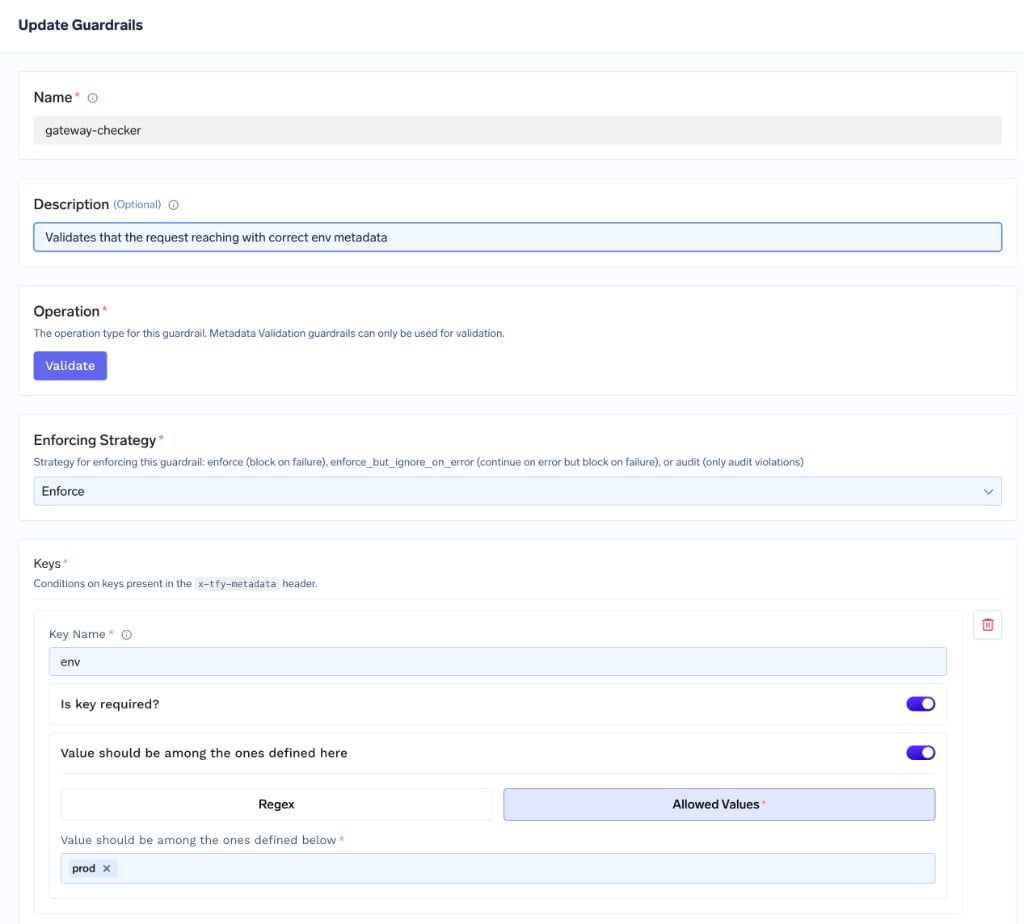
Add a Metadata Validation guardrail (for example `gateway-checker`) with a single key rule:
* **Key Name**: `env`
* **Is key required?**: on
* **Value should be among the ones defined here**: on, with **Allowed Values**: `prod`
Set the **Enforcing Strategy** to **Enforce** so non-matching requests are blocked. This guardrail blocks any request whose `env` is not `prod`.
Click **Save** to add the guardrail to your group.
## Configuration Options
| Parameter | Default | Description |
| ---------------------- | ----------------------------- | ---------------------------------------------------------------------------------------------------- |
| **Name** | Required | Unique identifier for this guardrail |
| **Operation** | `validate` | Metadata Validation can only be used for validation |
| **Enforcing Strategy** | `enforce_but_ignore_on_error` | `enforce`, `enforce_but_ignore_on_error`, or `audit` |
| **Allow unknown keys** | `true` | When on, metadata keys not listed in the rules pass through. When off, only listed keys are accepted |
| **Keys** | None | The per-key rules applied to specific metadata fields (see Key Rules below) |
See [Guardrails Overview](/docs/ai-gateway/guardrails-overview#operation-modes) for details on Operation Modes and Enforcing Strategy.
## Key Rules
Each entry under **Keys** maps a metadata key name to a rule. There are two kinds of rules:
### Key must exist
Only the presence of the key is checked — any value passes. Once configured, the key must be present in the request metadata.
### Value must match
Validates the key's value, with an optional requirement that the key be present:
| Field | Default | Description |
| -------------------- | -------- | --------------------------------------------------------------------------------------------------------------------------- |
| **Required** | `true` | When on, the key must be present. When off, the key is optional, but if present its value must still satisfy the constraint |
| **Value constraint** | Required | How the value is validated — either a regex pattern or a fixed list of allowed values |
The value constraint is one of:
| Constraint | Description |
| ------------------ | ----------------------------------------------------------------------------------- |
| **Regex** | The value must match the provided regular expression |
| **Allowed values** | The value must exactly match one of the listed values. Comparison is case-sensitive |
## How It Works
When a request reaches the LLM Input hook, the guardrail evaluates the request metadata as follows:
1. If **Allow unknown keys** is off, every metadata key that is not declared in your rules raises an `unknown_key` violation. Keys injected by the gateway itself (for example `subject`, `subjectType`, `tfy_agent_name`, and any default gateway metadata) are exempt from this check.
2. For each declared key rule:
* **Key must exist**: a missing key raises a `missing_required` violation.
* **Value must match (required)**: a missing key raises a `missing_required` violation.
* **Value must match (regex)**: if the key is present, its value must match the pattern, otherwise a `pattern_mismatch` violation is raised. An invalid regex pattern raises an `invalid_regex_pattern` violation.
* **Value must match (allowed values)**: if the key is present, its value must be in the allowed set, otherwise a `value_not_allowed` violation is raised.
3. If any violations are found, the verdict fails. The response handling then depends on the configured **Enforcing Strategy**.
### Violation Reasons
| Reason | Meaning |
| ----------------------- | ------------------------------------------------------------------------------------------------------ |
| `missing_required` | A required key was not present in the request metadata |
| `pattern_mismatch` | The key's value did not match the configured regex pattern |
| `value_not_allowed` | The key's value was not in the configured allowed values list |
| `unknown_key` | A metadata key was present that is not declared in the rules (only when **Allow unknown keys** is off) |
| `invalid_regex_pattern` | The configured regex pattern itself was invalid |
## Examples
Consider a guardrail with **Allow unknown keys** turned off and the following key rules:
* `environment` — Value must match, allowed values: `prod`, `staging`, `dev`
* `customer_id` — Value must match, regex: `^cust_[0-9]+$`
* `team` — Key must exist
**Metadata**:
```json theme={"dark"}
{"environment": "prod", "customer_id": "cust_12345", "team": "billing"}
```
**Result**: Allowed — all keys are present and valid, and no unknown keys are sent.
**Metadata**:
```json theme={"dark"}
{"environment": "prod", "customer_id": "cust_12345"}
```
**Result**: Blocked — `team:missing_required` (the `team` key is missing).
**Metadata**:
```json theme={"dark"}
{"environment": "production", "customer_id": "cust_12345", "team": "billing"}
```
**Result**: Blocked — `environment:value_not_allowed` (`production` is not in `[prod, staging, dev]`).
**Metadata**:
```json theme={"dark"}
{"environment": "dev", "customer_id": "12345", "team": "billing"}
```
**Result**: Blocked — `customer_id:pattern_mismatch` (`12345` does not match `^cust_[0-9]+$`).
**Metadata**:
```json theme={"dark"}
{"environment": "dev", "customer_id": "cust_1", "team": "billing", "debug": "true"}
```
**Result**: Blocked — `debug:unknown_key` (the `debug` key is not declared and unknown keys are not allowed).
## Sending Metadata
Metadata is sent using the `X-TFY-METADATA` header as a JSON object of string key-value pairs:
```bash theme={"dark"}
curl -X POST "{GATEWAY_BASE_URL}/chat/completions" \
-H "Authorization: Bearer YOUR_API_KEY" \
-H "Content-Type: application/json" \
-H 'X-TFY-METADATA: {"environment":"prod","customer_id":"cust_12345","team":"billing"}' \
-H 'X-TFY-GUARDRAILS: {"llm_input_guardrails":["my-guardrail-group/metadata-validation"],"llm_output_guardrails":[]}' \
-d '{
"model": "openai-main/gpt-4o-mini",
"messages": [
{"role": "user", "content": "Hello"}
]
}'
```
See [Log Custom Metadata](/docs/ai-gateway/log-custom-metadata) for how to attach metadata using the OpenAI, LangChain, and Node.js SDKs.
## Use Cases
| Scenario | Configuration |
| ----------------------------------- | ------------------------------------------------------------------------------------------------------------ |
| **Mandatory cost-attribution tags** | Require keys like `team` or `customer_id` so every request can be attributed in analytics |
| **Restrict environment values** | Constrain `environment` to an allowed list (`prod`, `staging`, `dev`) to prevent typos and unexpected values |
| **Enforce ID formats** | Use a regex to ensure identifiers such as `customer_id` follow your organization's format |
| **Lock down metadata** | Turn off **Allow unknown keys** to reject any metadata field that is not explicitly approved |
## Example use cases
When you run more than one gateway against the same control plane — for example a **dev** gateway and a **prod** gateway — you may want to lock down the prod gateway so only production applications can call it, and a dev application that points at it is rejected.
You can enforce this with Metadata Validation, without changing any application code, by combining two pieces of metadata the gateway already provides:
* **The caller's environment** comes from [virtual account tags](/docs/ai-gateway/request-headers#automatic-metadata-injection). Tagging a virtual account with `env: prod` means every request made with that account's token carries `env: prod`.
* **The gateway's environment** comes from [default gateway metadata](/docs/platform/deploy-control-plane-faq#how-do-you-add-default-metadata-to-all-requests-passing-via-the-gateway). Each gateway stamps every request that passes through it with its own value, for example `tfy_gateway_region: PROD`.
A [guardrail rule](/docs/ai-gateway/guardrails-configuration) then matches on the gateway's stamp (`tfy_gateway_region`) and applies a Metadata Validation guardrail that requires the caller's `env` to be the matching value. Because the rule only fires on the gateway whose stamp it matches, the prod-environment guardrail runs only on the prod gateway:
| Caller (virtual account tag) | Gateway (stamped value) | Result |
| ---------------------------- | ----------------------------------------- | ------- |
| Prod app — `env: prod` | Prod gateway — `tfy_gateway_region: PROD` | Allowed |
| Dev app — `env: dev` | Prod gateway — `tfy_gateway_region: PROD` | Blocked |
Add a tag to every [virtual account](/docs/platform/virtual-account-management): set `env: prod` on the accounts used by production applications and `env: dev` on the ones used by dev applications. These tags are injected as metadata on every request made with that account's token.
Set [`DEFAULT_GATEWAY_METADATA`](/docs/platform/deploy-control-plane-faq#how-do-you-add-default-metadata-to-all-requests-passing-via-the-gateway) on each gateway plane so it tags every request that passes through it. On the **prod** gateway plane's values file:
```yaml theme={"dark"}
tfy-llm-gateway:
env:
DEFAULT_GATEWAY_METADATA: '{"tfy_gateway_region":"PROD"}'
```
On the **dev** gateway plane's values file:
```yaml theme={"dark"}
tfy-llm-gateway:
env:
DEFAULT_GATEWAY_METADATA: '{"tfy_gateway_region":"DEV"}'
```
Add a Metadata Validation guardrail (for example `gateway-checker`) with a single key rule:
* **Key Name**: `env`
* **Is key required?**: on
* **Value should be among the ones defined here**: on, with **Allowed Values**: `prod`
Set the **Enforcing Strategy** to **Enforce** so non-matching requests are blocked. This guardrail blocks any request whose `env` is not `prod`.
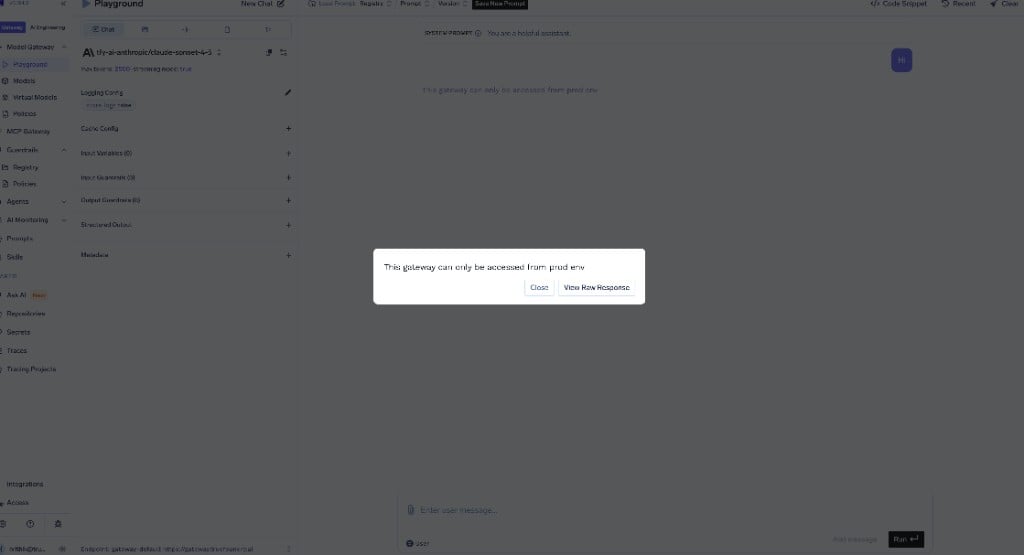
 Create a [guardrail rule](/docs/ai-gateway/guardrails-configuration) under **AI Gateway → Guardrails → Policies** that runs `gateway-checker` on the **LLM Input** hook only when the request carries the prod gateway's stamp. In the rule builder, add a **WITH METADATA** condition of `tfy_gateway_region` = `PROD`, set **APPLY ON HOOKS → LLM Input** to the `gateway-checker` guardrail, and optionally set a **Custom Error Message** such as `This gateway can only be accessed from prod env`.
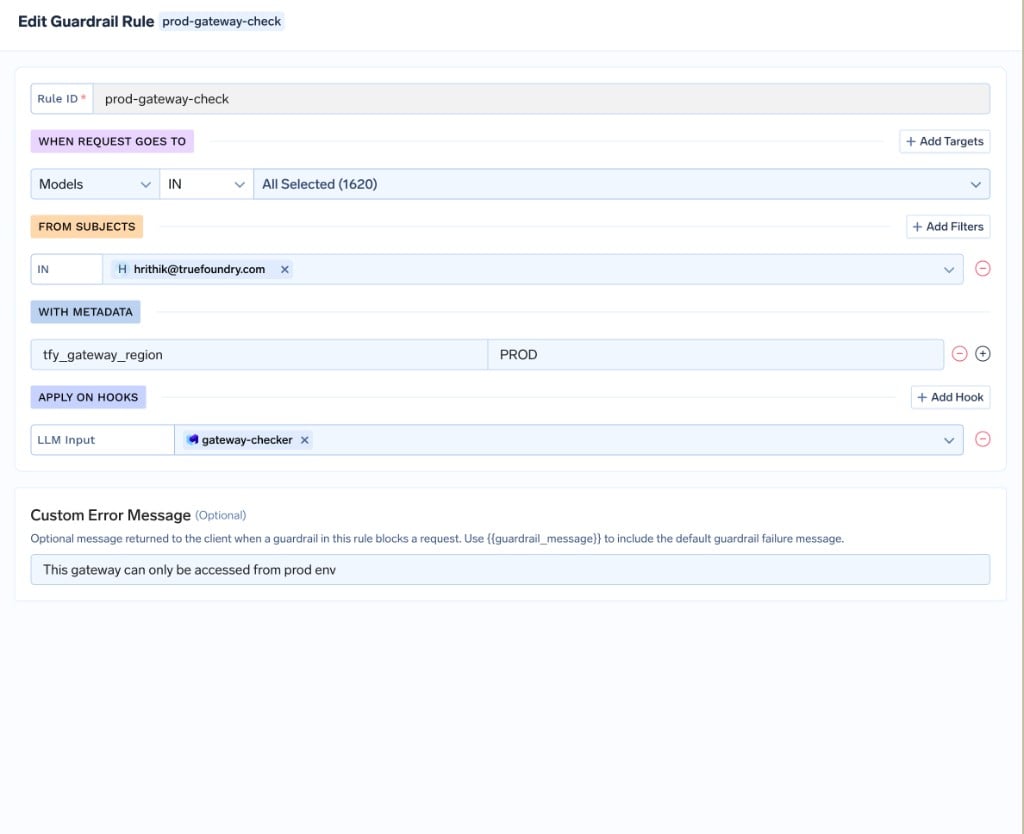 The equivalent [GitOps](/docs/setup-gitops-using-truefoundry) configuration is:
```yaml theme={"dark"}
name: gateway-env-pinning
type: gateway-guardrails-config
rules:
- id: prod-gateway-check
when:
target:
operator: or
conditions:
metadata:
tfy_gateway_region: PROD
llm_input_guardrails:
- /gateway-checker
llm_output_guardrails: []
mcp_tool_pre_invoke_guardrails: []
mcp_tool_post_invoke_guardrails: []
custom_error_message: "This gateway can only be accessed from prod env"
```
The rule fires only on requests stamped `tfy_gateway_region: PROD` — that is, requests reaching the prod gateway — so a dev application (`env: dev`) calling the prod gateway is rejected, while it is unaffected on the dev gateway.
Send a request with `env: prod` in its metadata through the prod gateway — it passes. Send one with any other `env` value (or none) and it is blocked with your custom error message.
The equivalent [GitOps](/docs/setup-gitops-using-truefoundry) configuration is:
```yaml theme={"dark"}
name: gateway-env-pinning
type: gateway-guardrails-config
rules:
- id: prod-gateway-check
when:
target:
operator: or
conditions:
metadata:
tfy_gateway_region: PROD
llm_input_guardrails:
- /gateway-checker
llm_output_guardrails: []
mcp_tool_pre_invoke_guardrails: []
mcp_tool_post_invoke_guardrails: []
custom_error_message: "This gateway can only be accessed from prod env"
```
The rule fires only on requests stamped `tfy_gateway_region: PROD` — that is, requests reaching the prod gateway — so a dev application (`env: dev`) calling the prod gateway is rejected, while it is unaffected on the dev gateway.
Send a request with `env: prod` in its metadata through the prod gateway — it passes. Send one with any other `env` value (or none) and it is blocked with your custom error message.
 Only the **prod** gateway is pinned. Production traffic comes from applications using [virtual accounts](/docs/platform/virtual-account-management), whose `env: prod` tag is injected automatically — so requiring it on the prod gateway is safe. The dev gateway is intentionally left open: developers typically access it interactively with [Personal Access Tokens (PATs)](/docs/generating-truefoundry-api-keys#personal-access-tokens-pats), which do not carry the virtual account's `env` tag. Enforcing the same guardrail on the dev gateway would block those legitimate users.
This assumes every production virtual account is tagged with `env: prod`. With **Is key required?** on, a request that reaches the prod gateway without that tag is blocked. Tag all production virtual accounts first, and consider starting the guardrail in **Audit** mode to confirm legitimate traffic passes before switching to **Enforce**.
To guarantee every request can be attributed in analytics and cost reports, require the metadata keys your finance and platform teams group by — for example `team` and `cost_center` — so no request reaches a model without them.
Add a Metadata Validation guardrail (for example `cost-attribution`) with one rule per key:
* **Key Name**: `team` — **Is key required?**: on (Key must exist)
* **Key Name**: `cost_center` — **Is key required?**: on, **Value should be among the ones defined here**: on, **Regex**: `^cc-[0-9]{4}$`
Set the **Enforcing Strategy** to **Enforce**. Requests missing `team`, or with a `cost_center` that does not match the format, are rejected before reaching the model.
Add a [guardrail rule](/docs/ai-gateway/guardrails-configuration) with an empty `when` block so it applies to every request:
```yaml theme={"dark"}
name: cost-attribution-enforcement
type: gateway-guardrails-config
rules:
- id: require-cost-attribution
when: {}
llm_input_guardrails:
- /cost-attribution
llm_output_guardrails: []
mcp_tool_pre_invoke_guardrails: []
mcp_tool_post_invoke_guardrails: []
```
Combine this with [automatic metadata injection](/docs/ai-gateway/request-headers#automatic-metadata-injection) — tag virtual accounts and teams so `team` and `cost_center` are added without any client-side changes — and the guardrail simply confirms they are always present.
## Recommended Hooks
| Hook | Use Case |
| ------------- | --------------------------------------------------------- |
| **LLM Input** | Validate request metadata before the request is processed |
Metadata Validation runs only on the **LLM Input** hook. Attaching it to other hooks has no effect.
## Best Practices
Start with the **Audit** enforcing strategy to observe metadata violations in Request Traces before switching to **Enforce**. This helps you confirm that callers are already sending the metadata your rules expect.
All metadata values are compared as strings, and allowed-value matching is case-sensitive. Make sure your allowed values and regex patterns account for the exact casing and format your applications send.
Only the **prod** gateway is pinned. Production traffic comes from applications using [virtual accounts](/docs/platform/virtual-account-management), whose `env: prod` tag is injected automatically — so requiring it on the prod gateway is safe. The dev gateway is intentionally left open: developers typically access it interactively with [Personal Access Tokens (PATs)](/docs/generating-truefoundry-api-keys#personal-access-tokens-pats), which do not carry the virtual account's `env` tag. Enforcing the same guardrail on the dev gateway would block those legitimate users.
This assumes every production virtual account is tagged with `env: prod`. With **Is key required?** on, a request that reaches the prod gateway without that tag is blocked. Tag all production virtual accounts first, and consider starting the guardrail in **Audit** mode to confirm legitimate traffic passes before switching to **Enforce**.
To guarantee every request can be attributed in analytics and cost reports, require the metadata keys your finance and platform teams group by — for example `team` and `cost_center` — so no request reaches a model without them.
Add a Metadata Validation guardrail (for example `cost-attribution`) with one rule per key:
* **Key Name**: `team` — **Is key required?**: on (Key must exist)
* **Key Name**: `cost_center` — **Is key required?**: on, **Value should be among the ones defined here**: on, **Regex**: `^cc-[0-9]{4}$`
Set the **Enforcing Strategy** to **Enforce**. Requests missing `team`, or with a `cost_center` that does not match the format, are rejected before reaching the model.
Add a [guardrail rule](/docs/ai-gateway/guardrails-configuration) with an empty `when` block so it applies to every request:
```yaml theme={"dark"}
name: cost-attribution-enforcement
type: gateway-guardrails-config
rules:
- id: require-cost-attribution
when: {}
llm_input_guardrails:
- /cost-attribution
llm_output_guardrails: []
mcp_tool_pre_invoke_guardrails: []
mcp_tool_post_invoke_guardrails: []
```
Combine this with [automatic metadata injection](/docs/ai-gateway/request-headers#automatic-metadata-injection) — tag virtual accounts and teams so `team` and `cost_center` are added without any client-side changes — and the guardrail simply confirms they are always present.
## Recommended Hooks
| Hook | Use Case |
| ------------- | --------------------------------------------------------- |
| **LLM Input** | Validate request metadata before the request is processed |
Metadata Validation runs only on the **LLM Input** hook. Attaching it to other hooks has no effect.
## Best Practices
Start with the **Audit** enforcing strategy to observe metadata violations in Request Traces before switching to **Enforce**. This helps you confirm that callers are already sending the metadata your rules expect.
All metadata values are compared as strings, and allowed-value matching is case-sensitive. Make sure your allowed values and regex patterns account for the exact casing and format your applications send.