> ## Documentation Index
> Fetch the complete documentation index at: https://www.truefoundry.com/llms.txt
> Use this file to discover all available pages before exploring further.
# Virtual MCP Server
> Combine tools from multiple MCP servers into a single curated virtual MCP server without extra deployments.
## What is Virtual MCP Server?
The Virtual MCP Server enables you to combine tools from multiple MCP servers into a single, curated MCP server that your application can connect to.
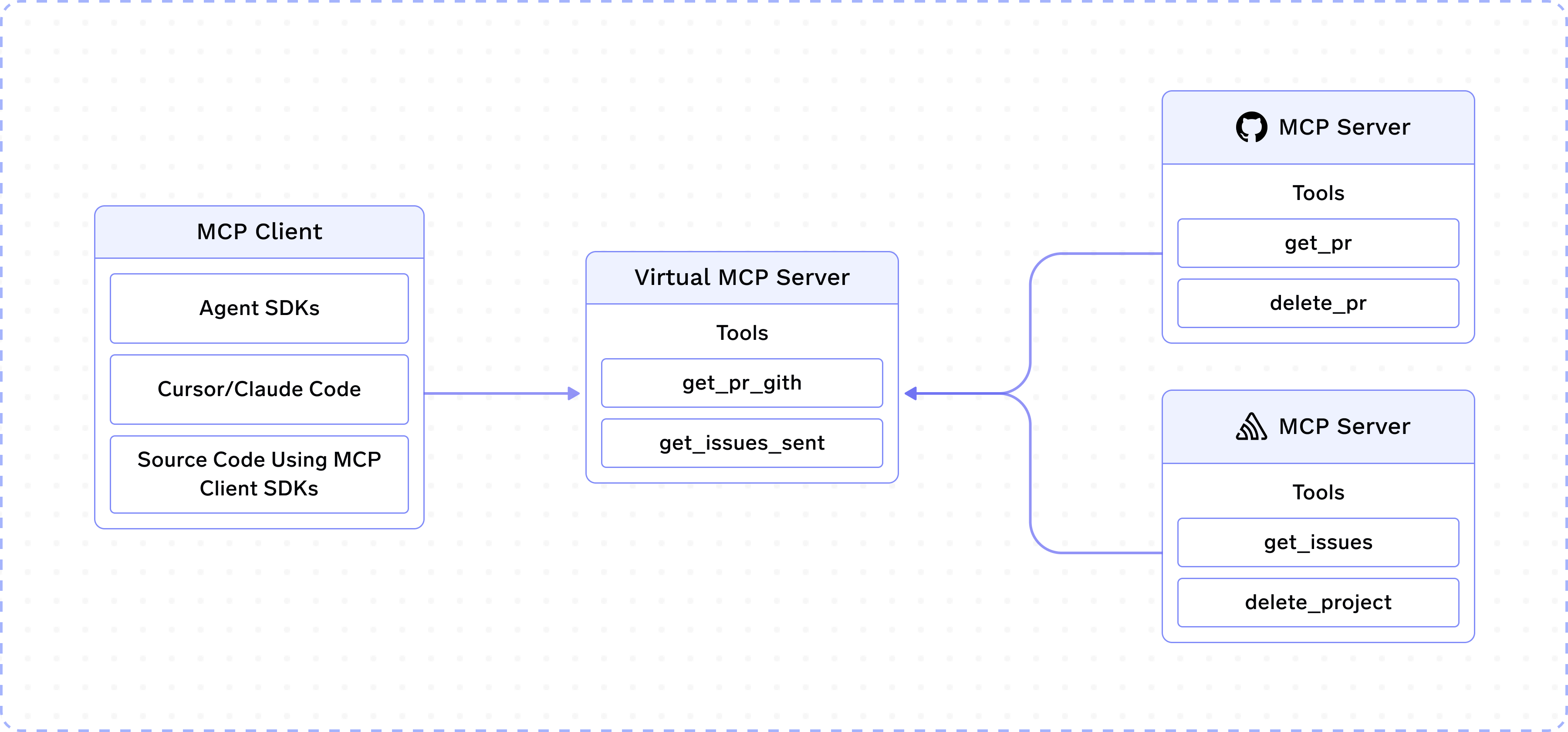 Suppose you have integrated MCP servers for GitHub and Slack on TrueFoundry. A team in your company is working on an Agent that requires access to these two MCP servers. But you do not want to expose tools like `delete_project`, `delete_pr`, etc.
As the name suggests, Virtual MCP Server allows you to create a new MCP server by taking a subset of safe tools from GitHub and Slack MCP servers. This new Virtual MCP server can be accessed like any other remote MCP server and does not require a deployment.
## How to create a Virtual MCP Server?
## How are tool names decided?
Tools in a Virtual MCP Server keep their original name with a short random suffix appended (`_`, for example `create_issue_a1b2c3`). This suffix handles collisions when multiple underlying MCP servers expose a tool with the same name, so each one stays unique within the virtual server. We avoid prefixing with the MCP server name (e.g. `github-create_issue`) because the MCP spec recommends keeping tool names within 64 characters, and a long server name can consume most of that budget. Since the tool name is the most important signal for the LLM when choosing a tool, preserving it in full while appending a short suffix keeps names both meaningful and unique.
## Frequently Asked Questions
You can use `x-tfy-mcp-headers` to pass custom headers, which will be passed to the remote MCP servers backing the virtual server.
**For MCP Gateway (direct MCP server access):**
```python theme={"dark"}
import json
from fastmcp import Client
from fastmcp.client.transports import StreamableHttpTransport
tfy_token = "Bearer ****"
# Use the remote server identifier as the key (MCP Gateway format)
extra_headers = json.dumps(
{
# backend-group/sentry is the remote MCP server backing the
# backend-group/restricted-sentry virtual server.
"backend-group/sentry": {"Authorization": "Bearer ****"},
}
)
url = "https://llm-gateway.truefoundry.com/mcp-server/backend-group/restricted-sentry/server"
async def main():
transport = StreamableHttpTransport(
url,
headers={"x-tfy-mcp-headers": extra_headers},
auth=f"Bearer {tfy_token}",
)
async with Client(transport=transport) as client:
tools = await client.list_tools()
```
**Format note**: The header format shown above is for MCP Gateway. If using the Agent API instead, use the full FQN-based format (e.g., `truefoundry:mcp-server-group:remote-mcp-servers:mcp-server:server-name`) documented in the [Agent API authentication section](/docs/ai-gateway/agents/use-mcp-server-in-code-agent#method-2:-using-x-tfy-mcp-headers-header-registered-servers-only).
The Virtual MCP server is managed by the MCP Gateway and does not require a new deployment.
For now, only listing and calling tools are allowed.
Suppose you have integrated MCP servers for GitHub and Slack on TrueFoundry. A team in your company is working on an Agent that requires access to these two MCP servers. But you do not want to expose tools like `delete_project`, `delete_pr`, etc.
As the name suggests, Virtual MCP Server allows you to create a new MCP server by taking a subset of safe tools from GitHub and Slack MCP servers. This new Virtual MCP server can be accessed like any other remote MCP server and does not require a deployment.
## How to create a Virtual MCP Server?
## How are tool names decided?
Tools in a Virtual MCP Server keep their original name with a short random suffix appended (`_`, for example `create_issue_a1b2c3`). This suffix handles collisions when multiple underlying MCP servers expose a tool with the same name, so each one stays unique within the virtual server. We avoid prefixing with the MCP server name (e.g. `github-create_issue`) because the MCP spec recommends keeping tool names within 64 characters, and a long server name can consume most of that budget. Since the tool name is the most important signal for the LLM when choosing a tool, preserving it in full while appending a short suffix keeps names both meaningful and unique.
## Frequently Asked Questions
You can use `x-tfy-mcp-headers` to pass custom headers, which will be passed to the remote MCP servers backing the virtual server.
**For MCP Gateway (direct MCP server access):**
```python theme={"dark"}
import json
from fastmcp import Client
from fastmcp.client.transports import StreamableHttpTransport
tfy_token = "Bearer ****"
# Use the remote server identifier as the key (MCP Gateway format)
extra_headers = json.dumps(
{
# backend-group/sentry is the remote MCP server backing the
# backend-group/restricted-sentry virtual server.
"backend-group/sentry": {"Authorization": "Bearer ****"},
}
)
url = "https://llm-gateway.truefoundry.com/mcp-server/backend-group/restricted-sentry/server"
async def main():
transport = StreamableHttpTransport(
url,
headers={"x-tfy-mcp-headers": extra_headers},
auth=f"Bearer {tfy_token}",
)
async with Client(transport=transport) as client:
tools = await client.list_tools()
```
**Format note**: The header format shown above is for MCP Gateway. If using the Agent API instead, use the full FQN-based format (e.g., `truefoundry:mcp-server-group:remote-mcp-servers:mcp-server:server-name`) documented in the [Agent API authentication section](/docs/ai-gateway/agents/use-mcp-server-in-code-agent#method-2:-using-x-tfy-mcp-headers-header-registered-servers-only).
The Virtual MCP server is managed by the MCP Gateway and does not require a new deployment.
For now, only listing and calling tools are allowed.