Learn how to create MCP Server Groups, add MCP servers, and use them in the TrueFoundry AI Gateway Playground.
This guide will walk you through the steps to add an MCP server to the TrueFoundry AI Gateway, and then use it in the Playground, or through
Cursor/VSCode/Claude, or in your coding agents.
1
Add an MCP Server
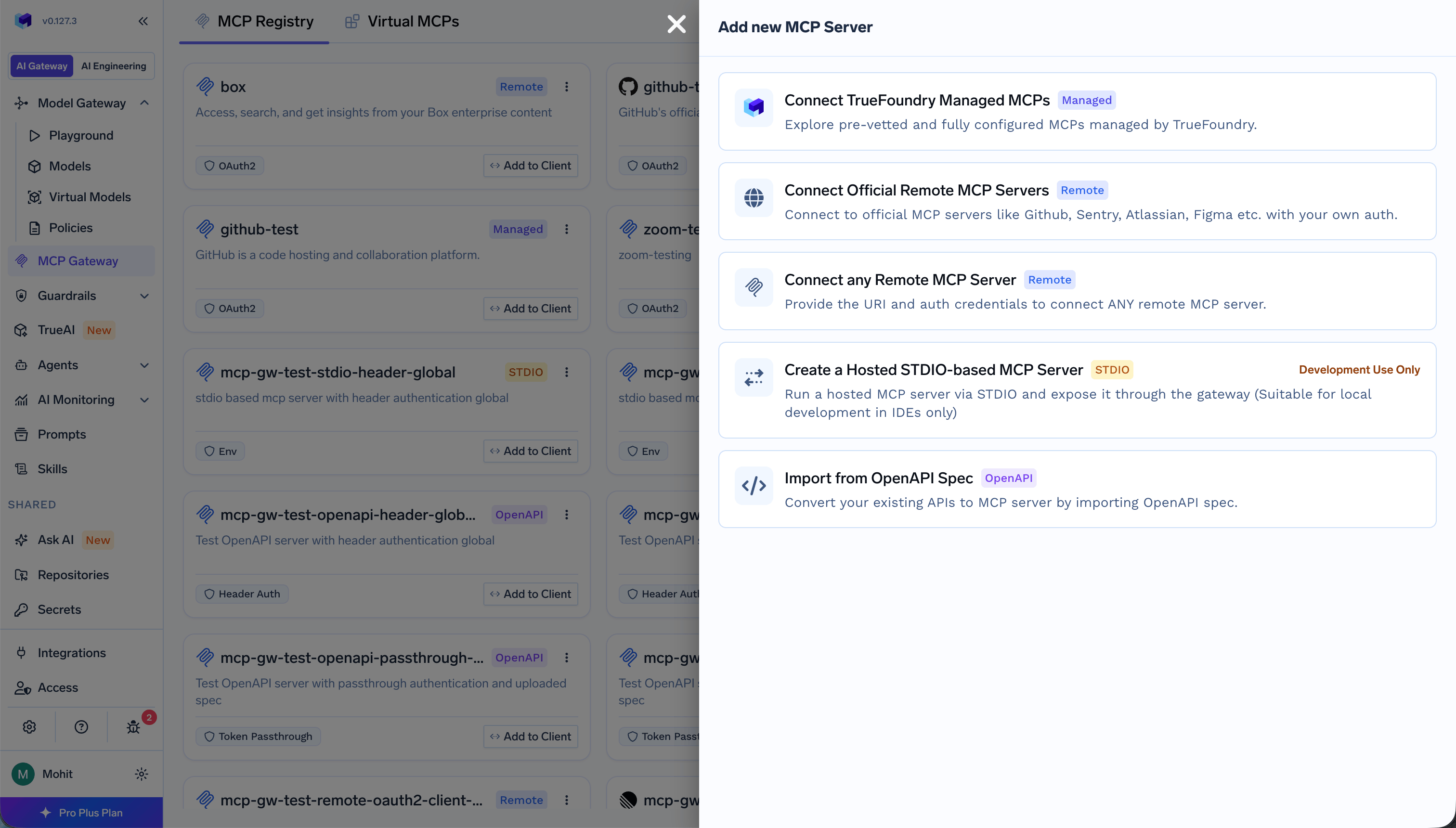
Navigate to MCP Gateway in the left sidebar, and click the Add Server button. You will see the following options:
Option
Description
Connect TrueFoundry Managed MCPs
Provision a pre-vetted MCP server from the TrueFoundry catalogue with just a name; URLs, auth, and credentials are managed by the platform. See TrueFoundry Managed MCPs.
Connect Official Remote MCP Servers
Connect to official MCP servers like GitHub, Sentry, Atlassian, etc. with your own auth.
Connect any Remote MCP Server
Provide the URI and auth credentials to connect any remote MCP server.
Create a Virtual MCP Server
Combine multiple MCPs (from different MCP servers) into a bundle so each user or team gets access to exactly the tools they need.
Import from OpenAPI Spec
Convert your existing APIs to MCP server by importing OpenAPI spec.
If you want to build an MCP server from scratch, you can follow the Create Calculator MCP Server tutorial.To add a custom Remote MCP server, click Connect any Remote MCP Server, and provide the following details:
Field
Description
Name
Unique identifier for the MCP server (lowercase letters, numbers, and hyphens). Used in URLs and API references.
Display Name
Optional human-readable label shown on the MCP registry page - instead of the internal name. If omitted, Name is shown. You can also set this later when editing the server.
Description
Short purpose of the server.
URL
The URL of the MCP server
Collaborators
Users and teams that have access to this MCP server
Auth Data
How the AI Gateway authenticates to the upstream MCP server
Collaborators
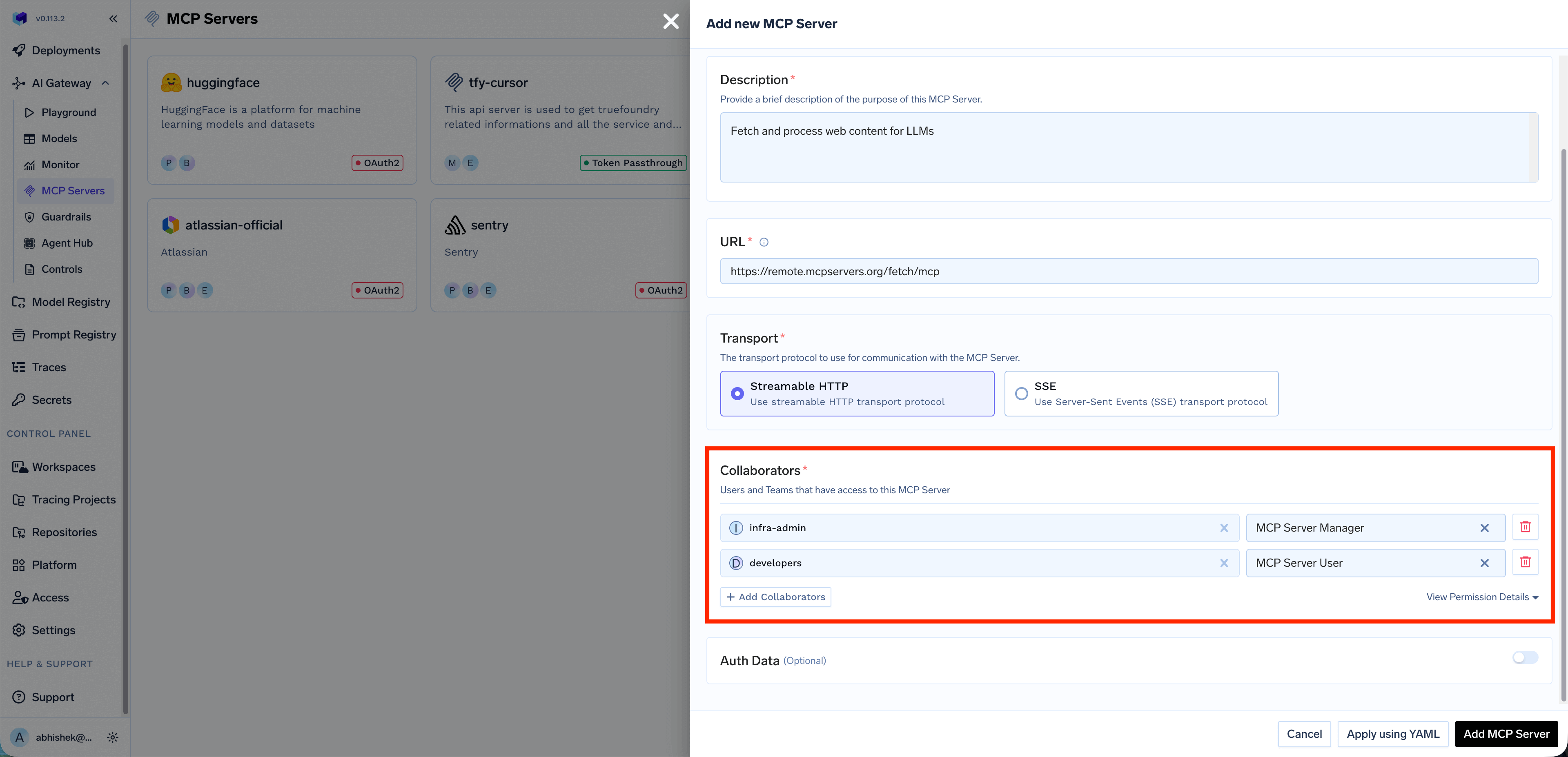
The Collaborators section allows you to control who can access and manage this MCP server. You can add individual users or entire teams and assign them specific roles:
Role
Description
MCP Server Manager
Full access to manage the MCP server, including editing configuration, managing collaborators, and deleting the server
MCP Server User
Can use the MCP server’s tools in the Playground and IDEs, but cannot modify server settings
Click + Add Collaborators to add more users or teams. You can also click View Permission Details to see the complete list of permissions for each role.
Auth Data
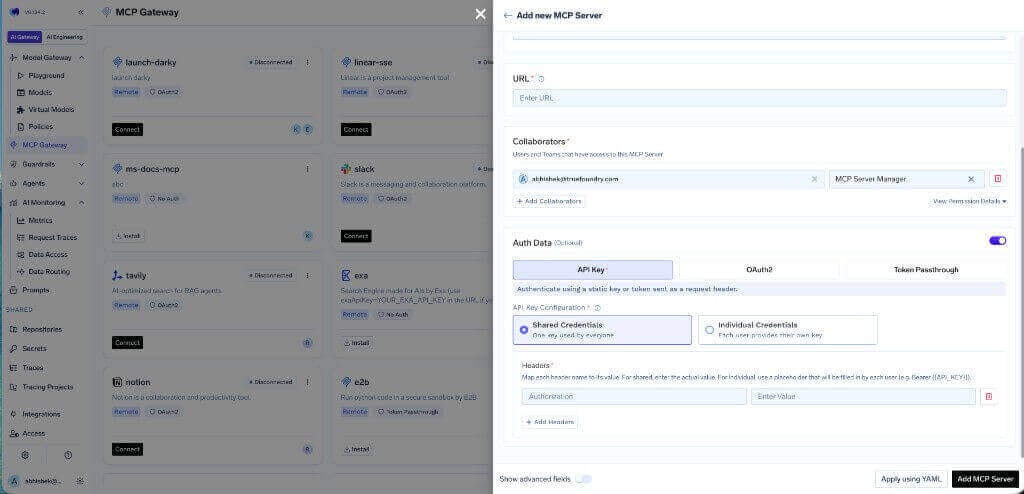
When registering an MCP server, choose the authentication type that determines how requests are authenticated with the upstream MCP server. You can select from: API Key, OAuth2, AWS SigV4, or Token Passthrough.
API Key
Authenticate using a static API key or token sent as a request header. When you select API Key, you need to choose between two credential modes:
Shared Credentials
One key is used by everyone. All users share the same downstream API key. Configure the header name (e.g., Authorization) and the corresponding value.
Use shared credentials for MCP servers where all users should have the same level of access, such as shared knowledge bases or read-only APIs.
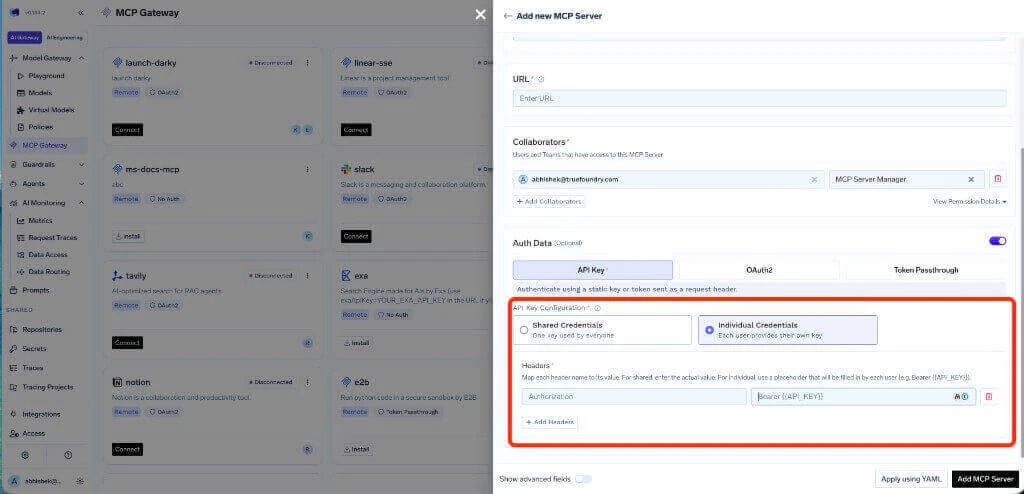
Individual Credentials
Each user provides their own key. When Individual Credentials is selected, configure the header name and use a placeholder like Bearer {{API_KEY}} in the value field. Each user will need to provide their own API key before they can use the MCP server.When individual credentials are configured, users can supply their API key through the Auth Overrides tab on the MCP server detail page. See Auth Overrides for details.
Use individual credentials when the upstream MCP server requires user-specific API keys, for example, when each user has their own API key for a third-party service.
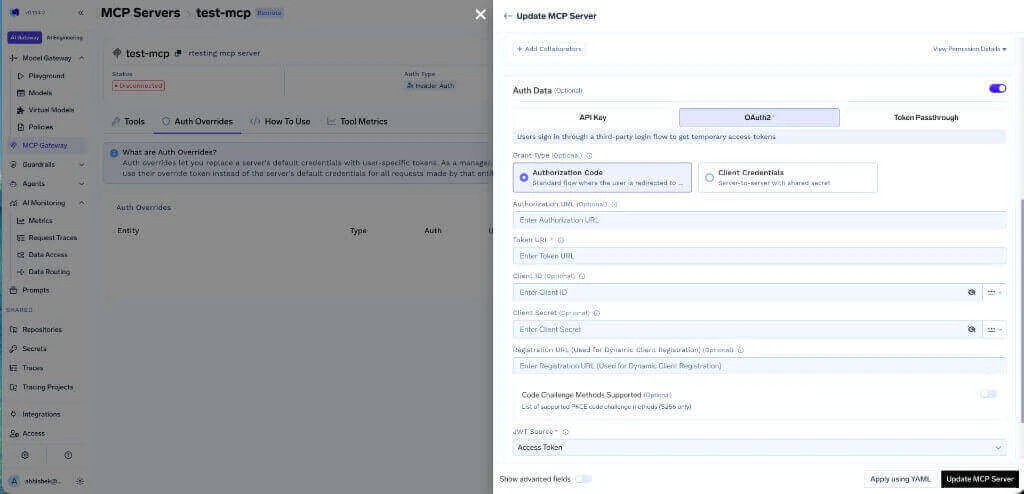
OAuth2
Users sign in through a third-party login flow to get temporary access tokens. OAuth2 is supported by popular services like Slack, GitHub, Atlassian, Google, and more.
Recommended for production. OAuth2 allows you to configure scopes (e.g., read-only), users can revoke their own authorization, and access is limited to resources each user is permitted to use.
When you select OAuth2, you need to choose a Grant Type:
Authorization Code
Standard flow where the user is redirected to the provider to authorize. This is the most common OAuth2 flow for user-facing applications.
Field
Description
Authorization URL
The URL where users are redirected to authorize (optional)
Token URL
The URL used to exchange the authorization code for an access token
Client ID
The client ID from your OAuth2 app (optional)
Client Secret
The client secret from your OAuth2 app (optional)
Registration URL
Used for Dynamic Client Registration (optional)
Code Challenge Methods Supported
List of supported PKCE code challenge methods, S256 only (optional)
JWT Source
Where to extract the JWT from - Access Token or ID Token
Client Credentials
Server-to-server flow with shared secret. No user interaction is required. This is suitable for backend services that need to authenticate without user involvement.
Field
Description
Token URL
The URL used to obtain the access token
Client ID
The client ID for the service
Client Secret
The client secret for the service
1
Create an OAuth2 app in your provider's developer portal
Replace <tfy-control-plane-base-url> with your TrueFoundry control plane URL. Note your OAuth2 App ID, Secret, and required scopes.
2
Register the MCP Server in the AI Gateway
Navigate to MCP Gateway in the left sidebar and click Add MCP Server
Select Connect any Remote MCP Server
Provide the MCP server URL and select OAuth2 as the authentication type
Choose the appropriate grant type (Authorization Code or Client Credentials)
Fill in the required OAuth2 fields
Store OAuth2 credentials in the TrueFoundry secrets store and reference their FQN for enhanced security.
3
Connect and authorize
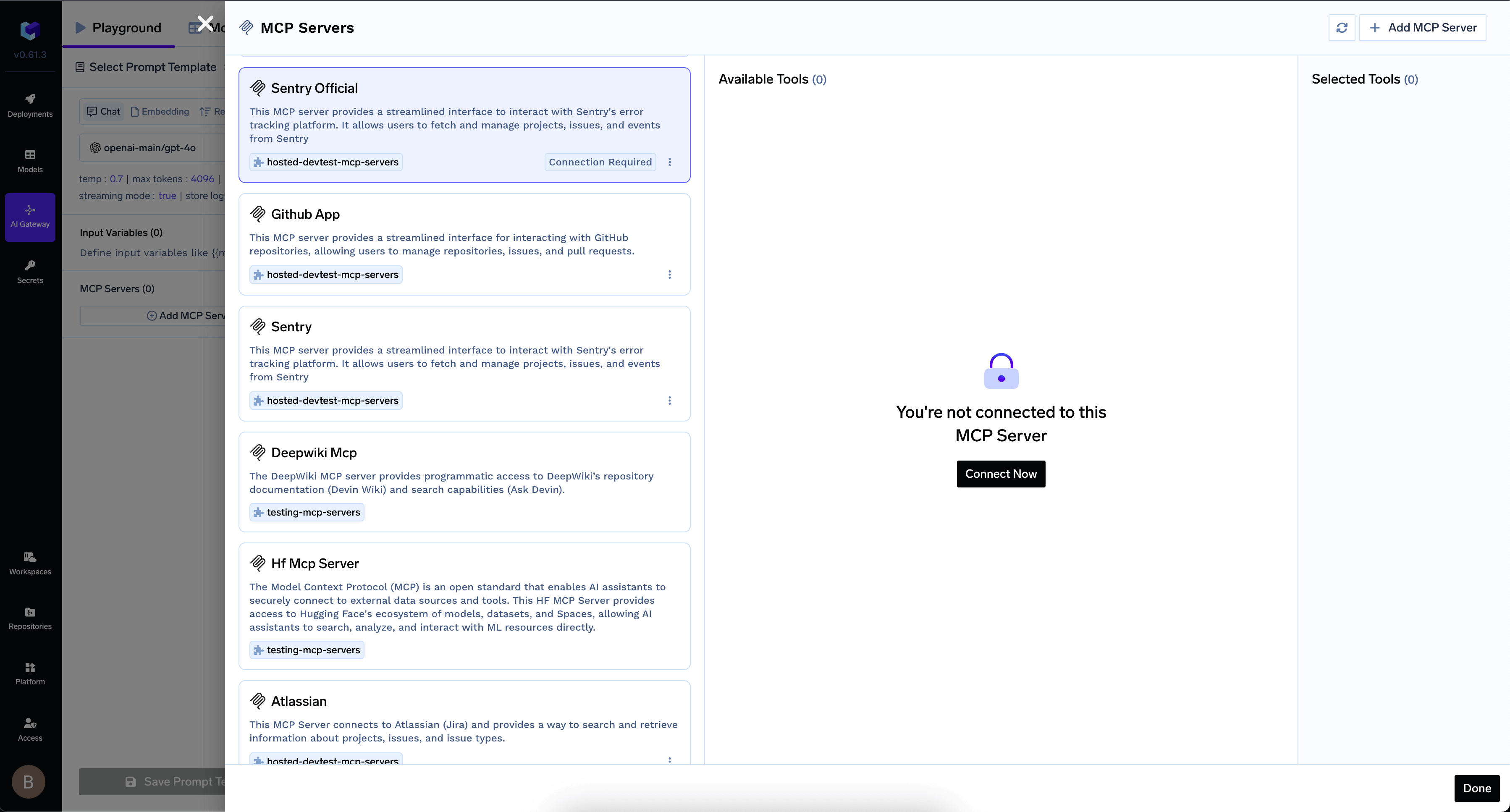
Click Add Tool/MCP Servers in the AI Gateway UI
For OAuth2 MCP Servers using Authorization Code flow, click Connect Now to authorize
Authorize your MCP Server in AI Gateway
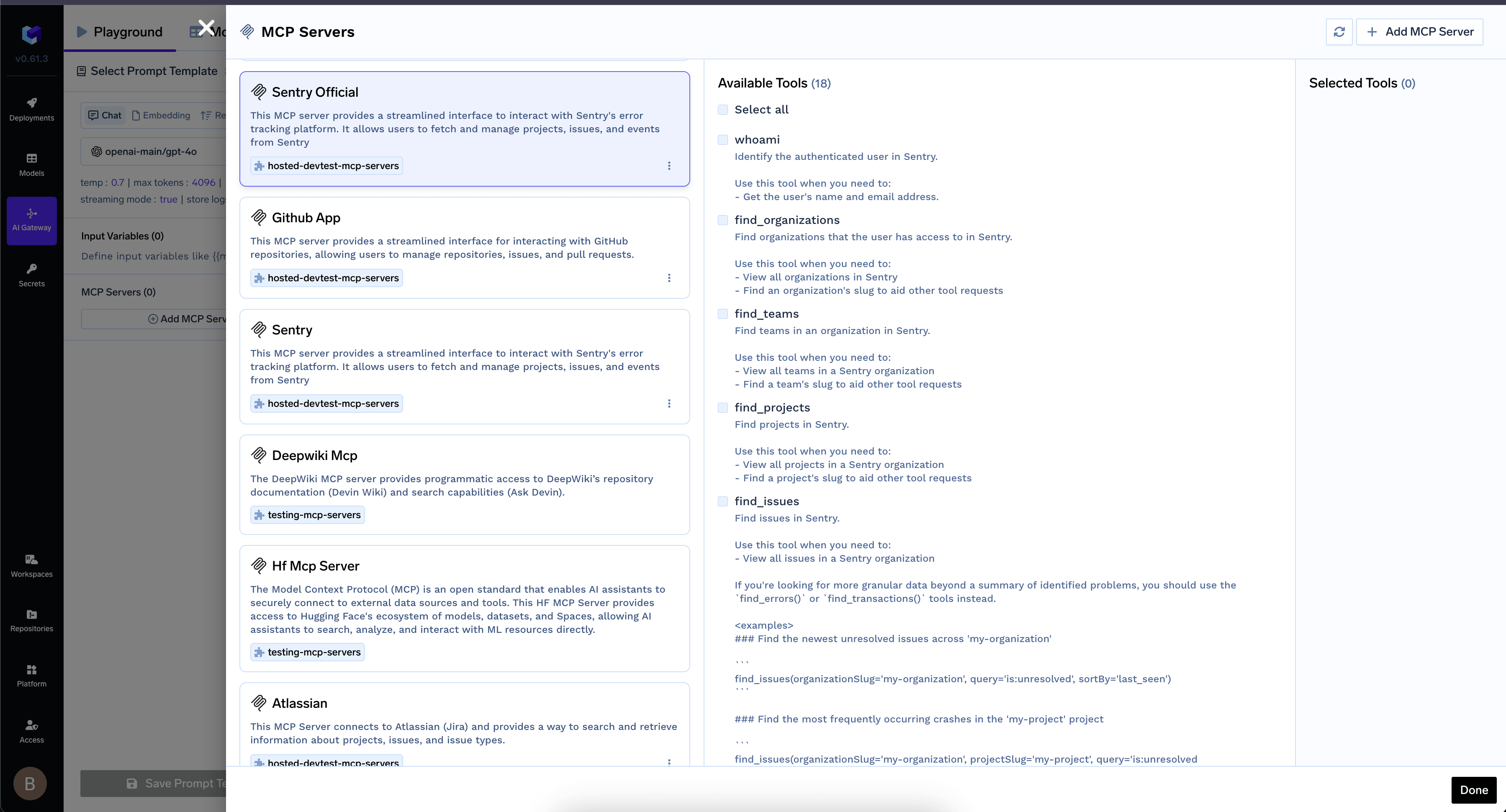
Once authorized, the MCP Server’s tools appear in the list
MCP Server tools available after authentication
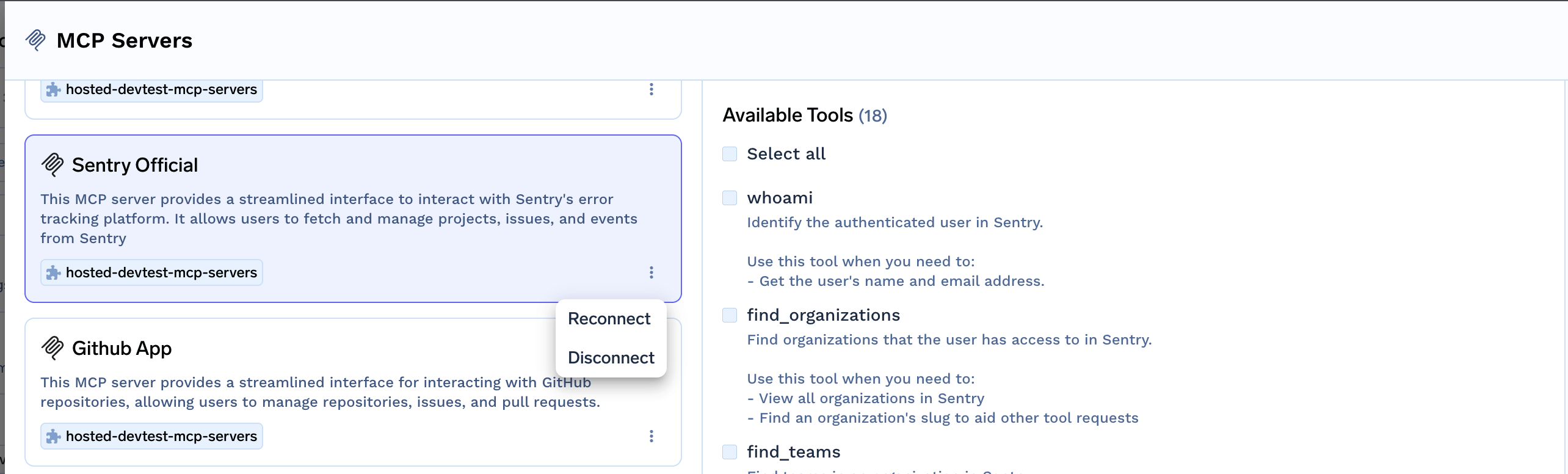
You can revoke authorization at any time:
Revoke your OAuth2 authorization
Token Passthrough
The AI Gateway passes the user’s JWT directly to the MCP server without transformation. The MCP server validates the token itself.Configuration:
Register the MCP server with Token Passthrough authentication type
Configure an Identity Provider to allow your IdP tokens
The user’s JWT is automatically forwarded to the MCP server
With Token Passthrough, the MCP server is responsible for validating the token. Make sure the MCP server is configured to trust your IdP.
2
Use MCP Server in Your IDE
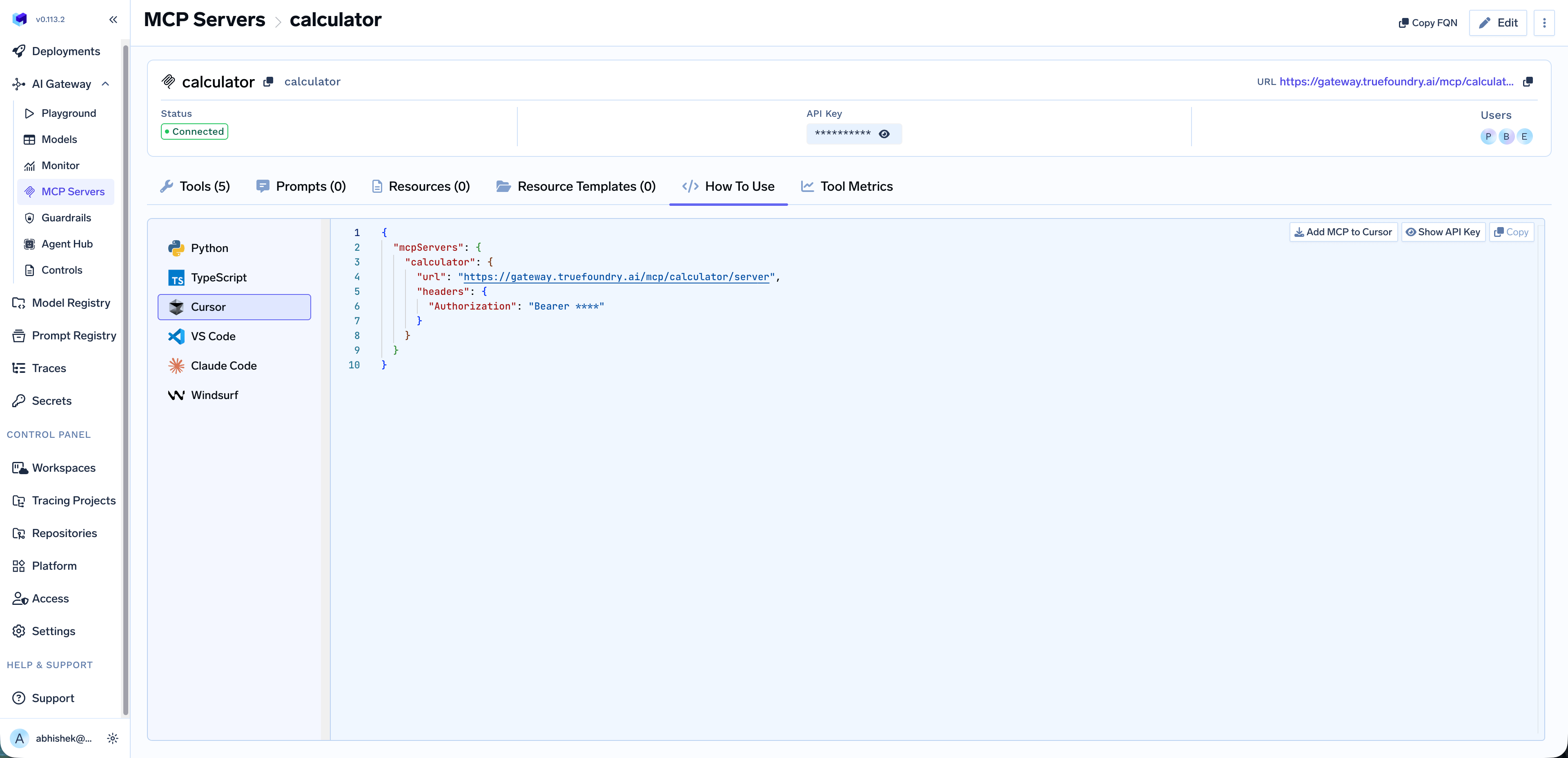
Once you’ve added an MCP server, you can easily integrate it with your favorite IDE or AI coding assistant. Navigate to the MCP server details page and click on the How To Use tab.
Use the Add MCP to Cursor button to automatically add the MCP server configuration to your Cursor IDE. You can also click Show API Key to reveal the full authorization token, or Copy to copy the configuration to your clipboard.
If no API key is shown in your code snippet, your version of the platform supports OAuth flow for obtaining the key. Cursor will automatically handle the OAuth flow when you use the MCP server.
3
Use MCP Servers in Playground
You can select the MCP servers from the Playground, select the tools, and send your prompt to see which tools are being called.
{"docsConfig":{"theme":"mint","$schema":"https://mintlify.com/docs.json","name":"TrueFoundry Docs","description":"TrueFoundry documentation — enterprise-grade AI Gateway combining LLM, MCP, and Agent Gateways to connect, monitor, and govern agentic AI applications across providers from a unified control plane.","colors":{"primary":"#4f46e5","light":"#4f46e5","dark":"#4f46e5"},"logo":{"light":"https://mintcdn.com/truefoundry/e2uUimEwX30qkWxc/logo/light.svg?fit=max\u0026auto=format\u0026n=e2uUimEwX30qkWxc\u0026q=85\u0026s=6068d83664aeda0239bec2422657dd20","dark":"https://mintcdn.com/truefoundry/e2uUimEwX30qkWxc/logo/dark.svg?fit=max\u0026auto=format\u0026n=e2uUimEwX30qkWxc\u0026q=85\u0026s=c1cb26554a546d84500b40f7057bece8"},"favicon":"https://mintcdn.com/truefoundry/6bbtTt95c1iCcyph/favicon.svg?fit=max\u0026auto=format\u0026n=6bbtTt95c1iCcyph\u0026q=85\u0026s=f55bde34214b38034126d05b08ea16c7","appearance":{"default":"light"},"background":{"decoration":"grid"},"navbar":{"links":[{"href":"https://www.truefoundry.com/book-demo","label":"Book Demo"},{"href":"https://www.truefoundry.com/blog","label":"Blog"}],"primary":{"type":"button","label":"Sign Up","href":"https://www.truefoundry.com/register"}},"footer":{"socials":{"x":"https://twitter.com/truefoundry","linkedin":"https://in.linkedin.com/company/truefoundry"}},"seo":{"metatags":{"og:type":"website","og:site_name":"TrueFoundry Docs","og:image":"https://assets.production.truefoundry.com/logo.svg","og:description":"TrueFoundry offers an enterprise-grade AI Gateway combining LLM, MCP, and Agent Gateways—empowering businesses to connect, monitor, and govern agentic AI applications across providers from a unified control plane.","description":"TrueFoundry offers an enterprise-grade AI Gateway combining LLM, MCP, and Agent Gateways—empowering businesses to connect, monitor, and govern agentic AI applications across providers from a unified control plane."}},"icons":{"library":"fontawesome"},"styling":{"codeblocks":"dark","latex":true},"contextual":{"options":["copy","view","chatgpt","claude","mcp","cursor","vscode"],"display":"header"},"navigation":{"pages":[]}},"deployment":{"deploymentMetadataValue":{"subdomain":"truefoundry","hasAudioNarration":false,"actualSubdomain":"truefoundry","customDomains":["www.truefoundry.com"],"gitSource":{"type":"github","owner":"truefoundry","repo":"docs-mintlify","deployBranch":"main","contentDirectory":"","isPrivate":true,"mountPath":"","label":""},"feedback":{"thumbs":true},"entitlements":{"AI_CHAT":{"status":"ENABLED"},"WEB_MCP":{"status":"ENABLED"},"NARRATION":{"status":"ENABLED"}},"buildId":"6afb41a693c081f905781c80","clientVersion":"0.0.4143","searchFilterCounts":[{"language":"default","tag":"AI Gateway","count":250},{"language":"default","tag":"API Reference","count":202},{"language":"default","tag":"Platform","count":196},{"language":"default","tag":"Integrations","count":132},{"language":"default","tag":"LLM Gateway","count":117},{"language":"default","tag":"AI Deployment","count":109},{"language":"default","tag":"Integrate Models","count":50},{"language":"default","tag":"Observability","count":47},{"language":"default","tag":"Guardrails and Security","count":46},{"language":"default","tag":"MCP Servers","count":44}]},"assistantConfig":{"enableAskAiButton":true,"enableAskAiSearchBar":true,"deflection":{"enabled":true,"email":"support@truefoundry.com","showHelpButton":true}},"basePath":"","hasChatPermissions":true,"hasWebMcpPermissions":true,"toggles":[{"name":"kill-isr","enabled":true,"variant":{"name":"disabled","enabled":false,"feature_enabled":true},"impressionData":false},{"name":"custom-rbac-roles","enabled":true,"variant":{"name":"disabled","enabled":false,"feature_enabled":true},"impressionData":false},{"name":"agent-mintlify-slack","enabled":true,"variant":{"name":"disabled","enabled":false,"feature_enabled":true},"impressionData":false},{"name":"agent-integrations-settings","enabled":true,"variant":{"name":"disabled","enabled":false,"feature_enabled":true},"impressionData":false},{"name":"rbac-expansion","enabled":true,"variant":{"name":"disabled","enabled":false,"feature_enabled":true},"impressionData":false},{"name":"automations-pr-grouping","enabled":true,"variant":{"name":"disabled","enabled":false,"feature_enabled":true},"impressionData":false},{"name":"custom-prefix","enabled":true,"variant":{"name":"disabled","enabled":false,"feature_enabled":true},"impressionData":false},{"name":"analytics-v7","enabled":true,"variant":{"name":"disabled","enabled":false,"feature_enabled":true},"impressionData":false},{"name":"user-flows-analytics","enabled":true,"variant":{"name":"disabled","enabled":false,"feature_enabled":true},"impressionData":false},{"name":"no-publish-flow","enabled":true,"variant":{"name":"disabled","enabled":false,"feature_enabled":true},"impressionData":false},{"name":"workos-onboarding","enabled":true,"variant":{"name":"disabled","enabled":false,"feature_enabled":true},"impressionData":false},{"name":"snapshot-serving-live","enabled":true,"variant":{"name":"disabled","enabled":false,"feature_enabled":true},"impressionData":false},{"name":"stripTemperatureMiddleware","enabled":true,"variant":{"name":"disabled","enabled":false,"feature_enabled":true},"impressionData":false},{"name":"support-platform-pylon-zendesk","enabled":true,"variant":{"name":"disabled","enabled":false,"feature_enabled":true},"impressionData":false},{"name":"snapshot-serving","enabled":true,"variant":{"name":"disabled","enabled":false,"feature_enabled":true},"impressionData":false},{"name":"instant-rollback","enabled":true,"variant":{"name":"disabled","enabled":false,"feature_enabled":true},"impressionData":false},{"name":"granular-notifications-server","enabled":true,"variant":{"name":"disabled","enabled":false,"feature_enabled":true},"impressionData":false},{"name":"granular-notifications","enabled":true,"variant":{"name":"disabled","enabled":false,"feature_enabled":true},"impressionData":false},{"name":"automations-fable","enabled":true,"variant":{"name":"disabled","enabled":false,"feature_enabled":true},"impressionData":false},{"name":"fixed-ai-action-pricing","enabled":true,"variant":{"name":"disabled","enabled":false,"feature_enabled":true},"impressionData":false},{"name":"automation-resolve-merge-conflict","enabled":true,"variant":{"name":"disabled","enabled":false,"feature_enabled":true},"impressionData":false},{"name":"scoped-publishing","enabled":true,"variant":{"name":"disabled","enabled":false,"feature_enabled":true},"impressionData":false},{"name":"mintql","enabled":true,"variant":{"name":"disabled","enabled":false,"feature_enabled":true},"impressionData":false},{"name":"page-level-analytics","enabled":true,"variant":{"name":"disabled","enabled":false,"feature_enabled":true},"impressionData":false},{"name":"editor-version-history-v2","enabled":true,"variant":{"name":"disabled","enabled":false,"feature_enabled":true},"impressionData":false},{"name":"billing-page-v2","enabled":true,"variant":{"name":"disabled","enabled":false,"feature_enabled":true},"impressionData":false},{"name":"full-page-search","enabled":true,"variant":{"name":"disabled","enabled":false,"feature_enabled":true},"impressionData":false},{"name":"workspace-projects","enabled":true,"variant":{"name":"disabled","enabled":false,"feature_enabled":true},"impressionData":false},{"name":"assistant-v5","enabled":true,"variant":{"name":"disabled","enabled":false,"feature_enabled":true},"impressionData":false},{"name":"fork-pr-previews","enabled":true,"variant":{"name":"disabled","enabled":false,"feature_enabled":true},"impressionData":false},{"name":"revalidation-jwt","enabled":true,"variant":{"name":"disabled","enabled":false,"feature_enabled":true},"impressionData":false},{"name":"workos-sso-scim","enabled":true,"variant":{"name":"disabled","enabled":false,"feature_enabled":true},"impressionData":false},{"name":"hobby-abuse-scan","enabled":true,"variant":{"name":"disabled","enabled":false,"feature_enabled":true},"impressionData":false},{"name":"dashboard-inbox","enabled":true,"variant":{"name":"disabled","enabled":false,"feature_enabled":true},"impressionData":false},{"name":"workos-signup","enabled":true,"variant":{"name":"disabled","enabled":false,"feature_enabled":true},"impressionData":false},{"name":"turbopuffer-dual-write","enabled":true,"variant":{"name":"disabled","enabled":false,"feature_enabled":true},"impressionData":false},{"name":"workos-enabled","enabled":true,"variant":{"name":"disabled","enabled":false,"feature_enabled":true},"impressionData":false},{"name":"approve-review-flow","enabled":true,"variant":{"name":"disabled","enabled":false,"feature_enabled":true},"impressionData":false},{"name":"editor-metadata","enabled":true,"variant":{"name":"disabled","enabled":false,"feature_enabled":true},"impressionData":false},{"name":"sso-setup-deadline-banner","enabled":true,"variant":{"name":"disabled","enabled":false,"feature_enabled":true},"impressionData":false},{"name":"turbopuffer-serve","enabled":true,"variant":{"name":"disabled","enabled":false,"feature_enabled":true},"impressionData":false},{"name":"live-agents","enabled":true,"variant":{"name":"disabled","enabled":false,"feature_enabled":true},"impressionData":false},{"name":"llms-txt-v2","enabled":true,"variant":{"name":"disabled","enabled":false,"feature_enabled":true},"impressionData":false}],"googleFontsInlined":false},"customCss":[{"filePath":"style.css","content":".line-highlight{background:rgb(var(--primary-light)/.7)!important}.tfy-cat-anchor{scroll-margin-top:6rem;margin-block:1.75rem}.line-highlight:before{background:rgb(var(--primary-light)/.7)!important}.line-highlight:after{background:rgb(var(--primary-light)/.7)!important}"}],"page":{"pagePath":"docs/ai-gateway/mcp/mcp-server-getting-started","slug":"/docs/ai-gateway/mcp/mcp-server-getting-started","pageMetadata":{"title":"MCP Server: Getting Started","sidebarTitle":"Getting Started","description":"Learn how to create MCP Server Groups, add MCP servers, and use them in the TrueFoundry AI Gateway Playground.","href":"/docs/ai-gateway/mcp/mcp-server-getting-started"},"description":{"compiledSource":"\"use strict\";\nconst {jsx: _jsx} = arguments[0];\nconst {useMDXComponents: _provideComponents} = arguments[0];\nfunction _createMdxContent(props) {\n const _components = {\n p: \"p\",\n ..._provideComponents(),\n ...props.components\n };\n return _jsx(_components.p, {\n children: \"Learn how to create MCP Server Groups, add MCP servers, and use them in the TrueFoundry AI Gateway Playground.\"\n });\n}\nfunction MDXContent(props = {}) {\n const {wrapper: MDXLayout} = {\n ..._provideComponents(),\n ...props.components\n };\n return MDXLayout ? _jsx(MDXLayout, {\n ...props,\n children: _jsx(_createMdxContent, {\n ...props\n })\n }) : _createMdxContent(props);\n}\nreturn {\n default: MDXContent\n};\n","frontmatter":{},"scope":{}},"pageType":"default","mdx":{"mdxSource":{"compiledSource":"\"use strict\";const{Fragment:_Fragment,jsx:_jsx,jsxs:_jsxs}=arguments[0];const{useMDXComponents:_provideComponents}=arguments[0];function _createMdxContent(props){const _components={a:`a`,code:`code`,h5:`h5`,li:`li`,ol:`ol`,p:`p`,pre:`pre`,span:`span`,strong:`strong`,tbody:`tbody`,td:`td`,th:`th`,thead:`thead`,tr:`tr`,..._provideComponents(),...props.components},{Accordion,AccordionGroup,CodeBlock,Frame,Heading,Note,OptimizedFrame,OptimizedImage,Step,Steps,Table,Tip}=_components;if(!Accordion)_missingMdxReference(`Accordion`,true);if(!AccordionGroup)_missingMdxReference(`AccordionGroup`,true);if(!CodeBlock)_missingMdxReference(`CodeBlock`,true);if(!Frame)_missingMdxReference(`Frame`,true);if(!Heading)_missingMdxReference(`Heading`,true);if(!Note)_missingMdxReference(`Note`,true);if(!OptimizedFrame)_missingMdxReference(`OptimizedFrame`,true);if(!OptimizedImage)_missingMdxReference(`OptimizedImage`,true);if(!Step)_missingMdxReference(`Step`,true);if(!Steps)_missingMdxReference(`Steps`,true);if(!Table)_missingMdxReference(`Table`,true);if(!Tip)_missingMdxReference(`Tip`,true);return _jsxs(_Fragment,{children:[_jsxs(_components.p,{children:[`This guide will walk you through the steps to add an MCP server to the TrueFoundry AI Gateway, and then use it in the `,_jsx(_components.strong,{children:`Playground`}),`, or through\nCursor/VSCode/Claude, or in your coding agents.`]}),`\n`,_jsxs(Steps,{children:[_jsxs(Step,{title:`Add an MCP Server`,children:[_jsxs(_components.p,{children:[`Navigate to `,_jsx(_components.strong,{children:`MCP Gateway`}),` in the left sidebar, and click the `,_jsx(_components.strong,{children:`Add Server`}),` button. You will see the following options:`]}),_jsx(OptimizedImage,{src:`https://mintcdn.com/truefoundry/qpANhu94l0rI9Dbt/images/docs/ai-gateway/add-mcp-server-options.png?fit=max\u0026auto=format\u0026n=qpANhu94l0rI9Dbt\u0026q=85\u0026s=8321a30cb13bcde5f75ffcdfad6d4ec0`,alt:`Add MCP Server Options`,\"data-og-width\":`3024`,width:`3024`,\"data-og-height\":`1720`,height:`1720`,\"data-path\":`images/docs/ai-gateway/add-mcp-server-options.png`,\"data-optimize\":`true`,\"data-opv\":`3`,srcset:`https://mintcdn.com/truefoundry/qpANhu94l0rI9Dbt/images/docs/ai-gateway/add-mcp-server-options.png?w=280\u0026fit=max\u0026auto=format\u0026n=qpANhu94l0rI9Dbt\u0026q=85\u0026s=438511defeed3518c1bff87cd8327fa7 280w, https://mintcdn.com/truefoundry/qpANhu94l0rI9Dbt/images/docs/ai-gateway/add-mcp-server-options.png?w=560\u0026fit=max\u0026auto=format\u0026n=qpANhu94l0rI9Dbt\u0026q=85\u0026s=ca196ed6e4b19b2929ef101ca6412a98 560w, https://mintcdn.com/truefoundry/qpANhu94l0rI9Dbt/images/docs/ai-gateway/add-mcp-server-options.png?w=840\u0026fit=max\u0026auto=format\u0026n=qpANhu94l0rI9Dbt\u0026q=85\u0026s=a6448385bea2b6820a0fd69b14e52e4a 840w, https://mintcdn.com/truefoundry/qpANhu94l0rI9Dbt/images/docs/ai-gateway/add-mcp-server-options.png?w=1100\u0026fit=max\u0026auto=format\u0026n=qpANhu94l0rI9Dbt\u0026q=85\u0026s=a7ff5139059d91de3ad845afac0eeaa3 1100w, https://mintcdn.com/truefoundry/qpANhu94l0rI9Dbt/images/docs/ai-gateway/add-mcp-server-options.png?w=1650\u0026fit=max\u0026auto=format\u0026n=qpANhu94l0rI9Dbt\u0026q=85\u0026s=fc403fa0fa76e646088894830ff1fded 1650w, https://mintcdn.com/truefoundry/qpANhu94l0rI9Dbt/images/docs/ai-gateway/add-mcp-server-options.png?w=2500\u0026fit=max\u0026auto=format\u0026n=qpANhu94l0rI9Dbt\u0026q=85\u0026s=8a0730dff680d719acb44fa909f567b5 2500w`}),_jsxs(Table,{children:[_jsx(_components.thead,{children:_jsxs(_components.tr,{children:[_jsx(_components.th,{children:`Option`}),_jsx(_components.th,{children:`Description`})]})}),_jsxs(_components.tbody,{children:[_jsxs(_components.tr,{children:[_jsx(_components.td,{children:_jsx(_components.strong,{children:`Connect TrueFoundry Managed MCPs`})}),_jsxs(_components.td,{children:[`Provision a pre-vetted MCP server from the TrueFoundry catalogue with just a name; URLs, auth, and credentials are managed by the platform. See `,_jsx(_components.a,{href:`/docs/ai-gateway/mcp/tfy-managed-mcp-server`,children:`TrueFoundry Managed MCPs`}),`.`]})]}),_jsxs(_components.tr,{children:[_jsx(_components.td,{children:_jsx(_components.strong,{children:`Connect Official Remote MCP Servers`})}),_jsx(_components.td,{children:`Connect to official MCP servers like GitHub, Sentry, Atlassian, etc. with your own auth.`})]}),_jsxs(_components.tr,{children:[_jsx(_components.td,{children:_jsx(_components.strong,{children:`Connect any Remote MCP Server`})}),_jsx(_components.td,{children:`Provide the URI and auth credentials to connect any remote MCP server.`})]}),_jsxs(_components.tr,{children:[_jsx(_components.td,{children:_jsx(_components.strong,{children:`Create a Virtual MCP Server`})}),_jsx(_components.td,{children:`Combine multiple MCPs (from different MCP servers) into a bundle so each user or team gets access to exactly the tools they need.`})]}),_jsxs(_components.tr,{children:[_jsx(_components.td,{children:_jsx(_components.strong,{children:`Import from OpenAPI Spec`})}),_jsx(_components.td,{children:`Convert your existing APIs to MCP server by importing OpenAPI spec.`})]}),_jsxs(_components.tr,{children:[_jsx(_components.td,{children:_jsx(_components.strong,{children:`Hosted Stdio-based MCP Server`})}),_jsxs(_components.td,{children:[`Register a CLI-style MCP server by command and arguments; see `,_jsx(_components.a,{href:`/docs/ai-gateway/mcp/stdio-mcp-server`,children:`Hosted Stdio-based MCP Server`}),`.`]})]})]})]}),_jsxs(_components.p,{children:[`If you want to build an MCP server from scratch, you can follow the `,_jsx(_components.a,{href:`/docs/ai-gateway/mcp/create-calculator-mcp-server`,children:`Create Calculator MCP Server`}),` tutorial.`]}),_jsxs(_components.p,{children:[`To add a custom Remote MCP server, click `,_jsx(_components.strong,{children:`Connect any Remote MCP Server`}),`, and provide the following details:`]}),_jsxs(Table,{children:[_jsx(_components.thead,{children:_jsxs(_components.tr,{children:[_jsx(_components.th,{children:`Field`}),_jsx(_components.th,{children:`Description`})]})}),_jsxs(_components.tbody,{children:[_jsxs(_components.tr,{children:[_jsx(_components.td,{children:_jsx(_components.strong,{children:`Name`})}),_jsx(_components.td,{children:`Unique identifier for the MCP server (lowercase letters, numbers, and hyphens). Used in URLs and API references.`})]}),_jsxs(_components.tr,{children:[_jsx(_components.td,{children:_jsx(_components.strong,{children:`Display Name`})}),_jsxs(_components.td,{children:[`Optional human-readable label shown on the MCP registry page - instead of the internal name. If omitted, `,_jsx(_components.strong,{children:`Name`}),` is shown. You can also set this later when editing the server.`]})]}),_jsxs(_components.tr,{children:[_jsx(_components.td,{children:_jsx(_components.strong,{children:`Description`})}),_jsx(_components.td,{children:`Short purpose of the server.`})]}),_jsxs(_components.tr,{children:[_jsx(_components.td,{children:_jsx(_components.strong,{children:`URL`})}),_jsx(_components.td,{children:`The URL of the MCP server`})]}),_jsxs(_components.tr,{children:[_jsx(_components.td,{children:_jsx(_components.strong,{children:`Collaborators`})}),_jsx(_components.td,{children:`Users and teams that have access to this MCP server`})]}),_jsxs(_components.tr,{children:[_jsx(_components.td,{children:_jsx(_components.strong,{children:`Auth Data`})}),_jsx(_components.td,{children:`How the AI Gateway authenticates to the upstream MCP server`})]})]})]}),_jsx(Heading,{level:`4`,id:`collaborators`,children:`Collaborators`}),_jsx(_components.p,{children:`The Collaborators section allows you to control who can access and manage this MCP server. You can add individual users or entire teams and assign them specific roles:`}),_jsx(OptimizedImage,{src:`https://mintcdn.com/truefoundry/02OfhC3cmaN0Ncb8/images/docs/ai-gateway/mcp-server-collaborators.png?fit=max\u0026auto=format\u0026n=02OfhC3cmaN0Ncb8\u0026q=85\u0026s=48b20a8d9e99249dd186879a5b7f27da`,alt:`MCP Server Collaborators`,\"data-og-width\":`3840`,width:`3840`,\"data-og-height\":`1854`,height:`1854`,\"data-path\":`images/docs/ai-gateway/mcp-server-collaborators.png`,\"data-optimize\":`true`,\"data-opv\":`3`,srcset:`https://mintcdn.com/truefoundry/02OfhC3cmaN0Ncb8/images/docs/ai-gateway/mcp-server-collaborators.png?w=280\u0026fit=max\u0026auto=format\u0026n=02OfhC3cmaN0Ncb8\u0026q=85\u0026s=0ddfc2dac856b48edfe2fec141cb0536 280w, https://mintcdn.com/truefoundry/02OfhC3cmaN0Ncb8/images/docs/ai-gateway/mcp-server-collaborators.png?w=560\u0026fit=max\u0026auto=format\u0026n=02OfhC3cmaN0Ncb8\u0026q=85\u0026s=a82b85d564ced3977b4175d0ba76c77e 560w, https://mintcdn.com/truefoundry/02OfhC3cmaN0Ncb8/images/docs/ai-gateway/mcp-server-collaborators.png?w=840\u0026fit=max\u0026auto=format\u0026n=02OfhC3cmaN0Ncb8\u0026q=85\u0026s=52450a82f0ca7554a60be31fc2a25d9c 840w, https://mintcdn.com/truefoundry/02OfhC3cmaN0Ncb8/images/docs/ai-gateway/mcp-server-collaborators.png?w=1100\u0026fit=max\u0026auto=format\u0026n=02OfhC3cmaN0Ncb8\u0026q=85\u0026s=c1805510bb24387e926084a335f29d4e 1100w, https://mintcdn.com/truefoundry/02OfhC3cmaN0Ncb8/images/docs/ai-gateway/mcp-server-collaborators.png?w=1650\u0026fit=max\u0026auto=format\u0026n=02OfhC3cmaN0Ncb8\u0026q=85\u0026s=89e3ed440f1c0fc11b20189386259705 1650w, https://mintcdn.com/truefoundry/02OfhC3cmaN0Ncb8/images/docs/ai-gateway/mcp-server-collaborators.png?w=2500\u0026fit=max\u0026auto=format\u0026n=02OfhC3cmaN0Ncb8\u0026q=85\u0026s=98cb69e02250a8f992e65abeb76eb735 2500w`}),_jsxs(Table,{children:[_jsx(_components.thead,{children:_jsxs(_components.tr,{children:[_jsx(_components.th,{children:`Role`}),_jsx(_components.th,{children:`Description`})]})}),_jsxs(_components.tbody,{children:[_jsxs(_components.tr,{children:[_jsx(_components.td,{children:_jsx(_components.strong,{children:`MCP Server Manager`})}),_jsx(_components.td,{children:`Full access to manage the MCP server, including editing configuration, managing collaborators, and deleting the server`})]}),_jsxs(_components.tr,{children:[_jsx(_components.td,{children:_jsx(_components.strong,{children:`MCP Server User`})}),_jsx(_components.td,{children:`Can use the MCP server’s tools in the Playground and IDEs, but cannot modify server settings`})]})]})]}),_jsxs(_components.p,{children:[`Click `,_jsx(_components.strong,{children:`+ Add Collaborators`}),` to add more users or teams. You can also click `,_jsx(_components.strong,{children:`View Permission Details`}),` to see the complete list of permissions for each role.`]}),_jsx(Heading,{level:`4`,id:`auth-data`,children:`Auth Data`}),_jsxs(_components.p,{children:[`When registering an MCP server, choose the authentication type that determines how requests are authenticated with the upstream MCP server. You can select from: `,_jsx(_components.code,{children:`API Key`}),`, `,_jsx(_components.code,{children:`OAuth2`}),`, `,_jsx(_components.code,{children:`AWS SigV4`}),`, or `,_jsx(_components.code,{children:`Token Passthrough`}),`.`]}),_jsxs(AccordionGroup,{children:[_jsxs(Accordion,{title:`API Key`,id:`api-key`,children:[_jsxs(_components.p,{children:[`Authenticate using a static API key or token sent as a request header. When you select `,_jsx(_components.strong,{children:`API Key`}),`, you need to choose between two credential modes:`]}),_jsx(_components.h5,{children:`Shared Credentials`}),_jsxs(_components.p,{children:[`One key is used by everyone. All users share the same downstream API key. Configure the header name (e.g., `,_jsx(_components.code,{children:`Authorization`}),`) and the corresponding value.`]}),_jsx(OptimizedImage,{src:`https://mintcdn.com/truefoundry/yR_clVDeJDlQkXKY/images/docs/ai-gateway/add-mcp-server-api-key-shared.png?fit=max\u0026auto=format\u0026n=yR_clVDeJDlQkXKY\u0026q=85\u0026s=bdd8c03ce7241753703264147b1e6f41`,alt:`API Key with Shared Credentials`,\"data-og-width\":`1024`,width:`1024`,\"data-og-height\":`494`,height:`494`,\"data-path\":`images/docs/ai-gateway/add-mcp-server-api-key-shared.png`,\"data-optimize\":`true`,\"data-opv\":`3`,srcset:`https://mintcdn.com/truefoundry/yR_clVDeJDlQkXKY/images/docs/ai-gateway/add-mcp-server-api-key-shared.png?w=280\u0026fit=max\u0026auto=format\u0026n=yR_clVDeJDlQkXKY\u0026q=85\u0026s=4da47b80471d0aa6e782574cc0045204 280w, https://mintcdn.com/truefoundry/yR_clVDeJDlQkXKY/images/docs/ai-gateway/add-mcp-server-api-key-shared.png?w=560\u0026fit=max\u0026auto=format\u0026n=yR_clVDeJDlQkXKY\u0026q=85\u0026s=b7b050a33035ae7603db85955bcae3ea 560w, https://mintcdn.com/truefoundry/yR_clVDeJDlQkXKY/images/docs/ai-gateway/add-mcp-server-api-key-shared.png?w=840\u0026fit=max\u0026auto=format\u0026n=yR_clVDeJDlQkXKY\u0026q=85\u0026s=a8540937efb0d29e345cf843a017f36e 840w, https://mintcdn.com/truefoundry/yR_clVDeJDlQkXKY/images/docs/ai-gateway/add-mcp-server-api-key-shared.png?w=1100\u0026fit=max\u0026auto=format\u0026n=yR_clVDeJDlQkXKY\u0026q=85\u0026s=dcff6fb2c9ad12f7e67cf74f07ede036 1100w, https://mintcdn.com/truefoundry/yR_clVDeJDlQkXKY/images/docs/ai-gateway/add-mcp-server-api-key-shared.png?w=1650\u0026fit=max\u0026auto=format\u0026n=yR_clVDeJDlQkXKY\u0026q=85\u0026s=2508201c2d6b13de2c23e47075a0a5d9 1650w, https://mintcdn.com/truefoundry/yR_clVDeJDlQkXKY/images/docs/ai-gateway/add-mcp-server-api-key-shared.png?w=2500\u0026fit=max\u0026auto=format\u0026n=yR_clVDeJDlQkXKY\u0026q=85\u0026s=8b046095715c884890d81cb44ff7b7ea 2500w`}),_jsx(Note,{children:_jsx(_components.p,{children:`Use shared credentials for MCP servers where all users should have the same level of access, such as shared knowledge bases or read-only APIs.`})}),_jsx(_components.h5,{children:`Individual Credentials`}),_jsxs(_components.p,{children:[`Each user provides their own key. When `,_jsx(_components.strong,{children:`Individual Credentials`}),` is selected, configure the header name and use a placeholder like `,_jsx(_components.code,{children:`Bearer {{API_KEY}}`}),` in the value field. Each user will need to provide their own API key before they can use the MCP server.`]}),_jsx(OptimizedImage,{src:`https://mintcdn.com/truefoundry/yR_clVDeJDlQkXKY/images/docs/ai-gateway/add-mcp-server-api-key-individual.png?fit=max\u0026auto=format\u0026n=yR_clVDeJDlQkXKY\u0026q=85\u0026s=e6d65900ec50a61da0e9db7d4d885498`,alt:`API Key with Individual Credentials`,\"data-og-width\":`1024`,width:`1024`,\"data-og-height\":`494`,height:`494`,\"data-path\":`images/docs/ai-gateway/add-mcp-server-api-key-individual.png`,\"data-optimize\":`true`,\"data-opv\":`3`,srcset:`https://mintcdn.com/truefoundry/yR_clVDeJDlQkXKY/images/docs/ai-gateway/add-mcp-server-api-key-individual.png?w=280\u0026fit=max\u0026auto=format\u0026n=yR_clVDeJDlQkXKY\u0026q=85\u0026s=6116ce337b2c4bb90419894d5b71a4e4 280w, https://mintcdn.com/truefoundry/yR_clVDeJDlQkXKY/images/docs/ai-gateway/add-mcp-server-api-key-individual.png?w=560\u0026fit=max\u0026auto=format\u0026n=yR_clVDeJDlQkXKY\u0026q=85\u0026s=29540a5eb7010ac34076803cedbe0e95 560w, https://mintcdn.com/truefoundry/yR_clVDeJDlQkXKY/images/docs/ai-gateway/add-mcp-server-api-key-individual.png?w=840\u0026fit=max\u0026auto=format\u0026n=yR_clVDeJDlQkXKY\u0026q=85\u0026s=5ace6daad52f6e59ee3db7593c423c6f 840w, https://mintcdn.com/truefoundry/yR_clVDeJDlQkXKY/images/docs/ai-gateway/add-mcp-server-api-key-individual.png?w=1100\u0026fit=max\u0026auto=format\u0026n=yR_clVDeJDlQkXKY\u0026q=85\u0026s=68fdf1257e10bc46f5be36b672dbbeed 1100w, https://mintcdn.com/truefoundry/yR_clVDeJDlQkXKY/images/docs/ai-gateway/add-mcp-server-api-key-individual.png?w=1650\u0026fit=max\u0026auto=format\u0026n=yR_clVDeJDlQkXKY\u0026q=85\u0026s=138484cedcfb75e7a6c4877652284ad4 1650w, https://mintcdn.com/truefoundry/yR_clVDeJDlQkXKY/images/docs/ai-gateway/add-mcp-server-api-key-individual.png?w=2500\u0026fit=max\u0026auto=format\u0026n=yR_clVDeJDlQkXKY\u0026q=85\u0026s=65b49fc643961d0fd059238a473499ee 2500w`}),_jsxs(_components.p,{children:[`When individual credentials are configured, users can supply their API key through the `,_jsx(_components.strong,{children:`Auth Overrides`}),` tab on the MCP server detail page. See `,_jsx(_components.a,{href:`/docs/ai-gateway/mcp/mcp-server-auth-overrides`,children:`Auth Overrides`}),` for details.`]}),_jsx(Note,{children:_jsx(_components.p,{children:`Use individual credentials when the upstream MCP server requires user-specific API keys, for example, when each user has their own API key for a third-party service.`})})]}),_jsxs(Accordion,{title:`OAuth2`,id:`oauth2`,children:[_jsx(_components.p,{children:`Users sign in through a third-party login flow to get temporary access tokens. OAuth2 is supported by popular services like Slack, GitHub, Atlassian, Google, and more.`}),_jsx(Tip,{children:_jsxs(_components.p,{children:[_jsx(_components.strong,{children:`Recommended for production.`}),` OAuth2 allows you to configure scopes (e.g., read-only), users can revoke their own authorization, and access is limited to resources each user is permitted to use.`]})}),_jsxs(_components.p,{children:[`When you select `,_jsx(_components.strong,{children:`OAuth2`}),`, you need to choose a `,_jsx(_components.strong,{children:`Grant Type`}),`:`]}),_jsx(OptimizedImage,{src:`https://mintcdn.com/truefoundry/yR_clVDeJDlQkXKY/images/docs/ai-gateway/mcp-server-oauth2-config.png?fit=max\u0026auto=format\u0026n=yR_clVDeJDlQkXKY\u0026q=85\u0026s=e810314f881eb955da194e66e8fde5d9`,alt:`OAuth2 Configuration`,\"data-og-width\":`1024`,width:`1024`,\"data-og-height\":`494`,height:`494`,\"data-path\":`images/docs/ai-gateway/mcp-server-oauth2-config.png`,\"data-optimize\":`true`,\"data-opv\":`3`,srcset:`https://mintcdn.com/truefoundry/yR_clVDeJDlQkXKY/images/docs/ai-gateway/mcp-server-oauth2-config.png?w=280\u0026fit=max\u0026auto=format\u0026n=yR_clVDeJDlQkXKY\u0026q=85\u0026s=96e1045e55f03590b14425666f1bc7df 280w, https://mintcdn.com/truefoundry/yR_clVDeJDlQkXKY/images/docs/ai-gateway/mcp-server-oauth2-config.png?w=560\u0026fit=max\u0026auto=format\u0026n=yR_clVDeJDlQkXKY\u0026q=85\u0026s=fa5eed7df44d77f4ec80d46eb21b6e43 560w, https://mintcdn.com/truefoundry/yR_clVDeJDlQkXKY/images/docs/ai-gateway/mcp-server-oauth2-config.png?w=840\u0026fit=max\u0026auto=format\u0026n=yR_clVDeJDlQkXKY\u0026q=85\u0026s=43f2d3abb7b2863ce8aa814336e8d498 840w, https://mintcdn.com/truefoundry/yR_clVDeJDlQkXKY/images/docs/ai-gateway/mcp-server-oauth2-config.png?w=1100\u0026fit=max\u0026auto=format\u0026n=yR_clVDeJDlQkXKY\u0026q=85\u0026s=c999b3a76035a7391b1fe325b55b32df 1100w, https://mintcdn.com/truefoundry/yR_clVDeJDlQkXKY/images/docs/ai-gateway/mcp-server-oauth2-config.png?w=1650\u0026fit=max\u0026auto=format\u0026n=yR_clVDeJDlQkXKY\u0026q=85\u0026s=59475ed2119f4917d9d0f9c9070b89b6 1650w, https://mintcdn.com/truefoundry/yR_clVDeJDlQkXKY/images/docs/ai-gateway/mcp-server-oauth2-config.png?w=2500\u0026fit=max\u0026auto=format\u0026n=yR_clVDeJDlQkXKY\u0026q=85\u0026s=7e5311efde25e003554b9493357c7a5b 2500w`}),_jsx(_components.h5,{children:`Authorization Code`}),_jsx(_components.p,{children:`Standard flow where the user is redirected to the provider to authorize. This is the most common OAuth2 flow for user-facing applications.`}),_jsxs(Table,{children:[_jsx(_components.thead,{children:_jsxs(_components.tr,{children:[_jsx(_components.th,{children:`Field`}),_jsx(_components.th,{children:`Description`})]})}),_jsxs(_components.tbody,{children:[_jsxs(_components.tr,{children:[_jsx(_components.td,{children:_jsx(_components.strong,{children:`Authorization URL`})}),_jsx(_components.td,{children:`The URL where users are redirected to authorize (optional)`})]}),_jsxs(_components.tr,{children:[_jsx(_components.td,{children:_jsx(_components.strong,{children:`Token URL`})}),_jsx(_components.td,{children:`The URL used to exchange the authorization code for an access token`})]}),_jsxs(_components.tr,{children:[_jsx(_components.td,{children:_jsx(_components.strong,{children:`Client ID`})}),_jsx(_components.td,{children:`The client ID from your OAuth2 app (optional)`})]}),_jsxs(_components.tr,{children:[_jsx(_components.td,{children:_jsx(_components.strong,{children:`Client Secret`})}),_jsx(_components.td,{children:`The client secret from your OAuth2 app (optional)`})]}),_jsxs(_components.tr,{children:[_jsx(_components.td,{children:_jsx(_components.strong,{children:`Registration URL`})}),_jsx(_components.td,{children:`Used for Dynamic Client Registration (optional)`})]}),_jsxs(_components.tr,{children:[_jsx(_components.td,{children:_jsx(_components.strong,{children:`Code Challenge Methods Supported`})}),_jsx(_components.td,{children:`List of supported PKCE code challenge methods, S256 only (optional)`})]}),_jsxs(_components.tr,{children:[_jsx(_components.td,{children:_jsx(_components.strong,{children:`JWT Source`})}),_jsx(_components.td,{children:`Where to extract the JWT from - Access Token or ID Token`})]})]})]}),_jsx(_components.h5,{children:`Client Credentials`}),_jsx(_components.p,{children:`Server-to-server flow with shared secret. No user interaction is required. This is suitable for backend services that need to authenticate without user involvement.`}),_jsxs(Table,{children:[_jsx(_components.thead,{children:_jsxs(_components.tr,{children:[_jsx(_components.th,{children:`Field`}),_jsx(_components.th,{children:`Description`})]})}),_jsxs(_components.tbody,{children:[_jsxs(_components.tr,{children:[_jsx(_components.td,{children:_jsx(_components.strong,{children:`Token URL`})}),_jsx(_components.td,{children:`The URL used to obtain the access token`})]}),_jsxs(_components.tr,{children:[_jsx(_components.td,{children:_jsx(_components.strong,{children:`Client ID`})}),_jsx(_components.td,{children:`The client ID for the service`})]}),_jsxs(_components.tr,{children:[_jsx(_components.td,{children:_jsx(_components.strong,{children:`Client Secret`})}),_jsx(_components.td,{children:`The client secret for the service`})]})]})]}),_jsxs(Steps,{children:[_jsxs(Step,{title:`Create an OAuth2 app in your provider's developer portal`,children:[_jsx(_components.p,{children:`Set the redirect URI to:`}),_jsx(CodeBlock,{filename:``,numberOfLines:`1`,language:`shellscript`,children:_jsx(_components.pre,{className:`shiki shiki-themes dark-plus dark-plus`,style:{backgroundColor:`#0B0C0E`,\"--shiki-dark-bg\":`#0B0C0E`,color:`#D4D4D4`,\"--shiki-dark\":`#D4D4D4`},language:`shellscript`,children:_jsxs(_components.code,{language:`shellscript`,numberOfLines:`1`,children:[_jsxs(_components.span,{className:`line`,children:[_jsx(_components.span,{style:{color:`#DCDCAA`,\"--shiki-dark\":`#DCDCAA`},children:`https://`}),_jsx(_components.span,{style:{color:`#D4D4D4`,\"--shiki-dark\":`#D4D4D4`},children:`\u003ctfy-control-plane-base-url>/api/svc/v1/llm-gateway/mcp-servers/oauth2/callback`})]}),`\n`]})})}),_jsxs(_components.p,{children:[`Replace `,_jsx(_components.code,{children:`\u003ctfy-control-plane-base-url>`}),` with your TrueFoundry control plane URL. Note your OAuth2 App ID, Secret, and required scopes.`]})]}),_jsxs(Step,{title:`Register the MCP Server in the AI Gateway`,children:[_jsxs(_components.ol,{children:[`\n`,_jsxs(_components.li,{children:[`Navigate to `,_jsx(_components.strong,{children:`MCP Gateway`}),` in the left sidebar and click `,_jsx(_components.strong,{children:`Add MCP Server`})]}),`\n`,_jsxs(_components.li,{children:[`Select `,_jsx(_components.strong,{children:`Connect any Remote MCP Server`})]}),`\n`,_jsxs(_components.li,{children:[`Provide the MCP server URL and select `,_jsx(_components.strong,{children:`OAuth2`}),` as the authentication type`]}),`\n`,_jsxs(_components.li,{children:[`Choose the appropriate grant type (`,_jsx(_components.strong,{children:`Authorization Code`}),` or `,_jsx(_components.strong,{children:`Client Credentials`}),`)`]}),`\n`,_jsx(_components.li,{children:`Fill in the required OAuth2 fields`}),`\n`]}),_jsx(Tip,{children:_jsx(_components.p,{children:`Store OAuth2 credentials in the TrueFoundry secrets store and reference their FQN for enhanced security.`})})]}),_jsxs(Step,{title:`Connect and authorize`,children:[_jsxs(_components.ol,{children:[`\n`,_jsxs(_components.li,{children:[`Click `,_jsx(_components.strong,{children:`Add Tool/MCP Servers`}),` in the AI Gateway UI`]}),`\n`,_jsxs(_components.li,{children:[`For OAuth2 MCP Servers using Authorization Code flow, click `,_jsx(_components.strong,{children:`Connect Now`}),` to authorize`]}),`\n`]}),_jsx(Frame,{caption:`Authorize your MCP Server in AI Gateway`,children:_jsx(OptimizedImage,{src:`https://mintcdn.com/truefoundry/JFTbQOWMkMfvFjDC/images/ai-gateway-add-tool-mcp-server-authorise-view.png?fit=max\u0026auto=format\u0026n=JFTbQOWMkMfvFjDC\u0026q=85\u0026s=50549d1e22bca79b488d4277dcc70ee4`,alt:`OAuth2 authorization interface for MCP Server in AI Gateway`,\"data-og-width\":`3596`,width:`3596`,\"data-og-height\":`1934`,height:`1934`,\"data-path\":`images/ai-gateway-add-tool-mcp-server-authorise-view.png`,\"data-optimize\":`true`,\"data-opv\":`3`,srcset:`https://mintcdn.com/truefoundry/JFTbQOWMkMfvFjDC/images/ai-gateway-add-tool-mcp-server-authorise-view.png?w=280\u0026fit=max\u0026auto=format\u0026n=JFTbQOWMkMfvFjDC\u0026q=85\u0026s=01bb23b560e03ae223a4d1d81216b864 280w, https://mintcdn.com/truefoundry/JFTbQOWMkMfvFjDC/images/ai-gateway-add-tool-mcp-server-authorise-view.png?w=560\u0026fit=max\u0026auto=format\u0026n=JFTbQOWMkMfvFjDC\u0026q=85\u0026s=b6f8c3624fd43ce6ccc0fbf9956f81c9 560w, https://mintcdn.com/truefoundry/JFTbQOWMkMfvFjDC/images/ai-gateway-add-tool-mcp-server-authorise-view.png?w=840\u0026fit=max\u0026auto=format\u0026n=JFTbQOWMkMfvFjDC\u0026q=85\u0026s=08db79859b933e1a5209f86afab19cfa 840w, https://mintcdn.com/truefoundry/JFTbQOWMkMfvFjDC/images/ai-gateway-add-tool-mcp-server-authorise-view.png?w=1100\u0026fit=max\u0026auto=format\u0026n=JFTbQOWMkMfvFjDC\u0026q=85\u0026s=90293cbbc3dd1e25760b6422f70fb6cb 1100w, https://mintcdn.com/truefoundry/JFTbQOWMkMfvFjDC/images/ai-gateway-add-tool-mcp-server-authorise-view.png?w=1650\u0026fit=max\u0026auto=format\u0026n=JFTbQOWMkMfvFjDC\u0026q=85\u0026s=11d0b6b7288aff054f90d3864566b852 1650w, https://mintcdn.com/truefoundry/JFTbQOWMkMfvFjDC/images/ai-gateway-add-tool-mcp-server-authorise-view.png?w=2500\u0026fit=max\u0026auto=format\u0026n=JFTbQOWMkMfvFjDC\u0026q=85\u0026s=22889b193f7b1572ac80a749fb59369f 2500w`})}),_jsxs(_components.ol,{start:`3`,children:[`\n`,_jsx(_components.li,{children:`Once authorized, the MCP Server’s tools appear in the list`}),`\n`]}),_jsx(Frame,{caption:`MCP Server tools available after authentication`,children:_jsx(OptimizedImage,{src:`https://mintcdn.com/truefoundry/JFTbQOWMkMfvFjDC/images/ai-gateway-add-tool-mcp-server-list-tools.png?fit=max\u0026auto=format\u0026n=JFTbQOWMkMfvFjDC\u0026q=85\u0026s=844d32f8c8beb65e1b978da5d805910f`,alt:`MCP Server tools available after successful authentication`,\"data-og-width\":`3598`,width:`3598`,\"data-og-height\":`1940`,height:`1940`,\"data-path\":`images/ai-gateway-add-tool-mcp-server-list-tools.png`,\"data-optimize\":`true`,\"data-opv\":`3`,srcset:`https://mintcdn.com/truefoundry/JFTbQOWMkMfvFjDC/images/ai-gateway-add-tool-mcp-server-list-tools.png?w=280\u0026fit=max\u0026auto=format\u0026n=JFTbQOWMkMfvFjDC\u0026q=85\u0026s=6fb19cd9888bccc898a3decc4e5f934b 280w, https://mintcdn.com/truefoundry/JFTbQOWMkMfvFjDC/images/ai-gateway-add-tool-mcp-server-list-tools.png?w=560\u0026fit=max\u0026auto=format\u0026n=JFTbQOWMkMfvFjDC\u0026q=85\u0026s=09b54044c82e92fe7556a75c13f5fbb8 560w, https://mintcdn.com/truefoundry/JFTbQOWMkMfvFjDC/images/ai-gateway-add-tool-mcp-server-list-tools.png?w=840\u0026fit=max\u0026auto=format\u0026n=JFTbQOWMkMfvFjDC\u0026q=85\u0026s=9540534a5f8c8d3de92b959e488b453b 840w, https://mintcdn.com/truefoundry/JFTbQOWMkMfvFjDC/images/ai-gateway-add-tool-mcp-server-list-tools.png?w=1100\u0026fit=max\u0026auto=format\u0026n=JFTbQOWMkMfvFjDC\u0026q=85\u0026s=7898eb161c755335572e6bcc776df6e9 1100w, https://mintcdn.com/truefoundry/JFTbQOWMkMfvFjDC/images/ai-gateway-add-tool-mcp-server-list-tools.png?w=1650\u0026fit=max\u0026auto=format\u0026n=JFTbQOWMkMfvFjDC\u0026q=85\u0026s=4ebce5bf5a69e7a7ad3eddaeca97d52c 1650w, https://mintcdn.com/truefoundry/JFTbQOWMkMfvFjDC/images/ai-gateway-add-tool-mcp-server-list-tools.png?w=2500\u0026fit=max\u0026auto=format\u0026n=JFTbQOWMkMfvFjDC\u0026q=85\u0026s=2723757f5232b66b8f695e00000fc95d 2500w`})}),_jsxs(_components.ol,{start:`4`,children:[`\n`,_jsx(_components.li,{children:`You can revoke authorization at any time:`}),`\n`]}),_jsx(Frame,{caption:`Revoke your OAuth2 authorization`,children:_jsx(OptimizedImage,{src:`https://mintcdn.com/truefoundry/JFTbQOWMkMfvFjDC/images/ai-gateway-add-tool-mcp-server-authorise-revoke.png?fit=max\u0026auto=format\u0026n=JFTbQOWMkMfvFjDC\u0026q=85\u0026s=5a4614f4161bee8581ec44805bf28c26`,alt:`TrueFoundry AI Gateway Dashboard showing how to revoke OAuth2 authorization for an MCP Server`,\"data-og-width\":`2568`,width:`2568`,\"data-og-height\":`776`,height:`776`,\"data-path\":`images/ai-gateway-add-tool-mcp-server-authorise-revoke.png`,\"data-optimize\":`true`,\"data-opv\":`3`,srcset:`https://mintcdn.com/truefoundry/JFTbQOWMkMfvFjDC/images/ai-gateway-add-tool-mcp-server-authorise-revoke.png?w=280\u0026fit=max\u0026auto=format\u0026n=JFTbQOWMkMfvFjDC\u0026q=85\u0026s=e11cf2acf3732e133f302cb82099a7ff 280w, https://mintcdn.com/truefoundry/JFTbQOWMkMfvFjDC/images/ai-gateway-add-tool-mcp-server-authorise-revoke.png?w=560\u0026fit=max\u0026auto=format\u0026n=JFTbQOWMkMfvFjDC\u0026q=85\u0026s=029fcf2e65fc115c9f3a3d4ac1f703e7 560w, https://mintcdn.com/truefoundry/JFTbQOWMkMfvFjDC/images/ai-gateway-add-tool-mcp-server-authorise-revoke.png?w=840\u0026fit=max\u0026auto=format\u0026n=JFTbQOWMkMfvFjDC\u0026q=85\u0026s=a508d158783002be8da1dcb748be8011 840w, https://mintcdn.com/truefoundry/JFTbQOWMkMfvFjDC/images/ai-gateway-add-tool-mcp-server-authorise-revoke.png?w=1100\u0026fit=max\u0026auto=format\u0026n=JFTbQOWMkMfvFjDC\u0026q=85\u0026s=37e127b217af370004594a0f5c742045 1100w, https://mintcdn.com/truefoundry/JFTbQOWMkMfvFjDC/images/ai-gateway-add-tool-mcp-server-authorise-revoke.png?w=1650\u0026fit=max\u0026auto=format\u0026n=JFTbQOWMkMfvFjDC\u0026q=85\u0026s=a19b797428e21f7808ea613a29c5110f 1650w, https://mintcdn.com/truefoundry/JFTbQOWMkMfvFjDC/images/ai-gateway-add-tool-mcp-server-authorise-revoke.png?w=2500\u0026fit=max\u0026auto=format\u0026n=JFTbQOWMkMfvFjDC\u0026q=85\u0026s=15ec787f661f09e2377ef851611954aa 2500w`})})]})]})]}),_jsxs(Accordion,{title:`Token Passthrough`,id:`token-passthrough`,children:[_jsx(_components.p,{children:`The AI Gateway passes the user’s JWT directly to the MCP server without transformation. The MCP server validates the token itself.`}),_jsx(_components.p,{children:_jsx(_components.strong,{children:`Configuration:`})}),_jsxs(_components.ol,{children:[`\n`,_jsxs(_components.li,{children:[`Register the MCP server with `,_jsx(_components.strong,{children:`Token Passthrough`}),` authentication type`]}),`\n`,_jsx(_components.li,{children:`Configure an Identity Provider to allow your IdP tokens`}),`\n`,_jsx(_components.li,{children:`The user’s JWT is automatically forwarded to the MCP server`}),`\n`]}),_jsx(Note,{children:_jsx(_components.p,{children:`With Token Passthrough, the MCP server is responsible for validating the token. Make sure the MCP server is configured to trust your IdP.`})})]})]})]}),_jsxs(Step,{title:`Use MCP Server in Your IDE`,children:[_jsxs(_components.p,{children:[`Once you’ve added an MCP server, you can easily integrate it with your favorite IDE or AI coding assistant. Navigate to the MCP server details page and click on the `,_jsx(_components.strong,{children:`How To Use`}),` tab.`]}),_jsx(OptimizedImage,{src:`https://mintcdn.com/truefoundry/02OfhC3cmaN0Ncb8/images/docs/ai-gateway/use-mcp-server-ide.png?fit=max\u0026auto=format\u0026n=02OfhC3cmaN0Ncb8\u0026q=85\u0026s=291ea5d6d5f29a0dd1ff84d1701db6ca`,alt:`Use MCP Server in IDE`,\"data-og-width\":`3840`,width:`3840`,\"data-og-height\":`1856`,height:`1856`,\"data-path\":`images/docs/ai-gateway/use-mcp-server-ide.png`,\"data-optimize\":`true`,\"data-opv\":`3`,srcset:`https://mintcdn.com/truefoundry/02OfhC3cmaN0Ncb8/images/docs/ai-gateway/use-mcp-server-ide.png?w=280\u0026fit=max\u0026auto=format\u0026n=02OfhC3cmaN0Ncb8\u0026q=85\u0026s=aad99a25eaf10f63d8f9f83175fc5055 280w, https://mintcdn.com/truefoundry/02OfhC3cmaN0Ncb8/images/docs/ai-gateway/use-mcp-server-ide.png?w=560\u0026fit=max\u0026auto=format\u0026n=02OfhC3cmaN0Ncb8\u0026q=85\u0026s=7d944012a06026560510640ffbd89498 560w, https://mintcdn.com/truefoundry/02OfhC3cmaN0Ncb8/images/docs/ai-gateway/use-mcp-server-ide.png?w=840\u0026fit=max\u0026auto=format\u0026n=02OfhC3cmaN0Ncb8\u0026q=85\u0026s=80e8a27d44d70501bbd46d3c4cdf4022 840w, https://mintcdn.com/truefoundry/02OfhC3cmaN0Ncb8/images/docs/ai-gateway/use-mcp-server-ide.png?w=1100\u0026fit=max\u0026auto=format\u0026n=02OfhC3cmaN0Ncb8\u0026q=85\u0026s=2d39cca3a903b7373f5cc420a45ed18d 1100w, https://mintcdn.com/truefoundry/02OfhC3cmaN0Ncb8/images/docs/ai-gateway/use-mcp-server-ide.png?w=1650\u0026fit=max\u0026auto=format\u0026n=02OfhC3cmaN0Ncb8\u0026q=85\u0026s=7d7405a9f7de6be4d81a4fe57e4827bb 1650w, https://mintcdn.com/truefoundry/02OfhC3cmaN0Ncb8/images/docs/ai-gateway/use-mcp-server-ide.png?w=2500\u0026fit=max\u0026auto=format\u0026n=02OfhC3cmaN0Ncb8\u0026q=85\u0026s=e1a0f5557478aee93aa4b2774688c0cf 2500w`}),_jsx(Tip,{children:_jsxs(_components.p,{children:[`Use the `,_jsx(_components.strong,{children:`Add MCP to Cursor`}),` button to automatically add the MCP server configuration to your Cursor IDE. You can also click `,_jsx(_components.strong,{children:`Show API Key`}),` to reveal the full authorization token, or `,_jsx(_components.strong,{children:`Copy`}),` to copy the configuration to your clipboard.`]})}),_jsx(Tip,{children:_jsx(_components.p,{children:`If no API key is shown in your code snippet, your version of the platform supports OAuth flow for obtaining the key. Cursor will automatically handle the OAuth flow when you use the MCP server.`})})]}),_jsxs(Step,{title:`Use MCP Servers in Playground`,children:[_jsx(_components.p,{children:`You can select the MCP servers from the Playground, select the tools, and send your prompt to see which tools are being called.`}),_jsx(OptimizedFrame,{provider:`app.supademo.com`,href:`https://app.supademo.com/embed/cmh8a1iqy0txl6133h9xkswh7`,typeofembed:`iframe`,height:`475px`,width:`100%`,src:`https://app.supademo.com/embed/cmh8a1iqy0txl6133h9xkswh7`,style:{border:`none`,display:`flex`,margin:`auto`}})]})]}),`\n`,_jsxs(_components.p,{children:[`To test MCP connectivity or debug Auth issues, see `,_jsx(_components.a,{href:`/docs/ai-gateway/mcp/mcp-troubleshooting-guide`,children:`MCP Troubleshooting Guide`}),`.`]})]})}function MDXContent(props={}){const{wrapper:MDXLayout}={..._provideComponents(),...props.components};return MDXLayout?_jsx(MDXLayout,{...props,children:_jsx(_createMdxContent,{...props})}):_createMdxContent(props)}return{default:MDXContent};function _missingMdxReference(id,component){throw new Error(`Expected `+(component?`component`:`object`)+\" `\"+id+\"` to be defined: you likely forgot to import, pass, or provide it.\")}","frontmatter":{},"scope":{"codeStyling":"dark","config":{},"pageMetadata":{"title":"MCP Server: Getting Started","sidebarTitle":"Getting Started","description":"Learn how to create MCP Server Groups, add MCP servers, and use them in the TrueFoundry AI Gateway Playground.","href":"/docs/ai-gateway/mcp/mcp-server-getting-started"}}},"mdxSourceWithNoJs":null},"mdxExtracts":{"tableOfContents":[{"title":"Collaborators","slug":"collaborators","depth":4,"children":[]},{"title":"Auth Data","slug":"auth-data","depth":4,"children":[]}],"codeExamples":{}},"jsLinks":["/_mintlify/custom/truefoundry/9e0085f7ed271180/scripts.js"],"subdomain":"truefoundry","siteName":"TrueFoundry Docs","title":"MCP Server: Getting Started - TrueFoundry Docs","navMaps":{"firstHrefInVersion":{},"firstHrefInLanguage":{}},"lastModified":"2026-11-13T07:27:51.532Z","originalFileLocation":"docs/ai-gateway/mcp/mcp-server-getting-started.mdx"},"headHtml":"\u003cscript data-mint-head>(function(){var d=document.documentElement,p=null;if(!p){try{p=localStorage.getItem(\"isDarkMode\")}catch(e){}if(p==='true')p='dark';else if(p==='false')p='light';if(p!=='light'\u0026\u0026p!=='dark'\u0026\u0026p!=='system')p=\"light\"}var r=p==='system'?(matchMedia(\"(prefers-color-scheme: dark)\").matches?'dark':'light'):p;d.classList.remove(r==='dark'?'light':'dark');d.classList.add(r);d.setAttribute(\"data-theme-preference\",p)})();\u003c/script>\u003cmeta data-mint-head name=\"description\" content=\"Learn how to create MCP Server Groups, add MCP servers, and use them in the TrueFoundry AI Gateway Playground.\">\u003cmeta data-mint-head name=\"application-name\" content=\"TrueFoundry Docs\">\u003cmeta data-mint-head name=\"generator\" content=\"Mintlify\">\u003clink data-mint-head rel=\"icon\" type=\"image/png\" sizes=\"192x192\" href=\"/mintlify-assets/_mintlify/favicons/truefoundry/DMuq4kzeTciVEGUc/_generated/favicon/android-chrome-192x192.png\" media=\"(prefers-color-scheme: light)\">\u003clink data-mint-head rel=\"apple-touch-icon\" type=\"image/png\" sizes=\"180x180\" href=\"/mintlify-assets/_mintlify/favicons/truefoundry/DMuq4kzeTciVEGUc/_generated/favicon/apple-touch-icon.png\">\u003clink data-mint-head rel=\"icon\" type=\"image/png\" sizes=\"16x16\" href=\"/mintlify-assets/_mintlify/favicons/truefoundry/DMuq4kzeTciVEGUc/_generated/favicon/favicon-16x16.png\" media=\"(prefers-color-scheme: light)\">\u003clink data-mint-head rel=\"icon\" type=\"image/png\" sizes=\"32x32\" href=\"/mintlify-assets/_mintlify/favicons/truefoundry/DMuq4kzeTciVEGUc/_generated/favicon/favicon-32x32.png\" media=\"(prefers-color-scheme: light)\">\u003clink data-mint-head rel=\"shortcut icon\" type=\"image/x-icon\" href=\"/mintlify-assets/_mintlify/favicons/truefoundry/DMuq4kzeTciVEGUc/_generated/favicon/favicon.ico\" media=\"(prefers-color-scheme: light)\">\u003clink data-mint-head rel=\"icon\" type=\"image/png\" sizes=\"192x192\" href=\"/mintlify-assets/_mintlify/favicons/truefoundry/DMuq4kzeTciVEGUc/_generated/favicon-dark/android-chrome-192x192.png\" media=\"(prefers-color-scheme: dark)\">\u003clink data-mint-head rel=\"icon\" type=\"image/png\" sizes=\"16x16\" href=\"/mintlify-assets/_mintlify/favicons/truefoundry/DMuq4kzeTciVEGUc/_generated/favicon-dark/favicon-16x16.png\" media=\"(prefers-color-scheme: dark)\">\u003clink data-mint-head rel=\"icon\" type=\"image/png\" sizes=\"32x32\" href=\"/mintlify-assets/_mintlify/favicons/truefoundry/DMuq4kzeTciVEGUc/_generated/favicon-dark/favicon-32x32.png\" media=\"(prefers-color-scheme: dark)\">\u003clink data-mint-head rel=\"shortcut icon\" type=\"image/x-icon\" href=\"/mintlify-assets/_mintlify/favicons/truefoundry/DMuq4kzeTciVEGUc/_generated/favicon-dark/favicon.ico\" media=\"(prefers-color-scheme: dark)\">\u003cmeta data-mint-head property=\"og:title\" content=\"MCP Server: Getting Started - TrueFoundry Docs\">\u003cmeta data-mint-head property=\"og:description\" content=\"TrueFoundry offers an enterprise-grade AI Gateway combining LLM, MCP, and Agent Gateways—empowering businesses to connect, monitor, and govern agentic AI applications across providers from a unified control plane.\">\u003cmeta data-mint-head property=\"og:site_name\" content=\"TrueFoundry Docs\">\u003cmeta data-mint-head property=\"og:url\" content=\"https://www.truefoundry.com/docs/ai-gateway/mcp/mcp-server-getting-started\">\u003cmeta data-mint-head property=\"og:type\" content=\"website\">\u003cmeta data-mint-head property=\"og:image\" content=\"https://assets.production.truefoundry.com/logo.svg\">\u003cmeta data-mint-head property=\"og:image:width\" content=\"1200\">\u003cmeta data-mint-head property=\"og:image:height\" content=\"630\">\u003cmeta data-mint-head name=\"twitter:card\" content=\"summary_large_image\">\u003cmeta data-mint-head name=\"twitter:title\" content=\"MCP Server: Getting Started - TrueFoundry Docs\">\u003cmeta data-mint-head name=\"twitter:description\" content=\"TrueFoundry offers an enterprise-grade AI Gateway combining LLM, MCP, and Agent Gateways—empowering businesses to connect, monitor, and govern agentic AI applications across providers from a unified control plane.\">\u003cmeta data-mint-head name=\"twitter:image\" content=\"https://assets.production.truefoundry.com/logo.svg\">\u003cmeta data-mint-head name=\"twitter:image:width\" content=\"1200\">\u003cmeta data-mint-head name=\"twitter:image:height\" content=\"630\">\u003cmeta data-mint-head name=\"msapplication-config\" content=\"/mintlify-assets/_mintlify/favicons/truefoundry/DMuq4kzeTciVEGUc/_generated/favicon/browserconfig.xml\">\u003cmeta data-mint-head name=\"apple-mobile-web-app-title\" content=\"TrueFoundry Docs\">\u003cmeta data-mint-head name=\"msapplication-TileColor\" content=\"#4f46e5\">\u003clink data-mint-head rel=\"canonical\" href=\"https://www.truefoundry.com/docs/ai-gateway/mcp/mcp-server-getting-started\">\u003clink data-mint-head rel=\"alternate\" type=\"application/xml\" href=\"/sitemap.xml\">\u003clink data-mint-head rel=\"alternate\" type=\"text/markdown\" href=\"/docs/ai-gateway/mcp/mcp-server-getting-started.md\">\u003cscript data-mint-head type=\"application/ld+json\">{\"@context\":\"https://schema.org\",\"@graph\":[{\"@type\":\"Organization\",\"@id\":\"https://www.truefoundry.com/#organization\",\"name\":\"TrueFoundry Docs\",\"url\":\"https://www.truefoundry.com\",\"logo\":{\"@type\":\"ImageObject\",\"url\":\"https://mintcdn.com/truefoundry/e2uUimEwX30qkWxc/logo/light.svg?fit=max\u0026auto=format\u0026n=e2uUimEwX30qkWxc\u0026q=85\u0026s=6068d83664aeda0239bec2422657dd20\"}},{\"@type\":\"WebSite\",\"@id\":\"https://www.truefoundry.com#website\",\"name\":\"TrueFoundry Docs\",\"url\":\"https://www.truefoundry.com\",\"publisher\":{\"@id\":\"https://www.truefoundry.com/#organization\"}},{\"@type\":\"WebPage\",\"@id\":\"https://www.truefoundry.com/docs/ai-gateway/mcp/mcp-server-getting-started#webpage\",\"url\":\"https://www.truefoundry.com/docs/ai-gateway/mcp/mcp-server-getting-started\",\"name\":\"MCP Server: Getting Started\",\"description\":\"Learn how to create MCP Server Groups, add MCP servers, and use them in the TrueFoundry AI Gateway Playground.\",\"dateModified\":\"2026-11-13T07:27:51.532Z\",\"isPartOf\":{\"@id\":\"https://www.truefoundry.com#website\"},\"breadcrumb\":{\"@id\":\"https://www.truefoundry.com/docs/ai-gateway/mcp/mcp-server-getting-started#breadcrumb\"}},{\"@type\":\"BreadcrumbList\",\"@id\":\"https://www.truefoundry.com/docs/ai-gateway/mcp/mcp-server-getting-started#breadcrumb\",\"itemListElement\":[{\"@type\":\"ListItem\",\"position\":1,\"name\":\"MCP Registry and Gateway\",\"item\":\"https://www.truefoundry.com/docs/ai-gateway/mcp/mcp-overview\"},{\"@type\":\"ListItem\",\"position\":2,\"name\":\"MCP Server: Getting Started\",\"item\":\"https://www.truefoundry.com/docs/ai-gateway/mcp/mcp-server-getting-started\"}]},{\"@type\":[\"Article\",\"TechArticle\"],\"@id\":\"https://www.truefoundry.com/docs/ai-gateway/mcp/mcp-server-getting-started#article\",\"headline\":\"MCP Server: Getting Started\",\"name\":\"MCP Server: Getting Started\",\"description\":\"Learn how to create MCP Server Groups, add MCP servers, and use them in the TrueFoundry AI Gateway Playground.\",\"url\":\"https://www.truefoundry.com/docs/ai-gateway/mcp/mcp-server-getting-started\",\"mainEntityOfPage\":{\"@id\":\"https://www.truefoundry.com/docs/ai-gateway/mcp/mcp-server-getting-started#webpage\"},\"image\":\"https://assets.production.truefoundry.com/logo.svg\",\"dateModified\":\"2026-11-13T07:27:51.532Z\",\"publisher\":{\"@id\":\"https://www.truefoundry.com/#organization\"},\"isPartOf\":{\"@id\":\"https://www.truefoundry.com#website\"}}]}\u003c/script>\u003cscript data-mint-head type=\"application/ld+json\">{\"@context\":\"https://schema.org\",\"@type\":\"WebSite\",\"name\":\"TrueFoundry Docs\",\"publisher\":{\"@type\":\"Organization\",\"name\":\"TrueFoundry Docs\"},\"provider\":{\"@type\":\"Organization\",\"name\":\"Mintlify\",\"url\":\"https://mintlify.com\"}}\u003c/script>","agentPointerHref":"/docs/ai-gateway/mcp/mcp-server-getting-started.md","siteName":"TrueFoundry Docs","nav":{"global":null,"tabs":[{"tab":"AI Gateway","groups":[{"group":"Get Started","pages":[{"title":"Introduction to AI Gateway","sidebarTitle":"AI Gateway Overview","href":"/docs/ai-gateway/intro-to-llm-gateway"},{"title":"Quick Start Guide: Setup \u0026 Integration","sidebarTitle":"Quick Start","href":"/docs/ai-gateway/quick-start"}]},{"group":"LLM Gateway","pages":[{"group":"Integrate Models","pages":[{"title":"TrueFoundry Managed Models","sidebarTitle":"TrueFoundry Managed Models","href":"/docs/ai-gateway/truefoundry-managed"},{"title":"Providers","sidebarTitle":"Supported Providers","href":"/docs/ai-gateway/supported-providers"},{"title":"OpenAI","sidebarTitle":"OpenAI Models","href":"/docs/ai-gateway/openai"},{"title":"Anthropic","sidebarTitle":"Anthropic","href":"/docs/ai-gateway/anthropic"},{"title":"AWS Claude Platform","sidebarTitle":"AWS Claude Platform","href":"/docs/ai-gateway/aws-claude-platform"},{"title":"AWS Bedrock","sidebarTitle":"AWS Bedrock","href":"/docs/ai-gateway/aws-bedrock"},{"title":"AWS Bedrock Mantle","sidebarTitle":"AWS Bedrock Mantle","href":"/docs/ai-gateway/aws-bedrock-mantle"},{"title":"AWS Sagemaker","sidebarTitle":"AWS Sagemaker","href":"/docs/ai-gateway/aws-sagemaker"},{"title":"Google Vertex","sidebarTitle":"Google Vertex AI","href":"/docs/ai-gateway/google-vertex"},{"title":"Google Gemini","sidebarTitle":"Google Gemini","href":"/docs/ai-gateway/google-gemini"},{"group":"Azure Models","pages":[{"title":"Choosing an Azure model integration","sidebarTitle":"Overview","href":"/docs/ai-gateway/azure-models-guide"},{"title":"Microsoft Foundry","sidebarTitle":"Microsoft Foundry","tag":"NEW","href":"/docs/ai-gateway/microsoft-foundry"},{"title":"Migrate to Microsoft Foundry","sidebarTitle":"Migrate to Microsoft Foundry","href":"/docs/ai-gateway/migrate-to-microsoft-foundry"},{"title":"Azure OpenAI","sidebarTitle":"Azure OpenAI","tag":"LEGACY","href":"/docs/ai-gateway/azure-openai"},{"title":"Azure Foundry","sidebarTitle":"Azure AI Foundry","tag":"LEGACY","href":"/docs/ai-gateway/azure-ai-foundry"},{"group":"Authentication","pages":[{"title":"Azure Entra ID Certificate Based Authentication","sidebarTitle":"Azure Certificate Auth","href":"/docs/ai-gateway/azure-entra-certificate-auth"},{"title":"Azure Entra ID Client Secret Based Authentication","sidebarTitle":"Azure Client Secret Auth","href":"/docs/ai-gateway/azure-entra-client-secret-auth"},{"title":"Azure Workload Identity Federation Authentication","sidebarTitle":"Azure Workload Identity","href":"/docs/ai-gateway/azure-entra-wif-auth"}]}]},{"title":"Databricks","sidebarTitle":"Databricks Models","href":"/docs/ai-gateway/databricks-models"},{"title":"Cohere","sidebarTitle":"Cohere Models","href":"/docs/ai-gateway/cohere"},{"title":"AI21","sidebarTitle":"AI21","href":"/docs/ai-gateway/ai21"},{"title":"Deepinfra","sidebarTitle":"Deepinfra Models","href":"/docs/ai-gateway/deepinfra"},{"title":"Groq","sidebarTitle":"Groq Models","href":"/docs/ai-gateway/groq"},{"title":"ElevenLabs","sidebarTitle":"ElevenLabs","href":"/docs/ai-gateway/elevenlabs"},{"title":"Deepgram","sidebarTitle":"Deepgram","href":"/docs/ai-gateway/deepgram"},{"title":"Cartesia","sidebarTitle":"Cartesia","href":"/docs/ai-gateway/cartesia"},{"title":"Smallest AI","sidebarTitle":"Smallest AI","href":"/docs/ai-gateway/smallest-ai"},{"title":"Mistral AI","sidebarTitle":"Mistral AI Models","href":"/docs/ai-gateway/mistral"},{"title":"Cloudera","sidebarTitle":"Cloudera Models","href":"/docs/ai-gateway/cloudera"},{"title":"OpenRouter","sidebarTitle":"OpenRouter","href":"/docs/ai-gateway/openrouter"},{"title":"Perplexity AI","sidebarTitle":"Perplexity Models","href":"/docs/ai-gateway/perplexity-ai"},{"title":"Together AI","sidebarTitle":"Together AI","href":"/docs/ai-gateway/together-ai"},{"title":"xAI","sidebarTitle":"xAI Models","href":"/docs/ai-gateway/xai"},{"title":"SambaNova","sidebarTitle":"SambaNova","href":"/docs/ai-gateway/sambanova"},{"title":"Cerebras","sidebarTitle":"Cerebras","href":"/docs/ai-gateway/cerebras"},{"title":"Wafer","sidebarTitle":"Wafer","href":"/docs/ai-gateway/wafer"},{"title":"Fireworks AI Model Provider for TrueFoundry AI Gateway","sidebarTitle":"Fireworks AI","href":"/docs/ai-gateway/fireworks-ai"},{"title":"Snowflake Cortex","sidebarTitle":"Snowflake Cortex","href":"/docs/ai-gateway/snowflake-cortex"},{"title":"Baseten","sidebarTitle":"Baseten","href":"/docs/ai-gateway/baseten"},{"title":"TypeSafe","sidebarTitle":"TypeSafe","href":"/docs/ai-gateway/typesafe"},{"group":"Custom Endpoints","root":{"title":"Custom Endpoints","sidebarTitle":"Custom Endpoints","href":"/docs/ai-gateway/custom-endpoints"},"expanded":false,"pages":[{"group":"Examples","pages":[{"title":"CoreWeave","sidebarTitle":"CoreWeave Models","href":"/docs/ai-gateway/coreweave-models"},{"title":"PipeShift","sidebarTitle":"PipeShift","href":"/docs/ai-gateway/pipeshift"},{"title":"SiliconFlow","sidebarTitle":"SiliconFlow","href":"/docs/ai-gateway/siliconflow"},{"title":"io.net","sidebarTitle":"io.net","href":"/docs/ai-gateway/io-net"},{"title":"Resemble AI","sidebarTitle":"Resemble AI","href":"/docs/ai-gateway/resemble-ai"},{"title":"Ringg.AI","sidebarTitle":"Ringg.AI","href":"/docs/ai-gateway/ringg-ai"},{"title":"Crusoe","sidebarTitle":"Crusoe","href":"/docs/ai-gateway/crusoe"},{"title":"Jev (TypeSafe)","sidebarTitle":"Jev","href":"/docs/ai-gateway/jev"},{"title":"SCX.ai","sidebarTitle":"SCX.ai","href":"/docs/ai-gateway/scx-ai"}]}]},{"title":"Self-Hosted Models","sidebarTitle":"Self-Hosted Models","href":"/docs/ai-gateway/self-hosted-models"}]},{"group":"Supported APIs","pages":[{"group":"Chat Completions","root":{"title":"Chat Completions API (/chat/completions)","sidebarTitle":"Overview","href":"/docs/ai-gateway/chat-completions-overview"},"expanded":false,"directory":"accordion","pages":[{"title":"Chat Completions API (/chat/completions)","sidebarTitle":"Overview","href":"/docs/ai-gateway/chat-completions-overview"},{"title":"Chat Completions: Multimodal","sidebarTitle":"Multimodal","href":"/docs/ai-gateway/chat-completions-multimodal"},{"title":"Chat Completions: Tools \u0026 Signatures","sidebarTitle":"Tools","href":"/docs/ai-gateway/chat-completions-tools"},{"title":"Chat Completions: Structured Outputs","sidebarTitle":"Structured Outputs","href":"/docs/ai-gateway/chat-completions-structured-outputs"},{"title":"Chat Completions: Caching \u0026 Reasoning","sidebarTitle":"Caching \u0026 Reasoning","href":"/docs/ai-gateway/chat-completions-advanced"},{"title":"Chat Completions: Extended Thinking","sidebarTitle":"Extended Thinking","href":"/docs/ai-gateway/chat-completions-extended-thinking"}]},{"title":"Embeddings API (/embeddings)","sidebarTitle":"Embeddings","href":"/docs/ai-gateway/embed"},{"title":"Batch API (/batches)","sidebarTitle":"Batch Predictions","href":"/docs/ai-gateway/batch-predictions-with-truefoundry-llm-gateway"},{"title":"Finetune API (/fine_tuning)","sidebarTitle":"Finetuning","href":"/docs/ai-gateway/finetune"},{"title":"Responses API (/responses)","sidebarTitle":"Responses API","href":"/docs/ai-gateway/responses-api"},{"title":"Image Generation API (/images/generations)","sidebarTitle":"Image Generation","href":"/docs/ai-gateway/image-generation"},{"title":"Image Edit API (/images/edits)","sidebarTitle":"Image Edit","href":"/docs/ai-gateway/image-edit"},{"title":"Image Variation API (/images/variations)","sidebarTitle":"Image Variation","href":"/docs/ai-gateway/image-variation"},{"title":"Video Generation API (/videos-proxy)","sidebarTitle":"Video Generation","href":"/docs/ai-gateway/video-generation"},{"title":"Text to Speech API","sidebarTitle":"Text to Speech","href":"/docs/ai-gateway/text-to-speech"},{"title":"Audio Translation API","sidebarTitle":"Audio Translation","href":"/docs/ai-gateway/audio-translation"},{"title":"Speech to Text API","sidebarTitle":"Speech to Text","href":"/docs/ai-gateway/audio-transcription"},{"group":"Live / Realtime API","root":{"title":"Live / Realtime API (/live)","sidebarTitle":"Overview","href":"/docs/ai-gateway/live-api"},"expanded":false,"directory":"accordion","pages":[{"title":"Live / Realtime API (/live)","sidebarTitle":"Overview","href":"/docs/ai-gateway/live-api"},{"title":"Live API: Code Snippets","sidebarTitle":"Code Snippets","href":"/docs/ai-gateway/live-api-code-snippets"},{"title":"Live API: Tool Calling","sidebarTitle":"Tool Calling","href":"/docs/ai-gateway/live-api-tool-calling"},{"title":"OpenAI Realtime with WebRTC","sidebarTitle":"WebRTC (OpenAI)","href":"/docs/ai-gateway/live-api-webrtc"},{"title":"Amazon Nova Sonic (Bedrock)","sidebarTitle":"Nova Sonic (Bedrock)","href":"/docs/ai-gateway/live-api-nova-sonic"}]},{"title":"Files API (/files)","sidebarTitle":"Files API","href":"/docs/ai-gateway/file-endpoints"},{"title":"Rerank API (/rerank)","sidebarTitle":"Rerank API","href":"/docs/ai-gateway/rerank"},{"title":"Moderation API (/moderations)","sidebarTitle":"Moderation API","href":"/docs/ai-gateway/moderation"},{"title":"Compaction API (/responses/compact)","sidebarTitle":"Compaction API","href":"/docs/ai-gateway/compaction"},{"title":"Messages API (/messages)","sidebarTitle":"Messages API","href":"/docs/ai-gateway/messages-overview"},{"title":"Decisions API (/v1/decisions, /v1/systemone)","sidebarTitle":"Decisions API","href":"/docs/ai-gateway/decisions"},{"title":"Proxy API (/proxy)","sidebarTitle":"Proxy API","href":"/docs/ai-gateway/proxy-api"}]},{"group":"Making LLM Requests","pages":[{"title":"Making Your First Request","sidebarTitle":"Making Your First Request","href":"/docs/ai-gateway/making-llm-requests-via-gateway"},{"title":"Authentication","sidebarTitle":"Authentication","href":"/docs/ai-gateway/authentication"},{"title":"Custom Metadata and Headers","sidebarTitle":"Metadata \u0026 Headers","href":"/docs/ai-gateway/request-headers"},{"title":"Native SDK Support","sidebarTitle":"Native SDK Support","href":"/docs/ai-gateway/native-sdk-support"},{"title":"Model Discovery","sidebarTitle":"Model Discovery","href":"/docs/ai-gateway/model-discovery"}]},{"group":"Set Up Your IDEs","pages":[{"title":"Set Up Your IDEs","sidebarTitle":"Overview","href":"/docs/ai-gateway/personal-setup"},{"title":"Claude Code","href":"/docs/ai-gateway/ide-setup/claude-code"},{"title":"Codex (CLI \u0026 Desktop)","href":"/docs/ai-gateway/ide-setup/codex"},{"title":"Claude Desktop","href":"/docs/ai-gateway/ide-setup/claude-desktop"},{"title":"Cursor","href":"/docs/ai-gateway/ide-setup/cursor"},{"title":"VS Code","href":"/docs/ai-gateway/ide-setup/vscode"},{"title":"GitHub Copilot CLI","href":"/docs/ai-gateway/ide-setup/copilot-cli"},{"title":"Gemini CLI","href":"/docs/ai-gateway/ide-setup/gemini-cli"},{"title":"OpenCode","href":"/docs/ai-gateway/ide-setup/opencode"},{"title":"Goose","href":"/docs/ai-gateway/ide-setup/goose"},{"title":"Qwen Code","href":"/docs/ai-gateway/ide-setup/qwen-code"},{"title":"Grok Build","href":"/docs/ai-gateway/ide-setup/grok-build"},{"title":"Pi","href":"/docs/ai-gateway/ide-setup/pi"}]},{"group":"Deploy with MDM","pages":[{"title":"Deploy coding agents with MDM","sidebarTitle":"Overview","href":"/docs/ai-gateway/mdm-setup"},{"title":"Claude Code and Claude Desktop with MDM","sidebarTitle":"Claude Code \u0026 Desktop","href":"/docs/ai-gateway/mdm/claude"},{"title":"Codex with MDM","sidebarTitle":"Codex","href":"/docs/ai-gateway/mdm/codex"},{"title":"MDM configuration reference","sidebarTitle":"Configuration reference","href":"/docs/ai-gateway/mdm/configuration-reference"}]},{"title":"TrueFoundry AI Gateway Playground","sidebarTitle":"AI Gateway Playground","href":"/docs/ai-gateway/playground-overview"},{"group":"Virtual Models","pages":[{"title":"Virtual Models","sidebarTitle":"Overview","href":"/docs/ai-gateway/virtual-model"},{"title":"Create a Virtual Model","sidebarTitle":"Create a Virtual Model","href":"/docs/ai-gateway/virtual-model-advanced"},{"title":"Auto Routing","sidebarTitle":"Auto Routing","href":"/docs/ai-gateway/auto-routing"}]},{"title":"Access Control","sidebarTitle":"Access Control","href":"/docs/ai-gateway/gateway-access-control"},{"group":"Policies","pages":[{"title":"Rate Limiting","sidebarTitle":"Rate Limiting","href":"/docs/ai-gateway/ratelimiting-v2"},{"title":"Rate Limiting (V1, deprecated)","sidebarTitle":"Rate Limiting (V1)","hidden":true,"href":"/docs/ai-gateway/ratelimiting"},{"title":"Budget Limiting","sidebarTitle":"Budget Limiting","href":"/docs/ai-gateway/budget-limiting-v2"},{"title":"Budget Usage Recovery","sidebarTitle":"Budget Usage Recovery","href":"/docs/ai-gateway/budget-usage-recovery"},{"title":"Budget Limiting (V1, deprecated)","sidebarTitle":"Budget Limiting (V1)","hidden":true,"href":"/docs/ai-gateway/budgetlimiting"},{"title":"Logging Configuration","sidebarTitle":"Logging Config","href":"/docs/ai-gateway/logging-config"}]},{"title":"Caching (Exact and Semantic)","sidebarTitle":"Caching (Exact and Semantic)","href":"/docs/ai-gateway/caching"},{"title":"Cost Tracking","sidebarTitle":"Cost Tracking","href":"/docs/ai-gateway/cost-tracking"},{"title":"Cost Savings","sidebarTitle":"Cost Savings","href":"/docs/ai-gateway/cost-savings"},{"group":"Extras","pages":[{"title":"Session Management","sidebarTitle":"Session Management","href":"/docs/ai-gateway/session-management"},{"title":"Log Feedback on Requests","sidebarTitle":"Log Feedback","href":"/docs/ai-gateway/feedback-for-traces"},{"title":"First Chunk Gate for Streaming","sidebarTitle":"First Chunk Gate","href":"/docs/ai-gateway/first-chunk-gate"},{"title":"Anthropic Stream Overload Fallback","sidebarTitle":"Anthropic Stream Fallback","href":"/docs/ai-gateway/anthropic-stream-overload-fallback"}]}]},{"group":"MCP Registry and Gateway","pages":[{"title":"TrueFoundry MCP Gateway","sidebarTitle":"Overview","description":"Centralized MCP gateway for enterprise AI agents—unified access, OAuth, security, observability, and guardrails for all your MCP servers.","href":"/docs/ai-gateway/mcp/mcp-overview"},{"title":"MCP Server: Getting Started","sidebarTitle":"Getting Started","href":"/docs/ai-gateway/mcp/mcp-server-getting-started"},{"title":"MCP Protocol Support","sidebarTitle":"Protocol Support","description":"MCP protocol versions, transports, and feature support across remote, virtual, OpenAPI, and stdio MCP servers on the TrueFoundry AI Gateway.","href":"/docs/ai-gateway/mcp/mcp-protocol-support"},{"group":"Authentication and Security","root":{"title":"Authentication and Security","sidebarTitle":"Authentication and Security","href":"/docs/ai-gateway/mcp/mcp-gateway-auth-security"},"pages":[{"title":"Authentication and Security","sidebarTitle":"Authentication and Security","href":"/docs/ai-gateway/mcp/mcp-gateway-auth-security"},{"title":"Auth Overrides","sidebarTitle":"Auth Overrides","href":"/docs/ai-gateway/mcp/mcp-server-auth-overrides"},{"group":"Outbound auth integrations","pages":[{"title":"Okta app setup","sidebarTitle":"Okta App Setup","href":"/docs/ai-gateway/mcp/okta-app-setup"},{"title":"Microsoft Entra app setup","sidebarTitle":"Microsoft Entra App Setup","href":"/docs/ai-gateway/mcp/entra-app-setup"},{"title":"Microsoft Entra On-Behalf-Of (OBO) for MCP","sidebarTitle":"Microsoft Entra OBO App Setup","href":"/docs/ai-gateway/mcp/mcp-server-oauth-azure-obo"},{"title":"Register an AWS Bedrock AgentCore MCP Server","sidebarTitle":"AgentCore (AWS SigV4)","href":"/docs/ai-gateway/mcp/mcp-server-agentcore-sigv4"}]}]},{"title":"MCP Troubleshooting Guide","sidebarTitle":"Troubleshooting Guide","href":"/docs/ai-gateway/mcp/mcp-troubleshooting-guide"},{"title":"MCP Tool Approvals","sidebarTitle":"Tool Approvals","href":"/docs/ai-gateway/mcp/mcp-tool-approval"},{"title":"MCP Tool Management","sidebarTitle":"Tool Management","href":"/docs/ai-gateway/mcp/mcp-tool-management"},{"title":"Connect MCP Servers from Your IDE","sidebarTitle":"Connect MCP Servers from Your IDE","href":"/docs/ai-gateway/mcp/connect-mcp-from-ide"},{"title":"TrueFoundry Managed MCPs","sidebarTitle":"TrueFoundry Managed MCPs","href":"/docs/ai-gateway/mcp/tfy-managed-mcp-server"},{"title":"Virtual MCP Server","sidebarTitle":"Virtual MCP Server","href":"/docs/ai-gateway/mcp/virtual-mcp-server"},{"title":"OpenAPI to MCP Server","sidebarTitle":"OpenAPI to MCP Server","href":"/docs/ai-gateway/mcp/openapi-mcp-server"},{"title":"Hosted Stdio-based MCP Server","sidebarTitle":"Hosted Stdio-based MCP Server","href":"/docs/ai-gateway/mcp/stdio-mcp-server"},{"group":"MCP Server Guides","pages":[{"group":"Creating MCP Servers","pages":[{"title":"Create a Basic Calculator MCP Server","sidebarTitle":"Basic Calculator MCP Server","href":"/docs/ai-gateway/mcp/create-calculator-mcp-server"},{"title":"Add Okta OAuth to a Calculator MCP Server","sidebarTitle":"Okta OAuth MCP server","href":"/docs/ai-gateway/mcp/mcp-server-oauth-okta"},{"title":"Create an OAuth MCP Server with Azure Entra ID","sidebarTitle":"Azure Entra ID OAuth MCP Server","href":"/docs/ai-gateway/mcp/mcp-server-oauth-azure"}]}]}]},{"group":"Skills Registry","pages":[{"title":"AI Gateway Skills Registry","sidebarTitle":"Overview","href":"/docs/ai-gateway/skills/skills-registry"},{"title":"Create, Manage, and Use Skills","sidebarTitle":"Create, Manage and Use Skills","href":"/docs/ai-gateway/skills/getting-started"}]},{"group":"Prompt Registry","pages":[{"title":"Prompt Management","sidebarTitle":"Create, Manage and Use Prompts","href":"/docs/ai-gateway/prompt-management"}]},{"group":"Guardrails and Security","pages":[{"title":"AI Gateway Guardrails Overview","sidebarTitle":"Overview","href":"/docs/ai-gateway/guardrails-overview"},{"title":"AI Gateway Guardrails: Quick Start","sidebarTitle":"Getting Started","href":"/docs/ai-gateway/guardrails-getting-started"},{"title":"Configure Guardrail Policies","sidebarTitle":"Configure Guardrail Policies","href":"/docs/ai-gateway/guardrails-configuration"},{"group":"TrueFoundry Guardrails","root":{"title":"TrueFoundry Guardrails","sidebarTitle":"Overview","href":"/docs/ai-gateway/truefoundry-guardrails"},"pages":[{"title":"TrueFoundry Guardrails","sidebarTitle":"Overview","href":"/docs/ai-gateway/truefoundry-guardrails"},{"title":"Secrets Detection Guardrail","sidebarTitle":"Secrets Detection","href":"/docs/ai-gateway/secrets-detection"},{"title":"Code Safety Linter Guardrail","sidebarTitle":"Code Safety Linter","href":"/docs/ai-gateway/code-safety-linter"},{"title":"SQL Sanitizer Guardrail","sidebarTitle":"SQL Sanitizer","href":"/docs/ai-gateway/sql-sanitizer"},{"title":"Regex Pattern Match Guardrail","sidebarTitle":"Regex Pattern Match","href":"/docs/ai-gateway/regex-pattern-matching"},{"title":"Prompt Injection Guardrail","sidebarTitle":"Prompt Injection","href":"/docs/ai-gateway/tfy-prompt-injection"},{"title":"PII/PHI Detection Guardrail","sidebarTitle":"PII/PHI","href":"/docs/ai-gateway/tfy-pii"},{"title":"Content Moderation Guardrail","sidebarTitle":"Content Moderation","href":"/docs/ai-gateway/tfy-content-moderation"},{"title":"Metadata Validation Guardrail","sidebarTitle":"Metadata Validation","href":"/docs/ai-gateway/metadata-validation"},{"title":"Cedar Guardrails","sidebarTitle":"Cedar Guardrails","href":"/docs/ai-gateway/cedar-guardrails"},{"title":"OPA Guardrails","sidebarTitle":"OPA Guardrails","href":"/docs/ai-gateway/opa-guardrails"}]},{"group":"External Providers","pages":[{"title":"Akto Integration","sidebarTitle":"Akto","href":"/docs/ai-gateway/akto"},{"title":"Arthur AI","sidebarTitle":"Arthur AI","href":"/docs/ai-gateway/arthur-ai"},{"title":"AWS Bedrock Guardrail Integration","sidebarTitle":"AWS Bedrock Guardrail","href":"/docs/ai-gateway/bedrock-guardrails"},{"title":"Azure Content Safety Guardrail Integration","sidebarTitle":"Azure Content Safety","href":"/docs/ai-gateway/azure-content-safety"},{"title":"Azure PII Guardrail Integration","sidebarTitle":"Azure PII","href":"/docs/ai-gateway/azure-pii"},{"title":"Azure Prompt Shield Guardrail Integration","sidebarTitle":"Azure Prompt Shield","href":"/docs/ai-gateway/azure-prompt-shield"},{"title":"CrowdStrike AIDR Integration","sidebarTitle":"CrowdStrike AIDR","href":"/docs/ai-gateway/crowdstrike"},{"title":"Cato Networks","sidebarTitle":"Cato Networks","href":"/docs/ai-gateway/cato-networks"},{"title":"Cisco AI Defense Integration","sidebarTitle":"Cisco AI Defense","href":"/docs/ai-gateway/cisco-ai-defense"},{"title":"DeepKeep AI Firewall","sidebarTitle":"DeepKeep","href":"/docs/ai-gateway/deepkeep"},{"title":"Enkrypt AI Guardrail Integration","sidebarTitle":"Enkrypt AI","href":"/docs/ai-gateway/enkrypt-ai"},{"title":"F5 AI Security (CalypsoAI) Integration","sidebarTitle":"F5 AI Security","href":"/docs/ai-gateway/f5-calypsoai"},{"title":"Fiddler Integration","sidebarTitle":"Fiddler","href":"/docs/ai-gateway/fiddler"},{"title":"Fireworks Safety Model Guardrail for TrueFoundry AI Gateway","sidebarTitle":"Fireworks","href":"/docs/ai-gateway/fireworks"},{"title":"Google Model Armor Guardrail Integration","sidebarTitle":"Google Model Armor","href":"/docs/ai-gateway/google-model-armor"},{"title":"Gray Swan Cygnal","sidebarTitle":"Gray Swan Cygnal","href":"/docs/ai-gateway/grayswan-cygnal"},{"title":"Guardrails AI Integration","sidebarTitle":"Guardrails AI","href":"/docs/ai-gateway/guardrails-ai"},{"title":"HiddenLayer Integration","sidebarTitle":"HiddenLayer","href":"/docs/ai-gateway/hiddenlayer"},{"title":"CoreWeave Weave Guardrails Integration","sidebarTitle":"CoreWeave Guardrails","href":"/docs/ai-gateway/coreweave-weave-guardrails"},{"title":"Lasso Security","sidebarTitle":"Lasso Security","href":"/docs/ai-gateway/lasso-security"},{"title":"Noma Security","sidebarTitle":"Noma Security","href":"/docs/ai-gateway/noma-security"},{"title":"NVIDIA NeMo Guardrails Integration","sidebarTitle":"NVIDIA NeMo","href":"/docs/ai-gateway/nvidia-nemo"},{"title":"OpenAI Moderation Integration","sidebarTitle":"OpenAI Moderation","href":"/docs/ai-gateway/openai-moderations"},{"title":"Onyx Security","sidebarTitle":"Onyx Security","href":"/docs/ai-gateway/onyx-security"},{"title":"Palo Alto Prisma AIRS Integration","sidebarTitle":"Palo Alto Prisma AIRS","href":"/docs/ai-gateway/palo-alto-airs"},{"title":"Patronus AI Integration","sidebarTitle":"Patronus AI","href":"/docs/ai-gateway/patronus"},{"title":"Pillar Security Integration","sidebarTitle":"Pillar Security","href":"/docs/ai-gateway/pillar-security"},{"title":"Straiker","sidebarTitle":"Straiker","href":"/docs/ai-gateway/straiker"},{"title":"TrojAI DEFEND Integration","sidebarTitle":"TrojAI","href":"/docs/ai-gateway/trojai"},{"title":"Verra","sidebarTitle":"Verra","href":"/docs/ai-gateway/verra"},{"title":"Zscaler AI Guard guardrail for prompts and responses","sidebarTitle":"Zscaler AI Guard","href":"/docs/ai-gateway/zscaler-ai-guard"}]},{"title":"Custom Guardrail/Plugins Configuration","sidebarTitle":"Bring your own Guardrail / Plugin","href":"/docs/ai-gateway/custom-guardrails"}]},{"group":"Observability","pages":[{"title":"Metrics Dashboard","sidebarTitle":"Metrics Dashboard","href":"/docs/ai-gateway/analytics"},{"title":"Request Logging","sidebarTitle":"Request Logging","href":"/docs/ai-gateway/request-logging"},{"title":"Configure Data Access","sidebarTitle":"Configure Data Access","href":"/docs/ai-gateway/data-access"},{"title":"Configure Data Routing","sidebarTitle":"Configure Data Routing","href":"/docs/ai-gateway/data-routing"},{"group":"Export Logs and Metrics","pages":[{"title":"Export OpenTelemetry Data","sidebarTitle":"Export via OpenTelemetry","href":"/docs/ai-gateway/export-opentelemetry-data"},{"title":"Prometheus Grafana Integration","sidebarTitle":"Prometheus \u0026 Grafana","href":"/docs/ai-gateway/prometheus-grafana-integration"}]},{"group":"API Access to Metrics","expanded":false,"pages":[{"title":"Model Metrics","sidebarTitle":"Model Metrics","href":"/docs/ai-gateway/fetch-model-metrics"},{"title":"MCP Metrics","sidebarTitle":"MCP Metrics","href":"/docs/ai-gateway/fetch-mcp-metrics"},{"title":"Guardrail Metrics","sidebarTitle":"Guardrail Metrics","href":"/docs/ai-gateway/fetch-guardrail-metrics"},{"title":"Cache Metrics","sidebarTitle":"Cache Metrics","href":"/docs/ai-gateway/fetch-cache-metrics"},{"title":"Routing Metrics","sidebarTitle":"Routing Metrics","href":"/docs/ai-gateway/fetch-routing-metrics"},{"title":"Agent Metrics","sidebarTitle":"Agent Metrics","href":"/docs/ai-gateway/fetch-agent-metrics"}]},{"group":"API Access to Logs","root":{"title":"API Access to Logs","sidebarTitle":"Overview","href":"/docs/ai-gateway/fetch-request-logs"},"expanded":false,"directory":"accordion","pages":[{"title":"API Access to Logs","sidebarTitle":"Overview","href":"/docs/ai-gateway/fetch-request-logs"},{"title":"Request Logs: Trace Inspection","sidebarTitle":"Trace Inspection","href":"/docs/ai-gateway/fetch-request-logs-trace-inspection"},{"title":"Request Logs: Filtering","sidebarTitle":"Filtering","href":"/docs/ai-gateway/fetch-request-logs-filtering"},{"group":"Use Cases","expanded":false,"pages":[{"title":"Request Logs: Common Use Cases","sidebarTitle":"Basic Queries","href":"/docs/ai-gateway/fetch-request-logs-use-cases"},{"title":"Request Logs: Advanced Queries","sidebarTitle":"Advanced Queries","href":"/docs/ai-gateway/fetch-request-logs-use-cases-advanced"}]},{"group":"Span Attributes","expanded":false,"pages":[{"title":"Request Logs: Span Attributes","sidebarTitle":"TrueFoundry Attributes","href":"/docs/ai-gateway/fetch-request-logs-span-attributes"},{"title":"GenAI Span Attributes","sidebarTitle":"GenAI Attributes","href":"/docs/ai-gateway/fetch-request-logs-span-attributes-genai"}]}]}]},{"group":"Deployment","pages":[{"title":"Gateway Architecture","sidebarTitle":"Architecture","href":"/docs/ai-gateway/gateway-architecture"},{"title":"Deployment Options","sidebarTitle":"Deployment Options","href":"/docs/ai-gateway/modes-of-deployment"},{"title":"Globally Distributed SAAS Gateway","sidebarTitle":"Globally Distributed SAAS","href":"/docs/ai-gateway/globally-distributed-saas"},{"title":"Connect Private Models and MCP Servers","sidebarTitle":"Connect Private Endpoints","href":"/docs/ai-gateway/connect-private-models-mcp-servers"},{"title":"Install LLM Gateway (Standalone)","sidebarTitle":"Install AI Gateway","href":"/docs/ai-gateway/install-only-llm-gateway"}]},{"group":"Admin Guide","pages":[{"title":"Setup AI Gateway in Your Organization","sidebarTitle":"Setup AI Gateway in Org","href":"/docs/ai-gateway/setup-ai-gateway-in-org"},{"title":"Govern All AI Traffic Through the AI Gateway","sidebarTitle":"Govern All AI Traffic","href":"/docs/ai-gateway/govern-traffic-through-ai-gateway"},{"title":"Setup Dev, Staging and Prod Environments","sidebarTitle":"Setup Multiple Environments","href":"/docs/ai-gateway/setup-multiple-environments"},{"title":"Use Secret Manager in Integrations","sidebarTitle":"Use Secret Manager","href":"/docs/ai-gateway/secret-manager-in-ai-gateway"}]},{"group":"Chat","pages":[{"title":"Chat Completions","deprecated":null,"version":null,"openapi":"/gateway-openapi.json post /chat/completions","href":"/docs/api-reference/chat/chat-completions"}]},{"group":"Messages","pages":[{"title":"Messages","deprecated":null,"version":null,"openapi":"/gateway-openapi.json post /messages","href":"/docs/api-reference/messages/messages"},{"title":"Count Tokens","deprecated":null,"version":null,"openapi":"/gateway-openapi.json post /messages/count_tokens","href":"/docs/api-reference/messages/count-tokens"}]},{"group":"Embeddings","pages":[{"title":"Generate Embeddings","deprecated":null,"version":null,"openapi":"/gateway-openapi.json post /embeddings","href":"/docs/api-reference/embeddings/generate-embeddings"}]},{"group":"Rerank","pages":[{"title":"Rerank Documents","deprecated":null,"version":null,"openapi":"/gateway-openapi.json post /v2/rerank","href":"/docs/api-reference/rerank/rerank-documents"}]},{"group":"Responses","pages":[{"title":"List Model Response Input Items","deprecated":null,"version":null,"openapi":"/gateway-openapi.json get /responses/{id}/input_items","href":"/docs/api-reference/responses/list-model-response-input-items"},{"title":"Get Model Response","deprecated":null,"version":null,"openapi":"/gateway-openapi.json get /responses/{id}","href":"/docs/api-reference/responses/get-model-response"},{"title":"Delete Model Response","deprecated":null,"version":null,"openapi":"/gateway-openapi.json delete /responses/{id}","href":"/docs/api-reference/responses/delete-model-response"},{"title":"Model Responses","deprecated":null,"version":null,"openapi":"/gateway-openapi.json post /responses","href":"/docs/api-reference/responses/model-responses"},{"title":"Model Responses Compact","deprecated":null,"version":null,"openapi":"/gateway-openapi.json post /responses/compact","href":"/docs/api-reference/responses/model-responses-compact"}]},{"group":"Image","pages":[{"title":"Generate Images","deprecated":null,"version":null,"openapi":"/gateway-openapi.json post /images/generations","href":"/docs/api-reference/image/generate-images"},{"title":"Edit Images","deprecated":null,"version":null,"openapi":"/gateway-openapi.json post /images/edits","href":"/docs/api-reference/image/edit-images"},{"title":"Create Image Variation","deprecated":null,"version":null,"openapi":"/gateway-openapi.json post /images/variations","href":"/docs/api-reference/image/create-image-variation"}]},{"group":"Audio","pages":[{"title":"Transcribe Audio","deprecated":null,"version":null,"openapi":"/gateway-openapi.json post /audio/transcriptions","href":"/docs/api-reference/audio/transcribe-audio"},{"title":"Translate Audio","deprecated":null,"version":null,"openapi":"/gateway-openapi.json post /audio/translations","href":"/docs/api-reference/audio/translate-audio"},{"title":"Generate Speech","deprecated":null,"version":null,"openapi":"/gateway-openapi.json post /audio/speech","href":"/docs/api-reference/audio/generate-speech"}]},{"group":"Batch","pages":[{"title":"List Batches","deprecated":null,"version":null,"openapi":"/gateway-openapi.json get /batches","href":"/docs/api-reference/batch/list-batches"},{"title":"Create Batch","deprecated":null,"version":null,"openapi":"/gateway-openapi.json post /batches","href":"/docs/api-reference/batch/create-batch"},{"title":"Get Batch","deprecated":null,"version":null,"openapi":"/gateway-openapi.json get /batches/{id}","href":"/docs/api-reference/batch/get-batch"},{"title":"Get Batch Output","deprecated":null,"version":null,"openapi":"/gateway-openapi.json get /batches/{id}/output","href":"/docs/api-reference/batch/get-batch-output"},{"title":"Cancel Batch","deprecated":null,"version":null,"openapi":"/gateway-openapi.json post /batches/{id}/cancel","href":"/docs/api-reference/batch/cancel-batch"}]},{"group":"Files","pages":[{"title":"List Files","deprecated":null,"version":null,"openapi":"/gateway-openapi.json get /files","href":"/docs/api-reference/files/list-files"},{"title":"Upload File","deprecated":null,"version":null,"openapi":"/gateway-openapi.json post /files","href":"/docs/api-reference/files/upload-file"},{"title":"Get File","deprecated":null,"version":null,"openapi":"/gateway-openapi.json get /files/{id}","href":"/docs/api-reference/files/get-file"},{"title":"Delete File","deprecated":null,"version":null,"openapi":"/gateway-openapi.json delete /files/{id}","href":"/docs/api-reference/files/delete-file"},{"title":"Get File Content","deprecated":null,"version":null,"openapi":"/gateway-openapi.json get /files/{id}/content","href":"/docs/api-reference/files/get-file-content"}]},{"group":"Fine-tuning","pages":[{"title":"List Fine-tuning Jobs","deprecated":null,"version":null,"openapi":"/gateway-openapi.json get /fine_tuning/jobs","href":"/docs/api-reference/fine-tuning/list-fine-tuning-jobs"},{"title":"Create Fine-tuning Job","deprecated":null,"version":null,"openapi":"/gateway-openapi.json post /fine_tuning/jobs","href":"/docs/api-reference/fine-tuning/create-fine-tuning-job"},{"title":"Retrieve Fine-tuning Job","deprecated":null,"version":null,"openapi":"/gateway-openapi.json get /fine_tuning/jobs/{fine_tuning_job_id}","href":"/docs/api-reference/fine-tuning/retrieve-fine-tuning-job"},{"title":"Cancel Fine-tuning Job","deprecated":null,"version":null,"openapi":"/gateway-openapi.json post /fine_tuning/jobs/{fine_tuning_job_id}/cancel","href":"/docs/api-reference/fine-tuning/cancel-fine-tuning-job"}]},{"group":"Moderations","pages":[{"title":"Create Moderation","deprecated":null,"version":null,"openapi":"/gateway-openapi.json post /moderations","href":"/docs/api-reference/moderations/create-moderation"}]},{"group":"Video","pages":[{"title":"Poll or Download Video","deprecated":null,"version":null,"openapi":"/gateway-openapi.json get /videos-proxy/{providerAccountName}/{nativePath}","href":"/docs/api-reference/video/poll-or-download-video"},{"title":"Generate Video","deprecated":null,"version":null,"openapi":"/gateway-openapi.json post /videos-proxy/{providerAccountName}/{nativePath}","href":"/docs/api-reference/video/generate-video"}]},{"group":"Models","pages":[{"title":"List available models","deprecated":null,"version":null,"openapi":"/gateway-openapi.json get /models","href":"/docs/api-reference/models/list-available-models"}]}]},{"tab":"Agent Platform","pages":[{"title":"Agent Platform","href":"/docs/agent-platform/agent-harness/overview"}]},{"tab":"Platform","pages":[{"title":"Platform","href":"/docs/platform/overview"}]},{"tab":"AI Deployment","pages":[{"title":"AI Deployment","href":"/docs/ai-deployment-overview"}]},{"tab":"API Reference","pages":[{"title":"API Reference","href":"/docs/truefoundry_sdk"}]},{"tab":"Integrations","pages":[{"title":"Integrations","href":"/docs/ai-gateway/ecosystem"}]},{"tab":"Changelog","pages":[{"title":"Changelog","href":"/docs/changelog"}]}]},"basePath":"","title":"MCP Server: Getting Started - TrueFoundry Docs","buildId":"dpl_Fyv1NbzwP68g2bEH2Roy98uY1zmE","deploymentId":"dpl_Fyv1NbzwP68g2bEH2Roy98uY1zmE","dynamics":["a74be98ba7","07c022d89b"],"chunks":["zoom-image-lightbox-BbK2OBGL.js","lightbox-handle-r17bVUz3.js","Frame-D2acuaLg.js","DynamicMarkdown-Co5nikxh.js"]}