> ## Documentation Index
> Fetch the complete documentation index at: https://www.truefoundry.com/llms.txt
> Use this file to discover all available pages before exploring further.
# TrueFoundry MCP Gateway
> Centralized MCP gateway for enterprise AI agents—unified access, OAuth, security, observability, and guardrails for all your MCP servers.
Model Context Protocol (MCP) is an open standard that enables AI assistants to securely connect to data sources and tools. As AI systems evolve from simple chat interfaces to tool-using agents, MCP provides the standardized interface for these connections.
Truefoundry MCP Gateway enables organizations to centralize access to MCP servers and provides a unified interface for AI agents to access them.
## Why Enterprises Need an MCP Gateway
As AI agents become central to enterprise workflows, organizations face critical challenges when scaling MCP server adoption:
Without a centralized gateway, each developer manages their own MCP server connections. Teams configure VS Code, Cursor, and Claude Code individually, leading to inconsistent setups and duplicated effort across the organization.
API keys and credentials scatter across developer machines and tools. There's no standard authentication flow for enterprise tools, making it impossible to enforce security policies or audit who has access to what.
IT and security teams have no insight into which tools are being used, by whom, or how frequently. Without observability, you can't detect misuse, optimize costs, or meet compliance requirements.
Sensitive tools and data sources get exposed without proper access controls. There's no way to require approvals for high-risk operations or enforce policies before tools execute.
### Before vs After: The MCP Gateway Difference
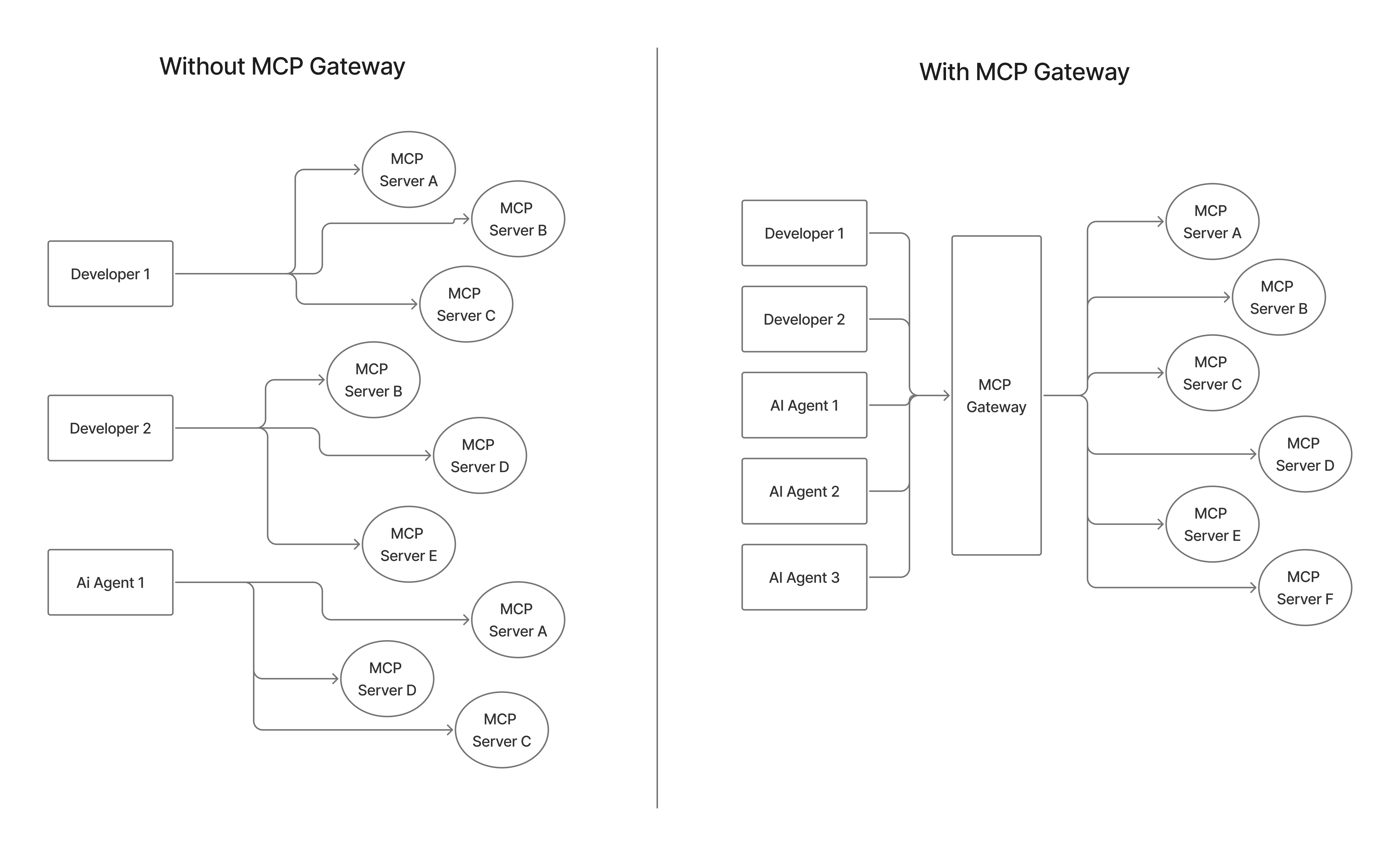 | **Without MCP Gateway** | **With TrueFoundry MCP Gateway** |
| :------------------------------------------------------------------------------------------------------ | :----------------------------------------------------------------------------------------------------------- |
| **Multiple Connections**
| **Without MCP Gateway** | **With TrueFoundry MCP Gateway** |
| :------------------------------------------------------------------------------------------------------ | :----------------------------------------------------------------------------------------------------------- |
| **Multiple Connections**
AI agents require separate connections to each MCP server | **Single Gateway Access**
AI agents connect to one gateway, access multiple MCP servers |
| **Fragmented Configuration**
Each developer configures VS Code, Cursor, Claude Code individually | **Unified Configuration**
Single configuration point for all AI development tools |
| **Local Server Management**
Developers must install and manage MCP servers locally | **Centralized Infrastructure**
Central IT manages cloud-hosted MCP infrastructure via streamable HTTP |
| **Ad-hoc Authentication**
No standard authentication flow for enterprise tools | **Standard OAuth Flows**
Developers use standard OAuth 2LO/3LO flows for enterprise MCP servers |
| **Credential Sprawl**
Scattered API keys and credentials across tools | **Secure Credential Management**
Centralized credential management with secure vault integration |
| **No Observability**
No visibility into what tools teams are using | **Full Audit Trail**
Complete visibility and audit trail for all tool usage |
| **Security Risks**
Security risks from unmanaged tool sprawl | **Governed Access**
Enterprise-grade security with governed tool access |
| **Static Tool Access**
No dynamic tool discovery for autonomous agents | **Dynamic Discovery**
Dynamic tool discovery and invocation for autonomous workflows |
| **No Catalog**
No curated tool catalog for multi-tenant environments | **Curated Registry**
Registry provides discoverable, curated MCP servers for multi-tenant use |
***
## TrueFoundry MCP Gateway
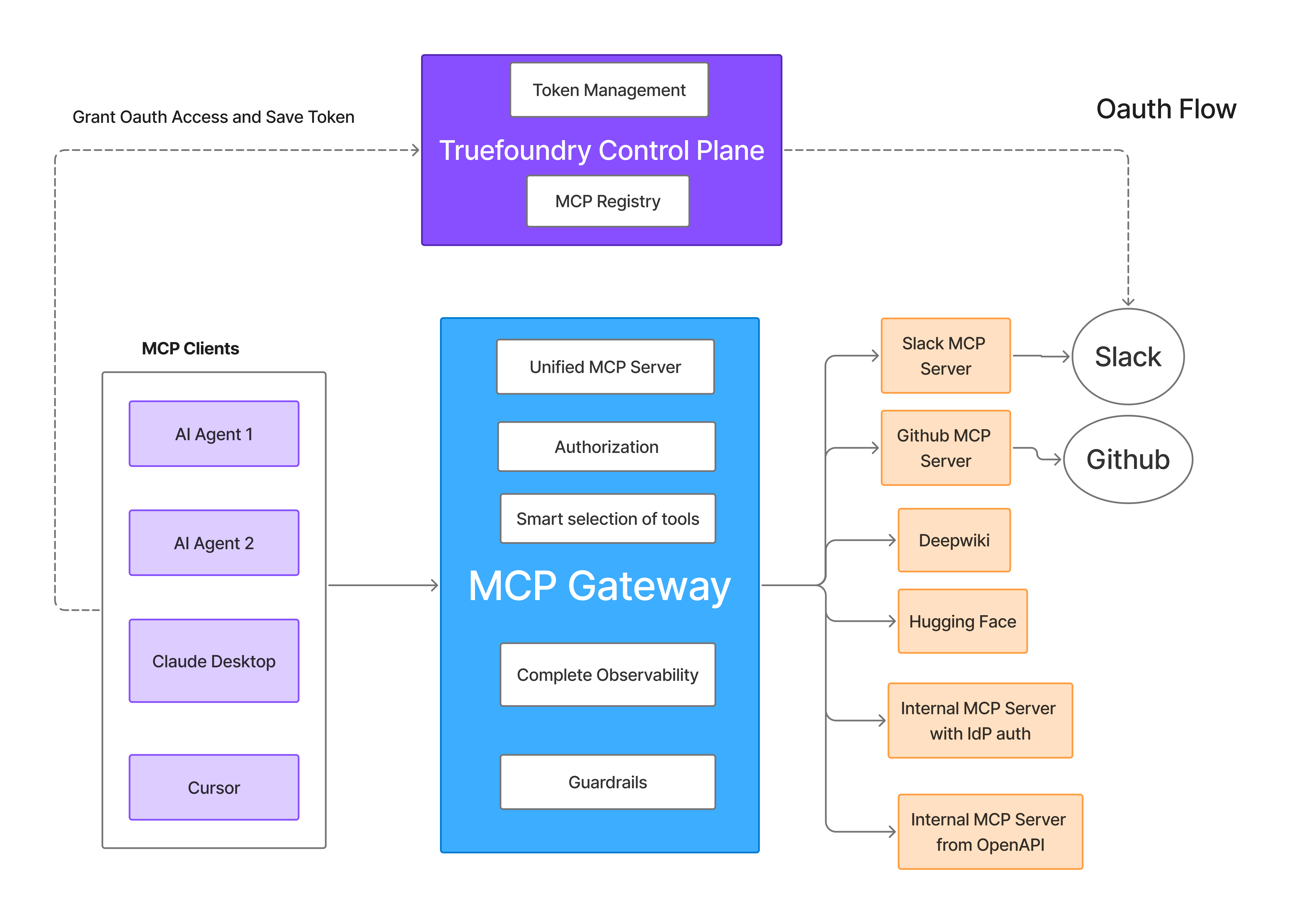
TrueFoundry MCP Gateway is an enterprise-ready platform that centralizes access to AI development tools using the Model Context Protocol. Instead of managing hundreds of individual tool configurations across your development teams, provide secure, governed access to curated AI tools through a single platform.
### Architecture
 ***
## Key Features
Use these guides to configure the MCP Gateway features that centralize server registration, authentication, access control, and tool consumption.
Register MCP servers, configure collaborators, and make servers available through the Gateway.
Configure inbound authentication, outbound authentication, access control, and token management.
Let users or virtual accounts supply their own upstream credentials for per-user server access.
Add Gateway-hosted MCP servers to Cursor, Claude Code, VS Code, and other MCP clients.
Curate tools from multiple MCP servers into one server for a team, workflow, or application.
Convert existing OpenAPI specifications into MCP tools without writing a custom server.
Run CLI-style MCP servers with managed commands, arguments, environment variables, and credentials.
Apply pre-tool and post-tool checks to enforce policies before and after MCP tool calls.
Monitor MCP server and tool-level request rates, latency, failures, and usage patterns.
***
## Key Features
Use these guides to configure the MCP Gateway features that centralize server registration, authentication, access control, and tool consumption.
Register MCP servers, configure collaborators, and make servers available through the Gateway.
Configure inbound authentication, outbound authentication, access control, and token management.
Let users or virtual accounts supply their own upstream credentials for per-user server access.
Add Gateway-hosted MCP servers to Cursor, Claude Code, VS Code, and other MCP clients.
Curate tools from multiple MCP servers into one server for a team, workflow, or application.
Convert existing OpenAPI specifications into MCP tools without writing a custom server.
Run CLI-style MCP servers with managed commands, arguments, environment variables, and credentials.
Apply pre-tool and post-tool checks to enforce policies before and after MCP tool calls.
Monitor MCP server and tool-level request rates, latency, failures, and usage patterns.