> ## Documentation Index
> Fetch the complete documentation index at: https://www.truefoundry.com/llms.txt
> Use this file to discover all available pages before exploring further.
# Authentication and Security
> Complete guide to authentication, authorization, and security for MCP Servers in TrueFoundry AI Gateway — from concepts to code.
TrueFoundry AI Gateway provides a comprehensive authentication and authorization system that separates how users authenticate to the Gateway (**inbound** authentication) from how the Gateway authenticates to downstream MCP servers (**outbound** authentication). This separation lets administrators choose the right security posture per tool without forcing end users to manage multiple credentials.
## Authentication Architecture Overview
The Gateway provides a three-part authentication and authorization system:
| Component | Description |
| --------------------------- | -------------------------------------------------------------------------------- |
| **Inbound Authentication** | How clients (AI agents, developers, end users) authenticate to the Gateway |
| **Access Control** | Role-based policies determine which users can access which MCP servers and tools |
| **Outbound Authentication** | How the Gateway authenticates to downstream MCP servers |
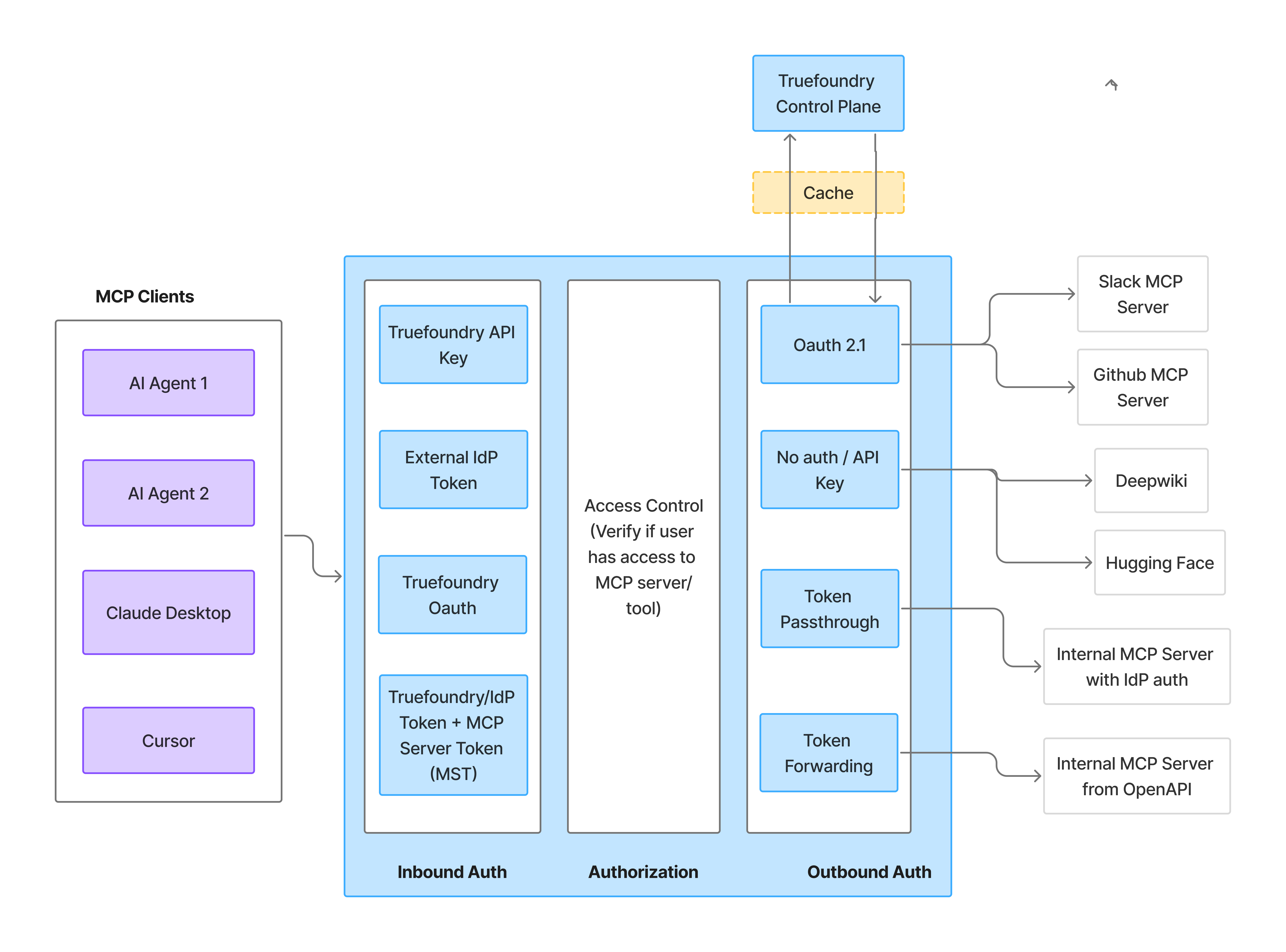 Before writing any code, answer two questions — they map directly to the two auth layers above:
| Question | What it determines |
| ---------------------------------------------------- | ------------------------------------------------------------------------------------------------ |
| **Who is calling the Gateway?** | The **Gateway Token** — identifies the caller for inbound authentication |
| **Whose credentials access the downstream service?** | The **MCP Server Auth** — determines whose data and permissions are used at the upstream service |
These layers are independent. The rest of this guide walks through each layer in turn, then shows how to combine them and code patterns for common implementations.
How clients authenticate to the Gateway
Who can use which MCP server and tools
How the Gateway authenticates to MCP servers
***
## Inbound Authentication
Inbound authentication controls how clients authenticate to the Gateway. Any user or application requires valid credentials to talk to the Gateway, which allows the Gateway to identify the caller and apply authorization rules.
### When to use which method
| Method | When to use |
| ----------------------------- | -------------------------------------------------------------------------------------------------------------------------------------------------------------------- |
| **TrueFoundry API Key (PAT)** | Internal developers with TrueFoundry accounts |
| **Virtual Account Token** | Service-to-service callers and shared application tokens |
| **Identity Provider Token** | End customers or services authenticating with a JWT from your IdP (B2B SaaS, CIAM, service-to-service). See [Identity Providers](/docs/platform/identity-providers). |
| **TrueFoundry OAuth** | IDE tools (Cursor, VS Code) that need delegated user access |
### Setup
Expand the method that matches your use case for the full setup steps and a code snippet.
For internal developers and applications with TrueFoundry accounts. Users generate a Personal Access Token (PAT) from the TrueFoundry UI.
1. Navigate to **Settings > API Keys** in the TrueFoundry UI
2. Click **Generate New API Key**
3. Store the token securely
```python theme={"dark"}
from fastmcp import Client
from fastmcp.client.transports import StreamableHttpTransport
transport = StreamableHttpTransport(
url="{GATEWAY_BASE_URL}/mcp//server",
headers={"Authorization": "Bearer "}
)
async with Client(transport) as client:
result = await client.call_tool("tool_name", {"arg": "value"})
```
Virtual Accounts are service accounts with specific permissions to access MCP servers. Use Virtual Accounts when you need a shared token for server-to-server communication or when building applications where individual user identity isn't required at the Gateway level.
1. Navigate to **Settings > Virtual Accounts** in the TrueFoundry UI
2. Click **Create Virtual Account**
3. Give it a descriptive name (e.g., `my-agent-mcp-access`)
4. Add permissions for the MCP servers your application needs to access
```python theme={"dark"}
from fastmcp import Client
from fastmcp.client.transports import StreamableHttpTransport
# Virtual Account token - same for all requests from your application
VA_TOKEN = "your-virtual-account-token"
transport = StreamableHttpTransport(
url="{GATEWAY_BASE_URL}/mcp//server",
headers={"Authorization": f"Bearer {VA_TOKEN}"}
)
async with Client(transport) as client:
result = await client.call_tool("tool_name", {"arg": "value"})
```
Virtual Account tokens provide the same level of access for all requests. For MCP servers that require user-specific access (like accessing a user's GitHub repositories), use OAuth2 with individual user tokens instead.
For end customers or when you want to use your own identity provider (Okta, Azure AD, Auth0, Cognito, etc.). The AI Gateway validates a JWT issued by your IdP and resolves it to a TrueFoundry user or virtual account using a configured [Identity Provider](/docs/platform/identity-providers).
This approach is ideal for:
* B2B SaaS applications where your customers don't have TrueFoundry accounts
* Applications that want to use their existing identity infrastructure
* Customer Identity and Access Management (CIAM) scenarios
* Service-to-service authentication where the caller already holds an IdP-issued JWT
Register your IdP with TrueFoundry:
1. Navigate to **Settings > Security & Access > Identity Providers**
2. Click **Add Identity Provider**
3. Fill in the form with the issuer URL, allowed audiences, and JWKS URI for your IdP (e.g., Okta, Azure AD)
4. Choose whether validated tokens resolve to a **virtual account** (machine-to-machine callers) or a **TrueFoundry user with team mapping** (human users)
For the full field reference and example configurations, see [Identity Providers](/docs/platform/identity-providers).
Add the matching Identity Provider mapping directly on the target identity:
* For a **virtual account**, add an [identity provider mapping](/docs/platform/virtual-account-management#identity-provider-mappings) that matches the configured **Name Claim**.
* For a **team**, add an [identity provider mapping](/docs/platform/team-management#identity-provider-mappings) that matches the configured **Team Claim**, and ensure the target users exist in the tenant.
Grant access to the resolved TrueFoundry identity:
1. Navigate to the MCP server's settings
2. Go to **Collaborators**
3. Add the mapped team, user, or virtual account with appropriate permissions
When your end user logs into your platform, your application receives their JWT. Use that JWT to authenticate with the Gateway:
```python theme={"dark"}
from fastmcp import Client
from fastmcp.client.transports import StreamableHttpTransport
# JWT from your IdP (e.g., Auth0, Okta)
user_jwt = "eyJhbGciOiJSUzI1NiIsInR5cCI6IkpXVCJ9..."
transport = StreamableHttpTransport(
url="{GATEWAY_BASE_URL}/mcp//server",
headers={"Authorization": f"Bearer {user_jwt}"}
)
async with Client(transport) as client:
result = await client.call_tool("tool_name", {"arg": "value"})
```
TrueFoundry OAuth lets IDE tools like **Cursor**, **Claude Code**, and **VS Code** connect to the MCP Gateway by signing in with TrueFoundry — no need to generate or manage API keys.
**When to use TrueFoundry OAuth:**
* Connecting to MCP servers from Cursor, Claude Code, VS Code, or other MCP-compatible IDEs
* Enabling team members to access MCP tools without sharing or managing API keys
* Leveraging existing TrueFoundry user authentication for MCP access
**What you do:**
1. Add the MCP server's Gateway URL in your IDE, or click **Connect** on the server in TrueFoundry.
2. Your browser opens and you sign in to TrueFoundry (using SSO if your organization has it configured).
3. You review and approve the access request, which shows your IDE and the MCP Gateway URL.
4. If the server connects to a third-party provider (such as GitHub or Slack), you authorize that provider with your own account.
After that, your IDE shows the server's tools as connected. For per-IDE setup steps and screenshots, see [Connect MCP Servers from Your IDE](/docs/ai-gateway/mcp/connect-mcp-from-ide).
TrueFoundry OAuth can be combined with Token Forwarding (outbound) to pass additional MCP server-specific headers alongside the sign-in.
***
## Access Control
Once authenticated, the Gateway verifies whether the user has permission to access the requested MCP server and tools.
Before writing any code, answer two questions — they map directly to the two auth layers above:
| Question | What it determines |
| ---------------------------------------------------- | ------------------------------------------------------------------------------------------------ |
| **Who is calling the Gateway?** | The **Gateway Token** — identifies the caller for inbound authentication |
| **Whose credentials access the downstream service?** | The **MCP Server Auth** — determines whose data and permissions are used at the upstream service |
These layers are independent. The rest of this guide walks through each layer in turn, then shows how to combine them and code patterns for common implementations.
How clients authenticate to the Gateway
Who can use which MCP server and tools
How the Gateway authenticates to MCP servers
***
## Inbound Authentication
Inbound authentication controls how clients authenticate to the Gateway. Any user or application requires valid credentials to talk to the Gateway, which allows the Gateway to identify the caller and apply authorization rules.
### When to use which method
| Method | When to use |
| ----------------------------- | -------------------------------------------------------------------------------------------------------------------------------------------------------------------- |
| **TrueFoundry API Key (PAT)** | Internal developers with TrueFoundry accounts |
| **Virtual Account Token** | Service-to-service callers and shared application tokens |
| **Identity Provider Token** | End customers or services authenticating with a JWT from your IdP (B2B SaaS, CIAM, service-to-service). See [Identity Providers](/docs/platform/identity-providers). |
| **TrueFoundry OAuth** | IDE tools (Cursor, VS Code) that need delegated user access |
### Setup
Expand the method that matches your use case for the full setup steps and a code snippet.
For internal developers and applications with TrueFoundry accounts. Users generate a Personal Access Token (PAT) from the TrueFoundry UI.
1. Navigate to **Settings > API Keys** in the TrueFoundry UI
2. Click **Generate New API Key**
3. Store the token securely
```python theme={"dark"}
from fastmcp import Client
from fastmcp.client.transports import StreamableHttpTransport
transport = StreamableHttpTransport(
url="{GATEWAY_BASE_URL}/mcp//server",
headers={"Authorization": "Bearer "}
)
async with Client(transport) as client:
result = await client.call_tool("tool_name", {"arg": "value"})
```
Virtual Accounts are service accounts with specific permissions to access MCP servers. Use Virtual Accounts when you need a shared token for server-to-server communication or when building applications where individual user identity isn't required at the Gateway level.
1. Navigate to **Settings > Virtual Accounts** in the TrueFoundry UI
2. Click **Create Virtual Account**
3. Give it a descriptive name (e.g., `my-agent-mcp-access`)
4. Add permissions for the MCP servers your application needs to access
```python theme={"dark"}
from fastmcp import Client
from fastmcp.client.transports import StreamableHttpTransport
# Virtual Account token - same for all requests from your application
VA_TOKEN = "your-virtual-account-token"
transport = StreamableHttpTransport(
url="{GATEWAY_BASE_URL}/mcp//server",
headers={"Authorization": f"Bearer {VA_TOKEN}"}
)
async with Client(transport) as client:
result = await client.call_tool("tool_name", {"arg": "value"})
```
Virtual Account tokens provide the same level of access for all requests. For MCP servers that require user-specific access (like accessing a user's GitHub repositories), use OAuth2 with individual user tokens instead.
For end customers or when you want to use your own identity provider (Okta, Azure AD, Auth0, Cognito, etc.). The AI Gateway validates a JWT issued by your IdP and resolves it to a TrueFoundry user or virtual account using a configured [Identity Provider](/docs/platform/identity-providers).
This approach is ideal for:
* B2B SaaS applications where your customers don't have TrueFoundry accounts
* Applications that want to use their existing identity infrastructure
* Customer Identity and Access Management (CIAM) scenarios
* Service-to-service authentication where the caller already holds an IdP-issued JWT
Register your IdP with TrueFoundry:
1. Navigate to **Settings > Security & Access > Identity Providers**
2. Click **Add Identity Provider**
3. Fill in the form with the issuer URL, allowed audiences, and JWKS URI for your IdP (e.g., Okta, Azure AD)
4. Choose whether validated tokens resolve to a **virtual account** (machine-to-machine callers) or a **TrueFoundry user with team mapping** (human users)
For the full field reference and example configurations, see [Identity Providers](/docs/platform/identity-providers).
Add the matching Identity Provider mapping directly on the target identity:
* For a **virtual account**, add an [identity provider mapping](/docs/platform/virtual-account-management#identity-provider-mappings) that matches the configured **Name Claim**.
* For a **team**, add an [identity provider mapping](/docs/platform/team-management#identity-provider-mappings) that matches the configured **Team Claim**, and ensure the target users exist in the tenant.
Grant access to the resolved TrueFoundry identity:
1. Navigate to the MCP server's settings
2. Go to **Collaborators**
3. Add the mapped team, user, or virtual account with appropriate permissions
When your end user logs into your platform, your application receives their JWT. Use that JWT to authenticate with the Gateway:
```python theme={"dark"}
from fastmcp import Client
from fastmcp.client.transports import StreamableHttpTransport
# JWT from your IdP (e.g., Auth0, Okta)
user_jwt = "eyJhbGciOiJSUzI1NiIsInR5cCI6IkpXVCJ9..."
transport = StreamableHttpTransport(
url="{GATEWAY_BASE_URL}/mcp//server",
headers={"Authorization": f"Bearer {user_jwt}"}
)
async with Client(transport) as client:
result = await client.call_tool("tool_name", {"arg": "value"})
```
TrueFoundry OAuth lets IDE tools like **Cursor**, **Claude Code**, and **VS Code** connect to the MCP Gateway by signing in with TrueFoundry — no need to generate or manage API keys.
**When to use TrueFoundry OAuth:**
* Connecting to MCP servers from Cursor, Claude Code, VS Code, or other MCP-compatible IDEs
* Enabling team members to access MCP tools without sharing or managing API keys
* Leveraging existing TrueFoundry user authentication for MCP access
**What you do:**
1. Add the MCP server's Gateway URL in your IDE, or click **Connect** on the server in TrueFoundry.
2. Your browser opens and you sign in to TrueFoundry (using SSO if your organization has it configured).
3. You review and approve the access request, which shows your IDE and the MCP Gateway URL.
4. If the server connects to a third-party provider (such as GitHub or Slack), you authorize that provider with your own account.
After that, your IDE shows the server's tools as connected. For per-IDE setup steps and screenshots, see [Connect MCP Servers from Your IDE](/docs/ai-gateway/mcp/connect-mcp-from-ide).
TrueFoundry OAuth can be combined with Token Forwarding (outbound) to pass additional MCP server-specific headers alongside the sign-in.
***
## Access Control
Once authenticated, the Gateway verifies whether the user has permission to access the requested MCP server and tools.
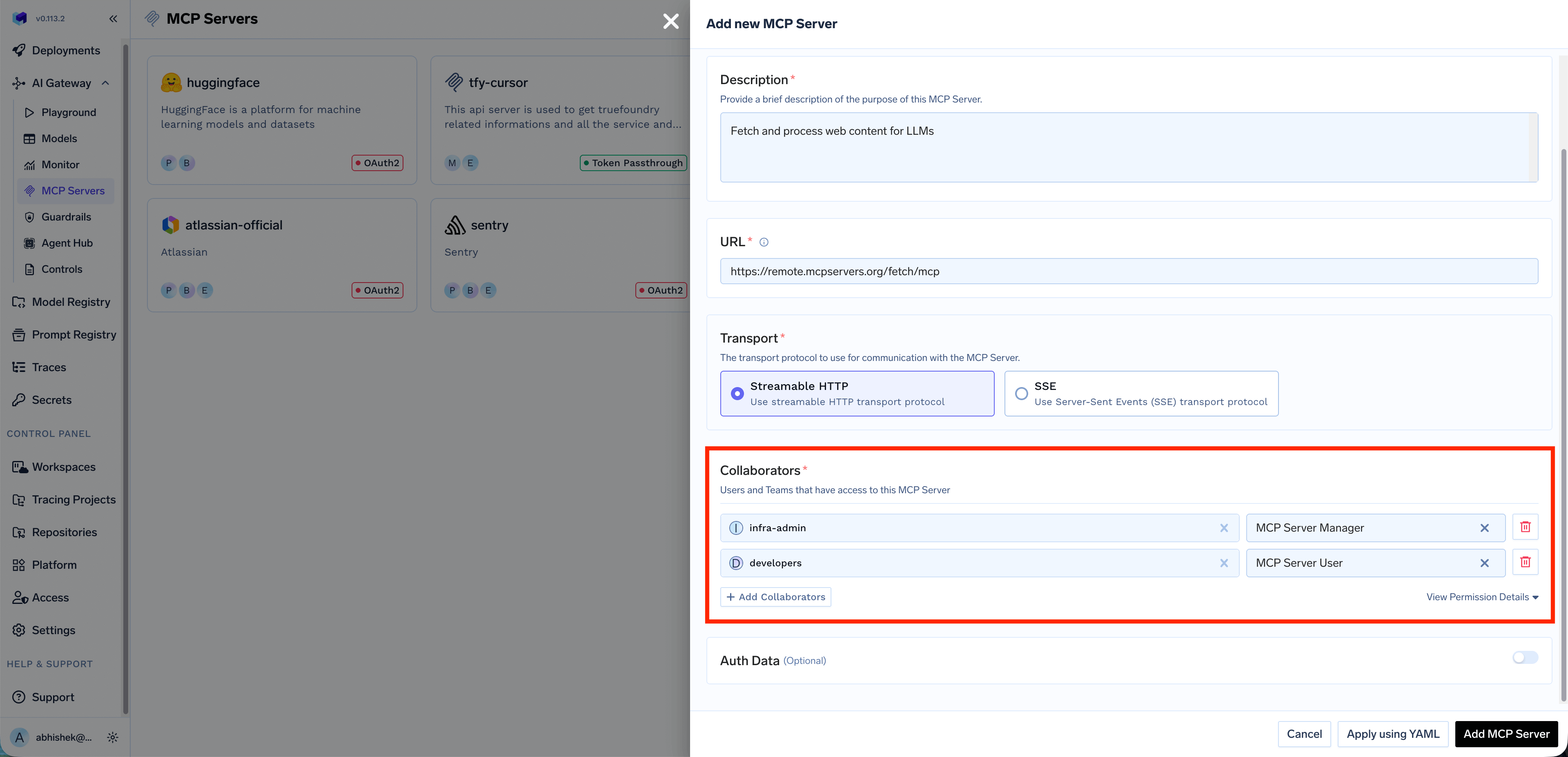 Access control is enforced based on the resolved TrueFoundry identity (user, team, or virtual account). You can define granular permissions for:
* Which MCP servers a user can access
* Which tools within an MCP server a user can invoke
You can also create a [Virtual MCP Server](/docs/ai-gateway/mcp/virtual-mcp-server) to expose a subset of tools from different MCP servers and grant access to specific users or teams.
***
## Outbound Authentication
Outbound authentication controls how the Gateway authenticates to downstream MCP servers. TrueFoundry supports multiple authentication models to handle different MCP server requirements.
### When to use which method
| Method | When to use | Example MCP servers |
| ------------------------------- | ------------------------------------------------------------------------------------------------------------------------------ | ----------------------------------------- |
| **OAuth2 (Authorization Code)** | Per-user access to third-party services where each user authorizes their own account | Gmail, Slack, GitHub, Atlassian |
| **OAuth2 (Client Credentials)** | Server-to-server access with no user interaction | Backend microservices, internal analytics |
| **API Key — Shared** | Shared resources or public APIs where one credential serves all users | Hugging Face, DeepWiki |
| **API Key — Individual** | Per-user upstream API keys (each user provides their own via [Auth Overrides](/docs/ai-gateway/mcp/mcp-server-auth-overrides)) | Third-party per-user APIs |
| **No Auth** | Public APIs that require no authentication | Calculator, public DeepWiki |
| **Token Passthrough** | Internal MCP servers that validate your IdP tokens directly | Internal MCP server with IdP auth |
| **Token Forwarding** | MCP servers with their own auth systems where the client provides credentials via `x-tfy-mcp-headers` | Internal MCP server from OpenAPI |
### Setup
Expand each model below for configuration details and example use cases.
**No Auth:** The MCP server doesn't require any authentication. Suitable for:
* Demo or sandbox APIs
* Public tools like a Calculator MCP Server or DeepWiki MCP server
Not recommended for production MCP servers or any server that provides access to sensitive data.
**API Key:** Authenticate using a static API key or token sent as a request header. When configuring API Key auth, you can choose between two credential modes:
* **Shared Credentials:** One key is used by everyone. You configure the credential once, and the Gateway injects it into every request regardless of which end user is calling.
* **Individual Credentials:** Each user provides their own key. Users must supply their own API key through [Auth Overrides](/docs/ai-gateway/mcp/mcp-server-auth-overrides) before they can use the MCP server. The Gateway injects the user-specific key into requests.
**Example (Shared):** A Hugging Face MCP server uses a shared API token. Users connect through the Gateway with their TrueFoundry credentials, while the Gateway injects the shared token and enforces which models or datasets each role can access.
**Example (Individual):** Each developer has their own API key for a third-party service. The admin configures the MCP server with Individual Credentials and a `Bearer {{API_KEY}}` placeholder. Each developer provides their API key via [Auth Overrides](/docs/ai-gateway/mcp/mcp-server-auth-overrides), and the Gateway injects the correct key per user.
OAuth2 allows the Gateway to authenticate with downstream MCP servers using tokens obtained through standard OAuth2 flows. TrueFoundry supports two grant types:
### Authorization Code
The Authorization Code flow is a user-facing flow where each end user is redirected to the provider (e.g., GitHub, Slack, Atlassian) to authorize access to **their** resources. The Gateway manages the full OAuth lifecycle — consent, token storage, and automatic refresh.
**How it works:**
1. End user authenticates with the Gateway (using a TrueFoundry token or an Identity Provider token)
2. End user attempts to call an MCP tool → Gateway returns an auth error with the authorization URL
3. End user visits the URL and completes OAuth consent on the third-party service (e.g., GitHub)
4. TrueFoundry stores the OAuth token for that end user
5. Future requests automatically include the end user's OAuth token
**Example:** A Slack MCP server prompts each employee to authorize their Slack account during first use. TrueFoundry stores the OAuth refresh token, rotates it automatically, and injects it only when that user invokes a Slack tool. Each user can only access their own messages and channels.
With the Authorization Code flow, end users authenticate **twice** — once with the Gateway (inbound), and once with the third-party service (GitHub, Slack, etc.) to grant access to their resources there (outbound).
### Client Credentials
The Client Credentials flow is a server-to-server flow where the Gateway authenticates to the downstream MCP server using a shared client ID and secret. No user interaction is required — the Gateway obtains an access token directly from the provider's token endpoint.
**How it works:**
1. The Gateway sends the client ID and secret to the provider's token endpoint
2. The provider returns an access token
3. The Gateway uses this token to authenticate requests to the MCP server
4. Tokens are automatically refreshed when they expire
**Example:** An internal analytics MCP server requires OAuth2 Client Credentials for authentication. The admin configures the client ID and secret once, and the Gateway handles token acquisition and refresh for all users accessing this server.
Use Client Credentials when the downstream MCP server authenticates the **application** rather than individual users — common for internal services, shared APIs, and backend integrations.
The incoming token used for inbound authentication (TrueFoundry token or Identity Provider token) is forwarded directly to the MCP server. The MCP server validates and uses this token for authorization.
**When to use Token Passthrough:**
* Your MCP server trusts the same IdP that authenticated the user to the Gateway
* The MCP server is configured to validate TrueFoundry tokens or your IdP's JWTs
* You want the MCP server to make authorization decisions based on the user's identity
**How Token Passthrough works:**
1. User authenticates to the Gateway with their token (TrueFoundry or IdP)
2. Gateway validates the token and checks access control
3. Gateway forwards the **same token** to the MCP server
4. MCP server validates the token and processes the request
**Example:** An internal MCP server that connects to your organization's services validates the user's IdP token to ensure they have access to specific resources based on their role claims.
**Key point**: Token Passthrough is ideal when your MCP server needs to know the user's identity and can validate tokens from TrueFoundry or your IdP.
Token Forwarding allows clients to pass additional headers to MCP servers using the `x-tfy-mcp-headers` header. This is useful when the MCP server requires specific authentication tokens or metadata that are different from the Gateway authentication.
**When to use Token Forwarding:**
* The MCP server requires a specific token format that differs from Gateway authentication
* You need to pass additional metadata or authentication headers
* The client has direct credentials for the MCP server
**How Token Forwarding works:**
1. Client authenticates to the Gateway with TrueFoundry token or IdP token (inbound auth)
2. Client includes `x-tfy-mcp-headers` with additional headers for the MCP server
3. Gateway validates the inbound token and checks access control
4. Gateway forwards the custom headers to the MCP server
For full code examples, see [Overriding auth with x-tfy-mcp-headers](#overriding-auth-with-x-tfy-mcp-headers) in the Implementation Recipes section.
Custom headers from `x-tfy-mcp-headers` always override the default authentication configured for the MCP server.
***
## Quick Decision Guide
Now that you've seen the inbound and outbound auth options, use this flowchart to pick the combination that matches your agent. Each outcome below includes a starter code snippet you can copy.
```mermaid theme={"dark"}
flowchart TD
Q1[Is your agent acting on behalf of individual users?]
Q1 -->|NO| A[Virtual Account + Shared Credentials]
Q1 -->|YES| Q2[Does the user have a TrueFoundry account?]
Q2 -->|YES| B[TrueFoundry PAT + Per-User OAuth]
Q2 -->|NO| C[Identity Provider Token + Per-User OAuth]
```
| Outcome | Gateway Token | MCP Server Auth |
| -------------------------------------------- | ---------------------------------------------------------------------------- | ---------------------------------------------------------------------------- |
| **Virtual Account + Shared Credentials** | Virtual Account | Static headers (configured once in UI). All users get the same access level. |
| **TrueFoundry PAT + Per-User OAuth** | User's TrueFoundry API Key | Per-user OAuth; user completes consent once. |
| **Identity Provider Token + Per-User OAuth** | JWT from a configured [Identity Provider](/docs/platform/identity-providers) | Per-user OAuth; user completes consent once. |
### Starter code for each outcome
**Your agent performs actions using your organization's credentials** — like a service account that does work on behalf of your company.
**Examples:**
* An internal support bot that queries your company's knowledge base
* A code assistant that uses a shared GitHub service account
* A data analysis agent that accesses shared analytics databases
**What to use:**
| Token Type | What to use | Why |
| ------------------- | ----------------------------------- | ----------------------------------------- |
| **Gateway Token** | Virtual Account token | Identifies your service/application |
| **MCP Server Auth** | Shared credentials (pre-configured) | All requests use the same service account |
You pass ONE token (Virtual Account). The MCP server's shared credentials are configured in the UI, not in your code.
```python theme={"dark"}
import os
from fastmcp import Client
from fastmcp.client.transports import StreamableHttpTransport
VA_TOKEN = os.environ["VIRTUAL_ACCOUNT_TOKEN"]
async def call_tool_as_service():
transport = StreamableHttpTransport(
url="https:///mcp//server",
headers={"Authorization": f"Bearer {VA_TOKEN}"}
)
async with Client(transport) as client:
result = await client.call_tool("query_knowledge_base", {"question": "..."})
return result
```
With this approach, all requests from your agent have the same permissions. User A and User B get identical access to the downstream service.
**Your agent performs actions using the end user's credentials** — the agent accesses each user's own data and respects their permissions.
**Examples:**
* A productivity agent that accesses the user's own Gmail, Slack, or Calendar
* A development assistant that accesses the user's GitHub repositories
* A CRM agent that sees only what the logged-in user can see
**What to use:**
| Token Type | What to use | Why |
| ------------------- | ------------------------------------------------------- | ------------------------------------------- |
| **Gateway Token** | User's token (TrueFoundry PAT or Identity Provider JWT) | Identifies which user is making the request |
| **MCP Server Auth** | Per-user OAuth (managed by TrueFoundry) | Each user's own credentials |
You pass the USER's token. TrueFoundry looks up and injects the OAuth token for that specific user.
```python theme={"dark"}
from fastmcp import Client
from fastmcp.client.transports import StreamableHttpTransport
async def call_tool_as_user(user_token: str):
transport = StreamableHttpTransport(
url="https:///mcp//server",
headers={"Authorization": f"Bearer {user_token}"}
)
async with Client(transport) as client:
result = await client.call_tool("search_emails", {"query": "..."})
return result
```
With this approach, User A and User B get different data based on their own OAuth authorizations. Each user must complete OAuth consent once — see [Handling OAuth-protected MCP servers](#handling-oauth-protected-mcp-servers).
**Your agent uses some tools with shared credentials and other tools with per-user credentials.**
**Examples:**
* An assistant that searches the web (shared API key) and sends emails on the user's behalf (per-user OAuth)
* A dev tool that queries documentation (shared) but accesses the user's GitHub (per-user)
**What to use:**
| Token Type | What to use | Why |
| ------------------- | --------------------------------- | -------------------------------- |
| **Gateway Token** | User's token | Identifies the caller |
| **MCP Server Auth** | Mixed — configured per MCP server | Gateway handles it automatically |
You pass ONE Gateway token. The Gateway routes to different MCP servers, each with its own auth model configured.
```python theme={"dark"}
from fastmcp import Client
from fastmcp.client.transports import StreamableHttpTransport
async def call_mixed_tools(user_token: str):
transport = StreamableHttpTransport(
url="https:///mcp//server",
headers={"Authorization": f"Bearer {user_token}"}
)
async with Client(transport) as client:
# Web search uses shared API key (configured on MCP server)
await client.call_tool("web_search", {"query": "..."})
# Gmail uses user's OAuth token (user must have completed OAuth)
await client.call_tool("send_email", {"to": "...", "body": "..."})
```
The Gateway abstracts away the complexity. You don't need to pass different tokens for different MCP servers — the Gateway injects the right credentials per server based on its configuration. See [Mixing OAuth and header-based MCP servers](#mixing-oauth-and-header-based-mcp-servers).
***
## Implementation Recipes
Code patterns for common implementation needs. The Gateway uses standard MCP transports — install the `fastmcp` Python client to follow these examples.
```bash theme={"dark"}
pip install fastmcp
```
### Connecting to an MCP server
The MCP Gateway exposes each registered MCP server at a unique URL. You can copy each server's URL from the TrueFoundry UI.
```python theme={"dark"}
import asyncio
from fastmcp import Client
from fastmcp.client.transports import StreamableHttpTransport
async def call_mcp_tool():
mcp_url = "https:///mcp//server"
auth_token = "your-token"
transport = StreamableHttpTransport(
url=mcp_url,
headers={"Authorization": f"Bearer {auth_token}"}
)
async with Client(transport) as client:
# List available tools
tools = await client.list_tools()
print(f"Available tools: {[t.name for t in tools]}")
# Call a specific tool
result = await client.call_tool("tool_name", {"arg1": "value1"})
print(f"Result: {result}")
asyncio.run(call_mcp_tool())
```
### Handling OAuth-protected MCP servers
When an MCP server is configured with OAuth2, each user authorizes the upstream provider (such as GitHub or Slack) once before they can use the server's tools. How that authorization happens depends on how you connect.
#### From an IDE or MCP client
If you connect from Cursor, Claude Code, VS Code, or another MCP client, this is handled for you in the browser. The first time you use the server, you sign in to TrueFoundry, approve the access request, and authorize the upstream provider if the server needs it. After that, the tools are available — no code required.
For per-IDE setup steps and what to expect, see [Connect MCP Servers from Your IDE](/docs/ai-gateway/mcp/connect-mcp-from-ide).
#### From a programmatic agent or SDK
If you call the Gateway directly from your own agent or SDK, you handle the authorization prompt yourself. When the user hasn't completed the OAuth flow, the Gateway returns a `401` HTTP error whose JSON body contains `authorization_urls` the user must visit.
```mermaid theme={"dark"}
sequenceDiagram
participant User
participant Agent as Your Agent
participant Gateway as MCP Gateway
participant OAuth as OAuth Provider
User->>Agent: "Show me my GitHub repos"
Agent->>Gateway: Request with user token
Gateway->>Gateway: User hasn't authorized GitHub
Gateway-->>Agent: 401 McpAuthRequiredError with authorization URLs
Agent-->>User: "Please authorize: [URL]"
User->>OAuth: Visits URL, grants access
OAuth-->>Gateway: Stores OAuth tokens
User->>Agent: Retry request
Agent->>Gateway: Request with user token
Gateway->>Gateway: Finds stored OAuth token
Gateway-->>Agent: User's repositories
Agent-->>User: "Here are your repos..."
```
**Handling OAuth errors in code:**
```python theme={"dark"}
import httpx
from fastmcp import Client
from fastmcp.client.transports import StreamableHttpTransport
def _make_httpx_client(**kwargs) -> httpx.AsyncClient:
"""Factory that creates an httpx client which reads error response bodies.
The MCP library uses streaming requests, so response bodies are not
automatically read. This hook ensures 4xx/5xx bodies are loaded before
raise_for_status() discards them.
"""
async def _read_error_body(response: httpx.Response):
if response.status_code >= 400:
await response.aread()
hooks = kwargs.pop("event_hooks", {})
hooks.setdefault("response", []).append(_read_error_body)
return httpx.AsyncClient(event_hooks=hooks, **kwargs)
async def call_mcp_with_oauth(
mcp_url: str,
user_token: str,
tool_name: str,
tool_args: dict
):
"""Call an MCP tool, handling OAuth authorization if needed."""
transport = StreamableHttpTransport(
url=mcp_url,
headers={"Authorization": f"Bearer {user_token}"},
httpx_client_factory=_make_httpx_client,
)
try:
async with Client(transport) as client:
result = await client.call_tool(tool_name, tool_args)
return {"success": True, "result": result}
except httpx.HTTPStatusError as e:
if e.response.status_code == 401:
body = e.response.json()
if body.get("error", {}).get("type") == "McpAuthRequiredError":
return {
"success": False,
"auth_required": True,
"authorization_urls": body.get("authorization_urls", {}),
"server_names": body.get("server_names", {}),
"message": body.get("message", ""),
}
raise
async def main():
result = await call_mcp_with_oauth(
mcp_url="https:///mcp//server",
user_token="user-tfy-token-or-idp-jwt",
tool_name="get_repositories",
tool_args={}
)
if result.get("auth_required"):
print(result["message"])
for server, url in result["authorization_urls"].items():
print(f" Authorize {server}: {url}")
# After user completes OAuth, retry the request
else:
print(f"Success: {result['result']}")
```
**OAuth errors are returned as HTTP 401 responses** with a JSON body containing `error.type` set to `"McpAuthRequiredError"`. The `authorization_urls` field is a dictionary keyed by server name, and each value is the URL the user must visit to complete the OAuth consent flow.
**After OAuth completion**: Once the user completes the OAuth consent flow, TrueFoundry stores their token. Future requests automatically include the OAuth credentials — no code changes needed.
### Mixing OAuth and header-based MCP servers
A common question: "My agent uses Gmail (OAuth) and a web search API (header-based). Do I need to handle them differently?"
**Answer: No.** The Gateway handles this for you.
1. **Configure each MCP server with its auth model in the UI:**
* Gmail MCP Server → OAuth2
* Web Search MCP Server → Static Header (API key)
2. **In your code, pass ONE Gateway token:**
```python theme={"dark"}
# Same code for all MCP servers - Gateway handles auth injection
transport = StreamableHttpTransport(
url="https:///mcp//server",
headers={"Authorization": f"Bearer {user_token}"}
)
async with Client(transport) as client:
# Web search - Gateway injects the pre-configured API key
await client.call_tool("web_search", {"query": "AI news"})
# Gmail - Gateway injects THIS user's OAuth token
await client.call_tool("search_emails", {"query": "from:boss"})
```
3. **The Gateway handles auth per server:**
| MCP Server | Auth Model | What the Gateway does |
| ---------- | ------------- | --------------------------------------- |
| Web Search | Static Header | Injects pre-configured API key |
| Gmail | OAuth2 | Looks up user's OAuth token, injects it |
| Calculator | No Auth | Passes request as-is |
### Overriding auth with `x-tfy-mcp-headers`
If you need to override the default auth for a specific MCP server, use the `x-tfy-mcp-headers` header. This is the implementation of the [Token Forwarding](#outbound-authentication) outbound auth model.
```python Single MCP Server theme={"dark"}
import json
from fastmcp import Client
from fastmcp.client.transports import StreamableHttpTransport
async def call_with_custom_headers():
custom_headers = json.dumps({
"Authorization": "Bearer custom-token",
"X-Custom-Header": "custom-value"
})
transport = StreamableHttpTransport(
url="https:///mcp//server",
headers={
"Authorization": "Bearer your-gateway-token", # Inbound auth
"x-tfy-mcp-headers": custom_headers # Outbound - forwarded
}
)
async with Client(transport) as client:
return await client.call_tool("tool_name", {})
```
```python Virtual MCP Server theme={"dark"}
import json
from fastmcp import Client
from fastmcp.client.transports import StreamableHttpTransport
async def call_virtual_mcp_with_headers():
# Headers for each underlying MCP server (nested by server identifier)
custom_headers = json.dumps({
"server-1": {"Authorization": "Bearer token-for-server-1"},
"server-2": {"Authorization": "Bearer token-for-server-2"}
})
transport = StreamableHttpTransport(
url="https:///mcp//server",
headers={
"Authorization": "Bearer your-gateway-token",
"x-tfy-mcp-headers": custom_headers
}
)
async with Client(transport) as client:
return await client.call_tool("tool_from_server_1", {})
```
For virtual MCP servers, use the remote MCP server identifier as the key (e.g., `server-1`). Copy the identifier from the UI since virtual MCP servers contain multiple remote MCP servers.
Custom headers **override** the default authentication. Use this sparingly, as it bypasses TrueFoundry's token management.
### Building a complete MCP-enabled agent
A reusable wrapper that handles connection, OAuth errors, and multiple MCP servers:
```python expandable theme={"dark"}
import asyncio
import os
from dataclasses import dataclass
import httpx
from fastmcp import Client
from fastmcp.client.transports import StreamableHttpTransport
def _make_httpx_client(**kwargs) -> httpx.AsyncClient:
"""Reads 4xx/5xx response bodies before raise_for_status() discards them."""
async def _read_error_body(response: httpx.Response):
if response.status_code >= 400:
await response.aread()
hooks = kwargs.pop("event_hooks", {})
hooks.setdefault("response", []).append(_read_error_body)
return httpx.AsyncClient(event_hooks=hooks, **kwargs)
@dataclass
class MCPConfig:
url: str
name: str
class MCPAgent:
"""An agent that can call tools from multiple MCP servers."""
def __init__(self, auth_token: str):
self.auth_token = auth_token
self.mcp_configs: dict[str, MCPConfig] = {}
def register_mcp_server(self, name: str, url: str):
self.mcp_configs[name] = MCPConfig(url=url, name=name)
async def call_tool(self, server_name: str, tool_name: str, tool_args: dict) -> dict:
if server_name not in self.mcp_configs:
raise ValueError(f"MCP server '{server_name}' not registered")
config = self.mcp_configs[server_name]
transport = StreamableHttpTransport(
url=config.url,
headers={"Authorization": f"Bearer {self.auth_token}"},
httpx_client_factory=_make_httpx_client,
)
try:
async with Client(transport) as client:
result = await client.call_tool(tool_name, tool_args)
return {"success": True, "result": result}
except httpx.HTTPStatusError as e:
if e.response.status_code == 401:
body = e.response.json()
if body.get("error", {}).get("type") == "McpAuthRequiredError":
return {
"success": False,
"auth_required": True,
"authorization_urls": body.get("authorization_urls", {}),
"server_names": body.get("server_names", {}),
"server": server_name,
"message": body.get("message", ""),
}
return {"success": False, "error": str(e)}
async def list_tools(self, server_name: str) -> list[str]:
if server_name not in self.mcp_configs:
raise ValueError(f"MCP server '{server_name}' not registered")
config = self.mcp_configs[server_name]
transport = StreamableHttpTransport(
url=config.url,
headers={"Authorization": f"Bearer {self.auth_token}"},
httpx_client_factory=_make_httpx_client,
)
async with Client(transport) as client:
tools = await client.list_tools()
return [tool.name for tool in tools]
async def main():
# Initialize with user token for per-user access
# Or use Virtual Account token for shared access
agent = MCPAgent(auth_token=os.environ["TFY_API_KEY"])
agent.register_mcp_server(
name="github",
url="https:///mcp/github-integration/server"
)
agent.register_mcp_server(
name="web-search",
url="https:///mcp/web-search/server"
)
result = await agent.call_tool(
server_name="github",
tool_name="list_repositories",
tool_args={"owner": "truefoundry"}
)
if result.get("auth_required"):
print("OAuth authorization required:")
for server, url in result["authorization_urls"].items():
print(f" Authorize {server}: {url}")
elif result.get("success"):
print(f"Result: {result['result']}")
else:
print(f"Error: {result.get('error')}")
if __name__ == "__main__":
asyncio.run(main())
```
***
## End-to-End Authentication Scenarios
The accordions below show how inbound and outbound auth combinations work end-to-end, with sequence diagrams and step-by-step request flow tables. Most readers can skip this section unless they're auditing the full request flow or implementing a less common combination.
**Inbound:** TrueFoundry API Key | **Outbound:** OAuth2 (Authorization Code)
**Use case:** Internal developers with TrueFoundry accounts accessing OAuth-protected services like Slack, GitHub, or Atlassian.
This is the most common enterprise scenario where your developers authenticate to TrueFoundry and the Gateway handles OAuth token management for downstream MCP servers.
Access control is enforced based on the resolved TrueFoundry identity (user, team, or virtual account). You can define granular permissions for:
* Which MCP servers a user can access
* Which tools within an MCP server a user can invoke
You can also create a [Virtual MCP Server](/docs/ai-gateway/mcp/virtual-mcp-server) to expose a subset of tools from different MCP servers and grant access to specific users or teams.
***
## Outbound Authentication
Outbound authentication controls how the Gateway authenticates to downstream MCP servers. TrueFoundry supports multiple authentication models to handle different MCP server requirements.
### When to use which method
| Method | When to use | Example MCP servers |
| ------------------------------- | ------------------------------------------------------------------------------------------------------------------------------ | ----------------------------------------- |
| **OAuth2 (Authorization Code)** | Per-user access to third-party services where each user authorizes their own account | Gmail, Slack, GitHub, Atlassian |
| **OAuth2 (Client Credentials)** | Server-to-server access with no user interaction | Backend microservices, internal analytics |
| **API Key — Shared** | Shared resources or public APIs where one credential serves all users | Hugging Face, DeepWiki |
| **API Key — Individual** | Per-user upstream API keys (each user provides their own via [Auth Overrides](/docs/ai-gateway/mcp/mcp-server-auth-overrides)) | Third-party per-user APIs |
| **No Auth** | Public APIs that require no authentication | Calculator, public DeepWiki |
| **Token Passthrough** | Internal MCP servers that validate your IdP tokens directly | Internal MCP server with IdP auth |
| **Token Forwarding** | MCP servers with their own auth systems where the client provides credentials via `x-tfy-mcp-headers` | Internal MCP server from OpenAPI |
### Setup
Expand each model below for configuration details and example use cases.
**No Auth:** The MCP server doesn't require any authentication. Suitable for:
* Demo or sandbox APIs
* Public tools like a Calculator MCP Server or DeepWiki MCP server
Not recommended for production MCP servers or any server that provides access to sensitive data.
**API Key:** Authenticate using a static API key or token sent as a request header. When configuring API Key auth, you can choose between two credential modes:
* **Shared Credentials:** One key is used by everyone. You configure the credential once, and the Gateway injects it into every request regardless of which end user is calling.
* **Individual Credentials:** Each user provides their own key. Users must supply their own API key through [Auth Overrides](/docs/ai-gateway/mcp/mcp-server-auth-overrides) before they can use the MCP server. The Gateway injects the user-specific key into requests.
**Example (Shared):** A Hugging Face MCP server uses a shared API token. Users connect through the Gateway with their TrueFoundry credentials, while the Gateway injects the shared token and enforces which models or datasets each role can access.
**Example (Individual):** Each developer has their own API key for a third-party service. The admin configures the MCP server with Individual Credentials and a `Bearer {{API_KEY}}` placeholder. Each developer provides their API key via [Auth Overrides](/docs/ai-gateway/mcp/mcp-server-auth-overrides), and the Gateway injects the correct key per user.
OAuth2 allows the Gateway to authenticate with downstream MCP servers using tokens obtained through standard OAuth2 flows. TrueFoundry supports two grant types:
### Authorization Code
The Authorization Code flow is a user-facing flow where each end user is redirected to the provider (e.g., GitHub, Slack, Atlassian) to authorize access to **their** resources. The Gateway manages the full OAuth lifecycle — consent, token storage, and automatic refresh.
**How it works:**
1. End user authenticates with the Gateway (using a TrueFoundry token or an Identity Provider token)
2. End user attempts to call an MCP tool → Gateway returns an auth error with the authorization URL
3. End user visits the URL and completes OAuth consent on the third-party service (e.g., GitHub)
4. TrueFoundry stores the OAuth token for that end user
5. Future requests automatically include the end user's OAuth token
**Example:** A Slack MCP server prompts each employee to authorize their Slack account during first use. TrueFoundry stores the OAuth refresh token, rotates it automatically, and injects it only when that user invokes a Slack tool. Each user can only access their own messages and channels.
With the Authorization Code flow, end users authenticate **twice** — once with the Gateway (inbound), and once with the third-party service (GitHub, Slack, etc.) to grant access to their resources there (outbound).
### Client Credentials
The Client Credentials flow is a server-to-server flow where the Gateway authenticates to the downstream MCP server using a shared client ID and secret. No user interaction is required — the Gateway obtains an access token directly from the provider's token endpoint.
**How it works:**
1. The Gateway sends the client ID and secret to the provider's token endpoint
2. The provider returns an access token
3. The Gateway uses this token to authenticate requests to the MCP server
4. Tokens are automatically refreshed when they expire
**Example:** An internal analytics MCP server requires OAuth2 Client Credentials for authentication. The admin configures the client ID and secret once, and the Gateway handles token acquisition and refresh for all users accessing this server.
Use Client Credentials when the downstream MCP server authenticates the **application** rather than individual users — common for internal services, shared APIs, and backend integrations.
The incoming token used for inbound authentication (TrueFoundry token or Identity Provider token) is forwarded directly to the MCP server. The MCP server validates and uses this token for authorization.
**When to use Token Passthrough:**
* Your MCP server trusts the same IdP that authenticated the user to the Gateway
* The MCP server is configured to validate TrueFoundry tokens or your IdP's JWTs
* You want the MCP server to make authorization decisions based on the user's identity
**How Token Passthrough works:**
1. User authenticates to the Gateway with their token (TrueFoundry or IdP)
2. Gateway validates the token and checks access control
3. Gateway forwards the **same token** to the MCP server
4. MCP server validates the token and processes the request
**Example:** An internal MCP server that connects to your organization's services validates the user's IdP token to ensure they have access to specific resources based on their role claims.
**Key point**: Token Passthrough is ideal when your MCP server needs to know the user's identity and can validate tokens from TrueFoundry or your IdP.
Token Forwarding allows clients to pass additional headers to MCP servers using the `x-tfy-mcp-headers` header. This is useful when the MCP server requires specific authentication tokens or metadata that are different from the Gateway authentication.
**When to use Token Forwarding:**
* The MCP server requires a specific token format that differs from Gateway authentication
* You need to pass additional metadata or authentication headers
* The client has direct credentials for the MCP server
**How Token Forwarding works:**
1. Client authenticates to the Gateway with TrueFoundry token or IdP token (inbound auth)
2. Client includes `x-tfy-mcp-headers` with additional headers for the MCP server
3. Gateway validates the inbound token and checks access control
4. Gateway forwards the custom headers to the MCP server
For full code examples, see [Overriding auth with x-tfy-mcp-headers](#overriding-auth-with-x-tfy-mcp-headers) in the Implementation Recipes section.
Custom headers from `x-tfy-mcp-headers` always override the default authentication configured for the MCP server.
***
## Quick Decision Guide
Now that you've seen the inbound and outbound auth options, use this flowchart to pick the combination that matches your agent. Each outcome below includes a starter code snippet you can copy.
```mermaid theme={"dark"}
flowchart TD
Q1[Is your agent acting on behalf of individual users?]
Q1 -->|NO| A[Virtual Account + Shared Credentials]
Q1 -->|YES| Q2[Does the user have a TrueFoundry account?]
Q2 -->|YES| B[TrueFoundry PAT + Per-User OAuth]
Q2 -->|NO| C[Identity Provider Token + Per-User OAuth]
```
| Outcome | Gateway Token | MCP Server Auth |
| -------------------------------------------- | ---------------------------------------------------------------------------- | ---------------------------------------------------------------------------- |
| **Virtual Account + Shared Credentials** | Virtual Account | Static headers (configured once in UI). All users get the same access level. |
| **TrueFoundry PAT + Per-User OAuth** | User's TrueFoundry API Key | Per-user OAuth; user completes consent once. |
| **Identity Provider Token + Per-User OAuth** | JWT from a configured [Identity Provider](/docs/platform/identity-providers) | Per-user OAuth; user completes consent once. |
### Starter code for each outcome
**Your agent performs actions using your organization's credentials** — like a service account that does work on behalf of your company.
**Examples:**
* An internal support bot that queries your company's knowledge base
* A code assistant that uses a shared GitHub service account
* A data analysis agent that accesses shared analytics databases
**What to use:**
| Token Type | What to use | Why |
| ------------------- | ----------------------------------- | ----------------------------------------- |
| **Gateway Token** | Virtual Account token | Identifies your service/application |
| **MCP Server Auth** | Shared credentials (pre-configured) | All requests use the same service account |
You pass ONE token (Virtual Account). The MCP server's shared credentials are configured in the UI, not in your code.
```python theme={"dark"}
import os
from fastmcp import Client
from fastmcp.client.transports import StreamableHttpTransport
VA_TOKEN = os.environ["VIRTUAL_ACCOUNT_TOKEN"]
async def call_tool_as_service():
transport = StreamableHttpTransport(
url="https:///mcp//server",
headers={"Authorization": f"Bearer {VA_TOKEN}"}
)
async with Client(transport) as client:
result = await client.call_tool("query_knowledge_base", {"question": "..."})
return result
```
With this approach, all requests from your agent have the same permissions. User A and User B get identical access to the downstream service.
**Your agent performs actions using the end user's credentials** — the agent accesses each user's own data and respects their permissions.
**Examples:**
* A productivity agent that accesses the user's own Gmail, Slack, or Calendar
* A development assistant that accesses the user's GitHub repositories
* A CRM agent that sees only what the logged-in user can see
**What to use:**
| Token Type | What to use | Why |
| ------------------- | ------------------------------------------------------- | ------------------------------------------- |
| **Gateway Token** | User's token (TrueFoundry PAT or Identity Provider JWT) | Identifies which user is making the request |
| **MCP Server Auth** | Per-user OAuth (managed by TrueFoundry) | Each user's own credentials |
You pass the USER's token. TrueFoundry looks up and injects the OAuth token for that specific user.
```python theme={"dark"}
from fastmcp import Client
from fastmcp.client.transports import StreamableHttpTransport
async def call_tool_as_user(user_token: str):
transport = StreamableHttpTransport(
url="https:///mcp//server",
headers={"Authorization": f"Bearer {user_token}"}
)
async with Client(transport) as client:
result = await client.call_tool("search_emails", {"query": "..."})
return result
```
With this approach, User A and User B get different data based on their own OAuth authorizations. Each user must complete OAuth consent once — see [Handling OAuth-protected MCP servers](#handling-oauth-protected-mcp-servers).
**Your agent uses some tools with shared credentials and other tools with per-user credentials.**
**Examples:**
* An assistant that searches the web (shared API key) and sends emails on the user's behalf (per-user OAuth)
* A dev tool that queries documentation (shared) but accesses the user's GitHub (per-user)
**What to use:**
| Token Type | What to use | Why |
| ------------------- | --------------------------------- | -------------------------------- |
| **Gateway Token** | User's token | Identifies the caller |
| **MCP Server Auth** | Mixed — configured per MCP server | Gateway handles it automatically |
You pass ONE Gateway token. The Gateway routes to different MCP servers, each with its own auth model configured.
```python theme={"dark"}
from fastmcp import Client
from fastmcp.client.transports import StreamableHttpTransport
async def call_mixed_tools(user_token: str):
transport = StreamableHttpTransport(
url="https:///mcp//server",
headers={"Authorization": f"Bearer {user_token}"}
)
async with Client(transport) as client:
# Web search uses shared API key (configured on MCP server)
await client.call_tool("web_search", {"query": "..."})
# Gmail uses user's OAuth token (user must have completed OAuth)
await client.call_tool("send_email", {"to": "...", "body": "..."})
```
The Gateway abstracts away the complexity. You don't need to pass different tokens for different MCP servers — the Gateway injects the right credentials per server based on its configuration. See [Mixing OAuth and header-based MCP servers](#mixing-oauth-and-header-based-mcp-servers).
***
## Implementation Recipes
Code patterns for common implementation needs. The Gateway uses standard MCP transports — install the `fastmcp` Python client to follow these examples.
```bash theme={"dark"}
pip install fastmcp
```
### Connecting to an MCP server
The MCP Gateway exposes each registered MCP server at a unique URL. You can copy each server's URL from the TrueFoundry UI.
```python theme={"dark"}
import asyncio
from fastmcp import Client
from fastmcp.client.transports import StreamableHttpTransport
async def call_mcp_tool():
mcp_url = "https:///mcp//server"
auth_token = "your-token"
transport = StreamableHttpTransport(
url=mcp_url,
headers={"Authorization": f"Bearer {auth_token}"}
)
async with Client(transport) as client:
# List available tools
tools = await client.list_tools()
print(f"Available tools: {[t.name for t in tools]}")
# Call a specific tool
result = await client.call_tool("tool_name", {"arg1": "value1"})
print(f"Result: {result}")
asyncio.run(call_mcp_tool())
```
### Handling OAuth-protected MCP servers
When an MCP server is configured with OAuth2, each user authorizes the upstream provider (such as GitHub or Slack) once before they can use the server's tools. How that authorization happens depends on how you connect.
#### From an IDE or MCP client
If you connect from Cursor, Claude Code, VS Code, or another MCP client, this is handled for you in the browser. The first time you use the server, you sign in to TrueFoundry, approve the access request, and authorize the upstream provider if the server needs it. After that, the tools are available — no code required.
For per-IDE setup steps and what to expect, see [Connect MCP Servers from Your IDE](/docs/ai-gateway/mcp/connect-mcp-from-ide).
#### From a programmatic agent or SDK
If you call the Gateway directly from your own agent or SDK, you handle the authorization prompt yourself. When the user hasn't completed the OAuth flow, the Gateway returns a `401` HTTP error whose JSON body contains `authorization_urls` the user must visit.
```mermaid theme={"dark"}
sequenceDiagram
participant User
participant Agent as Your Agent
participant Gateway as MCP Gateway
participant OAuth as OAuth Provider
User->>Agent: "Show me my GitHub repos"
Agent->>Gateway: Request with user token
Gateway->>Gateway: User hasn't authorized GitHub
Gateway-->>Agent: 401 McpAuthRequiredError with authorization URLs
Agent-->>User: "Please authorize: [URL]"
User->>OAuth: Visits URL, grants access
OAuth-->>Gateway: Stores OAuth tokens
User->>Agent: Retry request
Agent->>Gateway: Request with user token
Gateway->>Gateway: Finds stored OAuth token
Gateway-->>Agent: User's repositories
Agent-->>User: "Here are your repos..."
```
**Handling OAuth errors in code:**
```python theme={"dark"}
import httpx
from fastmcp import Client
from fastmcp.client.transports import StreamableHttpTransport
def _make_httpx_client(**kwargs) -> httpx.AsyncClient:
"""Factory that creates an httpx client which reads error response bodies.
The MCP library uses streaming requests, so response bodies are not
automatically read. This hook ensures 4xx/5xx bodies are loaded before
raise_for_status() discards them.
"""
async def _read_error_body(response: httpx.Response):
if response.status_code >= 400:
await response.aread()
hooks = kwargs.pop("event_hooks", {})
hooks.setdefault("response", []).append(_read_error_body)
return httpx.AsyncClient(event_hooks=hooks, **kwargs)
async def call_mcp_with_oauth(
mcp_url: str,
user_token: str,
tool_name: str,
tool_args: dict
):
"""Call an MCP tool, handling OAuth authorization if needed."""
transport = StreamableHttpTransport(
url=mcp_url,
headers={"Authorization": f"Bearer {user_token}"},
httpx_client_factory=_make_httpx_client,
)
try:
async with Client(transport) as client:
result = await client.call_tool(tool_name, tool_args)
return {"success": True, "result": result}
except httpx.HTTPStatusError as e:
if e.response.status_code == 401:
body = e.response.json()
if body.get("error", {}).get("type") == "McpAuthRequiredError":
return {
"success": False,
"auth_required": True,
"authorization_urls": body.get("authorization_urls", {}),
"server_names": body.get("server_names", {}),
"message": body.get("message", ""),
}
raise
async def main():
result = await call_mcp_with_oauth(
mcp_url="https:///mcp//server",
user_token="user-tfy-token-or-idp-jwt",
tool_name="get_repositories",
tool_args={}
)
if result.get("auth_required"):
print(result["message"])
for server, url in result["authorization_urls"].items():
print(f" Authorize {server}: {url}")
# After user completes OAuth, retry the request
else:
print(f"Success: {result['result']}")
```
**OAuth errors are returned as HTTP 401 responses** with a JSON body containing `error.type` set to `"McpAuthRequiredError"`. The `authorization_urls` field is a dictionary keyed by server name, and each value is the URL the user must visit to complete the OAuth consent flow.
**After OAuth completion**: Once the user completes the OAuth consent flow, TrueFoundry stores their token. Future requests automatically include the OAuth credentials — no code changes needed.
### Mixing OAuth and header-based MCP servers
A common question: "My agent uses Gmail (OAuth) and a web search API (header-based). Do I need to handle them differently?"
**Answer: No.** The Gateway handles this for you.
1. **Configure each MCP server with its auth model in the UI:**
* Gmail MCP Server → OAuth2
* Web Search MCP Server → Static Header (API key)
2. **In your code, pass ONE Gateway token:**
```python theme={"dark"}
# Same code for all MCP servers - Gateway handles auth injection
transport = StreamableHttpTransport(
url="https:///mcp//server",
headers={"Authorization": f"Bearer {user_token}"}
)
async with Client(transport) as client:
# Web search - Gateway injects the pre-configured API key
await client.call_tool("web_search", {"query": "AI news"})
# Gmail - Gateway injects THIS user's OAuth token
await client.call_tool("search_emails", {"query": "from:boss"})
```
3. **The Gateway handles auth per server:**
| MCP Server | Auth Model | What the Gateway does |
| ---------- | ------------- | --------------------------------------- |
| Web Search | Static Header | Injects pre-configured API key |
| Gmail | OAuth2 | Looks up user's OAuth token, injects it |
| Calculator | No Auth | Passes request as-is |
### Overriding auth with `x-tfy-mcp-headers`
If you need to override the default auth for a specific MCP server, use the `x-tfy-mcp-headers` header. This is the implementation of the [Token Forwarding](#outbound-authentication) outbound auth model.
```python Single MCP Server theme={"dark"}
import json
from fastmcp import Client
from fastmcp.client.transports import StreamableHttpTransport
async def call_with_custom_headers():
custom_headers = json.dumps({
"Authorization": "Bearer custom-token",
"X-Custom-Header": "custom-value"
})
transport = StreamableHttpTransport(
url="https:///mcp//server",
headers={
"Authorization": "Bearer your-gateway-token", # Inbound auth
"x-tfy-mcp-headers": custom_headers # Outbound - forwarded
}
)
async with Client(transport) as client:
return await client.call_tool("tool_name", {})
```
```python Virtual MCP Server theme={"dark"}
import json
from fastmcp import Client
from fastmcp.client.transports import StreamableHttpTransport
async def call_virtual_mcp_with_headers():
# Headers for each underlying MCP server (nested by server identifier)
custom_headers = json.dumps({
"server-1": {"Authorization": "Bearer token-for-server-1"},
"server-2": {"Authorization": "Bearer token-for-server-2"}
})
transport = StreamableHttpTransport(
url="https:///mcp//server",
headers={
"Authorization": "Bearer your-gateway-token",
"x-tfy-mcp-headers": custom_headers
}
)
async with Client(transport) as client:
return await client.call_tool("tool_from_server_1", {})
```
For virtual MCP servers, use the remote MCP server identifier as the key (e.g., `server-1`). Copy the identifier from the UI since virtual MCP servers contain multiple remote MCP servers.
Custom headers **override** the default authentication. Use this sparingly, as it bypasses TrueFoundry's token management.
### Building a complete MCP-enabled agent
A reusable wrapper that handles connection, OAuth errors, and multiple MCP servers:
```python expandable theme={"dark"}
import asyncio
import os
from dataclasses import dataclass
import httpx
from fastmcp import Client
from fastmcp.client.transports import StreamableHttpTransport
def _make_httpx_client(**kwargs) -> httpx.AsyncClient:
"""Reads 4xx/5xx response bodies before raise_for_status() discards them."""
async def _read_error_body(response: httpx.Response):
if response.status_code >= 400:
await response.aread()
hooks = kwargs.pop("event_hooks", {})
hooks.setdefault("response", []).append(_read_error_body)
return httpx.AsyncClient(event_hooks=hooks, **kwargs)
@dataclass
class MCPConfig:
url: str
name: str
class MCPAgent:
"""An agent that can call tools from multiple MCP servers."""
def __init__(self, auth_token: str):
self.auth_token = auth_token
self.mcp_configs: dict[str, MCPConfig] = {}
def register_mcp_server(self, name: str, url: str):
self.mcp_configs[name] = MCPConfig(url=url, name=name)
async def call_tool(self, server_name: str, tool_name: str, tool_args: dict) -> dict:
if server_name not in self.mcp_configs:
raise ValueError(f"MCP server '{server_name}' not registered")
config = self.mcp_configs[server_name]
transport = StreamableHttpTransport(
url=config.url,
headers={"Authorization": f"Bearer {self.auth_token}"},
httpx_client_factory=_make_httpx_client,
)
try:
async with Client(transport) as client:
result = await client.call_tool(tool_name, tool_args)
return {"success": True, "result": result}
except httpx.HTTPStatusError as e:
if e.response.status_code == 401:
body = e.response.json()
if body.get("error", {}).get("type") == "McpAuthRequiredError":
return {
"success": False,
"auth_required": True,
"authorization_urls": body.get("authorization_urls", {}),
"server_names": body.get("server_names", {}),
"server": server_name,
"message": body.get("message", ""),
}
return {"success": False, "error": str(e)}
async def list_tools(self, server_name: str) -> list[str]:
if server_name not in self.mcp_configs:
raise ValueError(f"MCP server '{server_name}' not registered")
config = self.mcp_configs[server_name]
transport = StreamableHttpTransport(
url=config.url,
headers={"Authorization": f"Bearer {self.auth_token}"},
httpx_client_factory=_make_httpx_client,
)
async with Client(transport) as client:
tools = await client.list_tools()
return [tool.name for tool in tools]
async def main():
# Initialize with user token for per-user access
# Or use Virtual Account token for shared access
agent = MCPAgent(auth_token=os.environ["TFY_API_KEY"])
agent.register_mcp_server(
name="github",
url="https:///mcp/github-integration/server"
)
agent.register_mcp_server(
name="web-search",
url="https:///mcp/web-search/server"
)
result = await agent.call_tool(
server_name="github",
tool_name="list_repositories",
tool_args={"owner": "truefoundry"}
)
if result.get("auth_required"):
print("OAuth authorization required:")
for server, url in result["authorization_urls"].items():
print(f" Authorize {server}: {url}")
elif result.get("success"):
print(f"Result: {result['result']}")
else:
print(f"Error: {result.get('error')}")
if __name__ == "__main__":
asyncio.run(main())
```
***
## End-to-End Authentication Scenarios
The accordions below show how inbound and outbound auth combinations work end-to-end, with sequence diagrams and step-by-step request flow tables. Most readers can skip this section unless they're auditing the full request flow or implementing a less common combination.
**Inbound:** TrueFoundry API Key | **Outbound:** OAuth2 (Authorization Code)
**Use case:** Internal developers with TrueFoundry accounts accessing OAuth-protected services like Slack, GitHub, or Atlassian.
This is the most common enterprise scenario where your developers authenticate to TrueFoundry and the Gateway handles OAuth token management for downstream MCP servers.
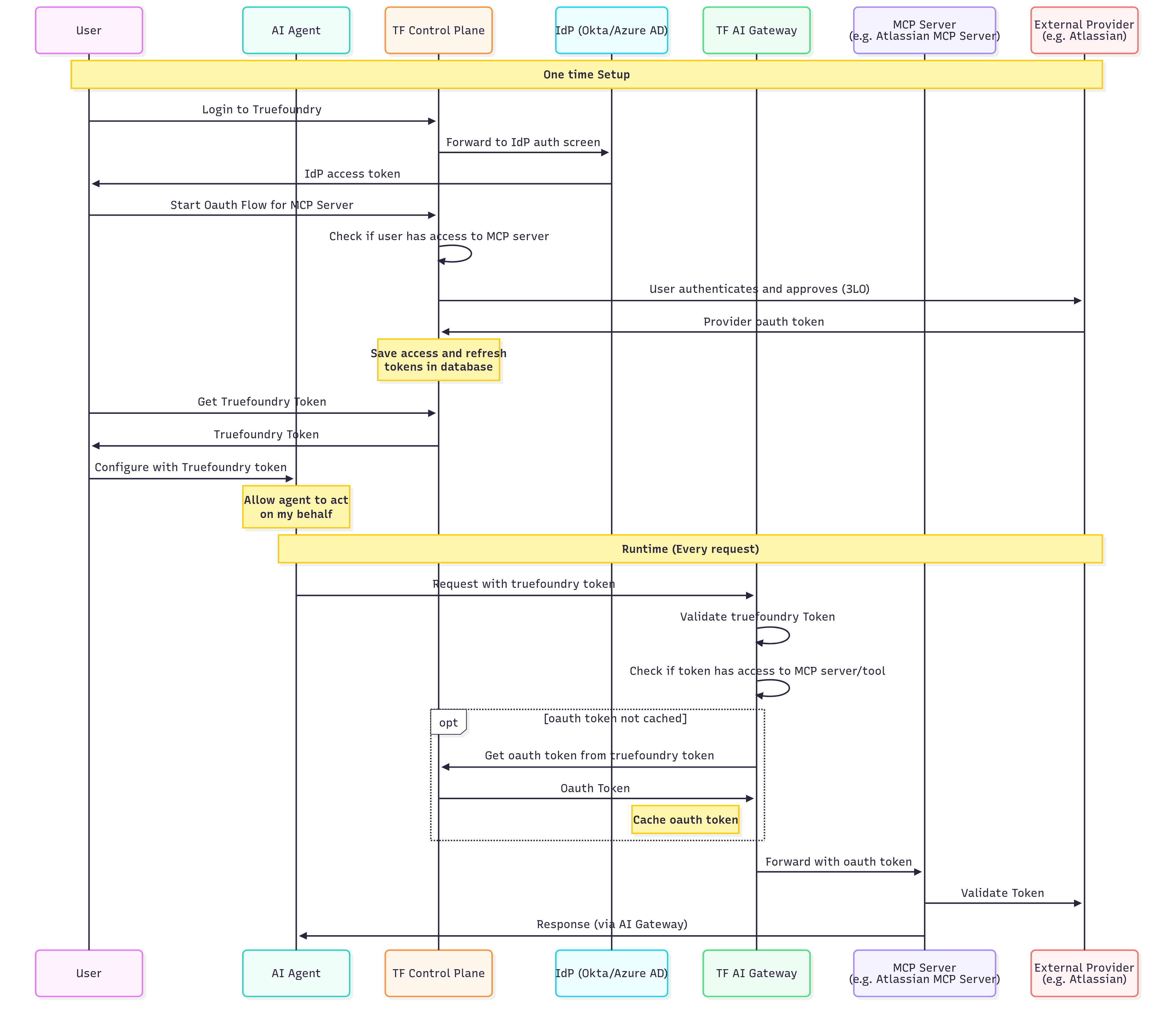 **One-Time Setup (what the user does):**
1. Sign in to TrueFoundry (using SSO if your organization has it configured).
2. Start the connection for the MCP server — add its Gateway URL in your IDE, or click **Connect** on the server in TrueFoundry.
3. Approve the access request.
4. Authorize the upstream provider (e.g., Atlassian) with your own account.
TrueFoundry stores your authorization, so you only do this once per provider.
**Runtime Flow (Every Request):**
| Step | Action | Description |
| ---- | ------------------------------ | ---------------------------------------------------------------- |
| 1 | Agent → Gateway | AI Agent sends request with TrueFoundry token (inbound auth) |
| 2 | Gateway | Validates the TrueFoundry token |
| 3 | Gateway | Checks if the token has access to the requested MCP server/tool |
| 4 | Gateway → Control Plane | (If not cached) Retrieves user's OAuth token for this MCP server |
| 5 | Gateway | Caches the OAuth token for subsequent requests |
| 6 | Gateway → MCP Server | Forwards request with the user's OAuth token (outbound auth) |
| 7 | MCP Server → External Provider | Validates token and fetches user-specific data |
| 8 | MCP Server → Agent | Returns response through the Gateway |
**Key benefits of this flow:**
* Users authenticate once to TrueFoundry and access multiple OAuth-protected services
* Tokens are automatically refreshed when they expire
* Each user's actions are attributed to their individual identity
* Users can revoke access to specific services at any time
**Inbound:** Identity Provider Token | **Outbound:** OAuth2 (Authorization Code)
**Use case:** Your end customers (who don't have TrueFoundry accounts) accessing OAuth-protected services through your application.
This scenario is common for Customer Identity and Access Management (CIAM) where you want your customers to connect their own accounts (e.g., their Gmail, Slack, or CRM) to your AI-powered application.
**One-Time Setup (what the user does):**
1. Sign in to TrueFoundry (using SSO if your organization has it configured).
2. Start the connection for the MCP server — add its Gateway URL in your IDE, or click **Connect** on the server in TrueFoundry.
3. Approve the access request.
4. Authorize the upstream provider (e.g., Atlassian) with your own account.
TrueFoundry stores your authorization, so you only do this once per provider.
**Runtime Flow (Every Request):**
| Step | Action | Description |
| ---- | ------------------------------ | ---------------------------------------------------------------- |
| 1 | Agent → Gateway | AI Agent sends request with TrueFoundry token (inbound auth) |
| 2 | Gateway | Validates the TrueFoundry token |
| 3 | Gateway | Checks if the token has access to the requested MCP server/tool |
| 4 | Gateway → Control Plane | (If not cached) Retrieves user's OAuth token for this MCP server |
| 5 | Gateway | Caches the OAuth token for subsequent requests |
| 6 | Gateway → MCP Server | Forwards request with the user's OAuth token (outbound auth) |
| 7 | MCP Server → External Provider | Validates token and fetches user-specific data |
| 8 | MCP Server → Agent | Returns response through the Gateway |
**Key benefits of this flow:**
* Users authenticate once to TrueFoundry and access multiple OAuth-protected services
* Tokens are automatically refreshed when they expire
* Each user's actions are attributed to their individual identity
* Users can revoke access to specific services at any time
**Inbound:** Identity Provider Token | **Outbound:** OAuth2 (Authorization Code)
**Use case:** Your end customers (who don't have TrueFoundry accounts) accessing OAuth-protected services through your application.
This scenario is common for Customer Identity and Access Management (CIAM) where you want your customers to connect their own accounts (e.g., their Gmail, Slack, or CRM) to your AI-powered application.
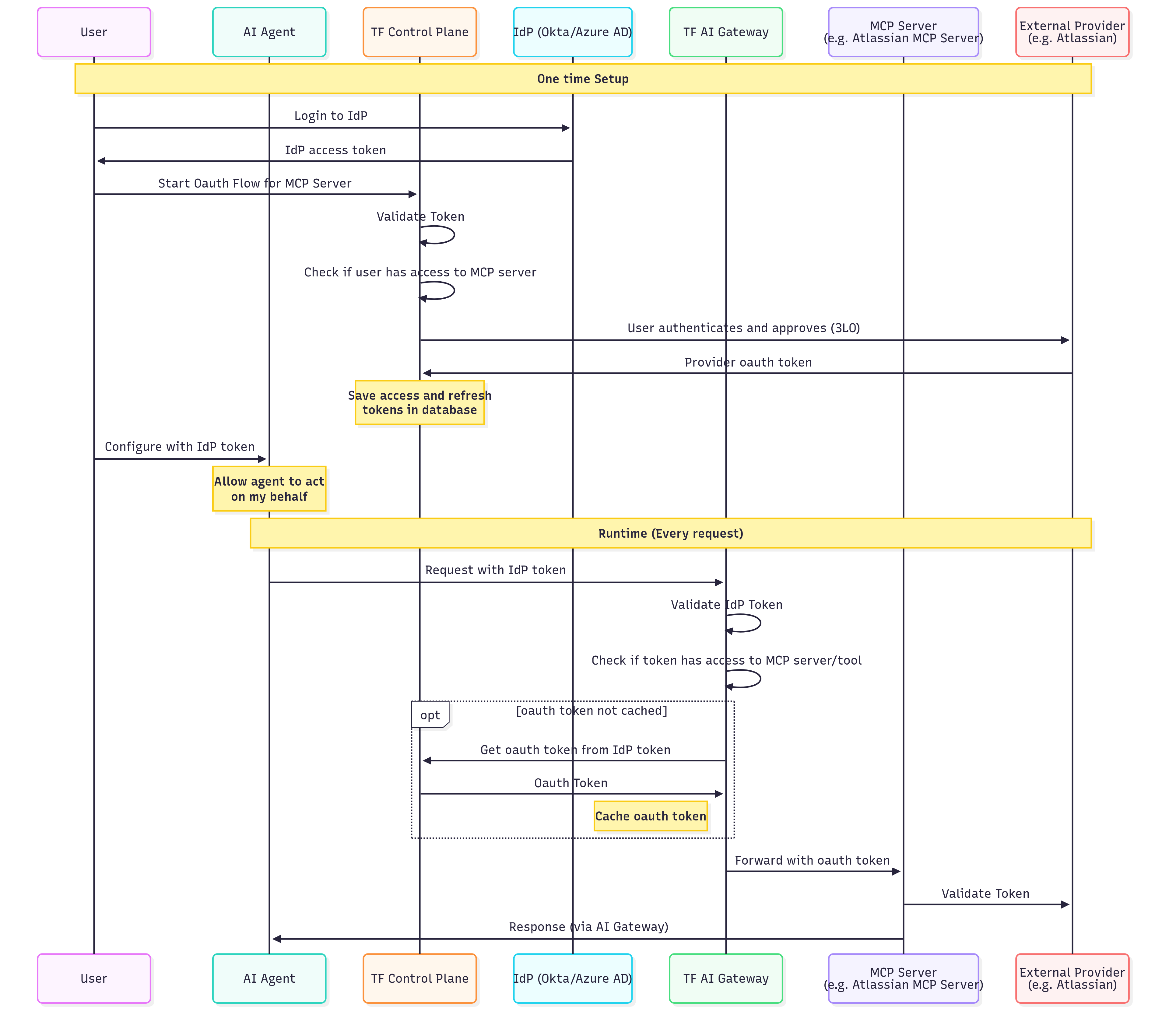 **One-Time Setup (what the user does):**
1. Sign in to your application, which authenticates the user with your identity provider.
2. Start the connection for the MCP server.
3. Approve the access request.
4. Authorize the upstream provider with their own account.
TrueFoundry stores the user's authorization, so they only do this once per provider.
**Runtime Flow (Every Request):**
| Step | Action | Description |
| ---- | ------------------------------ | ------------------------------------------------------------------------- |
| 1 | Agent → Gateway | AI Agent sends request with IdP token (inbound auth) |
| 2 | Gateway | Validates the IdP token using your SSO configuration |
| 3 | Gateway | Checks if the extracted user identity has access to the MCP server/tool |
| 4 | Gateway → Control Plane | (If not cached) Retrieves the user's OAuth token using their IdP identity |
| 5 | Gateway | Caches the OAuth token for performance |
| 6 | Gateway → MCP Server | Forwards request with user's OAuth token (outbound auth) |
| 7 | MCP Server → External Provider | Validates and processes the request |
| 8 | MCP Server → Agent | Returns response through the Gateway |
**Key differences from Scenario 1:**
* Users authenticate with your IdP, not TrueFoundry (different inbound auth)
* The Gateway validates your IdP tokens directly
* Useful for B2B SaaS applications with end-customer integrations
You can also use this method for internal developers if you prefer not to use TrueFoundry tokens and want to leverage your existing identity infrastructure.
**Inbound:** TrueFoundry API Key or Identity Provider Token | **Outbound:** No Auth / API Key (Shared or Individual)
**Use case:** Accessing MCP servers with shared credentials where individual user identity at the downstream service is not required.
This scenario is ideal for read-only access to shared resources, internal tools, or services that don't support per-user OAuth.
**One-Time Setup (what the user does):**
1. Sign in to your application, which authenticates the user with your identity provider.
2. Start the connection for the MCP server.
3. Approve the access request.
4. Authorize the upstream provider with their own account.
TrueFoundry stores the user's authorization, so they only do this once per provider.
**Runtime Flow (Every Request):**
| Step | Action | Description |
| ---- | ------------------------------ | ------------------------------------------------------------------------- |
| 1 | Agent → Gateway | AI Agent sends request with IdP token (inbound auth) |
| 2 | Gateway | Validates the IdP token using your SSO configuration |
| 3 | Gateway | Checks if the extracted user identity has access to the MCP server/tool |
| 4 | Gateway → Control Plane | (If not cached) Retrieves the user's OAuth token using their IdP identity |
| 5 | Gateway | Caches the OAuth token for performance |
| 6 | Gateway → MCP Server | Forwards request with user's OAuth token (outbound auth) |
| 7 | MCP Server → External Provider | Validates and processes the request |
| 8 | MCP Server → Agent | Returns response through the Gateway |
**Key differences from Scenario 1:**
* Users authenticate with your IdP, not TrueFoundry (different inbound auth)
* The Gateway validates your IdP tokens directly
* Useful for B2B SaaS applications with end-customer integrations
You can also use this method for internal developers if you prefer not to use TrueFoundry tokens and want to leverage your existing identity infrastructure.
**Inbound:** TrueFoundry API Key or Identity Provider Token | **Outbound:** No Auth / API Key (Shared or Individual)
**Use case:** Accessing MCP servers with shared credentials where individual user identity at the downstream service is not required.
This scenario is ideal for read-only access to shared resources, internal tools, or services that don't support per-user OAuth.
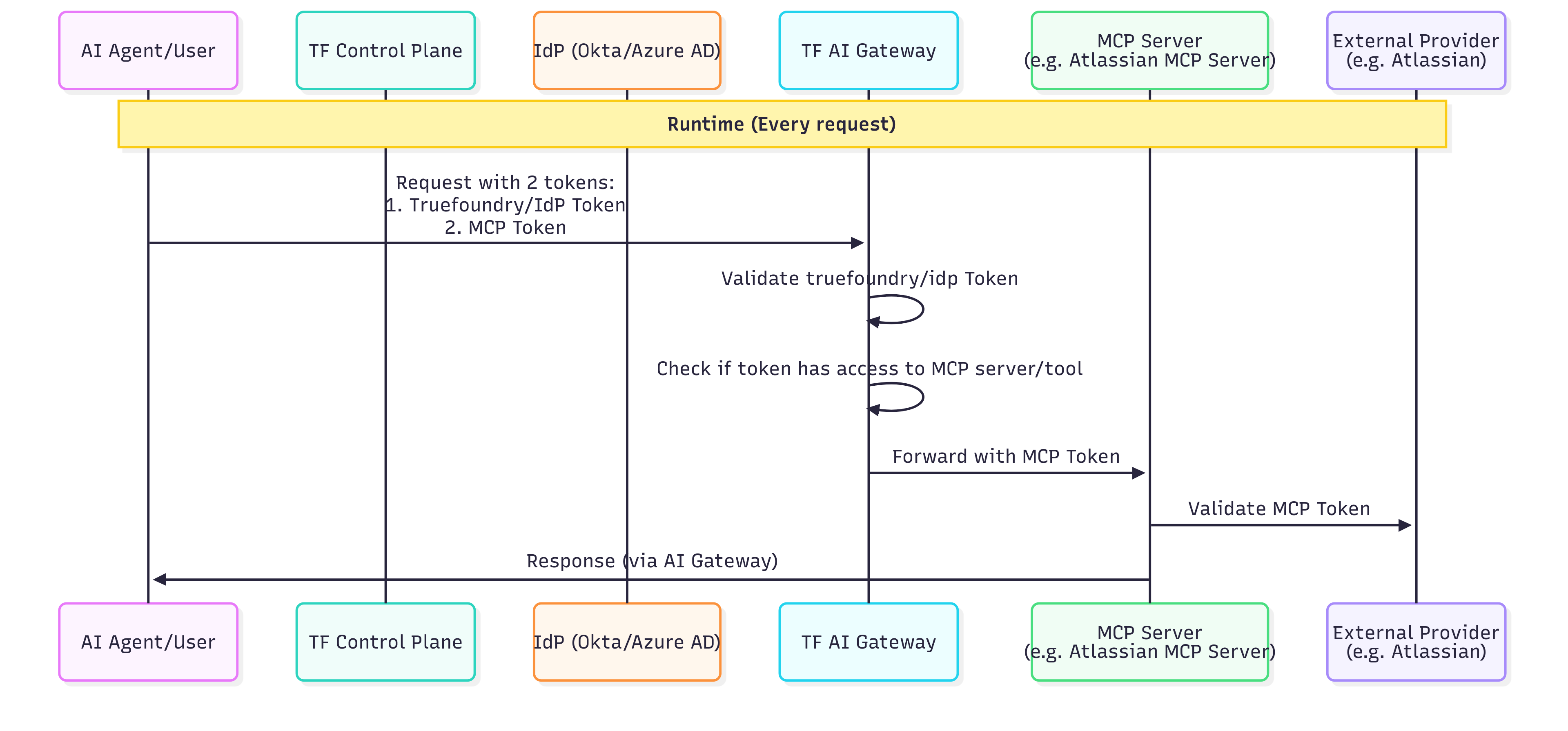 **Administrator Setup (One-Time):**
| Step | Action | Description |
| ---- | --------------------- | ----------------------------------------------------------------------------------- |
| 1 | Admin → Control Plane | Administrator registers the MCP server with static header authentication (outbound) |
| 2 | Admin | Configures the shared API key or bearer token in the MCP server settings |
| 3 | Admin | Defines which users/roles have access to this MCP server through RBAC policies |
The shared credentials are stored securely and never exposed to end users.
**Runtime Flow (Every Request):**
| Step | Action | Description |
| ---- | -------------------- | -------------------------------------------------------------------------------- |
| 1 | Agent → Gateway | AI Agent sends request with user's TrueFoundry or IdP token (inbound auth) |
| 2 | Gateway | Validates the user token |
| 3 | Gateway | Checks if the user has access to this MCP server (RBAC) |
| 4 | Gateway | Injects the shared credentials (static headers) into the request (outbound auth) |
| 5 | Gateway → MCP Server | Forwards request with shared service account credentials |
| 6 | MCP Server | Processes request using the shared credentials |
| 7 | MCP Server → Agent | Returns response through the Gateway |
**Security considerations:**
* All users share the same level of access to the downstream service
* Actions cannot be attributed to individual users at the downstream service level
* TrueFoundry's audit logs still track which user made each request at the Gateway level
**Inbound:** TrueFoundry API Key or Identity Provider Token | **Outbound:** Token Passthrough
**Use case:** Accessing MCP servers that validate the same token used for Gateway authentication.
This scenario is for organizations where the MCP server itself can validate the user's TrueFoundry token or IdP JWT.
```mermaid theme={"dark"}
sequenceDiagram
participant User
participant IdP as Your IdP / TrueFoundry
participant Agent as AI Agent
participant Gateway as MCP Gateway
participant MCP as MCP Server
rect rgb(240, 248, 255)
Note over User, IdP: Initial Authentication (Inbound)
User->>IdP: 1. Authenticate
IdP-->>User: JWT Token (TrueFoundry or IdP)
end
rect rgb(245, 245, 245)
Note over Agent, MCP: Runtime Request Flow
User->>Agent: Request action
Agent->>Gateway: 2. Request + User's Token (Inbound Auth)
Gateway->>Gateway: 3. Validate token
Gateway->>Gateway: 4. Check RBAC permissions
Gateway->>MCP: 5. Forward request with same token (Outbound: Token Passthrough)
MCP->>MCP: 6. Validate token
MCP-->>Gateway: 7. Response
Gateway-->>Agent: Response
Agent-->>User: Result
end
```
**Setup Requirements:**
| Step | Action | Description |
| ---- | ---------------------- | ------------------------------------------------------------------------------------- |
| 1 | Configure Inbound Auth | Set up TrueFoundry API key or [Identity Provider token](#identity-provider-token) |
| 2 | Register MCP Server | Register the MCP server with Token Passthrough as outbound authentication |
| 3 | Configure MCP Server | Ensure the MCP server is configured to validate TrueFoundry tokens or your IdP's JWTs |
**Runtime Flow (Every Request):**
| Step | Action | Description |
| ---- | ---------------------- | -------------------------------------------------------------------------- |
| 1 | User → IdP/TrueFoundry | User authenticates and receives a token |
| 2 | Agent → Gateway | AI Agent sends request with user's token (inbound auth) |
| 3 | Gateway | Validates the token |
| 4 | Gateway | Checks if the user has access to this MCP server (RBAC) |
| 5 | Gateway → MCP Server | Forwards request with user's token unchanged (outbound: token passthrough) |
| 6 | MCP Server | Validates the token and processes the request |
| 7 | MCP Server → Agent | Returns response through the Gateway |
**When to use Token Passthrough:**
* Your MCP server can validate TrueFoundry tokens or your IdP's JWTs
* You want the MCP server to know the user's identity
* The MCP server makes authorization decisions based on token claims
**Inbound:** TrueFoundry API Key or Identity Provider Token | **Outbound:** Token Forwarding
**Use case:** The client has specific credentials for the MCP server that are different from the Gateway authentication token.
This scenario is useful when the MCP server requires its own authentication that cannot be managed by the Gateway (e.g., internal APIs with their own token systems).
```mermaid theme={"dark"}
sequenceDiagram
participant User
participant Agent as AI Agent
participant Gateway as MCP Gateway
participant MCP as MCP Server
rect rgb(245, 245, 245)
Note over Agent, MCP: Runtime Request Flow
User->>Agent: Request action
Agent->>Gateway: 1. Request + TrueFoundry Token (Inbound) + x-tfy-mcp-headers (Outbound)
Gateway->>Gateway: 2. Validate TrueFoundry token
Gateway->>Gateway: 3. Check RBAC permissions
Gateway->>Gateway: 4. Extract headers from x-tfy-mcp-headers
Gateway->>MCP: 5. Forward request with custom headers
MCP->>MCP: 6. Validate custom headers
MCP-->>Gateway: 7. Response
Gateway-->>Agent: Response
Agent-->>User: Result
end
```
**Setup Requirements:**
| Step | Action | Description |
| ---- | ---------------------- | ----------------------------------------------------------------------------------------------------------------------------------------------------------- |
| 1 | Configure Inbound Auth | Set up TrueFoundry API key or Identity Provider token |
| 2 | Register MCP Server | Register the MCP server (no outbound auth configured, or Token Forwarding mode) |
| 3 | Client Configuration | Client must include `x-tfy-mcp-headers` with MCP server credentials (see [Overriding auth with x-tfy-mcp-headers](#overriding-auth-with-x-tfy-mcp-headers)) |
**Runtime Flow (Every Request):**
| Step | Action | Description |
| ---- | -------------------- | ----------------------------------------------------------------------- |
| 1 | Agent → Gateway | AI Agent sends request with TrueFoundry/IdP token + `x-tfy-mcp-headers` |
| 2 | Gateway | Validates the inbound token |
| 3 | Gateway | Checks if the user has access to this MCP server (RBAC) |
| 4 | Gateway | Extracts headers from `x-tfy-mcp-headers` |
| 5 | Gateway → MCP Server | Forwards request with extracted headers (outbound auth) |
| 6 | MCP Server | Validates the custom headers and processes the request |
| 7 | MCP Server → Agent | Returns response through the Gateway |
**When to use Token Forwarding:**
* The MCP server has its own authentication system separate from Gateway authentication
* You need to pass user-specific tokens that the client manages
* The MCP server requires additional metadata alongside authentication
***
## FAQ
Use this quick reference to pick between OAuth2 and Token Passthrough:
| Question | If yes → |
| ---------------------------------------------------------------------------------- | ------------------------------- |
| Does the MCP server connect to third-party services (GitHub, Slack, Google, etc.)? | **OAuth2 (Authorization Code)** |
| Is this a server-to-server flow with no user interaction? | **OAuth2 (Client Credentials)** |
| Does the MCP server validate the same token used for inbound auth? | **Token Passthrough** |
For full descriptions of each model, see the [Outbound Authentication](#outbound-authentication) reference table.
* **Token Passthrough**: The Gateway forwards the **same token** used for inbound authentication to the MCP server. The MCP server must be able to validate TrueFoundry tokens or your IdP tokens.
* **Token Forwarding**: The client provides **separate credentials** for the MCP server via `x-tfy-mcp-headers`. These are different from the inbound auth token and are forwarded as-is to the MCP server.
Use Token Passthrough when your MCP server trusts your existing identity provider. Use Token Forwarding when the MCP server has its own authentication system that doesn't recognize your inbound tokens.
Yes. The Gateway validates any supported inbound auth method (TrueFoundry API Key, Identity Provider Token, or TrueFoundry OAuth). Access control is then applied based on the authenticated identity. This means you can have some users authenticate with TrueFoundry tokens and others with IdP tokens, as long as both have appropriate permissions.
Not directly. Virtual Accounts don't have per-user OAuth tokens.
**Options:**
1. Use a TrueFoundry PAT or a JWT from a configured [Identity Provider](/docs/platform/identity-providers) for per-user OAuth
2. Configure the MCP server with Static Header (shared) auth instead
[Auth0 Organizations](https://auth0.com/docs/manage-users/organizations) model each business customer as a separate tenant and add an organization claim to every JWT issued in an Organization context. The issuer and JWKS URI remain your Auth0 tenant's standard endpoints - they do **not** change per Organization, so a single Identity Provider configuration covers all your Organizations.
1. Navigate to **Settings > Security & Access > Identity Providers** and click **Add Identity Provider**.
2. Select **Auth0** in the **Provider** dropdown and fill in the issuer, allowed audiences, and JWKS URI.
3. Under **Resolve Token To > Virtual Account**, set the **Name Claim** and the **Organization Claim**.
**Administrator Setup (One-Time):**
| Step | Action | Description |
| ---- | --------------------- | ----------------------------------------------------------------------------------- |
| 1 | Admin → Control Plane | Administrator registers the MCP server with static header authentication (outbound) |
| 2 | Admin | Configures the shared API key or bearer token in the MCP server settings |
| 3 | Admin | Defines which users/roles have access to this MCP server through RBAC policies |
The shared credentials are stored securely and never exposed to end users.
**Runtime Flow (Every Request):**
| Step | Action | Description |
| ---- | -------------------- | -------------------------------------------------------------------------------- |
| 1 | Agent → Gateway | AI Agent sends request with user's TrueFoundry or IdP token (inbound auth) |
| 2 | Gateway | Validates the user token |
| 3 | Gateway | Checks if the user has access to this MCP server (RBAC) |
| 4 | Gateway | Injects the shared credentials (static headers) into the request (outbound auth) |
| 5 | Gateway → MCP Server | Forwards request with shared service account credentials |
| 6 | MCP Server | Processes request using the shared credentials |
| 7 | MCP Server → Agent | Returns response through the Gateway |
**Security considerations:**
* All users share the same level of access to the downstream service
* Actions cannot be attributed to individual users at the downstream service level
* TrueFoundry's audit logs still track which user made each request at the Gateway level
**Inbound:** TrueFoundry API Key or Identity Provider Token | **Outbound:** Token Passthrough
**Use case:** Accessing MCP servers that validate the same token used for Gateway authentication.
This scenario is for organizations where the MCP server itself can validate the user's TrueFoundry token or IdP JWT.
```mermaid theme={"dark"}
sequenceDiagram
participant User
participant IdP as Your IdP / TrueFoundry
participant Agent as AI Agent
participant Gateway as MCP Gateway
participant MCP as MCP Server
rect rgb(240, 248, 255)
Note over User, IdP: Initial Authentication (Inbound)
User->>IdP: 1. Authenticate
IdP-->>User: JWT Token (TrueFoundry or IdP)
end
rect rgb(245, 245, 245)
Note over Agent, MCP: Runtime Request Flow
User->>Agent: Request action
Agent->>Gateway: 2. Request + User's Token (Inbound Auth)
Gateway->>Gateway: 3. Validate token
Gateway->>Gateway: 4. Check RBAC permissions
Gateway->>MCP: 5. Forward request with same token (Outbound: Token Passthrough)
MCP->>MCP: 6. Validate token
MCP-->>Gateway: 7. Response
Gateway-->>Agent: Response
Agent-->>User: Result
end
```
**Setup Requirements:**
| Step | Action | Description |
| ---- | ---------------------- | ------------------------------------------------------------------------------------- |
| 1 | Configure Inbound Auth | Set up TrueFoundry API key or [Identity Provider token](#identity-provider-token) |
| 2 | Register MCP Server | Register the MCP server with Token Passthrough as outbound authentication |
| 3 | Configure MCP Server | Ensure the MCP server is configured to validate TrueFoundry tokens or your IdP's JWTs |
**Runtime Flow (Every Request):**
| Step | Action | Description |
| ---- | ---------------------- | -------------------------------------------------------------------------- |
| 1 | User → IdP/TrueFoundry | User authenticates and receives a token |
| 2 | Agent → Gateway | AI Agent sends request with user's token (inbound auth) |
| 3 | Gateway | Validates the token |
| 4 | Gateway | Checks if the user has access to this MCP server (RBAC) |
| 5 | Gateway → MCP Server | Forwards request with user's token unchanged (outbound: token passthrough) |
| 6 | MCP Server | Validates the token and processes the request |
| 7 | MCP Server → Agent | Returns response through the Gateway |
**When to use Token Passthrough:**
* Your MCP server can validate TrueFoundry tokens or your IdP's JWTs
* You want the MCP server to know the user's identity
* The MCP server makes authorization decisions based on token claims
**Inbound:** TrueFoundry API Key or Identity Provider Token | **Outbound:** Token Forwarding
**Use case:** The client has specific credentials for the MCP server that are different from the Gateway authentication token.
This scenario is useful when the MCP server requires its own authentication that cannot be managed by the Gateway (e.g., internal APIs with their own token systems).
```mermaid theme={"dark"}
sequenceDiagram
participant User
participant Agent as AI Agent
participant Gateway as MCP Gateway
participant MCP as MCP Server
rect rgb(245, 245, 245)
Note over Agent, MCP: Runtime Request Flow
User->>Agent: Request action
Agent->>Gateway: 1. Request + TrueFoundry Token (Inbound) + x-tfy-mcp-headers (Outbound)
Gateway->>Gateway: 2. Validate TrueFoundry token
Gateway->>Gateway: 3. Check RBAC permissions
Gateway->>Gateway: 4. Extract headers from x-tfy-mcp-headers
Gateway->>MCP: 5. Forward request with custom headers
MCP->>MCP: 6. Validate custom headers
MCP-->>Gateway: 7. Response
Gateway-->>Agent: Response
Agent-->>User: Result
end
```
**Setup Requirements:**
| Step | Action | Description |
| ---- | ---------------------- | ----------------------------------------------------------------------------------------------------------------------------------------------------------- |
| 1 | Configure Inbound Auth | Set up TrueFoundry API key or Identity Provider token |
| 2 | Register MCP Server | Register the MCP server (no outbound auth configured, or Token Forwarding mode) |
| 3 | Client Configuration | Client must include `x-tfy-mcp-headers` with MCP server credentials (see [Overriding auth with x-tfy-mcp-headers](#overriding-auth-with-x-tfy-mcp-headers)) |
**Runtime Flow (Every Request):**
| Step | Action | Description |
| ---- | -------------------- | ----------------------------------------------------------------------- |
| 1 | Agent → Gateway | AI Agent sends request with TrueFoundry/IdP token + `x-tfy-mcp-headers` |
| 2 | Gateway | Validates the inbound token |
| 3 | Gateway | Checks if the user has access to this MCP server (RBAC) |
| 4 | Gateway | Extracts headers from `x-tfy-mcp-headers` |
| 5 | Gateway → MCP Server | Forwards request with extracted headers (outbound auth) |
| 6 | MCP Server | Validates the custom headers and processes the request |
| 7 | MCP Server → Agent | Returns response through the Gateway |
**When to use Token Forwarding:**
* The MCP server has its own authentication system separate from Gateway authentication
* You need to pass user-specific tokens that the client manages
* The MCP server requires additional metadata alongside authentication
***
## FAQ
Use this quick reference to pick between OAuth2 and Token Passthrough:
| Question | If yes → |
| ---------------------------------------------------------------------------------- | ------------------------------- |
| Does the MCP server connect to third-party services (GitHub, Slack, Google, etc.)? | **OAuth2 (Authorization Code)** |
| Is this a server-to-server flow with no user interaction? | **OAuth2 (Client Credentials)** |
| Does the MCP server validate the same token used for inbound auth? | **Token Passthrough** |
For full descriptions of each model, see the [Outbound Authentication](#outbound-authentication) reference table.
* **Token Passthrough**: The Gateway forwards the **same token** used for inbound authentication to the MCP server. The MCP server must be able to validate TrueFoundry tokens or your IdP tokens.
* **Token Forwarding**: The client provides **separate credentials** for the MCP server via `x-tfy-mcp-headers`. These are different from the inbound auth token and are forwarded as-is to the MCP server.
Use Token Passthrough when your MCP server trusts your existing identity provider. Use Token Forwarding when the MCP server has its own authentication system that doesn't recognize your inbound tokens.
Yes. The Gateway validates any supported inbound auth method (TrueFoundry API Key, Identity Provider Token, or TrueFoundry OAuth). Access control is then applied based on the authenticated identity. This means you can have some users authenticate with TrueFoundry tokens and others with IdP tokens, as long as both have appropriate permissions.
Not directly. Virtual Accounts don't have per-user OAuth tokens.
**Options:**
1. Use a TrueFoundry PAT or a JWT from a configured [Identity Provider](/docs/platform/identity-providers) for per-user OAuth
2. Configure the MCP server with Static Header (shared) auth instead
[Auth0 Organizations](https://auth0.com/docs/manage-users/organizations) model each business customer as a separate tenant and add an organization claim to every JWT issued in an Organization context. The issuer and JWKS URI remain your Auth0 tenant's standard endpoints - they do **not** change per Organization, so a single Identity Provider configuration covers all your Organizations.
1. Navigate to **Settings > Security & Access > Identity Providers** and click **Add Identity Provider**.
2. Select **Auth0** in the **Provider** dropdown and fill in the issuer, allowed audiences, and JWKS URI.
3. Under **Resolve Token To > Virtual Account**, set the **Name Claim** and the **Organization Claim**.
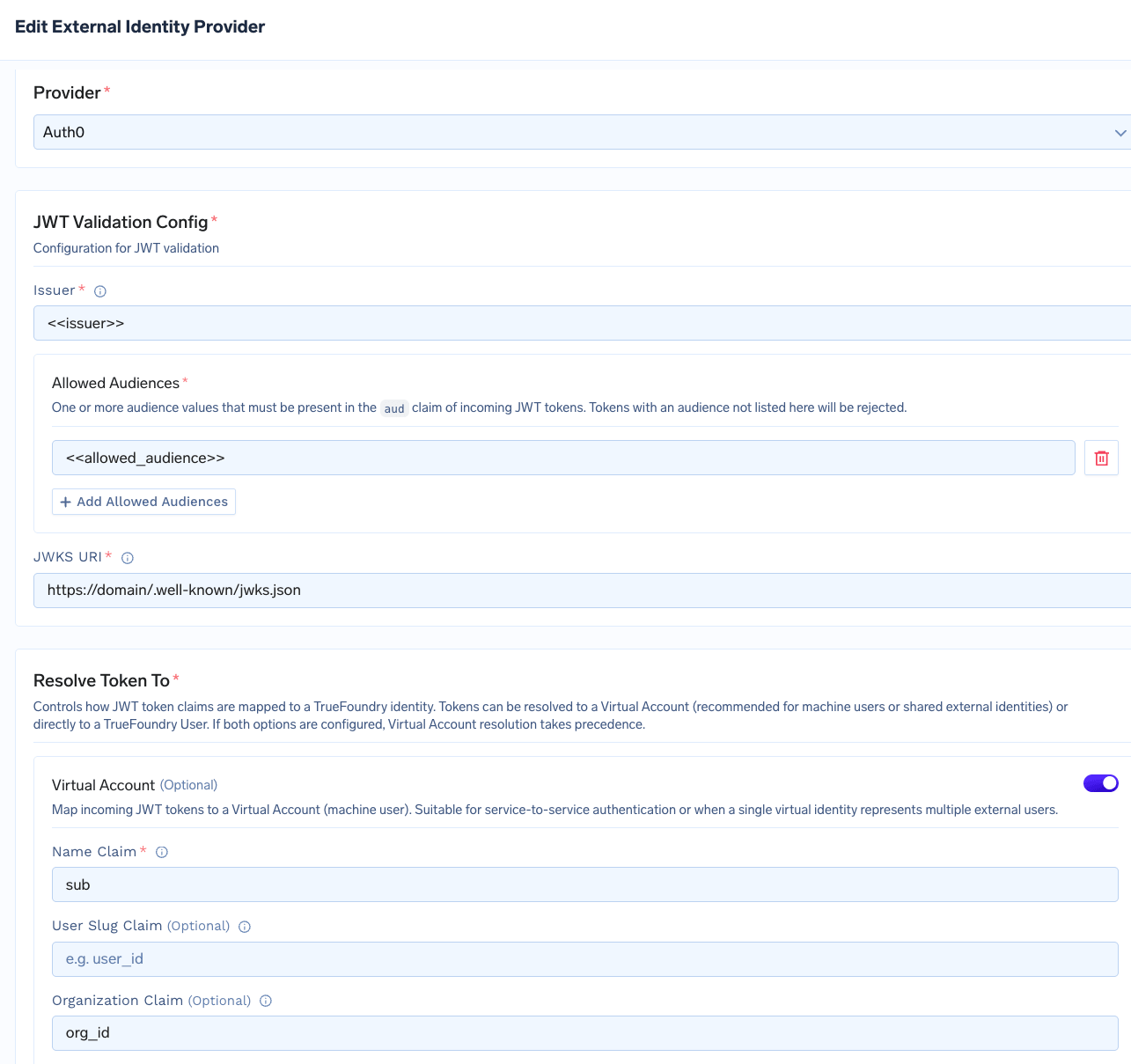 | UI label | Manifest field | Description |
| ---------------------- | ----------------------------------------------------- | ---------------------------------------------------------------------------------------- |
| **Provider** | `provider` | Set to `auth0` to enable Auth0-specific token handling. |
| **Name Claim** | `resolve_token_to.virtual_account.name_claim` | The JWT claim that identifies the caller - typically `sub` for an Auth0 M2M application. |
| **Organization Claim** | `resolve_token_to.virtual_account.organization_claim` | The JWT claim carrying the Auth0 Organization identifier - typically `org_id`. |
For the full field reference, see [Identity Providers](/docs/platform/identity-providers).
On the MCP server's **Auth Data** form:
1. Choose **OAuth2 > Client Credentials**.
2. Enter the **Token URL**, **Client ID**, and **Client Secret** from your Auth0 application.
3. Set **OAuth Provider** to **Auth0** and enable **Use Organization**.
4. Under **Additional Token Parameters**, add `audience` set to the API identifier of the protected resource the MCP server fronts.
The Gateway will attach the inbound `organization` parameter when calling the Auth0 token endpoint.
| UI label | Manifest field | Description |
| ---------------------- | ----------------------------------------------------- | ---------------------------------------------------------------------------------------- |
| **Provider** | `provider` | Set to `auth0` to enable Auth0-specific token handling. |
| **Name Claim** | `resolve_token_to.virtual_account.name_claim` | The JWT claim that identifies the caller - typically `sub` for an Auth0 M2M application. |
| **Organization Claim** | `resolve_token_to.virtual_account.organization_claim` | The JWT claim carrying the Auth0 Organization identifier - typically `org_id`. |
For the full field reference, see [Identity Providers](/docs/platform/identity-providers).
On the MCP server's **Auth Data** form:
1. Choose **OAuth2 > Client Credentials**.
2. Enter the **Token URL**, **Client ID**, and **Client Secret** from your Auth0 application.
3. Set **OAuth Provider** to **Auth0** and enable **Use Organization**.
4. Under **Additional Token Parameters**, add `audience` set to the API identifier of the protected resource the MCP server fronts.
The Gateway will attach the inbound `organization` parameter when calling the Auth0 token endpoint.
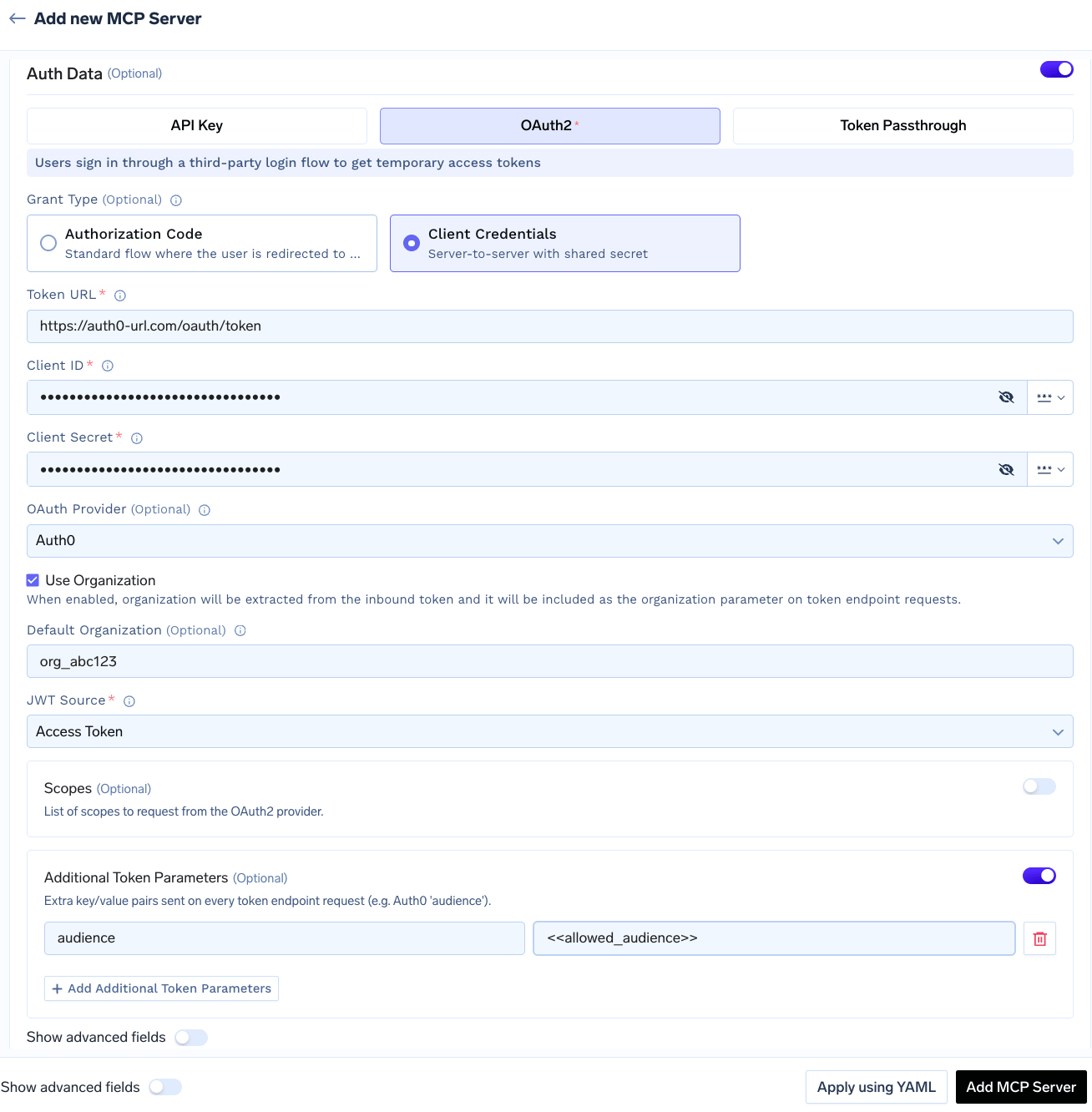 | UI label | Manifest field | Description |
| -------------------------------------------- | ---------------------------------- | ----------------------------------------------------------------------------------------------------------------------------------------------------- |
| **OAuth Provider** | `provider` | Set to `auth0` to enable Auth0-specific token request behavior. |
| **Use Organization** | `use_organization` | When enabled, the Gateway extracts organization from the inbound token and attaches it as the `organization` parameter on the token endpoint request. |
| **Default Organization** | `default_organization` | Used when no organization is present in the inbound token. |
| **Additional Token Parameters** > `audience` | `additional_token_params.audience` | API identifier of the protected resource. Required by Auth0 for Organization-aware tokens. |
With **Use Organization** enabled, the per-request organization is always derived from the inbound token. Set **Default Organization** only when the MCP server must also be reachable by callers whose inbound token does not carry organization claim - for example, internal service accounts.
Pass the Auth0-issued access token as the inbound `Authorization` header, exactly as in the [Identity Provider Token](#inbound-authentication) flow.
**What the Gateway does on each request:**
1. Resolves the token to a virtual account.
2. Applies that virtual account's permissions for access control.
3. If the MCP server uses outbound Auth0, forwards the same Organization to the downstream token endpoint.
```python theme={"dark"}
from fastmcp import Client
from fastmcp.client.transports import StreamableHttpTransport
# Auth0 access token issued for an Organization, e.g.:
# { "iss": "https://.auth0.com/", "sub": "abc123@clients",
# "org_id": "org_AbCdEf123456" }
auth0_jwt = "eyJhbGciOiJSUzI1NiIs..."
transport = StreamableHttpTransport(
url="{GATEWAY_BASE_URL}/mcp//server",
headers={"Authorization": f"Bearer {auth0_jwt}"}
)
async with Client(transport) as client:
result = await client.call_tool("tool_name", {"arg": "value"})
```
* Verify your authentication token is valid and not expired
* Check that you have access to the MCP server (see collaborators in UI)
* For Virtual Accounts, ensure the account has the required permissions
* For OAuth-protected servers, the user may need to complete the OAuth consent flow first — see [Handling OAuth-protected MCP servers](#handling-oauth-protected-mcp-servers)
* List available tools using `client.list_tools()` to confirm what's exposed
* Tool names are case-sensitive
* The MCP server may have been updated — refresh the tool list
| UI label | Manifest field | Description |
| -------------------------------------------- | ---------------------------------- | ----------------------------------------------------------------------------------------------------------------------------------------------------- |
| **OAuth Provider** | `provider` | Set to `auth0` to enable Auth0-specific token request behavior. |
| **Use Organization** | `use_organization` | When enabled, the Gateway extracts organization from the inbound token and attaches it as the `organization` parameter on the token endpoint request. |
| **Default Organization** | `default_organization` | Used when no organization is present in the inbound token. |
| **Additional Token Parameters** > `audience` | `additional_token_params.audience` | API identifier of the protected resource. Required by Auth0 for Organization-aware tokens. |
With **Use Organization** enabled, the per-request organization is always derived from the inbound token. Set **Default Organization** only when the MCP server must also be reachable by callers whose inbound token does not carry organization claim - for example, internal service accounts.
Pass the Auth0-issued access token as the inbound `Authorization` header, exactly as in the [Identity Provider Token](#inbound-authentication) flow.
**What the Gateway does on each request:**
1. Resolves the token to a virtual account.
2. Applies that virtual account's permissions for access control.
3. If the MCP server uses outbound Auth0, forwards the same Organization to the downstream token endpoint.
```python theme={"dark"}
from fastmcp import Client
from fastmcp.client.transports import StreamableHttpTransport
# Auth0 access token issued for an Organization, e.g.:
# { "iss": "https://.auth0.com/", "sub": "abc123@clients",
# "org_id": "org_AbCdEf123456" }
auth0_jwt = "eyJhbGciOiJSUzI1NiIs..."
transport = StreamableHttpTransport(
url="{GATEWAY_BASE_URL}/mcp//server",
headers={"Authorization": f"Bearer {auth0_jwt}"}
)
async with Client(transport) as client:
result = await client.call_tool("tool_name", {"arg": "value"})
```
* Verify your authentication token is valid and not expired
* Check that you have access to the MCP server (see collaborators in UI)
* For Virtual Accounts, ensure the account has the required permissions
* For OAuth-protected servers, the user may need to complete the OAuth consent flow first — see [Handling OAuth-protected MCP servers](#handling-oauth-protected-mcp-servers)
* List available tools using `client.list_tools()` to confirm what's exposed
* Tool names are case-sensitive
* The MCP server may have been updated — refresh the tool list