> ## Documentation Index
> Fetch the complete documentation index at: https://www.truefoundry.com/llms.txt
> Use this file to discover all available pages before exploring further.
# Securing OpenAI Codex with TrueFoundry
> Govern OpenAI Codex in the enterprise: route model traffic through the TrueFoundry AI Gateway and enforce Codex settings across developer machines with MDM.
This guide covers how to secure **OpenAI Codex (CLI)** in the enterprise using TrueFoundry. The focus is on the controls you own and configure:
* **Route all model traffic** through the [TrueFoundry AI Gateway](/docs/ai-gateway/intro-to-llm-gateway) for centralized access control, routing, and cost governance.
* **Enforce Codex configuration** consistently across every developer machine using MDM, including which gateway Codex talks to and how it authenticates.
Codex supports two ways of authenticating to OpenAI, and TrueFoundry's MDM setup supports both: a usage-based **API key**, or **sign in with your ChatGPT account** (Business or Enterprise subscription). Pick the one that matches how you buy Codex. The difference is one config value.
Identity setup (SSO, workspace membership) and admin-console policies are configured in OpenAI's own console and documented in [OpenAI's managed-configuration docs](https://learn.chatgpt.com/docs/enterprise/managed-configuration). This guide does not repeat that; it focuses on what's specific to a TrueFoundry deployment.
**One binary covers every client.** The same [`tfy-local-ai-setup`](https://github.com/truefoundry/tfy-local-ai-setup) binary this guide deploys also enforces **[Claude Code](/docs/ai-gateway/mcp/enterprise-security-claude)** and **[Claude Desktop (Cowork 3P)](/docs/ai-gateway/claude-desktop)** fleet-wide. Pass `--codex` to configure Codex only, or omit all tool flags to auto-detect and configure every client that is installed. Prebuilt binaries for every platform are on the [releases page](https://github.com/truefoundry/tfy-local-ai-setup/releases).
***
## 1. Identity (prerequisite)
Before rolling out Codex, enforce SSO and workspace membership in your OpenAI admin console so access is tied to your IdP and employees can't fall back to personal accounts. See [OpenAI's managed-configuration docs](https://learn.chatgpt.com/docs/enterprise/managed-configuration).
With TrueFoundry, developers don't manage personal API keys. Authentication is handled automatically by the `tfy-local-ai-setup` binary deployed via MDM (see [Enforce settings with MDM](#3-enforce-settings-with-mdm)). It fetches a fresh gateway token scoped to the user's TrueFoundry identity and writes it into Codex's managed configuration.
***
## 2. Route model traffic through TrueFoundry AI Gateway
Codex reads its model provider from `config.toml`. Pointing it at the [TrueFoundry AI Gateway](/docs/ai-gateway/intro-to-llm-gateway) means every request passes through a single control point before reaching any provider:
```toml theme={"dark"}
model_provider = "truefoundry"
[model_providers.truefoundry]
name = "TrueFoundry Gateway"
base_url = "https://"
wire_api = "responses"
```
**`wire_api = "responses"` is required, not a preference.** The AI Gateway appends the `/responses` endpoint only for the Responses wire. With `wire_api = "chat"` the request is sent to `/chat/completions` against the same base URL, which is not a valid endpoint for Codex traffic. It is also what makes `gpt-5.x-codex` thinking tokens behave correctly.
Once routed through the AI Gateway you can apply access control, [budget](/docs/ai-gateway/budgetlimiting) and [rate limits](/docs/ai-gateway/ratelimiting) per user and team, multi-provider routing with fallbacks via [virtual models](/docs/ai-gateway/virtual-model), and full request tracing.
For a single developer setting this up by hand, including how to find your gateway base URL and which model slug to use, see [OpenAI Codex CLI](/docs/ai-gateway/openai-codex-cli). The rest of this guide is about enforcing the same configuration across a fleet.
***
## 3. Enforce settings with MDM
Codex reads configuration in priority order, with the system-level `managed_config.toml` taking precedence over the developer's own file:
```text theme={"dark"}
managed_config.toml ← admin-controlled, reapplied on every launch
└── ~/.codex/config.toml ← developer-controlled
└── CLI flags
```
**System paths:** macOS and Linux `/etc/codex/managed_config.toml`.
**Windows is not supported for Codex.** Codex reads its managed config from `~/.codex/managed_config.toml`, a per-user path, while the MDM binary runs as SYSTEM. On Windows the binary logs a warning and skips Codex rather than writing to the wrong place. Claude Code and Claude Desktop are unaffected; see the [Claude MDM guide](/docs/ai-gateway/mcp/enterprise-security-claude) for those.
The binary writes the gateway provider block and the auth header into `managed_config.toml`, then locks the file. Because `managed_config.toml` is reapplied on every launch, a developer editing their own `~/.codex/config.toml` cannot move Codex off your gateway. With the default `api-key` auth mode the result looks like this:
```toml theme={"dark"}
model_provider = "truefoundry"
model = "gpt-5.2-codex"
[model_providers.truefoundry]
name = "TrueFoundry Gateway"
base_url = "https://"
wire_api = "responses"
[model_providers.truefoundry.http_headers]
Authorization = "Bearer "
```
The top-level `model` key is written **only** when you set `CODEX_DEFAULT_MODEL`; otherwise model selection stays with the developer. Point it at a [virtual model](/docs/ai-gateway/virtual-model) slug so you can change routing centrally without redeploying the script.
### Deployment scripts
The scripts below deploy and **lock** `managed_config.toml`. On every run the script fetches a fresh gateway token for the logged-in user and writes it into the provider's auth header, so no PAT or manual credentials are needed. **Schedule the script to run hourly** so the token stays fresh; the browser device flow only appears on first run or after the refresh token expires.
The scripts download the `tfy-local-ai-setup` binary from the [truefoundry/tfy-local-ai-setup](https://github.com/truefoundry/tfy-local-ai-setup) GitHub repo. The README there documents all available flags and advanced usage (config templates, manual runs).
Update the placeholders in the **Config** section before running: ``, ``, and ``. The script will misconfigure Codex if these are left as placeholders.
**How the script works**
The script runs as root on a schedule (recommended: hourly) and does four things on every execution:
1. **Saves and loads config.** On first run, the three required values (`GATEWAY_URL`, `CONTROL_PLANE_URL`, `TENANT_NAME`) are read from the script's Config section and written to a root-owned config file (macOS: `/Library/Preferences/com.truefoundry.tfy-local-ai-setup.conf`; Linux: `/etc/tfy/tfy-local-ai-setup.conf`). On subsequent runs the file is loaded automatically, so no changes to the script are needed. This is the same config file the Claude MDM script uses, so a machine running both shares one saved configuration.
2. **Installs or updates `tfy-local-ai-setup`.** Downloads the binary if it is not present or if the installed version does not match `RELEASE_TAG`. On subsequent runs where the version already matches, this step is skipped entirely.
3. **Detects the logged-in user and fetches a fresh auth token.** The binary identifies who is currently logged into the machine, then silently refreshes the token from `~/.tf/refresh-token`. The browser device-authorization flow only appears the very first time, or after the refresh token has expired. Every other run completes silently in the background.
4. **Writes and locks `managed_config.toml`.** The binary builds the TOML with the AI Gateway URL, the selected auth mode, and the freshly fetched token, then writes it to `/etc/codex/managed_config.toml` and locks the file so developers cannot modify it (macOS: `chflags schg`; Linux: `chattr +i`).
If Codex is not installed on a machine, the binary skips it with a warning and exits cleanly. An hourly run on a machine without Codex is a no-op, with no token fetch and no login prompt.
Run via Jamf, Mosyle, Kandji, or any MDM supporting script execution. Must run as root. Detects Apple Silicon vs Intel automatically.
```bash theme={"dark"}
#!/bin/bash
# MDM Deployment Script: OpenAI Codex, macOS (arm64 + amd64)
# Must be run as root.
set -euo pipefail
[[ "$(id -u)" -ne 0 ]] && { echo "ERROR: Must be run as root." >&2; exit 1; }
CONFIG_FILE="/Library/Preferences/com.truefoundry.tfy-local-ai-setup.conf"
log() { echo "[$(date '+%Y-%m-%d %H:%M:%S')] $*"; }
# ---------------------------------------------------------------------------
# Config: fill in on first run. Values are saved to ${CONFIG_FILE} and
# reloaded automatically on subsequent runs, so no edits are needed after
# that. To update a value later, set it here and run the script once more.
# ---------------------------------------------------------------------------
GATEWAY_URL=""
CONTROL_PLANE_URL=""
TENANT_NAME=""
# Optional: gateway URL override for Codex (defaults to GATEWAY_URL if not set)
# CODEX_GATEWAY_URL=""
# Optional: Codex auth flow. "api-key" (default) or "chatgpt-subscription".
# See "Using Codex MDM with a ChatGPT Business or Enterprise subscription" below.
# CODEX_AUTH_MODE="api-key"
# Optional: default model for Codex (a virtual model slug is recommended).
# If unset, no model key is written and developers choose their own.
# CODEX_DEFAULT_MODEL="gpt-5.2-codex"
# Optional: path to a TOML template that the provider block is injected into
# CODEX_SETTINGS_FILE="/etc/tfy/base-codex-config.toml"
# ---------------------------------------------------------------------------
# Load + save config (before binary install)
# ---------------------------------------------------------------------------
# Fill in any placeholder values from the saved config file
if [[ -f "${CONFIG_FILE}" ]]; then
while IFS='=' read -r _key _value; do
[[ -z "${_key}" || "${_key}" == \#* ]] && continue
_key="${_key// /}"; _value="${_value%\"}"; _value="${_value#\"}"
case "${_key}" in
GATEWAY_URL) [[ "${GATEWAY_URL}" == "" ]] && GATEWAY_URL="${_value}" ;;
CONTROL_PLANE_URL) [[ "${CONTROL_PLANE_URL}" == "" ]] && CONTROL_PLANE_URL="${_value}" ;;
TENANT_NAME) [[ "${TENANT_NAME}" == "" ]] && TENANT_NAME="${_value}" ;;
esac
done < "${CONFIG_FILE}"
fi
[[ "${GATEWAY_URL}" == "" ]] && { log "ERROR: GATEWAY_URL not set. Fill it in above or check ${CONFIG_FILE}."; exit 1; }
[[ "${CONTROL_PLANE_URL}" == "" ]] && { log "ERROR: CONTROL_PLANE_URL not set. Fill it in above or check ${CONFIG_FILE}."; exit 1; }
[[ "${TENANT_NAME}" == "" ]] && { log "ERROR: TENANT_NAME not set. Fill it in above or check ${CONFIG_FILE}."; exit 1; }
# Persist config for future runs (root-owned, 644, developers cannot edit)
cat > "${CONFIG_FILE}" <&2; exit 1 ;;
esac
log "Installing tfy-local-ai-setup ${RELEASE_TAG} ($(uname -m))..."
curl -fsSL "${BINARY_URL}" -o "${BINARY_PATH}" && chmod +x "${BINARY_PATH}"
echo "${RELEASE_TAG}" > "${VERSION_FILE}"
log "tfy-local-ai-setup installed at ${BINARY_PATH}."
else
log "tfy-local-ai-setup ${RELEASE_TAG} already installed, skipping download."
fi
# ---------------------------------------------------------------------------
# Run
# ---------------------------------------------------------------------------
exec "${BINARY_PATH}" \
--codex \
--url="${CONTROL_PLANE_URL}" \
--tenant="${TENANT_NAME}" \
--gateway="${GATEWAY_URL}" \
${CODEX_GATEWAY_URL:+--codex-gateway="${CODEX_GATEWAY_URL}"} \
${CODEX_AUTH_MODE:+--codex-auth-mode="${CODEX_AUTH_MODE}"} \
${CODEX_DEFAULT_MODEL:+--codex-default-model="${CODEX_DEFAULT_MODEL}"} \
${CODEX_SETTINGS_FILE:+--codex-settings-file="${CODEX_SETTINGS_FILE}"}
```
Drop the `--codex` flag to auto-detect and configure every supported client that is installed (Claude Code, Claude Desktop, Codex), or add `--claude-code` and `--claude-desktop` alongside it to manage those explicitly in the same run.
| Path | Owner | Mode | Effect |
| --------------------- | ------------ | -------------- | ---------------------------------------------- |
| `/etc/codex/` | `root:wheel` | `755` | Users can read but not write |
| `managed_config.toml` | `root:wheel` | `644` + `schg` | Locked, root must run `chflags noschg` to edit |
Run via your Linux MDM or configuration management tool (Ansible, Chef, Puppet, etc.). Must run as root.
```bash theme={"dark"}
#!/bin/bash
# MDM Deployment Script: OpenAI Codex, Linux (amd64)
# Must be run as root.
set -euo pipefail
[[ "$(id -u)" -ne 0 ]] && { echo "ERROR: Must be run as root." >&2; exit 1; }
CONFIG_FILE="/etc/tfy/tfy-local-ai-setup.conf"
log() { echo "[$(date '+%Y-%m-%d %H:%M:%S')] $*"; }
# ---------------------------------------------------------------------------
# Config: fill in on first run. Values are saved to ${CONFIG_FILE} and
# reloaded automatically on subsequent runs, so no edits are needed after
# that. To update a value later, set it here and run the script once more.
# ---------------------------------------------------------------------------
GATEWAY_URL=""
CONTROL_PLANE_URL=""
TENANT_NAME=""
# Optional: gateway URL override for Codex (defaults to GATEWAY_URL if not set)
# CODEX_GATEWAY_URL=""
# Optional: Codex auth flow. "api-key" (default) or "chatgpt-subscription".
# See "Using Codex MDM with a ChatGPT Business or Enterprise subscription" below.
# CODEX_AUTH_MODE="api-key"
# Optional: default model for Codex (a virtual model slug is recommended).
# If unset, no model key is written and developers choose their own.
# CODEX_DEFAULT_MODEL="gpt-5.2-codex"
# Optional: path to a TOML template that the provider block is injected into
# CODEX_SETTINGS_FILE="/etc/tfy/base-codex-config.toml"
# ---------------------------------------------------------------------------
# Load + save config (before binary install)
# ---------------------------------------------------------------------------
# Fill in any placeholder values from the saved config file
if [[ -f "${CONFIG_FILE}" ]]; then
while IFS='=' read -r _key _value; do
[[ -z "${_key}" || "${_key}" == \#* ]] && continue
_key="${_key// /}"; _value="${_value%\"}"; _value="${_value#\"}"
case "${_key}" in
GATEWAY_URL) [[ "${GATEWAY_URL}" == "" ]] && GATEWAY_URL="${_value}" ;;
CONTROL_PLANE_URL) [[ "${CONTROL_PLANE_URL}" == "" ]] && CONTROL_PLANE_URL="${_value}" ;;
TENANT_NAME) [[ "${TENANT_NAME}" == "" ]] && TENANT_NAME="${_value}" ;;
esac
done < "${CONFIG_FILE}"
fi
[[ "${GATEWAY_URL}" == "" ]] && { log "ERROR: GATEWAY_URL not set. Fill it in above or check ${CONFIG_FILE}."; exit 1; }
[[ "${CONTROL_PLANE_URL}" == "" ]] && { log "ERROR: CONTROL_PLANE_URL not set. Fill it in above or check ${CONFIG_FILE}."; exit 1; }
[[ "${TENANT_NAME}" == "" ]] && { log "ERROR: TENANT_NAME not set. Fill it in above or check ${CONFIG_FILE}."; exit 1; }
# Persist config for future runs (root-owned, 644, developers cannot edit)
mkdir -p "$(dirname "${CONFIG_FILE}")"
cat > "${CONFIG_FILE}" < "${VERSION_FILE}"
log "tfy-local-ai-setup installed at ${BINARY_PATH}."
else
log "tfy-local-ai-setup ${RELEASE_TAG} already installed, skipping download."
fi
# ---------------------------------------------------------------------------
# Run
# ---------------------------------------------------------------------------
exec "${BINARY_PATH}" \
--codex \
--url="${CONTROL_PLANE_URL}" \
--tenant="${TENANT_NAME}" \
--gateway="${GATEWAY_URL}" \
${CODEX_GATEWAY_URL:+--codex-gateway="${CODEX_GATEWAY_URL}"} \
${CODEX_AUTH_MODE:+--codex-auth-mode="${CODEX_AUTH_MODE}"} \
${CODEX_DEFAULT_MODEL:+--codex-default-model="${CODEX_DEFAULT_MODEL}"} \
${CODEX_SETTINGS_FILE:+--codex-settings-file="${CODEX_SETTINGS_FILE}"}
```
Drop the `--codex` flag to auto-detect and configure every supported client that is installed (Claude Code, Claude Desktop, Codex), or add `--claude-code` and `--claude-desktop` alongside it to manage those explicitly in the same run.
| Path | Owner | Mode | Effect |
| --------------------- | ----------- | ------------------- | -------------------------------------------- |
| `/etc/codex/` | `root:root` | `755` | Users can read but not write |
| `managed_config.toml` | `root:root` | `644` + `chattr +i` | Immutable, root must run `chattr -i` to edit |
### Verify the deployment
After the first run, confirm the file was written and locked:
```bash theme={"dark"}
cat /etc/codex/managed_config.toml
ls -lO /etc/codex/managed_config.toml # expect the "schg" flag
```
```bash theme={"dark"}
cat /etc/codex/managed_config.toml
lsattr /etc/codex/managed_config.toml # expect the "i" attribute
```
Then run `codex` and send a prompt. The request should appear in the AI Gateway's request logs, attributed to the logged-in developer.
To preview the exact TOML without writing anything, which is useful when validating flags before a fleet rollout, add `--dry-run`:
```bash theme={"dark"}
sudo /usr/local/bin/tfy-local-ai-setup --dry-run --codex \
--url="" \
--tenant="" \
--gateway="" \
--codex-auth-mode="api-key"
```
***
## Using Codex MDM with a ChatGPT Business or Enterprise subscription
If your organization buys Codex through a **ChatGPT Business or Enterprise subscription** rather than a usage-based OpenAI API key, the MDM setup requires one additional configuration step on TrueFoundry: you create an OpenAI model account that acts as a pass-through, and the OpenAI credentials are supplied at request time by each developer's own ChatGPT account rather than stored on TrueFoundry.
This approach also gives you **per-user usage attribution on both sides**. TrueFoundry logs which user made each request, and OpenAI attributes usage to the individual ChatGPT seat. Codex sends its own ChatGPT OAuth token upstream, while a separate `x-tfy-api-key` header authenticates the developer to TrueFoundry, so every request carries their identity end to end.
**First-time login required.** The first time a developer opens Codex on a managed machine, they will be prompted to sign in to their ChatGPT account through a browser. Separately, the MDM binary's own first run opens a TrueFoundry device-authorization flow that binds the machine to the developer's TrueFoundry identity. After that, the MDM script silently refreshes the gateway token on every hourly run, so no further interaction is needed unless a token expires or the developer switches accounts.
In the TrueFoundry platform, navigate to **Integrations → Providers** and create a new provider of type **OpenAI**.
Set the **Base URL** to `https://chatgpt.com/backend-api/codex`. This is the endpoint Codex uses for ChatGPT subscription traffic, not the default OpenAI API endpoint.
When prompted for authentication credentials, **leave the API key field empty**. Do not enter any API key or secret. The actual ChatGPT credentials are sent by Codex from the developer's subscription session and forwarded by the AI Gateway at request time.
After saving the model account, TrueFoundry assigns model IDs for each Codex model (for example `chatgpt-codex/gpt-5.2-codex`). Copy these from the model account detail page, or create a [virtual model](/docs/ai-gateway/virtual-model) that fronts them.
In the script's Config section, switch the auth mode and point Codex at the model you copied:
```bash theme={"dark"}
CODEX_AUTH_MODE="chatgpt-subscription"
CODEX_DEFAULT_MODEL=""
```
On the next run the binary writes `requires_openai_auth = true` into the provider block and moves the TrueFoundry token from the `Authorization` header to `x-tfy-api-key`:
```toml theme={"dark"}
[model_providers.truefoundry]
name = "TrueFoundry Gateway"
base_url = "https://"
wire_api = "responses"
requires_openai_auth = true
[model_providers.truefoundry.http_headers]
x-tfy-api-key = ""
```
**Why the headers swap.** `requires_openai_auth = true` tells Codex to attach the developer's own ChatGPT OAuth token as the `Authorization` header. That frees `x-tfy-api-key` to carry the TrueFoundry credential, and the AI Gateway reads the two independently: `x-tfy-api-key` authenticates the developer to TrueFoundry, while the `Authorization` bearer is treated as the upstream provider credential and used to authenticate against OpenAI. In the default `api-key` mode there is no ChatGPT token, so the TrueFoundry token travels in `Authorization` instead.
The OpenAI model account on TrueFoundry **must have an empty API key**. If a stored API key is present, the AI Gateway uses that key instead of the developer's ChatGPT credentials, which breaks the subscription flow and may route traffic under the wrong account.
**Using a virtual model with a ChatGPT subscription**
The MDM setup works with [virtual models](/docs/ai-gateway/virtual-model) as well. Point `CODEX_DEFAULT_MODEL` at a virtual model slug instead of a direct model ID and you get two immediate benefits:
* **Fallbacks:** if one target is unavailable, traffic automatically falls through to the next.
* **Model changes without touching the MDM script:** update the virtual model's routing on TrueFoundry and the change takes effect across all managed machines with no script redeployment.
One important constraint: **only one of the virtual model's targets can be a ChatGPT-subscription model account**. The credential Codex sends is issued for one specific ChatGPT account, so if multiple targets were subscription-backed providers they would all receive the same token and all but one would fail. Targets backed by a normal OpenAI API key can coexist without issue.
**Troubleshooting: 401 / 403 errors**
A `401 Unauthorized` or `403 Forbidden` can come from either side, and the fix differs:
* **The developer's ChatGPT session expired.** They need to run `codex` and sign in to their ChatGPT account again.
* **The TrueFoundry token expired.** The next hourly MDM run refreshes it silently. To fix it immediately, re-run the binary manually (see the FAQ below).
Because the upstream credential belongs to the individual rather than to a shared model account, a per-developer `401`, `403` or `429` does not put the shared target into load-balancer cooldown, so one developer exhausting their ChatGPT quota cannot affect anyone else's routing.
***
## 4. Observability with TrueFoundry
When Codex traffic flows through the [TrueFoundry AI Gateway](/docs/ai-gateway/intro-to-llm-gateway), you get built-in observability across both LLM and MCP requests, with no extra instrumentation.
**Request tracing:** every request is traced with full attribution (user, model, token counts, latency, cost).
 **Metrics dashboard:** real-time visibility into model, MCP, and guardrail metrics.
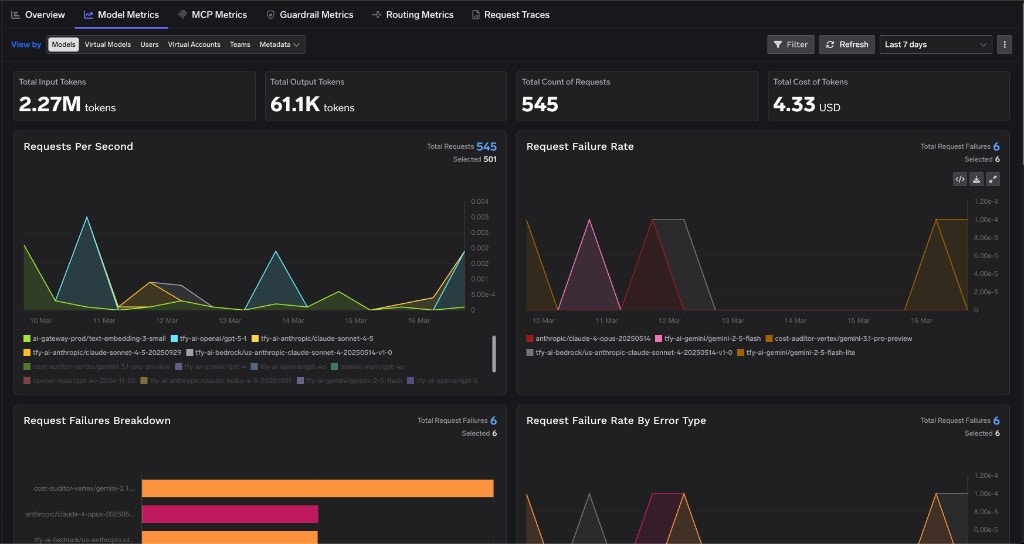 All traces export to any OTEL-compatible platform (Grafana, Datadog, Splunk) for your SIEM. [Learn more](/docs/ai-gateway/export-opentelemetry-data). To set spending guardrails, use the AI Gateway's [budget limits](/docs/ai-gateway/budgetlimiting) and [rate limits](/docs/ai-gateway/ratelimiting) per user and team.
In the `chatgpt-subscription` flow, attribution lands on both sides: TrueFoundry records the developer's identity from `x-tfy-api-key`, and OpenAI attributes the usage to that developer's ChatGPT seat.
***
## 5. Data retention and compliance
Retention of prompts and outputs is governed by your agreement with OpenAI and differs between API and ChatGPT subscription plans. Review your enterprise agreement for the full scope, and see [OpenAI's managed-configuration docs](https://learn.chatgpt.com/docs/enterprise/managed-configuration) for the admin controls available on your plan.
On the TrueFoundry side, the AI Gateway is the single point where you control what is logged and where it goes: request tracing with per-user attribution, configurable prompt logging, and OTEL export into your own SIEM. Because all Codex traffic is routed through the gateway, your audit trail does not depend on any client-side setting a developer could change.
***
## Frequently asked questions
A direct connection gives you no central place to enforce policy. Routing through the TrueFoundry AI Gateway lets you apply access control, rate and budget limits, multi-provider routing with failover, and full tracing from a single control point. With MDM, developers cannot move Codex off it.
The MDM deployment installs the `tfy-local-ai-setup` binary and runs it on a schedule (hourly) to fetch a fresh gateway token scoped to the user's TrueFoundry identity. In `api-key` mode the token is written into the provider's `Authorization` header. In `chatgpt-subscription` mode it goes into `x-tfy-api-key` and the developer's own ChatGPT credentials carry the upstream auth. Either way it is a short-lived token, refreshed automatically, so there are no personal or long-lived API keys on developer machines.
**30 days** from when it was last issued or rotated. `tfy-local-ai-setup` uses the TrueFoundry Auth Server refresh token rather than setting its own expiry. Each successful MDM run rotates the token and writes a new 30-day value. If the script runs at least once within those 30 days, no re-login is required. After 30 days without a refresh, the next run opens the browser device-authorization flow.
No. This setup manages `managed_config.toml`, which covers the model provider and auth. Codex's admin enforcement of which MCP servers a developer may enable lives in a separate `requirements.toml` (`/etc/codex/requirements.toml` on macOS and Linux) that `tfy-local-ai-setup` does not write, so deploy it alongside this script if you need that. See [OpenAI's managed-configuration docs](https://learn.chatgpt.com/docs/enterprise/managed-configuration) for its format, and [Codex web search](/docs/ai-gateway/openai-codex-cli#web-search) for pointing Codex at a gateway-governed MCP server.
Not currently. Codex reads its managed config from the per-user path `~/.codex/managed_config.toml`, while the MDM binary runs as SYSTEM, so it skips Codex on Windows with a warning. Claude Code and Claude Desktop are both supported on Windows; see the [Claude MDM guide](/docs/ai-gateway/mcp/enterprise-security-claude).
No. The cancelled device code expires immediately, but you can start a fresh login at any time. Since your config is already saved from the initial run, source the config file and run the binary directly:
```bash theme={"dark"}
source /Library/Preferences/com.truefoundry.tfy-local-ai-setup.conf
sudo /usr/local/bin/tfy-local-ai-setup --codex \
--url="${CONTROL_PLANE_URL}" \
--tenant="${TENANT_NAME}" \
--gateway="${GATEWAY_URL}"
```
```bash theme={"dark"}
source /etc/tfy/tfy-local-ai-setup.conf
sudo /usr/local/bin/tfy-local-ai-setup --codex \
--url="${CONTROL_PLANE_URL}" \
--tenant="${TENANT_NAME}" \
--gateway="${GATEWAY_URL}"
```
Once you complete the login, the refresh token is saved and all future MDM runs will finish silently, with no browser prompt needed.
***
## Related
* [OpenAI Codex CLI](/docs/ai-gateway/openai-codex-cli): single-developer setup for both auth modes, plus [MCP-based web search](/docs/ai-gateway/openai-codex-cli#web-search) through the gateway.
* [Securing Claude Code with TrueFoundry](/docs/ai-gateway/mcp/enterprise-security-claude): the same MDM binary for Claude Code, including Windows.
* [Govern all AI traffic](/docs/ai-gateway/govern-traffic-through-ai-gateway): which AI clients can be enforced via MDM and which need an on-device agent.
* [TrueFoundry MCP Gateway](/docs/ai-gateway/mcp/mcp-overview): centralized MCP registry, auth, and audit trail.
All traces export to any OTEL-compatible platform (Grafana, Datadog, Splunk) for your SIEM. [Learn more](/docs/ai-gateway/export-opentelemetry-data). To set spending guardrails, use the AI Gateway's [budget limits](/docs/ai-gateway/budgetlimiting) and [rate limits](/docs/ai-gateway/ratelimiting) per user and team.
In the `chatgpt-subscription` flow, attribution lands on both sides: TrueFoundry records the developer's identity from `x-tfy-api-key`, and OpenAI attributes the usage to that developer's ChatGPT seat.
***
## 5. Data retention and compliance
Retention of prompts and outputs is governed by your agreement with OpenAI and differs between API and ChatGPT subscription plans. Review your enterprise agreement for the full scope, and see [OpenAI's managed-configuration docs](https://learn.chatgpt.com/docs/enterprise/managed-configuration) for the admin controls available on your plan.
On the TrueFoundry side, the AI Gateway is the single point where you control what is logged and where it goes: request tracing with per-user attribution, configurable prompt logging, and OTEL export into your own SIEM. Because all Codex traffic is routed through the gateway, your audit trail does not depend on any client-side setting a developer could change.
***
## Frequently asked questions
A direct connection gives you no central place to enforce policy. Routing through the TrueFoundry AI Gateway lets you apply access control, rate and budget limits, multi-provider routing with failover, and full tracing from a single control point. With MDM, developers cannot move Codex off it.
The MDM deployment installs the `tfy-local-ai-setup` binary and runs it on a schedule (hourly) to fetch a fresh gateway token scoped to the user's TrueFoundry identity. In `api-key` mode the token is written into the provider's `Authorization` header. In `chatgpt-subscription` mode it goes into `x-tfy-api-key` and the developer's own ChatGPT credentials carry the upstream auth. Either way it is a short-lived token, refreshed automatically, so there are no personal or long-lived API keys on developer machines.
**30 days** from when it was last issued or rotated. `tfy-local-ai-setup` uses the TrueFoundry Auth Server refresh token rather than setting its own expiry. Each successful MDM run rotates the token and writes a new 30-day value. If the script runs at least once within those 30 days, no re-login is required. After 30 days without a refresh, the next run opens the browser device-authorization flow.
No. This setup manages `managed_config.toml`, which covers the model provider and auth. Codex's admin enforcement of which MCP servers a developer may enable lives in a separate `requirements.toml` (`/etc/codex/requirements.toml` on macOS and Linux) that `tfy-local-ai-setup` does not write, so deploy it alongside this script if you need that. See [OpenAI's managed-configuration docs](https://learn.chatgpt.com/docs/enterprise/managed-configuration) for its format, and [Codex web search](/docs/ai-gateway/openai-codex-cli#web-search) for pointing Codex at a gateway-governed MCP server.
Not currently. Codex reads its managed config from the per-user path `~/.codex/managed_config.toml`, while the MDM binary runs as SYSTEM, so it skips Codex on Windows with a warning. Claude Code and Claude Desktop are both supported on Windows; see the [Claude MDM guide](/docs/ai-gateway/mcp/enterprise-security-claude).
No. The cancelled device code expires immediately, but you can start a fresh login at any time. Since your config is already saved from the initial run, source the config file and run the binary directly:
```bash theme={"dark"}
source /Library/Preferences/com.truefoundry.tfy-local-ai-setup.conf
sudo /usr/local/bin/tfy-local-ai-setup --codex \
--url="${CONTROL_PLANE_URL}" \
--tenant="${TENANT_NAME}" \
--gateway="${GATEWAY_URL}"
```
```bash theme={"dark"}
source /etc/tfy/tfy-local-ai-setup.conf
sudo /usr/local/bin/tfy-local-ai-setup --codex \
--url="${CONTROL_PLANE_URL}" \
--tenant="${TENANT_NAME}" \
--gateway="${GATEWAY_URL}"
```
Once you complete the login, the refresh token is saved and all future MDM runs will finish silently, with no browser prompt needed.
***
## Related
* [OpenAI Codex CLI](/docs/ai-gateway/openai-codex-cli): single-developer setup for both auth modes, plus [MCP-based web search](/docs/ai-gateway/openai-codex-cli#web-search) through the gateway.
* [Securing Claude Code with TrueFoundry](/docs/ai-gateway/mcp/enterprise-security-claude): the same MDM binary for Claude Code, including Windows.
* [Govern all AI traffic](/docs/ai-gateway/govern-traffic-through-ai-gateway): which AI clients can be enforced via MDM and which need an on-device agent.
* [TrueFoundry MCP Gateway](/docs/ai-gateway/mcp/mcp-overview): centralized MCP registry, auth, and audit trail.