> ## Documentation Index
> Fetch the complete documentation index at: https://www.truefoundry.com/llms.txt
> Use this file to discover all available pages before exploring further.
# Logging Configuration
> Control which AI Gateway requests are logged and redact sensitive values from stored request and response bodies using rule-based logging configurations.
Logging configuration lets you control which AI Gateway requests are logged and redact sensitive content from the logged copy. You define named logging configs that match requests by subject, model, or metadata, and each config decides whether matching requests are logged, and optionally which patterns to redact from the stored request and response.
Logging configuration replaces the global logging settings (Always / Never / Header controlled). See [Migrating to logging configs](/docs/ai-gateway/request-logging#migrating-to-logging-configs) for the mapping from global settings.
## How logging configs work
Logging configuration consists of a set of independent rules. Each rule defines *which requests* it applies to and *whether* those requests are logged.
**During evaluation:**
1. **Every matching rule is checked.** The gateway finds all rules whose conditions match the incoming request.
2. **Logging is deny-wins.** If any matching rule has **Log** turned off, the request and response bodies are not logged.
3. **Redactions are merged.** When logging is allowed, the redaction patterns from every matching rule are applied to the logged copy.
Think of matching rules as deny-wins for logging: a request body is stored only when every rule it matches allows logging. A single rule with **Log** off is enough to suppress the body.
Redaction is applied only to the **logged copy** of the request and response. The live request forwarded to the model provider is never modified.
When no logging config matches a request, the gateway falls back to the per-request `X-TFY-LOGGING-CONFIG` header behavior. See [Request Logging](/docs/ai-gateway/request-logging).
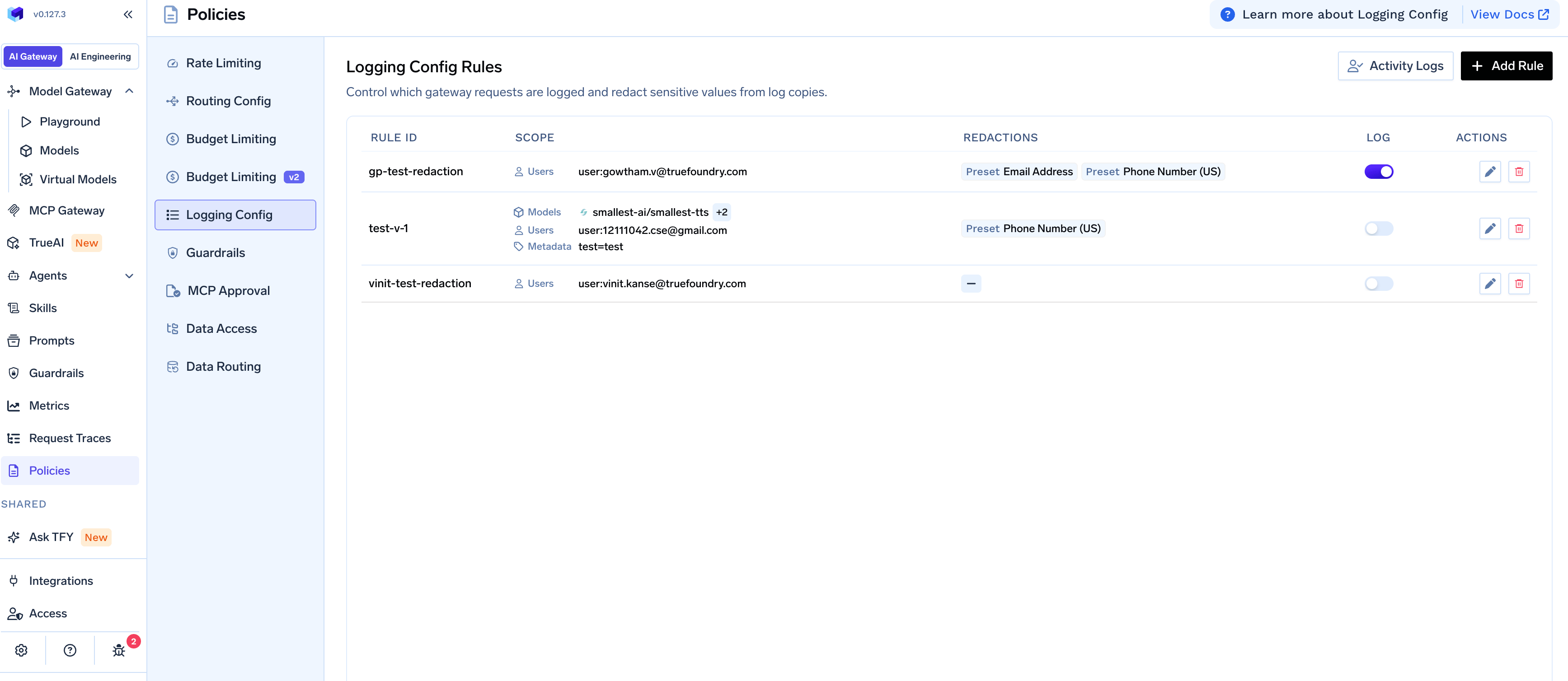 ## Setting up a logging config
To create a rule, go to **AI Gateway** → **Policies** → **Logging Config** and click **Add Rule**.
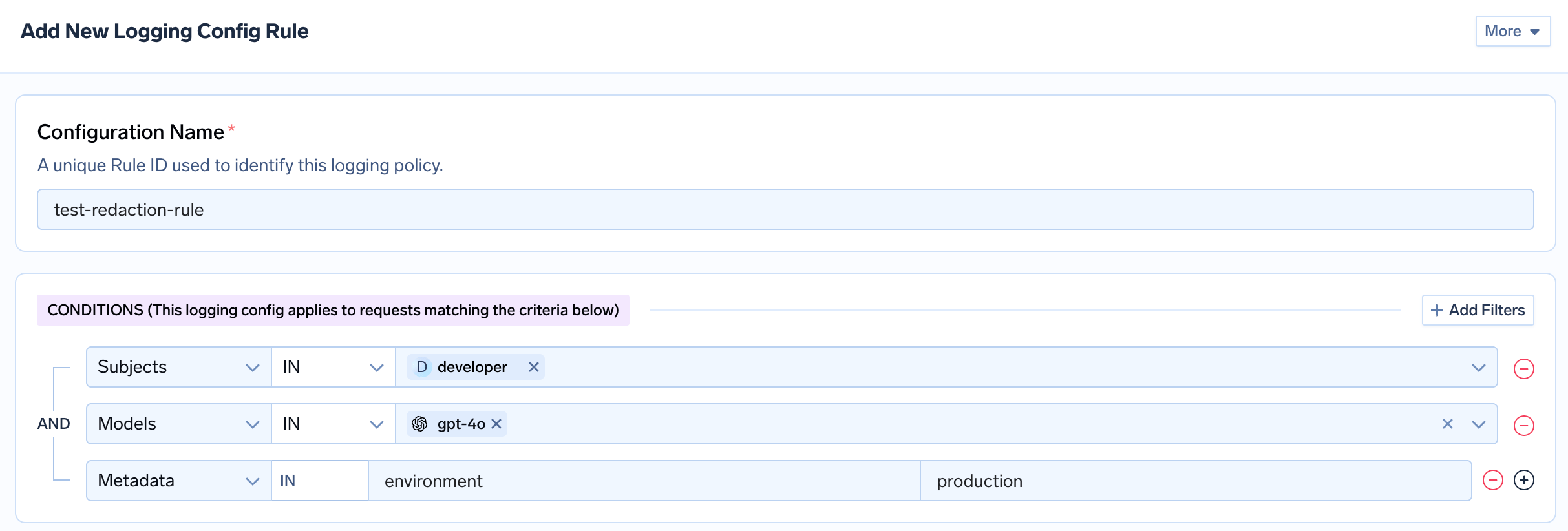
The rule form has three parts: a **Configuration Name**, the **Conditions** that select matching requests, and the **Log** and **Redaction** settings.
### Configuration name
A unique Rule ID that identifies the logging config within your tenant. Choose a descriptive name like `never-log-finance` or `log-support-with-redaction`.
### Conditions
Conditions define which requests the rule applies to. Add filters with **+ Add Filters**. Filters use **AND** logic, so a request must match every filter you add.
| Filter | Operators | Description |
| ------------ | -------------- | ------------------------------------------------------------------------------------------------ |
| **Subjects** | `IN`, `NOT IN` | Users, teams, or virtual accounts. Prefix each value with `user:`, `team:`, or `virtualaccount:` |
| **Models** | `IN`, `NOT IN` | Model names served through the gateway (for example, `openai-main/gpt-4o`) |
| **Metadata** | exact match | Key-value pairs from the `X-TFY-METADATA` header. Every listed pair must match |
If you leave conditions empty, the rule matches **every request** in your tenant. This is useful for a default rule that logs everything.
## Setting up a logging config
To create a rule, go to **AI Gateway** → **Policies** → **Logging Config** and click **Add Rule**.
The rule form has three parts: a **Configuration Name**, the **Conditions** that select matching requests, and the **Log** and **Redaction** settings.
### Configuration name
A unique Rule ID that identifies the logging config within your tenant. Choose a descriptive name like `never-log-finance` or `log-support-with-redaction`.
### Conditions
Conditions define which requests the rule applies to. Add filters with **+ Add Filters**. Filters use **AND** logic, so a request must match every filter you add.
| Filter | Operators | Description |
| ------------ | -------------- | ------------------------------------------------------------------------------------------------ |
| **Subjects** | `IN`, `NOT IN` | Users, teams, or virtual accounts. Prefix each value with `user:`, `team:`, or `virtualaccount:` |
| **Models** | `IN`, `NOT IN` | Model names served through the gateway (for example, `openai-main/gpt-4o`) |
| **Metadata** | exact match | Key-value pairs from the `X-TFY-METADATA` header. Every listed pair must match |
If you leave conditions empty, the rule matches **every request** in your tenant. This is useful for a default rule that logs everything.
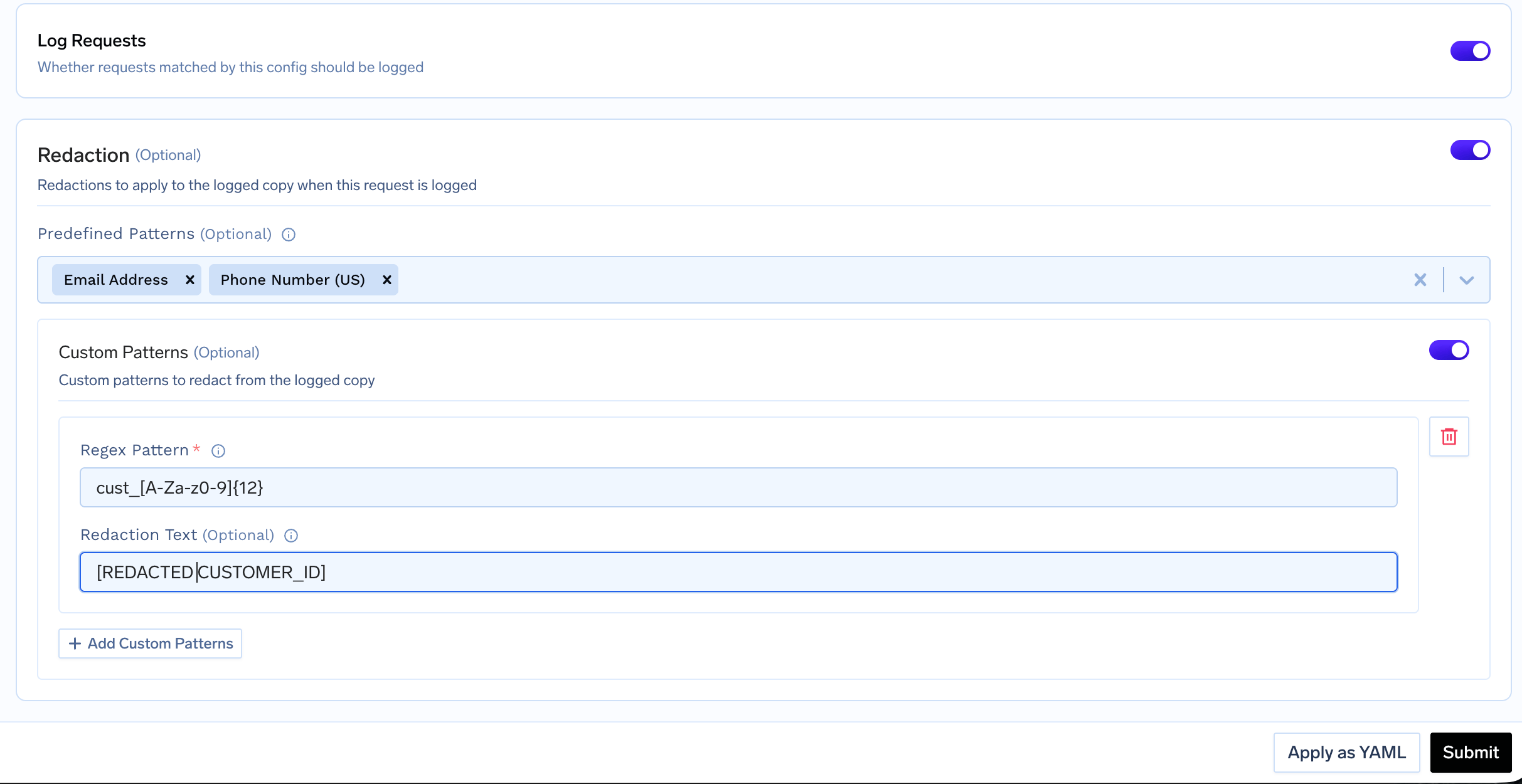
 ## Log decision and redaction
### Log requests
The **Log Requests** toggle controls whether requests matched by this rule have their request and response bodies logged. In YAML, this is the `log` field.
* **ON:** matching requests are logged (subject to deny-wins across all matching rules).
* **OFF:** matching requests are not logged. The body is suppressed even if another rule would allow it.
### Redaction
Enable **Redaction** to remove sensitive values from the logged copy while leaving the live request untouched. You can combine predefined patterns and custom patterns.
* **Predefined Patterns:** a catalog of built-in patterns such as `email`, `us_ssn`, and `credit_card`. This is the same catalog used by the Regex Pattern Match guardrail. See the full [Preset Patterns reference](/docs/ai-gateway/regex-pattern-matching#preset-patterns) for every available pattern, its regex, and its default redaction text.
* **Custom Patterns:** your own regex patterns with an optional **Redaction Text** (defaults to `[REDACTED]`). For example, redact internal customer IDs with pattern `cust_[A-Za-z0-9]{12}` and redaction text `[REDACTED CUSTOMER_ID]`.
In YAML, backslashes inside a double-quoted regex must be escaped. Write `\\d` for a digit and `\\.` for a literal dot. For example, `"cust_[A-Za-z0-9]{12}"` needs no escaping, but `"acct_\\d{10}"` does.
## Log decision and redaction
### Log requests
The **Log Requests** toggle controls whether requests matched by this rule have their request and response bodies logged. In YAML, this is the `log` field.
* **ON:** matching requests are logged (subject to deny-wins across all matching rules).
* **OFF:** matching requests are not logged. The body is suppressed even if another rule would allow it.
### Redaction
Enable **Redaction** to remove sensitive values from the logged copy while leaving the live request untouched. You can combine predefined patterns and custom patterns.
* **Predefined Patterns:** a catalog of built-in patterns such as `email`, `us_ssn`, and `credit_card`. This is the same catalog used by the Regex Pattern Match guardrail. See the full [Preset Patterns reference](/docs/ai-gateway/regex-pattern-matching#preset-patterns) for every available pattern, its regex, and its default redaction text.
* **Custom Patterns:** your own regex patterns with an optional **Redaction Text** (defaults to `[REDACTED]`). For example, redact internal customer IDs with pattern `cust_[A-Za-z0-9]{12}` and redaction text `[REDACTED CUSTOMER_ID]`.
In YAML, backslashes inside a double-quoted regex must be escaped. Write `\\d` for a digit and `\\.` for a literal dot. For example, `"cust_[A-Za-z0-9]{12}"` needs no escaping, but `"acct_\\d{10}"` does.
 ## Verifying in Request Traces
Logging configuration only controls whether request and response **bodies** are stored, and redacts sensitive values in the stored copy. Everything else (cost, tokens, latency, and metadata) is always recorded.
To confirm a rule is working, open **AI Gateway** → **Request Traces** and inspect a matching request. The trace below shows a rule with a custom `cust_...` pattern and the `email` preset: the customer ID and email are redacted in both the request and response bodies, while cost, tokens, and latency remain fully visible.
## Verifying in Request Traces
Logging configuration only controls whether request and response **bodies** are stored, and redacts sensitive values in the stored copy. Everything else (cost, tokens, latency, and metadata) is always recorded.
To confirm a rule is working, open **AI Gateway** → **Request Traces** and inspect a matching request. The trace below shows a rule with a custom `cust_...` pattern and the `email` preset: the customer ID and email are redacted in both the request and response bodies, while cost, tokens, and latency remain fully visible.
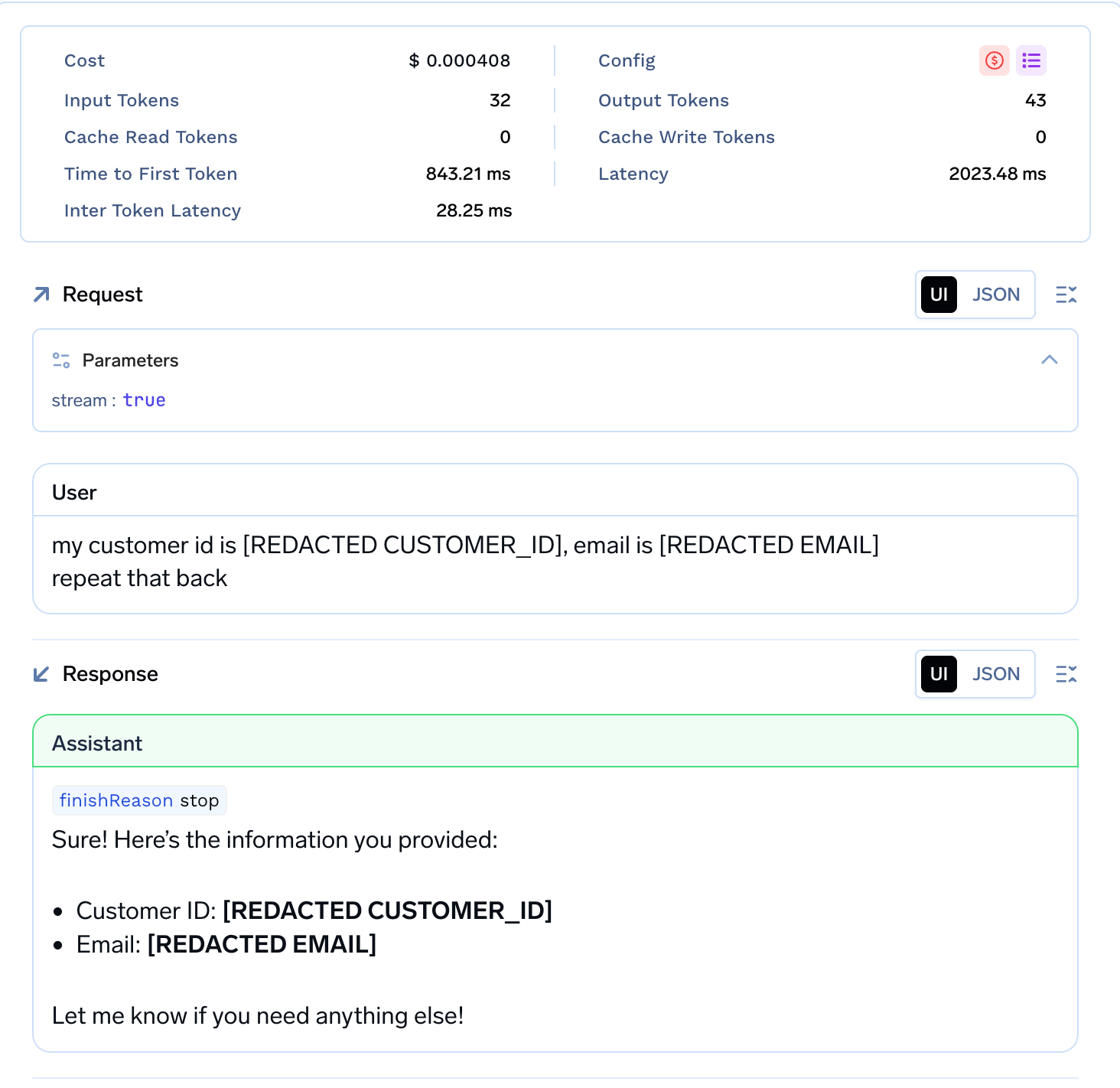 The root span records `tfy.logging.prompt_logging_enabled` and `tfy.logging.matched_config_names`, which lists the rules that matched the request. Use these attributes to trace a logging decision back to the rules that produced it. For programmatic access, see [API Access to Logs](/docs/ai-gateway/fetch-request-logs).
## Practical examples
Each example shows both the UI configuration and the equivalent YAML. Click **Apply as YAML** in the rule form to paste or edit YAML directly.
Suppress body logging entirely for a team that handles sensitive data.
| Rule ID | Conditions | Log | Redaction |
| ------------------- | ---------------------------------- | --- | --------- |
| `never-log-finance` | Subjects: `team:finance-sensitive` | Off | None |
**How it works:** Any request from a member of `finance-sensitive` matches this rule. Because **Log** is off, the request and response bodies are never stored.
```yaml theme={"dark"}
type: gateway-logging-config
name: never-log-finance
when:
subjects:
in:
- team:finance-sensitive
log: false
```
Log a team's requests but strip emails and SSNs from the stored copy.
| Rule ID | Conditions | Log | Redaction |
| ---------------------------- | ------------------------ | --- | ------------------ |
| `log-support-with-redaction` | Subjects: `team:support` | On | Preset: Email, SSN |
**How it works:** Support team requests are logged, but any email address or US SSN in the request or response is replaced with its redaction text in the stored copy.
```yaml theme={"dark"}
type: gateway-logging-config
name: log-support-with-redaction
when:
subjects:
in:
- team:support
log: true
redact_with:
presets:
- email
- us_ssn
```
Skip logging for a specific user on an internal model, while a default rule logs everything else. These are two separate rules.
| Rule ID | Conditions | Log | Redaction |
| --------------------- | ------------------------------------------------------------------------------------- | --- | --------- |
| `skip-internal-model` | Subjects: `user:gowtham.v@truefoundry.com`, Models: `internal-provider/private-model` | Off | None |
| `log-default` | *(no conditions, matches all)* | On | None |
**How it works:** For that user calling the internal model, both rules match, and deny-wins means the body is not logged. Every other request matches only `log-default`, so it is logged.
```yaml theme={"dark"}
# Rule 1: skip a specific user on an internal model
type: gateway-logging-config
name: skip-internal-model
when:
subjects:
in:
- user:gowtham.v@truefoundry.com
models:
in:
- internal-provider/private-model
log: false
---
# Rule 2: log everything else
type: gateway-logging-config
name: log-default
log: true
```
Log production requests and redact internal customer IDs using a custom regex.
| Rule ID | Conditions | Log | Redaction |
| ------------------------------ | ------------------------------------ | --- | ------------------------------ |
| `log-prod-redact-customer-ids` | Metadata: `environment = production` | On | Custom: `cust_[A-Za-z0-9]{12}` |
Requests must include the header:
```text theme={"dark"}
X-TFY-METADATA: {"environment": "production"}
```
Any value matching `cust_[A-Za-z0-9]{12}` is replaced with `[REDACTED CUSTOMER_ID]` in the logged copy.
```yaml theme={"dark"}
type: gateway-logging-config
name: log-prod-redact-customer-ids
when:
metadata:
environment: production
log: true
redact_with:
custom_patterns:
- pattern: "cust_[A-Za-z0-9]{12}"
redaction_text: "[REDACTED CUSTOMER_ID]"
```
## YAML configuration reference
```yaml theme={"dark"}
type: gateway-logging-config
name: example-logging-config
when:
subjects:
in:
- user:alice@example.com
- team:engineering
not_in:
- team:contractors
models:
in:
- openai-main/gpt-4o
metadata:
environment: production
log: true
redact_with:
presets:
- email
- us_ssn
custom_patterns:
- pattern: "cust_[A-Za-z0-9]{12}"
redaction_text: "[REDACTED CUSTOMER_ID]"
```
**Field reference:**
| Field | Description |
| ----------------------------- | --------------------------------------------------------------------------------------------------------------------------- |
| `type` | Always `gateway-logging-config` |
| `name` | Unique rule ID within the tenant (letters, numbers, and hyphens) |
| `when` | Optional. Conditions that select which requests this config applies to. Omit to match every request |
| `when.subjects` | `in` / `not_in` list of subjects. Prefix each value with `user:`, `team:`, or `virtualaccount:` |
| `when.models` | `in` / `not_in` list of model names (for example, `openai-main/gpt-4o`) |
| `when.metadata` | Exact key-value pairs matched against request metadata from the `X-TFY-METADATA` header. All listed pairs must match |
| `log` | Whether matched requests have their request and response bodies logged |
| `redact_with.presets` | Predefined redaction patterns. See the [Preset Patterns reference](/docs/ai-gateway/regex-pattern-matching#preset-patterns) |
| `redact_with.custom_patterns` | Custom regex patterns. Each has a `pattern` and an optional `redaction_text` (defaults to `[REDACTED]`) |
The root span records `tfy.logging.prompt_logging_enabled` and `tfy.logging.matched_config_names`, which lists the rules that matched the request. Use these attributes to trace a logging decision back to the rules that produced it. For programmatic access, see [API Access to Logs](/docs/ai-gateway/fetch-request-logs).
## Practical examples
Each example shows both the UI configuration and the equivalent YAML. Click **Apply as YAML** in the rule form to paste or edit YAML directly.
Suppress body logging entirely for a team that handles sensitive data.
| Rule ID | Conditions | Log | Redaction |
| ------------------- | ---------------------------------- | --- | --------- |
| `never-log-finance` | Subjects: `team:finance-sensitive` | Off | None |
**How it works:** Any request from a member of `finance-sensitive` matches this rule. Because **Log** is off, the request and response bodies are never stored.
```yaml theme={"dark"}
type: gateway-logging-config
name: never-log-finance
when:
subjects:
in:
- team:finance-sensitive
log: false
```
Log a team's requests but strip emails and SSNs from the stored copy.
| Rule ID | Conditions | Log | Redaction |
| ---------------------------- | ------------------------ | --- | ------------------ |
| `log-support-with-redaction` | Subjects: `team:support` | On | Preset: Email, SSN |
**How it works:** Support team requests are logged, but any email address or US SSN in the request or response is replaced with its redaction text in the stored copy.
```yaml theme={"dark"}
type: gateway-logging-config
name: log-support-with-redaction
when:
subjects:
in:
- team:support
log: true
redact_with:
presets:
- email
- us_ssn
```
Skip logging for a specific user on an internal model, while a default rule logs everything else. These are two separate rules.
| Rule ID | Conditions | Log | Redaction |
| --------------------- | ------------------------------------------------------------------------------------- | --- | --------- |
| `skip-internal-model` | Subjects: `user:gowtham.v@truefoundry.com`, Models: `internal-provider/private-model` | Off | None |
| `log-default` | *(no conditions, matches all)* | On | None |
**How it works:** For that user calling the internal model, both rules match, and deny-wins means the body is not logged. Every other request matches only `log-default`, so it is logged.
```yaml theme={"dark"}
# Rule 1: skip a specific user on an internal model
type: gateway-logging-config
name: skip-internal-model
when:
subjects:
in:
- user:gowtham.v@truefoundry.com
models:
in:
- internal-provider/private-model
log: false
---
# Rule 2: log everything else
type: gateway-logging-config
name: log-default
log: true
```
Log production requests and redact internal customer IDs using a custom regex.
| Rule ID | Conditions | Log | Redaction |
| ------------------------------ | ------------------------------------ | --- | ------------------------------ |
| `log-prod-redact-customer-ids` | Metadata: `environment = production` | On | Custom: `cust_[A-Za-z0-9]{12}` |
Requests must include the header:
```text theme={"dark"}
X-TFY-METADATA: {"environment": "production"}
```
Any value matching `cust_[A-Za-z0-9]{12}` is replaced with `[REDACTED CUSTOMER_ID]` in the logged copy.
```yaml theme={"dark"}
type: gateway-logging-config
name: log-prod-redact-customer-ids
when:
metadata:
environment: production
log: true
redact_with:
custom_patterns:
- pattern: "cust_[A-Za-z0-9]{12}"
redaction_text: "[REDACTED CUSTOMER_ID]"
```
## YAML configuration reference
```yaml theme={"dark"}
type: gateway-logging-config
name: example-logging-config
when:
subjects:
in:
- user:alice@example.com
- team:engineering
not_in:
- team:contractors
models:
in:
- openai-main/gpt-4o
metadata:
environment: production
log: true
redact_with:
presets:
- email
- us_ssn
custom_patterns:
- pattern: "cust_[A-Za-z0-9]{12}"
redaction_text: "[REDACTED CUSTOMER_ID]"
```
**Field reference:**
| Field | Description |
| ----------------------------- | --------------------------------------------------------------------------------------------------------------------------- |
| `type` | Always `gateway-logging-config` |
| `name` | Unique rule ID within the tenant (letters, numbers, and hyphens) |
| `when` | Optional. Conditions that select which requests this config applies to. Omit to match every request |
| `when.subjects` | `in` / `not_in` list of subjects. Prefix each value with `user:`, `team:`, or `virtualaccount:` |
| `when.models` | `in` / `not_in` list of model names (for example, `openai-main/gpt-4o`) |
| `when.metadata` | Exact key-value pairs matched against request metadata from the `X-TFY-METADATA` header. All listed pairs must match |
| `log` | Whether matched requests have their request and response bodies logged |
| `redact_with.presets` | Predefined redaction patterns. See the [Preset Patterns reference](/docs/ai-gateway/regex-pattern-matching#preset-patterns) |
| `redact_with.custom_patterns` | Custom regex patterns. Each has a `pattern` and an optional `redaction_text` (defaults to `[REDACTED]`) |