> ## Documentation Index
> Fetch the complete documentation index at: https://www.truefoundry.com/llms.txt
> Use this file to discover all available pages before exploring further.
# LangChain
> Learn how to use langchain with TrueFoundry AI Gateway, including setup steps, use cases, and production-ready examples.
This guide provides instructions for integrating [LangChain](https://langchain.com/) with the TrueFoundry AI Gateway.
## What is LangChain?
LangChain is a framework for developing applications powered by large language models (LLMs). It provides a comprehensive suite of tools and integrations that streamline the entire lifecycle of LLM applications, from development to deployment and monitoring.
### Key Features of LangChain
* **[Modular Components](https://python.langchain.com/docs/introduction/)**: Offers a range of building blocks including chains, agents, prompt templates, and memory modules that can be composed together to create complex LLM applications
* **[Extensive Integrations](https://python.langchain.com/docs/integrations/providers/)**: Supports integrations with various LLM providers, embedding models, vector stores, and external tools, facilitating seamless connectivity within the AI ecosystem
* **[Production-Ready Tools](https://python.langchain.com/docs/introduction/)**: Includes LangGraph for building stateful agents and LangSmith for monitoring and evaluating applications, ensuring robust deployment and maintenance of LLM-powered solutions
## Quickstart Guide
TrueFoundry is compatible with the OpenAI signature, so you can connect to TrueFoundry's unified LLM gateway through the `ChatOpenAI` interface.
### Installation & Setup
1. Sign up for a [TrueFoundry account](https://www.truefoundry.com/register)
2. Follow the steps in our [Gateway Quick Start Guide](https://docs.truefoundry.com/gateway/quick-start)
You will get your base URL and model name directly from the unified code snippet:
 * Set the `base_url` to your TrueFoundry endpoint
* Use TrueFoundry model names in the format `provider-main/model-name`
### Installation
```bash lines theme={"dark"}
pip install langchain-openai
```
### Basic Setup
Connect to TrueFoundry by updating the `ChatOpenAI` model in LangChain:
```python lines theme={"dark"}
from langchain_openai import ChatOpenAI
TRUEFOUNDRY_PAT = "..." # Your TrueFoundry Personal Access Token
TRUEFOUNDRY_BASE_URL = "{GATEWAY_BASE_URL}"
llm = ChatOpenAI(
api_key=TRUEFOUNDRY_PAT,
base_url=TRUEFOUNDRY_BASE_URL,
model="openai-main/gpt-4o" #similarly you can call any model from any model provider like anthropic, gemini
)
llm.invoke("What is the meaning of life, universe and everything?")
```
The request is routed through your TrueFoundry gateway to the specified model provider. TrueFoundry automatically handles authentication, routing, and logging.
### Advanced Example with LangGraph
```python lines theme={"dark"}
from langgraph.graph import StateGraph, MessagesState
from langchain_core.messages import HumanMessage
# Build workflow
workflow = StateGraph(MessagesState)
workflow.add_node("agent", call_model)
workflow.set_entry_point("agent")
workflow.set_finish_point("agent")
app = workflow.compile()
# Run agent through TrueFoundry
result = app.invoke({"messages": [HumanMessage(content="Hello!")]})
```
### Observability and Governance
Monitor your LangChain applications through TrueFoundry's metrics tab:
* Set the `base_url` to your TrueFoundry endpoint
* Use TrueFoundry model names in the format `provider-main/model-name`
### Installation
```bash lines theme={"dark"}
pip install langchain-openai
```
### Basic Setup
Connect to TrueFoundry by updating the `ChatOpenAI` model in LangChain:
```python lines theme={"dark"}
from langchain_openai import ChatOpenAI
TRUEFOUNDRY_PAT = "..." # Your TrueFoundry Personal Access Token
TRUEFOUNDRY_BASE_URL = "{GATEWAY_BASE_URL}"
llm = ChatOpenAI(
api_key=TRUEFOUNDRY_PAT,
base_url=TRUEFOUNDRY_BASE_URL,
model="openai-main/gpt-4o" #similarly you can call any model from any model provider like anthropic, gemini
)
llm.invoke("What is the meaning of life, universe and everything?")
```
The request is routed through your TrueFoundry gateway to the specified model provider. TrueFoundry automatically handles authentication, routing, and logging.
### Advanced Example with LangGraph
```python lines theme={"dark"}
from langgraph.graph import StateGraph, MessagesState
from langchain_core.messages import HumanMessage
# Build workflow
workflow = StateGraph(MessagesState)
workflow.add_node("agent", call_model)
workflow.set_entry_point("agent")
workflow.set_finish_point("agent")
app = workflow.compile()
# Run agent through TrueFoundry
result = app.invoke({"messages": [HumanMessage(content="Hello!")]})
```
### Observability and Governance
Monitor your LangChain applications through TrueFoundry's metrics tab:
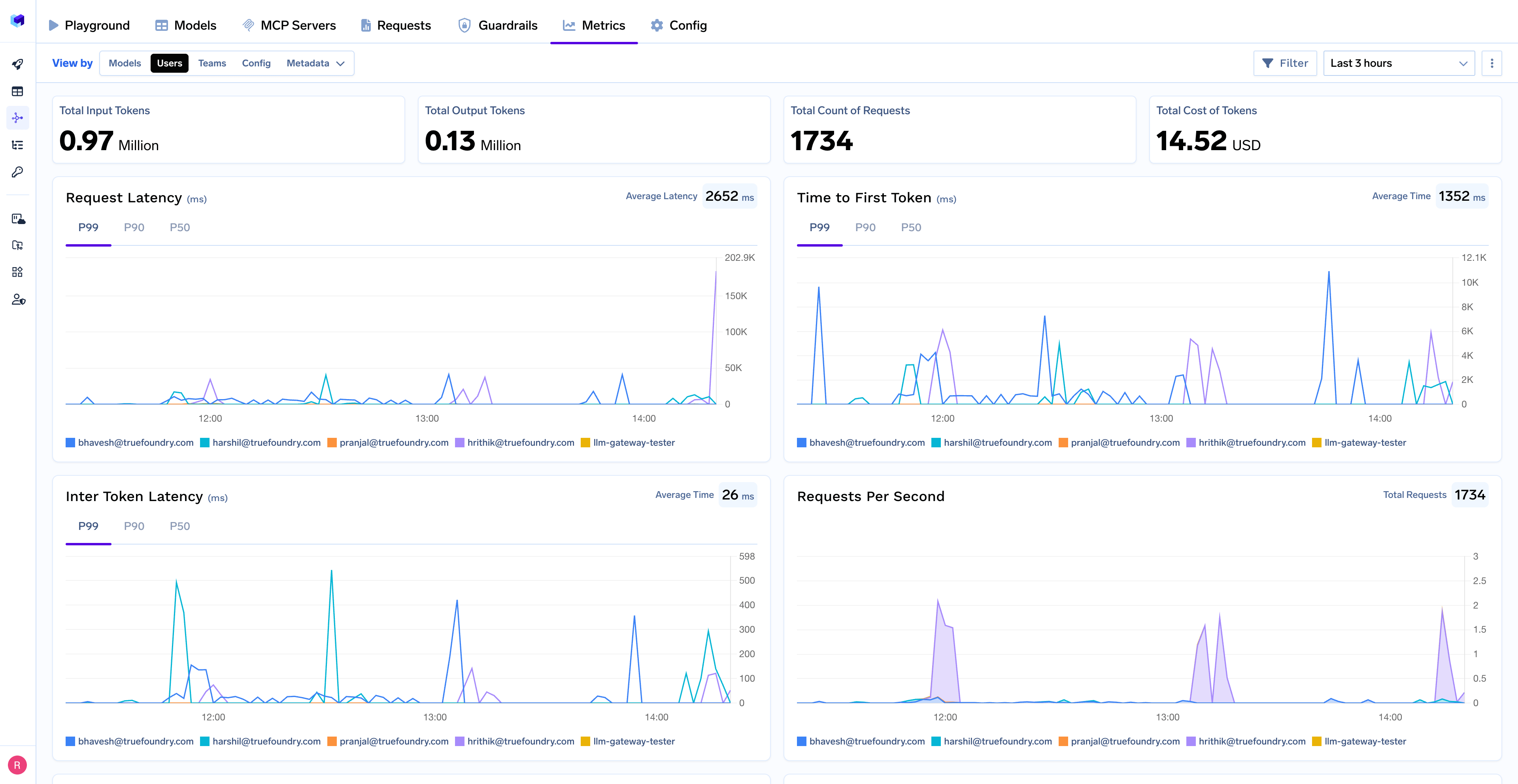 With TrueFoundry's AI Gateway, you can monitor and analyze:
* **Performance Metrics**: Track key latency metrics like Request Latency, Time to First Token (TTFS), and Inter-Token Latency (ITL) with P99, P90, and P50 percentiles
* **Cost and Token Usage**: Gain visibility into your application's costs with detailed breakdowns of input/output tokens and the associated expenses for each model
* **Usage Patterns**: Understand how your application is being used with detailed analytics on user activity, model distribution, and team-based usage
* **Rate Limiting and Virtual Models**: Set up rate limiting and configure [Virtual Models](/docs/ai-gateway/virtual-model) for intelligent routing and fallback across your models
With TrueFoundry's AI Gateway, you can monitor and analyze:
* **Performance Metrics**: Track key latency metrics like Request Latency, Time to First Token (TTFS), and Inter-Token Latency (ITL) with P99, P90, and P50 percentiles
* **Cost and Token Usage**: Gain visibility into your application's costs with detailed breakdowns of input/output tokens and the associated expenses for each model
* **Usage Patterns**: Understand how your application is being used with detailed analytics on user activity, model distribution, and team-based usage
* **Rate Limiting and Virtual Models**: Set up rate limiting and configure [Virtual Models](/docs/ai-gateway/virtual-model) for intelligent routing and fallback across your models