> ## Documentation Index
> Fetch the complete documentation index at: https://www.truefoundry.com/llms.txt
> Use this file to discover all available pages before exploring further.
# Introduction
> Learn about guardrails for ensuring safety, compliance, and quality in LLM interactions and MCP tool invocations
## Why Guardrails?
Once AI applications go to production, they handle real user data and — in the case of agents — call external tools on their own. Things can go wrong fast:
* **A customer support chatbot** leaks a user's credit card number because PII wasn't stripped from the context.
* **A coding agent** runs `rm -rf /` through an MCP tool after hallucinating a shell command — and nothing stopped it.
* **A healthcare assistant** makes up drug dosage numbers. The response reaches the patient unchecked.
* **An internal Q\&A bot** gets jailbroken through prompt injection, leaking confidential company data.
Guardrails prevent these scenarios. They sit between your application and the LLM (or MCP tool), inspecting and — when needed — blocking or rewriting data before it causes damage. You can attach them to **LLM requests** (check the prompt going in, check the response coming out) and to **MCP tool calls** (check the arguments before the tool runs, check the results after it returns).
## How a TrueFoundry Guardrail Works
Each guardrail has two settings you configure: what it *does* with the data, and how strictly it *enforces* its decisions.
### Operation Mode
| Mode | Behavior | Execution |
| ------------ | --------------------------------------------------------------------------------------------------------------------------------------------------------------------------------------------------------- | --------------------------------------------------------------------------------------------------------------------------------------------------------------------------------------------------------------------------------------------- |
| **Validate** | Looks at the data, blocks the request if something is wrong. Doesn't touch the data itself.
`E.g., a content moderation guardrail sees hate speech in the prompt and blocks the request outright.` | **LLM Input Validation** can run **in parallel with the model request** (see below). **LLM Output Validation** and **MCP Pre/Post Tool** validation run **synchronously** in the request path before the response or tool result is released. |
| **Mutate** | Looks at the data *and* rewrites it. Can also block.
`E.g., a PII guardrail rewrites `"My SSN is 123-45-6789"`to`"My SSN is REDACTED"` and lets the request through.` | Runs **sequentially** by priority (lower = first) |
**Request Traces vs. this table:** Traces show each guardrail as its own span with start/end times. **LLM Input Validation** spans often overlap the model span because validation runs alongside the in-flight model request. **Output** and **MCP** guardrail spans typically appear **after** the model or tool span finishes — that ordering reflects synchronous evaluation, not a contradiction with the execution model above.
### Enforcement Strategy
This decides what happens when a guardrail catches a violation — and also what happens if the guardrail *itself* has a problem (like a timeout or a provider outage).
| Strategy | On Violation | On Guardrail Error |
| ------------------------------- | ---------------------- | ---------------------------------- |
| **Enforce** | Block | Block |
| **Enforce But Ignore On Error** | Block | Let through (graceful degradation) |
| **Audit** | Let through (log only) | Let through |
**How to roll out safely**:
* Start with **Audit** so you can see what guardrails would catch without affecting users.
* Once things look right, switch to **Enforce But Ignore On Error** — you get protection, but a guardrail provider outage won't take your app down.
* Move to **Enforce** when you need strict compliance.
## How TrueFoundry AI Gateway Runs Guardrails
Where guardrails run depends on whether you're making an LLM call or invoking an MCP tool.
LLM requests have two hooks — **Input** (before the model sees the prompt) and **Output** (after the model responds):
Runs **before** the prompt reaches the LLM:
* PII masking and redaction
* Prompt injection detection
* Content moderation
Runs **after** the LLM responds:
* Hallucination detection
* Secrets detection
* Content filtering
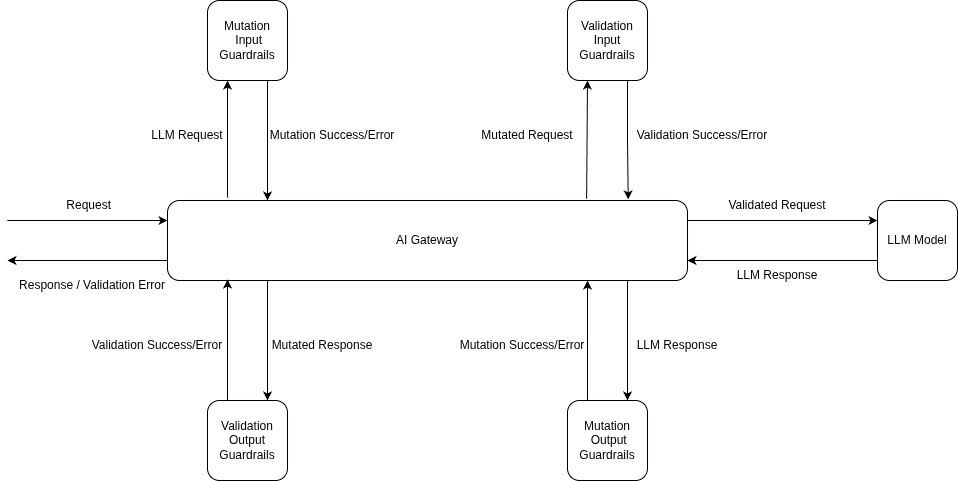 Here's the order of operations when a request hits the gateway:
1. **Input Mutation** guardrails run first and block until they finish (e.g., redacting PII from the prompt).
2. **Input Validation** kicks off in the background — it checks for things like prompt injection *while* the model request is already in flight.
3. The **model request starts** with the mutated prompt.
4. If **Input Validation fails** while the model is still running, the gateway **cancels the model request** right away so you don't pay for it.
5. Once the model responds, **Output Mutation** guardrails process the response (e.g., stripping secrets).
6. **Output Validation** checks the final result. If it fails, the response is blocked — though model costs have already been incurred at this point.
7. The clean response goes back to the client.
| Hook | Execution | What Happens on Failure |
| --------------------- | ----------------------------------- | ----------------------- |
| **Input Validation** | Async (parallel with model request) | Model request cancelled |
| **Input Mutation** | Sync (before model request) | Request blocked |
| **Output Mutation** | Sync (after model response) | Response blocked |
| **Output Validation** | Sync (after output mutation) | Response rejected |
**Streaming (`stream: true`) and LLM output guardrails:** Output guardrails are **not applied** when the response is streamed (`"stream": true`). This is because output guardrails need the complete response text to evaluate, but streaming sends the response in chunks as they are generated. If you need output guardrails to run, set `"stream": false` in your request. Input guardrails work the same way regardless of streaming mode — they always run before the request is sent to the model. See the [FAQ](#faq) for more details.
MCP tool calls have two hooks — **Pre Tool** (before the tool runs) and **Post Tool** (after it returns):
Runs **before** the tool is called:
* SQL injection prevention
* Parameter validation
* Permission checks (Cedar/OPA policies)
Runs **after** the tool returns:
* Code safety checks
* Secrets detection in outputs
* PII redaction from results
Here's the order of operations when a request hits the gateway:
1. **Input Mutation** guardrails run first and block until they finish (e.g., redacting PII from the prompt).
2. **Input Validation** kicks off in the background — it checks for things like prompt injection *while* the model request is already in flight.
3. The **model request starts** with the mutated prompt.
4. If **Input Validation fails** while the model is still running, the gateway **cancels the model request** right away so you don't pay for it.
5. Once the model responds, **Output Mutation** guardrails process the response (e.g., stripping secrets).
6. **Output Validation** checks the final result. If it fails, the response is blocked — though model costs have already been incurred at this point.
7. The clean response goes back to the client.
| Hook | Execution | What Happens on Failure |
| --------------------- | ----------------------------------- | ----------------------- |
| **Input Validation** | Async (parallel with model request) | Model request cancelled |
| **Input Mutation** | Sync (before model request) | Request blocked |
| **Output Mutation** | Sync (after model response) | Response blocked |
| **Output Validation** | Sync (after output mutation) | Response rejected |
**Streaming (`stream: true`) and LLM output guardrails:** Output guardrails are **not applied** when the response is streamed (`"stream": true`). This is because output guardrails need the complete response text to evaluate, but streaming sends the response in chunks as they are generated. If you need output guardrails to run, set `"stream": false` in your request. Input guardrails work the same way regardless of streaming mode — they always run before the request is sent to the model. See the [FAQ](#faq) for more details.
MCP tool calls have two hooks — **Pre Tool** (before the tool runs) and **Post Tool** (after it returns):
Runs **before** the tool is called:
* SQL injection prevention
* Parameter validation
* Permission checks (Cedar/OPA policies)
Runs **after** the tool returns:
* Code safety checks
* Secrets detection in outputs
* PII redaction from results
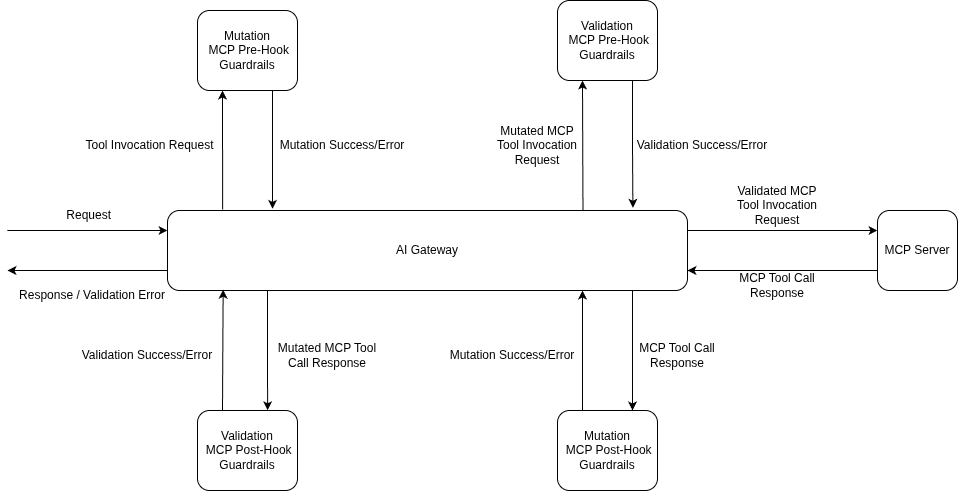 The flow is straightforward:
1. **Pre Tool** guardrails all run before the tool is called. If any of them fail, the tool never executes.
2. The **tool runs** only after all pre-tool guardrails pass.
3. **Post Tool** guardrails check (and optionally rewrite) the tool's output.
4. The validated result goes back to the model.
| Hook | Execution | What Happens on Failure |
| ----------------- | ----------------------------- | -------------------------- |
| **MCP Pre Tool** | Sync (before tool invocation) | Tool doesn't run |
| **MCP Post Tool** | Sync (after tool returns) | Result withheld from model |
Guardrails run on **every tool call separately**. If an agent calls five tools in a row, each one gets its own guardrail checks.
MCP hooks matter most in agentic setups where the model decides which tools to call on its own. Use **Pre Tool** to stop bad actions before they happen (e.g., blocking a `DROP TABLE` query), and **Post Tool** to clean up results before the model sees them (e.g., redacting secrets from a database response).
## Latency Impact of Guardrails
Guardrails add processing time — but the gateway is designed to keep that impact small.
* **Input Validation runs in parallel** with the model request, so in the happy path, it adds no extra wait time before you see the first token.
* **Input Mutation runs before** the model request, so its processing time is added directly.
* When **Input Validation fails**, the model request gets cancelled immediately — you don't pay for a response you were going to throw away.
**Execution Flow Examples**
Input validation runs in parallel with the model request. Output guardrails process the response before it's returned.
```mermaid theme={"dark"}
gantt
title All Guardrails Pass
dateFormat X
axisFormat
section Input
Input Mutation :done, 0, 2
section Parallel Execution
Input Validation ✓ :done, 2, 5
Model Request :active, 2, 8
section Output
Output Mutation :done, 8, 10
Output Validation ✓ :done, 10, 12
```
Input validation fails while the model is running — the model request gets **cancelled immediately** to save costs.
```mermaid theme={"dark"}
gantt
title Input Validation Failure — Model Request Cancelled
dateFormat X
axisFormat
section Input
Input Mutation :done, 0, 2
section Parallel Execution
Input Validation ✗ :crit, 2, 5
Model Request (cancelled) :crit, 2, 5
```
The model finishes, but output validation fails — the response is rejected. Model costs are already incurred at this point.
```mermaid theme={"dark"}
gantt
title Output Validation Failure — Response Rejected
dateFormat X
axisFormat
section Input
Input Mutation :done, 0, 2
section Parallel Execution
Input Validation ✓ :done, 2, 5
Model Request :active, 2, 8
section Output
Output Mutation :done, 8, 10
Output Validation ✗ :crit, 10, 12
```
* **All MCP guardrails run synchronously** — pre-tool guardrails block before the tool executes, and post-tool guardrails block after.
* **Pre-tool guardrail latency adds directly** to the tool call time since the tool cannot start until all pre-tool checks pass.
* When a **pre-tool guardrail fails**, the tool never executes — you avoid the cost and side effects of a bad tool call entirely.
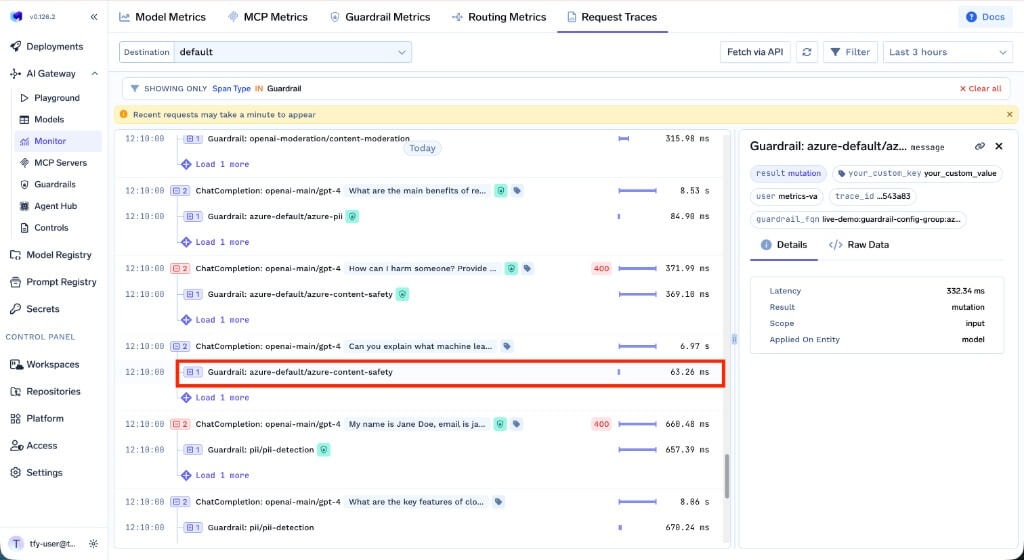
You can track the latency impact of each guardrail in **AI Gateway → Monitor → Request Traces**. Each guardrail span shows its execution time, result, scope, and which entity it was applied on.
The flow is straightforward:
1. **Pre Tool** guardrails all run before the tool is called. If any of them fail, the tool never executes.
2. The **tool runs** only after all pre-tool guardrails pass.
3. **Post Tool** guardrails check (and optionally rewrite) the tool's output.
4. The validated result goes back to the model.
| Hook | Execution | What Happens on Failure |
| ----------------- | ----------------------------- | -------------------------- |
| **MCP Pre Tool** | Sync (before tool invocation) | Tool doesn't run |
| **MCP Post Tool** | Sync (after tool returns) | Result withheld from model |
Guardrails run on **every tool call separately**. If an agent calls five tools in a row, each one gets its own guardrail checks.
MCP hooks matter most in agentic setups where the model decides which tools to call on its own. Use **Pre Tool** to stop bad actions before they happen (e.g., blocking a `DROP TABLE` query), and **Post Tool** to clean up results before the model sees them (e.g., redacting secrets from a database response).
## Latency Impact of Guardrails
Guardrails add processing time — but the gateway is designed to keep that impact small.
* **Input Validation runs in parallel** with the model request, so in the happy path, it adds no extra wait time before you see the first token.
* **Input Mutation runs before** the model request, so its processing time is added directly.
* When **Input Validation fails**, the model request gets cancelled immediately — you don't pay for a response you were going to throw away.
**Execution Flow Examples**
Input validation runs in parallel with the model request. Output guardrails process the response before it's returned.
```mermaid theme={"dark"}
gantt
title All Guardrails Pass
dateFormat X
axisFormat
section Input
Input Mutation :done, 0, 2
section Parallel Execution
Input Validation ✓ :done, 2, 5
Model Request :active, 2, 8
section Output
Output Mutation :done, 8, 10
Output Validation ✓ :done, 10, 12
```
Input validation fails while the model is running — the model request gets **cancelled immediately** to save costs.
```mermaid theme={"dark"}
gantt
title Input Validation Failure — Model Request Cancelled
dateFormat X
axisFormat
section Input
Input Mutation :done, 0, 2
section Parallel Execution
Input Validation ✗ :crit, 2, 5
Model Request (cancelled) :crit, 2, 5
```
The model finishes, but output validation fails — the response is rejected. Model costs are already incurred at this point.
```mermaid theme={"dark"}
gantt
title Output Validation Failure — Response Rejected
dateFormat X
axisFormat
section Input
Input Mutation :done, 0, 2
section Parallel Execution
Input Validation ✓ :done, 2, 5
Model Request :active, 2, 8
section Output
Output Mutation :done, 8, 10
Output Validation ✗ :crit, 10, 12
```
* **All MCP guardrails run synchronously** — pre-tool guardrails block before the tool executes, and post-tool guardrails block after.
* **Pre-tool guardrail latency adds directly** to the tool call time since the tool cannot start until all pre-tool checks pass.
* When a **pre-tool guardrail fails**, the tool never executes — you avoid the cost and side effects of a bad tool call entirely.
You can track the latency impact of each guardrail in **AI Gateway → Monitor → Request Traces**. Each guardrail span shows its execution time, result, scope, and which entity it was applied on.
 ## How to Apply Guardrails
You can attach guardrails in two ways:
Pass the `X-TFY-GUARDRAILS` header to apply guardrails on a single request. Handy for testing or when different requests need different guardrails.
```json theme={"dark"}
{
"llm_input_guardrails": ["my-group/pii-redaction"],
"llm_output_guardrails": ["my-group/secrets-detection"],
"mcp_tool_pre_invoke_guardrails": ["my-group/sql-sanitizer"],
"mcp_tool_post_invoke_guardrails": ["my-group/code-safety"]
}
```
Set up guardrail rules in **AI Gateway → Controls → Guardrails** to apply guardrails automatically based on who's making the request, which model they're calling, or which MCP tool is being used. This is the way to go for org-wide enforcement.
For a step-by-step walkthrough, see the [Getting Started](/docs/ai-gateway/guardrails-getting-started) guide. For the full policy reference, see [Guardrails Configuration](/docs/ai-gateway/guardrails-configuration).
## Supported Guardrails
The AI Gateway ships with built-in guardrails and integrates with a range of external providers — all managed through a single interface.
### TrueFoundry Built-in Guardrails
Ready to use out of the box — no external credentials needed.
These integrations run on **TrueFoundry-managed** infrastructure: you configure them in the AI Gateway; TrueFoundry operates the guardrail execution path (no third-party API keys required for the built-ins listed here). If you need a **specific vendor** (for example OpenAI Moderations, Azure Content Safety, Bedrock Guardrails, or Google Model Armor), use an integration from [External Providers](#external-providers) or [Custom Guardrails](/docs/ai-gateway/custom-guardrails).
Among TrueFoundry guardrails, these guardrails use the following services under the hood:
| Guardrail | Underlying Service | What It Does |
| ------------------------------------------------------------- | --------------------------------------- | --------------------------------------------------------------------------------------------------------------------------------------------------------------------------- |
| [Content Moderation](/docs/ai-gateway/tfy-content-moderation) | Azure AI Content Safety | Detects harmful content across four categories: Hate, Self-Harm, Sexual, and Violence. Each category has configurable severity thresholds. |
| [PII / PHI Detection](/docs/ai-gateway/tfy-pii) | Azure AI Language — PII Detection | Detects and optionally redacts personally identifiable information (PII) and protected health information (PHI) such as names, addresses, SSNs, and medical record numbers. |
| [Prompt Injection](/docs/ai-gateway/tfy-prompt-injection) | Azure AI Content Safety — Prompt Shield | Detects jailbreak attempts and prompt injection attacks designed to manipulate LLM behavior. |
These three guardrails are available **only when the gateway is hosted by TrueFoundry** ([SaaS deployment options](/docs/ai-gateway/modes-of-deployment)). They are **not available when the gateway runs on your own infrastructure** — this includes self-hosted and hybrid ("Gateway Plane only") deployments, even though TrueFoundry manages the control plane in the hybrid case.
For these deployments, use the following alternatives instead:
| Instead of | Consider Using |
| ------------------- | ------------------------------------------------------------------------------------------------------------------------------------------------------------------- |
| Content Moderation | [OpenAI Moderations](/docs/ai-gateway/openai-moderations), [AWS Bedrock Guardrails](/docs/ai-gateway/bedrock-guardrails), [Enkrypt AI](/docs/ai-gateway/enkrypt-ai) |
| PII / PHI Detection | [Azure PII](/docs/ai-gateway/azure-pii) (bring your own key), [CrowdStrike](/docs/ai-gateway/crowdstrike) |
| Prompt Injection | [Azure Prompt Shield](/docs/ai-gateway/azure-prompt-shield) (bring your own key), [Palo Alto Prisma AIRS](/docs/ai-gateway/palo-alto-airs) |
Catches and redacts credentials like AWS keys, API keys, JWT tokens, and private keys.
Flags unsafe code patterns — eval, exec, os.system, subprocess calls, dangerous shell commands.
Catches risky SQL: DROP, TRUNCATE, DELETE/UPDATE without WHERE, string interpolation.
Matches and redacts sensitive patterns (PII, payment cards, credentials) using built-in or custom regex.
Detects prompt injection attacks and jailbreak attempts using model-based analysis.
Finds and redacts personally identifiable information with configurable entity categories.
Blocks harmful content across hate, self-harm, sexual, and violence categories with adjustable thresholds.
Fine-grained access control for MCP tools using Cedar policy language with default-deny security.
Fine-grained access control with full policy lifecycle management using Open Policy Agent.
### External Providers
We also integrate with third-party guardrail providers. Don't see yours? Reach out — we're happy to add it.
OpenAI's moderation API for detecting violence, hate speech, harassment, and other policy violations.
AWS Bedrock's guardrail capabilities for AI models.
Azure's PII detection service for identifying and redacting personal data.
Azure Content Safety for detecting harmful or inappropriate content.
Azure Prompt Shield for blocking prompt injection and jailbreak attempts.
Advanced moderation and compliance — toxicity, bias, and sensitive data detection.
Palo Alto AI Risk for content safety and threat detection.
Fiddler-Safety and Fiddler-Response-Faithfulness guardrails.
API-based security — content moderation, prompt injection detection, toxicity analysis. (Formerly Pangea, acquired by CrowdStrike in 2025.)
Hallucination detection, prompt injection, PII leakage, toxicity, and bias evaluators.
Google Cloud Model Armor for prompt injection, harmful content, PII, and malicious URI detection.
Policy violation detection and content safety monitoring powered by GraySwan Cygnal.
LLM security, prompt injection detection, and policy violation monitoring with native streaming support.
LLM security testing and runtime guardrails from TrojAI.
Pillar Security guardrails for LLM application protection.
### Custom guardrail wrappers
These providers integrate through a **deployable HTTP wrapper** and the [Custom Guardrail](/docs/ai-gateway/custom-guardrails) contract (same dashboard flow as bring-your-own guardrails). Clone, deploy the FastAPI service, register URLs in **AI Gateway → Guardrails**.
NeMo `self_check_input` / `self_check_output` for jailbreak and output safety (judge LLM via your gateway).
Hub validators for PII, secrets, toxicity, and profanity—local heuristics in the wrapper pod.
Lasso API v3 `classify` and `classifix` for validate and mutate (PII masking)—policy in the Lasso console.
Arthur GenAI Engine stateless validation for prompt injection, toxicity, and hallucination—validate-only SaaS.
Managed AI governance for regulated industries—validate and mutate with PII/secrets redaction and compliant audit trail.
### Bring Your Own Guardrail / Plugin
If the built-in and provider integrations don't cover your use case, you can write your own. Build a custom guardrail with Guardrails.AI, a plain Python function, or any framework you prefer, and plug it into the gateway.
Build and integrate your own guardrail using the template repo, or start from the [reference integrations](/docs/ai-gateway/custom-guardrails#reference-integrations-deployable-wrappers) above.
## FAQ
By default, guardrails look at **all messages** in the conversation. If you only care about the latest message, set the `X-TFY-GUARDRAILS-SCOPE` header:
* **`all`** (default): Checks the full conversation history
* **`last`**: Checks only the most recent message
Using `last` is faster when you don't need to scan the whole conversation.
```bash theme={"dark"}
curl -X POST "{GATEWAY_BASE_URL}/chat/completions" \
-H "Authorization: Bearer YOUR_API_KEY" \
-H "Content-Type: application/json" \
-H 'X-TFY-GUARDRAILS: {"llm_input_guardrails":["my-group/pii-redaction"]}' \
-H "X-TFY-GUARDRAILS-SCOPE: last" \
-d '{
"model": "openai/gpt-4o",
"messages": [
{"role": "system", "content": "You are a helpful assistant."},
{"role": "user", "content": "Hello, how can you help me today?"}
]
}'
```
Depends on the enforcement strategy you picked:
* **Enforce**: Request gets blocked.
* **Enforce But Ignore On Error**: Request goes through anyway. This is the safest default — you stay protected when guardrails work, but a provider outage won't break your app.
* **Audit**: Request always goes through.
Go to **AI Gateway → Monitor → Request Traces**. You'll see:
* Which guardrails ran on each hook
* Whether they passed or failed, and how long they took
* What they found (secrets, SQL issues, unsafe patterns, etc.)
* What mutations were applied
Traces are logged for both successful and blocked requests.
**No.** Output guardrails are **skipped** when the response is streamed (`"stream": true`). Output guardrails need the complete response text to evaluate, but streaming sends tokens to the client as they are generated — so there is no full response to check before delivery begins.
**What you can do:**
* **Set `"stream": false`** if you need output guardrails to run. This ensures the gateway receives the full response, evaluates it against your output guardrails, and only then returns it to the client.
* **Handle checks client-side** — assemble the full streamed response on the client and run your own output validation after the stream completes.
* **Use input-only guardrails with streaming** — input guardrails always run regardless of streaming mode, so you still get protection on the prompt side.
```python theme={"dark"}
# Output guardrails WILL run:
response = client.chat.completions.create(
model="my-model",
messages=[{"role": "user", "content": "Hello"}],
stream=False # output guardrails are applied
)
# Output guardrails will NOT run:
response = client.chat.completions.create(
model="my-model",
messages=[{"role": "user", "content": "Hello"}],
stream=True # output guardrails are skipped
)
```
**No.** System prompts are excluded from guardrails by default — the gateway strips them before sending content to any guardrail, so they are never inspected, blocked, or redacted.
The one exception is [CrowdStrike AIDR](/docs/ai-gateway/crowdstrike), which sees the system prompt for analysis but never modifies it.
## How to Apply Guardrails
You can attach guardrails in two ways:
Pass the `X-TFY-GUARDRAILS` header to apply guardrails on a single request. Handy for testing or when different requests need different guardrails.
```json theme={"dark"}
{
"llm_input_guardrails": ["my-group/pii-redaction"],
"llm_output_guardrails": ["my-group/secrets-detection"],
"mcp_tool_pre_invoke_guardrails": ["my-group/sql-sanitizer"],
"mcp_tool_post_invoke_guardrails": ["my-group/code-safety"]
}
```
Set up guardrail rules in **AI Gateway → Controls → Guardrails** to apply guardrails automatically based on who's making the request, which model they're calling, or which MCP tool is being used. This is the way to go for org-wide enforcement.
For a step-by-step walkthrough, see the [Getting Started](/docs/ai-gateway/guardrails-getting-started) guide. For the full policy reference, see [Guardrails Configuration](/docs/ai-gateway/guardrails-configuration).
## Supported Guardrails
The AI Gateway ships with built-in guardrails and integrates with a range of external providers — all managed through a single interface.
### TrueFoundry Built-in Guardrails
Ready to use out of the box — no external credentials needed.
These integrations run on **TrueFoundry-managed** infrastructure: you configure them in the AI Gateway; TrueFoundry operates the guardrail execution path (no third-party API keys required for the built-ins listed here). If you need a **specific vendor** (for example OpenAI Moderations, Azure Content Safety, Bedrock Guardrails, or Google Model Armor), use an integration from [External Providers](#external-providers) or [Custom Guardrails](/docs/ai-gateway/custom-guardrails).
Among TrueFoundry guardrails, these guardrails use the following services under the hood:
| Guardrail | Underlying Service | What It Does |
| ------------------------------------------------------------- | --------------------------------------- | --------------------------------------------------------------------------------------------------------------------------------------------------------------------------- |
| [Content Moderation](/docs/ai-gateway/tfy-content-moderation) | Azure AI Content Safety | Detects harmful content across four categories: Hate, Self-Harm, Sexual, and Violence. Each category has configurable severity thresholds. |
| [PII / PHI Detection](/docs/ai-gateway/tfy-pii) | Azure AI Language — PII Detection | Detects and optionally redacts personally identifiable information (PII) and protected health information (PHI) such as names, addresses, SSNs, and medical record numbers. |
| [Prompt Injection](/docs/ai-gateway/tfy-prompt-injection) | Azure AI Content Safety — Prompt Shield | Detects jailbreak attempts and prompt injection attacks designed to manipulate LLM behavior. |
These three guardrails are available **only when the gateway is hosted by TrueFoundry** ([SaaS deployment options](/docs/ai-gateway/modes-of-deployment)). They are **not available when the gateway runs on your own infrastructure** — this includes self-hosted and hybrid ("Gateway Plane only") deployments, even though TrueFoundry manages the control plane in the hybrid case.
For these deployments, use the following alternatives instead:
| Instead of | Consider Using |
| ------------------- | ------------------------------------------------------------------------------------------------------------------------------------------------------------------- |
| Content Moderation | [OpenAI Moderations](/docs/ai-gateway/openai-moderations), [AWS Bedrock Guardrails](/docs/ai-gateway/bedrock-guardrails), [Enkrypt AI](/docs/ai-gateway/enkrypt-ai) |
| PII / PHI Detection | [Azure PII](/docs/ai-gateway/azure-pii) (bring your own key), [CrowdStrike](/docs/ai-gateway/crowdstrike) |
| Prompt Injection | [Azure Prompt Shield](/docs/ai-gateway/azure-prompt-shield) (bring your own key), [Palo Alto Prisma AIRS](/docs/ai-gateway/palo-alto-airs) |
Catches and redacts credentials like AWS keys, API keys, JWT tokens, and private keys.
Flags unsafe code patterns — eval, exec, os.system, subprocess calls, dangerous shell commands.
Catches risky SQL: DROP, TRUNCATE, DELETE/UPDATE without WHERE, string interpolation.
Matches and redacts sensitive patterns (PII, payment cards, credentials) using built-in or custom regex.
Detects prompt injection attacks and jailbreak attempts using model-based analysis.
Finds and redacts personally identifiable information with configurable entity categories.
Blocks harmful content across hate, self-harm, sexual, and violence categories with adjustable thresholds.
Fine-grained access control for MCP tools using Cedar policy language with default-deny security.
Fine-grained access control with full policy lifecycle management using Open Policy Agent.
### External Providers
We also integrate with third-party guardrail providers. Don't see yours? Reach out — we're happy to add it.
OpenAI's moderation API for detecting violence, hate speech, harassment, and other policy violations.
AWS Bedrock's guardrail capabilities for AI models.
Azure's PII detection service for identifying and redacting personal data.
Azure Content Safety for detecting harmful or inappropriate content.
Azure Prompt Shield for blocking prompt injection and jailbreak attempts.
Advanced moderation and compliance — toxicity, bias, and sensitive data detection.
Palo Alto AI Risk for content safety and threat detection.
Fiddler-Safety and Fiddler-Response-Faithfulness guardrails.
API-based security — content moderation, prompt injection detection, toxicity analysis. (Formerly Pangea, acquired by CrowdStrike in 2025.)
Hallucination detection, prompt injection, PII leakage, toxicity, and bias evaluators.
Google Cloud Model Armor for prompt injection, harmful content, PII, and malicious URI detection.
Policy violation detection and content safety monitoring powered by GraySwan Cygnal.
LLM security, prompt injection detection, and policy violation monitoring with native streaming support.
LLM security testing and runtime guardrails from TrojAI.
Pillar Security guardrails for LLM application protection.
### Custom guardrail wrappers
These providers integrate through a **deployable HTTP wrapper** and the [Custom Guardrail](/docs/ai-gateway/custom-guardrails) contract (same dashboard flow as bring-your-own guardrails). Clone, deploy the FastAPI service, register URLs in **AI Gateway → Guardrails**.
NeMo `self_check_input` / `self_check_output` for jailbreak and output safety (judge LLM via your gateway).
Hub validators for PII, secrets, toxicity, and profanity—local heuristics in the wrapper pod.
Lasso API v3 `classify` and `classifix` for validate and mutate (PII masking)—policy in the Lasso console.
Arthur GenAI Engine stateless validation for prompt injection, toxicity, and hallucination—validate-only SaaS.
Managed AI governance for regulated industries—validate and mutate with PII/secrets redaction and compliant audit trail.
### Bring Your Own Guardrail / Plugin
If the built-in and provider integrations don't cover your use case, you can write your own. Build a custom guardrail with Guardrails.AI, a plain Python function, or any framework you prefer, and plug it into the gateway.
Build and integrate your own guardrail using the template repo, or start from the [reference integrations](/docs/ai-gateway/custom-guardrails#reference-integrations-deployable-wrappers) above.
## FAQ
By default, guardrails look at **all messages** in the conversation. If you only care about the latest message, set the `X-TFY-GUARDRAILS-SCOPE` header:
* **`all`** (default): Checks the full conversation history
* **`last`**: Checks only the most recent message
Using `last` is faster when you don't need to scan the whole conversation.
```bash theme={"dark"}
curl -X POST "{GATEWAY_BASE_URL}/chat/completions" \
-H "Authorization: Bearer YOUR_API_KEY" \
-H "Content-Type: application/json" \
-H 'X-TFY-GUARDRAILS: {"llm_input_guardrails":["my-group/pii-redaction"]}' \
-H "X-TFY-GUARDRAILS-SCOPE: last" \
-d '{
"model": "openai/gpt-4o",
"messages": [
{"role": "system", "content": "You are a helpful assistant."},
{"role": "user", "content": "Hello, how can you help me today?"}
]
}'
```
Depends on the enforcement strategy you picked:
* **Enforce**: Request gets blocked.
* **Enforce But Ignore On Error**: Request goes through anyway. This is the safest default — you stay protected when guardrails work, but a provider outage won't break your app.
* **Audit**: Request always goes through.
Go to **AI Gateway → Monitor → Request Traces**. You'll see:
* Which guardrails ran on each hook
* Whether they passed or failed, and how long they took
* What they found (secrets, SQL issues, unsafe patterns, etc.)
* What mutations were applied
Traces are logged for both successful and blocked requests.
**No.** Output guardrails are **skipped** when the response is streamed (`"stream": true`). Output guardrails need the complete response text to evaluate, but streaming sends tokens to the client as they are generated — so there is no full response to check before delivery begins.
**What you can do:**
* **Set `"stream": false`** if you need output guardrails to run. This ensures the gateway receives the full response, evaluates it against your output guardrails, and only then returns it to the client.
* **Handle checks client-side** — assemble the full streamed response on the client and run your own output validation after the stream completes.
* **Use input-only guardrails with streaming** — input guardrails always run regardless of streaming mode, so you still get protection on the prompt side.
```python theme={"dark"}
# Output guardrails WILL run:
response = client.chat.completions.create(
model="my-model",
messages=[{"role": "user", "content": "Hello"}],
stream=False # output guardrails are applied
)
# Output guardrails will NOT run:
response = client.chat.completions.create(
model="my-model",
messages=[{"role": "user", "content": "Hello"}],
stream=True # output guardrails are skipped
)
```
**No.** System prompts are excluded from guardrails by default — the gateway strips them before sending content to any guardrail, so they are never inspected, blocked, or redacted.
The one exception is [CrowdStrike AIDR](/docs/ai-gateway/crowdstrike), which sees the system prompt for analysis but never modifies it.