> ## Documentation Index
> Fetch the complete documentation index at: https://www.truefoundry.com/llms.txt
> Use this file to discover all available pages before exploring further.
# GraySwan Cygnal Integration
> Learn how to use GraySwan Cygnal with TrueFoundry AI Gateway for policy violation detection and content safety monitoring.
This guide explains how to integrate [GraySwan Cygnal](https://docs.grayswan.ai/cygnal/monitor-requests) with TrueFoundry to enhance the safety and compliance of your LLM applications.
## What is GraySwan Cygnal?
GraySwan Cygnal is an AI safety monitoring platform that analyzes messages for policy violations and potential risks in your LLM deployments. It returns violation scores ranging from 0 to 1, where higher scores indicate greater likelihood of policy violations, along with metadata for risk assessment.
### Key Features of GraySwan Cygnal
1. **Policy-Based Content Monitoring**: Customizable rules and policies to detect violations across multiple dimensions, with built-in policies like Basic Content Safety.
2. **Multi-Policy Aggregation**: Combine multiple policy IDs with custom rules for layered security. Earlier policies take precedence, and custom rules supplement the merged policy rules.
3. **Configurable Reasoning Modes**: Balance detection quality and latency with `off`, `hybrid`, and `thinking` reasoning modes.
### Adding GraySwan Cygnal Integration
To add GraySwan Cygnal to your TrueFoundry setup, follow these steps:
**Fill in the Guardrails Group Form**
* **Name**: Enter a name for your guardrails group.
* **Collaborators**: Add collaborators who will have access to this group.
* **GraySwan Cygnal Config**:
* **Name**: Enter a name for the GraySwan Cygnal configuration (e.g., `grayswan`).
* **Description** (Optional): A description for the guardrail (e.g., "GraySwan Cygnal for policy violation and content safety monitoring").
* **Operation**: The operation type for this guardrail. GraySwan Cygnal guardrails can only be used for **Validate** — requests are validated against configured policies and rules.
* **GraySwan Cygnal Authentication Data**:
* **API Key**: The API key for GraySwan Cygnal. This key is required to authenticate requests to the Cygnal monitoring API. You can obtain it from the [GraySwan portal](https://docs.grayswan.ai/cygnal/monitor-requests). Ensure you keep this key secure, as it grants access to your GraySwan Cygnal resources.
* **Policy IDs** (Optional): Custom policy IDs to use for monitoring. Rules from all policies are merged in order, with earlier policies taking precedence. If not provided, the default **Basic Content Safety** policy is applied. You can create and manage policies in the [GraySwan portal](https://docs.grayswan.ai/cygnal/monitor-requests).
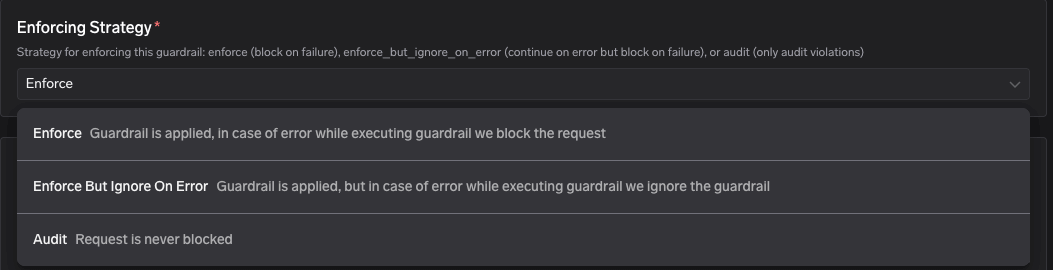
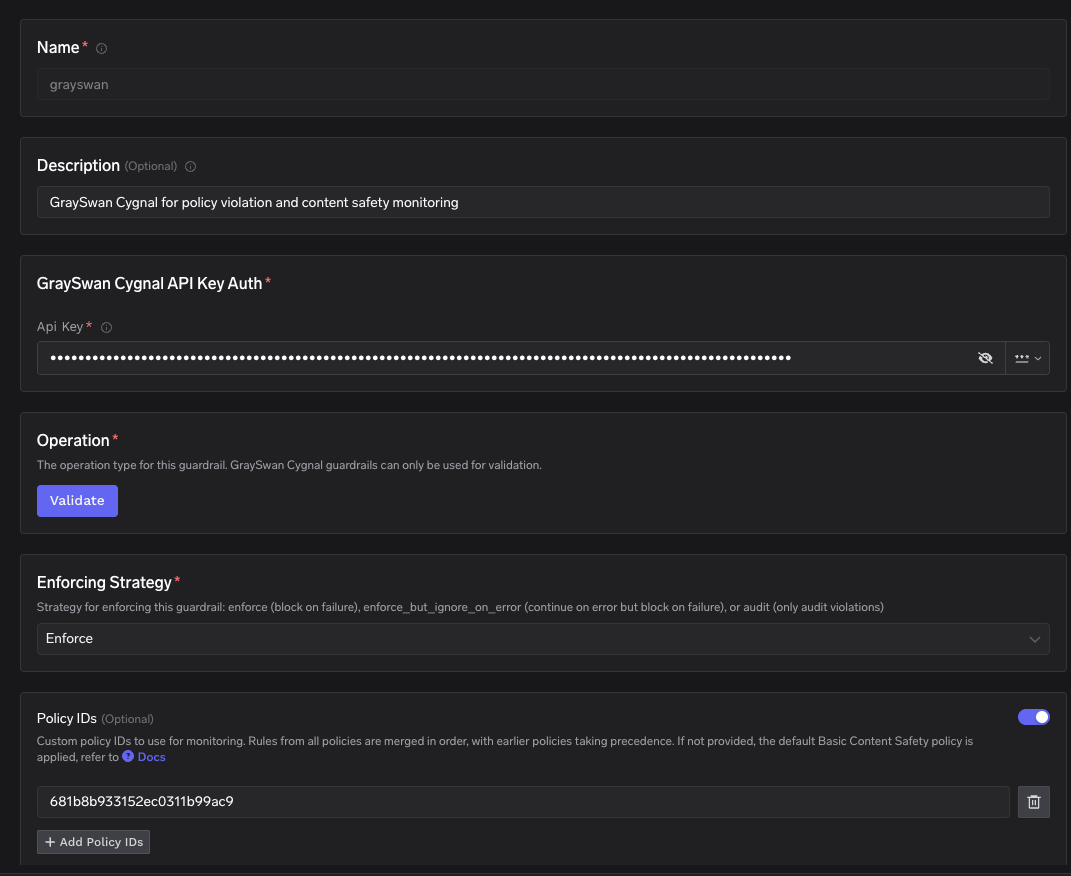 * **Enforcing Strategy**: Strategy for enforcing this guardrail:
* **Enforce**: Guardrail is applied. If a violation is detected or an error occurs during execution, the request is blocked.
* **Enforce But Ignore On Error**: Guardrail is applied, but if an error occurs during execution, the guardrail is ignored and the request proceeds.
* **Audit**: Request is never blocked. Violations are logged for review only.
* **Enforcing Strategy**: Strategy for enforcing this guardrail:
* **Enforce**: Guardrail is applied. If a violation is detected or an error occurs during execution, the request is blocked.
* **Enforce But Ignore On Error**: Guardrail is applied, but if an error occurs during execution, the guardrail is ignored and the request proceeds.
* **Audit**: Request is never blocked. Violations are logged for review only.
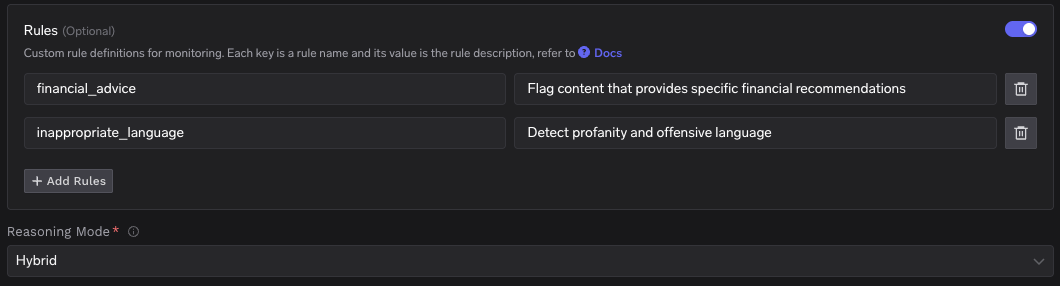
 * **Rules** (Optional): Custom rule definitions for monitoring. Each key is a rule name and its value is the rule description. For example:
* `financial_advice` → "Flag content that provides specific financial recommendations"
* `inappropriate_language` → "Detect profanity and offensive language"
* **Reasoning Mode**: Controls whether Cygnal uses internal reasoning steps before determining if content violates policy:
* **Off** (default): Fastest and lowest latency. No additional reasoning tokens. Recommended for most production use.
* **Hybrid**: Moderate latency increase. The model reasons as needed without a prescribed reasoning style. Good balance for higher-risk contexts.
* **Thinking**: Highest latency and token usage. The model performs guided internal reasoning before classification. Use when detection quality matters more than speed (e.g., offline analysis, security reviews).
* **Rules** (Optional): Custom rule definitions for monitoring. Each key is a rule name and its value is the rule description. For example:
* `financial_advice` → "Flag content that provides specific financial recommendations"
* `inappropriate_language` → "Detect profanity and offensive language"
* **Reasoning Mode**: Controls whether Cygnal uses internal reasoning steps before determining if content violates policy:
* **Off** (default): Fastest and lowest latency. No additional reasoning tokens. Recommended for most production use.
* **Hybrid**: Moderate latency increase. The model reasons as needed without a prescribed reasoning style. Good balance for higher-risk contexts.
* **Thinking**: Highest latency and token usage. The model performs guided internal reasoning before classification. Use when detection quality matters more than speed (e.g., offline analysis, security reviews).
 #### Response Structure
The GraySwan Cygnal monitoring API (`POST https://api.grayswan.ai/cygnal/monitor`) returns a response with the following structure:
This is an example response from GraySwan Cygnal where policy violations are detected. The `violation` score is close to 1.0, indicating high confidence that the content violates the specified policies. The `violated_rules` array lists the indices of specific rules that were violated.
```json theme={"dark"}
{
"violation": 0.92,
"violated_rules": [2, 3],
"mutation": false,
"ipi": true,
"violated_rule_descriptions": [
{ "rule": 2, "name": "financial_advice", "description": "Flag content that provides specific financial recommendations" },
{ "rule": 3, "name": "inappropriate_language", "description": "Detect profanity and offensive language" }
]
}
```
This is an example response from GraySwan Cygnal where the content passes all policy checks. The `violation` score is close to 0.0, indicating no policy violations were detected.
```json theme={"dark"}
{
"violation": 0.005,
"violated_rules": [],
"mutation": false,
"ipi": false,
"violated_rule_descriptions": []
}
```
| Field | Type | Description |
| ---------------------------- | ------- | ------------------------------------------------------------------------------------------------------ |
| `violation` | number | Probability of violation (0.0 to 1.0). Higher scores indicate greater likelihood of policy violations. |
| `violated_rules` | array | List of indices of the specific rules that were violated. |
| `mutation` | boolean | Whether text formatting or mutation was detected in the input. |
| `ipi` | boolean | Whether indirect prompt injection was detected (applicable for tool role messages). |
| `violated_rule_descriptions` | array | Detailed information for each violated rule, including rule index, name, and description. |
#### Validation Logic
GraySwan Cygnal returns a `violation` score between 0.0 and 1.0. Policies and rules configured in the [GraySwan portal](https://docs.grayswan.ai/cygnal/monitor-requests) define what content is checked, but the numeric cutoff for blocking is applied on the client side by TrueFoundry.
TrueFoundry uses a default threshold of **0.5** to determine content safety:
* If the `violation` score is **>= 0.5**, the request is considered a policy violation — it will be blocked and a 400 error is returned.
* If the `violation` score is **\< 0.5**, the request will be allowed to proceed.
If you need a custom violation threshold for your use case, reach out to us at [support@truefoundry.com](mailto:support@truefoundry.com).
#### Request Logs
When a GraySwan Cygnal guardrail triggers, you can inspect the full request flow in the TrueFoundry request logs. The logs show the guardrail evaluation call to `https://api.grayswan.ai/cygnal/monitor`, the violation result, and the downstream model request status.
#### Response Structure
The GraySwan Cygnal monitoring API (`POST https://api.grayswan.ai/cygnal/monitor`) returns a response with the following structure:
This is an example response from GraySwan Cygnal where policy violations are detected. The `violation` score is close to 1.0, indicating high confidence that the content violates the specified policies. The `violated_rules` array lists the indices of specific rules that were violated.
```json theme={"dark"}
{
"violation": 0.92,
"violated_rules": [2, 3],
"mutation": false,
"ipi": true,
"violated_rule_descriptions": [
{ "rule": 2, "name": "financial_advice", "description": "Flag content that provides specific financial recommendations" },
{ "rule": 3, "name": "inappropriate_language", "description": "Detect profanity and offensive language" }
]
}
```
This is an example response from GraySwan Cygnal where the content passes all policy checks. The `violation` score is close to 0.0, indicating no policy violations were detected.
```json theme={"dark"}
{
"violation": 0.005,
"violated_rules": [],
"mutation": false,
"ipi": false,
"violated_rule_descriptions": []
}
```
| Field | Type | Description |
| ---------------------------- | ------- | ------------------------------------------------------------------------------------------------------ |
| `violation` | number | Probability of violation (0.0 to 1.0). Higher scores indicate greater likelihood of policy violations. |
| `violated_rules` | array | List of indices of the specific rules that were violated. |
| `mutation` | boolean | Whether text formatting or mutation was detected in the input. |
| `ipi` | boolean | Whether indirect prompt injection was detected (applicable for tool role messages). |
| `violated_rule_descriptions` | array | Detailed information for each violated rule, including rule index, name, and description. |
#### Validation Logic
GraySwan Cygnal returns a `violation` score between 0.0 and 1.0. Policies and rules configured in the [GraySwan portal](https://docs.grayswan.ai/cygnal/monitor-requests) define what content is checked, but the numeric cutoff for blocking is applied on the client side by TrueFoundry.
TrueFoundry uses a default threshold of **0.5** to determine content safety:
* If the `violation` score is **>= 0.5**, the request is considered a policy violation — it will be blocked and a 400 error is returned.
* If the `violation` score is **\< 0.5**, the request will be allowed to proceed.
If you need a custom violation threshold for your use case, reach out to us at [support@truefoundry.com](mailto:support@truefoundry.com).
#### Request Logs
When a GraySwan Cygnal guardrail triggers, you can inspect the full request flow in the TrueFoundry request logs. The logs show the guardrail evaluation call to `https://api.grayswan.ai/cygnal/monitor`, the violation result, and the downstream model request status.
