> ## Documentation Index
> Fetch the complete documentation index at: https://www.truefoundry.com/llms.txt
> Use this file to discover all available pages before exploring further.
# Exporting traces using Vector
> Export AI Gateway traces through Vector on your gateway plane: disk-buffered delivery to the control plane and optional sinks to other OTLP collectors.
The `tfy-llm-gateway` Helm chart ships an optional [Vector](https://vector.dev/) aggregator that sits between the gateway and the control plane. The gateway sends traces to Vector inside the cluster. Vector writes them to a disk buffer on a PersistentVolume and forwards them to the control plane, retrying until delivery succeeds. You can also add extra sinks so the same traces go to collectors such as Pydantic Logfire or your own OpenTelemetry Collector.
Vector is **disabled by default**. On-prem customers can enable it by adding the values below to their gateway plane values file.
## How it works
```mermaid theme={"dark"}
flowchart LR
GW["tfy-llm-gateway pods"] -- "OTLP/HTTP :4318" --> V["tfy-vector StatefulSet
(disk buffer per replica)"]
V -- "tfy_otel_traces sink" --> CP["TrueFoundry control plane
/api/otel/v1/traces"]
V -. "optional extra sinks" .-> EXT["Your OTLP collectors"]
```
When you set `vector.enabled: true`, the chart:
* Deploys Vector as a StatefulSet named `tfy-vector` (3 replicas by default), each replica with its own PersistentVolumeClaim for the disk buffer.
* Renders the Vector configuration into the `tfy-llm-gateway-vector-config` ConfigMap. It defines an `otel_in` OTLP source (gRPC `4317`, HTTP `4318`) and a `tfy_otel_traces` sink that forwards to `/api/otel/v1/traces`.
* Points the gateway at Vector by setting `TFY_OTEL_EXPORTER_OTLP_TRACES_ENDPOINT` to `http://tfy-vector..svc.cluster.local:4318/v1/traces` (`https://` when `vector.mtls.enabled` is true). If you already set `env.TFY_OTEL_EXPORTER_OTLP_TRACES_ENDPOINT` yourself, the chart leaves it unchanged.
* Authenticates to the control plane with `TFY_API_KEY` from the `truefoundry-creds` secret that you created during [gateway plane installation](/docs/platform/deploy-gateway-plane).
Only traces go through Vector. Gateway metrics are not affected.
## Prerequisites
* `global.controlPlaneURL` is set in your values file. The chart fails to render without it when Vector is enabled.
* The `truefoundry-creds` secret with the `TFY_API_KEY` key exists in the gateway namespace.
* A StorageClass that can provision `ReadWriteOnce` volumes. With the defaults, Vector requests 3 PVCs of `22Gi` each.
* The gateway and Vector run in the release namespace. Vector cannot be combined with a `global.namespaceOverride` that differs from the release namespace.
* Nodes can pull `tfy.jfrog.io/tfy-mirror/timberio/vector` using the `truefoundry-image-pull-secret` image pull secret (override with `vector.image.pullSecrets` if needed).
## Enable Vector
Add the following to the values file that you use for the gateway plane, for example `truefoundry-values.yaml`:
```yaml truefoundry-values.yaml theme={"dark"}
global:
controlPlaneURL: https://example-company.truefoundry.cloud
vector:
enabled: true
```
```bash theme={"dark"}
helm upgrade --install truefoundry oci://tfy.jfrog.io/tfy-helm/tfy-llm-gateway \
-n truefoundry -f truefoundry-values.yaml
```
Check that the Vector pods are ready and that each replica has a bound volume:
```bash theme={"dark"}
kubectl get statefulset tfy-vector -n truefoundry
kubectl get pvc -n truefoundry | grep data-tfy-vector
```
Confirm that the gateway exports traces to Vector:
```bash theme={"dark"}
kubectl get deploy -n truefoundry -o yaml | grep -A1 TFY_OTEL_EXPORTER_OTLP_TRACES_ENDPOINT
```
The value should be `http://tfy-vector.truefoundry.svc.cluster.local:4318/v1/traces`.
Send a request through the gateway and check the Vector logs. A successful delivery to the control plane logs `HTTP response. status=200` for the `tfy_otel_traces` sink:
```bash theme={"dark"}
kubectl logs -n truefoundry tfy-vector-0 | grep tfy_otel_traces | grep "status="
```
The trace for the request shows up in **AI Gateway** → **Monitor** → **Request Traces** in the TrueFoundry dashboard.
## Configuration reference
All keys live under `vector` in the `tfy-llm-gateway` values file. The defaults suit most deployments.
| Key | Default | Description |
| - | - | - |
| `vector.enabled` | `false` | Deploy Vector and route gateway traces through it. |
| `vector.replicas` | `3` | Number of Vector replicas. Each replica has its own disk buffer. |
| `vector.buffer.maxSizeBytes` | `21474836480` (20 GiB) | Disk buffer size for the control plane sink, per replica. Must fit inside `vector.persistence.size`. |
| `vector.buffer.whenFull` | `drop_newest` | `drop_newest` discards new spans when the buffer is full. `block` applies backpressure to the gateway. |
| `vector.forward.enabled` | `true` | Send traces to the control plane. See [Stop sending traces to the control plane](#stop-sending-traces-to-the-control-plane). |
| `vector.extraSinks` | `{}` | Additional Vector sinks. See [Export traces to other OTLP collectors](#export-traces-to-other-otlp-collectors). |
| `vector.persistence.enabled` | `true` | Create a PVC per replica for the disk buffer. If disabled, the buffer lives in an `emptyDir` and is lost on reschedule. |
| `vector.persistence.size` | `22Gi` | PVC size per replica. Keep it about 10% larger than `vector.buffer.maxSizeBytes`. |
| `vector.persistence.storageClassName` | `""` | StorageClass for the PVCs. Empty uses the cluster default. |
| `vector.mtls.enabled` | `false` | Require mTLS on Vector's OTLP receivers. Requires `global.mTLS.enabled: true`. |
| `vector.image.pullSecrets` | `[truefoundry-image-pull-secret]` | Image pull secrets for Vector pods. The Vector subchart ignores `imagePullSecrets` and `global.imagePullSecrets`. |
For retries, compression, resources, scheduling, logging, and other keys, see the [`tfy-llm-gateway` chart values](https://github.com/truefoundry/infra-charts/tree/main/charts/tfy-llm-gateway) and the upstream [Vector Helm chart](https://github.com/vectordotdev/helm-charts/tree/develop/charts/vector). Sink-level options such as batching, retries, and TLS are documented in the [OpenTelemetry sink reference](https://vector.dev/docs/reference/configuration/sinks/opentelemetry/) and the [Vector buffering model](https://vector.dev/docs/architecture/buffering-model/).
If you might add extra sinks with disk buffers later, include them in `vector.persistence.size` from the start. Changing the size on an existing install takes manual steps outside Helm. See [Resize the buffer disk](#resize-the-buffer-disk).
Helm replaces lists as a whole instead of merging them. When you override any of these list values, copy the chart defaults into your override and add your entries:
`vector.env`, `vector.args`, `vector.existingConfigMaps`, `vector.extraVolumes`, and `vector.extraVolumeMounts`. Run `helm show values oci://tfy.jfrog.io/tfy-helm/tfy-llm-gateway --version ` to see the defaults for your chart version.
## Export traces to other OTLP collectors
Besides the control plane, Vector can send the same traces to any OTLP-compatible backend, such as Pydantic Logfire, Grafana, Datadog, Honeycomb, or your own OpenTelemetry Collector. These exports go **directly from your gateway plane** to the destination and do not pass through the TrueFoundry control plane.
TrueFoundry stores and shows only the traces that the `tfy_otel_traces` sink delivers to the control plane. Data that you send to other collectors is not queryable from the TrueFoundry platform. You will have to query it in the destination tool instead.
If you want the control plane to forward traces to an external platform, use the dashboard instead: see [Export OpenTelemetry Data](/docs/ai-gateway/export-opentelemetry-data). The Vector approach on this page keeps exported data inside your network path and does not depend on the control plane being reachable.
### Add collectors with `vector.extraSinks`
Each entry under `vector.extraSinks` is one Vector [sink](https://vector.dev/docs/reference/configuration/sinks/). The key is the sink ID and the value is the sink configuration. The chart merges these entries into the Vector configuration next to `tfy_otel_traces`, so you can add as many collectors as you need.
* Sink IDs must be unique. `tfy_otel_traces` and `prom_exporter` are reserved for the sinks the chart renders, and the chart fails to render if you reuse them.
* Every entry needs a `type`. For OTLP backends, use `type: opentelemetry` with `protocol.type: http` and the destination's `/v1/traces` endpoint. Vector's OpenTelemetry sink does not send OTLP over gRPC.
* If an entry does not set `inputs` or `buffer`, the chart fills them from `vector.extraSinkDefaults`: `inputs: [otel_in.traces]` (the gateway traces) and an in-memory buffer of 10,000 events that drops new spans when full. This keeps a slow or unreachable collector from stalling delivery to the control plane and to your other collectors. See [Sink options](#sink-options) to change it.
* Vector reloads its configuration in place about every 30 seconds, so adding, changing, or removing an entry does not restart the pods.
### Store collector credentials
Do not write tokens or API keys into your values file. Store them in a Kubernetes Secret and reference them from the sink.
Other values in TrueFoundry charts reference secrets as `${k8s-secret//}`. That syntax does not work inside a Vector sink, because Vector reads its configuration directly and does not interpolate environment variables. Vector sinks use Vector's [`SECRET[...]` references](https://vector.dev/docs/reference/configuration/secrets/) instead. The chart uses the same mechanism for its own control plane token.
The chart sets up everything except the Secret itself:
1. You create a Kubernetes Secret named `tfy-vector-extra-sink-credentials` in the gateway namespace, with one key per credential.
2. The chart mounts that Secret into every Vector pod at `/etc/vector-extra-sink-credentials`, where each key becomes a file. The mount is optional, so Vector starts normally before the Secret exists.
3. The chart declares a Vector secret backend named `extra_sink_credentials` that reads that directory.
4. In a sink, you write `SECRET[extra_sink_credentials.]`. Vector replaces it with the value of that key when it loads the configuration. The value never appears in your values file, the Helm release, or the ConfigMap.
| Secret key | Reference in a sink |
| - | - |
| `LOGFIRE_TOKEN` | `SECRET[extra_sink_credentials.LOGFIRE_TOKEN]` |
| `HONEYCOMB_API_KEY` | `SECRET[extra_sink_credentials.HONEYCOMB_API_KEY]` |
A reference can be part of a longer string, for example `"Bearer SECRET[extra_sink_credentials.GRAFANA_TOKEN]"`.
```bash theme={"dark"}
kubectl create secret generic tfy-vector-extra-sink-credentials -n truefoundry \
--from-literal=LOGFIRE_TOKEN='' \
--from-literal=HONEYCOMB_API_KEY=''
```
```yaml tfy-vector-extra-sink-credentials.yaml theme={"dark"}
apiVersion: v1
kind: Secret
metadata:
name: tfy-vector-extra-sink-credentials
namespace: truefoundry
type: Opaque
stringData:
LOGFIRE_TOKEN:
HONEYCOMB_API_KEY:
```
```bash theme={"dark"}
kubectl apply -f tfy-vector-extra-sink-credentials.yaml
```
Do not commit this file with real values. If you manage secrets with a tool such as External Secrets Operator or Sealed Secrets, have it produce a Secret with this name and these keys.
Update the key in the Secret, then restart Vector:
```bash theme={"dark"}
kubectl rollout restart statefulset tfy-vector -n truefoundry
```
Vector reads secret values only when it loads its configuration. Kubernetes refreshes the mounted file after you update the Secret, but Vector keeps using the old value until the pods restart or the configuration changes.
The Vector subchart cannot template volume names, so point the `extra-sink-credentials` volume at your Secret in `vector.extraVolumes`. Helm replaces this list as a whole, so keep the other default volumes:
```yaml truefoundry-values.yaml theme={"dark"}
vector:
extraVolumes:
- name: tfy-credentials
secret:
secretName: truefoundry-creds
items:
- key: TFY_API_KEY
path: TFY_API_KEY
- name: truefoundry-mtls
secret:
secretName: truefoundry-internal-tls
optional: true
- name: custom-ca
configMap:
name: tfy-llm-gateway-custom-ca
optional: true
- name: ssl-certs
emptyDir:
sizeLimit: 10Mi
- name: extra-sink-credentials
secret:
secretName: my-observability-secrets # your Secret
optional: true
```
References stay the same: `SECRET[extra_sink_credentials.]`, where `` is a key in your Secret.
Vector rejects a configuration that references a key that is not in the Secret, and logs `Error while retrieving secret from backend "extra_sink_credentials"`. A pod that is starting fails to start. A running pod keeps its previous configuration until you add the key or fix the reference.
### Example: Logfire and an in-cluster collector
This example keeps the control plane sink and adds two collectors:
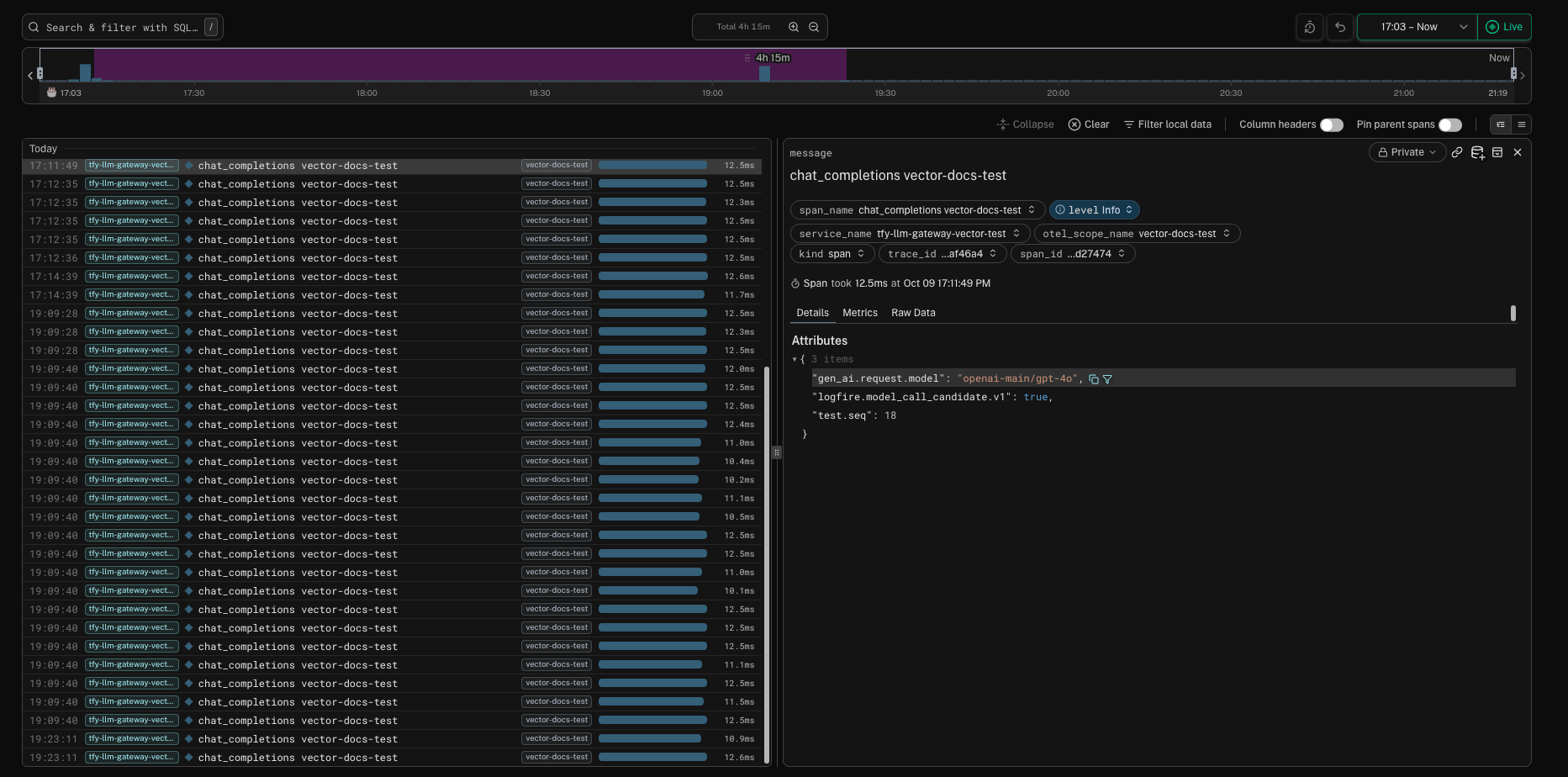
* `logfire` sends traces to [Pydantic Logfire](https://logfire.pydantic.dev/docs/how-to-guides/alternative-clients/) and authenticates with a write token from the `tfy-vector-extra-sink-credentials` Secret.
* `otel_collector` sends traces to an OpenTelemetry Collector in the same cluster, without authentication.
```bash theme={"dark"}
kubectl create secret generic tfy-vector-extra-sink-credentials -n truefoundry \
--from-literal=LOGFIRE_TOKEN=''
```
Create the write token in your Logfire project settings. See [Create write tokens](https://pydantic.dev/docs/logfire/manage/create-write-tokens/). Use the endpoint for your Logfire region, `https://logfire-us.pydantic.dev` or `https://logfire-eu.pydantic.dev`. A token from one region is rejected by the other.
```yaml truefoundry-values.yaml lines theme={"dark"}
global:
controlPlaneURL: https://example-company.truefoundry.cloud
vector:
enabled: true
extraSinks:
logfire:
type: opentelemetry
protocol:
type: http
uri: https://logfire-us.pydantic.dev/v1/traces
method: post
compression: gzip
encoding:
codec: otlp
request:
timeout_secs: 30
headers:
Authorization: "SECRET[extra_sink_credentials.LOGFIRE_TOKEN]"
otel_collector:
type: opentelemetry
protocol:
type: http
uri: http://otel-collector.observability.svc.cluster.local:4318/v1/traces
method: post
encoding:
codec: otlp
request:
timeout_secs: 30
```
```bash theme={"dark"}
helm upgrade --install truefoundry oci://tfy.jfrog.io/tfy-helm/tfy-llm-gateway \
-n truefoundry -f truefoundry-values.yaml
```
Send a few requests through the gateway, then check the response status that each sink logs:
```bash theme={"dark"}
kubectl logs -n truefoundry tfy-vector-0 \
| grep -E "component_id=(tfy_otel_traces|logfire|otel_collector)" \
| grep "status="
```
Every sink should log `status=200`:
```text theme={"dark"}
... component_id=tfy_otel_traces ... HTTP response. status=200 ...
... component_id=logfire ... HTTP response. status=200 ...
... component_id=otel_collector ... HTTP response. status=200 ...
```
The traces then appear in TrueFoundry and in the Logfire **Live** view:
 ### Stop sending traces to the control plane
To send gateway traces only to your own collectors, set `vector.forward.enabled: false`. The chart then leaves out the `tfy_otel_traces` sink. At least one entry in `vector.extraSinks` is required, and the chart fails to render without one.
```yaml truefoundry-values.yaml theme={"dark"}
vector:
enabled: true
forward:
enabled: false
extraSinks:
otel_collector:
type: opentelemetry
protocol:
type: http
uri: http://otel-collector.observability.svc.cluster.local:4318/v1/traces
method: post
encoding:
codec: otlp
```
With `vector.forward.enabled: false`, the control plane receives no traces from this gateway. Request Traces, the model metrics built from traces, and the OTEL traces export configured in the dashboard stay empty for it. Gateway metrics do not go through Vector and are not affected.
Only `tfy_otel_traces` uses the disk buffer by default. If none of your sinks uses a disk buffer, you can set `vector.persistence.enabled: false` to skip creating the PersistentVolumeClaims.
### How sinks share Vector
Every sink reads the same traces from the `otel_in` source and keeps its own copy of each span.
* **Each sink has its own buffer, retries, and connection settings.** A collector that is slow, unreachable, or rejecting requests fills only its own buffer. The control plane sink and your other collectors keep delivering.
* **Disk buffers are separate but share one volume.** Vector keeps each disk buffer in its own directory under `vector.dataDir`, named after the sink ID, with its own `max_size`. All of them live on the same PersistentVolume, so `vector.persistence.size` must hold the sum of every disk buffer plus some headroom.
* **Buffers are per replica.** With 3 replicas, each sink has 3 independent buffers, and the gateway's spans are spread across the replicas.
* **Sinks do not slow down the gateway.** Vector responds to the gateway's OTLP request without waiting for the sinks to deliver, so an unreachable collector does not add latency to trace export.
These parts are shared by all sinks and cannot be set per sink:
* **Input.** Every sink receives every gateway trace. The chart does not support Vector transforms, so you cannot filter or sample spans for one sink only.
* **Vector deployment.** The OTLP receiver (ports, mTLS, maximum request size), replicas, resources, scheduling, the PersistentVolume, and the Vector version.
* **Backpressure.** When a sink with `when_full: block` has a full buffer, Vector stops reading from the source and every sink stalls. Extra sinks use `drop_newest` by default for this reason.
#### Control plane sink compared with extra sinks
| | Control plane sink (`tfy_otel_traces`) | Extra sinks (`vector.extraSinks`) |
| - | - | - |
| Configuration | Rendered by the chart. Only the `vector.buffer.*` and `vector.forward.*` values can be changed. | Any Vector sink configuration, passed through as written. |
| Buffer | Disk. Size and `whenFull` are configurable. | Memory by default (10,000 events, `drop_newest`). Memory or disk. |
| Retries | Status codes in `vector.forward.retryStatusCodes`, retried without limit. | Any retry strategy and limit. |
| Destination and credentials | `/api/otel/v1/traces` with `TFY_API_KEY`. | Any endpoint. Credentials through `SECRET[extra_sink_credentials.]`. |
| Turn on or off | `vector.forward.enabled` | Add or remove the entry. |
| Data visible in TrueFoundry | Yes | No |
#### Options you can set per extra sink
For an `opentelemetry` sink, set `inputs`, `buffer`, `healthcheck`, and `proxy` at the top level. Everything else goes under `protocol` (URI, headers, retries, batching, TLS, and so on).
This example gives Logfire a 2 GiB disk buffer and a retry limit:
```yaml truefoundry-values.yaml theme={"dark"}
vector:
extraSinks:
logfire:
type: opentelemetry
buffer:
type: disk
max_size: 2147483648 # 2 GiB; must fit in vector.persistence.size with the other disk buffers
when_full: drop_newest
protocol:
type: http
uri: https://logfire-us.pydantic.dev/v1/traces
method: post
compression: gzip
encoding:
codec: otlp
request:
timeout_secs: 30
retry_attempts: 10
headers:
Authorization: "SECRET[extra_sink_credentials.LOGFIRE_TOKEN]"
```
For every option and its default, see the [OpenTelemetry sink reference](https://vector.dev/docs/reference/configuration/sinks/opentelemetry/) and the [Vector buffering model](https://vector.dev/docs/architecture/buffering-model/).
### Sink options
A buffer set on a sink replaces the default buffer as a whole. To make a sink survive restarts and longer collector outages, give it a disk buffer. The disk buffer shares the PersistentVolume with the control plane buffer, so make room for it in one of these ways:
* On a new install, increase `vector.persistence.size` by the same amount.
* On an existing install, either lower `vector.buffer.maxSizeBytes` by the same amount, or grow the volumes as described in [Resize the buffer disk](#resize-the-buffer-disk).
```yaml truefoundry-values.yaml theme={"dark"}
vector:
extraSinks:
otel_collector:
type: opentelemetry
buffer:
type: disk
max_size: 5368709120 # 5 GiB; must fit in vector.persistence.size with the other disk buffers
when_full: drop_newest
protocol:
type: http
uri: http://otel-collector.observability.svc.cluster.local:4318/v1/traces
method: post
encoding:
codec: otlp
```
To change the default for every extra sink, set `vector.extraSinkDefaults.buffer`. Avoid `when_full: block` on extra sinks: when that buffer fills up, Vector stops reading from the shared source, which also stalls the control plane sink. See [Vector buffering model](https://vector.dev/docs/architecture/buffering-model/) for details.
Most OTLP backends authenticate with a header. Add one key per credential to the `tfy-vector-extra-sink-credentials` Secret and reference it from `request.headers`:
```yaml theme={"dark"}
request:
headers:
x-honeycomb-team: "SECRET[extra_sink_credentials.HONEYCOMB_API_KEY]"
```
Header names and value formats come from the destination's OTLP/HTTP documentation.
Vector trusts the system CA bundle plus `global.customCA` when it is enabled. For a collector that uses a private CA that is not in that bundle, set TLS options on the sink, for example `tls.ca_file`, and mount the CA file with `vector.extraVolumes`. See the `tls` options in the [OpenTelemetry sink reference](https://vector.dev/docs/reference/configuration/sinks/opentelemetry/).
## Resize the buffer disk
You cannot change `vector.persistence.size` on an existing install with `helm upgrade` alone:
* Vector's PersistentVolumeClaims come from the StatefulSet's `volumeClaimTemplates`. Kubernetes does not allow that field to change on an existing StatefulSet, so the upgrade fails.
* Reinstalling does not help either. The claims (`data-tfy-vector-0`, `data-tfy-vector-1`, and so on) are kept when the StatefulSet or the release is deleted, and a new StatefulSet reuses them at their old size.
You often do not need a bigger disk to add a collector:
* Keep the default memory buffer for the new sink. It uses no disk, and you lose only the spans it holds when a pod restarts.
* Split the existing disk. For example, lower `vector.buffer.maxSizeBytes` from 20 GiB to 14 GiB and give the new sink a 6 GiB disk buffer, all within the default `22Gi` volume.
To grow the volumes, resize the claims directly and then let Helm recreate the StatefulSet. Kubernetes can only grow volumes, not shrink them. The example below grows each replica's volume from `22Gi` to `44Gi`.
Your Vector PVCs must use a StorageClass with `allowVolumeExpansion: true`. Without that, Kubernetes rejects the resize. Check with `kubectl get storageclass -o jsonpath='{.allowVolumeExpansion}'` — it must print `true`. If it does not, ask your cluster administrator to enable volume expansion, or use one of the options above that need no resize.
```bash theme={"dark"}
kubectl get pvc data-tfy-vector-0 -n truefoundry -o jsonpath='{.spec.storageClassName}'
kubectl get storageclass -o jsonpath='{.allowVolumeExpansion}'
```
The second command must print `true`.
Patch every replica's claim. Vector keeps running while the storage driver grows the volume:
```bash theme={"dark"}
for i in 0 1 2; do
kubectl patch pvc data-tfy-vector-$i -n truefoundry \
-p '{"spec":{"resources":{"requests":{"storage":"44Gi"}}}}'
done
```
Wait until every claim shows the new capacity:
```bash theme={"dark"}
kubectl get pvc -n truefoundry | grep data-tfy-vector
```
If `vector.replicas` is not `3`, adjust the loop to match.
```bash theme={"dark"}
kubectl delete statefulset tfy-vector -n truefoundry --cascade=orphan
```
`--cascade=orphan` deletes only the StatefulSet object. The Vector pods and their buffers keep running.
Set the new volume size, and then the buffer sizes that use the extra space:
```yaml truefoundry-values.yaml theme={"dark"}
vector:
persistence:
size: 44Gi
extraSinks:
logfire:
buffer:
type: disk
max_size: 21474836480 # 20 GiB, next to the 20 GiB control plane buffer
when_full: drop_newest
# ... rest of the sink
```
```bash theme={"dark"}
helm upgrade --install truefoundry oci://tfy.jfrog.io/tfy-helm/tfy-llm-gateway \
-n truefoundry -f truefoundry-values.yaml
```
Helm creates the StatefulSet again with the new size, and it takes over the running pods and the resized claims.
Grow the volumes before you raise any buffer sizes. If the buffers add up to more than the volume holds, a long outage can fill the disk before Vector reaches the buffer limits.
## Monitor Vector
Vector exposes its internal metrics in Prometheus format on port `9598` at `/metrics`. With the Prometheus Operator installed, the chart's PodMonitor scrapes them automatically. Useful series:
| Metric | What it tells you |
| - | - |
| `vector_buffer_size_bytes{component_id="tfy_otel_traces"}` | Bytes waiting in the disk buffer. Growth means the control plane is not accepting spans as fast as the gateway produces them. |
| `vector_buffer_discarded_events_total{component_id="tfy_otel_traces",intentional="true"}` | Spans dropped because the buffer was full (`whenFull: drop_newest`). |
| `vector_component_discarded_events_total{component_id="tfy_otel_traces",intentional="false"}` | Spans dropped because the control plane returned a status code that is not in `retryStatusCodes`, such as `401` or `403`. |
| `vector_component_errors_total{component_id="tfy_otel_traces"}` | Errors while sending to the control plane. |
| `vector_component_sent_events_total{component_id="tfy_otel_traces"}` | Spans delivered. |
Replace `tfy_otel_traces` with your sink name, such as `logfire`, to watch an extra sink. See [Monitoring Vector](https://vector.dev/docs/administration/monitoring/) for the full metric list.
## Troubleshooting
Check whether the PVCs (`data-tfy-vector-0`, `data-tfy-vector-1`, and so on) are bound with `kubectl get pvc -n truefoundry | grep data-tfy-vector`. If they are `Pending`, set `vector.persistence.storageClassName` to a StorageClass that exists in the cluster.
If the PVCs are bound, check node taints and selectors. Vector uses `vector.tolerations`, `vector.nodeSelector`, and `vector.affinity`, and falls back to the matching `global.*` values when they are empty.
The `TFY_API_KEY` in the `truefoundry-creds` secret is missing, wrong, or expired. These responses are not retried, and the affected spans are dropped. Update the secret with a valid gateway token. Vector reads the secret from a mounted volume, so restart the pods after updating it: `kubectl rollout restart statefulset tfy-vector -n truefoundry`.
Check the credential reference first. A header written as `${ENV_VAR}` or `${k8s-secret/...}` is sent as that literal text, because Vector does not interpolate either form. Replace it with `SECRET[extra_sink_credentials.]` as described in [Store collector credentials](#store-collector-credentials).
If the reference is correct, the credential itself is wrong or expired, or it belongs to a different region or account than the endpoint. Update the key in the `tfy-vector-extra-sink-credentials` Secret and restart Vector.
Vector refuses to load the configuration when a `SECRET[...]` reference does not match a key in the Secret, and logs `Configuration error. error=Error while retrieving secret from backend "extra_sink_credentials"`. Check that the `tfy-vector-extra-sink-credentials` Secret exists in the gateway namespace and that the key name matches exactly (it is case-sensitive). If you override `vector.extraVolumes`, check that it still contains the `extra-sink-credentials` volume.
The chart validates Vector settings and fails with a message that names the problem:
* `global.controlPlaneURL is required when vector.enabled is true`: set `global.controlPlaneURL`.
* `vector.mtls.enabled requires global.mTLS.enabled`: enable `global.mTLS` or turn off `vector.mtls`.
* `vector extraVolumes truefoundry-mtls secretName ...` or `custom-ca configMap.name ...`: the names in your `vector.extraVolumes` override do not match `global.mTLS` or `global.customCA`. Use the names from the error message.
* `vector.extraSinks. collides with a sink the chart renders`: rename the sink. `tfy_otel_traces` and `prom_exporter` are reserved.
* `vector.extraSinks. must be a Vector sink config with a type`: add a `type` to that entry.
* `vector.forward.enabled is false and vector.extraSinks is empty`: add a sink or set `vector.forward.enabled: true`.
## Further reading
* [Vector OpenTelemetry sink](https://vector.dev/docs/reference/configuration/sinks/opentelemetry/): all options for OTLP exports, including TLS, batching, and retries.
* [Vector OpenTelemetry source](https://vector.dev/docs/reference/configuration/sources/opentelemetry/): the `otel_in` source that receives gateway traces.
* [Vector sinks catalog](https://vector.dev/docs/reference/configuration/sinks/): every sink type and its options.
* [Vector secrets](https://vector.dev/docs/reference/configuration/secrets/): the `directory` backend and `SECRET[...]` syntax.
* [Vector buffering model](https://vector.dev/docs/architecture/buffering-model/): memory and disk buffers and `when_full` behavior.
* [Vector Helm chart](https://github.com/vectordotdev/helm-charts/tree/develop/charts/vector): upstream values that the `tfy-llm-gateway` chart passes through.
This documentation is built and hosted on [Mintlify](https://mintlify.com), a developer documentation platform.
### Stop sending traces to the control plane
To send gateway traces only to your own collectors, set `vector.forward.enabled: false`. The chart then leaves out the `tfy_otel_traces` sink. At least one entry in `vector.extraSinks` is required, and the chart fails to render without one.
```yaml truefoundry-values.yaml theme={"dark"}
vector:
enabled: true
forward:
enabled: false
extraSinks:
otel_collector:
type: opentelemetry
protocol:
type: http
uri: http://otel-collector.observability.svc.cluster.local:4318/v1/traces
method: post
encoding:
codec: otlp
```
With `vector.forward.enabled: false`, the control plane receives no traces from this gateway. Request Traces, the model metrics built from traces, and the OTEL traces export configured in the dashboard stay empty for it. Gateway metrics do not go through Vector and are not affected.
Only `tfy_otel_traces` uses the disk buffer by default. If none of your sinks uses a disk buffer, you can set `vector.persistence.enabled: false` to skip creating the PersistentVolumeClaims.
### How sinks share Vector
Every sink reads the same traces from the `otel_in` source and keeps its own copy of each span.
* **Each sink has its own buffer, retries, and connection settings.** A collector that is slow, unreachable, or rejecting requests fills only its own buffer. The control plane sink and your other collectors keep delivering.
* **Disk buffers are separate but share one volume.** Vector keeps each disk buffer in its own directory under `vector.dataDir`, named after the sink ID, with its own `max_size`. All of them live on the same PersistentVolume, so `vector.persistence.size` must hold the sum of every disk buffer plus some headroom.
* **Buffers are per replica.** With 3 replicas, each sink has 3 independent buffers, and the gateway's spans are spread across the replicas.
* **Sinks do not slow down the gateway.** Vector responds to the gateway's OTLP request without waiting for the sinks to deliver, so an unreachable collector does not add latency to trace export.
These parts are shared by all sinks and cannot be set per sink:
* **Input.** Every sink receives every gateway trace. The chart does not support Vector transforms, so you cannot filter or sample spans for one sink only.
* **Vector deployment.** The OTLP receiver (ports, mTLS, maximum request size), replicas, resources, scheduling, the PersistentVolume, and the Vector version.
* **Backpressure.** When a sink with `when_full: block` has a full buffer, Vector stops reading from the source and every sink stalls. Extra sinks use `drop_newest` by default for this reason.
#### Control plane sink compared with extra sinks
| | Control plane sink (`tfy_otel_traces`) | Extra sinks (`vector.extraSinks`) |
| - | - | - |
| Configuration | Rendered by the chart. Only the `vector.buffer.*` and `vector.forward.*` values can be changed. | Any Vector sink configuration, passed through as written. |
| Buffer | Disk. Size and `whenFull` are configurable. | Memory by default (10,000 events, `drop_newest`). Memory or disk. |
| Retries | Status codes in `vector.forward.retryStatusCodes`, retried without limit. | Any retry strategy and limit. |
| Destination and credentials | `/api/otel/v1/traces` with `TFY_API_KEY`. | Any endpoint. Credentials through `SECRET[extra_sink_credentials.]`. |
| Turn on or off | `vector.forward.enabled` | Add or remove the entry. |
| Data visible in TrueFoundry | Yes | No |
#### Options you can set per extra sink
For an `opentelemetry` sink, set `inputs`, `buffer`, `healthcheck`, and `proxy` at the top level. Everything else goes under `protocol` (URI, headers, retries, batching, TLS, and so on).
This example gives Logfire a 2 GiB disk buffer and a retry limit:
```yaml truefoundry-values.yaml theme={"dark"}
vector:
extraSinks:
logfire:
type: opentelemetry
buffer:
type: disk
max_size: 2147483648 # 2 GiB; must fit in vector.persistence.size with the other disk buffers
when_full: drop_newest
protocol:
type: http
uri: https://logfire-us.pydantic.dev/v1/traces
method: post
compression: gzip
encoding:
codec: otlp
request:
timeout_secs: 30
retry_attempts: 10
headers:
Authorization: "SECRET[extra_sink_credentials.LOGFIRE_TOKEN]"
```
For every option and its default, see the [OpenTelemetry sink reference](https://vector.dev/docs/reference/configuration/sinks/opentelemetry/) and the [Vector buffering model](https://vector.dev/docs/architecture/buffering-model/).
### Sink options
A buffer set on a sink replaces the default buffer as a whole. To make a sink survive restarts and longer collector outages, give it a disk buffer. The disk buffer shares the PersistentVolume with the control plane buffer, so make room for it in one of these ways:
* On a new install, increase `vector.persistence.size` by the same amount.
* On an existing install, either lower `vector.buffer.maxSizeBytes` by the same amount, or grow the volumes as described in [Resize the buffer disk](#resize-the-buffer-disk).
```yaml truefoundry-values.yaml theme={"dark"}
vector:
extraSinks:
otel_collector:
type: opentelemetry
buffer:
type: disk
max_size: 5368709120 # 5 GiB; must fit in vector.persistence.size with the other disk buffers
when_full: drop_newest
protocol:
type: http
uri: http://otel-collector.observability.svc.cluster.local:4318/v1/traces
method: post
encoding:
codec: otlp
```
To change the default for every extra sink, set `vector.extraSinkDefaults.buffer`. Avoid `when_full: block` on extra sinks: when that buffer fills up, Vector stops reading from the shared source, which also stalls the control plane sink. See [Vector buffering model](https://vector.dev/docs/architecture/buffering-model/) for details.
Most OTLP backends authenticate with a header. Add one key per credential to the `tfy-vector-extra-sink-credentials` Secret and reference it from `request.headers`:
```yaml theme={"dark"}
request:
headers:
x-honeycomb-team: "SECRET[extra_sink_credentials.HONEYCOMB_API_KEY]"
```
Header names and value formats come from the destination's OTLP/HTTP documentation.
Vector trusts the system CA bundle plus `global.customCA` when it is enabled. For a collector that uses a private CA that is not in that bundle, set TLS options on the sink, for example `tls.ca_file`, and mount the CA file with `vector.extraVolumes`. See the `tls` options in the [OpenTelemetry sink reference](https://vector.dev/docs/reference/configuration/sinks/opentelemetry/).
## Resize the buffer disk
You cannot change `vector.persistence.size` on an existing install with `helm upgrade` alone:
* Vector's PersistentVolumeClaims come from the StatefulSet's `volumeClaimTemplates`. Kubernetes does not allow that field to change on an existing StatefulSet, so the upgrade fails.
* Reinstalling does not help either. The claims (`data-tfy-vector-0`, `data-tfy-vector-1`, and so on) are kept when the StatefulSet or the release is deleted, and a new StatefulSet reuses them at their old size.
You often do not need a bigger disk to add a collector:
* Keep the default memory buffer for the new sink. It uses no disk, and you lose only the spans it holds when a pod restarts.
* Split the existing disk. For example, lower `vector.buffer.maxSizeBytes` from 20 GiB to 14 GiB and give the new sink a 6 GiB disk buffer, all within the default `22Gi` volume.
To grow the volumes, resize the claims directly and then let Helm recreate the StatefulSet. Kubernetes can only grow volumes, not shrink them. The example below grows each replica's volume from `22Gi` to `44Gi`.
Your Vector PVCs must use a StorageClass with `allowVolumeExpansion: true`. Without that, Kubernetes rejects the resize. Check with `kubectl get storageclass -o jsonpath='{.allowVolumeExpansion}'` — it must print `true`. If it does not, ask your cluster administrator to enable volume expansion, or use one of the options above that need no resize.
```bash theme={"dark"}
kubectl get pvc data-tfy-vector-0 -n truefoundry -o jsonpath='{.spec.storageClassName}'
kubectl get storageclass -o jsonpath='{.allowVolumeExpansion}'
```
The second command must print `true`.
Patch every replica's claim. Vector keeps running while the storage driver grows the volume:
```bash theme={"dark"}
for i in 0 1 2; do
kubectl patch pvc data-tfy-vector-$i -n truefoundry \
-p '{"spec":{"resources":{"requests":{"storage":"44Gi"}}}}'
done
```
Wait until every claim shows the new capacity:
```bash theme={"dark"}
kubectl get pvc -n truefoundry | grep data-tfy-vector
```
If `vector.replicas` is not `3`, adjust the loop to match.
```bash theme={"dark"}
kubectl delete statefulset tfy-vector -n truefoundry --cascade=orphan
```
`--cascade=orphan` deletes only the StatefulSet object. The Vector pods and their buffers keep running.
Set the new volume size, and then the buffer sizes that use the extra space:
```yaml truefoundry-values.yaml theme={"dark"}
vector:
persistence:
size: 44Gi
extraSinks:
logfire:
buffer:
type: disk
max_size: 21474836480 # 20 GiB, next to the 20 GiB control plane buffer
when_full: drop_newest
# ... rest of the sink
```
```bash theme={"dark"}
helm upgrade --install truefoundry oci://tfy.jfrog.io/tfy-helm/tfy-llm-gateway \
-n truefoundry -f truefoundry-values.yaml
```
Helm creates the StatefulSet again with the new size, and it takes over the running pods and the resized claims.
Grow the volumes before you raise any buffer sizes. If the buffers add up to more than the volume holds, a long outage can fill the disk before Vector reaches the buffer limits.
## Monitor Vector
Vector exposes its internal metrics in Prometheus format on port `9598` at `/metrics`. With the Prometheus Operator installed, the chart's PodMonitor scrapes them automatically. Useful series:
| Metric | What it tells you |
| - | - |
| `vector_buffer_size_bytes{component_id="tfy_otel_traces"}` | Bytes waiting in the disk buffer. Growth means the control plane is not accepting spans as fast as the gateway produces them. |
| `vector_buffer_discarded_events_total{component_id="tfy_otel_traces",intentional="true"}` | Spans dropped because the buffer was full (`whenFull: drop_newest`). |
| `vector_component_discarded_events_total{component_id="tfy_otel_traces",intentional="false"}` | Spans dropped because the control plane returned a status code that is not in `retryStatusCodes`, such as `401` or `403`. |
| `vector_component_errors_total{component_id="tfy_otel_traces"}` | Errors while sending to the control plane. |
| `vector_component_sent_events_total{component_id="tfy_otel_traces"}` | Spans delivered. |
Replace `tfy_otel_traces` with your sink name, such as `logfire`, to watch an extra sink. See [Monitoring Vector](https://vector.dev/docs/administration/monitoring/) for the full metric list.
## Troubleshooting
Check whether the PVCs (`data-tfy-vector-0`, `data-tfy-vector-1`, and so on) are bound with `kubectl get pvc -n truefoundry | grep data-tfy-vector`. If they are `Pending`, set `vector.persistence.storageClassName` to a StorageClass that exists in the cluster.
If the PVCs are bound, check node taints and selectors. Vector uses `vector.tolerations`, `vector.nodeSelector`, and `vector.affinity`, and falls back to the matching `global.*` values when they are empty.
The `TFY_API_KEY` in the `truefoundry-creds` secret is missing, wrong, or expired. These responses are not retried, and the affected spans are dropped. Update the secret with a valid gateway token. Vector reads the secret from a mounted volume, so restart the pods after updating it: `kubectl rollout restart statefulset tfy-vector -n truefoundry`.
Check the credential reference first. A header written as `${ENV_VAR}` or `${k8s-secret/...}` is sent as that literal text, because Vector does not interpolate either form. Replace it with `SECRET[extra_sink_credentials.]` as described in [Store collector credentials](#store-collector-credentials).
If the reference is correct, the credential itself is wrong or expired, or it belongs to a different region or account than the endpoint. Update the key in the `tfy-vector-extra-sink-credentials` Secret and restart Vector.
Vector refuses to load the configuration when a `SECRET[...]` reference does not match a key in the Secret, and logs `Configuration error. error=Error while retrieving secret from backend "extra_sink_credentials"`. Check that the `tfy-vector-extra-sink-credentials` Secret exists in the gateway namespace and that the key name matches exactly (it is case-sensitive). If you override `vector.extraVolumes`, check that it still contains the `extra-sink-credentials` volume.
The chart validates Vector settings and fails with a message that names the problem:
* `global.controlPlaneURL is required when vector.enabled is true`: set `global.controlPlaneURL`.
* `vector.mtls.enabled requires global.mTLS.enabled`: enable `global.mTLS` or turn off `vector.mtls`.
* `vector extraVolumes truefoundry-mtls secretName ...` or `custom-ca configMap.name ...`: the names in your `vector.extraVolumes` override do not match `global.mTLS` or `global.customCA`. Use the names from the error message.
* `vector.extraSinks. collides with a sink the chart renders`: rename the sink. `tfy_otel_traces` and `prom_exporter` are reserved.
* `vector.extraSinks. must be a Vector sink config with a type`: add a `type` to that entry.
* `vector.forward.enabled is false and vector.extraSinks is empty`: add a sink or set `vector.forward.enabled: true`.
## Further reading
* [Vector OpenTelemetry sink](https://vector.dev/docs/reference/configuration/sinks/opentelemetry/): all options for OTLP exports, including TLS, batching, and retries.
* [Vector OpenTelemetry source](https://vector.dev/docs/reference/configuration/sources/opentelemetry/): the `otel_in` source that receives gateway traces.
* [Vector sinks catalog](https://vector.dev/docs/reference/configuration/sinks/): every sink type and its options.
* [Vector secrets](https://vector.dev/docs/reference/configuration/secrets/): the `directory` backend and `SECRET[...]` syntax.
* [Vector buffering model](https://vector.dev/docs/architecture/buffering-model/): memory and disk buffers and `when_full` behavior.
* [Vector Helm chart](https://github.com/vectordotdev/helm-charts/tree/develop/charts/vector): upstream values that the `tfy-llm-gateway` chart passes through.
This documentation is built and hosted on [Mintlify](https://mintlify.com), a developer documentation platform.