> ## Documentation Index
> Fetch the complete documentation index at: https://www.truefoundry.com/llms.txt
> Use this file to discover all available pages before exploring further.
# Future AGI
> Learn how to export LLM Gateway traces to Future AGI using OpenTelemetry integration.
This guide provides instructions for integrating [Future AGI](https://futureagi.com/) with the TrueFoundry AI Gateway to export OpenTelemetry traces.
## What is Future AGI?
Future AGI is an end-to-end platform for evaluating, observing, and improving LLM and AI agent applications. Its **Observe** workspace ingests OTLP traces so you can monitor gateway traffic, debug agent workflows, analyze latency and token usage, and run evaluations on production spans.
### Key capabilities
* **[LLM tracing & observability](https://futureagi.com/platform/monitor/tracing/)**: End-to-end traces for LLM calls, tools, MCP invocations, and agent steps with latency, status, and token details
* **[OpenTelemetry ingestion](https://docs.futureagi.com/docs/tracing/concepts/)**: Accepts OTLP/HTTP traces authenticated with API and secret keys
* **[Evaluations & alerts](https://docs.futureagi.com/docs/observe/)**: Run evals on traced spans, build dashboards, and set up alerts on top of gateway traffic
## Prerequisites
Before integrating Future AGI with TrueFoundry, ensure you have:
1. **TrueFoundry account**: Create a [TrueFoundry account](https://www.truefoundry.com/register) and follow our [Gateway Quick Start Guide](https://docs.truefoundry.com/gateway/quick-start)
2. **Future AGI account**: Sign up at [Future AGI](https://futureagi.com/) and access your project dashboard
3. **API credentials**: Obtain your **API key** and **secret key** from the Future AGI dashboard under **Build** → **Keys**
The TrueFoundry **OTEL Config** export sends **traces only** for the AI
Gateway. It does not export OTEL metrics from this screen.
## OTLP traces endpoint
Future AGI exposes a dedicated OTLP/HTTP traces endpoint:
```
https://api.futureagi.com/tracer/v1/traces
```
## Integration steps
TrueFoundry AI Gateway supports exporting OpenTelemetry traces to Future AGI over OTLP/HTTP so you can monitor LLM gateway traffic in the Future AGI Observe dashboard.
1. Log in to your [Future AGI dashboard](https://futureagi.com/).
2. Go to **Build** → **Keys**.
3. Copy your **API key** and **secret key**, and store them securely — you will use them as `X-Api-Key` and `X-Secret-Key` in TrueFoundry.
Both keys are required for OTLP trace ingestion. If export fails with auth errors, verify the keys are active and copied without extra whitespace.
1. Go to **AI Gateway** → **Controls** → **Settings** in the TrueFoundry dashboard.
2. Scroll to **OTEL Config** and click the edit (pencil) control.
3. Enable **Otel Traces Exporter Configuration**.
4. Select **HTTP Configuration**.
5. Set **Endpoint** to `https://api.futureagi.com/tracer/v1/traces`.
6. Set **Encoding** to **Json**.
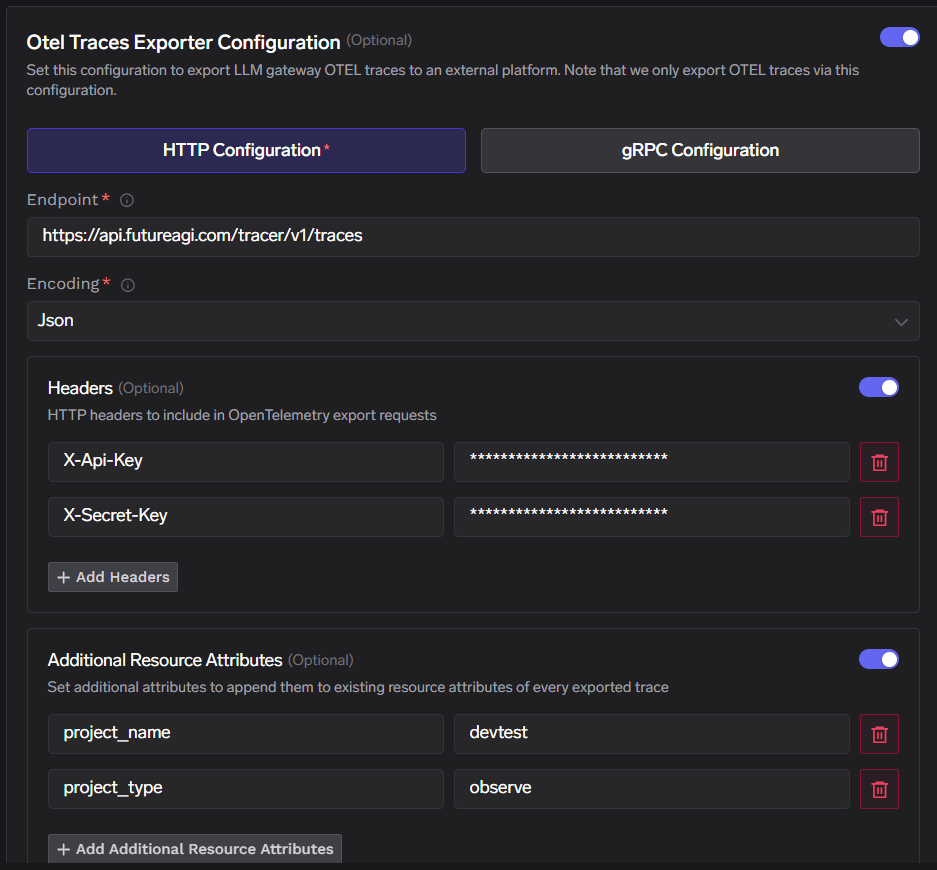 Enable **Headers** and add:
| Header | Value |
| -------------- | -------------------------- |
| `X-Api-Key` | Your Future AGI API key |
| `X-Secret-Key` | Your Future AGI secret key |
Enable **Additional Resource Attributes** and add:
| Attribute | Value |
| -------------- | ---------------------------------------------------- |
| `project_name` | Your Future AGI project name (for example `devtest`) |
| `project_type` | `observe` |
`project_type` must be set to `observe` so traces are routed to the Future AGI Observe workspace. `project_name` can be any name you choose — it determines which project the gateway traces appear under in Future AGI.
Click **Save** to apply the configuration.
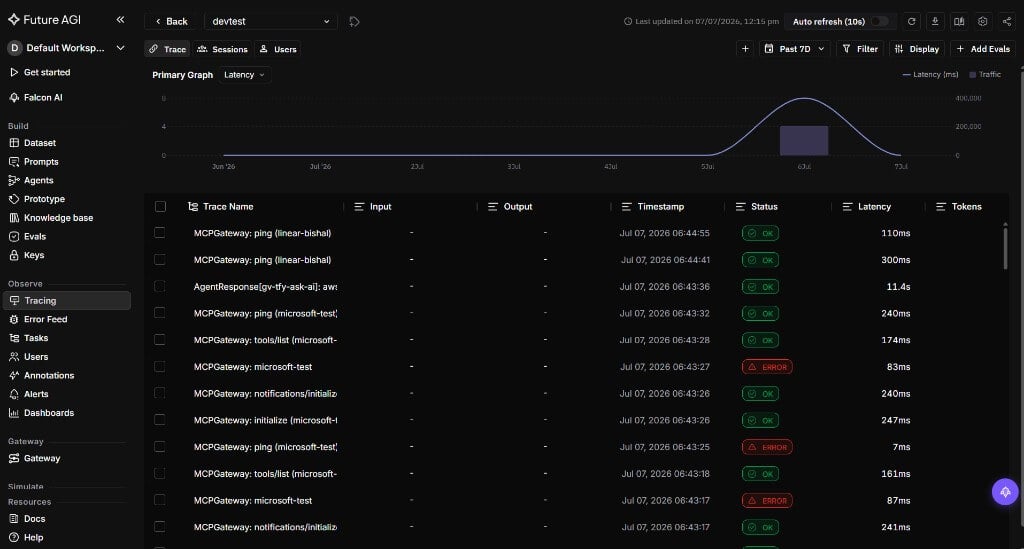
1. Send a few requests through the TrueFoundry AI Gateway.
2. In TrueFoundry, open **Monitor** to confirm gateway traffic is flowing.
3. In Future AGI, open your project and go to **Observe** → **Tracing**.
4. Confirm new traces appear with trace names, latency, status, and timestamps for your gateway requests.
Enable **Headers** and add:
| Header | Value |
| -------------- | -------------------------- |
| `X-Api-Key` | Your Future AGI API key |
| `X-Secret-Key` | Your Future AGI secret key |
Enable **Additional Resource Attributes** and add:
| Attribute | Value |
| -------------- | ---------------------------------------------------- |
| `project_name` | Your Future AGI project name (for example `devtest`) |
| `project_type` | `observe` |
`project_type` must be set to `observe` so traces are routed to the Future AGI Observe workspace. `project_name` can be any name you choose — it determines which project the gateway traces appear under in Future AGI.
Click **Save** to apply the configuration.
1. Send a few requests through the TrueFoundry AI Gateway.
2. In TrueFoundry, open **Monitor** to confirm gateway traffic is flowing.
3. In Future AGI, open your project and go to **Observe** → **Tracing**.
4. Confirm new traces appear with trace names, latency, status, and timestamps for your gateway requests.
 ## Configuration reference
| Configuration | Value |
| ----------------------- | ------------------------------------------------------------------------ |
| **Traces endpoint** | `https://api.futureagi.com/tracer/v1/traces` |
| **Protocol** | HTTP (OTLP) |
| **Encoding** | Json |
| **Headers** | `X-Api-Key` set to your API key; `X-Secret-Key` set to your secret key |
| **Resource attributes** | `project_name` set to your project name; `project_type` set to `observe` |
## Configuration reference
| Configuration | Value |
| ----------------------- | ------------------------------------------------------------------------ |
| **Traces endpoint** | `https://api.futureagi.com/tracer/v1/traces` |
| **Protocol** | HTTP (OTLP) |
| **Encoding** | Json |
| **Headers** | `X-Api-Key` set to your API key; `X-Secret-Key` set to your secret key |
| **Resource attributes** | `project_name` set to your project name; `project_type` set to `observe` |