> ## Documentation Index
> Fetch the complete documentation index at: https://www.truefoundry.com/llms.txt
> Use this file to discover all available pages before exploring further.
# CrewAI
> Learn how to deploy CrewAI agents using the TrueFoundry AI Gateway.
This guide provides instructions for integrating [CrewAI](https://crewai.com/) with the TrueFoundry AI Gateway.
## What is CrewAI?
CrewAI is a framework for orchestrating role-playing, autonomous AI agents that collaborate to complete complex tasks. It enables you to create specialized agent crews where each agent has defined roles, responsibilities, and expertise areas, working together systematically to achieve shared objectives.
### Key Features of CrewAI
* **[Role-Playing Agents](https://docs.crewai.com/concepts/agents)**: Create specialized agents with distinct personas, skills, and responsibilities that can take on specific roles within your crew
* **[Collaborative Crews](https://docs.crewai.com/concepts/crews)**: Orchestrate teams of agents that work together, share context, and coordinate their efforts to tackle complex multi-step workflows
* **[Structured Tasks](https://docs.crewai.com/concepts/tasks)**: Define clear, actionable tasks with specific objectives, expected outputs, and success criteria for systematic execution
* **[Tool Integration](https://docs.crewai.com/concepts/tools)**: Equip your agents with powerful tools and capabilities to interact with external systems, APIs, and data sources
## How TrueFoundry Integrates with CrewAI
### Installation & Setup
```bash lines theme={"dark"}
pip install crewai
```
1. Sign up for a [TrueFoundry account](https://www.truefoundry.com/register)
2. Follow the steps here in [Quick start](https://docs.truefoundry.com/gateway/quick-start)
 ```python lines theme={"dark"}
from crewai import LLM
# Create an LLM instance with TrueFoundry AI Gateway
truefoundry_llm = LLM(
model="openai/openai-main/gpt-4o", # Format: openai/
base_url="{GATEWAY_BASE_URL}",
api_key="your_truefoundry_api_key"
)
# Use in your CrewAI agents
from crewai import Agent
@agent
def researcher(self) -> Agent:
return Agent(
config=self.agents_config['researcher'],
llm=truefoundry_llm,
verbose=True
)
```
### Complete CrewAI Example
```python lines theme={"dark"}
from crewai import Agent, Task, Crew, LLM
# Configure LLM with TrueFoundry
llm = LLM(
model="openai/openai-main/gpt-4o", # Format: openai/
base_url="{GATEWAY_BASE_URL}",
api_key="your_truefoundry_api_key"
)
# Create agents
researcher = Agent(
role='Research Analyst',
goal='Conduct detailed market research',
backstory='Expert market analyst with attention to detail',
llm=llm,
verbose=True
)
writer = Agent(
role='Content Writer',
goal='Create comprehensive reports',
backstory='Experienced technical writer',
llm=llm,
verbose=True
)
# Create tasks
research_task = Task(
description='Research AI market trends for 2024',
agent=researcher,
expected_output='Comprehensive research summary'
)
writing_task = Task(
description='Create a market research report',
agent=writer,
expected_output='Well-structured report with insights',
context=[research_task]
)
# Create and execute crew
crew = Crew(
agents=[researcher, writer],
tasks=[research_task, writing_task],
verbose=True
)
result = crew.kickoff()
```
### Observability and Governance
Monitor your CrewAI agents through TrueFoundry's metrics tab:
```python lines theme={"dark"}
from crewai import LLM
# Create an LLM instance with TrueFoundry AI Gateway
truefoundry_llm = LLM(
model="openai/openai-main/gpt-4o", # Format: openai/
base_url="{GATEWAY_BASE_URL}",
api_key="your_truefoundry_api_key"
)
# Use in your CrewAI agents
from crewai import Agent
@agent
def researcher(self) -> Agent:
return Agent(
config=self.agents_config['researcher'],
llm=truefoundry_llm,
verbose=True
)
```
### Complete CrewAI Example
```python lines theme={"dark"}
from crewai import Agent, Task, Crew, LLM
# Configure LLM with TrueFoundry
llm = LLM(
model="openai/openai-main/gpt-4o", # Format: openai/
base_url="{GATEWAY_BASE_URL}",
api_key="your_truefoundry_api_key"
)
# Create agents
researcher = Agent(
role='Research Analyst',
goal='Conduct detailed market research',
backstory='Expert market analyst with attention to detail',
llm=llm,
verbose=True
)
writer = Agent(
role='Content Writer',
goal='Create comprehensive reports',
backstory='Experienced technical writer',
llm=llm,
verbose=True
)
# Create tasks
research_task = Task(
description='Research AI market trends for 2024',
agent=researcher,
expected_output='Comprehensive research summary'
)
writing_task = Task(
description='Create a market research report',
agent=writer,
expected_output='Well-structured report with insights',
context=[research_task]
)
# Create and execute crew
crew = Crew(
agents=[researcher, writer],
tasks=[research_task, writing_task],
verbose=True
)
result = crew.kickoff()
```
### Observability and Governance
Monitor your CrewAI agents through TrueFoundry's metrics tab:
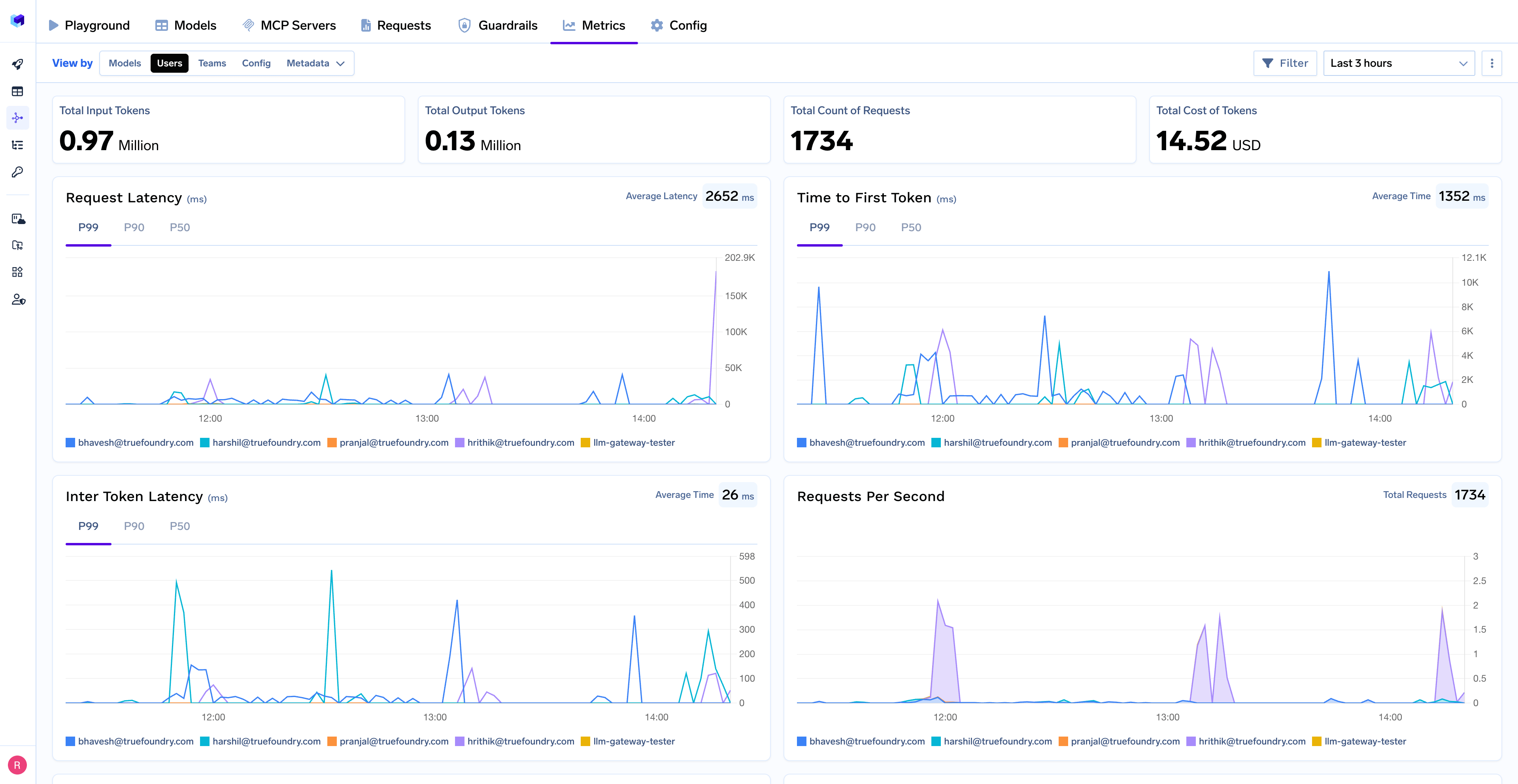 With TrueFoundry's AI Gateway, you can monitor and analyze:
* **Performance Metrics**: Track key latency metrics like Request Latency, Time to First Token (TTFS), and Inter-Token Latency (ITL) with P99, P90, and P50 percentiles
* **Cost and Token Usage**: Gain visibility into your application's costs with detailed breakdowns of input/output tokens and the associated expenses for each model
* **Usage Patterns**: Understand how your application is being used with detailed analytics on user activity, model distribution, and team-based usage
* **Rate Limiting and Virtual Models**: Set up rate limiting and configure [Virtual Models](/docs/ai-gateway/virtual-model) for intelligent routing and fallback across your models
## Tracing
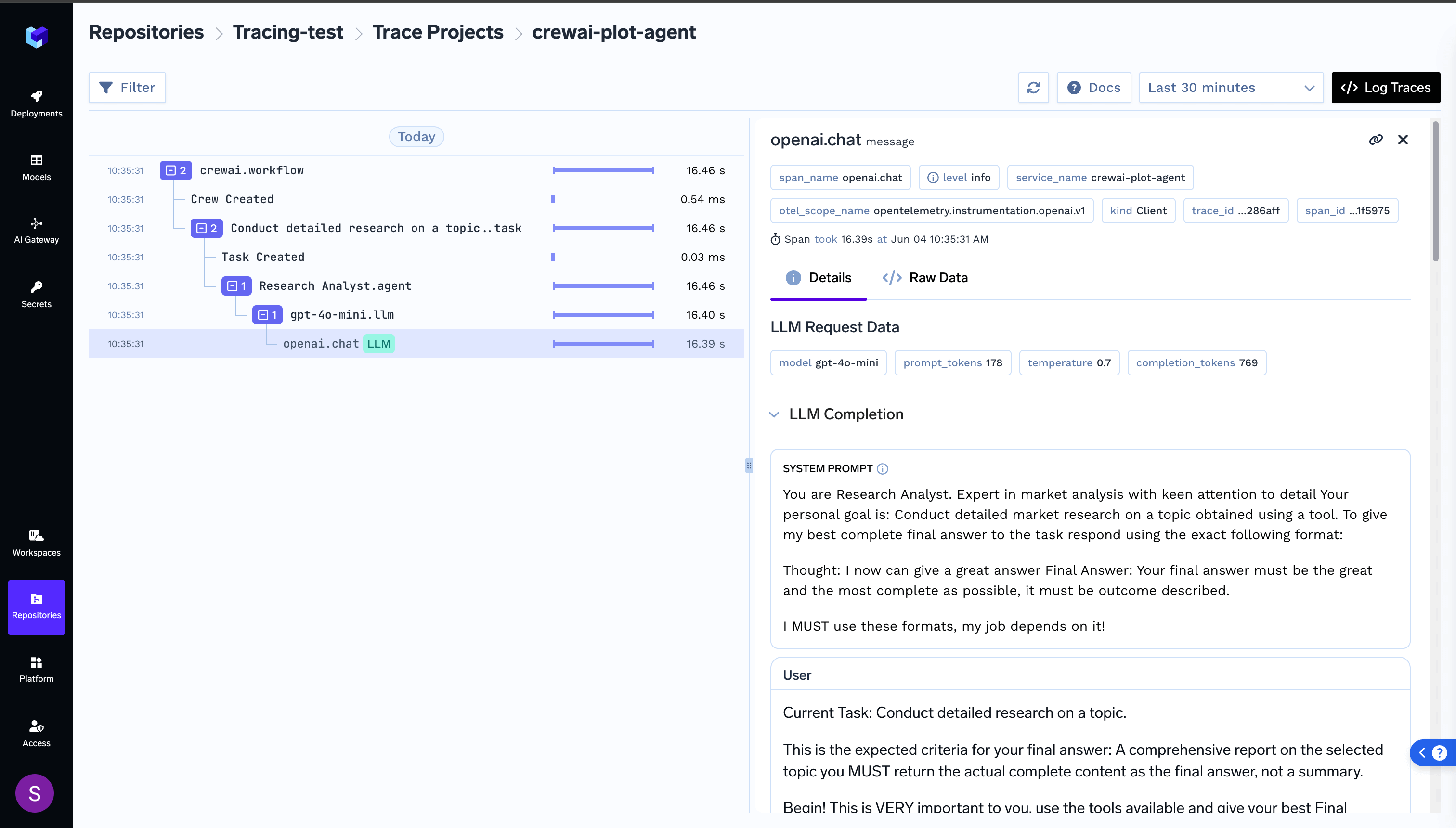
For a more detailed understanding on tracing, please see [getting-started-tracing](https://docs.truefoundry.com/docs/tracing/tracing-getting-started).For tracing, you can add the Traceloop SDK:
```bash lines theme={"dark"}
pip install traceloop-sdk
```
```python lines theme={"dark"}
from traceloop.sdk import Traceloop
# Initialize enhanced tracing
Traceloop.init(
api_endpoint="https://your-truefoundry-endpoint/api/tracing",
headers={
"Authorization": f"Bearer {your_truefoundry_pat_token}",
"TFY-Tracing-Project": "your_project_name",
},
)
```
This provides additional trace correlation across your entire CrewAI workflow.
With TrueFoundry's AI Gateway, you can monitor and analyze:
* **Performance Metrics**: Track key latency metrics like Request Latency, Time to First Token (TTFS), and Inter-Token Latency (ITL) with P99, P90, and P50 percentiles
* **Cost and Token Usage**: Gain visibility into your application's costs with detailed breakdowns of input/output tokens and the associated expenses for each model
* **Usage Patterns**: Understand how your application is being used with detailed analytics on user activity, model distribution, and team-based usage
* **Rate Limiting and Virtual Models**: Set up rate limiting and configure [Virtual Models](/docs/ai-gateway/virtual-model) for intelligent routing and fallback across your models
## Tracing
For a more detailed understanding on tracing, please see [getting-started-tracing](https://docs.truefoundry.com/docs/tracing/tracing-getting-started).For tracing, you can add the Traceloop SDK:
```bash lines theme={"dark"}
pip install traceloop-sdk
```
```python lines theme={"dark"}
from traceloop.sdk import Traceloop
# Initialize enhanced tracing
Traceloop.init(
api_endpoint="https://your-truefoundry-endpoint/api/tracing",
headers={
"Authorization": f"Bearer {your_truefoundry_pat_token}",
"TFY-Tracing-Project": "your_project_name",
},
)
```
This provides additional trace correlation across your entire CrewAI workflow.