> ## Documentation Index
> Fetch the complete documentation index at: https://www.truefoundry.com/llms.txt
> Use this file to discover all available pages before exploring further.
# Connect Private Models and MCP Servers
> Connect models and MCP servers running in your private network to the Truefoundry SAAS Gateway without exposing them to the public internet.
When your models or MCP servers run inside a private network — a VPC, on-prem cluster, or any environment unreachable from the public internet — the SAAS gateway needs a network path to reach them. This page describes the supported ways to set up that path, along with the trade-offs of each.
## Choose an approach
| Option | What it does | Best for | Plan |
| -------------------------------------------------------- | --------------------------------------------------------------------------------------------------------------------- | ---------------------------------------------------------------------- | ---------- |
| [Reverse Tunnel Agent](#option-1-reverse-tunnel-agent) | A small agent inside your network opens an outbound-only tunnel that the gateway uses to reach your private services. | Fast to set up. Works in any environment that can make outbound HTTPS. | Enterprise |
| [Self-Host the Gateway](#option-2-self-host-the-gateway) | Run the gateway plane inside your own infrastructure so it has direct network access to your services. | Zero cross-network traffic and full data residency control. | Enterprise |
## Option 1: Reverse Tunnel Agent
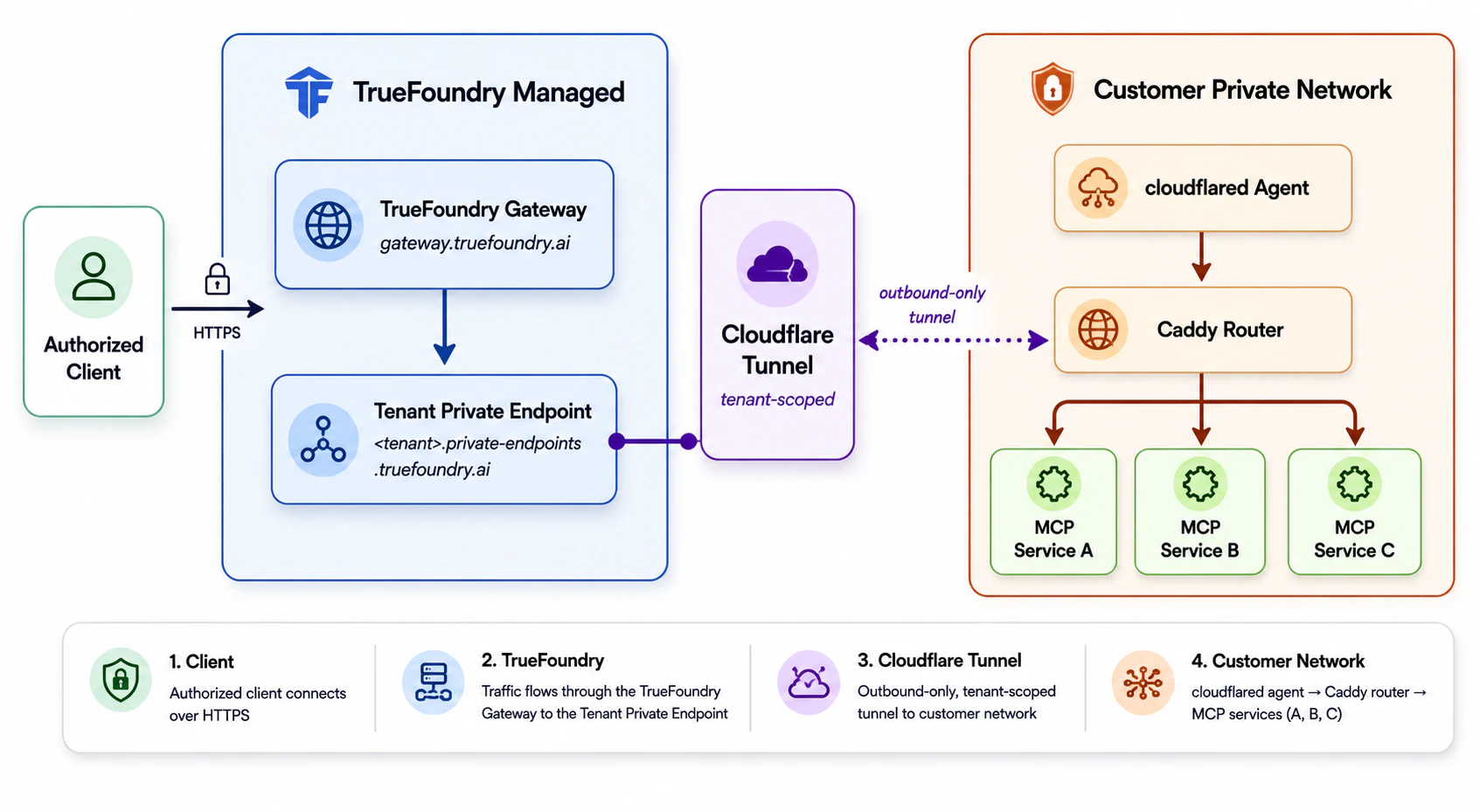
Instead of exposing your model or MCP server publicly, you run a `cloudflared` agent inside your network. The agent opens an outbound-only tunnel to a Truefoundry-managed domain dedicated to your tenant. The gateway then reaches your private services through that tunnel — no inbound firewall ports need to be opened.
This option is available on enterprise plans. Contact the Truefoundry team to enable it for your tenant.
### How it works
Two components run inside your network:
* **cloudflared agent** — The tunnel client. It initiates outbound-only connections to Cloudflare's edge and carries encrypted traffic from the gateway back to your private services.
* **Caddy internal router** — Truefoundry's routing component. It receives traffic arriving through the tunnel and forwards each request to the correct upstream service based on the URL.
Once the tunnel is active, any private service in your network is reachable at:
```
https://.private-endpoints.truefoundry.ai/default/
```
For example, an MCP server running at `http://my-mcp-server.internal:8080/sse` inside your VPC becomes reachable at:
```
https://acme.private-endpoints.truefoundry.ai/default/my-mcp-server.internal:8080/sse
```
### Request flow
 ### Setup
Contact the Truefoundry team to provision a new tunnel for your tenant. You will receive:
* `public_domain` — Your tenant's public domain, e.g., `.private-endpoints.truefoundry.ai`.
* `auth_token` — The token used to run `cloudflared` in your environment.
Run `cloudflared` and the Caddy internal router inside your network using the `auth_token`.
```bash theme={"dark"}
cloudflared tunnel run --token
```
```bash theme={"dark"}
helm repo add truefoundry https://truefoundry.github.io/infra-charts/
helm repo update
helm install tfy-cloudflared truefoundry/tfy-cloudflared \
--set tunnel.token= \
-n tfy-cloudflared --create-namespace
```
Confirm the pods are running:
```bash theme={"dark"}
kubectl get pods -n tfy-cloudflared
```
Once the tunnel is active, your private services are reachable at:
```
https://.private-endpoints.truefoundry.ai/default/
```
Use this URL as the endpoint when registering the model or MCP server in the gateway. For MCP servers, see [Getting started with MCP servers](/docs/ai-gateway/mcp/mcp-server-getting-started).
### Security
* **No inbound exposure.** All traffic from the gateway to your services travels over the encrypted outbound tunnel. No inbound ports are opened on your network.
* **Gateway-only access to the tunnel.** Each tenant's tunnel endpoint is locked down to the Truefoundry gateway's IP addresses, so requests from any other source are rejected — even if they know the private endpoint URL.
* **Tenant isolation.** MCP server URLs can only be registered if they begin with your tenant's private endpoint domain (`.private-endpoints.truefoundry.ai`), which prevents cross-tenant SSRF. Access is further restricted by a tenant-specific secret token.
* **Protect the `auth_token`.** Treat it as a high-value secret — store it in Kubernetes Secrets or a dedicated secrets manager. If an attacker obtains it, they can impersonate your tunnel. Contact the Truefoundry team immediately if you suspect it has been compromised.
## Option 2: Self-Host the Gateway
If neither of the above options meets your requirements, you can self-host the Truefoundry gateway plane inside your own infrastructure. In this setup, the gateway runs in the same network as your models and MCP servers and reaches them directly — no public exposure or cross-network connectivity is required.
See [Deploy the Gateway Plane](/docs/platform/deployment-overview#option2-gateway-plane-only) for installation details.
### Setup
Contact the Truefoundry team to provision a new tunnel for your tenant. You will receive:
* `public_domain` — Your tenant's public domain, e.g., `.private-endpoints.truefoundry.ai`.
* `auth_token` — The token used to run `cloudflared` in your environment.
Run `cloudflared` and the Caddy internal router inside your network using the `auth_token`.
```bash theme={"dark"}
cloudflared tunnel run --token
```
```bash theme={"dark"}
helm repo add truefoundry https://truefoundry.github.io/infra-charts/
helm repo update
helm install tfy-cloudflared truefoundry/tfy-cloudflared \
--set tunnel.token= \
-n tfy-cloudflared --create-namespace
```
Confirm the pods are running:
```bash theme={"dark"}
kubectl get pods -n tfy-cloudflared
```
Once the tunnel is active, your private services are reachable at:
```
https://.private-endpoints.truefoundry.ai/default/
```
Use this URL as the endpoint when registering the model or MCP server in the gateway. For MCP servers, see [Getting started with MCP servers](/docs/ai-gateway/mcp/mcp-server-getting-started).
### Security
* **No inbound exposure.** All traffic from the gateway to your services travels over the encrypted outbound tunnel. No inbound ports are opened on your network.
* **Gateway-only access to the tunnel.** Each tenant's tunnel endpoint is locked down to the Truefoundry gateway's IP addresses, so requests from any other source are rejected — even if they know the private endpoint URL.
* **Tenant isolation.** MCP server URLs can only be registered if they begin with your tenant's private endpoint domain (`.private-endpoints.truefoundry.ai`), which prevents cross-tenant SSRF. Access is further restricted by a tenant-specific secret token.
* **Protect the `auth_token`.** Treat it as a high-value secret — store it in Kubernetes Secrets or a dedicated secrets manager. If an attacker obtains it, they can impersonate your tunnel. Contact the Truefoundry team immediately if you suspect it has been compromised.
## Option 2: Self-Host the Gateway
If neither of the above options meets your requirements, you can self-host the Truefoundry gateway plane inside your own infrastructure. In this setup, the gateway runs in the same network as your models and MCP servers and reaches them directly — no public exposure or cross-network connectivity is required.
See [Deploy the Gateway Plane](/docs/platform/deployment-overview#option2-gateway-plane-only) for installation details.