> ## Documentation Index
> Fetch the complete documentation index at: https://www.truefoundry.com/llms.txt
> Use this file to discover all available pages before exploring further.
# ClickStack
> Learn how to deploy the ClickStack OTEL Collector and export LLM Gateway traces to ClickStack using OpenTelemetry integration.
This guide explains how to integrate [ClickStack](https://www.clickhouse.com/clickstack) with the TrueFoundry AI Gateway to export OpenTelemetry traces.
## What is ClickStack?
ClickStack is an open-source observability platform on [ClickHouse](https://clickhouse.com/) for logs, metrics, and traces. Its HyperDX-based UI supports Lucene search, SQL queries, and distributed trace exploration for LLM and MCP workloads.
### Key capabilities
* **[Distributed tracing](https://clickhouse.com/docs/use-cases/observability/clickstack/overview)**: Filter and inspect spans by service, attributes, and status in the ClickStack UI
* **[OpenTelemetry ingestion](https://clickhouse.com/docs/use-cases/observability/clickstack/overview)**: Receive OTLP traces over HTTP or gRPC via the ClickStack OTEL Collector
## Prerequisites
1. **TrueFoundry account**: [Register](https://www.truefoundry.com/register) and complete the [Gateway Quick Start Guide](https://docs.truefoundry.com/gateway/quick-start)
2. **ClickStack or ClickHouse Cloud**: Sign in to [ClickStack](https://www.clickhouse.com/clickstack) or [ClickHouse Cloud](https://clickhouse.com/cloud) and note your ClickHouse endpoint, user, and password
3. **Hosted OTEL collector**: A reachable ClickStack OTEL Collector deployment exposing the OTLP HTTP traces endpoint
## Architecture overview
ClickStack requires a **ClickStack OTEL Collector** that receives OTLP from TrueFoundry, writes traces to ClickHouse, and serves them in the UI:
```text theme={"dark"}
[TrueFoundry AI Gateway]
↓
[ClickStack OTEL Collector :4318 /v1/traces]
↓
[ClickHouse Cloud :8443]
↓
[ClickStack UI (HyperDX)]
```
## Integration steps
From ClickStack or ClickHouse Cloud, collect `CLICKHOUSE_ENDPOINT` (for example `https://:8443`), `CLICKHOUSE_USER` (commonly `default`), and `CLICKHOUSE_PASSWORD` for the collector.
**Image:** `clickhouse/clickstack-otel-collector:latest`
| Port | Type | Usage |
| ------ | ---- | ---------------- |
| `4317` | TCP | OTLP gRPC |
| `4318` | HTTP | OTLP HTTP traces |
```bash theme={"dark"}
docker run -d \
--name clickstack-otel-collector \
-p 4317:4317 \
-p 4318:4318 \
-e CLICKHOUSE_ENDPOINT=https://:8443 \
-e CLICKHOUSE_USER=default \
-e CLICKHOUSE_PASSWORD= \
clickhouse/clickstack-otel-collector:latest
```
Expose port `4318` (or TLS at a reverse proxy) and use this **Traces Endpoint** in TrueFoundry:
```
https:///v1/traces
```
Replace `` with your collector's public hostname.
Confirm the endpoint is reachable:
```
POST https:///v1/traces
```
| Header | Value |
| -------------- | ------------------ |
| `Content-Type` | `application/json` |
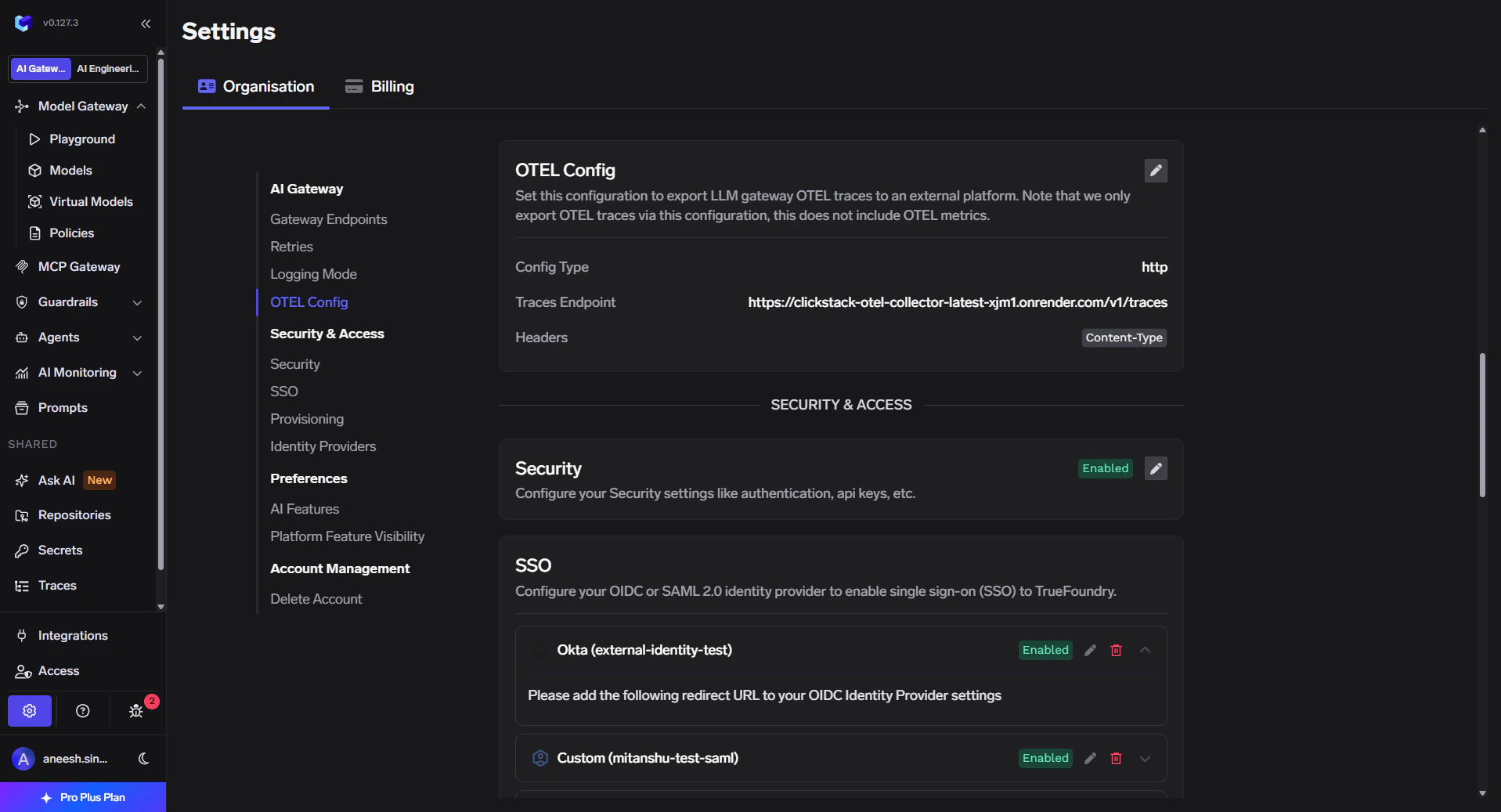
1. In the TrueFoundry dashboard go to **Settings** → **Organisation** → **AI Gateway** → **OTEL Config**.
2. Click the edit (pencil) control on the OTEL card.
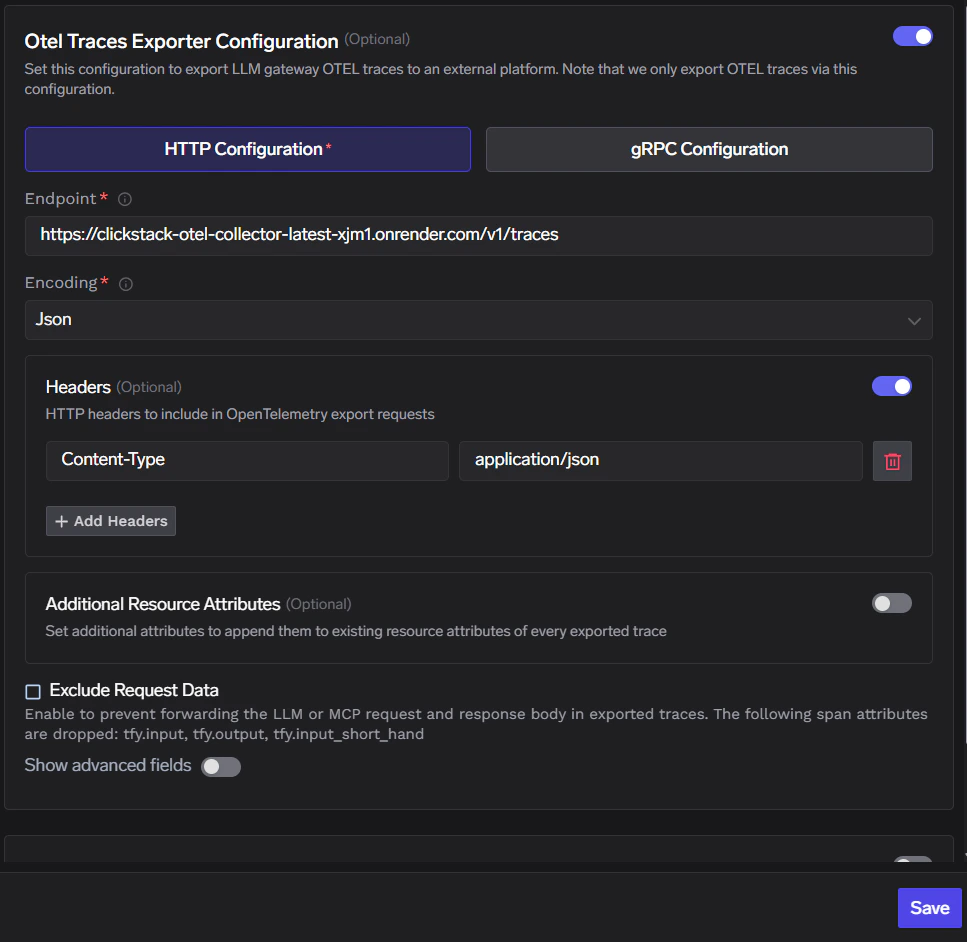
3. Enable **Otel Traces Exporter Configuration**.
4. Select **HTTP Configuration**.
5. Set **Endpoint** to `https:///v1/traces`.
6. Set **Encoding** to **Json**.
The OTEL card summary shows your saved **Config Type**, **Traces Endpoint**, and **Headers** before you open the editor:
 In the exporter form, enable **Headers** and add:
| Header | Value |
| -------------- | ------------------ |
| `Content-Type` | `application/json` |
Click **Save** to apply the configuration.
In the exporter form, enable **Headers** and add:
| Header | Value |
| -------------- | ------------------ |
| `Content-Type` | `application/json` |
Click **Save** to apply the configuration.
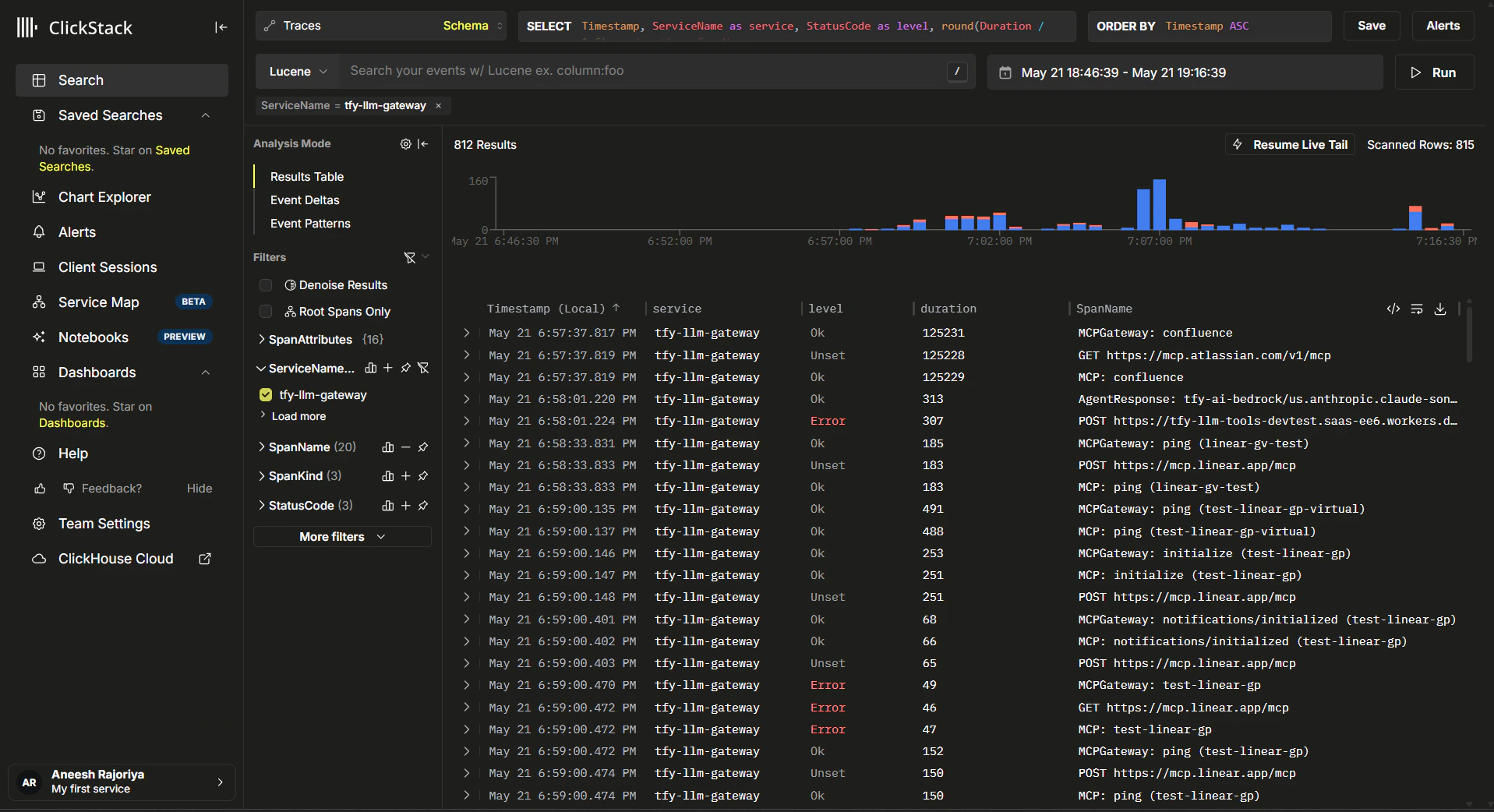
 1. Send requests through the TrueFoundry AI Gateway.
2. In ClickStack, open **Search** → **Traces**, set a recent time range, and filter **ServiceName** = `tfy-llm-gateway`.
1. Send requests through the TrueFoundry AI Gateway.
2. In ClickStack, open **Search** → **Traces**, set a recent time range, and filter **ServiceName** = `tfy-llm-gateway`.
 ## Configuration summary
| Setting | Value |
| ------------------- | --------------------------------------------------------------- |
| **Collector image** | `clickhouse/clickstack-otel-collector:latest` |
| **Traces endpoint** | `https:///v1/traces` |
| **Protocol** | HTTP (OTLP) |
| **Encoding** | JSON |
| **Headers** | `Content-Type`: `application/json` |
| **Collector env** | `CLICKHOUSE_ENDPOINT`, `CLICKHOUSE_USER`, `CLICKHOUSE_PASSWORD` |
## Configuration summary
| Setting | Value |
| ------------------- | --------------------------------------------------------------- |
| **Collector image** | `clickhouse/clickstack-otel-collector:latest` |
| **Traces endpoint** | `https:///v1/traces` |
| **Protocol** | HTTP (OTLP) |
| **Encoding** | JSON |
| **Headers** | `Content-Type`: `application/json` |
| **Collector env** | `CLICKHOUSE_ENDPOINT`, `CLICKHOUSE_USER`, `CLICKHOUSE_PASSWORD` |