> ## Documentation Index
> Fetch the complete documentation index at: https://www.truefoundry.com/llms.txt
> Use this file to discover all available pages before exploring further.
# Claude Code
> How to connect Claude Code with the TrueFoundry AI Gateway.
This guide provides instructions for integrating [Claude Code](https://docs.anthropic.com/en/docs/claude-code) with the Truefoundry AI Gateway.
For **Claude Desktop** (Cowork on third-party inference), route inference through the TrueFoundry AI Gateway using the in-app developer configuration — see [Claude Desktop](/docs/ai-gateway/claude-desktop). This page covers the **Claude Code CLI** and the **VS Code extension**, which use `ANTHROPIC_BASE_URL` and environment variables in `settings.json`.
## What is Claude Code?
Claude Code is Anthropic's agentic coding tool that lives in your terminal, understands your codebase, and helps you code faster through natural language commands. It serves as an intelligent pair programming partner that can read, analyze, and work with your entire project structure.
## Model Configuration
Claude Code supports model aliases (`opus`, `sonnet`, `haiku`, `opusplan`) that provide convenient shortcuts for different use cases. When integrating with TrueFoundry, you can configure these aliases to use your specific TrueFoundry models through environment variables.
Model aliases allow you to switch between different Claude models during your coding session using simple commands like `/model opus` or `/model sonnet`.
## Prerequisites
Before integrating Claude Code with TrueFoundry, ensure you have:
1. **TrueFoundry Account**: Create a [Truefoundry account](https://www.truefoundry.com/register) and follow the instructions in our [Gateway Quick Start Guide](https://docs.truefoundry.com/gateway/quick-start)
2. **Claude Code Installation**: Install Claude Code following the [official documentation](https://docs.anthropic.com/en/docs/claude-code)
3. Configure models in Truefoundry for each provider you want to use
## Integrate Truefoundry with Claude Code
Claude Code uses a settings.json file for configuration. You'll need to modify the environment variables to route requests through Truefoundry.
First, get the base URL and model name from your TrueFoundry AI Gateway playground using the unified code snippet:
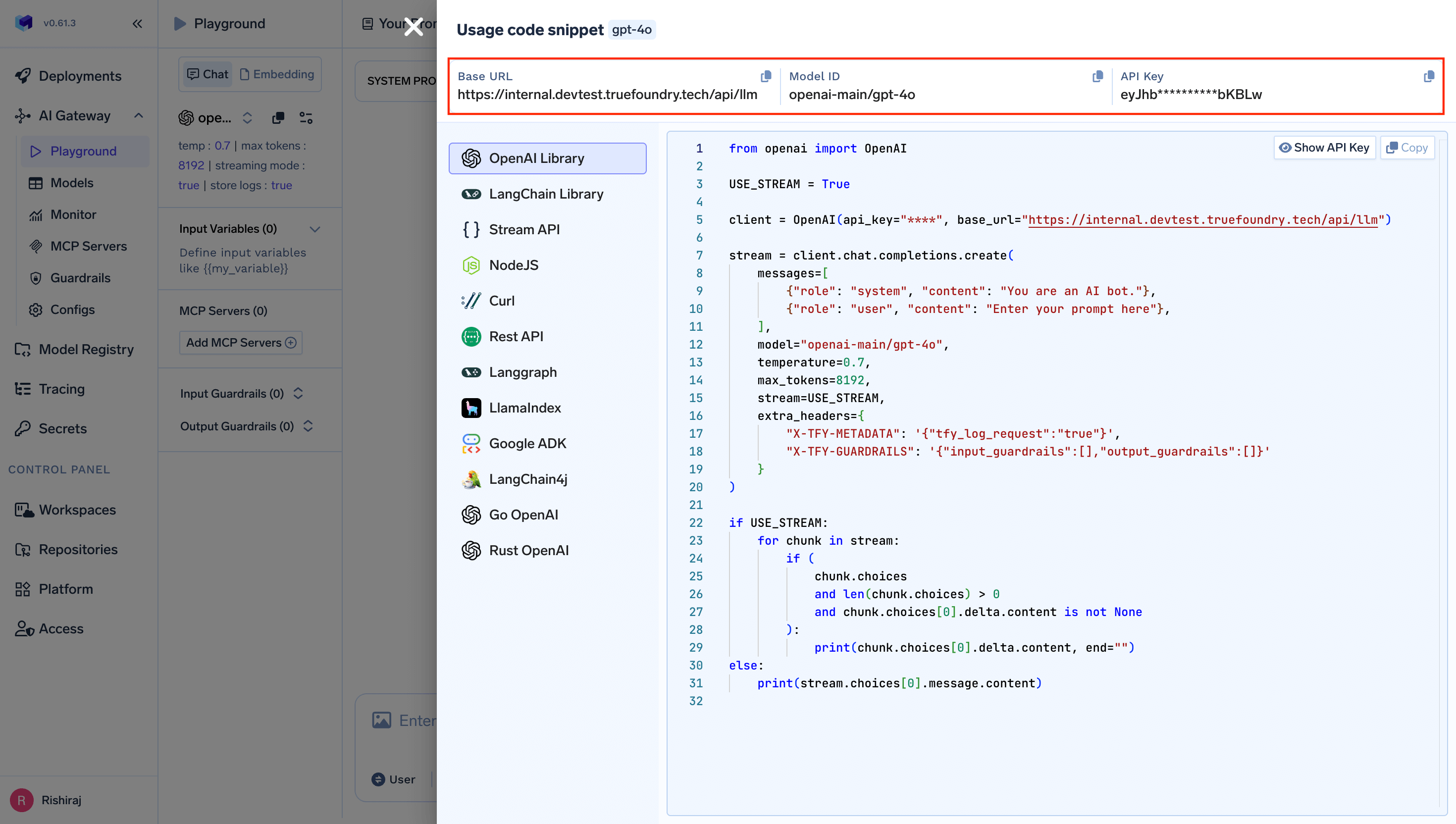 Claude Code can be configured either globally or per project by editing the settings file:
* Global: `~/.claude/settings.json`
* Project-specific: `.claude/settings.json` in your project directory
```json lines theme={"dark"}
{
"env": {
"ANTHROPIC_BASE_URL": "{GATEWAY_BASE_URL}",
"ANTHROPIC_AUTH_TOKEN": "your-truefoundry-api-key",
"ANTHROPIC_MODEL": "claude-code/claude-sonnet",
"ANTHROPIC_DEFAULT_OPUS_MODEL": "claude-code/claude-opus",
"ANTHROPIC_DEFAULT_SONNET_MODEL": "claude-code/claude-sonnet",
"ANTHROPIC_DEFAULT_HAIKU_MODEL": "claude-code/claude-haiku",
"CLAUDE_CODE_DISABLE_EXPERIMENTAL_BETAS": "1",
"ANTHROPIC_CUSTOM_HEADERS": "x-tfy-anthropic-beta: context-management-2025-06-27"
}
}
```
`CLAUDE_CODE_DISABLE_EXPERIMENTAL_BETAS` disables experimental features in Claude Code for stable behavior with TrueFoundry Gateway.
Claude Code detects model capabilities (e.g. extended thinking `effort`, ToolSearch, beta tool blocks) by string-matching the model id. Make sure the value of `ANTHROPIC_DEFAULT_OPUS_MODEL`, `ANTHROPIC_DEFAULT_SONNET_MODEL`, and `ANTHROPIC_DEFAULT_HAIKU_MODEL` contains a recognizable Anthropic model id like `claude-opus-4-7`, `claude-sonnet-4-6`, or `claude-haiku-4-5` or `claude-haiku-4-5-20251001`. If you're using a TrueFoundry virtual model, ensure that the virtual model's display name is the same as the underlying Anthropic model id (e.g. `claude-haiku-4-5`), so the full value `your-account/claude-haiku-4-5` contains a recognizable id for Claude Code; otherwise Claude Code may attach parameters the underlying model doesn't support and Anthropic will return `400: This model does not support the effort parameter`.
### Forwarding Anthropic Beta Features
Anthropic releases beta features (e.g. [context management](https://docs.anthropic.com/en/docs/build-with-claude/context-editing)) that require the `anthropic-beta` header on API requests. To forward a beta flag through the TrueFoundry Gateway, set the `x-tfy-anthropic-beta` header via `ANTHROPIC_CUSTOM_HEADERS` as shown in the config above.
To enable multiple beta features, pass them as a comma-separated list (no spaces):
```json theme={"dark"}
{
"env": {
"ANTHROPIC_CUSTOM_HEADERS": "x-tfy-anthropic-beta: context-management-2025-06-27,files-api-2025-04-14"
}
}
```
Use exact beta feature names as documented by [Anthropic](https://docs.anthropic.com/en/api/beta-headers). Invalid beta names will return a `400` error from the Anthropic API.
`x-tfy-anthropic-beta` is a gateway-specific header that gets mapped to the `anthropic-beta` header on the outbound request to Anthropic. This avoids conflicts with Claude Code's own `anthropic-beta` header.
## Using Claude Code VS Code Extension
The [Claude Code VS Code extension](https://marketplace.visualstudio.com/items?itemName=Anthropic.claude-code) works seamlessly with TrueFoundry once you've configured the CLI.
The VS Code extension is **not standalone**. It requires the Claude Code CLI to be installed separately and configured first.
**Setup Steps:**
1. Install and configure the Claude Code CLI as described [above](#integrate-truefoundry-with-claude-code)
2. Install the VS Code extension
3. Launch VS Code from your terminal to inherit the configuration:
```bash lines theme={"dark"}
code .
```
The extension automatically uses your CLI configuration (base URL, API keys, model aliases). No separate setup needed.
**Important for macOS/Linux:** Launch VS Code from the terminal where you've set up Claude Code. GUI applications don't inherit shell environment variables by default.
### Model Alias Configuration
The following environment variables map Claude Code's built-in aliases to your TrueFoundry models:
* `ANTHROPIC_DEFAULT_OPUS_MODEL`: Maps `opus` alias to your TrueFoundry Opus model
* `ANTHROPIC_DEFAULT_SONNET_MODEL`: Maps `sonnet` alias to your TrueFoundry Sonnet model
* `ANTHROPIC_DEFAULT_HAIKU_MODEL`: Maps `haiku` alias to your TrueFoundry Haiku model
**Benefits:** Model aliases enable seamless integration with Claude Code's built-in commands, flexible model switching with `/model opus` or `/model sonnet`, and optimized workflows by choosing the right model for each task.
### Example Usage
```bash lines theme={"dark"}
# Use different models for different tasks
claude --model opus "Design a scalable microservices architecture"
claude --model sonnet "Implement a user authentication system"
claude --model haiku "Write a function to validate email addresses"
# Switch models during a session
/model opusplan # Uses opus for planning, sonnet for execution
```
## Claude Agent SDK
The [Claude Agent SDK](https://docs.claude.com/en/api/agent-sdk/overview) is the successor to the Claude Code SDK, providing programmatic access to build custom AI agents with the same capabilities as Claude Code.
The Claude Code SDK has been deprecated. If you're using the old SDK, migrate to the Claude Agent SDK for continued support and new features.
### Installation
```bash theme={"dark"}
pip install claude-agent-sdk
```
### Key Changes from Claude Code SDK
**What changed:** The SDK no longer reads from filesystem settings automatically. You must explicitly specify which settings to load.
**Manual setup required:** You now need to explicitly load settings for:
* Settings files (`.claude/settings.json` for project, `~/.claude/settings.json` for user)
* `CLAUDE.md` files (project memory)
* Custom slash commands from `.claude/commands/`
### TrueFoundry Integration
Your existing `.claude/settings.json` configuration works seamlessly with the Agent SDK. Simply specify `setting_sources=["project"]` to load your TrueFoundry gateway configuration:
```python theme={"dark"}
from claude_agent_sdk import query, ClaudeAgentOptions
async for message in query(
prompt="Analyze my codebase",
options=ClaudeAgentOptions(
setting_sources=["project"], # Loads .claude/settings.json
max_turns=5,
allowed_tools=["Read", "Grep", "Glob"]
)
):
if message.type == "result":
print(message.result)
```
All your existing TrueFoundry configurations (`Anthropic Direct`, `AWS Bedrock`, `Google Vertex AI`) work identically with the Agent SDK.
## FAQs
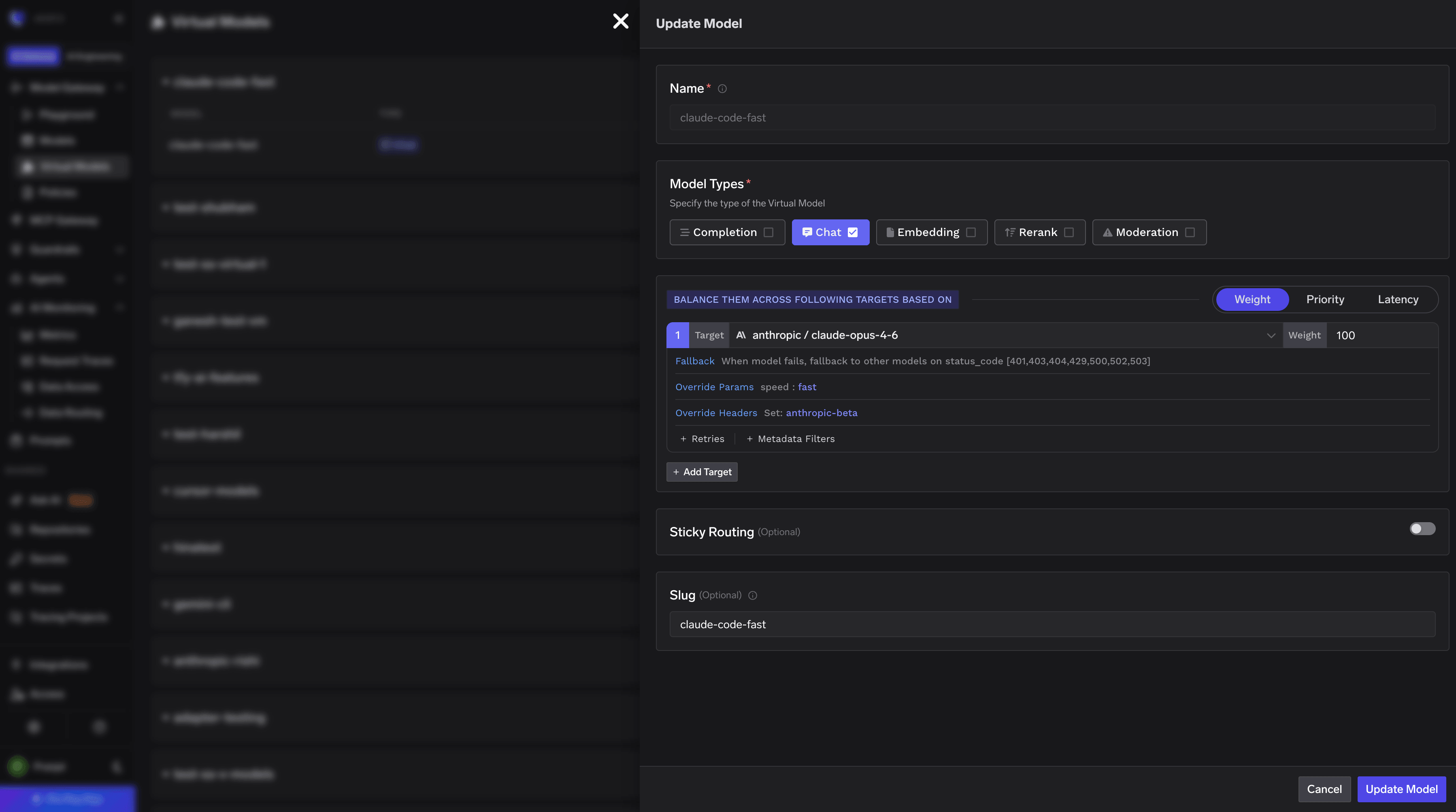
Claude Opus 4.6 supports a **fast mode** that provides lower-latency responses. To use it through the TrueFoundry Gateway, you need to create a virtual model with the correct additional parameters and headers.
**Step 1: Create a Virtual Model**
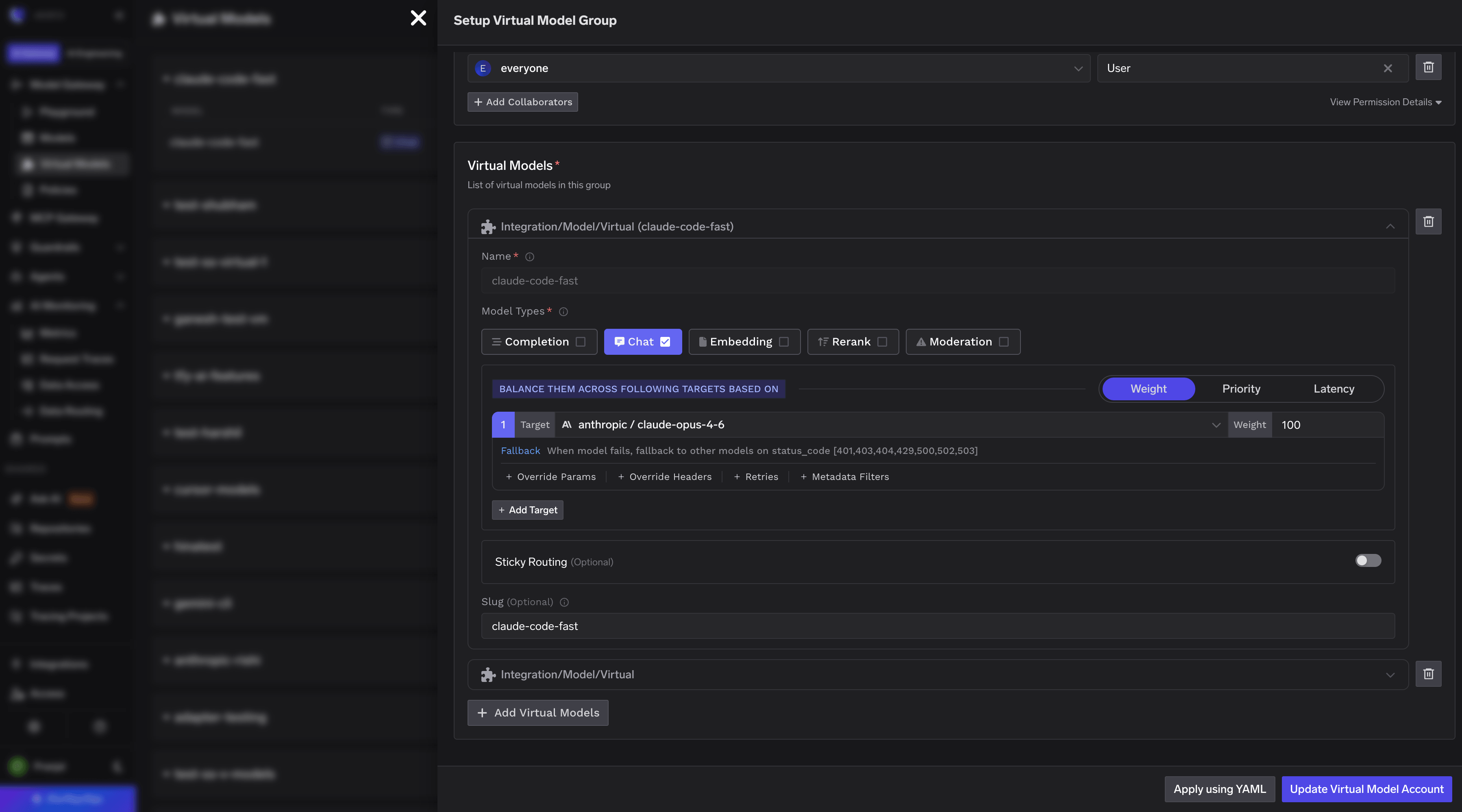
Create a virtual model in TrueFoundry that routes all traffic to `claude-opus-4-6`. In the virtual model configuration, set it to forward requests to your underlying `claude-opus-4-6` model.
Claude Code can be configured either globally or per project by editing the settings file:
* Global: `~/.claude/settings.json`
* Project-specific: `.claude/settings.json` in your project directory
```json lines theme={"dark"}
{
"env": {
"ANTHROPIC_BASE_URL": "{GATEWAY_BASE_URL}",
"ANTHROPIC_AUTH_TOKEN": "your-truefoundry-api-key",
"ANTHROPIC_MODEL": "claude-code/claude-sonnet",
"ANTHROPIC_DEFAULT_OPUS_MODEL": "claude-code/claude-opus",
"ANTHROPIC_DEFAULT_SONNET_MODEL": "claude-code/claude-sonnet",
"ANTHROPIC_DEFAULT_HAIKU_MODEL": "claude-code/claude-haiku",
"CLAUDE_CODE_DISABLE_EXPERIMENTAL_BETAS": "1",
"ANTHROPIC_CUSTOM_HEADERS": "x-tfy-anthropic-beta: context-management-2025-06-27"
}
}
```
`CLAUDE_CODE_DISABLE_EXPERIMENTAL_BETAS` disables experimental features in Claude Code for stable behavior with TrueFoundry Gateway.
Claude Code detects model capabilities (e.g. extended thinking `effort`, ToolSearch, beta tool blocks) by string-matching the model id. Make sure the value of `ANTHROPIC_DEFAULT_OPUS_MODEL`, `ANTHROPIC_DEFAULT_SONNET_MODEL`, and `ANTHROPIC_DEFAULT_HAIKU_MODEL` contains a recognizable Anthropic model id like `claude-opus-4-7`, `claude-sonnet-4-6`, or `claude-haiku-4-5` or `claude-haiku-4-5-20251001`. If you're using a TrueFoundry virtual model, ensure that the virtual model's display name is the same as the underlying Anthropic model id (e.g. `claude-haiku-4-5`), so the full value `your-account/claude-haiku-4-5` contains a recognizable id for Claude Code; otherwise Claude Code may attach parameters the underlying model doesn't support and Anthropic will return `400: This model does not support the effort parameter`.
### Forwarding Anthropic Beta Features
Anthropic releases beta features (e.g. [context management](https://docs.anthropic.com/en/docs/build-with-claude/context-editing)) that require the `anthropic-beta` header on API requests. To forward a beta flag through the TrueFoundry Gateway, set the `x-tfy-anthropic-beta` header via `ANTHROPIC_CUSTOM_HEADERS` as shown in the config above.
To enable multiple beta features, pass them as a comma-separated list (no spaces):
```json theme={"dark"}
{
"env": {
"ANTHROPIC_CUSTOM_HEADERS": "x-tfy-anthropic-beta: context-management-2025-06-27,files-api-2025-04-14"
}
}
```
Use exact beta feature names as documented by [Anthropic](https://docs.anthropic.com/en/api/beta-headers). Invalid beta names will return a `400` error from the Anthropic API.
`x-tfy-anthropic-beta` is a gateway-specific header that gets mapped to the `anthropic-beta` header on the outbound request to Anthropic. This avoids conflicts with Claude Code's own `anthropic-beta` header.
## Using Claude Code VS Code Extension
The [Claude Code VS Code extension](https://marketplace.visualstudio.com/items?itemName=Anthropic.claude-code) works seamlessly with TrueFoundry once you've configured the CLI.
The VS Code extension is **not standalone**. It requires the Claude Code CLI to be installed separately and configured first.
**Setup Steps:**
1. Install and configure the Claude Code CLI as described [above](#integrate-truefoundry-with-claude-code)
2. Install the VS Code extension
3. Launch VS Code from your terminal to inherit the configuration:
```bash lines theme={"dark"}
code .
```
The extension automatically uses your CLI configuration (base URL, API keys, model aliases). No separate setup needed.
**Important for macOS/Linux:** Launch VS Code from the terminal where you've set up Claude Code. GUI applications don't inherit shell environment variables by default.
### Model Alias Configuration
The following environment variables map Claude Code's built-in aliases to your TrueFoundry models:
* `ANTHROPIC_DEFAULT_OPUS_MODEL`: Maps `opus` alias to your TrueFoundry Opus model
* `ANTHROPIC_DEFAULT_SONNET_MODEL`: Maps `sonnet` alias to your TrueFoundry Sonnet model
* `ANTHROPIC_DEFAULT_HAIKU_MODEL`: Maps `haiku` alias to your TrueFoundry Haiku model
**Benefits:** Model aliases enable seamless integration with Claude Code's built-in commands, flexible model switching with `/model opus` or `/model sonnet`, and optimized workflows by choosing the right model for each task.
### Example Usage
```bash lines theme={"dark"}
# Use different models for different tasks
claude --model opus "Design a scalable microservices architecture"
claude --model sonnet "Implement a user authentication system"
claude --model haiku "Write a function to validate email addresses"
# Switch models during a session
/model opusplan # Uses opus for planning, sonnet for execution
```
## Claude Agent SDK
The [Claude Agent SDK](https://docs.claude.com/en/api/agent-sdk/overview) is the successor to the Claude Code SDK, providing programmatic access to build custom AI agents with the same capabilities as Claude Code.
The Claude Code SDK has been deprecated. If you're using the old SDK, migrate to the Claude Agent SDK for continued support and new features.
### Installation
```bash theme={"dark"}
pip install claude-agent-sdk
```
### Key Changes from Claude Code SDK
**What changed:** The SDK no longer reads from filesystem settings automatically. You must explicitly specify which settings to load.
**Manual setup required:** You now need to explicitly load settings for:
* Settings files (`.claude/settings.json` for project, `~/.claude/settings.json` for user)
* `CLAUDE.md` files (project memory)
* Custom slash commands from `.claude/commands/`
### TrueFoundry Integration
Your existing `.claude/settings.json` configuration works seamlessly with the Agent SDK. Simply specify `setting_sources=["project"]` to load your TrueFoundry gateway configuration:
```python theme={"dark"}
from claude_agent_sdk import query, ClaudeAgentOptions
async for message in query(
prompt="Analyze my codebase",
options=ClaudeAgentOptions(
setting_sources=["project"], # Loads .claude/settings.json
max_turns=5,
allowed_tools=["Read", "Grep", "Glob"]
)
):
if message.type == "result":
print(message.result)
```
All your existing TrueFoundry configurations (`Anthropic Direct`, `AWS Bedrock`, `Google Vertex AI`) work identically with the Agent SDK.
## FAQs
Claude Opus 4.6 supports a **fast mode** that provides lower-latency responses. To use it through the TrueFoundry Gateway, you need to create a virtual model with the correct additional parameters and headers.
**Step 1: Create a Virtual Model**
Create a virtual model in TrueFoundry that routes all traffic to `claude-opus-4-6`. In the virtual model configuration, set it to forward requests to your underlying `claude-opus-4-6` model.
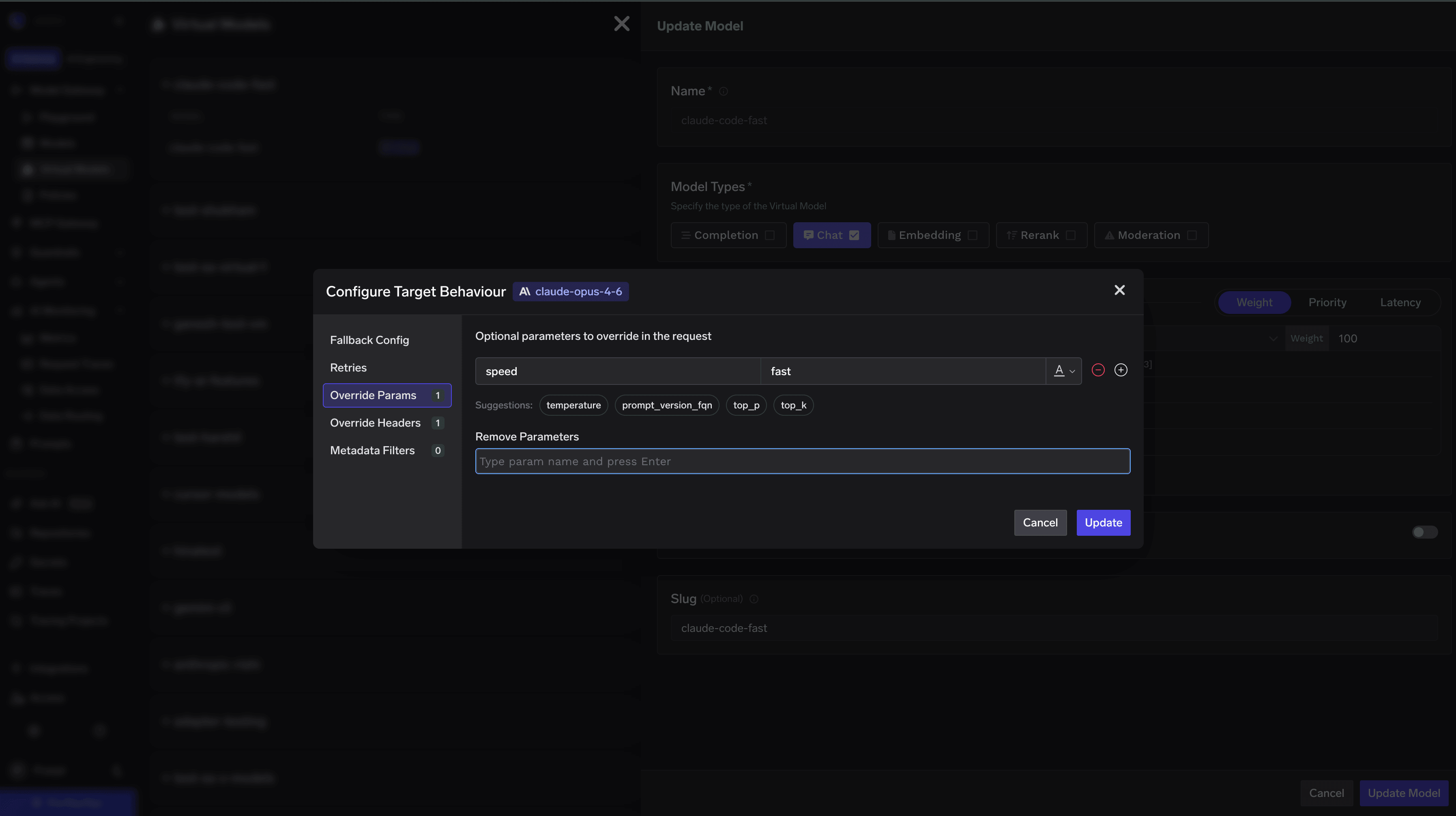
 **Step 2: Add the `speed` parameter**
In the virtual model's additional parameters, add the following field:
```json theme={"dark"}
{
"speed": "fast"
}
```
This ensures every request sent through this virtual model includes the `speed: fast` parameter.
**Step 2: Add the `speed` parameter**
In the virtual model's additional parameters, add the following field:
```json theme={"dark"}
{
"speed": "fast"
}
```
This ensures every request sent through this virtual model includes the `speed: fast` parameter.
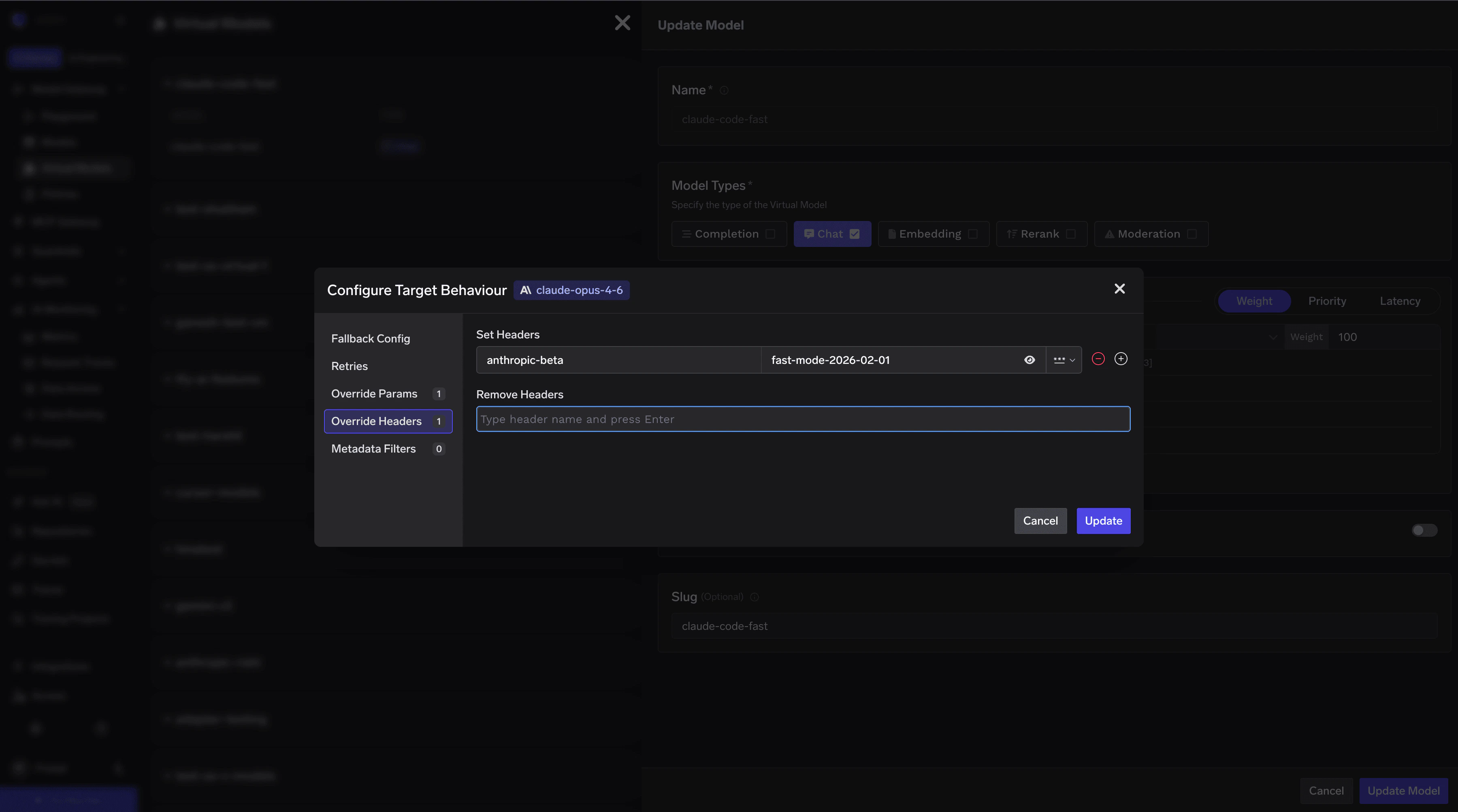
 **Step 3: Add the required beta header**
Fast mode requires the `anthropic-beta` header with the value `fast-mode-2026-02-01`. Add this as an additional header in the virtual model configuration:
```text theme={"dark"}
anthropic-beta: fast-mode-2026-02-01
```
**Step 3: Add the required beta header**
Fast mode requires the `anthropic-beta` header with the value `fast-mode-2026-02-01`. Add this as an additional header in the virtual model configuration:
```text theme={"dark"}
anthropic-beta: fast-mode-2026-02-01
```
 **Step 4: Use the virtual model in Claude Code**
Once the virtual model is created, use its model name in your `settings.json`. Replace the `ANTHROPIC_MODEL` and the relevant alias (e.g. `ANTHROPIC_DEFAULT_OPUS_MODEL`) with the virtual model name:
```json theme={"dark"}
{
"env": {
"ANTHROPIC_BASE_URL": "{GATEWAY_BASE_URL}",
"ANTHROPIC_AUTH_TOKEN": "your-truefoundry-api-key",
"ANTHROPIC_MODEL": "your-fast-opus-virtual-model-name",
"ANTHROPIC_DEFAULT_OPUS_MODEL": "your-fast-opus-virtual-model-name",
"ANTHROPIC_DEFAULT_SONNET_MODEL": "your-sonnet-model-name",
"ANTHROPIC_DEFAULT_HAIKU_MODEL": "your-haiku-model-name",
"CLAUDE_CODE_DISABLE_EXPERIMENTAL_BETAS": "1"
}
}
```
When selecting a model in Claude Code (via `/model` or the `--model` flag), choose the virtual model name you configured above. All requests will automatically include the fast mode parameter and the required beta header.
Users can enable fast mode in Claude Code — either per-request with `/fast` or globally in their config so all requests use fast mode. Since fast mode uses significantly more credits, you may want to control when it's used. Create two `virtual models` — one that disables fast mode and one that allows it — then hand out the appropriate model ID to users.
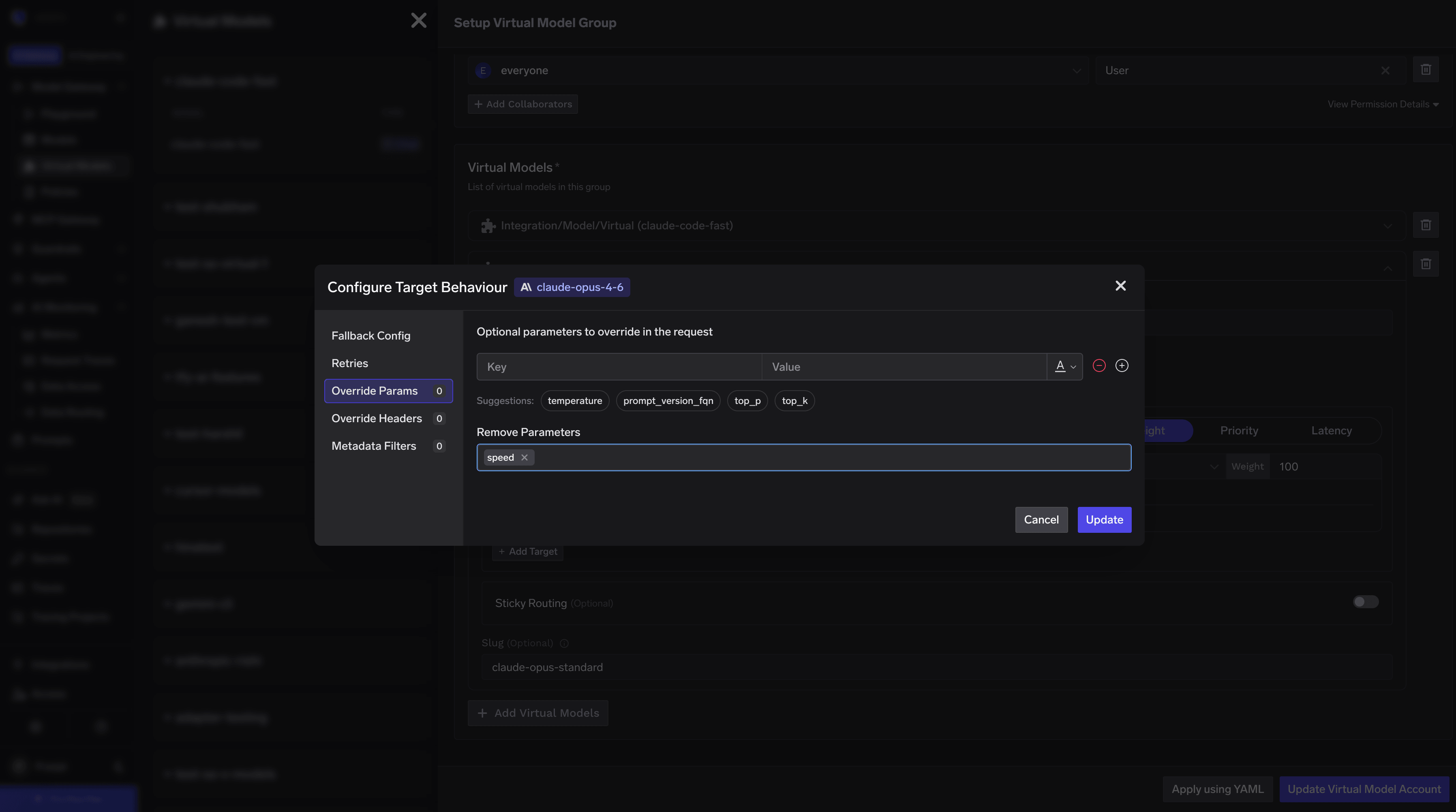
**Virtual Model 1: Fast mode disabled (strip `speed`)**
Create a virtual model that routes to `claude-opus-4-6` and configure it to delete the `speed` field from the request body. This ensures requests always go through as standard, non-fast requests — even if the user has fast mode enabled.
**Step 4: Use the virtual model in Claude Code**
Once the virtual model is created, use its model name in your `settings.json`. Replace the `ANTHROPIC_MODEL` and the relevant alias (e.g. `ANTHROPIC_DEFAULT_OPUS_MODEL`) with the virtual model name:
```json theme={"dark"}
{
"env": {
"ANTHROPIC_BASE_URL": "{GATEWAY_BASE_URL}",
"ANTHROPIC_AUTH_TOKEN": "your-truefoundry-api-key",
"ANTHROPIC_MODEL": "your-fast-opus-virtual-model-name",
"ANTHROPIC_DEFAULT_OPUS_MODEL": "your-fast-opus-virtual-model-name",
"ANTHROPIC_DEFAULT_SONNET_MODEL": "your-sonnet-model-name",
"ANTHROPIC_DEFAULT_HAIKU_MODEL": "your-haiku-model-name",
"CLAUDE_CODE_DISABLE_EXPERIMENTAL_BETAS": "1"
}
}
```
When selecting a model in Claude Code (via `/model` or the `--model` flag), choose the virtual model name you configured above. All requests will automatically include the fast mode parameter and the required beta header.
Users can enable fast mode in Claude Code — either per-request with `/fast` or globally in their config so all requests use fast mode. Since fast mode uses significantly more credits, you may want to control when it's used. Create two `virtual models` — one that disables fast mode and one that allows it — then hand out the appropriate model ID to users.
**Virtual Model 1: Fast mode disabled (strip `speed`)**
Create a virtual model that routes to `claude-opus-4-6` and configure it to delete the `speed` field from the request body. This ensures requests always go through as standard, non-fast requests — even if the user has fast mode enabled.
 **Virtual Model 2: Fast mode allowed**
Create a second virtual model that routes to `claude-opus-4-6` with no additional parameters or headers. This model passes requests through as-is, so when a user enables fast mode, it will reach Anthropic.
**Virtual Model 2: Fast mode allowed**
Create a second virtual model that routes to `claude-opus-4-6` with no additional parameters or headers. This model passes requests through as-is, so when a user enables fast mode, it will reach Anthropic.
 Then use the appropriate virtual model name in `settings.json`:
```json theme={"dark"}
{
"env": {
"ANTHROPIC_BASE_URL": "{GATEWAY_BASE_URL}",
"ANTHROPIC_AUTH_TOKEN": "your-truefoundry-api-key",
"ANTHROPIC_MODEL": "your-virtual-model-name",
"ANTHROPIC_DEFAULT_OPUS_MODEL": "your-virtual-model-name",
"ANTHROPIC_DEFAULT_SONNET_MODEL": "your-sonnet-model-name",
"ANTHROPIC_DEFAULT_HAIKU_MODEL": "your-haiku-model-name",
"CLAUDE_CODE_DISABLE_EXPERIMENTAL_BETAS": "1"
}
}
```
Then use the appropriate virtual model name in `settings.json`:
```json theme={"dark"}
{
"env": {
"ANTHROPIC_BASE_URL": "{GATEWAY_BASE_URL}",
"ANTHROPIC_AUTH_TOKEN": "your-truefoundry-api-key",
"ANTHROPIC_MODEL": "your-virtual-model-name",
"ANTHROPIC_DEFAULT_OPUS_MODEL": "your-virtual-model-name",
"ANTHROPIC_DEFAULT_SONNET_MODEL": "your-sonnet-model-name",
"ANTHROPIC_DEFAULT_HAIKU_MODEL": "your-haiku-model-name",
"CLAUDE_CODE_DISABLE_EXPERIMENTAL_BETAS": "1"
}
}
```