> ## Documentation Index
> Fetch the complete documentation index at: https://www.truefoundry.com/llms.txt
> Use this file to discover all available pages before exploring further.
# Claude Code Max
> How to connect Claude Code Max with the TrueFoundry AI Gateway.
This guide explains how to integrate [Claude Code](https://docs.anthropic.com/en/docs/claude-code) with an Anthropic Max subscription through the TrueFoundry AI Gateway.
## Integrate Truefoundry with Claude Code Max
Claude Code Max can be integrated with TrueFoundry AI Gateway using a dedicated configuration pattern.
### Prerequisites for Claude Code Max integration
Before integrating Claude Code Max with TrueFoundry, ensure you have:
1. **Claude Max Subscription**: An active Anthropic Claude Max subscription (required for this integration flow)
2. **TrueFoundry Account**: Create a [Truefoundry account](https://www.truefoundry.com/register) and follow the instructions in our [Gateway Quick Start Guide](https://docs.truefoundry.com/gateway/quick-start)
When creating the Anthropic provider account in TrueFoundry for this setup, leave the API key field empty. The actual Anthropic `Authorization` header is sent by Claude Code (from your Max account session) and forwarded by the gateway at request time. See [Anthropic model integration](/docs/ai-gateway/anthropic) for account setup steps.
3. **Claude Code Installation**: Install Claude Code following the [official documentation](https://docs.anthropic.com/en/docs/claude-code)
4. Configure models in TrueFoundry (leave the Anthropic account API key empty)
First, get the base URL and model name from your TrueFoundry AI Gateway playground using the unified code snippet:
 Claude Code can be configured either globally or per project by editing the settings file:
* Global: `~/.claude/settings.json`
* Project-specific: `.claude/settings.json` in your project directory
**Why this is good:**
* Anthropic Max includes everything in Pro, plus significantly higher usage capacity (5x or 20x vs Pro), higher output limits, priority access during high traffic, and early access to advanced features.
* You keep using your Anthropic account/session for Claude Code, while TrueFoundry handles gateway authentication independently via `x-tfy-api-key`.
* You get centralized governance from TrueFoundry (usage visibility, quotas/rate limits, RBAC, logs, and guardrails) without changing your day-to-day Claude Code workflow.
* You keep one consistent gateway endpoint and model abstraction, so teams can evolve routing/fallback/cost controls centrally with minimal client-side config changes.
If you use Claude Code Max, Claude Code reserves the `Authorization` header for Anthropic account auth.\
Use `x-tfy-api-key` in `ANTHROPIC_CUSTOM_HEADERS` so the gateway can authenticate separately.
1. Set `ANTHROPIC_BASE_URL` to your TrueFoundry Gateway URL.
2. Set `ANTHROPIC_CUSTOM_HEADERS` with `x-tfy-api-key`.
3. Start Claude Code and sign in with your Anthropic subscription account when prompted.
Use this `settings.json` variant for Max subscription:
```json lines theme={"dark"}
{
"env": {
"ANTHROPIC_BASE_URL": "{GATEWAY_BASE_URL}",
"ANTHROPIC_CUSTOM_HEADERS": "x-tfy-api-key: your-truefoundry-api-key\nX-TFY-LOGGING-CONFIG: {\"enabled\": true}",
"ANTHROPIC_DEFAULT_OPUS_MODEL": "claude-code/claude-opus",
"ANTHROPIC_DEFAULT_SONNET_MODEL": "claude-code/claude-sonnet",
"ANTHROPIC_DEFAULT_HAIKU_MODEL": "claude-code/claude-haiku"
}
}
```
```bash theme={"dark"}
export ANTHROPIC_BASE_URL="https://"
export ANTHROPIC_CUSTOM_HEADERS="x-tfy-api-key: "
export ANTHROPIC_DEFAULT_OPUS_MODEL="claude-code/claude-opus"
export ANTHROPIC_DEFAULT_SONNET_MODEL="claude-code/claude-sonnet"
export ANTHROPIC_DEFAULT_HAIKU_MODEL="claude-code/claude-haiku"
claude
```
Claude Code detects model capabilities (e.g. extended thinking `effort`, ToolSearch, beta tool blocks) by string-matching the model id. Make sure the value of `ANTHROPIC_DEFAULT_OPUS_MODEL`, `ANTHROPIC_DEFAULT_SONNET_MODEL`, and `ANTHROPIC_DEFAULT_HAIKU_MODEL` contains a recognizable Anthropic model id like `claude-opus-4-7`, `claude-sonnet-4-6`, or `claude-haiku-4-5` or `claude-haiku-4-5-20251001`. If you're using a TrueFoundry virtual model, ensure that the virtual model's display name is the same as the underlying Anthropic model id (e.g. `claude-haiku-4-5`), so the full value `your-account/claude-haiku-4-5` contains a recognizable id for Claude Code; otherwise Claude Code may attach parameters the underlying model doesn't support and Anthropic will return `400: This model does not support the effort parameter`.
`x-tfy-api-key` authenticates to the gateway. The `Authorization` header from Claude Code is forwarded to Anthropic only when the provider account has no API key.
Replace:
* `your-truefoundry-api-key` with your TrueFoundry API key
* `GATEWAY_BASE_URL` with your TrueFoundry AI Gateway Base URL ([how to find it](/docs/ai-gateway/quick-start#gateway-base-url))
* Update the model names to match your TrueFoundry configured models in `provider-name/model-name` format (supports Anthropic, Bedrock and Vertex AI providers)
## Fall back from your Max subscription to the Anthropic API
A Claude Max subscription gives you a large monthly usage allowance (roughly $4,000–$8,000 of equivalent usage depending on the tier). Used well, it covers most day-to-day Claude Code work. The problem starts when you hit the subscription limit: requests begin failing, and your session stops mid-task.
You can avoid this by routing through a TrueFoundry [virtual model](/docs/ai-gateway/virtual-model) that uses your Max subscription first and automatically [falls back](/docs/ai-gateway/load-balancing-overview) to the standard Anthropic API when the subscription limit is reached. Your work continues uninterrupted and overflow traffic is billed per token through the Anthropic API.
The setup uses two Anthropic integrations and one virtual model per Claude model:
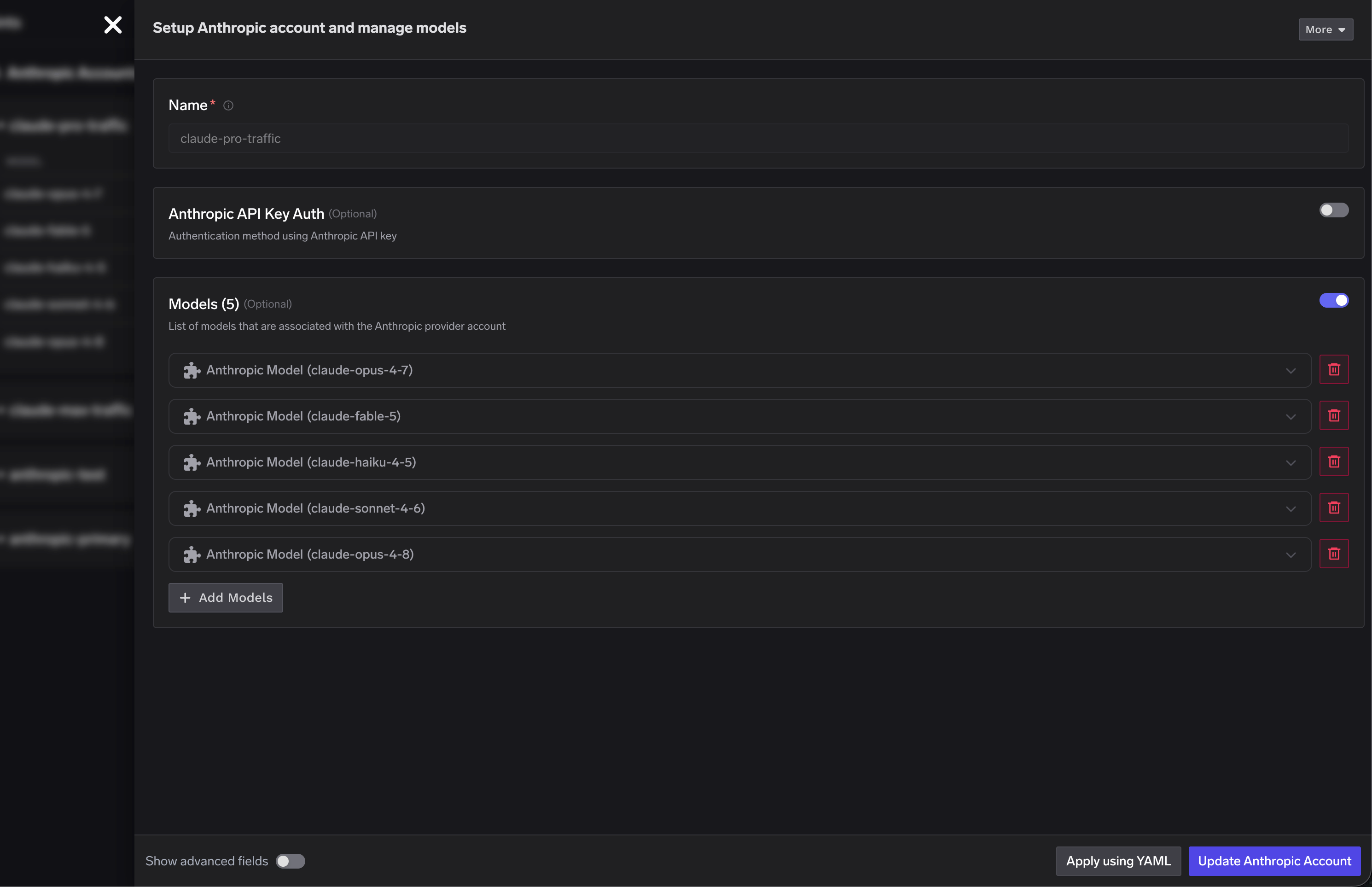
* A **subscription integration** (for example `claude-pro-traffic`) with no API key. The `Authorization` header that Claude Code sends from your Max session is forwarded to Anthropic, while TrueFoundry identifies you using `x-tfy-api-key`.
* A **standard integration** (for example `anthropic-primary`) configured with an Anthropic API key for pay-as-you-go usage.
* A **virtual model** that targets the subscription integration at priority `0` and the standard integration at a lower priority as the fallback.
Create an Anthropic provider integration for your Max subscription traffic. Leave **Anthropic API Key Auth** disabled so the gateway forwards the `Authorization` header that Claude Code sends from your Max session. Add the Claude models you want to route through the subscription.
Claude Code can be configured either globally or per project by editing the settings file:
* Global: `~/.claude/settings.json`
* Project-specific: `.claude/settings.json` in your project directory
**Why this is good:**
* Anthropic Max includes everything in Pro, plus significantly higher usage capacity (5x or 20x vs Pro), higher output limits, priority access during high traffic, and early access to advanced features.
* You keep using your Anthropic account/session for Claude Code, while TrueFoundry handles gateway authentication independently via `x-tfy-api-key`.
* You get centralized governance from TrueFoundry (usage visibility, quotas/rate limits, RBAC, logs, and guardrails) without changing your day-to-day Claude Code workflow.
* You keep one consistent gateway endpoint and model abstraction, so teams can evolve routing/fallback/cost controls centrally with minimal client-side config changes.
If you use Claude Code Max, Claude Code reserves the `Authorization` header for Anthropic account auth.\
Use `x-tfy-api-key` in `ANTHROPIC_CUSTOM_HEADERS` so the gateway can authenticate separately.
1. Set `ANTHROPIC_BASE_URL` to your TrueFoundry Gateway URL.
2. Set `ANTHROPIC_CUSTOM_HEADERS` with `x-tfy-api-key`.
3. Start Claude Code and sign in with your Anthropic subscription account when prompted.
Use this `settings.json` variant for Max subscription:
```json lines theme={"dark"}
{
"env": {
"ANTHROPIC_BASE_URL": "{GATEWAY_BASE_URL}",
"ANTHROPIC_CUSTOM_HEADERS": "x-tfy-api-key: your-truefoundry-api-key\nX-TFY-LOGGING-CONFIG: {\"enabled\": true}",
"ANTHROPIC_DEFAULT_OPUS_MODEL": "claude-code/claude-opus",
"ANTHROPIC_DEFAULT_SONNET_MODEL": "claude-code/claude-sonnet",
"ANTHROPIC_DEFAULT_HAIKU_MODEL": "claude-code/claude-haiku"
}
}
```
```bash theme={"dark"}
export ANTHROPIC_BASE_URL="https://"
export ANTHROPIC_CUSTOM_HEADERS="x-tfy-api-key: "
export ANTHROPIC_DEFAULT_OPUS_MODEL="claude-code/claude-opus"
export ANTHROPIC_DEFAULT_SONNET_MODEL="claude-code/claude-sonnet"
export ANTHROPIC_DEFAULT_HAIKU_MODEL="claude-code/claude-haiku"
claude
```
Claude Code detects model capabilities (e.g. extended thinking `effort`, ToolSearch, beta tool blocks) by string-matching the model id. Make sure the value of `ANTHROPIC_DEFAULT_OPUS_MODEL`, `ANTHROPIC_DEFAULT_SONNET_MODEL`, and `ANTHROPIC_DEFAULT_HAIKU_MODEL` contains a recognizable Anthropic model id like `claude-opus-4-7`, `claude-sonnet-4-6`, or `claude-haiku-4-5` or `claude-haiku-4-5-20251001`. If you're using a TrueFoundry virtual model, ensure that the virtual model's display name is the same as the underlying Anthropic model id (e.g. `claude-haiku-4-5`), so the full value `your-account/claude-haiku-4-5` contains a recognizable id for Claude Code; otherwise Claude Code may attach parameters the underlying model doesn't support and Anthropic will return `400: This model does not support the effort parameter`.
`x-tfy-api-key` authenticates to the gateway. The `Authorization` header from Claude Code is forwarded to Anthropic only when the provider account has no API key.
Replace:
* `your-truefoundry-api-key` with your TrueFoundry API key
* `GATEWAY_BASE_URL` with your TrueFoundry AI Gateway Base URL ([how to find it](/docs/ai-gateway/quick-start#gateway-base-url))
* Update the model names to match your TrueFoundry configured models in `provider-name/model-name` format (supports Anthropic, Bedrock and Vertex AI providers)
## Fall back from your Max subscription to the Anthropic API
A Claude Max subscription gives you a large monthly usage allowance (roughly $4,000–$8,000 of equivalent usage depending on the tier). Used well, it covers most day-to-day Claude Code work. The problem starts when you hit the subscription limit: requests begin failing, and your session stops mid-task.
You can avoid this by routing through a TrueFoundry [virtual model](/docs/ai-gateway/virtual-model) that uses your Max subscription first and automatically [falls back](/docs/ai-gateway/load-balancing-overview) to the standard Anthropic API when the subscription limit is reached. Your work continues uninterrupted and overflow traffic is billed per token through the Anthropic API.
The setup uses two Anthropic integrations and one virtual model per Claude model:
* A **subscription integration** (for example `claude-pro-traffic`) with no API key. The `Authorization` header that Claude Code sends from your Max session is forwarded to Anthropic, while TrueFoundry identifies you using `x-tfy-api-key`.
* A **standard integration** (for example `anthropic-primary`) configured with an Anthropic API key for pay-as-you-go usage.
* A **virtual model** that targets the subscription integration at priority `0` and the standard integration at a lower priority as the fallback.
Create an Anthropic provider integration for your Max subscription traffic. Leave **Anthropic API Key Auth** disabled so the gateway forwards the `Authorization` header that Claude Code sends from your Max session. Add the Claude models you want to route through the subscription.
 Create a second Anthropic provider integration (for example `anthropic-primary`) and enable **Anthropic API Key Auth** with a valid Anthropic API key. This integration is billed per token and serves as the fallback when the Max subscription limit is hit. See [Anthropic model integration](/docs/ai-gateway/anthropic) for the account setup steps.
Create a virtual model for each Claude model using priority-based routing. Set the subscription model as priority `0` and the standard Anthropic model as the fallback priority. The gateway sends each request to priority `0` first and routes to the fallback only when the subscription target is rate-limited or unavailable.
Create a second Anthropic provider integration (for example `anthropic-primary`) and enable **Anthropic API Key Auth** with a valid Anthropic API key. This integration is billed per token and serves as the fallback when the Max subscription limit is hit. See [Anthropic model integration](/docs/ai-gateway/anthropic) for the account setup steps.
Create a virtual model for each Claude model using priority-based routing. Set the subscription model as priority `0` and the standard Anthropic model as the fallback priority. The gateway sends each request to priority `0` first and routes to the fallback only when the subscription target is rate-limited or unavailable.
 In the example above, the `claude-opus` virtual model routes to `claude-pro-traffic/claude-opus-4-8` first and falls back to `anthropic-primary/claude-opus-4-8`, and the same pattern applies to the Sonnet and Haiku models.
Update `ANTHROPIC_DEFAULT_OPUS_MODEL`, `ANTHROPIC_DEFAULT_SONNET_MODEL`, and `ANTHROPIC_DEFAULT_HAIKU_MODEL` in your `settings.json` to the virtual model names (in `your-account/model-name` format). Claude Code now talks to a single endpoint, while the gateway handles the subscription-to-API fallback behind the scenes.
For Claude Code CLI and VS Code extension usage patterns, refer to the main [Claude Code integration guide](/docs/ai-gateway/claude-code).
In the example above, the `claude-opus` virtual model routes to `claude-pro-traffic/claude-opus-4-8` first and falls back to `anthropic-primary/claude-opus-4-8`, and the same pattern applies to the Sonnet and Haiku models.
Update `ANTHROPIC_DEFAULT_OPUS_MODEL`, `ANTHROPIC_DEFAULT_SONNET_MODEL`, and `ANTHROPIC_DEFAULT_HAIKU_MODEL` in your `settings.json` to the virtual model names (in `your-account/model-name` format). Claude Code now talks to a single endpoint, while the gateway handles the subscription-to-API fallback behind the scenes.
For Claude Code CLI and VS Code extension usage patterns, refer to the main [Claude Code integration guide](/docs/ai-gateway/claude-code).