> ## Documentation Index
> Fetch the complete documentation index at: https://www.truefoundry.com/llms.txt
> Use this file to discover all available pages before exploring further.
# AWS Bedrock AgentCore
> Deploy the AWS Bedrock AgentCore MCP server on TrueFoundry and register it with the MCP Gateway.
This guide walks you through deploying the [AWS Bedrock AgentCore MCP Server](https://docs.aws.amazon.com/bedrock-agentcore/latest/devguide/mcp-getting-started.html) on TrueFoundry and registering it with the TrueFoundry MCP Gateway. Once registered, your agents and AI coding assistants can search and fetch AWS Bedrock AgentCore documentation through a centralized, managed endpoint.
## What is AWS Bedrock AgentCore MCP?
The AWS Bedrock AgentCore MCP server provides AI tools with direct access to Amazon Bedrock AgentCore documentation. It enables LLMs and coding assistants to search, retrieve, and understand AgentCore concepts — covering runtime deployment, gateway connectivity, memory management, and agent lifecycle workflows.
The AWS Bedrock AgentCore MCP server is a **documentation-only** tool. It does **not** provision AWS resources, deploy agents, or make API calls to AWS services on your behalf. Its sole purpose is to give AI assistants access to the AgentCore documentation so they can help you write code, understand concepts, and troubleshoot issues related to Amazon Bedrock AgentCore services such as Runtime, Memory, Code Interpreter, Browser, Gateway, Observability, and Identity.
### Available Tools
The MCP server exposes the following tools:
| Tool | Description |
| ------------------------------ | --------------------------------------------------------------------------------------------------------------------------------------------------- |
| **search\_agentcore\_docs** | Search curated AgentCore documentation and return ranked results with contextual snippets |
| **fetch\_agentcore\_doc** | Fetch full document content by URL for in-depth understanding of specific pages |
| **manage\_agentcore\_runtime** | Get step-by-step documentation on deploying and managing agents in AgentCore Runtime, including CLI workflows, code patterns, and troubleshooting |
| **manage\_agentcore\_memory** | Get documentation on creating and managing AgentCore Memory resources, covering short-term memory, long-term memory, and semantic memory strategies |
| **manage\_agentcore\_gateway** | Get documentation on deploying and managing MCP Gateways in AgentCore, including target management, authentication setup, and CLI commands |
## Prerequisites
Before you begin, ensure you have:
1. **TrueFoundry Account**: A [TrueFoundry account](https://www.truefoundry.com/register) with a configured workspace
2. **MCP Gateway Access**: Follow the [MCP Gateway Getting Started](/docs/ai-gateway/mcp/mcp-server-getting-started) guide to set up your MCP Server Group
## Step 1: Create the MCP Server
The server wraps the official AWS Bedrock AgentCore MCP package and exposes it over HTTP using [FastMCP](https://github.com/jlowin/fastmcp).
```python main.py expandable lines theme={"dark"}
#!/usr/bin/env python3
"""
AWS Bedrock AgentCore MCP Server HTTP Wrapper
Runs the AWS Bedrock AgentCore MCP server with HTTP transport.
"""
import os
import sys
# Ensure cache is ready before importing the server
from awslabs.amazon_bedrock_agentcore_mcp_server.utils import cache
cache.ensure_ready()
# Import the MCP server
from awslabs.amazon_bedrock_agentcore_mcp_server.server import mcp
def main():
"""Run the AWS Bedrock AgentCore MCP server with HTTP transport."""
port = int(os.environ.get("PORT", "3000"))
host = os.environ.get("HOST", "0.0.0.0")
# Configure server settings
mcp.settings.host = host
mcp.settings.port = port
# Disable DNS rebinding protection for production deployment
# This allows requests from any host (e.g., gateway.truefoundry.ai)
mcp.settings.transport_security.enable_dns_rebinding_protection = False
print("=" * 60)
print("AWS Bedrock AgentCore MCP Server")
print("=" * 60)
print(f"Host: {host}")
print(f"Port: {port}")
print(f"MCP endpoint: http://{host}:{port}/mcp")
print("=" * 60)
sys.stdout.flush()
# Run the MCP server with streamable HTTP transport
mcp.run(transport="streamable-http")
if __name__ == "__main__":
main()
```
```txt requirements.txt lines theme={"dark"}
# AWS Bedrock AgentCore MCP Server Dependencies
fastmcp>=2.0.0
awslabs-amazon-bedrock-agentcore-mcp-server
```
```dockerfile Dockerfile expandable lines theme={"dark"}
# AWS Bedrock AgentCore MCP Server
# Deployable as a service on TrueFoundry with /mcp endpoint
FROM python:3.11-slim
# Set working directory
WORKDIR /app
# Install system dependencies
RUN apt-get update && apt-get install -y --no-install-recommends \
curl \
&& rm -rf /var/lib/apt/lists/*
# Copy requirements and install dependencies
COPY requirements.txt .
RUN pip install --no-cache-dir -r requirements.txt
# Copy application files
COPY main.py .
# Environment variables
ENV PORT=3000
ENV HOST=0.0.0.0
ENV FASTMCP_LOG_LEVEL=INFO
# Expose port
EXPOSE 3000
# Health check
HEALTHCHECK --interval=30s --timeout=10s --start-period=10s --retries=3 \
CMD curl -f http://localhost:3000/mcp || exit 1
# Start the MCP server
CMD ["python", "main.py"]
```
You can find the complete example code at: [AWS AgentCore MCP Server Repository](https://github.com/rishiraj-tf/aws-agentcore-mcp)
## Step 2: Run Locally
```bash lines theme={"dark"}
# Install dependencies
pip install -r requirements.txt
# Run the server
python main.py
```
Your MCP server will be available at `http://localhost:3000/mcp`.
## Step 3: Deploy on TrueFoundry
Deploy this MCP server as a service on TrueFoundry:
1. Create a new **Service** in your TrueFoundry workspace.
2. Point to the [GitHub repository](https://github.com/rishiraj-tf/aws-agentcore-mcp) or use the Dockerfile above.
3. Optionally set environment variables for AWS access:
| Variable | Description | Default |
| ----------------------- | --------------------------------------- | --------- |
| `PORT` | Port to run the server on | `3000` |
| `HOST` | Host to bind to | `0.0.0.0` |
| `FASTMCP_LOG_LEVEL` | Log level (DEBUG, INFO, WARNING, ERROR) | `INFO` |
| `AWS_ACCESS_KEY_ID` | AWS Access Key ID | - |
| `AWS_SECRET_ACCESS_KEY` | AWS Secret Access Key | - |
| `AWS_REGION` | AWS Region | - |
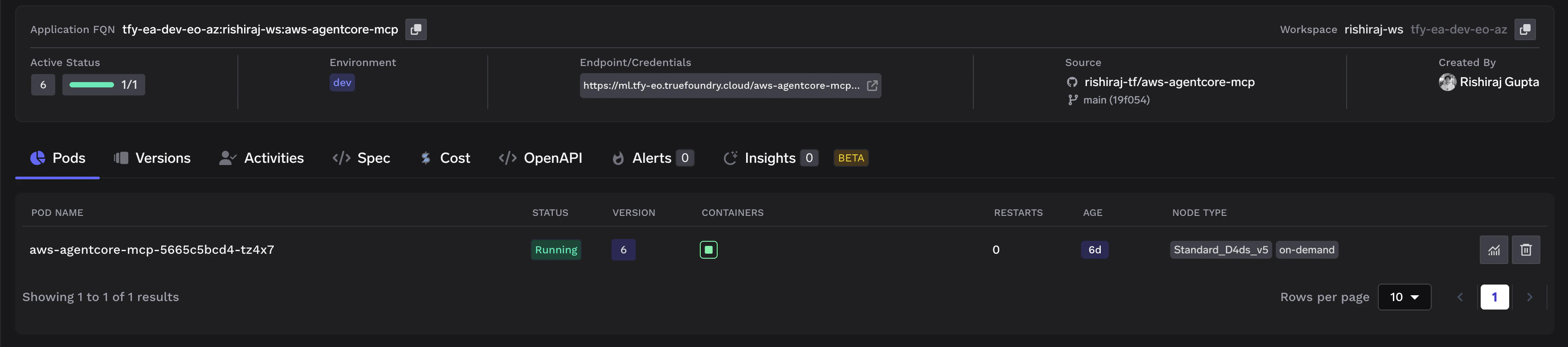
5. Deploy the service. Once running, your deployment will look like this:
 ## Step 4: Register in TrueFoundry MCP Gateway
Once the service is deployed, register it with the TrueFoundry MCP Gateway:
1. Navigate to **MCP Server Groups** in the TrueFoundry dashboard.
2. Select your MCP Server Group (or create one following the [Getting Started guide](/docs/ai-gateway/mcp/mcp-server-getting-started)).
3. Click **Add MCP Server** and fill in the following details:
| Field | Value |
| ------------------ | ----------------------------------------------------------------------------------- |
| **Name** | `aws-agentcore-mcp` |
| **Description** | AWS Bedrock AgentCore MCP server for searching and fetching AgentCore documentation |
| **URL** | `https:///mcp` |
| **Transport** | Streamable HTTP |
| **Authentication** | No Auth |
## Step 4: Register in TrueFoundry MCP Gateway
Once the service is deployed, register it with the TrueFoundry MCP Gateway:
1. Navigate to **MCP Server Groups** in the TrueFoundry dashboard.
2. Select your MCP Server Group (or create one following the [Getting Started guide](/docs/ai-gateway/mcp/mcp-server-getting-started)).
3. Click **Add MCP Server** and fill in the following details:
| Field | Value |
| ------------------ | ----------------------------------------------------------------------------------- |
| **Name** | `aws-agentcore-mcp` |
| **Description** | AWS Bedrock AgentCore MCP server for searching and fetching AgentCore documentation |
| **URL** | `https:///mcp` |
| **Transport** | Streamable HTTP |
| **Authentication** | No Auth |
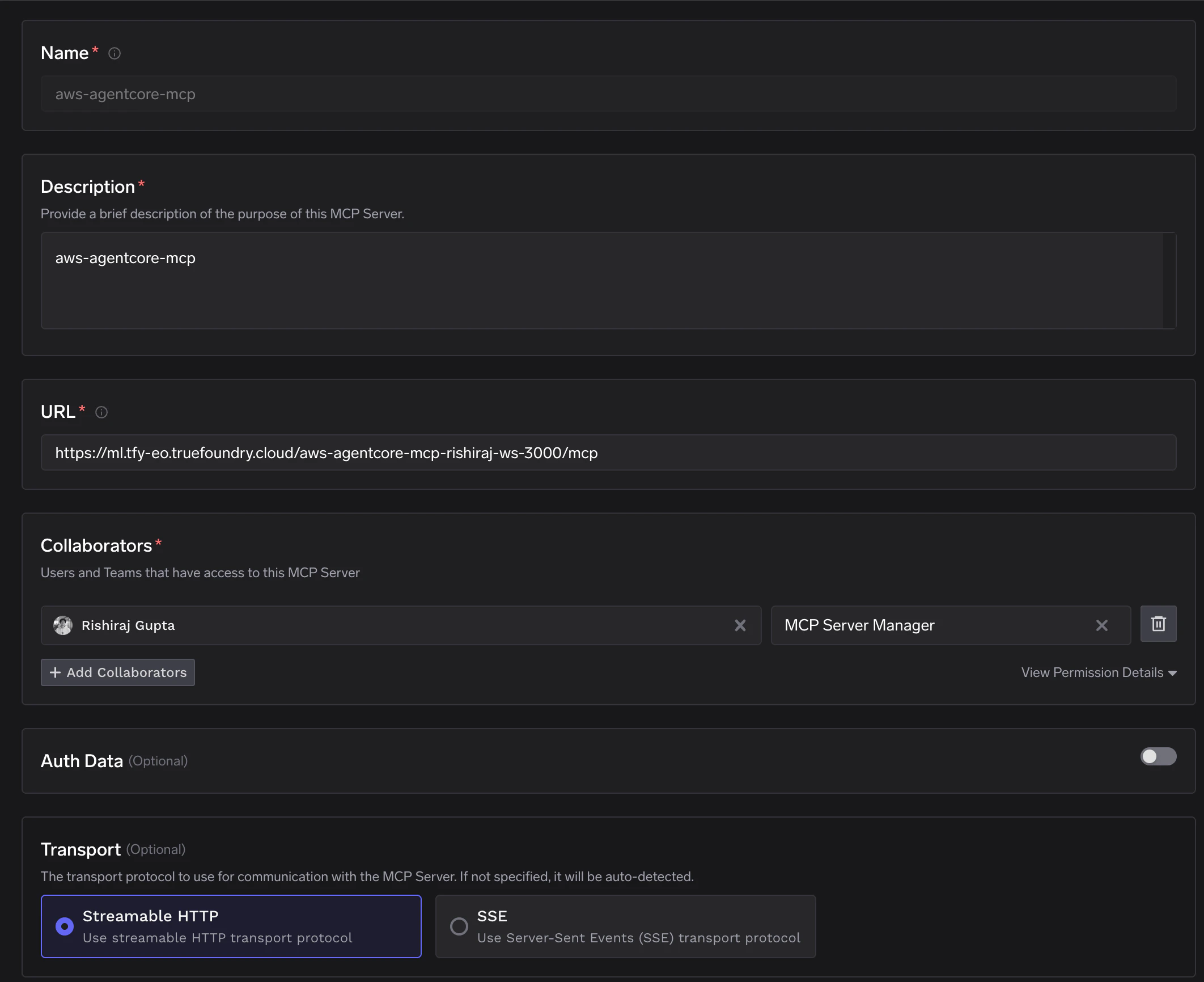 4. Save the configuration. The MCP Gateway will connect to your server and discover the available tools.
## Step 5: Verify the Integration
After registration, navigate to your MCP server in the dashboard. You should see all 5 tools discovered and available:
4. Save the configuration. The MCP Gateway will connect to your server and discover the available tools.
## Step 5: Verify the Integration
After registration, navigate to your MCP server in the dashboard. You should see all 5 tools discovered and available:
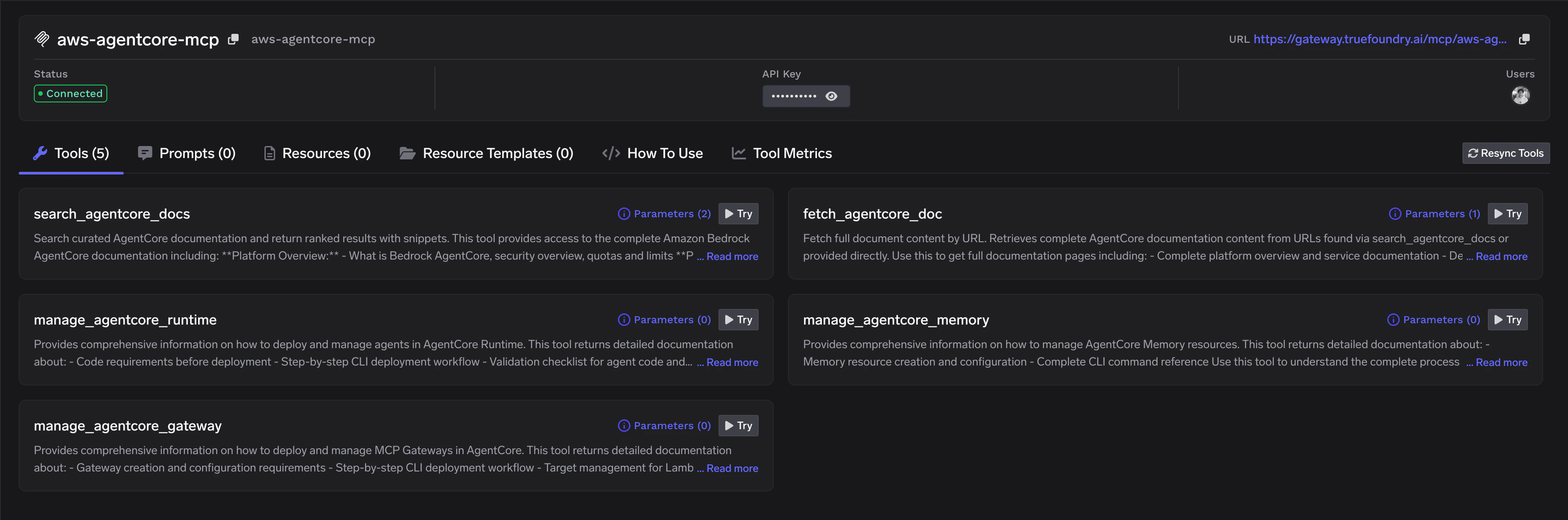 You can click **Try** on any tool to test it directly from the dashboard.
## Next Steps
* **Use in an agent**: Connect this MCP server to an AI agent using the [Implementation Recipes](/docs/ai-gateway/mcp/mcp-gateway-auth-security#implementation-recipes)
* **Add authentication**: Secure your MCP server with [authentication and access control](/docs/ai-gateway/mcp/mcp-gateway-auth-security)
* **Create a Virtual MCP Server**: Combine this with other MCP servers into a [Virtual MCP Server](/docs/ai-gateway/mcp/virtual-mcp-server) for unified tool access
You can click **Try** on any tool to test it directly from the dashboard.
## Next Steps
* **Use in an agent**: Connect this MCP server to an AI agent using the [Implementation Recipes](/docs/ai-gateway/mcp/mcp-gateway-auth-security#implementation-recipes)
* **Add authentication**: Secure your MCP server with [authentication and access control](/docs/ai-gateway/mcp/mcp-gateway-auth-security)
* **Create a Virtual MCP Server**: Combine this with other MCP servers into a [Virtual MCP Server](/docs/ai-gateway/mcp/virtual-mcp-server) for unified tool access