> ## Documentation Index
> Fetch the complete documentation index at: https://www.truefoundry.com/llms.txt
> Use this file to discover all available pages before exploring further.
# Auto Routing
> Classify each request as simple, medium, or complex and route it to the cheapest model that can handle it.
Most production traffic is not uniformly hard. A greeting, a one-line factual lookup, and a request to design a distributed rate limiter all arrive on the same endpoint — and if every one of them is served by your most capable model, you pay top-tier prices for the easy majority.
**Auto Routing** classifies each request into a complexity tier — `simple`, `medium`, or `complex` — and routes it to the target you configured for that tier. Your application keeps calling one [virtual model](/docs/ai-gateway/virtual-model) name; the AI Gateway decides which model actually serves each request.
```mermaid theme={"dark"}
flowchart LR
App[Your application] --> VM["model: my-group/smart-chat"]
VM --> CL{Classify complexity}
CL -->|simple| S["openai-main/gpt-4o-mini"]
CL -->|medium| M["openai-main/gpt-4o"]
CL -->|complex| C["anthropic-main/claude-sonnet-4"]
```
Unlike the other routing strategies, the routing decision depends on **what is in the request**, not on weights, priorities, or measured latency.
| Strategy | Decides based on |
| ----------------------------------------------------------------------- | ------------------------------------- |
| [Weight-based](/docs/ai-gateway/virtual-model#weight-based-routing) | A fixed traffic split you configure |
| [Priority-based](/docs/ai-gateway/virtual-model#priority-based-routing) | Target order and target health |
| [Latency-based](/docs/ai-gateway/virtual-model#latency-based-routing) | Recent measured latency per target |
| **Auto Routing** | **The content of the request itself** |
In benchmarks, Auto Routing cut cost 50–70% at \~98% of quality. [See the full benchmark](#benchmark-results).
## Requirements and availability
Complexity-based routing is **generally available** — it is offered to every tenant in the console with no flag to request or enable. Note that this makes the routing type available to select; it does not change the default, which is still weight-based routing when you create a virtual model.
Auto Routing is available on **virtual models only**. It is not a valid rule type in the tenant-level [Routing Config](/docs/ai-gateway/load-balancing-overview) YAML (`gateway-load-balancing-config`).
The virtual model must also meet these conditions, or it is rejected when you save it:
* **Model types** must be limited to `chat`, `completion`, and `responses`. Embedding, image, audio, rerank, and moderation are not supported.
* **Each target serves exactly one tier**, and the same model cannot appear under two tiers.
* **The classifier model** (LLM strategy only) must be a catalog chat model, not a virtual model.
See [Validation errors](#validation-errors) for the exact messages and fixes.
## How a request is routed
If any target defines [`metadata_match`](/docs/ai-gateway/virtual-model#metadata-based-target-filtering), non-matching targets are dropped before anything else happens. Classification and escalation only ever consider the remaining targets.
If [sticky routing](#sticky-routing) is configured and this session already has a pin, the pinned tier and target are reused and classification is **skipped** entirely.
The [heuristic classifier](#heuristic-classification-default) (default) or the [LLM classifier](#llm-classification) assigns the request to `simple`, `medium`, or `complex`.
The targets for the classified tier come first, followed by the [escalation chain](#escalation-and-fallback) — higher tiers, then lower tiers.
The first target is attempted with its own retry configuration. If it fails with a fallback status code, the AI Gateway moves to the next target in the chain.
Once a target returns a successful response, the tier and target are written to the session pin (when sticky routing is enabled) so subsequent turns skip classification.
## Complexity tiers
There are exactly three tiers, ordered from cheapest to most capable.
| Tier | Typical requests | Point it at |
| --------- | ------------------------------------------------------------------ | ------------------------------- |
| `simple` | Quick answers, lookups, classification, simple rewrites | Your fastest, lowest-cost model |
| `medium` | Multi-step summaries, drafting, standard code, light reasoning | A balanced mid-tier model |
| `complex` | Deep reasoning, long context, hard problem-solving, agentic chains | Your most capable model |
These descriptions are the same ones shown next to each tier in the dashboard.
You do **not** have to configure all three tiers. Configuring only `simple` and `complex`, for example, is valid — requests classified as `medium` escalate to `complex`. See [Escalation and fallback](#escalation-and-fallback).
## Classification strategies
Two strategies are available. The heuristic classifier is the default and costs nothing; the LLM classifier is more accurate on ambiguous prompts but adds a model call to every request.
| | Heuristic (default) | LLM classifier |
| ------------------------ | ---------------------- | ------------------------------------------------------------------------------- |
| Added latency | None — runs in-process | One chat completion before the request is forwarded |
| Added cost | None | One classifier call per request |
| Determinism | Fully deterministic | Depends on the classifier model |
| Needs a classifier model | No | Yes |
| Behaviour on failure | Cannot fail | Applies the configured [fallback strategy](#fallback-when-the-classifier-fails) |
### What text gets classified
Both strategies look at the same two pieces of text, extracted from the request body:
* **The last user message** — the current turn.
* **The last system or developer message** — for context. This includes the top-level `system` field on Anthropic [`/messages`](/docs/ai-gateway/messages-overview) requests and the top-level `instructions` field on [`/responses`](/docs/ai-gateway/responses-api) requests.
Earlier turns, assistant replies, and tool messages are **ignored**. Consistency across a multi-turn conversation comes from [sticky routing](#sticky-routing), not from classifying the whole history.
Classification scans at most 8,000 characters of user text and 2,000 characters of system text. A prompt longer than that is still recognised as a long prompt.
### Heuristic classification (default)
The heuristic classifier reads the prompt text, looks for a fixed set of signals, and picks a tier. It needs no configuration — this is what you get if you do not set `classification_strategy` at all.
```yaml theme={"dark"}
routing_config:
type: complexity-based-routing
classification_strategy:
type: heuristic # this is the default — the block can be omitted
```
These signals push a request toward a **higher** tier, listed from most to least influential:
| Signal | What it matches |
| --------------------------- | ------------------------------------------------------------------------------------------------------------------------------------------------------------------------ |
| Code | Programming keywords in the user or system text — `function`, `class`, `api`, `docker`, `sql`, language names, and similar. |
| Explicit reasoning requests | Phrases in the user text that ask the model to reason — `step by step`, `think through`, `pros and cons`, `compare and contrast`, `explain your reasoning`, and similar. |
| Technical vocabulary | Systems and ML terms — `architecture`, `distributed`, `neural network`, `concurrency`, `throughput`, and similar. |
| Prompt length | Long user prompts. |
| Multi-step structure | Cues such as `first … then`, `step 2`, numbered or lettered lists. |
| Many questions at once | More than three question marks in one request. |
These push a request toward a **lower** tier:
| Signal | What it matches |
| ------------------------------ | -------------------------------------------------------------------------- |
| Lookup and small-talk phrasing | `what is`, `who is`, `how many`, `define`, `hello`, `thanks`, and similar. |
| Short prompts | Very short user prompts. |
**Reasoning override.** Two or more distinct reasoning phrases in the user text always route to `complex`, whatever the other signals say.
**Empty prompts.** A request with no classifiable text is treated as `simple`.
The signals and keyword lists are fixed and cannot be customised. If they don't match how difficulty shows up in your traffic, use the [LLM classifier](#llm-classification) instead.
| Prompt | Signals matched | Tier |
| ------------------------------------------------------------------------------------------------------------ | ------------------------------------- | --------- |
| `Hi, thanks!` | short prompt, small talk | `simple` |
| `What is the capital of France?` | short prompt, lookup phrasing | `simple` |
| `Write a Python function that reverses a linked list.` | code | `medium` |
| `Design a distributed rate limiter. Walk me through the trade-offs step by step and explain your reasoning.` | two reasoning phrases → override | `complex` |
| `Our gRPC service has high tail latency under concurrency. Analyze this and break down the likely causes.` | technical vocabulary, reasoning, code | `complex` |
### LLM classification
The AI Gateway classifies the request by calling a fast chat model you nominate. Use this when the heuristic's keyword-based view is too coarse for your traffic — for example domain-specific prompts where difficulty is not signalled by vocabulary.
```yaml theme={"dark"}
routing_config:
type: complexity-based-routing
classification_strategy:
type: llm-classifier
model: openai-main/gpt-4o-mini # must be a catalog chat model
timeout_ms: 2000 # default: 2000
fallback_strategy: # required
type: heuristic
```
`fallback_strategy` is **required** whenever `classification_strategy.type` is `llm-classifier`. The console pre-fills it with the heuristic fallback, so this only affects configs written by hand or through the API — omitting the key there is rejected with `must have required property 'fallback_strategy'`.
`{"type": "heuristic"}` reproduces the behaviour that used to apply implicitly, so add it to existing configs to keep them working unchanged. `classification_strategy` itself remains optional and still defaults to the heuristic strategy.
Each classifier call is a **billable gateway request**. It appears in your request logs, and its tokens and cost are attributed to the same tenant and subject as the request that triggered it. Use a small, fast model and keep `timeout_ms` tight.
* The classifier is sent the request's system context and user text, along with a short instruction block describing the three tiers.
* Its reply is constrained to a JSON schema (`{"tier": "simple" | "medium" | "complex"}`) and capped at 256 output tokens. Models that ignore the schema and answer in prose still work — the AI Gateway extracts the first tier word it finds.
* The call is abandoned after `timeout_ms` (default `2000`), and the [fallback strategy](#fallback-when-the-classifier-fails) applies.
#### Fallback when the classifier fails
If the classifier times out, errors, returns a non-2xx status, or returns nothing usable, the configured fallback strategy decides the tier. The classifier failure never fails the request.
```yaml Heuristic fallback theme={"dark"}
classification_strategy:
type: llm-classifier
model: openai-main/gpt-4o-mini
fallback_strategy:
type: heuristic # classify with the built-in heuristic instead
```
```yaml Static fallback theme={"dark"}
classification_strategy:
type: llm-classifier
model: openai-main/gpt-4o-mini
fallback_strategy:
type: static
default_tier: medium # always use this tier; default: medium
```
Use `heuristic` to keep a content-aware decision during an outage, or `static` to send everything to one known tier. `default_tier: complex` preserves answer quality at higher spend; `default_tier: simple` does the opposite.
## Escalation and fallback
Auto Routing does not just pick one target. It builds a **fully ordered chain**, so a request still gets served when the tier it classified into has no usable target.
For a request classified into tier `T`, the order is:
1. Targets in tier `T`, in the order you declared them.
2. Targets in **higher** tiers, working upward one tier at a time.
3. Targets in **lower** tiers, working downward one tier at a time.
So a request classified as `simple` is attempted on `simple`, then `medium`, then `complex`. A request classified as `complex` is attempted on `complex`, then `medium`, then `simple`. A request fails only after every target has been tried.
```mermaid theme={"dark"}
flowchart LR
R["Request classified: medium"] --> A["medium target"]
A -->|fails or absent| B["complex target"]
B -->|fails| C["simple target"]
C -->|fails| E[Request fails]
```
Each target in the chain uses its own `retry_config`, `fallback_status_codes`, and `fallback_candidate` settings — these behave exactly as they do for the [other routing strategies](/docs/ai-gateway/virtual-model#retries-and-fallbacks).
**Escalation also covers tiers you did not configure.** With only `simple` and `complex` targets, a request classified as `medium` is escalated straight to `complex` and the response header reports the escalation. This is how you run a two-tier setup.
**Unhealthy-target cooldown does not apply here.** Under the other strategies a failing target is demoted to the end of the list; under Auto Routing, target order is always tier order. Per-target [rate limits and budgets](/docs/ai-gateway/ratelimiting) are still enforced, and a rate-limited or over-budget target is skipped.
## Sticky routing
By default every turn of a conversation is classified independently, so a chat can start on your cheap model, move to your expensive one on a hard follow-up, and move back again. That is the cheapest behaviour, but it can be visibly inconsistent within one conversation.
Sticky routing pins a session to the tier and target chosen on its **first classified turn**. Subsequent turns in the same session skip classification entirely and go straight to the pinned target.
```yaml theme={"dark"}
routing_config:
type: complexity-based-routing
sticky_routing:
ttl_seconds: 900 # 300 (5 min) to 3600 (1 hour)
session_identifiers:
- key: x-conversation-id
source: headers
load_balance_targets: [...]
```
**Session identifiers** tell the AI Gateway which request fields identify a session. All configured identifiers are combined into one session key, and you can mix headers and metadata:
* **`key`** — the header or metadata field name to read.
* **`source`** — `headers` or `metadata`.
**TTL** (`ttl_seconds`) must be between `300` (5 minutes) and `3600` (1 hour) — a shorter range than [weight-based sticky routing](/docs/ai-gateway/virtual-model#sticky-routing-weight-based-only) allows. The window slides: every turn that reads the pin refreshes its expiry, so an active conversation stays pinned and an abandoned one expires.
* **Redis is required.** Pins are stored in Redis and shared across all gateway pods. If Redis is not configured or is unreachable, sticky routing no-ops and every turn is classified independently.
* **Pins are written only after success.** A target that failed is never pinned.
* **Sessions are isolated.** Two different session identifier values are two different pins.
* **Stale pins are discarded.** If the pinned target is no longer an eligible target of the virtual model, the request is reclassified.
* **Missing identifiers.** If none of the configured identifiers resolve to a value on a request, there is no session to pin and the request is classified normally.
## Benchmark results
We benchmarked Auto Routing against sending every request to a single top-tier model (Claude Opus 5), over the same prompts. Cost is computed from the tokens each request actually used at list prices, and quality retained is the router's pass rate divided by the baseline's. Every answer is graded deterministically; generated code is run against unit tests, and math and multiple-choice are matched to answer keys.
| Workload | Cost savings | Quality retained |
| ----------------------------------------------------- | ------------ | --------------------------- |
| Graded academic benchmarks (11 datasets, 550 prompts) | 69% | 98% |
| Realistic production traffic (chat, developer, agent) | 80% | cost-only (no ground truth) |
Against a prior-generation top model the graded savings are about 50%; the exact figure depends on which model you route away from. Auto Routing was also faster on average, since most requests skip the top-tier reasoning model.
A few honest notes: savings depend on your traffic mix, and the free heuristic classifier gives up some accuracy on short-but-hard prompts (the LLM classifier recovers most of it at lower savings). Figures measured August 2026 on a Claude Haiku / Sonnet / Opus tier ladder.
To measure your own savings, see [Observability](#observability) — the gateway logs the resolved tier for every request.
## Configure in the dashboard
Auto Routing is configured on a virtual model, alongside the other routing strategies. See [Create a virtual model](/docs/ai-gateway/virtual-model-advanced) for the full walkthrough.
Go to **AI Gateway** → **Models** → **Virtual Model** and add or edit a model. Give it a **Name**, and under **Model Types** select only from **Chat**, **Completion**, and **Responses**.
Under **Balance them across following targets based on**, choose **Complexity**.
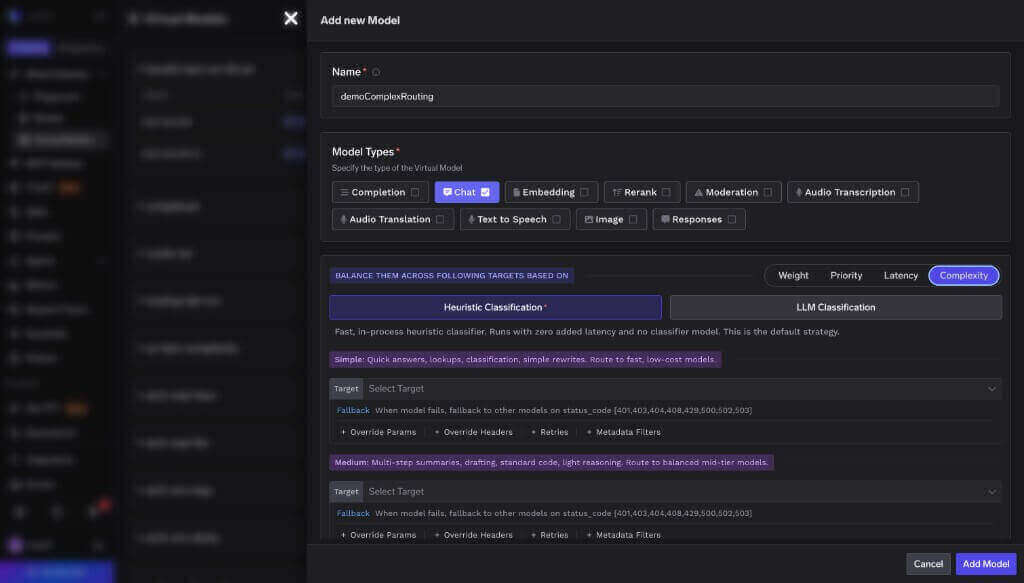 **Heuristic Classification** is selected by default and needs nothing else.
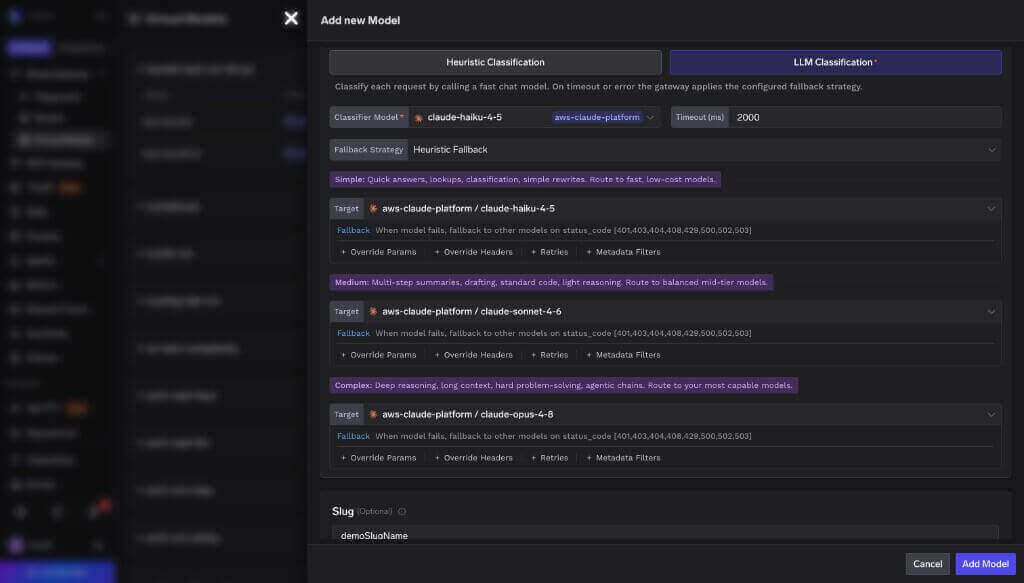
Choose **LLM Classification** instead to classify with a model, then set **Classifier Model**, **Timeout (ms)**, and **Fallback Strategy**. Switching **Fallback Strategy** to **Static Fallback** adds a **Default Tier** field.
**Heuristic Classification** is selected by default and needs nothing else.
Choose **LLM Classification** instead to classify with a model, then set **Classifier Model**, **Timeout (ms)**, and **Fallback Strategy**. Switching **Fallback Strategy** to **Static Fallback** adds a **Default Tier** field.
 The form has one **Target** slot under each of **Simple**, **Medium**, and **Complex**. Pick a model for each tier you want to serve and leave the rest empty — an empty tier is skipped and its traffic [escalates](#escalation-and-fallback).
Each target carries its own **Fallback** status codes, plus optional **Retries**, **Override Params**, **Override Headers**, and **Metadata Filters** — all behaving as they do for the other routing strategies.
The form has one **Target** slot under each of **Simple**, **Medium**, and **Complex**. Pick a model for each tier you want to serve and leave the rest empty — an empty tier is skipped and its traffic [escalates](#escalation-and-fallback).
Each target carries its own **Fallback** status codes, plus optional **Retries**, **Override Params**, **Override Headers**, and **Metadata Filters** — all behaving as they do for the other routing strategies.
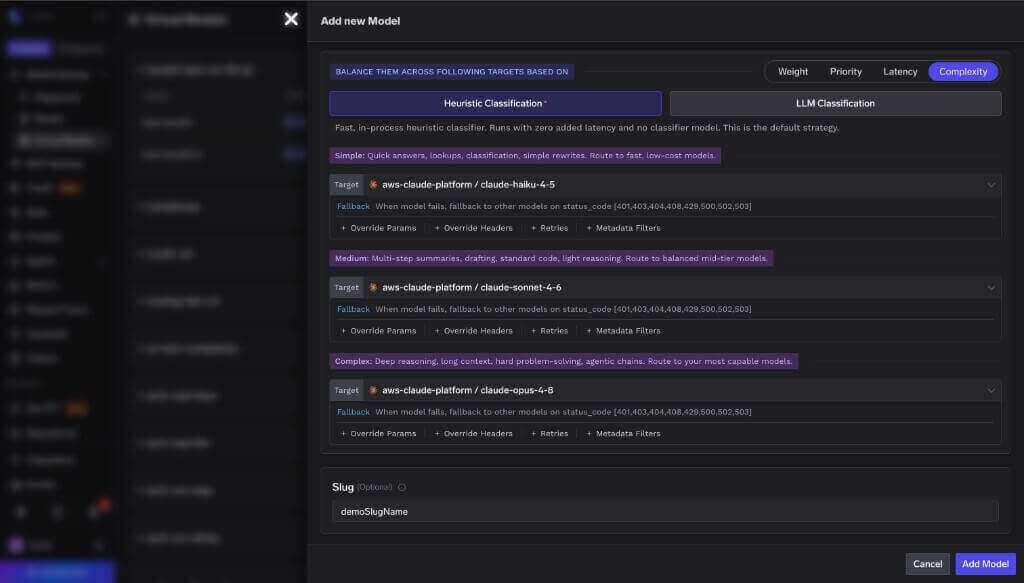 **Current dashboard limitations.** The virtual model form supports **one target per tier**, and **sticky routing is not yet exposed** in the UI. To configure multiple targets in the same tier or to enable sticky routing, apply the virtual model manifest with [`tfy apply`](/docs/using-tfy-apply) or the API instead. Both are fully supported by the AI Gateway.
## Configuration reference
```yaml YAML theme={"dark"}
routing_config:
type: complexity-based-routing
# How requests are classified. Optional; defaults to { type: heuristic }.
classification_strategy:
type: heuristic | llm-classifier
# llm-classifier only:
model: string # catalog chat model FQN (not a virtual model)
timeout_ms: integer # default: 2000
fallback_strategy: # required when type is llm-classifier
type: heuristic | static
default_tier: simple | medium | complex # static only; required when type is static
# Optional. Pins a session to its first classified tier/target. Requires Redis.
sticky_routing:
ttl_seconds: integer # 300–3600 (5 minutes to 1 hour)
session_identifiers:
- key: string # header or metadata field name
source: headers | metadata
load_balance_targets:
- target: string # catalog model FQN, e.g. openai-main/gpt-4o
tier: simple | medium | complex # required; each target serves exactly one tier
retry_config:
attempts: integer # retries on the SAME target; default: 0
delay: integer # ms between retries; default: 100
on_status_codes: string[] # default: ["429","500","502","503"]
fallback_status_codes: string[] # codes that move to the NEXT target in the chain
# default: ["401","403","404","408","429","500","502","503"]
fallback_candidate: boolean # eligible to receive escalated traffic; default: true
metadata_match: # all pairs must match resolved request metadata
key: value
headers_override:
set:
header-name: header-value
remove:
- header-name
override_params:
temperature: number
max_tokens: integer
prompt_version_fqn: string
```
## Examples
The common starting point: cheap model for the easy majority, mid-tier for everyday work, top model for the hard tail. No classifier cost, no extra latency.
```yaml theme={"dark"}
routing_config:
type: complexity-based-routing
load_balance_targets:
- target: openai-main/gpt-4o-mini
tier: simple
- target: openai-main/gpt-4o
tier: medium
- target: anthropic-main/claude-sonnet-4
tier: complex
```
Skip `medium` entirely. Requests classified as `medium` escalate to the `complex` target.
```yaml theme={"dark"}
routing_config:
type: complexity-based-routing
load_balance_targets:
- target: openai-main/gpt-4o-mini
tier: simple
- target: anthropic-main/claude-sonnet-4
tier: complex
```
Use a small model to classify, and route everything to the `complex` tier if that classifier is ever unavailable — quality never regresses, spend rises only during the outage.
```yaml theme={"dark"}
routing_config:
type: complexity-based-routing
classification_strategy:
type: llm-classifier
model: openai-main/gpt-4o-mini
timeout_ms: 1500
fallback_strategy:
type: static
default_tier: complex
load_balance_targets:
- target: openai-main/gpt-4o-mini
tier: simple
- target: openai-main/gpt-4o
tier: medium
- target: anthropic-main/claude-sonnet-4
tier: complex
```
Pin each conversation to the tier its first turn classified into, for 15 minutes of inactivity.
```yaml theme={"dark"}
routing_config:
type: complexity-based-routing
sticky_routing:
ttl_seconds: 900
session_identifiers:
- key: x-conversation-id
source: headers
load_balance_targets:
- target: openai-main/gpt-4o-mini
tier: simple
- target: openai-main/gpt-4o
tier: medium
- target: anthropic-main/claude-sonnet-4
tier: complex
```
Multiple targets in the same tier are attempted in declaration order before escalating. This shape requires the YAML manifest or API — the dashboard form allows one target per tier.
```yaml theme={"dark"}
routing_config:
type: complexity-based-routing
load_balance_targets:
- target: openai-main/gpt-4o-mini
tier: simple
retry_config:
attempts: 2
delay: 100
- target: openai-main/gpt-4o
tier: medium
- target: anthropic-main/claude-sonnet-4
tier: complex
fallback_status_codes: ["429", "500", "502", "503"]
- target: bedrock-main/claude-sonnet-4
tier: complex
```
Pair each tier with a prompt version tuned for that model, using [per-target overrides](/docs/ai-gateway/virtual-model#model-specific-prompt-overrides).
```yaml theme={"dark"}
routing_config:
type: complexity-based-routing
load_balance_targets:
- target: openai-main/gpt-4o-mini
tier: simple
override_params:
max_tokens: 512
prompt_version_fqn: chat_prompt:internal/my-app/concise-answer:1
- target: anthropic-main/claude-sonnet-4
tier: complex
override_params:
prompt_version_fqn: chat_prompt:internal/my-app/deep-reasoning:1
```
## Observability
### Which tier served the request?
Every response carries an `x-tfy-applied-rules` header. For Auto Routing it includes a `complexity` block with the tier that was served and how the tier was decided, plus the full ordered chain in `routing_model_order`:
```json theme={"dark"}
{
"routing_config": {
"rule_id": "my-group/smart-chat",
"requested_model": "my-group/smart-chat",
"resolved_model": "anthropic-main/claude-sonnet-4",
"complexity": { "tier": "complex", "cause": "heuristic" },
"routing_model_order": [
{ "model": "anthropic-main/claude-sonnet-4", "reason": "complexity-tier" },
{ "model": "openai-main/gpt-4o", "reason": "complexity-escalation" },
{ "model": "openai-main/gpt-4o-mini", "reason": "complexity-escalation" }
]
}
}
```
`cause` tells you which mechanism produced the tier:
| `cause` | Meaning |
| ---------------- | ------------------------------------------------------------------------------------------------------------------------------------------- |
| `heuristic` | The built-in heuristic classifier decided the tier — either as the configured strategy, or as the fallback after an LLM classifier failure. |
| `llm_classifier` | The LLM classifier returned the tier. |
| `session_pin` | Classification was skipped; the tier came from an existing sticky session pin. |
| `default` | The LLM classifier failed and a `static` fallback strategy applied its `default_tier`. |
`reason` on each entry in `routing_model_order` tells you why that target is in that position:
| `reason` | Meaning |
| ------------------------ | ------------------------------------------------------------------- |
| `complexity-tier` | Target belongs to the tier the request classified into. |
| `complexity-escalation` | Target belongs to a different tier and is in the chain as failover. |
| `complexity-session-pin` | Target was placed first because a sticky session pin selected it. |
The actual model that served the request is also returned in the `x-tfy-resolved-model` [response header](/docs/ai-gateway/headers#response-headers).
### Metrics
Every routing decision increments a counter, so you can see your tier mix and how often escalation happens.
| Metric | Type | Labels |
| ----------------------------------------------- | ------- | --------------------------------------------------------------------- |
| `ai_gateway_complexity_routing_decisions_total` | Counter | `tenant_name`, `model_name`, `decided_tier`, `resolved_tier`, `cause` |
* **`decided_tier`** — the tier the request classified into.
* **`resolved_tier`** — the tier of the first target actually attempted.
When the two differ, the request was escalated because the classified tier had no eligible target. A persistent gap is a signal that a tier is misconfigured or missing. See [Prometheus and Grafana integration](/docs/ai-gateway/prometheus-grafana-integration) for scraping setup.
### Traces and logs
* Each LLM classifier call produces a **`ComplexityBasedRouting: LLMClassifier`** span, with the classifier's own chat-completion span nested beneath it — so classifier latency is visible separately from the served model's latency.
* The request span carries `tfy.complexity.tier` and `tfy.complexity.cause`.
* The gateway logs each decision with the tier, the cause, the signals that matched, and the resolved model — useful for checking why a given request landed on the tier it did.
## Validation errors
These configurations are rejected when you save the virtual model, with a `400`:
| Error | Fix |
| ---------------------------------------------------------------------------------------------------------------- | ------------------------------------------------------------------------------------------------------------------------------------------------------------ |
| `cannot use Auto Routing with model_types [embedding]. Auto Routing supports only [chat, completion, responses]` | Remove the unsupported model types, or serve them from a separate virtual model. Mixed lists are rejected too — declaring both `chat` and `embedding` fails. |
| Duplicate target across tiers | Assign the model to a single tier. |
| `classifier model "…" could not be resolved in this tenant` | Use a model FQN that exists in your model catalog. |
| `classifier model "…" cannot be a virtual model` | Point the classifier at a catalog model. |
| `classifier model "…" must support [chat]` | Pick a model whose model types include `chat`. |
The three classifier checks also run at request time, so a classifier model that is later deleted or changed surfaces the same error on the request rather than misrouting silently.
## FAQ
That depends on your traffic mix, so measure it. Break `ai_gateway_complexity_routing_decisions_total` down by `resolved_tier` to see what share of traffic landed on each tier, and compare per-model cost in [analytics](/docs/ai-gateway/analytics-model-metrics). Your saving is that share multiplied by the price difference between tiers.
No. It is a virtual-model-only routing type. Create a virtual model and point your clients at it.
No — a virtual model declaring those model types with Auto Routing is rejected at save time. Use [weight-, priority-, or latency-based routing](/docs/ai-gateway/virtual-model#routing-strategies) for them.
No, its signals are fixed. If the heuristic misclassifies your traffic, switch to the [LLM classifier](#llm-classification) and nominate your own judging model.
Yes. It appears in request logs, and its tokens and cost are attributed to the same tenant and subject as the request that triggered it. Use a small, cheap model and keep `timeout_ms` tight.
The request is never failed by a classifier problem. On timeout, error, non-2xx, or an unusable reply, the configured `fallback_strategy` decides the tier — the built-in heuristic by default, or a fixed `default_tier` if you chose `static`.
It escalates to the next higher tier, and if there is none, down to lower tiers. The response header reports the tier actually used, and the metric records `decided_tier` and `resolved_tier` separately so you can spot it.
Each turn is classified independently unless you enable [sticky routing](#sticky-routing) — a follow-up that reads as harder than the opening message routes to a higher tier. To keep one conversation on one target, add `sticky_routing` with a session identifier your client always sends.
No. Targets are ordered by tier and escalation, never reordered by health. Per-target retries, fallback status codes, rate limits, and budgets all still apply.
Yes. Classification finishes before the upstream request is made, so streaming responses are unaffected.
Yes. A `chat` virtual model serves both `/chat/completions` and `/messages`, and a `responses` virtual model serves `/responses`. In both cases the top-level system prompt (`system` and `instructions` respectively) is included as classification context.
## Next steps
* [Virtual Models overview](/docs/ai-gateway/virtual-model) — the other routing strategies, per-target options, and health detection.
* [Create a virtual model](/docs/ai-gateway/virtual-model-advanced) — step-by-step setup.
* [Analytics](/docs/ai-gateway/analytics-model-metrics) — compare cost and latency per target once traffic is flowing.
**Current dashboard limitations.** The virtual model form supports **one target per tier**, and **sticky routing is not yet exposed** in the UI. To configure multiple targets in the same tier or to enable sticky routing, apply the virtual model manifest with [`tfy apply`](/docs/using-tfy-apply) or the API instead. Both are fully supported by the AI Gateway.
## Configuration reference
```yaml YAML theme={"dark"}
routing_config:
type: complexity-based-routing
# How requests are classified. Optional; defaults to { type: heuristic }.
classification_strategy:
type: heuristic | llm-classifier
# llm-classifier only:
model: string # catalog chat model FQN (not a virtual model)
timeout_ms: integer # default: 2000
fallback_strategy: # required when type is llm-classifier
type: heuristic | static
default_tier: simple | medium | complex # static only; required when type is static
# Optional. Pins a session to its first classified tier/target. Requires Redis.
sticky_routing:
ttl_seconds: integer # 300–3600 (5 minutes to 1 hour)
session_identifiers:
- key: string # header or metadata field name
source: headers | metadata
load_balance_targets:
- target: string # catalog model FQN, e.g. openai-main/gpt-4o
tier: simple | medium | complex # required; each target serves exactly one tier
retry_config:
attempts: integer # retries on the SAME target; default: 0
delay: integer # ms between retries; default: 100
on_status_codes: string[] # default: ["429","500","502","503"]
fallback_status_codes: string[] # codes that move to the NEXT target in the chain
# default: ["401","403","404","408","429","500","502","503"]
fallback_candidate: boolean # eligible to receive escalated traffic; default: true
metadata_match: # all pairs must match resolved request metadata
key: value
headers_override:
set:
header-name: header-value
remove:
- header-name
override_params:
temperature: number
max_tokens: integer
prompt_version_fqn: string
```
## Examples
The common starting point: cheap model for the easy majority, mid-tier for everyday work, top model for the hard tail. No classifier cost, no extra latency.
```yaml theme={"dark"}
routing_config:
type: complexity-based-routing
load_balance_targets:
- target: openai-main/gpt-4o-mini
tier: simple
- target: openai-main/gpt-4o
tier: medium
- target: anthropic-main/claude-sonnet-4
tier: complex
```
Skip `medium` entirely. Requests classified as `medium` escalate to the `complex` target.
```yaml theme={"dark"}
routing_config:
type: complexity-based-routing
load_balance_targets:
- target: openai-main/gpt-4o-mini
tier: simple
- target: anthropic-main/claude-sonnet-4
tier: complex
```
Use a small model to classify, and route everything to the `complex` tier if that classifier is ever unavailable — quality never regresses, spend rises only during the outage.
```yaml theme={"dark"}
routing_config:
type: complexity-based-routing
classification_strategy:
type: llm-classifier
model: openai-main/gpt-4o-mini
timeout_ms: 1500
fallback_strategy:
type: static
default_tier: complex
load_balance_targets:
- target: openai-main/gpt-4o-mini
tier: simple
- target: openai-main/gpt-4o
tier: medium
- target: anthropic-main/claude-sonnet-4
tier: complex
```
Pin each conversation to the tier its first turn classified into, for 15 minutes of inactivity.
```yaml theme={"dark"}
routing_config:
type: complexity-based-routing
sticky_routing:
ttl_seconds: 900
session_identifiers:
- key: x-conversation-id
source: headers
load_balance_targets:
- target: openai-main/gpt-4o-mini
tier: simple
- target: openai-main/gpt-4o
tier: medium
- target: anthropic-main/claude-sonnet-4
tier: complex
```
Multiple targets in the same tier are attempted in declaration order before escalating. This shape requires the YAML manifest or API — the dashboard form allows one target per tier.
```yaml theme={"dark"}
routing_config:
type: complexity-based-routing
load_balance_targets:
- target: openai-main/gpt-4o-mini
tier: simple
retry_config:
attempts: 2
delay: 100
- target: openai-main/gpt-4o
tier: medium
- target: anthropic-main/claude-sonnet-4
tier: complex
fallback_status_codes: ["429", "500", "502", "503"]
- target: bedrock-main/claude-sonnet-4
tier: complex
```
Pair each tier with a prompt version tuned for that model, using [per-target overrides](/docs/ai-gateway/virtual-model#model-specific-prompt-overrides).
```yaml theme={"dark"}
routing_config:
type: complexity-based-routing
load_balance_targets:
- target: openai-main/gpt-4o-mini
tier: simple
override_params:
max_tokens: 512
prompt_version_fqn: chat_prompt:internal/my-app/concise-answer:1
- target: anthropic-main/claude-sonnet-4
tier: complex
override_params:
prompt_version_fqn: chat_prompt:internal/my-app/deep-reasoning:1
```
## Observability
### Which tier served the request?
Every response carries an `x-tfy-applied-rules` header. For Auto Routing it includes a `complexity` block with the tier that was served and how the tier was decided, plus the full ordered chain in `routing_model_order`:
```json theme={"dark"}
{
"routing_config": {
"rule_id": "my-group/smart-chat",
"requested_model": "my-group/smart-chat",
"resolved_model": "anthropic-main/claude-sonnet-4",
"complexity": { "tier": "complex", "cause": "heuristic" },
"routing_model_order": [
{ "model": "anthropic-main/claude-sonnet-4", "reason": "complexity-tier" },
{ "model": "openai-main/gpt-4o", "reason": "complexity-escalation" },
{ "model": "openai-main/gpt-4o-mini", "reason": "complexity-escalation" }
]
}
}
```
`cause` tells you which mechanism produced the tier:
| `cause` | Meaning |
| ---------------- | ------------------------------------------------------------------------------------------------------------------------------------------- |
| `heuristic` | The built-in heuristic classifier decided the tier — either as the configured strategy, or as the fallback after an LLM classifier failure. |
| `llm_classifier` | The LLM classifier returned the tier. |
| `session_pin` | Classification was skipped; the tier came from an existing sticky session pin. |
| `default` | The LLM classifier failed and a `static` fallback strategy applied its `default_tier`. |
`reason` on each entry in `routing_model_order` tells you why that target is in that position:
| `reason` | Meaning |
| ------------------------ | ------------------------------------------------------------------- |
| `complexity-tier` | Target belongs to the tier the request classified into. |
| `complexity-escalation` | Target belongs to a different tier and is in the chain as failover. |
| `complexity-session-pin` | Target was placed first because a sticky session pin selected it. |
The actual model that served the request is also returned in the `x-tfy-resolved-model` [response header](/docs/ai-gateway/headers#response-headers).
### Metrics
Every routing decision increments a counter, so you can see your tier mix and how often escalation happens.
| Metric | Type | Labels |
| ----------------------------------------------- | ------- | --------------------------------------------------------------------- |
| `ai_gateway_complexity_routing_decisions_total` | Counter | `tenant_name`, `model_name`, `decided_tier`, `resolved_tier`, `cause` |
* **`decided_tier`** — the tier the request classified into.
* **`resolved_tier`** — the tier of the first target actually attempted.
When the two differ, the request was escalated because the classified tier had no eligible target. A persistent gap is a signal that a tier is misconfigured or missing. See [Prometheus and Grafana integration](/docs/ai-gateway/prometheus-grafana-integration) for scraping setup.
### Traces and logs
* Each LLM classifier call produces a **`ComplexityBasedRouting: LLMClassifier`** span, with the classifier's own chat-completion span nested beneath it — so classifier latency is visible separately from the served model's latency.
* The request span carries `tfy.complexity.tier` and `tfy.complexity.cause`.
* The gateway logs each decision with the tier, the cause, the signals that matched, and the resolved model — useful for checking why a given request landed on the tier it did.
## Validation errors
These configurations are rejected when you save the virtual model, with a `400`:
| Error | Fix |
| ---------------------------------------------------------------------------------------------------------------- | ------------------------------------------------------------------------------------------------------------------------------------------------------------ |
| `cannot use Auto Routing with model_types [embedding]. Auto Routing supports only [chat, completion, responses]` | Remove the unsupported model types, or serve them from a separate virtual model. Mixed lists are rejected too — declaring both `chat` and `embedding` fails. |
| Duplicate target across tiers | Assign the model to a single tier. |
| `classifier model "…" could not be resolved in this tenant` | Use a model FQN that exists in your model catalog. |
| `classifier model "…" cannot be a virtual model` | Point the classifier at a catalog model. |
| `classifier model "…" must support [chat]` | Pick a model whose model types include `chat`. |
The three classifier checks also run at request time, so a classifier model that is later deleted or changed surfaces the same error on the request rather than misrouting silently.
## FAQ
That depends on your traffic mix, so measure it. Break `ai_gateway_complexity_routing_decisions_total` down by `resolved_tier` to see what share of traffic landed on each tier, and compare per-model cost in [analytics](/docs/ai-gateway/analytics-model-metrics). Your saving is that share multiplied by the price difference between tiers.
No. It is a virtual-model-only routing type. Create a virtual model and point your clients at it.
No — a virtual model declaring those model types with Auto Routing is rejected at save time. Use [weight-, priority-, or latency-based routing](/docs/ai-gateway/virtual-model#routing-strategies) for them.
No, its signals are fixed. If the heuristic misclassifies your traffic, switch to the [LLM classifier](#llm-classification) and nominate your own judging model.
Yes. It appears in request logs, and its tokens and cost are attributed to the same tenant and subject as the request that triggered it. Use a small, cheap model and keep `timeout_ms` tight.
The request is never failed by a classifier problem. On timeout, error, non-2xx, or an unusable reply, the configured `fallback_strategy` decides the tier — the built-in heuristic by default, or a fixed `default_tier` if you chose `static`.
It escalates to the next higher tier, and if there is none, down to lower tiers. The response header reports the tier actually used, and the metric records `decided_tier` and `resolved_tier` separately so you can spot it.
Each turn is classified independently unless you enable [sticky routing](#sticky-routing) — a follow-up that reads as harder than the opening message routes to a higher tier. To keep one conversation on one target, add `sticky_routing` with a session identifier your client always sends.
No. Targets are ordered by tier and escalation, never reordered by health. Per-target retries, fallback status codes, rate limits, and budgets all still apply.
Yes. Classification finishes before the upstream request is made, so streaming responses are unaffected.
Yes. A `chat` virtual model serves both `/chat/completions` and `/messages`, and a `responses` virtual model serves `/responses`. In both cases the top-level system prompt (`system` and `instructions` respectively) is included as classification context.
## Next steps
* [Virtual Models overview](/docs/ai-gateway/virtual-model) — the other routing strategies, per-target options, and health detection.
* [Create a virtual model](/docs/ai-gateway/virtual-model-advanced) — step-by-step setup.
* [Analytics](/docs/ai-gateway/analytics-model-metrics) — compare cost and latency per target once traffic is flowing.