> ## Documentation Index
> Fetch the complete documentation index at: https://www.truefoundry.com/llms.txt
> Use this file to discover all available pages before exploring further.
# Create and use agents via SDK
> Understand Agent, Session, Turn, Event, and Delta — then follow the two SDK paths to create agents and invoke them programmatically.
The Agent Harness SDK lets you define agents in code, save them to the Agent Registry, and invoke them from any application — with multi-turn conversations, live event streaming, human-in-the-loop approvals, and parallel sub-agents.
Read the **concepts** below — each one uses the same `support-bot` example so you can see how the pieces connect. When you're ready to write code, follow one of the two paths in [Getting started](#getting-started).
## Core concepts
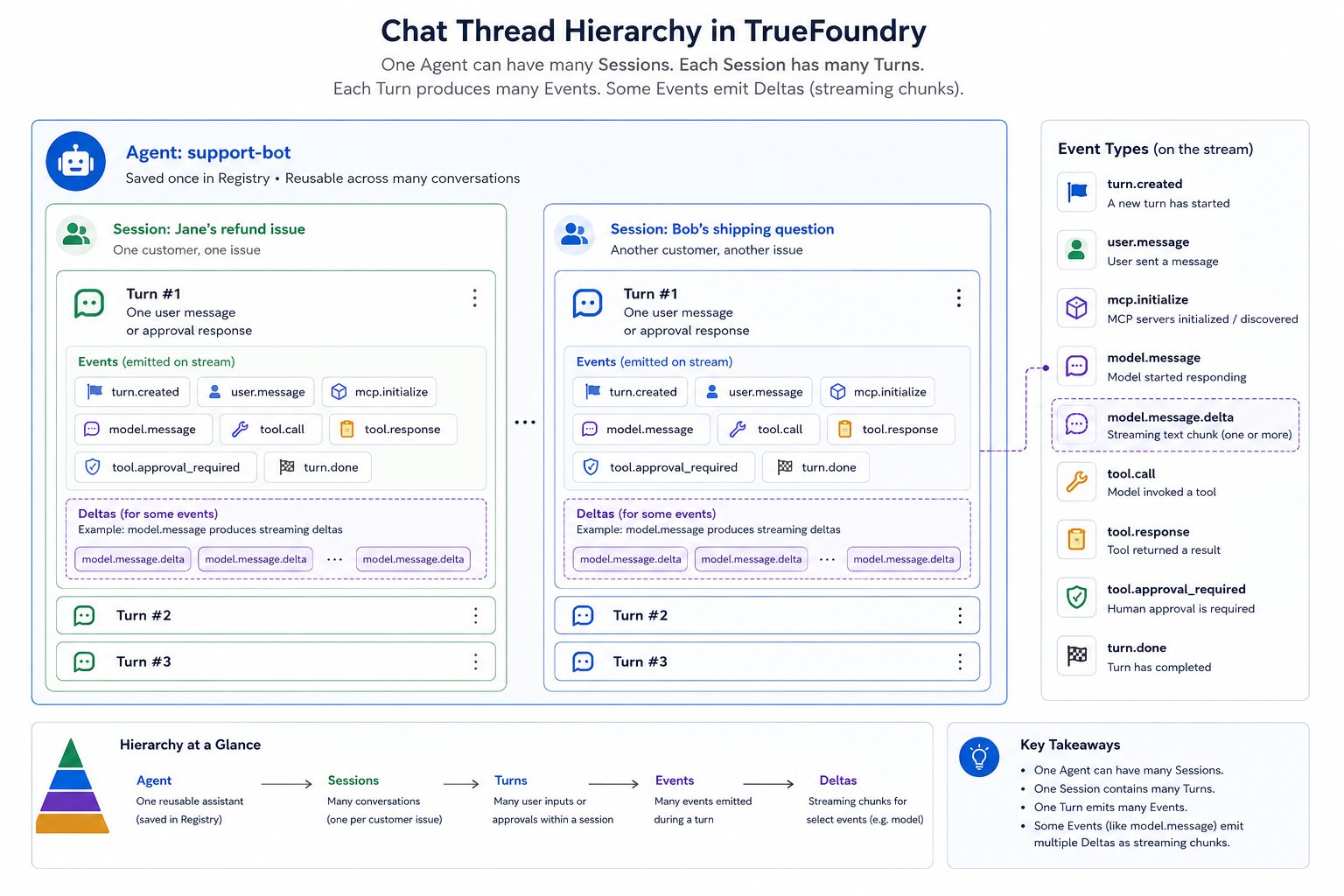
Interaction with an agent follows a strict hierarchy: **one Agent → many Sessions → many Turns → many Events → some Deltas**. The sections below walk through each layer using a single running example, a customer support agent named **`support-bot`**.
 ### Agent
An **agent** is a saved definition in the Agent Registry — not a running process. You define it once (model, instructions, tools, config) and any number of customers can invoke it by name.
Imagine **`support-bot`**: a customer support assistant that looks up orders and processes refunds via an MCP server. Its spec might look like this:
```yaml support-bot — AgentManifest theme={"dark"}
type: truefoundry-agent
name: support-bot
description: Customer support assistant for order lookups and refunds
model:
name: anthropic/claude-sonnet-4-6
params:
max_tokens: 4096
instructions: |
You help customers with orders. Look up order details before taking action.
Always confirm before processing refunds.
mcp_servers:
- name: orders-api
enable_tools: ["get_order", "process_refund"]
require_approval_for_tools: ["process_refund"]
config:
iteration_limit: 25
sandbox:
enabled: true
collaborators: []
```
Every customer session loads this same definition. Changing the agent (new model, new tools) creates a new version in the Registry — existing sessions keep the config they started with. See [Agent manifest reference](/docs/agent-platform/agent-harness/sdk/agent-manifest-reference) for every field.
### Session
A **session** is **one issue** worked through with the agent. It is the conversation context: all turns on that issue chain together, and the agent remembers what happened earlier in the same session. Each new issue — whether from the same customer or a different one — gets its own session.
**Example — two independent sessions:**
| Session | Issue | How it starts |
| --------------- | -------------------------------- | ------------------------------------------ |
| `sess-7f2a9c1b` | Jane — refund for order ORD-2031 | *"What's the status of order ORD-2031?"* |
| `sess-9d4e2a88` | Bob — shipping question | A different customer starts their own chat |
Jane's follow-up messages about the refund stay in `sess-7f2a9c1b`. Bob's question runs in a separate session, so the two conversations never share context.
```json Session for Jane's refund issue theme={"dark"}
{
"id": "sess-7f2a9c1b",
"agent_name": "support-bot",
"title": "Jane Doe — refund for ORD-2031",
"created_at": "2026-06-24T10:00:00Z"
}
```
Persist `session.id` so Jane can return tomorrow and pick up where she left off. Only one turn runs inside a session at a time.
### Turn
A **turn** is one request in the conversation — a single back-and-forth boundary between your app and the agent. Each time Jane sends a message (or your app sends an approval), you create a new turn. Turns inside a session **chain automatically**: the agent sees every earlier turn in that session.
**Example — three turns in Jane's refund session:**
```mermaid theme={"dark"}
flowchart LR
T1["Turn 1
### Agent
An **agent** is a saved definition in the Agent Registry — not a running process. You define it once (model, instructions, tools, config) and any number of customers can invoke it by name.
Imagine **`support-bot`**: a customer support assistant that looks up orders and processes refunds via an MCP server. Its spec might look like this:
```yaml support-bot — AgentManifest theme={"dark"}
type: truefoundry-agent
name: support-bot
description: Customer support assistant for order lookups and refunds
model:
name: anthropic/claude-sonnet-4-6
params:
max_tokens: 4096
instructions: |
You help customers with orders. Look up order details before taking action.
Always confirm before processing refunds.
mcp_servers:
- name: orders-api
enable_tools: ["get_order", "process_refund"]
require_approval_for_tools: ["process_refund"]
config:
iteration_limit: 25
sandbox:
enabled: true
collaborators: []
```
Every customer session loads this same definition. Changing the agent (new model, new tools) creates a new version in the Registry — existing sessions keep the config they started with. See [Agent manifest reference](/docs/agent-platform/agent-harness/sdk/agent-manifest-reference) for every field.
### Session
A **session** is **one issue** worked through with the agent. It is the conversation context: all turns on that issue chain together, and the agent remembers what happened earlier in the same session. Each new issue — whether from the same customer or a different one — gets its own session.
**Example — two independent sessions:**
| Session | Issue | How it starts |
| --------------- | -------------------------------- | ------------------------------------------ |
| `sess-7f2a9c1b` | Jane — refund for order ORD-2031 | *"What's the status of order ORD-2031?"* |
| `sess-9d4e2a88` | Bob — shipping question | A different customer starts their own chat |
Jane's follow-up messages about the refund stay in `sess-7f2a9c1b`. Bob's question runs in a separate session, so the two conversations never share context.
```json Session for Jane's refund issue theme={"dark"}
{
"id": "sess-7f2a9c1b",
"agent_name": "support-bot",
"title": "Jane Doe — refund for ORD-2031",
"created_at": "2026-06-24T10:00:00Z"
}
```
Persist `session.id` so Jane can return tomorrow and pick up where she left off. Only one turn runs inside a session at a time.
### Turn
A **turn** is one request in the conversation — a single back-and-forth boundary between your app and the agent. Each time Jane sends a message (or your app sends an approval), you create a new turn. Turns inside a session **chain automatically**: the agent sees every earlier turn in that session.
**Example — three turns in Jane's refund session:**
```mermaid theme={"dark"}
flowchart LR
T1["Turn 1
Jane: status of ORD-2031?"]
T2["Turn 2
Jane: issue full refund"]
T3["Turn 3
Jane: approves refund"]
T1 -->|"agent replies, Jane follows up"| T2
T2 -->|"agent pauses for approval"| T3
```
| Turn | Who sends it | Input | What happens |
| ---------- | --------------------- | ---------------------------------------------- | --------------------------------------------------------------- |
| **Turn 1** | Jane (via your app) | `"What's the status of order ORD-2031?"` | Agent looks up the order and replies with shipping status. |
| **Turn 2** | Jane | `"Please issue a full refund for that order."` | Agent prepares a refund, hits an approval gate, and **pauses**. |
| **Turn 3** | Jane (or support rep) | Approval: allow `process_refund` | Agent runs the refund and sends a confirmation. |
Your code calls `session.prepare_turn(input=...)` and `turn.execute(stream=True)` once per row and consumes the returned event stream. Turn 2 knows Jane asked about ORD-2031 in Turn 1 without you resending that history — the harness chains turns for you.
A turn can also end paused when the agent asks a clarifying question (`tool.response_required`) or needs MCP OAuth (`mcp.auth_required`). You resume with a new turn, just like Turn 3 above.
### Event
While a turn runs, the agent emits **events** over Server-Sent Events (SSE) — one JSON object at a time. Events tell your app what the agent is doing: calling a tool, getting a result, writing a reply, or finishing.
**Example — events during Turn 1** (Jane asks for order status):
| Order | Event type | What your app learns |
| ----- | --------------------- | --------------------------------------------------------- |
| 1 | `turn.created` | Turn started — `turn_id: turn-001` |
| 2 | `mcp.initialize` | Agent connected to `orders-api` |
| 3 | `model.message` | Agent decided to call `get_order` |
| 4 | `tool.response` | Order data: shipped, \$1,240.00 |
| 5 | `model.message` | Agent starts composing the reply |
| 6–8 | `model.message.delta` | Reply text arriving in chunks — see [Delta](#delta) below |
| 9 | `turn.done` | Turn finished — final reply in `state.output` |
Sample payloads:
```json turn.created theme={"dark"}
{ "type": "turn.created", "turn_id": "turn-001", "thread_id": null, "sequence_number": 1 }
```
```json tool.response theme={"dark"}
{
"type": "tool.response",
"thread_id": "main",
"tool_call_id": "call-get-order-01",
"content": "{\"order_id\":\"ORD-2031\",\"status\":\"shipped\",\"total\":1240.00}"
}
```
```json turn.done theme={"dark"}
{
"type": "turn.done",
"thread_id": null,
"state": {
"status": "done",
"output": {
"type": "model.message",
"content": "Your order ORD-2031 shipped on June 12. Total: $1,240.00."
}
}
}
```
Every event carries an `id`, a `thread_id` (`"main"` for the root agent, or `null` for turn-level events like `turn.created`), and a `sequence_number`. The stream always opens with `turn.created` and closes with `turn.done`.
**All event types:**
| Event type | Meaning |
| ------------------------ | -------------------------------------------------------------------------------------------------------------------------------------------------------------------------------------------------------------------- |
| `turn.created` | First event on every turn stream. Carries the `turn_id` and `previous_turn_id`. |
| `turn.done` | Last event on every turn stream. Carries the terminal `state` (`done`, `cancelled`, or `error`) and the final `output` or `required_actions`. |
| `model.message` | The base assistant message — assembled model output, including any tool calls. On a live stream it arrives empty and fills in via deltas. |
| `model.message.delta` | An incremental fragment of a `model.message` (text and/or tool-call chunks). Merge into the base by shared `id`. The most frequent event. |
| `tool.response` | The result of a server-side tool the harness executed, linked to its call by `tool_call_id`. |
| `tool.approval_required` | A tool call needs human approval before it can run. The turn pauses; resume with a [`UserToolApprovalEvent`](/docs/agent-platform/agent-harness/sdk/runtime-api-reference#usertoolapprovalevent). |
| `tool.response_required` | A client-side tool (e.g. `ask_user_question`) needs a result from you. The turn pauses; resume with a [`UserToolResponseEvent`](/docs/agent-platform/agent-harness/sdk/runtime-api-reference#usertoolresponseevent). |
| `thread.created` | A sub-agent thread started. Carries its `thread_id` and `title`. Not emitted for the main thread. |
| `thread.done` | A sub-agent thread finished (`done`) or failed (`error`). Not emitted for the main thread; does not close the turn stream. |
| `mcp.initialize` | One or more MCP server sessions were initialized for a thread. Lists each server in `mcp_servers`. |
| `mcp.auth_required` | One or more MCP servers need OAuth before the agent can proceed. The turn pauses; resume after the user authorizes via the provided `auth_url`. |
| `sandbox.created` | A sandbox was provisioned for the turn. Reused across turns in the session. |
For full field-level schemas of every event, see the [Turn events reference](/docs/agent-platform/agent-harness/sdk/turn-events-reference).
### Delta
Most events arrive as a complete payload. **Model output is different** — the LLM streams token by token, so the harness sends a base `model.message` event first, then a series of **`model.message.delta`** fragments that you merge into it. All deltas share the base event's `id`.
**Example — streaming Jane's reply in Turn 1:**
The agent's full reply is: *"Your order ORD-2031 shipped on June 12. Total: \$1,240.00."*
Your client receives this sequence:
```json Base event (empty shell) theme={"dark"}
{ "type": "model.message", "id": "msg-a1", "thread_id": "main", "content": "", "sequence_number": 5 }
```
```json Deltas (merge into msg-a1 as they arrive) theme={"dark"}
{ "type": "model.message.delta", "id": "msg-a1", "content": "Your order ORD-2031", "sequence_number": 6 }
{ "type": "model.message.delta", "id": "msg-a1", "content": " shipped on June 12.", "sequence_number": 7 }
{ "type": "model.message.delta", "id": "msg-a1", "content": " Total: $1,240.00.", "finish_reason": "stop", "sequence_number": 8 }
```
**Why stream deltas to the client?** So you can show progress while the model generates — a typing indicator, word-by-word rendering, or a partial reply before the turn finishes. Your app merges each delta into the base event and re-renders `events["msg-a1"].content` on every chunk:
```
Your order ORD-2031
Your order ORD-2031 shipped on June 12.
Your order ORD-2031 shipped on June 12. Total: $1,240.00.
```
Use `is_event_delta` and `merge_event_delta` from `truefoundry_gateway_sdk.agents` (Python) or `truefoundry-gateway-sdk/agents` (TypeScript) — see [Handling Event Delta](/docs/agent-platform/agent-harness/sdk/use-agent#handling-event-delta-while-streaming). When the turn completes, `turn.list_events()` returns one pre-merged `model.message` — no deltas to handle on replay.
**Thread** is a related concept: an execution context inside a session. The root agent runs on `thread_id: "main"`; [sub-agents](/docs/agent-platform/agent-harness/context-engineering/subagents) get their own thread IDs. Events carry `thread_id` so you can partition a single turn stream when sub-agents run in parallel.
## End-to-end walkthrough
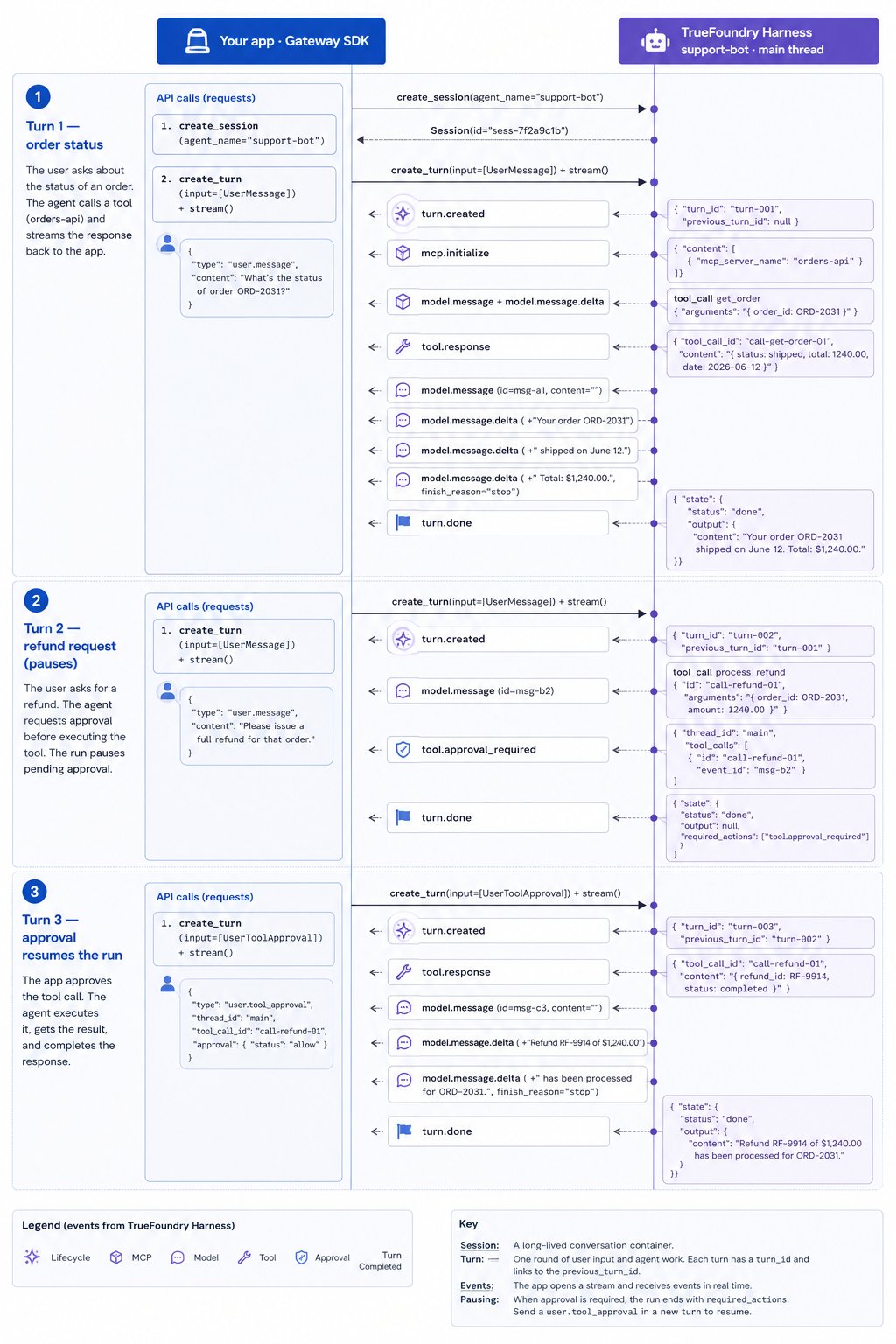
The three turns from [Turn](#turn) above, shown together with the actual SDK calls and event payloads for Jane's refund session (`sess-7f2a9c1b`) against `support-bot`. Solid arrows are SDK calls you make; dashed arrows are SSE events streamed back from `turn.execute(stream=True)`.
 **Input:** `"What's the status of order ORD-2031?"`
| seq | type | summary |
| --- | ---------------------------- | ------------------------------------- |
| 1 | `turn.created` | Turn starts |
| 2 | `mcp.initialize` | Connected to `orders-api` |
| 3–4 | `model.message` + deltas | Agent calls `get_order` |
| 5 | `tool.response` | `{ status: shipped, total: 1240.00 }` |
| 6–8 | `model.message` + **deltas** | Streams reply to Jane's UI |
| 9 | `turn.done` | Done — `output` has full reply |
**Input:** `"Please issue a full refund for that order."`
| seq | type | summary |
| --- | ------------------------ | ----------------------------------------- |
| 1 | `turn.created` | Chains from Turn 1 |
| 2 | `model.message` | Agent calls `process_refund` |
| 3 | `tool.approval_required` | Paused — Jane must approve |
| 4 | `turn.done` | `required_actions` populated, no `output` |
**Input:** `{ type: "user.tool_approval", approval: { status: "allow" } }`
| seq | type | summary |
| --- | ---------------------------- | --------------------------------- |
| 1 | `turn.created` | Chains from Turn 2 |
| 2 | `tool.response` | Refund processed |
| 3–5 | `model.message` + **deltas** | Streams confirmation to Jane's UI |
| 6 | `turn.done` | Issue resolved |
| Turn | Jane's action | Ends with | What your app does next |
| ---- | --------------------- | ------------------------ | --------------------------------- |
| 1 | Asks for order status | Reply in `output` | Show reply, wait for next message |
| 2 | Requests refund | `tool.approval_required` | Show approval UI → Turn 3 |
| 3 | Approves refund | Confirmation in `output` | Show confirmation, issue closed |
A separate issue — Bob's shipping question, or even Jane's next problem — runs in its own session, where Turn 1 starts fresh with no refund history carried over.
## Getting started
Two SDK packages, two paths. You can create agents in the [Playground](/docs/agent-platform/agent-harness/getting-started) and skip the create path entirely.
| Task | Package | Client |
| ------------------------------ | ------------------------- | ---------------------------------------------------------- |
| Define and save an agent | `truefoundry` | `from truefoundry import client` |
| Run a saved agent (Python) | `truefoundry-gateway-sdk` | `AgentSessionClient` from `truefoundry_gateway_sdk.agents` |
| Run a saved agent (TypeScript) | `truefoundry-gateway-sdk` | `AgentSessionClient` from `truefoundry-gateway-sdk/agents` |
```mermaid theme={"dark"}
flowchart LR
subgraph path1 ["Path 1 — Create"]
M["AgentManifest"] --> R["Agent Registry"]
end
subgraph path2 ["Path 2 — Use"]
R --> S["Session"]
S --> T["Turn"]
T --> E["Events"]
end
```
Define an `AgentManifest` and save it to the Registry with the `truefoundry` client — model, MCP tools, skills, and runtime config.
Invoke a saved agent with the AI Gateway SDK — `AgentSessionClient` in Python and TypeScript — sessions, turns, event streaming, delta merging, approvals, threads, and reconnects.
Runnable terminal chat client handling every event type.
Build and test agents in the UI, then invoke them from code.
## Reference
Every field on `AgentManifest`.
All event types with field schemas.
SDK methods and turn input types.
**Input:** `"What's the status of order ORD-2031?"`
| seq | type | summary |
| --- | ---------------------------- | ------------------------------------- |
| 1 | `turn.created` | Turn starts |
| 2 | `mcp.initialize` | Connected to `orders-api` |
| 3–4 | `model.message` + deltas | Agent calls `get_order` |
| 5 | `tool.response` | `{ status: shipped, total: 1240.00 }` |
| 6–8 | `model.message` + **deltas** | Streams reply to Jane's UI |
| 9 | `turn.done` | Done — `output` has full reply |
**Input:** `"Please issue a full refund for that order."`
| seq | type | summary |
| --- | ------------------------ | ----------------------------------------- |
| 1 | `turn.created` | Chains from Turn 1 |
| 2 | `model.message` | Agent calls `process_refund` |
| 3 | `tool.approval_required` | Paused — Jane must approve |
| 4 | `turn.done` | `required_actions` populated, no `output` |
**Input:** `{ type: "user.tool_approval", approval: { status: "allow" } }`
| seq | type | summary |
| --- | ---------------------------- | --------------------------------- |
| 1 | `turn.created` | Chains from Turn 2 |
| 2 | `tool.response` | Refund processed |
| 3–5 | `model.message` + **deltas** | Streams confirmation to Jane's UI |
| 6 | `turn.done` | Issue resolved |
| Turn | Jane's action | Ends with | What your app does next |
| ---- | --------------------- | ------------------------ | --------------------------------- |
| 1 | Asks for order status | Reply in `output` | Show reply, wait for next message |
| 2 | Requests refund | `tool.approval_required` | Show approval UI → Turn 3 |
| 3 | Approves refund | Confirmation in `output` | Show confirmation, issue closed |
A separate issue — Bob's shipping question, or even Jane's next problem — runs in its own session, where Turn 1 starts fresh with no refund history carried over.
## Getting started
Two SDK packages, two paths. You can create agents in the [Playground](/docs/agent-platform/agent-harness/getting-started) and skip the create path entirely.
| Task | Package | Client |
| ------------------------------ | ------------------------- | ---------------------------------------------------------- |
| Define and save an agent | `truefoundry` | `from truefoundry import client` |
| Run a saved agent (Python) | `truefoundry-gateway-sdk` | `AgentSessionClient` from `truefoundry_gateway_sdk.agents` |
| Run a saved agent (TypeScript) | `truefoundry-gateway-sdk` | `AgentSessionClient` from `truefoundry-gateway-sdk/agents` |
```mermaid theme={"dark"}
flowchart LR
subgraph path1 ["Path 1 — Create"]
M["AgentManifest"] --> R["Agent Registry"]
end
subgraph path2 ["Path 2 — Use"]
R --> S["Session"]
S --> T["Turn"]
T --> E["Events"]
end
```
Define an `AgentManifest` and save it to the Registry with the `truefoundry` client — model, MCP tools, skills, and runtime config.
Invoke a saved agent with the AI Gateway SDK — `AgentSessionClient` in Python and TypeScript — sessions, turns, event streaming, delta merging, approvals, threads, and reconnects.
Runnable terminal chat client handling every event type.
Build and test agents in the UI, then invoke them from code.
## Reference
Every field on `AgentManifest`.
All event types with field schemas.
SDK methods and turn input types.