> ## Documentation Index
> Fetch the complete documentation index at: https://www.truefoundry.com/llms.txt
> Use this file to discover all available pages before exploring further.
# Agent Harness
> Build and run managed AI agents on TrueFoundry with MCP tools, skills, sandboxing, approvals, governance, and observability built in.
## What Is An Agent Harness?
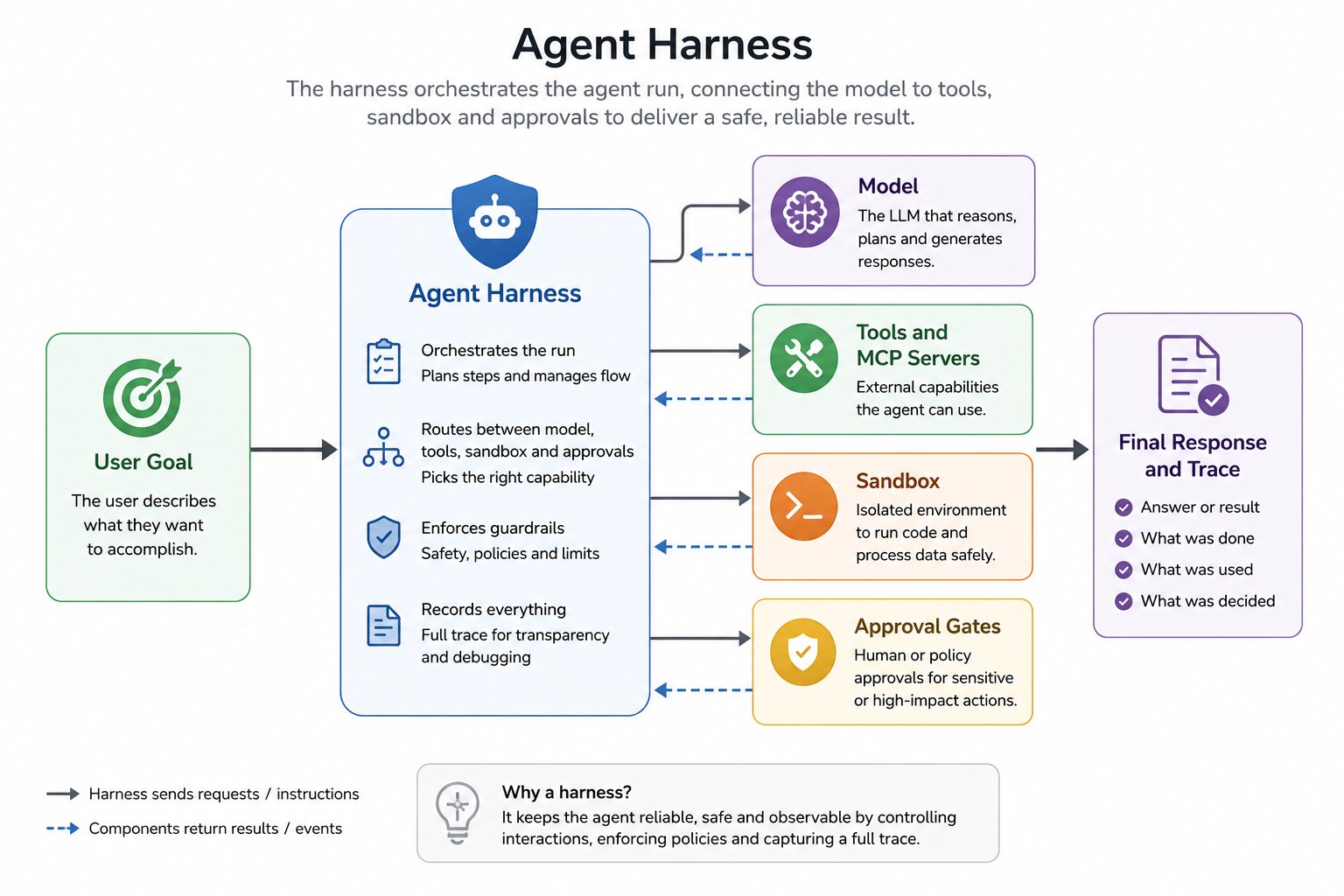
An agent harness is the runtime layer around an LLM that turns it into a reliable, long-running agent.
Instead of only generating text, the harness manages the full execution loop: planning, tool calling, context management, approvals, state, and observability.
Most production harnesses include:
* An orchestration loop (`plan -> act -> observe -> continue/stop`)
* Tool routing and execution (for APIs, MCP tools, and code)
* Memory and context controls for long-running tasks
* Security boundaries (sandboxing, credentials, permissions)
* Human-in-the-loop gates for sensitive actions
* Tracing, logs, metrics, and cost visibility
 ## TrueFoundry Agent Harness
TrueFoundry Agent Harness is a managed harness built on top of the AI Gateway and MCP Gateway.
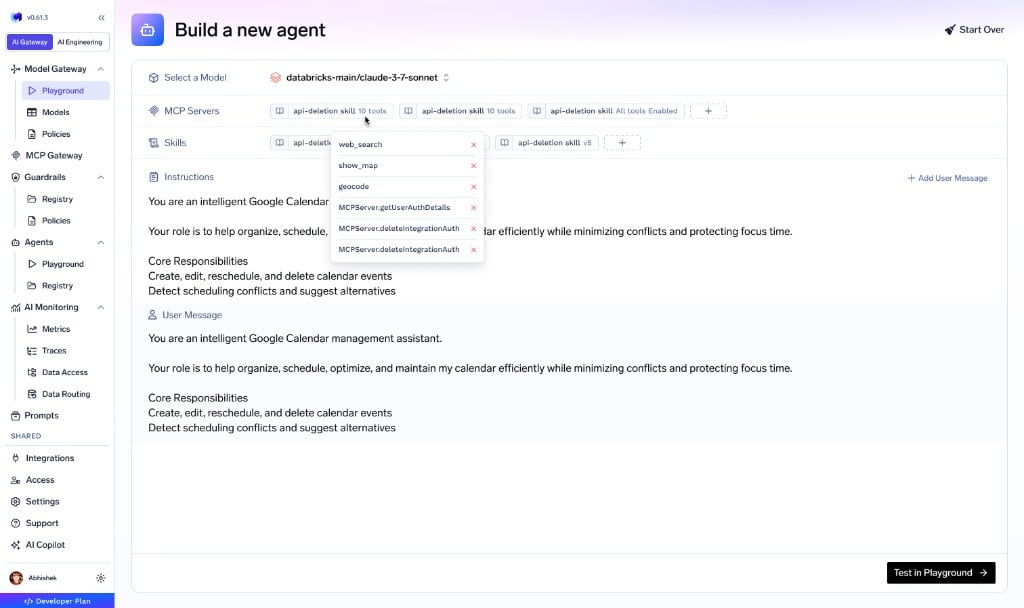
You choose a model, connect MCP servers, add skills, and write instructions. TrueFoundry manages orchestration, sandbox lifecycle, tool execution, approvals, governance, and observability.
## TrueFoundry Agent Harness
TrueFoundry Agent Harness is a managed harness built on top of the AI Gateway and MCP Gateway.
You choose a model, connect MCP servers, add skills, and write instructions. TrueFoundry manages orchestration, sandbox lifecycle, tool execution, approvals, governance, and observability.
 ## Harness Capabilities
Agent Harness combines the core capabilities needed to ship agents safely in production:
Any provider through AI Gateway, with model-level RBAC, budgets, and routing.
Governed MCP tools with centralized auth, in-chat OAuth, and per-user delegation.
Versioned `SKILL.md` instructions from the Skills Registry, mounted on demand.
Secure execution environment for code, files, and long-running tasks.
Subagents, preload tools, code mode, large-result offloading, and compaction — keep context lean automatically.
Pause sensitive tool calls and require explicit user approval before execution.
Let the agent request clarification or pick between options during a run.
Stream structured UI blocks the client can render as cards, tables, and charts.
## No Keys, Full Governance
A key difference between TrueFoundry Agent Harness and other hosted runtimes is that **no API keys or credentials are ever pasted into agent definitions**.
Models, MCP servers, and skills are all managed through TrueFoundry's central control plane:
* **Models** — Provider credentials live in AI Gateway. Agents reference model names. RBAC controls who can use which models. Budgets, rate limits, and guardrails are enforced at the AI Gateway.
* **MCP Servers** — Authentication (OAuth tokens, API keys) lives in MCP Gateway. Agents call tools by name. The AI Gateway handles credential injection, token refresh, and user delegation.
* **Skills** — Published in the Skills Registry with full versioning and RBAC. Agents pick from a governed catalog. Platform teams control what's available to whom.
In Claude Managed Agents or LangSmith Managed Deep Agents, developers must register credentials (vault IDs, header arrays with bearer tokens) per agent or workspace. In TrueFoundry, platform teams configure access once and agent builders never handle secrets.
## Comparison with Other Harnesses
Claude Managed Agents and LangSmith Managed Deep Agents are both strong hosted runtimes. The differences become clear when you look at how each platform handles builder experience, credentials, governance, observability, and deployment.
| | TrueFoundry | Claude Managed Agents | LangSmith Managed Deep Agents |
| --------------------------------------- | --------------------------------------------------------------------------------------------------------------------------------------------------------------------------------------------------------------------------------------------------------------------------------------- | ----------------------------------------------------------------------------------------------------------------------------------------------------------------------------------------------------------------------------------------------------------------------------- | ------------------------------------------------------------------------------------------------------------------------------------------------------------------------------------------------------------------------------------------------------------------------------------------------------------------------- |
| **Builder experience & learning curve** | **No-code first** — non-developers ship agents from the Playground UI (pick a model, attach MCP servers and skills, write instructions, Save). Pro-code path via Python SDK and REST API for the same agent definition. Minutes to first working agent. | **Pro-code only** — define agents, environments, sessions as JSON payloads through the [API/SDK](https://platform.claude.com/docs/en/managed-agents/overview). No managed builder UI; developers write and maintain agent definitions in code. | **Pro-code only, API-first** — [private preview REST API](https://docs.langchain.com/langsmith/deploy-managed-deep-agent) consumed with `httpx`/`fetch`; SDK is "coming in a follow-up release." Agent definition lives in your repo (`AGENTS.md`, `skills/`, `subagents/`, `tools.json`) and is pushed via `POST/PATCH`. |
| **MCP credentials** | Centralized in MCP Gateway with per-user OAuth, automatic refresh, and delegation. Users authenticate inline in chat (OAuth popup → continue). Admins rotate centrally — one update applies to every agent and user. | Per-user [Vaults](https://platform.claude.com/docs/en/managed-agents/vaults) you create programmatically and register per MCP server URL with `vault_ids` at session creation. No in-chat auth — developer acquires tokens externally. Rotate via `PATCH` per vault per user. | Static `headers` arrays registered via [`POST /v1/deepagents/mcp-servers`](https://docs.langchain.com/langsmith/deploy-managed-deep-agent#configure-mcp-servers). One credential set per workspace — no per-user isolation. OAuth-backed registration is planned but not yet available. |
| **Tool approval & safety** | Tools flagged as destructive once at the MCP Gateway. Org-wide policy auto-enforced for every agent — agent builders don't configure anything. | Per-tool [`permission_policy`](https://platform.claude.com/docs/en/managed-agents/permission-policies) declared in each agent JSON (default `always_ask`). Forgetting to set it on a sensitive tool means it runs without confirmation. | Per-tool [`interrupt_config`](https://docs.langchain.com/langsmith/deploy-managed-deep-agent#define-the-agent) keyed by `{mcp_server_url}::{tool_name}`. Every agent must list every tool's interrupt preference; missed entries mean no approval gate. |
| **Model access & governance** | Any provider via AI Gateway. Model-level RBAC, per-user/team budgets, rate limits, and pre/post-call guardrails (PII, content policies, custom). | Anthropic models only (`claude-opus-4-7`, `claude-sonnet-4-6`, ...). No model RBAC, budgets, or guardrails at the harness layer. | Any model via `{provider}:{model_id}` through [`init_chat_model`](https://docs.langchain.com/langsmith/deploy-managed-deep-agent#supported-models). No model RBAC, budgets, or guardrails in the managed runtime. |
| **Observability** | Built-in end-to-end traces per agent run (LLM calls, tool calls, sandbox execs, subagents) with cost, tokens, and latency per step. Inherits AI Gateway analytics, request logs, OpenTelemetry export, and Prometheus/Grafana — one pane of glass across model, MCP, and agent traffic. | Server-side event history persisted per session and fetchable via API; SSE event stream during runs. No managed traces dashboard, cost analytics, or org-wide metrics surface at the harness layer. | [Traced in LangSmith](https://docs.langchain.com/langsmith/deploy-managed-deep-agent#inspect-the-result-in-langsmith) — inspect messages, tool calls, files, and subagent activity per run. Observability is scoped to LangSmith only; no cross-stack metrics, budgets, or alerting are part of the managed runtime. |
| **Deployment** | SaaS (globally distributed), self-hosted, or on-prem — deployed in your own cloud and region. | [Managed Anthropic cloud](https://platform.claude.com/docs/en/managed-agents/overview) (US-only beta, EU post-GA) plus a separate self-hosted SDK path. No on-prem. | [Managed cloud](https://docs.langchain.com/langsmith/deploy-managed-deep-agent) (US-only private preview); self-host via `langgraph build`. No on-prem. |
## Architecture
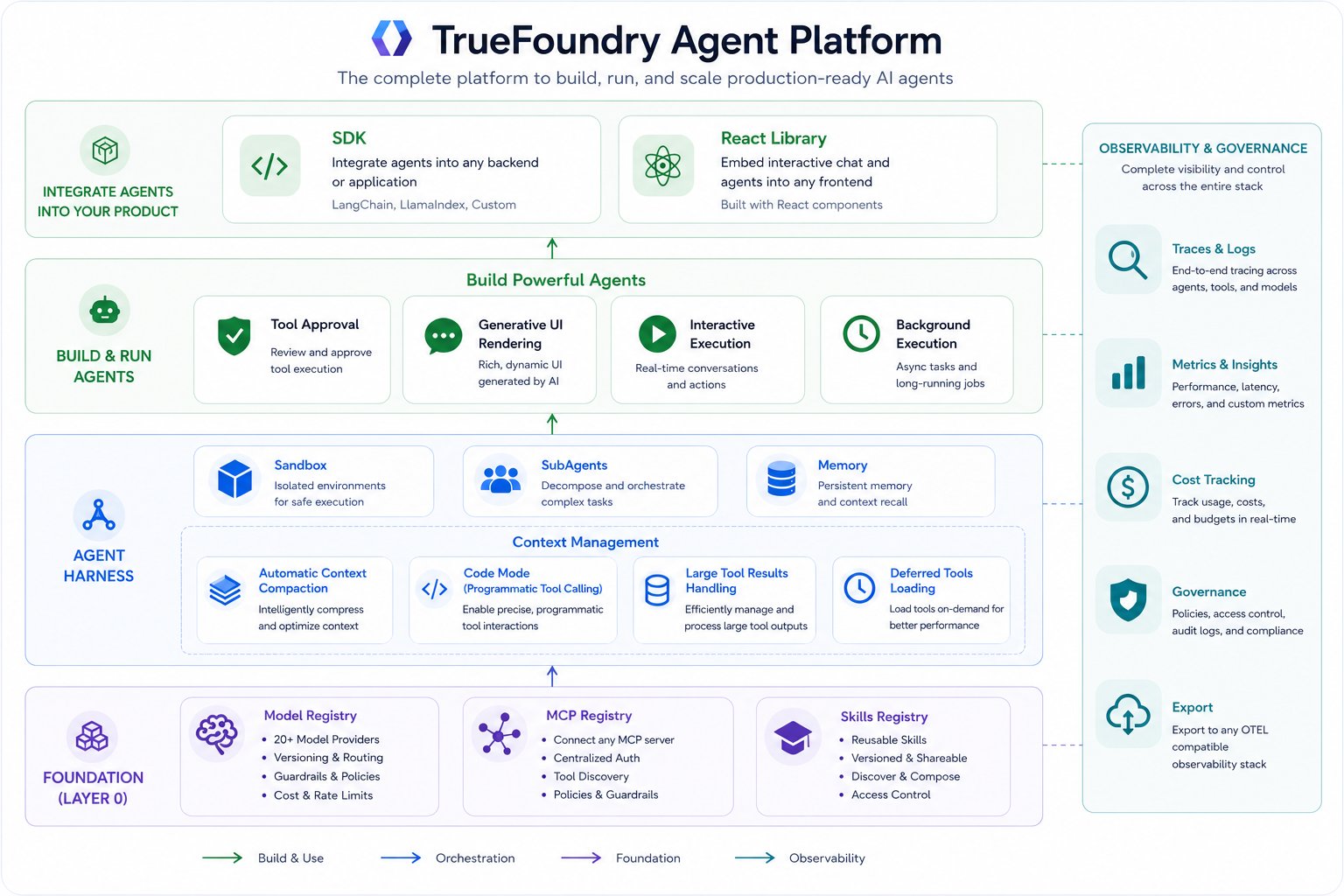
Agent Harness runs in the same gateway plane as model and MCP traffic, so orchestration, governance, and observability stay in one system.
## Harness Capabilities
Agent Harness combines the core capabilities needed to ship agents safely in production:
Any provider through AI Gateway, with model-level RBAC, budgets, and routing.
Governed MCP tools with centralized auth, in-chat OAuth, and per-user delegation.
Versioned `SKILL.md` instructions from the Skills Registry, mounted on demand.
Secure execution environment for code, files, and long-running tasks.
Subagents, preload tools, code mode, large-result offloading, and compaction — keep context lean automatically.
Pause sensitive tool calls and require explicit user approval before execution.
Let the agent request clarification or pick between options during a run.
Stream structured UI blocks the client can render as cards, tables, and charts.
## No Keys, Full Governance
A key difference between TrueFoundry Agent Harness and other hosted runtimes is that **no API keys or credentials are ever pasted into agent definitions**.
Models, MCP servers, and skills are all managed through TrueFoundry's central control plane:
* **Models** — Provider credentials live in AI Gateway. Agents reference model names. RBAC controls who can use which models. Budgets, rate limits, and guardrails are enforced at the AI Gateway.
* **MCP Servers** — Authentication (OAuth tokens, API keys) lives in MCP Gateway. Agents call tools by name. The AI Gateway handles credential injection, token refresh, and user delegation.
* **Skills** — Published in the Skills Registry with full versioning and RBAC. Agents pick from a governed catalog. Platform teams control what's available to whom.
In Claude Managed Agents or LangSmith Managed Deep Agents, developers must register credentials (vault IDs, header arrays with bearer tokens) per agent or workspace. In TrueFoundry, platform teams configure access once and agent builders never handle secrets.
## Comparison with Other Harnesses
Claude Managed Agents and LangSmith Managed Deep Agents are both strong hosted runtimes. The differences become clear when you look at how each platform handles builder experience, credentials, governance, observability, and deployment.
| | TrueFoundry | Claude Managed Agents | LangSmith Managed Deep Agents |
| --------------------------------------- | --------------------------------------------------------------------------------------------------------------------------------------------------------------------------------------------------------------------------------------------------------------------------------------- | ----------------------------------------------------------------------------------------------------------------------------------------------------------------------------------------------------------------------------------------------------------------------------- | ------------------------------------------------------------------------------------------------------------------------------------------------------------------------------------------------------------------------------------------------------------------------------------------------------------------------- |
| **Builder experience & learning curve** | **No-code first** — non-developers ship agents from the Playground UI (pick a model, attach MCP servers and skills, write instructions, Save). Pro-code path via Python SDK and REST API for the same agent definition. Minutes to first working agent. | **Pro-code only** — define agents, environments, sessions as JSON payloads through the [API/SDK](https://platform.claude.com/docs/en/managed-agents/overview). No managed builder UI; developers write and maintain agent definitions in code. | **Pro-code only, API-first** — [private preview REST API](https://docs.langchain.com/langsmith/deploy-managed-deep-agent) consumed with `httpx`/`fetch`; SDK is "coming in a follow-up release." Agent definition lives in your repo (`AGENTS.md`, `skills/`, `subagents/`, `tools.json`) and is pushed via `POST/PATCH`. |
| **MCP credentials** | Centralized in MCP Gateway with per-user OAuth, automatic refresh, and delegation. Users authenticate inline in chat (OAuth popup → continue). Admins rotate centrally — one update applies to every agent and user. | Per-user [Vaults](https://platform.claude.com/docs/en/managed-agents/vaults) you create programmatically and register per MCP server URL with `vault_ids` at session creation. No in-chat auth — developer acquires tokens externally. Rotate via `PATCH` per vault per user. | Static `headers` arrays registered via [`POST /v1/deepagents/mcp-servers`](https://docs.langchain.com/langsmith/deploy-managed-deep-agent#configure-mcp-servers). One credential set per workspace — no per-user isolation. OAuth-backed registration is planned but not yet available. |
| **Tool approval & safety** | Tools flagged as destructive once at the MCP Gateway. Org-wide policy auto-enforced for every agent — agent builders don't configure anything. | Per-tool [`permission_policy`](https://platform.claude.com/docs/en/managed-agents/permission-policies) declared in each agent JSON (default `always_ask`). Forgetting to set it on a sensitive tool means it runs without confirmation. | Per-tool [`interrupt_config`](https://docs.langchain.com/langsmith/deploy-managed-deep-agent#define-the-agent) keyed by `{mcp_server_url}::{tool_name}`. Every agent must list every tool's interrupt preference; missed entries mean no approval gate. |
| **Model access & governance** | Any provider via AI Gateway. Model-level RBAC, per-user/team budgets, rate limits, and pre/post-call guardrails (PII, content policies, custom). | Anthropic models only (`claude-opus-4-7`, `claude-sonnet-4-6`, ...). No model RBAC, budgets, or guardrails at the harness layer. | Any model via `{provider}:{model_id}` through [`init_chat_model`](https://docs.langchain.com/langsmith/deploy-managed-deep-agent#supported-models). No model RBAC, budgets, or guardrails in the managed runtime. |
| **Observability** | Built-in end-to-end traces per agent run (LLM calls, tool calls, sandbox execs, subagents) with cost, tokens, and latency per step. Inherits AI Gateway analytics, request logs, OpenTelemetry export, and Prometheus/Grafana — one pane of glass across model, MCP, and agent traffic. | Server-side event history persisted per session and fetchable via API; SSE event stream during runs. No managed traces dashboard, cost analytics, or org-wide metrics surface at the harness layer. | [Traced in LangSmith](https://docs.langchain.com/langsmith/deploy-managed-deep-agent#inspect-the-result-in-langsmith) — inspect messages, tool calls, files, and subagent activity per run. Observability is scoped to LangSmith only; no cross-stack metrics, budgets, or alerting are part of the managed runtime. |
| **Deployment** | SaaS (globally distributed), self-hosted, or on-prem — deployed in your own cloud and region. | [Managed Anthropic cloud](https://platform.claude.com/docs/en/managed-agents/overview) (US-only beta, EU post-GA) plus a separate self-hosted SDK path. No on-prem. | [Managed cloud](https://docs.langchain.com/langsmith/deploy-managed-deep-agent) (US-only private preview); self-host via `langgraph build`. No on-prem. |
## Architecture
Agent Harness runs in the same gateway plane as model and MCP traffic, so orchestration, governance, and observability stay in one system.
 ## Start Building
Create an agent by choosing a model, connecting MCP servers, adding skills, and writing instructions. Then test in playground, integrate via API, monitor through traces and metrics, and ship it to users.
Create and test a managed agent from the TrueFoundry console.
Create sessions, stream progress, and integrate Agent Harness into your application.
## Start Building
Create an agent by choosing a model, connecting MCP servers, adding skills, and writing instructions. Then test in playground, integrate via API, monitor through traces and metrics, and ship it to users.
Create and test a managed agent from the TrueFoundry console.
Create sessions, stream progress, and integrate Agent Harness into your application.