> ## Documentation Index
> Fetch the complete documentation index at: https://www.truefoundry.com/llms.txt
> Use this file to discover all available pages before exploring further.
# Ask User Questions
> Let the agent ask structured multiple-choice questions and pause until the user answers.
Agents often hit decision points where they cannot make a safe assumption — which cluster to deploy to, whether a new environment is production, what an ambiguous field on a tool schema should be set to. Without a way to ask, the agent either guesses (and gets it wrong) or stalls with a free-form question that the UI cannot render as a first-class action.
Ask User Questions lets the harness pause the agent, surface a structured multiple-choice prompt to the user, and resume the run with the chosen answer once the user responds.
## A concrete use case
Suppose a user says **"Create a new environment called `testing-1`"** to an agent backed by the TrueFoundry MCP server. The `create_or_update_environment` tool requires fields like `isProduction` (boolean) and `optimizeFor` (`AVAILABILITY` or `COST`) that the user never specified.
A naive agent would either invent values or send back a wall of text asking for clarification. With `ask_user_question`, the agent instead inspects the tool schema, identifies the fields it cannot infer, and asks the user one structured question at a time:
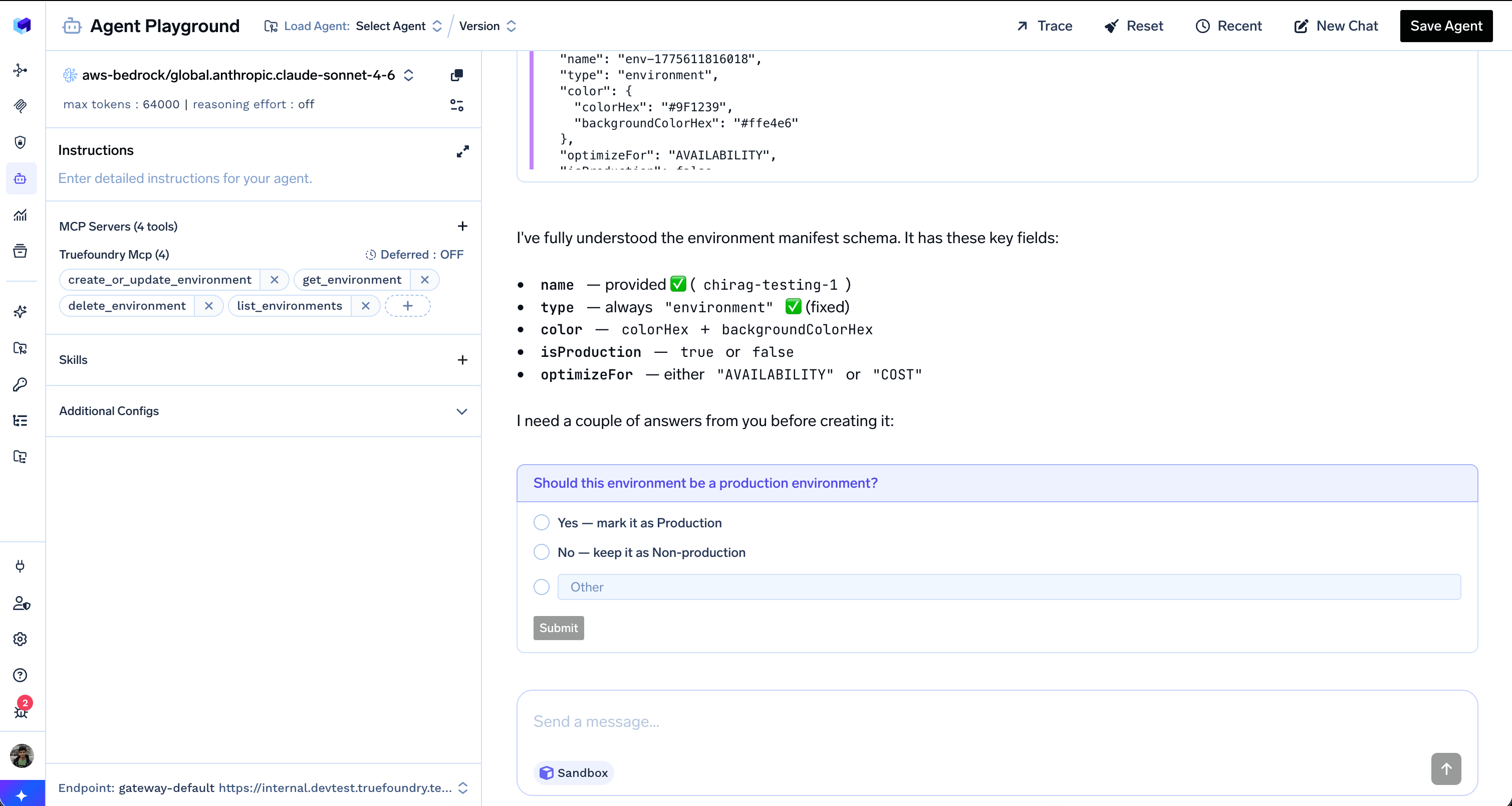 Once the user picks an option, the question is locked in as `Answered` and the agent immediately asks the next required field — `optimizeFor` — with options drawn from the schema's allowed values:
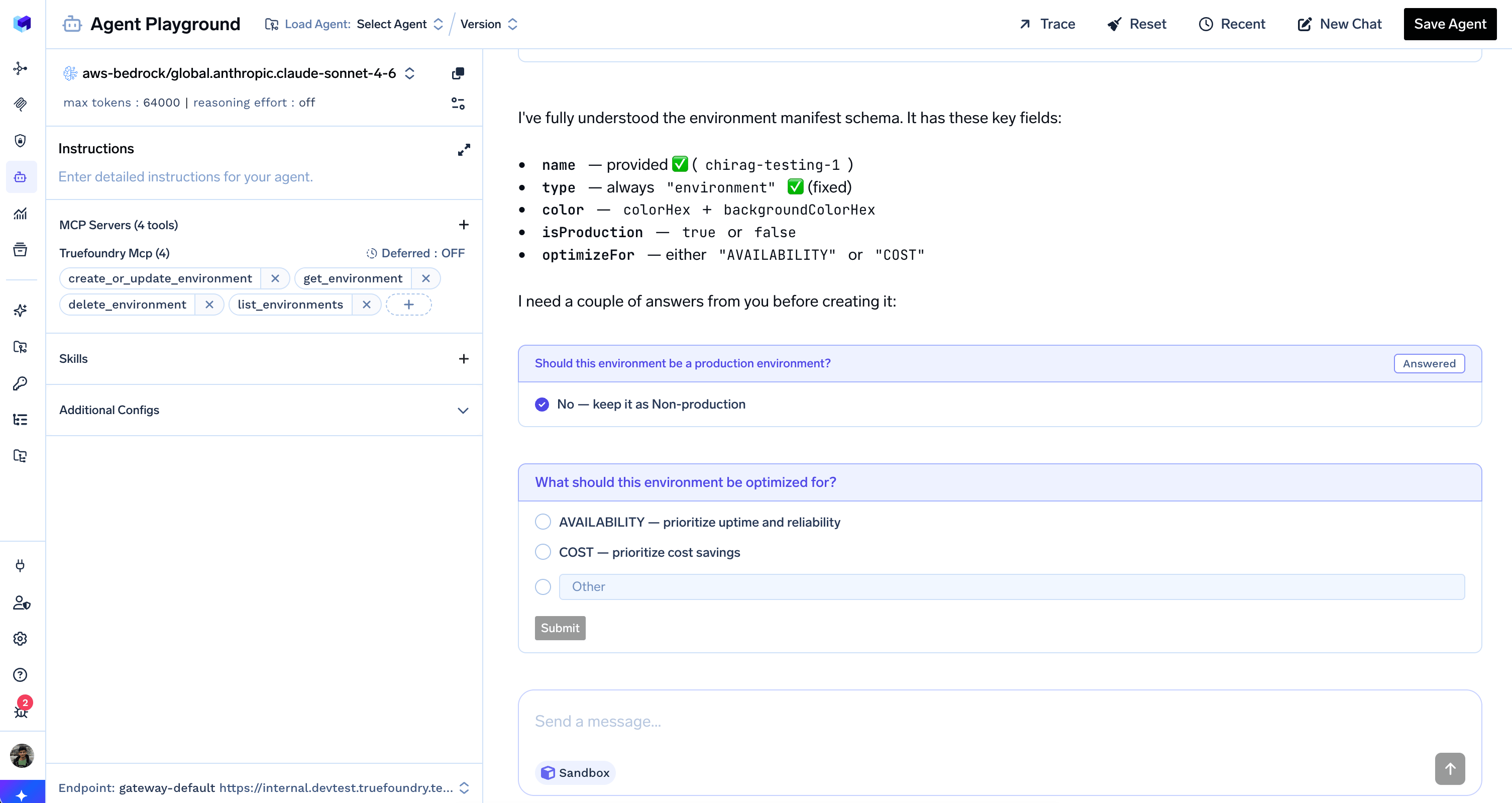 The agent only proceeds to call `create_or_update_environment` after every required clarification has a concrete answer — turning an ambiguous request into a deterministic, auditable sequence of decisions.
## How it works
The AI Gateway registers `ask_user_question` as a **client-side** tool. The server never executes it; instead, the harness emits `tool.response_required` and waits for your application to collect the user's choice and resume the run.
```mermaid theme={"dark"}
sequenceDiagram
participant User
participant Browser
participant Harness as Agent Harness
participant Model
User->>Browser: Send message
Browser->>Harness: responses.create
Harness->>Model: LLM call
rect rgba(255, 237, 153, 0.45)
Model->>Harness: Tool call: ask_user_question
Harness-->>Browser: tool.response_required
end
Browser->>User: Show question + options
User->>Browser: Pick an option
rect rgba(255, 237, 153, 0.45)
Browser->>Harness: tool.client_side_response
Harness->>Model: Tool response
end
```
The user selects **one** of the listed options or types a free-form answer into the `Other` field. The agent receives the response as a regular tool result and continues from where it paused.
Sub-agents cannot ask the user questions. Only the root agent can call `ask_user_question` — sub-agents must resolve ambiguity from the context the root agent provides them.
## When to use Ask User Questions
Use `ask_user_question` when the agent genuinely cannot proceed without a user decision and the answer comes from a small, enumerable set — for example:
* Choosing a target environment, cluster, account, or workspace
* Disambiguating between multiple matches (e.g. "I found 3 services named `api`, which one?")
* Resolving required tool-call fields that the user did not specify (booleans, enums, modes)
* Picking between alternative strategies before a destructive or expensive operation
Skip `ask_user_question` for decisions the agent can confidently infer from context, conversation history, or sensible defaults. Asking too often turns the agent into a form and breaks autonomy.
## Example
} noAnchor>
Create a new environment called `chirag-testing-1`.
} noAnchor>
I need a couple of answers before creating it.
**Tool Call**
```json lines theme={"dark"}
{
"question": "Should this environment be a production environment?",
"options": [
"Yes — mark it as Production",
"No — keep it as Non-production"
]
}
```
**Tool Response** — execution paused; answer required from client
} noAnchor>
No — keep it as Non-production
} noAnchor>
**Tool Call**
```json lines theme={"dark"}
{
"question": "What should this environment be optimized for?",
"options": [
"AVAILABILITY — prioritize uptime and reliability",
"COST — prioritize cost savings"
]
}
```
**Tool Response** — execution paused; answer required from client
} noAnchor>
COST — prioritize cost savings
} noAnchor>
Creating environment **chirag-testing-1** (non-production, optimized for COST) …
## Handling questions from the API
Handle `tool.response_required`, send `tool.client_side_response` with the user's choice, and continue the run with `previous_response_id`.
For the streaming events, JSON payloads, and a full client implementation, see [Turn events — ToolResponseRequiredEvent](/docs/agent-platform/agent-harness/sdk/turn-events-reference#toolresponserequiredevent).
The agent only proceeds to call `create_or_update_environment` after every required clarification has a concrete answer — turning an ambiguous request into a deterministic, auditable sequence of decisions.
## How it works
The AI Gateway registers `ask_user_question` as a **client-side** tool. The server never executes it; instead, the harness emits `tool.response_required` and waits for your application to collect the user's choice and resume the run.
```mermaid theme={"dark"}
sequenceDiagram
participant User
participant Browser
participant Harness as Agent Harness
participant Model
User->>Browser: Send message
Browser->>Harness: responses.create
Harness->>Model: LLM call
rect rgba(255, 237, 153, 0.45)
Model->>Harness: Tool call: ask_user_question
Harness-->>Browser: tool.response_required
end
Browser->>User: Show question + options
User->>Browser: Pick an option
rect rgba(255, 237, 153, 0.45)
Browser->>Harness: tool.client_side_response
Harness->>Model: Tool response
end
```
The user selects **one** of the listed options or types a free-form answer into the `Other` field. The agent receives the response as a regular tool result and continues from where it paused.
Sub-agents cannot ask the user questions. Only the root agent can call `ask_user_question` — sub-agents must resolve ambiguity from the context the root agent provides them.
## When to use Ask User Questions
Use `ask_user_question` when the agent genuinely cannot proceed without a user decision and the answer comes from a small, enumerable set — for example:
* Choosing a target environment, cluster, account, or workspace
* Disambiguating between multiple matches (e.g. "I found 3 services named `api`, which one?")
* Resolving required tool-call fields that the user did not specify (booleans, enums, modes)
* Picking between alternative strategies before a destructive or expensive operation
Skip `ask_user_question` for decisions the agent can confidently infer from context, conversation history, or sensible defaults. Asking too often turns the agent into a form and breaks autonomy.
## Example
} noAnchor>
Create a new environment called `chirag-testing-1`.
} noAnchor>
I need a couple of answers before creating it.
**Tool Call**
```json lines theme={"dark"}
{
"question": "Should this environment be a production environment?",
"options": [
"Yes — mark it as Production",
"No — keep it as Non-production"
]
}
```
**Tool Response** — execution paused; answer required from client
} noAnchor>
No — keep it as Non-production
} noAnchor>
**Tool Call**
```json lines theme={"dark"}
{
"question": "What should this environment be optimized for?",
"options": [
"AVAILABILITY — prioritize uptime and reliability",
"COST — prioritize cost savings"
]
}
```
**Tool Response** — execution paused; answer required from client
} noAnchor>
COST — prioritize cost savings
} noAnchor>
Creating environment **chirag-testing-1** (non-production, optimized for COST) …
## Handling questions from the API
Handle `tool.response_required`, send `tool.client_side_response` with the user's choice, and continue the run with `previous_response_id`.
For the streaming events, JSON payloads, and a full client implementation, see [Turn events — ToolResponseRequiredEvent](/docs/agent-platform/agent-harness/sdk/turn-events-reference#toolresponserequiredevent).